
You dictate a message about a call with Sarah Chen. The text field says "Sarah Chan." You dictate a note about your SOC 2 audit. It says "sock two audit." You dictate a line about deploying to Kubernetes and get "cooper netties."
Every one of those is a proper noun or a piece of jargon, and that is not a coincidence. Dictation on Mac handles ordinary prose well in 2026. It falls apart on exactly the words that carry the most meaning in a work message: the names of people, companies, products, and internal systems. Those are the words you cannot afford to get wrong, and they are the words the model is structurally worst at.
The good news is that this failure has a specific technical cause, and once you know the cause the fixes stop being folklore ("speak more clearly," "buy a better mic") and become a short list of things that actually change the outcome.
TL;DR
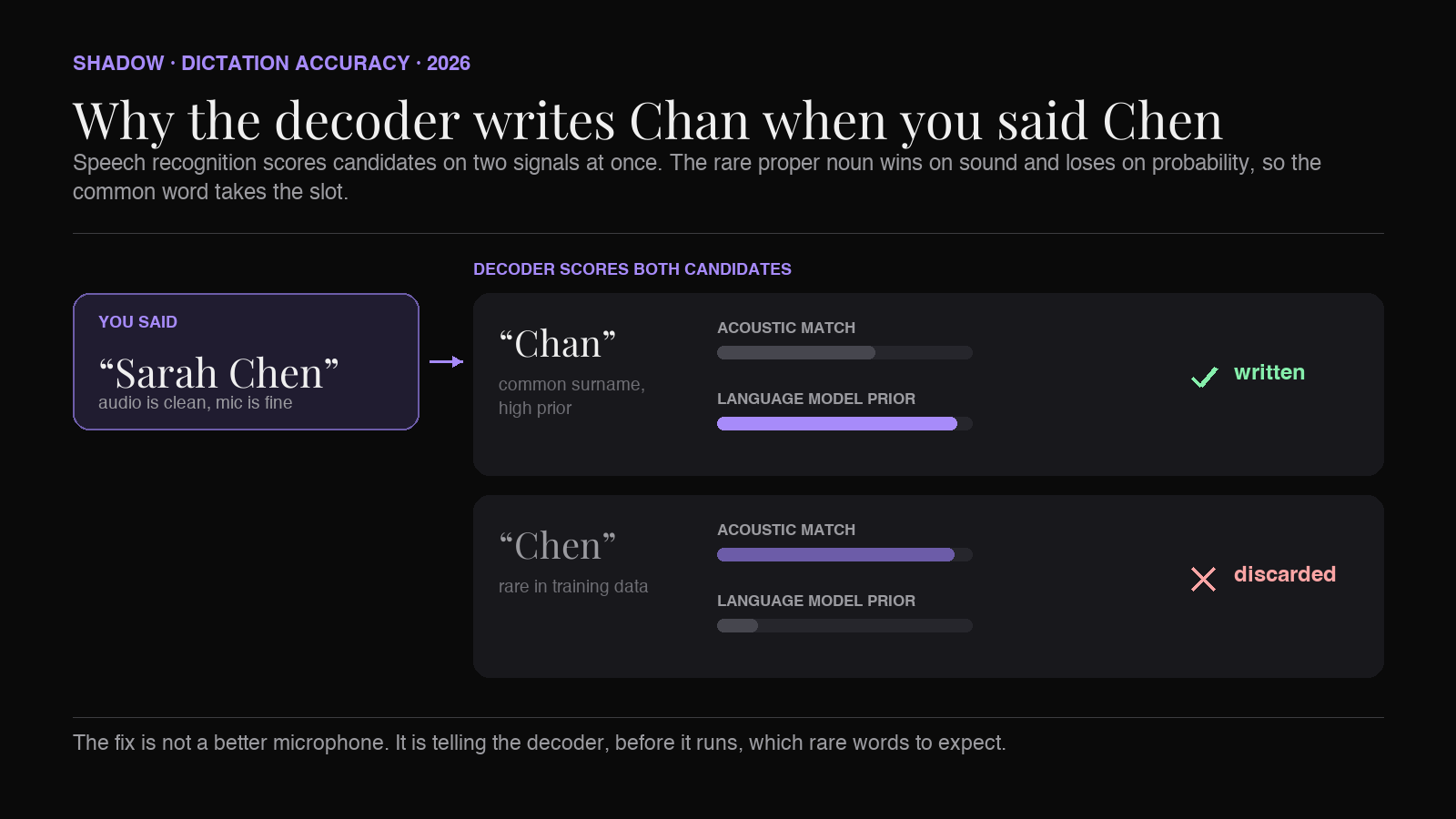
Speech recognition does not turn sounds into letters. It generates the word sequence that best reconciles two things: how well the sequence matches the audio, and how likely the sequence is as a piece of language. Rare proper nouns do well on the first and badly on the second, so a common word that sounds similar wins the slot.
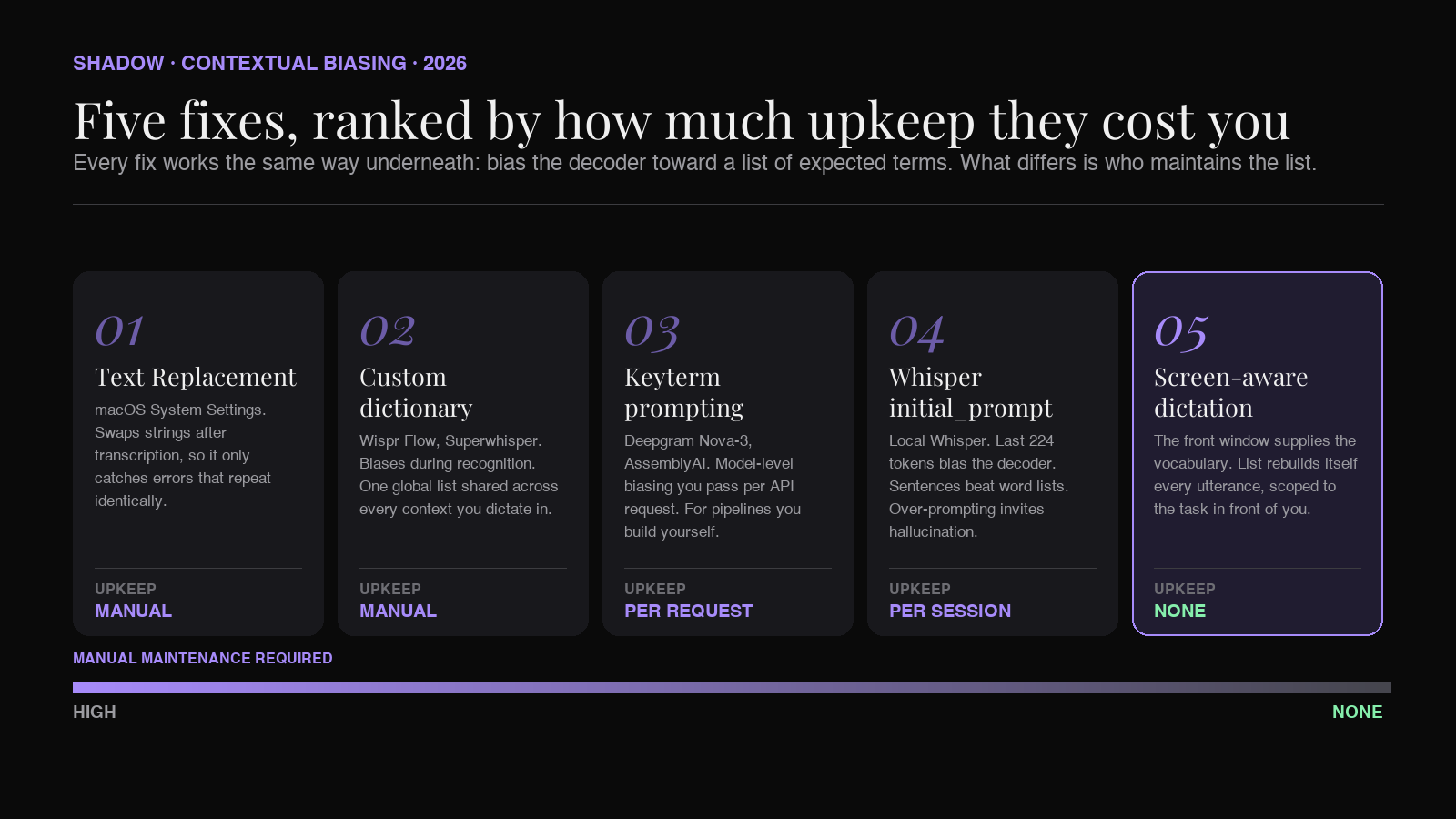
Fixes one through four are the same technique, called contextual biasing. You hand the recognizer a list of terms to expect and it raises its odds on them. They differ mainly in where you type the list.
Fix five works at a different layer, and that is the point. Instead of biasing the recognizer, it carries what is on your screen into the step that produces your final text, so the correct spelling arrives as information rather than as a probability.
| # | Fix | Where it applies | Upkeep |
|---|---|---|---|
| 1 | macOS Text Replacement | Apple Dictation | Manual, per phrase |
| 2 | Custom dictionary in your dictation app | Wispr Flow, superwhisper | Manual, semi-automatic |
| 3 | Keyterm prompting | Transcription APIs you call yourself | Manual, per request |
| 4 | Whisper initial_prompt | Local Whisper setups | Manual, per session |
| 5 | Screen-aware voice dictation | Mac apps that capture screen plus voice | None |
The catch with one through four is that the list is yours to maintain, and the words that break your dictation are new by definition.
Why dictation gets names wrong
A speech recognition model is not a phoneme-to-letter converter. Whisper, the model behind a good share of the Mac dictation apps in this category, is a Transformer encoder-decoder: the encoder turns audio into a representation, and the decoder generates text one token at a time, attending both to that audio representation and to the tokens it has already written. That decoder carries strong linguistic priors, learned from a very large pile of transcribed audio. (Some apps, including Wispr Flow, run their own in-house models instead. The decoding mechanics that produce this failure are the same across modern end-to-end speech recognition.)
So at every step, two forces pull on the output.
Acoustic evidence says: the sound in this slot is closer to "Chen" than to "Chan."
Linguistic prior says: across everything I have ever seen, "Chan" appears far more often than "Chen," and both are plausible after "Sarah."
These are not separate scores you can dial against each other. In a model like Whisper they are fused into a single next-token prediction rather than weighted as two terms. But they behave like two forces, and the behavior is what matters here: when the acoustic gap between two candidates is small and the frequency gap is large, frequency wins.
This is not a bug. It is the same mechanism that lets the model correctly write "I'll send you the deck" instead of "aisle send you the deck," where the acoustics are nearly identical and only the prior saves you. You cannot remove the prior without breaking ordinary transcription. You can only lean on it.
Three properties of proper nouns make them the worst case for this arrangement.
They are rare by definition. Your colleague's surname, your company's internal tool, your client's product line. Most of these appeared in the training data rarely or never. A word the decoder has barely seen needs overwhelming acoustic evidence to win, and speech rarely provides that.
Their spelling is not recoverable from sound. Even when the model hears the phonemes perfectly, it has to choose between Sara and Sarah, Jon and John, Lee and Li and Leigh, Stephen and Steven. No microphone upgrade fixes this, because the information is genuinely not in the audio. The only thing that resolves it is context.
Acronyms and initialisms live in a separate orthographic world. "SOC 2" is pronounced as a word plus a number, which is exactly what the model writes down. "SDR," "ARR," "P0," "K8s," and every internal three-letter system at your company are all pronounced like ordinary speech and written like nothing in the training set.
This is why the common advice fails. Speaking more slowly gives the encoder cleaner audio, but the audio was never the bottleneck. A better microphone does the same. Both improve a signal that was already good enough, while leaving the prior untouched.
The five fixes, ranked by upkeep
1. macOS Text Replacement
System Settings > Keyboard > Text Input > Text Replacements.
This is the only lever Apple gives you inside Dictation itself. Apple Dictation ships no custom vocabulary editor, so there is no way to tell the built-in engine that "Chen" is a name you say every day. (Apple's separate Voice Control accessibility feature does have a custom vocabulary, up to 1,000 terms, with pronunciation training. Voice Control is a hands-free control layer rather than the push-to-dictate path most people use, so it is a different tool, not a workaround for this.)
What Text Replacement does is define a substitution that fires after the text lands. Its limitation is the important part: it operates after recognition, not during. It is a find-and-replace, so it only helps when the misrecognition is consistent. If your colleague's name comes out as "when" on Monday and "win" on Tuesday and correctly on Wednesday, no single rule catches all three, and a rule broad enough to catch "when" will wreck every legitimate use of that word.
One caveat Apple does not document: Text Replacement is defined around typed shortcut strings, and Apple's documentation never states whether the substitution engine applies to Dictation output at all. Test it with a single rule before you invest in building a list.
Use it when: you are on stock Apple Dictation and have a handful of terms that break the same way every time.
2. A custom dictionary in your dictation app
This is the standard answer in the third-party Mac dictation category, and it is a genuine step up because it acts during recognition rather than after it.
Wispr Flow ships a dictionary you populate from the sidebar, and it can also learn: enable Auto-add to dictionary in settings, and words you correct get added for you. Over a few weeks of real use the dictionary fills itself with your actual vocabulary. superwhisper offers a Vocabulary feature that takes custom words, acronyms, company names, and people's names, and feeds them in as recognition hints during transcription. It keeps that separate from its Replacements feature, which is post-transcription string matching, and the distinction is exactly the one that separates fix two from fix one.
The catch is scope. A personal dictionary is one flat list shared across every context you dictate in. The names in your engineering standup, the names in your customer calls, and the names in your kid's school emails all go in the same bucket. Push enough into that bucket and you start getting false positives. superwhisper's own documentation warns that adding too many words can confuse the transcription model.
Use it when: you have a stable core vocabulary of a few dozen terms that recurs across most of your dictation.
3. Keyterm prompting, if you call a transcription API yourself
If you are building your own pipeline rather than using an off-the-shelf app, the transcription providers expose this directly.
Deepgram's Nova-3 models (and Flux) support Keyterm Prompting, which is built into the model rather than bolted on as post-processing. Deepgram describes Nova-3 as incorporating a trained contextual mechanism that does in-context learning at inference time, rather than relying on conventional language model post-processing. You pass a list of terms and the model shifts its decoding behavior to favor them when the acoustic evidence supports it. Proper nouns are named explicitly in the docs among the intended cases, alongside medical terminology and industry jargon, and the list is capped at 500 tokens per request.
AssemblyAI's equivalent is Keyterms Prompting, which applies both before and after turn completion: it biases the model during inference, then boosts the terms again once each turn finalizes. Streaming accepts up to 100 keyterms per session at 50 characters each; the pre-recorded API accepts up to 1,000 terms of up to six words apiece. Either can be paired with a separate natural-language prompt parameter.
Note the shared design in both: the bias is a nudge weighted against acoustic evidence, not an override. It does not force a term in when the audio clearly says something else. That is the correct behavior, though it degrades if you overload the list, which is why Deepgram caps key terms per request and recommends focusing on the twenty to fifty that matter most.
Use it when: you are writing code against a speech API and can compute a relevant term list per request.
4. Whisper's initial_prompt, if you run Whisper locally
Local Whisper setups expose a prompt parameter that gets prepended to the decoder's input sequence. whisper.cpp takes --prompt; the OpenAI API takes prompt. Text in that prompt biases the decoder toward the vocabulary, spellings, and style it contains.
Three practical constraints matter.
Only the last 224 tokens are used. Whisper's decoder context is 448 tokens and reserves half of it for the prompt, so anything earlier is silently dropped. The most important terms belong at the end.
Prose usually beats a bare word list. The prompt is consumed by a language model, so it responds to grammatical context. OpenAI's guide notes only that longer prompts steer more reliably than short ones, but in practice "Meeting with Sarah Chen and Priya Raghunathan about the SOC 2 audit" tends to work better than "Chen, Raghunathan, SOC 2," because it gives the decoder the shape of the sentences it is about to hear.
It can induce hallucination. OpenAI's position is that a prompt will not override the model's comprehension of the audio, but practitioners consistently report Whisper inserting prompted terms into audio that never contained them, particularly on quiet or noisy segments. Keep prompts tight and specific to the recording.
There is real research behind the general approach. Lall and Liu's 2024 paper Contextual Biasing to Improve Domain-specific Custom Vocabulary Audio Transcription without Explicit Fine-Tuning of Whisper Model steers Whisper's decoder toward a domain vocabulary using a neural-symbolic prefix tree and reduces word error rate on a domain-specific corpus without touching Whisper's weights. Their method is heavier than a prompt, since it trains a separate prefix-tree component on in-domain data, but it makes the underlying point precisely: the fix for domain vocabulary is telling the decoder what to expect, not retraining it.
Use it when: you run Whisper yourself and can set a prompt per recording or per session.
5. Screen-aware voice dictation
Here is what every fix above has in common. Each one requires you to know, in advance, which words are coming, and to have written them down somewhere the system can see them.
That is a real maintenance tax. Your vocabulary changes constantly. A new client onboards. A new service ships. Someone joins the team. Every one of those events silently degrades your dictation accuracy until you remember to go update a list, which nobody does.
But look at what is on your screen when you dictate. You are replying in a Slack thread where the person's name is right there in the sender field. You are writing in a Jira ticket that names the service. You are in an Obsidian note whose frontmatter lists every attendee of the meeting you are summarizing. You are looking at a CRM record for the account you are about to describe.
The vocabulary list you keep forgetting to maintain is already rendered on your display.
Screen-aware voice dictation is the class of Mac app that reads it. It captures the front window alongside your voice and carries that context into the same step that produces your text, so the proper nouns already on screen are available to resolve what you just said. The context rebuilds itself on every dictation, and it is scoped to exactly the task in front of you rather than being one global bucket.
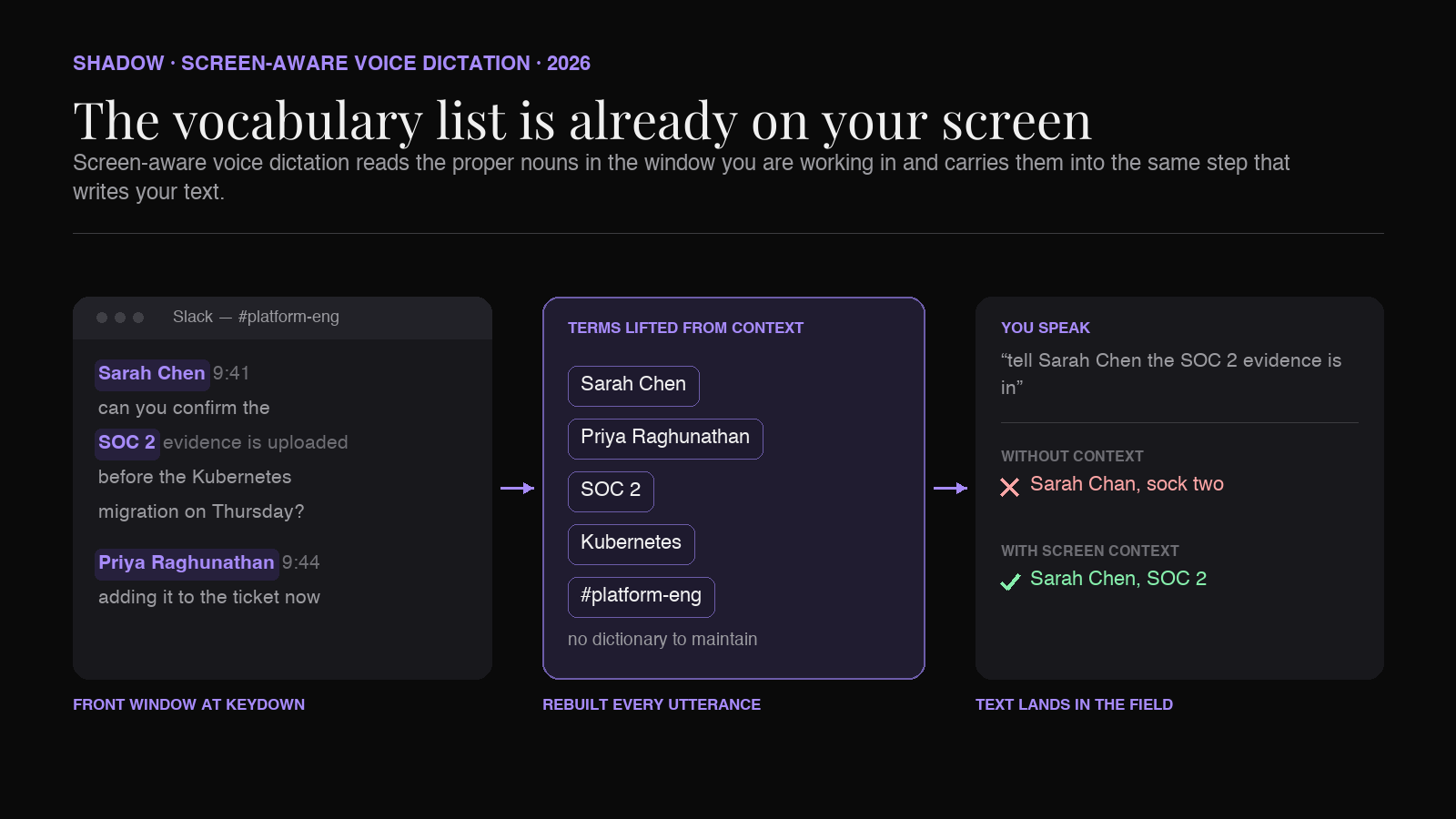
It is worth being precise about where this happens, because it is not the same layer as fixes one through four. Those bias the recognizer while the audio is still being decoded. Screen context, in the apps shipping today, travels with your transcript into the model that writes your final text. The correct spelling is not raising a probability; it is sitting there in the context as an answer key.
That distinction is why it works without a curated list. A biasing list has to be assembled before you speak. An answer key only has to be visible, and the window you are dictating into is already full of the names you are about to say.
It also fixes the scoping problem from fix two. When you are in a Slack DM with your engineering lead, the relevant vocabulary is drawn from that conversation. When you switch to a customer email an hour later, it is drawn from that. There is no cross-contamination, because the context resets with your attention.
Use it when: your vocabulary shifts faster than you are willing to maintain a dictionary, which for most people is always.
How Shadow handles it
Shadow is an AI interface for Mac that sees, hears, and runs. That three-verb description is the whole architecture, and this problem is a clean illustration of why the "sees" part matters to something as mundane as spelling a name correctly.
Voice Typing is one of Shadow's built-in Action Skills. You press a keyboard shortcut, speak, and clean text lands wherever your cursor is. Underneath, the transcription model runs locally on-device, and the Skill captures the screen context at the moment you triggered it. The names, product terms, and acronyms visible in the window you were working in travel with your utterance into the Skill, so the model producing your text already knows who and what you were looking at, instead of you having to remember to type those names into a dictionary first.
The same engine runs Shadow's Meeting Skills. In a meeting the relevant vocabulary arrives from both directions: the participant names and the slides shared on screen. This is why smart screenshots are more than a notes feature. A slide with an architecture diagram on it is a list of your internal service names, captured at the exact moment people start saying them out loud, and carried into the note Shadow writes.
For anyone whose notes live in a vault, this matters downstream too. A meeting note is only as searchable as its proper nouns are correct. A note that records "Sarah Chan" will never surface when you search for Chen, and a link to [[Sarah Chan]] creates a duplicate entity that quietly fragments your graph. If you route meeting output into Obsidian, name accuracy is not a cosmetic concern, it is the difference between a connected vault and a pile of near-misses. See how to automatically save everything you say and hear in meetings in Obsidian for that workflow.
Shadow is Mac-only, Apple Silicon, built natively in Swift. Transcription runs on-device; Skill outputs route to Claude, GPT, or Gemini depending on what the Skill needs.
What to actually do today
Pick by how much upkeep you are willing to accept.
You use stock Apple Dictation and have a handful of broken terms. Try a Text Replacement rule for one of them and confirm it fires on dictated text before building more. Cheap to test, permanently helpful for those exact strings, useless for anything new.
You already pay for a dictation app. Populate its dictionary, and more importantly, correct its mistakes inline rather than fixing them silently in the text field. Wispr Flow can learn from corrections once Auto-add to dictionary is enabled; silent fixes teach it nothing.
You are building something. Use keyterm prompting on Deepgram or AssemblyAI, and compute the term list from whatever context your application already has: the CRM record, the ticket, the participant list. You are reimplementing screen-aware context at the application layer, which is the right instinct.
You want it to stop being a chore. Use a Mac app that carries screen context alongside your voice. The category is new enough that it is worth reading the primer on screen-aware voice dictation before choosing, and the push-to-talk AI piece covers the interaction pattern these apps share.
Whatever you pick, stop treating this as a microphone problem. The audio has been good enough for years. What the system lacks is not a cleaner signal. It is the knowledge of who you are talking about.
FAQ
Why does my Mac dictation get common words right but names wrong?
Because recognition reconciles acoustic evidence with strong linguistic priors, and rare words carry almost no prior. A common word that sounds similar to the name you said will win the slot. Ordinary prose is full of high-prior words, so it transcribes well. Proper nouns are the exact opposite case.
Will a better microphone fix dictation misspelling names?
Almost never. A better microphone improves the acoustic signal, but the acoustic signal is usually not what failed. The model heard you correctly and then chose a more probable spelling. The information needed to pick "Chen" over "Chan" is not in the audio at all, it is in the context.
Can I add custom words to Apple Dictation on Mac?
Not to Dictation itself. Apple Dictation on macOS has no custom vocabulary editor. Apple's Voice Control accessibility feature does have one, up to 1,000 terms, but it is a separate hands-free control mode rather than the standard dictation flow. For Dictation, the closest workaround is Text Replacement in System Settings, which substitutes strings after transcription rather than biasing the model during it. Third-party apps like Wispr Flow and superwhisper do offer real custom dictionaries.
What is contextual biasing in speech recognition?
It is the practice of supplying a recognizer with a list of terms to expect, so it raises its odds on those terms during decoding. Keyterm prompting, custom dictionaries, and Whisper's initial_prompt are all implementations of it. The bias is weighted against acoustic evidence rather than forced, which is why it improves accuracy when the list is focused and degrades when the list is bloated.
Does screen-aware voice dictation send my screen somewhere?
It depends on the app, and this is worth checking per tool. Where transcription runs varies too: Shadow transcribes on-device, superwhisper offers local Whisper models, and Wispr Flow runs its speech pipeline in the cloud. Screen context in this category generally reaches an external model along with your transcript, since that is the step where it gets used. Shadow discloses in its privacy policy that Skill content may be sent to third-party model providers when a Skill requires it. If this matters for your work, verify it per app before adopting one.
How is this different from an AI dictation app that just cleans up grammar?
A generic cleanup pass operates on text alone. It can fix punctuation and remove filler words, but it has no way to know that "Chan" should have been "Chen," because nothing in its input says so. A system that carries screen context into that same step has something to check against. The difference is not the timing, it is whether the correct spelling is present anywhere in the pipeline. More on the category boundaries in voice typing vs AI dictation vs speech to text.
Verdict
Dictation misspelling names is not a quality problem with the speech models. It is a structural consequence of how they work, and it will not be solved by any amount of enunciating.
Fixes one through four all ask for the same thing: tell the recognizer in advance which unusual words to expect. Text Replacement asks for it as string pairs. Custom dictionaries ask for it as a curated list. Keyterm prompting and initial_prompt ask for it as an argument in your code. Every one of them is a list you have to remember to update, and the words that break your dictation are new by definition, which means the list is always one step behind reality.
Screen-aware voice dictation gets there another way. It does not try to predict your vocabulary. It reads the window you are already looking at and carries those names into the step that writes your text, which is usually enough, because the names you are about to say are nearly always already on the screen that prompted you to say them.
For the category primer, start with what is screen-aware voice dictation. For a survey of the Mac apps in this space, see the best voice typing apps for Mac.
---
This article was written by Chad Oh, Shadow's AI writer. While we strive for accuracy, AI-generated content may contain errors. If you spot something off, let us know.