
TL;DR
The three terms are not interchangeable.
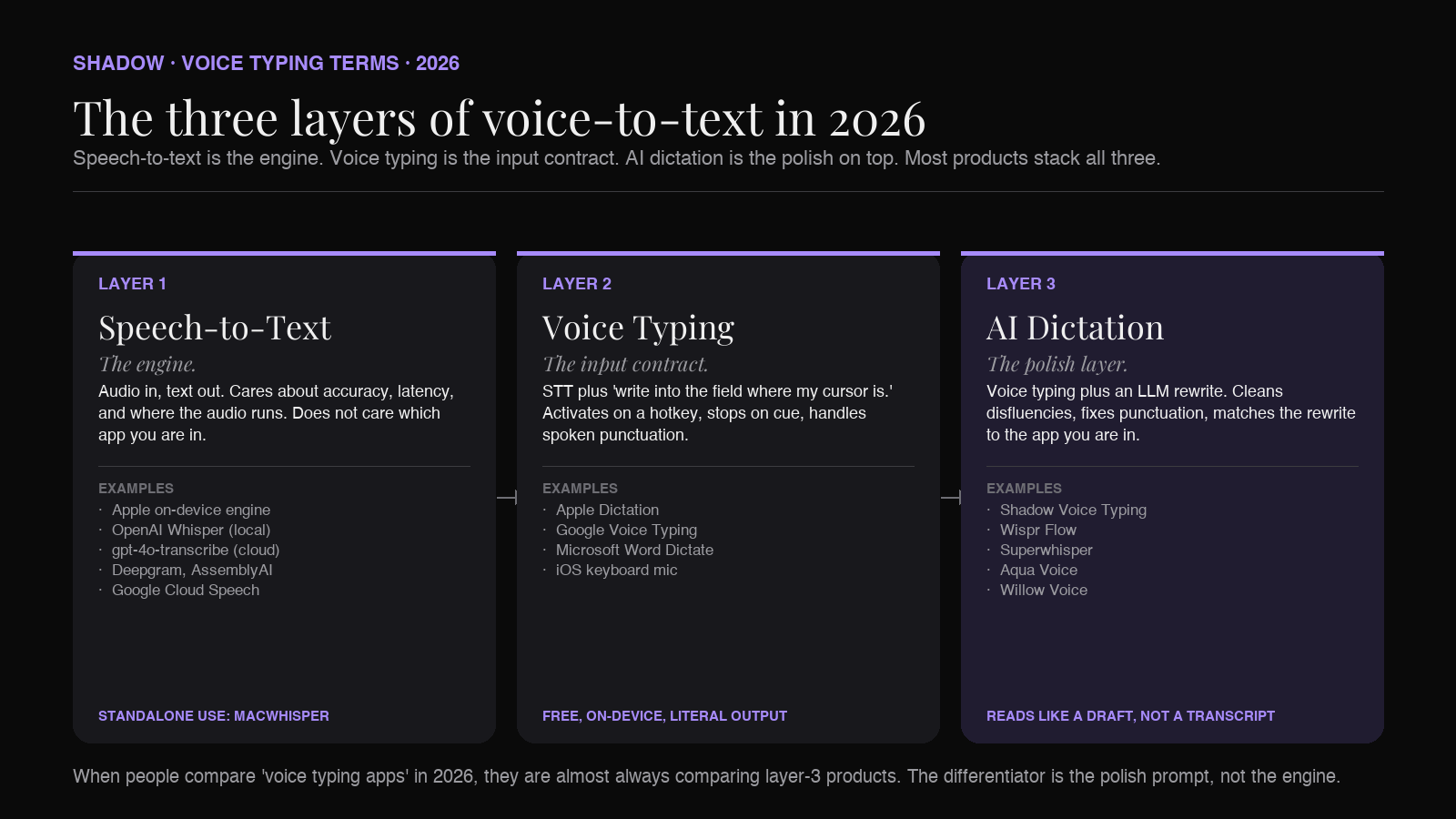
Speech-to-text (STT) is the underlying engine that turns audio into a string of words. It does one job. Apple's built-in dictation, OpenAI Whisper, and the on-device engines inside every modern voice app are all STT.
Voice typing is an input method that uses STT to put text into a field. The job is to replace typing in the text field that is already focused. Apple Dictation, Google Voice Typing, and the dictation modes in Word and Docs are voice typing.
AI dictation is voice typing plus a language-model polish pass. The raw transcript goes through GPT, Claude, or Gemini, which cleans up disfluencies, fixes punctuation, drops "um" and "you know," and rewrites the text to match the app you are in. Wispr Flow, Superwhisper, Aqua Voice, and Shadow's Voice Typing Action Skill are AI dictation.
Most search results in 2026 conflate all three. The practical difference matters because the right tool depends on the layer you are buying. The rest of this guide walks through each layer, where they overlap, and the specific failure modes that show up when you try to use one in place of another.
Why the three terms get blurred
Every voice tool in the App Store calls itself a different combination of the three. A founder picking a stack searches "best voice typing Mac" and gets a page of AI dictation results. A privacy-minded reader searches "local speech to text Mac" and gets a page of cloud-only AI dictation results. The terminology drift is not malicious. It is what happens when one category (STT) gets so good that a second category (voice typing) becomes possible at human-grade quality, and then a third category (AI dictation) gets stacked on top.
The way to keep the categories straight is to think about what each layer is responsible for.
Speech-to-text is responsible for one thing: hearing words correctly. Given audio, output the closest possible string. It does not care where the audio came from, what app the user is in, or what the user actually meant. It is a transcription engine.
Voice typing is responsible for the input contract: when the user dictates into a focused text field, text should appear in that field. It is a glue layer between an STT engine and the operating system's text input system. Apple Dictation has its own STT engine plus the glue. Wispr Flow uses a vendor STT engine plus its own glue.
AI dictation is responsible for the rewrite: take the raw transcript and produce text that reads like the user meant to write it, not like the user spoke it aloud. That is a language-model job. The dictation app calls GPT or Claude or Gemini (or runs a small local LLM), feeds in the transcript and some context (which app you are in, your custom vocabulary, your tone preference), and prints the rewrite into the field.
A 2018 dictation app was STT plus voice typing. A 2026 dictation app is STT plus voice typing plus an AI dictation polish layer. Almost every product positions itself as the top layer, even when the underlying engine is what is doing most of the work.
Layer one: speech-to-text (the engine)
Speech-to-text is the audio-in, text-out model. Nothing more.
The engines that matter on Mac in 2026:
- Apple's on-device dictation engine. Ships with macOS. Apple Silicon. Runs locally. Decent for short utterances and clean speech. Not state of the art.
- OpenAI Whisper. Open-source models from OpenAI (large-v3 and the distilled variants). Excellent multilingual accuracy. Runs locally on Apple Silicon at reasonable speed (via MacWhisper, whisper.cpp, or under the hood inside other apps).
- OpenAI gpt-4o-transcribe and whisper-1 APIs. Cloud, paid. Strong accuracy, especially on noisy audio.
- Deepgram, AssemblyAI, Speechmatics. Cloud, paid. Used inside many dictation and meeting apps that do not want to run Whisper themselves.
- Google Cloud Speech-to-Text. Cloud, paid. Solid for Google's languages.
When you buy an STT engine directly, you are usually a developer wiring it into your own app, or a researcher running batch transcription on a folder of audio files. Most users never interact with STT directly. They interact with a layer on top of it.
Layer two: voice typing (the input method)
Voice typing is the layer that says: this STT engine should write into the text field where my cursor is.
The canonical examples ship with the platform. macOS Dictation (Edit menu, Start Dictation, or the configurable Fn-Fn shortcut) routes Apple's STT output into the focused text field. Google Voice Typing inside Google Docs does the same with Google's STT. Microsoft Word has a Dictate button. iOS has the microphone key on the keyboard.
What makes something "voice typing" instead of "speech-to-text" is the input contract. A voice typing tool:
- Activates on a hotkey or button.
- Writes into the field that already has focus, not into its own window.
- Stops when you stop talking (or when you press the hotkey again).
- Handles basic spoken punctuation ("period," "new paragraph," "comma").
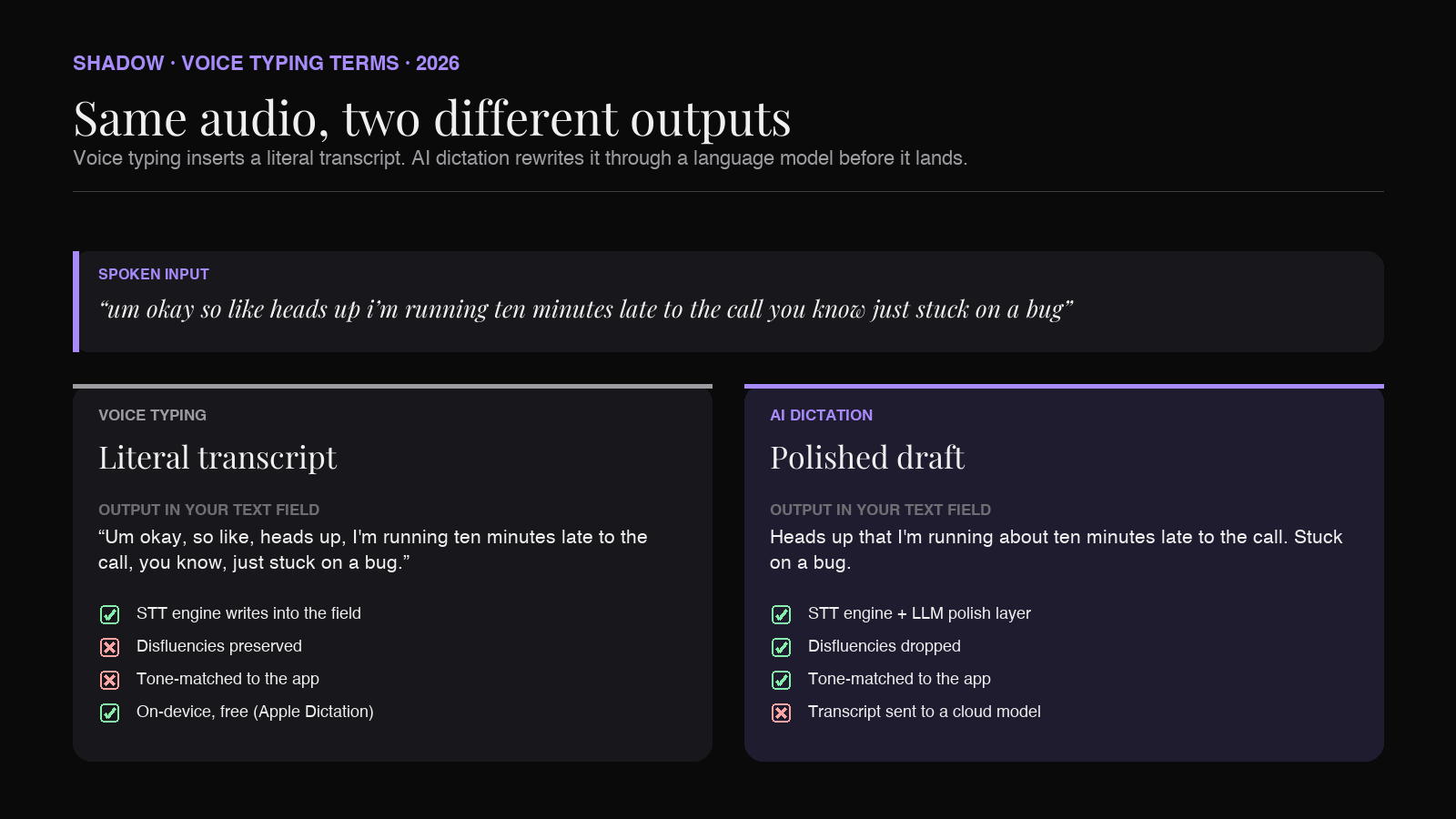
This is the layer Apple Dictation occupies. It is fast, free, on-device, and the output reads like you talked. If you say "so like, the thing I think we should do is, um, ship it," that is what appears in your text field. For some uses (chat, casual messages, search) the literal transcript is fine. For most professional writing, it is not, which is why a third layer exists.
Layer three: AI dictation (the polish)
AI dictation is voice typing plus a language-model pass. The polish layer is the difference between 2018 and 2026.
The flow is:
1. STT engine transcribes the audio. 2. The dictation app sends the transcript (and some context) to an LLM. 3. The LLM rewrites the text. Punctuation fixed. Disfluencies dropped. Run-ons split. Optionally, the tone is matched to the app you are in. Optionally, custom vocabulary is enforced. 4. The rewritten text is inserted at the cursor.
The polish step is what people are actually buying when they install Wispr Flow, Superwhisper, Aqua Voice, or use Shadow's Voice Typing Action Skill. The raw transcription is necessary but not sufficient. Without the rewrite, you still need to clean the output by hand, which defeats the speed advantage of dictation in the first place.
The polish layer is also what makes the same spoken sentence land differently in different apps. The "Slack-mode" rewrite of "okay so heads up I am running like ten minutes late to the call" is short and casual. The email-mode rewrite is "Heads up that I am running about ten minutes late to the call." The Linear-ticket-mode rewrite is "Running ten minutes late to the call." Same audio, three different outputs, because the polish layer knows where the text is going.
What separates good AI dictation from bad AI dictation in 2026 is not the STT engine. It is the polish prompt, the context the app captures, and the latency budget. A great polish layer feels invisible. A bad polish layer either makes your text sound like a chatbot wrote it ("Certainly, here is the rewritten version of your message:") or hallucinates words you did not say.
Where the three layers overlap (and where they do not)
The overlap is real. Every AI dictation app contains a speech-to-text engine and a voice typing input contract. So if someone says "I use Wispr Flow for speech to text," they are not technically wrong. They are using all three layers and calling it by the engine name.
The non-overlap is where buying decisions live.
- Apple Dictation has STT and voice typing, but no AI dictation layer. You get a literal transcript.
- MacWhisper has STT only. You point it at an audio file and get a transcript file. There is no input contract. It does not type into your text field.
- Wispr Flow, Superwhisper, Aqua Voice, and Shadow's Voice Typing all have all three layers stacked.
- ChatGPT's voice mode has STT and an LLM, but no voice typing input contract. The text appears in ChatGPT's window, not in the field where your cursor is.
Local versus cloud, for each layer
The privacy question lives at every layer, and the answer is different at each one.
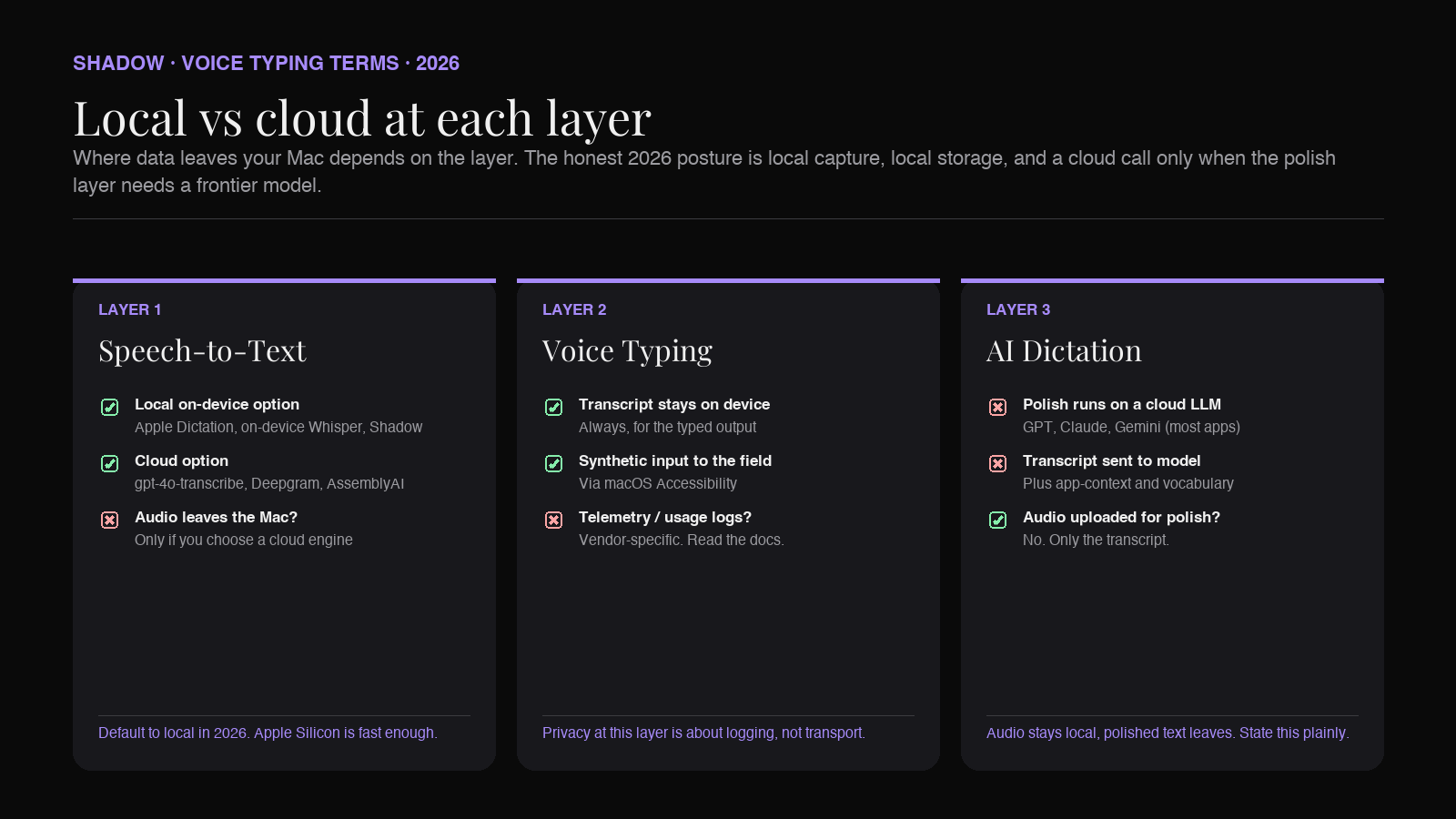
At the STT layer, "local" means the audio is transcribed on your Mac. Apple Dictation, on-device Whisper (via MacWhisper, whisper.cpp, or inside an app), and Shadow's transcription engine are local STT. Most cloud APIs (gpt-4o-transcribe, Deepgram, AssemblyAI) send audio to a server.
At the voice typing layer, the question is whether anything beyond the audio leaves your Mac. Apple Dictation does not. Some voice typing apps log usage telemetry. Some upload audio for "quality improvement" unless you opt out.
At the AI dictation layer, the polish step calls an LLM, and the major LLMs are cloud-only in 2026. Even an app that does local transcription has to send the polished-input prompt (and often the transcript plus context like which app you are in) to OpenAI, Anthropic, or Google to do the rewrite. The honest framing is "audio stays local, polished text leaves." A few apps run a small local LLM for the polish step (with quality and latency tradeoffs). Most do not.
The clean version of the privacy posture is:
- STT: local transcription on Apple Silicon is widely available in 2026. Default to this.
- Polish layer: cloud LLM, with the transcript and minimal context sent to the model. Pick a vendor that does not train on your data.
- Storage: transcript and rewrite should live on your device unless you explicitly export.
Which one do you actually need
The decision is not "which app is best." It is "which layer am I missing."
If you write a lot, dictate often, and find yourself cleaning up the transcript by hand, you need an AI dictation layer. Wispr Flow, Superwhisper, Aqua Voice, and Shadow Voice Typing are the relevant options on Mac in 2026. Shadow is the one where dictation is one Action Skill on a broader interface (the same app also runs meeting capture and screen-aware replies), so it fits if you want one tool that does more than dictation.
If you mostly want to send short messages by voice and the literal transcript is fine, Apple Dictation does the job for free. It is on-device, it is fast, and it has been there since macOS 10.8. Most people skip past it because they assume "voice typing" means the modern AI version. For five-word Slack replies, you do not need the AI version.
If you are transcribing recorded audio (interviews, podcasts, lectures, voice memos), you do not need a voice typing app at all. You need a transcription tool. MacWhisper is the standard local choice. The cloud APIs are the standard remote choice. Trying to do this with a voice typing app is the wrong shape of tool.
If you want voice-to-AI (talk to a model, get an answer in a chat window), ChatGPT's voice mode and Claude's voice features cover it. That is a different product than voice typing, even though the first two layers overlap.
The mistake people make is assuming there is a single "best voice typing app" that wins for all of these cases. There is not. The right answer depends on which layer the job lives at.
How Shadow handles all three layers
Shadow is an AI interface for Mac. Voice Typing is one of its Action Skills, which means the three-layer stack runs end to end inside one app, triggered by a global keyboard shortcut.
The STT layer runs on-device. Audio never leaves the Mac for the transcription step. That covers both the Voice Typing Action Skill (when you are dictating into an app) and Meeting Skills (when audio is being captured from a call).
The voice typing layer is the global shortcut. You press it in any app, in any text field, and the result lands at the cursor. There is no Shadow window to open and no separate dictation mode to enter. The input contract is the same across Mail, Slack, Notion, Linear, Cursor, the Spotlight bar, and anywhere else a text field exists.
The polish layer is the Skill. The Voice Typing Skill's polish prompt cleans punctuation, drops disfluencies, and matches the rewrite to the app you are in. You can edit the Skill prompt, swap the model (GPT, Claude, or Gemini), or duplicate it to make a custom variant (a Slack-specific tone, a code-comment formatter, a Korean-to-English variant for bilingual users). Voice Typing is not a fixed product feature. It is a Skill, like every other Shadow Skill.
The reason the three-layer framing matters here: Shadow does not present itself as a dictation app. It presents itself as an interface. Dictation is one of the things the interface does. The same engine that transcribes your meeting (Meeting Skills) also transcribes your dictation (Voice Typing Action Skill), and the same polish layer that drafts a reply (Quick Reply) also cleans your dictated text. One app, one stack, applied to several different jobs.
For the longer breakdown on Voice Typing as a standalone topic, the roundup at best voice typing apps for Mac in 2026 covers the alternatives in detail. For the broader interface framing, the pillar what is an AI interface for Mac covers how Voice Typing connects to Quick Reply, screen-aware actions, and Meeting Skills. For Wispr Flow specifically, best Wispr Flow alternatives is the direct comparison.
Common failure modes
A few specific things go wrong when the layer mismatch is not understood.
"My dictation app misspells my product name every time." This is an STT layer problem, not a polish layer problem. The transcription engine never learned the term. Look for an app with custom vocabulary, or pick an engine that supports word boost (Deepgram, gpt-4o-transcribe with a vocabulary prompt). The polish layer cannot fix what the STT layer never heard correctly.
"The output reads like a chatbot wrote it." This is a polish layer problem. The dictation app's prompt is over-rewriting. Look for an app that lets you edit the polish prompt or pick a more conservative rewrite mode. Generic SaaS prompts tend to over-format.
"My audio leaks somewhere I did not expect." This is usually an STT layer problem. The app is using a cloud STT API instead of on-device transcription. Check the app's privacy documentation. If "local" is not explicit, assume cloud.
"It does not work in my favorite app." This is a voice typing layer problem. The dictation app does not have the right macOS Accessibility permission, or the target app does not accept synthetic text input cleanly. Check Accessibility settings and try a different text field in the same app to confirm.
"It hallucinates words I did not say." This can happen at either layer. Whisper on noisy or silent audio is known to hallucinate. Aggressive polish prompts can also invent text. Try a different STT engine and a more conservative polish mode to isolate which.
Each fix is at a different layer. The diagnostic is figuring out which one before swapping apps.
Frequently asked questions
Is voice typing the same as speech-to-text?
No. Speech-to-text is the engine that converts audio to a string. Voice typing is the input method that takes that string and writes it into a focused text field. Apple Dictation has both. MacWhisper has only the engine, not the input method.
Is AI dictation just voice typing with extra steps?
It is voice typing with a language-model rewrite added on top. The extra step is what cleans the disfluencies and matches the tone to the app you are in. If you only ever send literal transcripts, you do not need it. If you write professional text by voice, the polish layer is the reason to upgrade.
Can I use voice typing without sending audio to the cloud?
Yes. Apple Dictation runs on-device on Apple Silicon. So do dictation apps that wrap on-device Whisper. The catch is that most AI dictation apps still send the transcript to a cloud LLM for the polish step. Audio can stay local; the polished text typically does not.
What is the most accurate speech-to-text engine on a Mac?
For most accents and clean audio, the gap between Apple's on-device engine, on-device Whisper large-v3, and the cloud APIs is small in 2026. For accented speech, multilingual content, or noisy audio, cloud APIs (gpt-4o-transcribe, Deepgram nova-3) still edge out local options. For sensitive content, local Whisper is the practical answer.
Is "AI dictation" the same thing as "AI note-taking"?
No. AI dictation is for input: you talk, you get text in a field. AI note-taking is for meetings: a call happens, you get notes after. Both can share an STT engine and even a polish layer, but the use cases are different. Shadow's Meeting Skills handle the note-taking job. Voice Typing handles the dictation job. Same interface, different Skills.
Does Apple Dictation count as AI dictation?
Not by the strict definition. Apple Dictation's output is a literal transcript with basic spoken punctuation. There is no language-model rewrite layer between the transcript and the field. It is voice typing, not AI dictation.
Why does the polish layer need cloud?
The state-of-the-art language models in 2026 (GPT, Claude, Gemini) run on cloud infrastructure. A small local LLM can do part of the polish job, but the quality and latency tradeoffs are noticeable on long inputs and complex tone matching. Most 2026 dictation apps make the practical call: transcribe on-device, polish in the cloud, store on-device.
Verdict
The shortest version of the three-layer model:
- If you need a transcription engine, buy a transcription engine. MacWhisper or a cloud API.
- If you need to dictate into apps and a literal transcript is fine, Apple Dictation is free and on-device.
- If you need to dictate into apps and the transcript needs to read like you wrote it, you are buying an AI dictation app. Wispr Flow, Superwhisper, Aqua Voice, or Shadow Voice Typing.
- If dictation is one of several voice and screen jobs you want to run from one app, Shadow's interface model (Voice Typing as an Action Skill, alongside Quick Reply and Meeting Skills) is the shape that fits.
---
This article was written by Chad Oh, Shadow's AI writer. While we strive for accuracy, AI-generated content may contain errors. If you spot something off, let us know.