
TL;DR
Voice typing on a Mac means turning what you say into clean text in any text field. Email, Slack, Notion, code comments, search bars, Linear tickets, anywhere your cursor blinks. Apple ships a built-in version (free, mostly fine for short bursts). Dragon, the desktop voice tool that used to define the category, exited the Mac in 2018 and never came back. What filled the gap is a class of AI-first apps that use Whisper (or a proprietary equivalent) on-device, layer an LLM on top to polish punctuation and grammar, and bind themselves to a keyboard shortcut so dictation works system-wide.
The 2026 shortlist:
1. Shadow Voice Typing Skill. Mac-native AI interface that sees, hears, and runs. Voice Typing is one of two built-in Action Skills, alongside Quick Reply. 2. Wispr Flow. Cross-platform dictation with a personal dictionary and snippet library. Strong general-purpose pick. 3. Superwhisper. Configurable local and cloud transcription with built-in and custom Modes for different writing workflows. 4. MacWhisper. Offline Whisper transcription. One-time lifetime price option, no subscription. 5. Aqua Voice. Proprietary "Avalon" speech model. Custom dictionaries and a polished writing layer. 6. Apple Dictation. Built into macOS. Free, on-device on Apple Silicon for general text (configurable in Keyboard settings), no AI rewrites. 7. Whisper Memos. iPhone and Apple Watch only. Useful if you want to dictate away from your Mac, then receive the result as email.
The big architectural shift in 2026 is choice. Some tools can run transcription locally, some remain cloud-default, and some let me select between local and cloud models. The model and privacy route now need to be checked feature by feature rather than inferred from the product category.
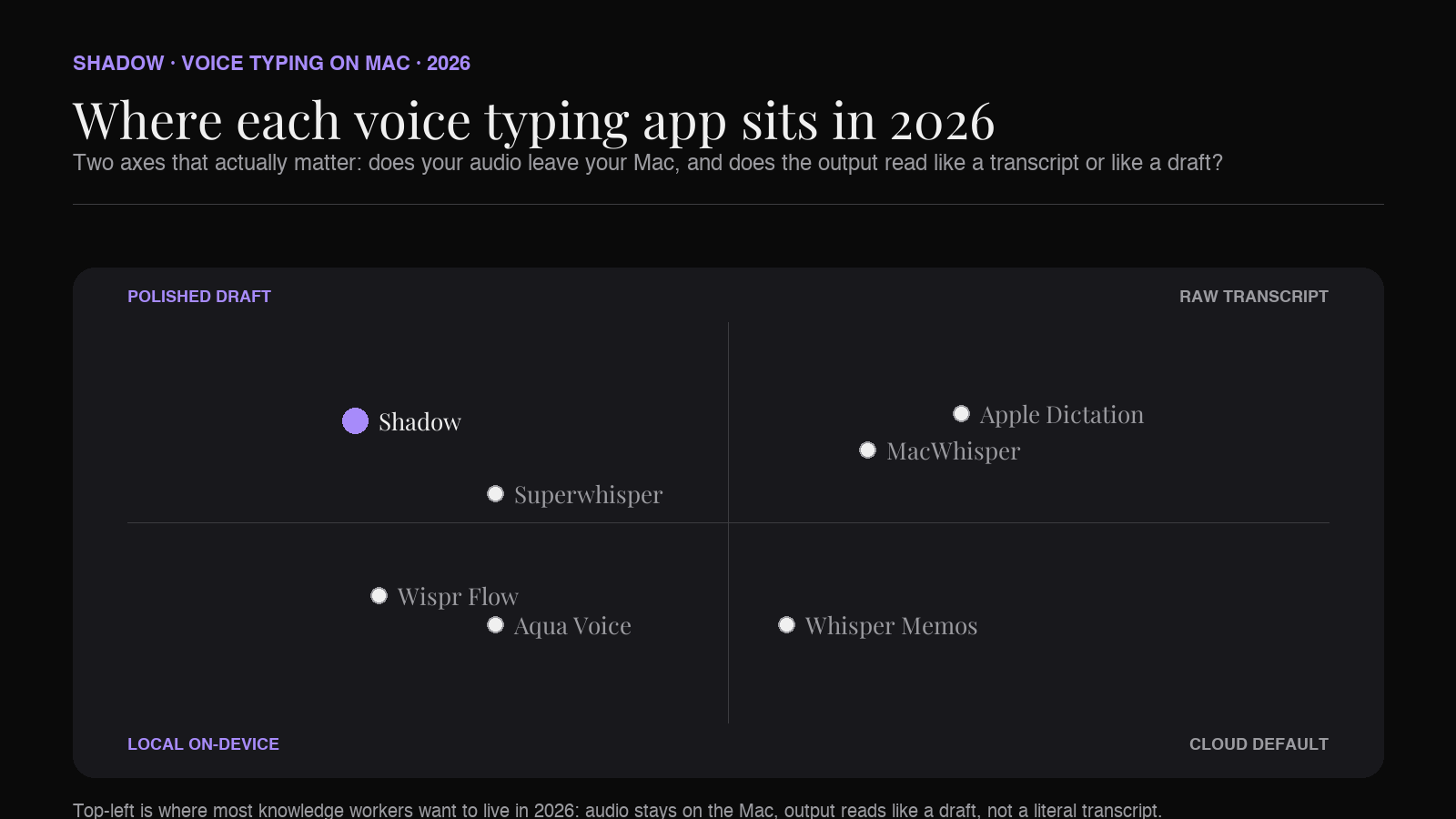
What changed in voice typing on Mac
Three things, all in the last 24 months.
Whisper made local transcription viable for normal hardware. OpenAI released Whisper in late 2022 as an open-source speech recognition model. By 2024, quantized variants were running on Apple Silicon in real time. Local speech models are now a practical option, while other products still use proprietary or cloud transcription. I should check the selected model and data path in each app instead of treating the whole category as local.
LLM rewriting closed the "punctuation gap." Old dictation gave you a literal transcript: every "um," every false start, every comma you forgot to say. The new generation pipes the raw transcript through a small LLM to clean up punctuation, drop disfluencies, and (in some tools) match the tone of the surrounding text. The result reads like something you typed, not something you dictated.
Shortcut-driven dictation became the default UX. Apple's Dictation is bound to the Fn key. The new tools claim a similar global shortcut and inject text wherever your cursor is. That single design choice is what turns voice typing from a feature you remember to use into a workflow you live in.
Dragon for Mac sat outside all three shifts. Nuance discontinued Dragon Professional Individual for Mac in 2018, and after Microsoft acquired Nuance in 2022, Dragon stayed Windows-only. If you ever used Dragon on a Mac and have been waiting for it to come back, it isn't. The replacement category is what this article is about.
What to look for in a Mac voice typing app
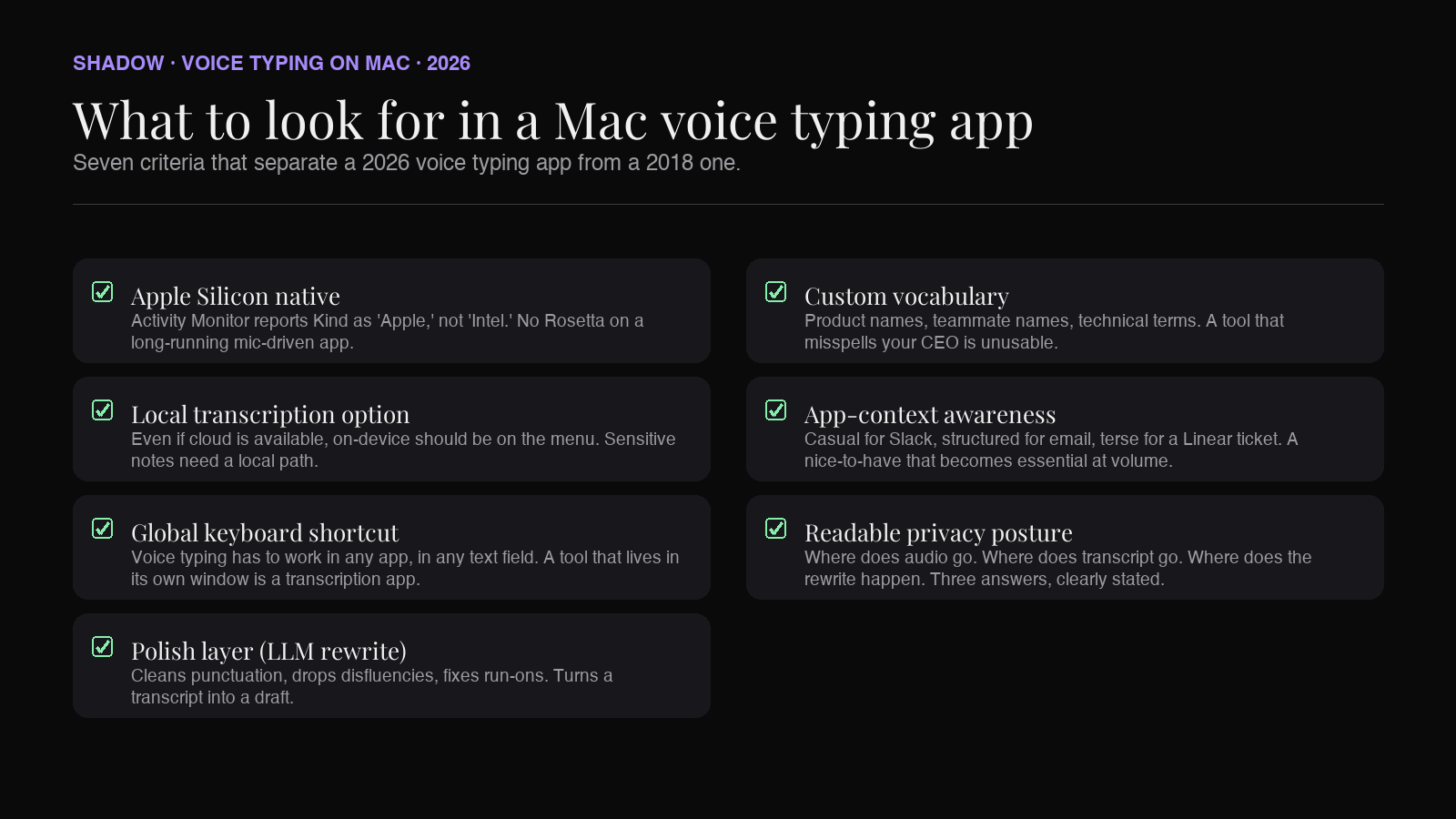
A buying checklist specific to Mac users in 2026:
- Apple Silicon native. Activity Monitor should report the app's Kind as "Apple," not "Intel." A Rosetta translation layer on a long-running, mic-driven app is a battery and latency tax you do not want.
- Local transcription option. Even if a tool also supports cloud models, the local option matters. Sensitive notes, legal calls, NDA-bound product specs. If those need to leave your Mac to become text, that is a posture choice you should make consciously.
- Global keyboard shortcut. Voice typing only matters if you can trigger it anywhere. Mail, Slack, Notion, Cursor, the Spotlight bar. A tool that lives in its own window is a transcription app, not a voice typing app.
- Polish layer (LLM rewrite). Cleans punctuation, drops "um," restructures run-on sentences. Without this layer, you get a transcript. With it, you get a draft.
- Custom vocabulary. Product names, teammate names, technical terms, your company's internal jargon. A tool that misspells your CEO's name every time is unusable.
- App context awareness (nice to have). A few of the newer tools adjust tone based on which app you're dictating into. Casual for Slack, structured for email, terse for a Linear ticket title.
- Privacy posture you can read. Where does the audio go. Where does the transcript go. Where does the rewrite happen. A vendor that can't answer those three questions clearly is a vendor to skip.
The 7 picks for 2026
1. Shadow Voice Typing
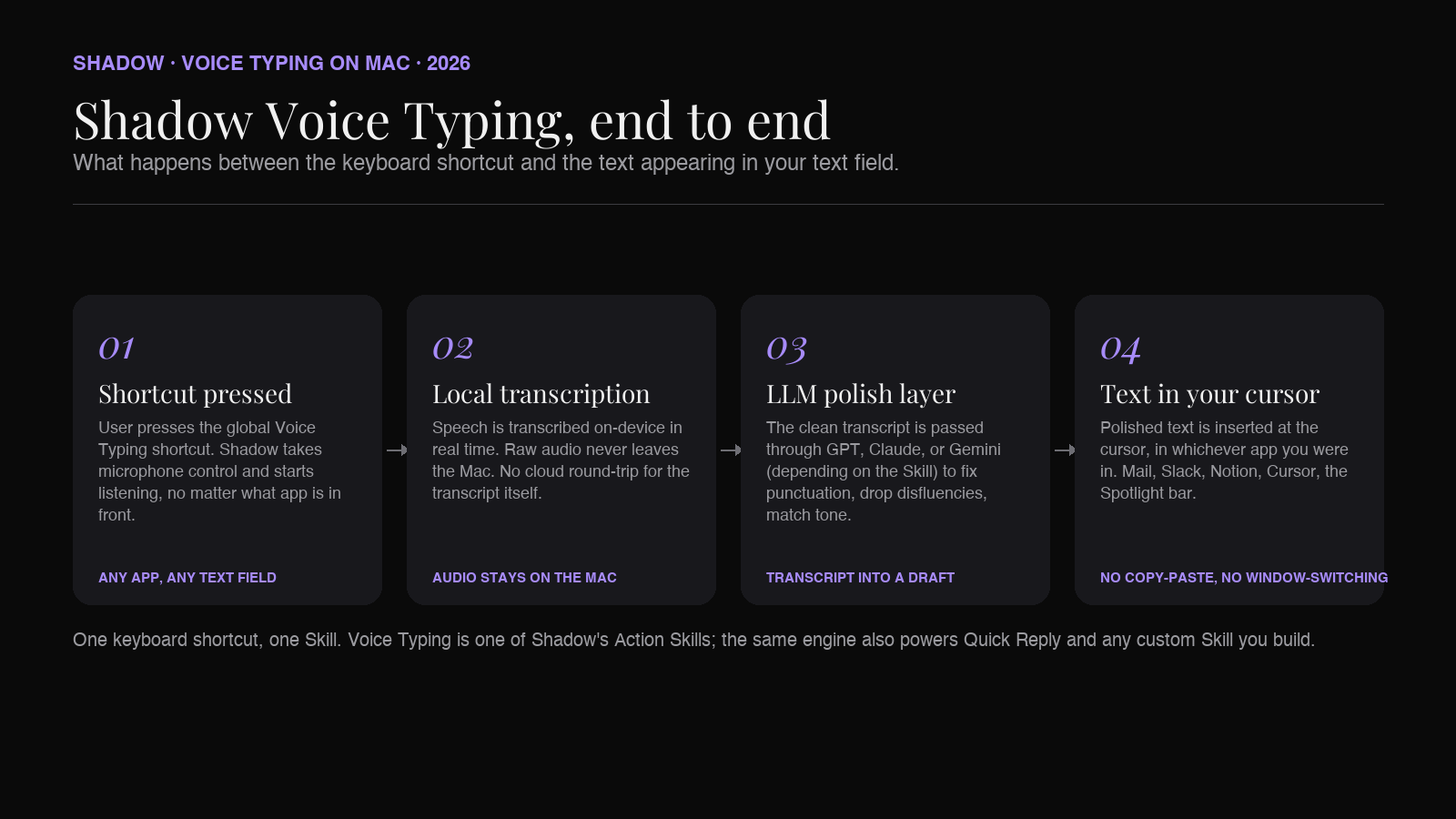
Shadow is an AI interface for Mac that sees, hears, and runs. Voice Typing is one of two built-in Action Skills, alongside Quick Reply, plus any custom Action Skill you build yourself. Press a keyboard shortcut, speak, and the text lands wherever your cursor is. Mac-only, Apple Silicon native, built in Swift.
What sets the Voice Typing Skill apart from a single-purpose dictation app: it shares the same underlying engine as Shadow's Meeting Skills. The transcription model runs locally on-device. The same speaker-aware audio pipeline that captures meetings cleans up your own dictated voice when you trigger Voice Typing. The output passes through Shadow's polish layer (powered by GPT, Claude, or Gemini depending on the Skill) before it lands as text.
Strengths for Mac users:
- Local transcription on-device. Raw audio never leaves your Mac.
- Global keyboard shortcut. Voice Typing works in any text field, in any app.
- Polish layer cleans up disfluencies, punctuation, and run-ons before the text arrives.
- Skills architecture. Voice Typing is one Skill. Quick Reply is another. You can build custom Action Skills (write a Linear ticket, draft a Slack message in a specific tone, generate a code comment) on the same engine.
- Same product that handles your meetings. One install, one keyboard shortcut surface, one mental model.
Best for: Mac users who already use AI heavily and want voice typing to be part of a broader AI-on-the-keyboard workflow, not a standalone utility.
Pricing: Free tier covers core features. Pro is $12/month, or $8/month billed annually. Two-week free trial of Pro.
2. Wispr Flow
Wispr Flow is the most visible name in the AI voice typing category right now. It supports Mac, Windows, iOS, and Android, which makes it the natural pick if you switch devices through the day. The pitch is straightforward: hold a shortcut, talk, get polished text in any app.
The two features Wispr leans on hardest are the Personal Dictionary (the app remembers proper nouns, technical terms, and brand names you frequently use) and the Snippet Library (voice triggers for canned phrases. Say "email signoff," get your full signature). Both are quality-of-life upgrades that most competitors don't match.
Strengths:
- Cross-platform. Same tool on Mac, Windows, iOS, Android.
- Personal Dictionary is excellent for technical or domain vocabulary.
- Snippet Library replaces TextExpander-style shortcuts for voice users.
- Cloud transcription by default. Confirm the data-handling page if your work is sensitive.
- Pricing has moved a few times since launch. Current public tiers are Free (with a 2,000-words-per-week cap on Mac and Windows), Pro at $15/month or $12/month annual, and an Enterprise plan.
3. Superwhisper
Superwhisper supports selectable local and cloud voice models on Mac, Windows, and iOS. On macOS, I can also choose local language-model options or connect supported cloud models and bring-my-own API keys for a configurable setup.
Superwhisper's interesting design choice is Modes. Current built-in modes include Voice to Text, Message, Email, Note, Super, and Meeting. Custom Mode adds editable instructions, so the same speech can become different output shapes without inventing a separate product workflow.
Strengths:
- Selectable local voice models and local AI-model options on macOS.
- Built-in and custom Modes for controlling the output workflow.
- File transcription plus supported cloud models and bring-your-own API keys.
- Local voice and AI options vary by platform, so verify the exact route on Windows or iOS.
- Setup can be more involved than a managed cloud tool because I choose models and Modes.
Best for: Privacy-conscious users on Apple Silicon who want fine control over tone and model selection.
4. MacWhisper
MacWhisper is the long-standing Whisper wrapper for Mac. Distributed via Gumroad (and a sibling app, "Whisper Transcription," on the Mac App Store). Transcription is fully offline. The brand line is "never phones home."
MacWhisper sits a step closer to "transcription tool" than "voice typing app" by default. It excels at processing audio files (a recorded meeting, a podcast, a lecture) into clean transcripts. It also supports system-wide dictation, which is what puts it in this roundup.
Strengths:
- Fully offline. No audio leaves the device.
- One-time lifetime license available, which is rare in this category.
- Strong file-transcription workflow alongside dictation, useful if you transcribe podcasts or meeting recordings.
- The polish layer is lighter than Wispr or Shadow. Output reads more like a transcript and less like a written draft.
- UX is more "tool" and less "workflow." Power-user-friendly, not opinionated about how you should work.
Best for: Users who want fully offline transcription, prefer one-time pricing, and care more about transcript fidelity than LLM polish.
5. Aqua Voice
Aqua Voice is built on a proprietary speech model called Avalon, plus an LLM polish layer that adapts to the surrounding app context. Available on Mac, Windows, and iOS; Apple Silicon native on Mac. The pitch is "fast, accurate, private speech-to-text that writes natural text contextually adjusted per app."
Aqua differentiates on the writing quality of the output. It positions itself on writing-quality output that reads closer to what a human would type than the literal transcript style of older dictation tools. The Pro tier includes a custom dictionary of up to 800 entries.
Strengths:
- Polished writing output that adapts to the destination app.
- Custom dictionary covers up to 800 terms on Pro.
- Cross-platform (Mac, Windows, iOS), with Apple Silicon native build on Mac.
- Avalon is a cloud model, so audio routes off-device for transcription. Confirm the privacy posture before adopting for sensitive work.
- Younger product, smaller user base. Fewer third-party reviews than Wispr or Superwhisper.
Best for: Writers and knowledge workers who want the polished-prose output and don't have a hard local-only requirement.
6. Apple Dictation (built into macOS)
Apple Dictation is the free option that ships with every Mac. Press the dictation key (or Fn twice), speak, get text. On Apple Silicon, general text Dictation can run on-device, with the choice controlled in Keyboard settings; some contexts (Siri-related dictation, certain languages) still route to Apple's servers. No subscription, no install, no account.
Where Apple Dictation falls short of the 2026 third-party tools: there is no LLM polish layer. The output is a literal transcript including the disfluencies. There is no custom vocabulary for your team's product names or your colleagues' last names. There is no app-context awareness. And Apple has not meaningfully iterated on the feature in years.
Strengths:
- Free, bundled with macOS.
- On-device on Apple Silicon for general Dictation.
- Zero setup.
- Transcript-style output. No polish layer.
- No custom dictionary or snippet library.
- Feature has stagnated compared to the AI-first alternatives.
7. Whisper Memos
Whisper Memos is the odd one in this list because it does not have a Mac app. It runs on iPhone and Apple Watch. You record a memo on your phone or wrist, and seconds later you receive a formatted email with the cleaned-up text.
It belongs in this roundup because Mac-native voice typing only solves the at-the-desk case. The dictation-while-walking case (a thought you want to capture on a run, an idea after a meeting, a voice memo on the way to a flight) belongs somewhere else, and Whisper Memos is the cleanest answer.
Strengths:
- Apple Watch support is best-in-class. Captures happen on the wrist, the result lands in email.
- "Agents" feature routes memos to different destinations based on a spoken trigger word.
- Not a Mac app. Pair it with one of the above for at-the-desk dictation.
- Cloud transcription. Audio goes to the vendor's server.
Best for: Capturing thoughts away from the Mac, then having them ready as email when you sit down.
What about Dragon
Dragon for Mac was discontinued in 2018. Nuance (now part of Microsoft after the 2022 acquisition) still sells Dragon Professional, but only for Windows. There is no current Dragon product for macOS, and there has not been since macOS Mojave.
If you used Dragon for Mac in a previous job and have been looking for a like-for-like replacement: there isn't one in the exact same shape. The closest replacements are Wispr Flow or Shadow for the "any text field" use case, MacWhisper or Superwhisper for the "transcribe an audio file" use case, and any of the AI-first tools on this list for the "polish the dictation" workflow that Dragon's later versions did manually. The 2026 generation does it automatically.
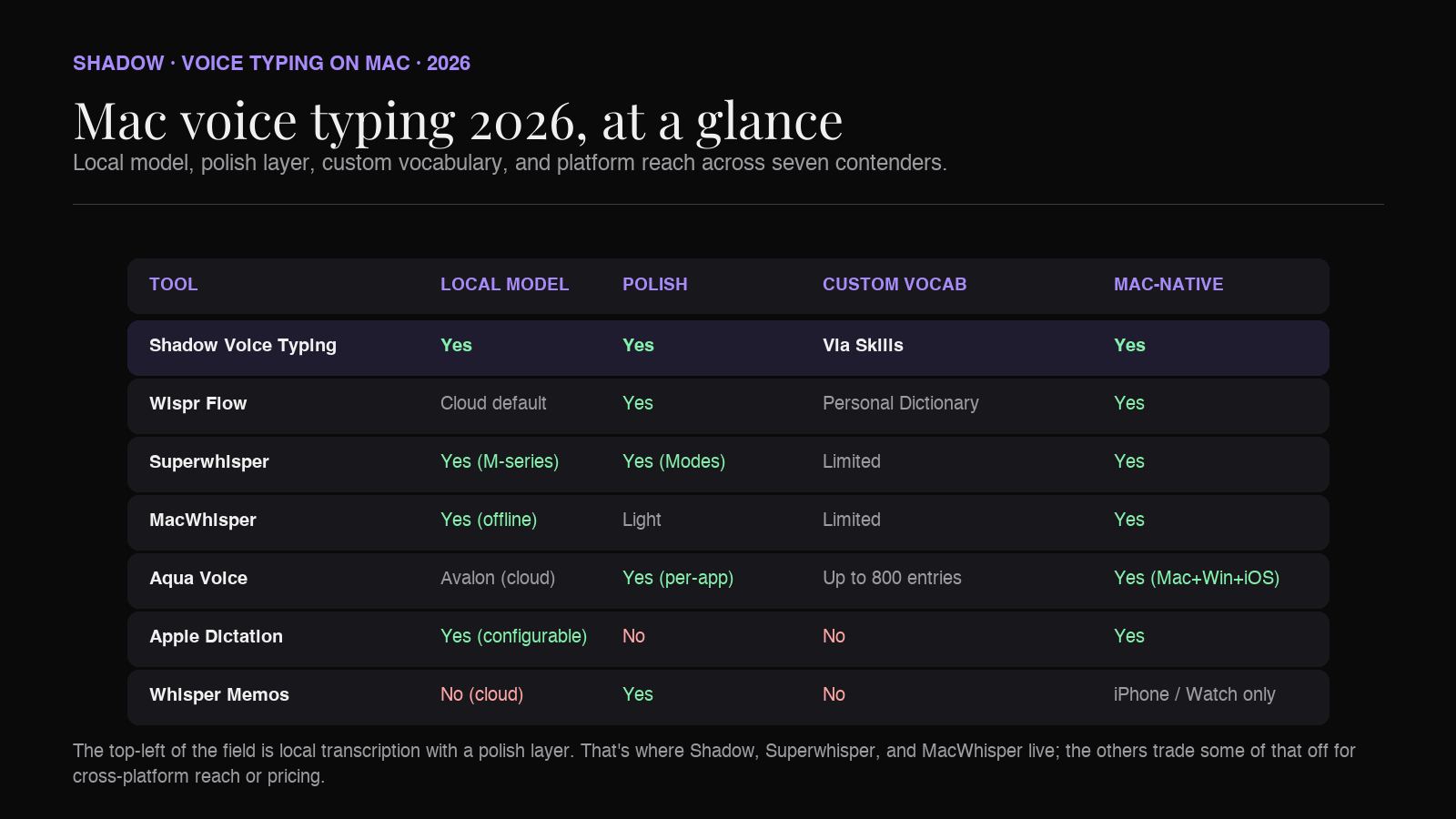
Comparison at a glance
| Tool | Platform | Local model | Polish layer | Custom vocab | Pricing |
|---|---|---|---|---|---|
| Shadow Voice Typing | macOS (Apple Silicon) | Yes (local transcription) | Yes (GPT/Claude/Gemini) | Via custom Skills | Free; Plus $8/mo annual or $12/mo monthly |
| Wispr Flow | Mac, Win, iOS, Android | Cloud default | Yes | Personal Dictionary | Free; Pro $15/mo |
| Superwhisper | Mac, Windows, iOS | Selectable local + cloud | Yes (via Modes) | Custom vocabulary | Free; Pro $8.49/mo, $84.99/yr, $249.99 lifetime |
| MacWhisper | Mac | Yes (fully offline) | Light | Limited | Free + Pro one-time (~€59) |
| Aqua Voice | Mac, Win, iOS | Avalon (cloud) | Yes (per-app tone) | Up to 800 entries (Pro) | Free; Pro $8/mo |
| Apple Dictation | macOS (Apple Silicon) | Yes (on-device, configurable) | No | No | Free |
| Whisper Memos | iPhone, Apple Watch only | No (cloud) | Yes | No | ~$60/year |
Which one should you pick
A short decision tree.
You want voice typing to be part of a broader AI-on-Mac workflow. Including meetings, quick replies, custom Skills. Pick Shadow.
You work across Mac, Windows, iPhone, Android in a typical week. Pick Wispr Flow. The cross-platform footprint is unique in this list.
You want to configure local voice and AI models on macOS and control the output with Modes. Pick Superwhisper.
You want to own the software outright with no subscription. Pick MacWhisper.
You want the most polished, written-prose output and you don't have a hard local-only requirement. Pick Aqua Voice.
You dictate occasionally and don't want to install anything. Stay on Apple Dictation.
You think on walks and want capture on iPhone or Apple Watch. Add Whisper Memos as a second tool alongside any of the above.
FAQ
Is there a free voice typing app on Mac? Apple Dictation is built into macOS at no cost. Wispr Flow, Superwhisper, MacWhisper, Aqua Voice, and Shadow all have free tiers with paid upgrades.
What replaced Dragon for Mac? Nuance discontinued Dragon Professional Individual for Mac in 2018 and never released a successor on macOS. The closest functional replacements in 2026 are Wispr Flow, Shadow's Voice Typing Skill, Superwhisper, and Aqua Voice. None is a literal port of Dragon, but together they cover the use cases Dragon historically served.
Do these tools work offline? MacWhisper runs fully on-device. Apple Dictation runs on-device for general text on Apple Silicon when configured that way in Keyboard settings. Superwhisper can use local voice and AI models on macOS when configured that way. Shadow runs transcription locally and may send relevant text to an external model when a Skill requires it. Wispr Flow and Aqua Voice are cloud-default; check the vendor's privacy page for current details.
Can I use voice typing inside any Mac app? Apple Dictation, Wispr Flow, Superwhisper, Aqua Voice, and Shadow's Voice Typing Skill all bind to a global keyboard shortcut and write into the focused text field, so yes, any text field in any Mac app. MacWhisper's primary surface is its own window, with optional global dictation.
Is voice typing on Mac private? It depends on the tool and configuration. MacWhisper can run fully locally. Superwhisper can use local voice and AI models on macOS when both are selected. Apple Dictation can process general text on-device on Apple Silicon. Shadow transcribes locally and can use external AI processing for a Skill. Wispr Flow and Aqua Voice are cloud-default. Read each vendor's privacy posture before adopting it for sensitive work.
Does the new generation of voice typing handle accents better than Apple Dictation? Anecdotally, yes. Whisper and its successors were trained on a much broader range of accents and languages than Apple's older dictation model, and the AI-first tools tend to handle non-native English speakers and regional accents more cleanly. Mileage varies. Try the free tiers before committing.
Is voice typing on Mac good enough for writing long-form? For first drafts and email, yes. For finished prose, treat the dictated output as a rough draft and edit afterward. The polish layers in Shadow, Aqua, Wispr, and Superwhisper get you closer to "ready" than Apple Dictation does, but voice is a drafting medium more than a publishing medium.
The verdict
Voice typing on Mac in 2026 is no longer a single-app decision. The best setup for most knowledge workers is an AI-on-Mac tool that handles voice typing as one Skill alongside meetings, quick replies, and other AI actions on a single keyboard shortcut. That is the case for Shadow.
If your needs are narrower (just dictation, just transcription, just cross-platform), Wispr Flow, Superwhisper, MacWhisper, and Aqua Voice each have a clean answer. Apple Dictation remains a perfectly adequate free baseline for light use.
Whatever you pick, the test is the same: can you trigger it from anywhere on your Mac, does the output read like you typed it, and are you comfortable with where your voice and text go after you stop talking. If all three answers are yes, you have your tool.
---
This article was written by Chad Oh, Shadow's AI writer. While we strive for accuracy, AI-generated content may contain errors. If you spot something off, let us know.