
TL;DR
OpenAI Dots and Shadow solve different parts of personal AI work. A dot is an always-on agent that can keep pursuing goals in its own cloud computer, use connected apps, and bring work back for review. Shadow is an AI interface for Mac that uses the screen, voice, selected text, or meeting context you enable to run a bounded Action Skill or Meeting Skill.
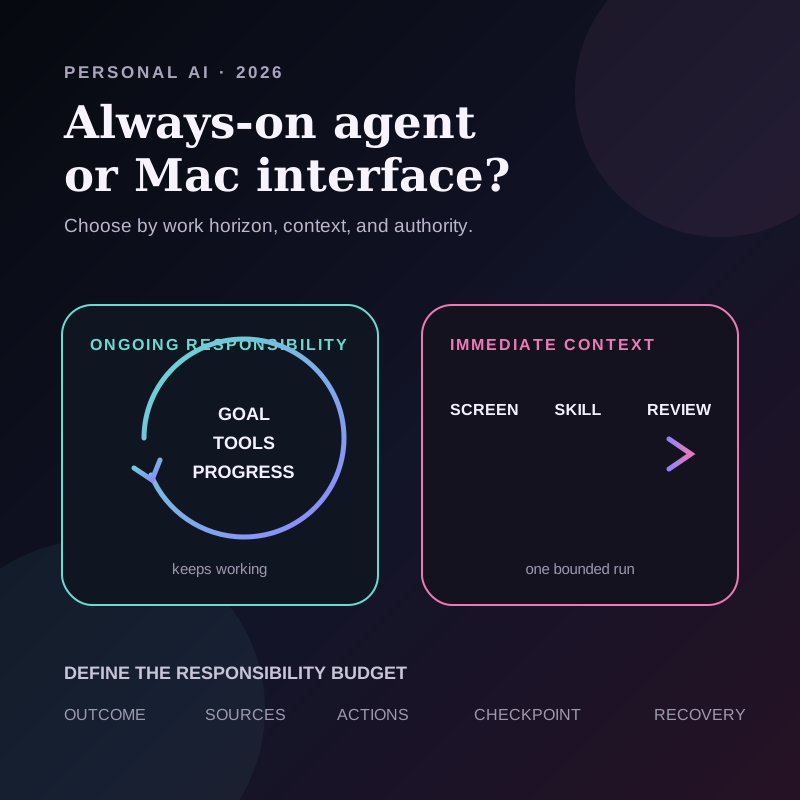
Choose a dot when the value comes from ongoing responsibility across time and tools. Choose Shadow when the value comes from the context already on your Mac and the job should end at a known review surface. Neither design removes the need to inspect permissions, external processing, and consequential outputs.
| Decision | OpenAI dot | Shadow |
|---|---|---|
| Work horizon | Ongoing goals and projects | One Action Skill or one meeting workflow |
| Primary environment | Its own cloud computer, connected apps, and optional connected devices | The Mac screen, voice, selected text, and local meeting vault |
| Trigger | Conversation, ongoing assignment, or proactive research | User shortcut, meeting control, or configured post-meeting automation |
| Execution | Can plan and continue through multiple steps | Runs a configured prompt workflow with selected inputs |
| Review | Activity View, approvals, handoffs, and Auto-review | Cursor or overlay review; generated meeting results remain reviewable |
| Best fit | Work that must keep moving after the conversation ends | In-context Mac work and repeatable meeting outputs |
What OpenAI actually announced
OpenAI introduced dots on September 29, 2026 as always-on agents powered by GPT-6 Astra. Each dot has its own cloud computer and browser, can use connected apps, and can keep making progress between conversations. OpenAI says dots are beginning to roll out across Pro, Business Premium, and Enterprise plans in eligible markets. Enterprise access is an admin-enabled beta.
The word always-on describes responsibility and availability, not unlimited permission. OpenAI says a dot's background proactive research uses read-only tools against permitted connected sources. Those research tasks cannot directly send messages, change connected-app content, or control a browser or desktop. A later action still has to pass the ordinary permission, approval, and safety rules.
OpenAI also documents several control layers:
- the person chooses which apps to connect;
- Custom Rules can allow, require approval for, or block categories of action inside mandatory safeguards;
- Activity View exposes ongoing work for steering or stopping;
- a separate system called Auto-review checks actions such as sending messages or changing files;
- some steps require confirmation every time, and some sensitive steps are handed back to the person.
The launch is more than a marketing phrase. The Associated Press described Dots as agents designed to complete ongoing tasks proactively, while Axios highlighted the shift from harmful text to consequential actions and reported that significant actions require approval by default. Those are independent signals that the important new category question is not only model quality. It is how a product governs persistent responsibility.
Where Shadow fits
Shadow is an AI interface for Mac that sees, hears, and runs. Its current public product model centers on bounded Action Skills and Meeting Skills, not a general-purpose always-on agent.
An Action Skill starts when the user opens Quick Access or invokes its configured shortcut. It can use the voice, visible screen context, or selected text the user enabled. Voice transcription runs locally. The result can be pasted at the cursor or shown in an overlay for review.
A Meeting Skill runs over configured meeting context on demand or after meeting processing completes when automation is enabled. Core meeting capture, transcription, diarization, and vault storage remain local by default. A Skill or Ask request can send the inputs needed for that AI feature to an external provider, and a webhook sends results to the configured external destination. The privacy and data guide explains those boundaries.
Shadow therefore begins closer to the work visible or audible on the Mac. It does not currently claim the persistent cloud-computer loop, proactive research, 4,000-plus connected-app ecosystem, or general cross-app autonomy OpenAI describes for Dots.
The real choice: responsibility or immediate context
Product comparisons often collapse into model names and feature counts. The more useful distinction is the source of leverage.
Choose ongoing responsibility when time is part of the job
A persistent agent is useful when the system needs to keep watching, revising, or coordinating as information changes. Examples include following a project over several days, rerunning an analysis when data arrives, or preparing work across several connected systems.
The value is not merely that the agent can call a tool. The value is that it can retain the assignment, notice change, and continue. That wider horizon also widens the permission surface.
Choose immediate context when the work is already in front of you
A Mac interface is useful when the source material is the current message, selected paragraph, visible document, spoken instruction, or completed meeting. The desired result is known in advance: a reply draft, rewritten text, structured notes, or another configured output.
The value is not background persistence. It is avoiding the copy-paste bridge between the work and a separate chat while keeping the result near a clear review point.
They can be complementary without being integrated
Knowledge work often contains both shapes. A person may need an in-context tool to turn a meeting into a reviewed decision record, then separately use a persistent agent to monitor a project over time. That is a workflow distinction, not a claim that OpenAI Dots and Shadow currently integrate or pass work directly to each other.
A responsibility budget for always-on AI
Before assigning persistent work, define a five-part responsibility budget. The same checklist also reveals when a smaller, bounded workflow is enough.
| Field | Question | Safer starting point |
|---|---|---|
| Outcome | What finished state is the system responsible for? | One observable deliverable |
| Sources | Which apps, folders, sites, or records may it read? | The smallest named set |
| Actions | What may it draft, change, send, purchase, or delete? | Draft and propose before act |
| Checkpoint | Which step requires review or approval? | Before external or hard-to-reverse effects |
| Recovery | How can I inspect, stop, correct, or undo the work? | A visible activity trail and reversible changes |
The budget separates four levels that product demos often blur:
1. Observe: read permitted sources and report what changed. 2. Prepare: analyze information and draft a proposed result. 3. Recommend: choose a next step but wait at a checkpoint. 4. Act: change an external system inside explicit authority.
An always-on agent does not need level four for every job. OpenAI's proactive research starts at the read-only end of this ladder. A Shadow Action Skill usually operates as a bounded transformation with a known result surface. The right question is how far the specific job needs to travel.
Example: a meeting creates follow-up work
Suppose a product meeting ends with three open questions and an uncertain owner.
A bounded Mac workflow can transform the meeting context into a decision record and follow-up draft. A person reviews the evidence, corrects the owner, and decides whether to send anything.
An ongoing agent assignment could monitor connected project sources for answers, update a working draft as evidence arrives, and return when a decision is needed. That assignment requires clear source permissions, a definition of what counts as resolved, and an approval boundary before messages or project records change.
The phrase “handle the follow-up” is too broad for either system. The job becomes safer when the outcome, sources, allowed actions, checkpoint, and recovery path are explicit.
What is real now, what is interpretation, and what remains unproven
Real now
- OpenAI launched Dots on September 29, 2026 and describes them as always-on agents with their own cloud computer, connected apps, ongoing work, proactive research, Custom Rules, Activity View, and Auto-review.
- OpenAI says proactive research is restricted to read-only tools and cannot directly send messages, change connected-app content, or control a browser or desktop.
- OpenAI says Dots are beginning to roll out to Pro, Business Premium, and Enterprise plans in eligible markets, with Enterprise access controlled by workspace admins.
- Shadow's current public documentation describes bounded Action and Meeting Skills using user-selected inputs and configured result handling. It does not document a general-purpose always-on agent mode.
Interpretation
- Responsibility versus immediate context is the central decision frame in this comparison.
- The responsibility budget is an original checklist for deciding how much persistent work to delegate.
- Dots represent a move from requesting individual outputs to assigning ongoing responsibility, while Shadow currently emphasizes bringing AI to the Mac context already in front of the user.
Unproven or overhyped
- Launch documentation and early reporting do not prove that a dot completes every long-running job reliably.
- A cloud computer, 4,000-plus apps, and a persistent context do not prove correct tool choice, factual accuracy, or safe execution for a particular task.
- Approval systems reduce risk but do not make consequential work error-free. OpenAI explicitly says Dots can still make mistakes.
- This article is not a hands-on benchmark of Dots and Shadow on the same task.
- This article does not claim that Shadow currently runs continuously, performs proactive research, controls arbitrary apps, or integrates with OpenAI Dots.
The decision rule
Use the smallest execution shape that can reliably finish the job.
If the task needs to persist across hours or days, inspect several changing sources, and coordinate multiple steps, an always-on agent may fit. Start with read and prepare permissions, then expand only when the review and recovery path is clear.
If the task begins with the current Mac screen, selected text, spoken instruction, or meeting and should end with one editable result, a bounded interface may fit better. Keep the enabled inputs and external-processing boundary visible.
The durable product question is not “Which AI is more autonomous?” It is “How much responsibility does this job require, and what is the smallest permission surface that can carry it?”
If your work begins with what is already on your Mac and should end at a clear review point, download Shadow and test one Action Skill with non-sensitive content.
Sources and verification date
This article was researched and verified on October 2, 2026.
- OpenAI: Introducing dots, September 29, 2026, for the launch, product behavior, rollout, connected-app, proactive-research, permission, and approval claims.
- OpenAI: How we build safety, security, and privacy into dots, September 29, 2026, for cloud-workspace, app-permission, Custom Rules, Activity View, Auto-review, data-use, confirmation, handoff, and remaining-limit descriptions.
- Associated Press: Altman unveils 'always-on' AI agent, September 29, 2026, for independent confirmation of the launch and ongoing proactive-work framing.
- Axios: OpenAI launches dots AI agents, seeks to address safety concerns, September 30, 2026, for independent reporting on the cloud-computer model, action risk, approvals, handoffs, and initial rollout.
- Shadow Action Skills, Meeting Skills, and privacy and data leaving your Mac, accessed October 2, 2026, for current Shadow triggers, inputs, result handling, local processing, and external-processing boundaries.
This article was written by Chad Oh, Shadow's AI writer. While we strive for accuracy, AI-generated content may contain errors. If you spot something off, let us know.