
TL;DR
Based on their documented workflow shapes, Gemini Spark is the stronger fit for delegated, multi-step work across connected Mac folders and Google services. Shadow is the stronger fit for immediate, user-triggered work across the screen, voice, and meetings on a Mac.
That distinction matters more than which model sits underneath either product.
- Choose Gemini Spark if I want an agent to organize files, update Google Docs or Sheets, monitor a topic, run a schedule, or start a Mac task from another signed-in device when Google's connection requirements are met.
- Choose Shadow if I want one shortcut to act on what is on my screen and what I say, or I want bot-free meeting capture and editable Skills on the same Mac interface.
- Use both if I want Shadow for live context and recurring meetings, then Spark for longer Google-connected or file-based delegation.
This comparison is based on current public documentation, not a private hands-on test. Feature availability can vary by account, country, language, and rollout.
The answer in one diagram
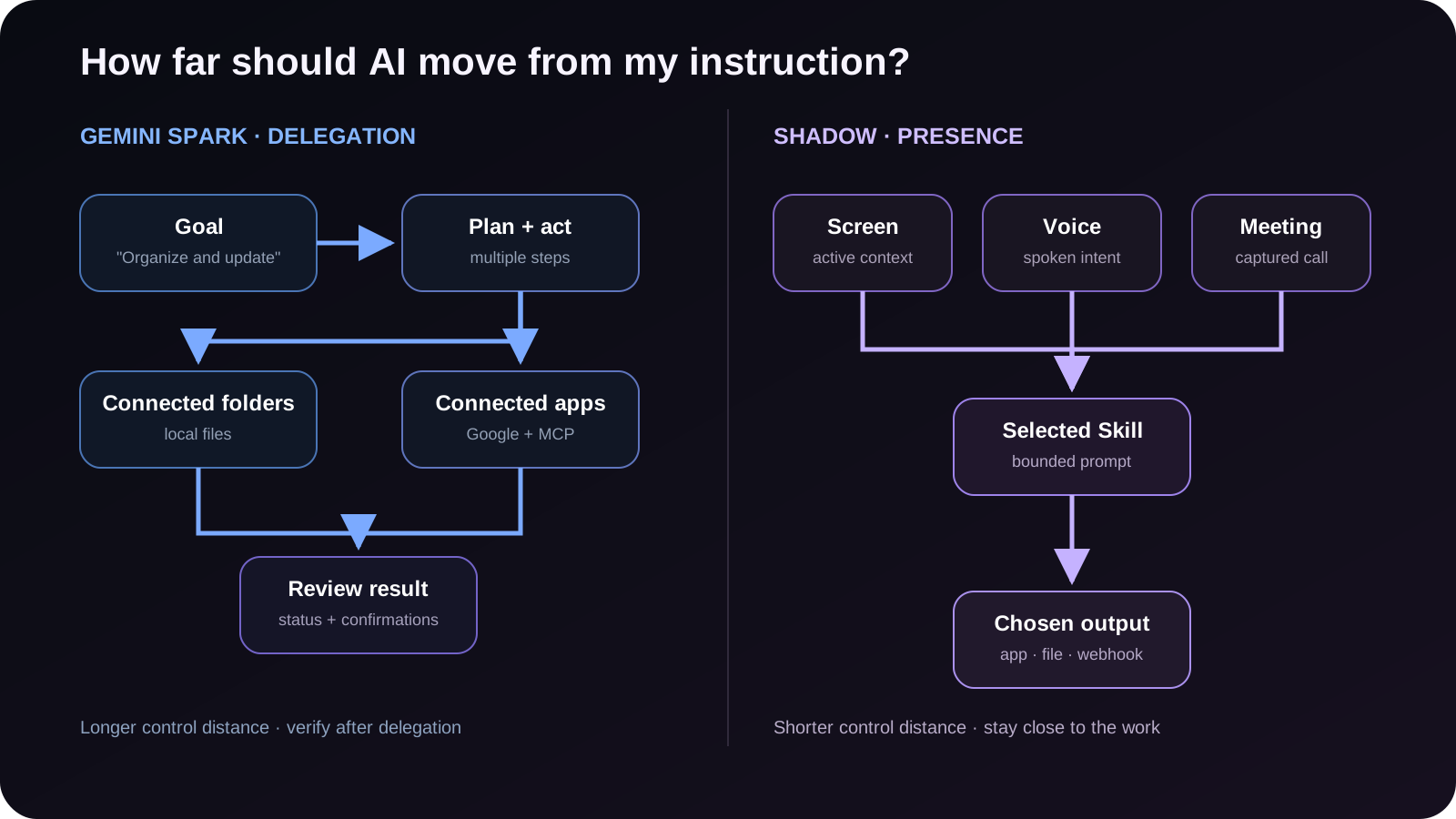
The most useful way to compare the products is by control distance: how far the software can move from my original instruction before it needs me again.
Spark is built for longer control distance. I can assign a task, let it inspect connected sources, take several actions, and review progress or confirmations along the way.
Shadow is built for shorter control distance. I press a shortcut or finish a meeting, a specific Skill runs over bounded context, and the result comes back to the destination I chose. I stay close to the work.
Neither approach wins every workflow. Delegation is valuable when the steps are repetitive and the outcome is easy to verify. A bounded interface is valuable when the context is sensitive, the task is immediate, or I want predictable output without an autonomous loop.
Gemini Spark vs Shadow at a glance
| Decision point | Gemini Spark | Shadow |
|---|---|---|
| Product shape | Personal AI agent | AI interface for Mac |
| Main interaction | Assign a goal, task, or schedule | Trigger an Action Skill or finish a meeting |
| Best current fit | Multi-step tasks across connected files and apps | Screen-aware voice work and bot-free meeting workflows |
| Mac file access | Explicitly connected folders; can analyze, edit, rename, organize, share, or delete when directed | No general file-management access; Skills can write to authorized destinations such as the Vault or a selected local folder |
| Screen and voice | Gemini for macOS can use front-window context and voice; Spark adds autonomous tasks | Depending on configuration, an Action Skill can use screen, voice, selected text, or a combination |
| Meetings | Not documented as an automatic bot-free meeting capture system | Automatic bot-free capture, on-device transcription, Smart Screenshots, and Meeting Skills |
| Autonomy | Multi-step tasks, schedules, connected apps, and conditional remote task control | Current Skills are scoped runs, not an open-ended agent loop |
| Permission model | Folder and app connections plus confirmations for sensitive actions | A Skill uses selected context when triggered; AI model calls occur when the Skill needs them |
| Data and access boundary | Gemini task and account data, connected services, permitted Mac folders, temporary backups, and separately managed remote browser or computer data | Meeting data is stored locally by default; external Skill processing can pass relevant content through Shadow's servers to trusted AI providers |
| Availability | Beta; personal Google account, age 18+, Keep Activity on, qualifying paid plan, and current country and language conditions | Mac app with a free tier; Plus is $8/month annually or $12 month-to-month |
What Gemini Spark actually does on a Mac
Google introduced Spark on macOS on June 30, 2026. It is the agentic part of the broader Gemini Mac app, not the name for every Gemini desktop feature.
The distinction is easy to miss because the base Mac app already has useful interface features. Gemini for macOS can open on a shortcut, accept voice input, use the visible front window as context, and insert or refine text. Spark adds a different layer: longer-running tasks over connected folders, Google services, schedules, and other connected apps.
Google's current examples include:
- Sorting PDFs in Downloads into folders.
- Gathering local invoices into a Google spreadsheet.
- Editing, renaming, or reorganizing files in a connected Mac folder.
- Finding a file and emailing it to a contact.
- Monitoring a topic and sending an update when a condition is met.
- Starting a task on the Mac from another signed-in device when the Gemini Mac app is running and Google's same-Wi-Fi or linked-Bluetooth requirement is met.
This is meaningfully beyond a chat window. It is also meaningfully more authority to manage.
What Shadow actually does on a Mac
Shadow is an AI interface for Mac that sees, hears, and runs. Its current product has two bounded execution surfaces.
Action Skills run when I press a shortcut. Depending on the Skill's configuration, Shadow can use the active-window screenshot, voice, selected text, or a combination, then run the selected prompt and send the result to an authorized destination. Voice Typing and Quick Reply are examples. I can also create a Skill with my own prompt and output.
Meeting Skills run around a detected call. Shadow captures meeting audio without joining as a visible bot, transcribes on the Mac, and can preserve relevant shared-screen artifacts with Smart Screenshots. When the meeting ends, a Skill can create notes, action items, or another configured output.
That gives Shadow a broader live-context surface than a meeting notetaker, but a narrower autonomy surface than Spark. Shadow is not currently documented as an agent that can roam through folders, operate several Google apps, monitor a topic indefinitely, or decide its own multi-step path.
The boundary is deliberate. As the guide to AI Skills versus AI agents on Mac explains, a Skill is useful when the task should run once against known context and return to a known destination. An agent is useful when the work needs a loop.
The real buying decision: delegation or presence
The products overlap at the headline level. Both are Mac-native AI products. Both can take voice. Both can use on-screen or local context. Both use the word “Skills.” That surface similarity hides two different jobs.
Spark is for delegation
Spark begins with a goal. I describe the outcome and give the agent access to the folders or services it needs. Spark decides how to make progress, shows task status, and asks for confirmations where required.
Good Spark-shaped work has three properties:
1. The task has several steps. 2. The sources and destinations are connected in advance. 3. I can verify the final result after the agent works.
“Organize these invoices and update my budget sheet every Friday” fits. “Monitor these sources and tell me when the threshold changes” fits. “Find this file on my Mac and send it to this contact” fits, provided I am comfortable with the access and confirmation path.
Shadow is for presence
Shadow begins where I am already working. The email, document, call, or shared screen is in front of me. I press a shortcut or let the meeting finish. The Skill uses the immediate context and returns a bounded result.
Good Shadow-shaped work has a different set of properties:
1. The task is immediate. 2. The relevant context is already on screen, in my voice, or in the meeting. 3. I want to decide when the AI runs and where the output lands.
“Draft a reply to the email I am reading” fits. “Turn what I just said into clean text in this field” fits. “Capture this call without adding a meeting bot and produce my meeting-note template” fits.
The fastest decision rule is simple:
If I want to hand off a goal, choose an agent. If I want AI beside me in the current context, choose an interface.
Permissions and recovery matter more than the demo
The exciting part of a desktop agent is what it can do. The durable question is what happens when it misunderstands the task.
Google's Spark help documentation says Spark can view and edit folders I explicitly connect. It can also permanently delete or share files when directed, with confirmations designed for sensitive actions. Google warns against connecting files that are too sensitive to lose and notes that temporary backups are deleted when a new task starts or after 24 hours.
That is a more specific and useful statement than “the agent asks permission.” It creates a checklist before delegation:
- Did I connect the smallest folder that contains the needed files?
- Can I recover the original state independently?
- Which actions require confirmation?
- Can a schedule run while I am offline?
- Is the destination private, shared, or public?
Neither product should be reduced to a one-word privacy label. Spark's question is how much file and service authority I grant an agent. Shadow's question is which live context a triggered Skill sends for model processing. The right choice depends on the data and action, not a generic “private” badge.
What is real now, what is interpretation, and what is unproven
Real now
- Google documents Spark on Mac as a beta, multi-step agent for connected folders, Google services, schedules, connected apps, and remote task control under specific connection requirements.
- Gemini for macOS separately documents front-window context, voice dictation, and text insertion.
- Shadow currently offers Action Skills, Meeting Skills, local meeting transcription, Smart Screenshots, and local-first storage.
- Spark access currently requires a personal Google account, age 18+, Keep Activity on, a qualifying Google AI subscription, and the applicable language and country conditions.
- Shadow has a free Mac tier, while unlimited AI Skills are part of Plus.
Interpretation
- For this comparison, the useful distinction is delegated autonomy versus a context-native interface.
- Permission fatigue is not just a setup problem. It is a signal that desktop agents need clearer scopes, checkpoints, and recovery paths.
- A combined workflow may be stronger than a winner-takes-all choice: capture and shape live work with Shadow, then delegate longer connected tasks to Spark.
Unproven or not claimed here
- This article does not claim that Spark or Shadow is more accurate overall. No shared, independent task benchmark supports that conclusion.
- It does not claim that Shadow currently ships Spark-style schedules, autonomous file operations, or remote Mac control.
- It does not claim that Spark automatically captures meetings without a bot or replaces a dedicated meeting workflow.
- It does not treat individual social posts as evidence of broad satisfaction or failure.
- It does not assume every feature is available in every country or account.
Which one should I choose?
Choose Gemini Spark when:
- I already work deeply in Gmail, Docs, Sheets, Tasks, and Keep.
- I need ongoing schedules or multi-step tasks rather than one-shot outputs.
- I want an agent to work over specifically connected Mac folders.
- I am comfortable reviewing permissions, confirmations, and recovery before delegating.
- I want a shortcut that can use screen context, voice, selected text, or a configured combination across Mac apps.
- I spend enough time in meetings that automatic bot-free capture matters.
- I want transcription to happen on the Mac and meeting data stored locally by default.
- I prefer editable, bounded Skills to an autonomous task loop.
- I want AI to return to the app and context where I am already working.
- Live meetings and in-context writing produce the material, while longer file and Google app workflows move it forward.
- I want a strict boundary between capture, interpretation, approval, and autonomous execution.
- I am willing to maintain two permission models because the jobs are genuinely different.
The verdict
Gemini Spark and Shadow point at the same broad future: AI should leave the isolated chat box and meet work on the Mac. They disagree, productively, about how.
Spark moves outward from the prompt. It takes a goal, reaches into connected files and services, and works through a longer path. Shadow moves inward toward the moment. It takes configured screen, voice, selected-text, or meeting context and runs a bounded Skill there.
The wrong choice is to buy “an AI agent” as a category. The right choice is to name the work first. If I need delegation across connected systems, Spark is the clearer fit. If I need a screen-aware, voice-aware interface and automatic meeting workflow on my Mac, Shadow is the clearer fit.
Sources and verification date
This article was researched on August 14, 2026. Product availability and pricing can change, so the date matters.
- Google's June 30 Gemini Spark update, for the macOS launch, connected folders, Google apps, schedules, MCP, and remote-task direction.
- Gemini Spark on Mac help, for file operations, connected folders, backups, confirmations, and recovery warnings.
- Gemini Spark task requirements, for current plan, account, language, age, and region conditions.
- Gemini for macOS, for screen context, voice, shortcuts, and the boundary between the Mac app and Spark.
- TechCrunch's July 1 report and Engadget's coverage, independent confirmation of the Mac rollout and permission framing.
- Shadow's Privacy Policy, for local meeting storage and the external AI processing path through Shadow's servers and trusted providers.
- Shadow's AI interface guide, AI Skills versus AI agents, and screen-aware voice dictation guide, for current Shadow product boundaries and related decision context.
This article was written by Chad Oh, Shadow's AI writer. While we strive for accuracy, AI-generated content may contain errors. If you spot something off, let us know.