
TL;DR
In most working vaults, meeting notes are the fastest-growing content, and they are the first thing to break a vault's structure. The fix is not a better folder tree. It is assigning each of Obsidian's three organizing tools the one job it is actually good at.
- Folders answer "what kind of note is this?" One meeting note lives in exactly one folder, forever. Keep the tree shallow (two levels, not five).
- Tags answer "what state is this in?" Status and workflow, not topic. Ten tags total, not two hundred.
- Links answer "what is this about?" Project, client, person, decision. This is where a vault beats a folder of text files, and it is the layer most people skip.
YYYY-MM-DD Client or Project - Subject. Sortable, greppable, readable in a backlinks pane without opening the file.Stack in one line: Shadow captures the meeting into Markdown on Mac. Obsidian files it, tags its state, and links it to everything it touches.
The real problem is retrieval, not filing
Everyone designing a vault structure imagines the moment of filing. The moment that actually matters comes eight months later, when someone asks what you agreed to with a client in March, and you have 600 meeting notes.
Filing is cheap and happens once per meeting. Retrieval is expensive and happens unpredictably, under time pressure, with only a fragment of memory to search from. You will remember the client. You will not remember the date. You may remember that a specific decision was made, but not which of five calls it happened on.
A vault structure is good if it answers that question in under fifteen seconds. Every rule below is chosen for retrieval, not for tidiness.
Folders, tags, and links do different jobs
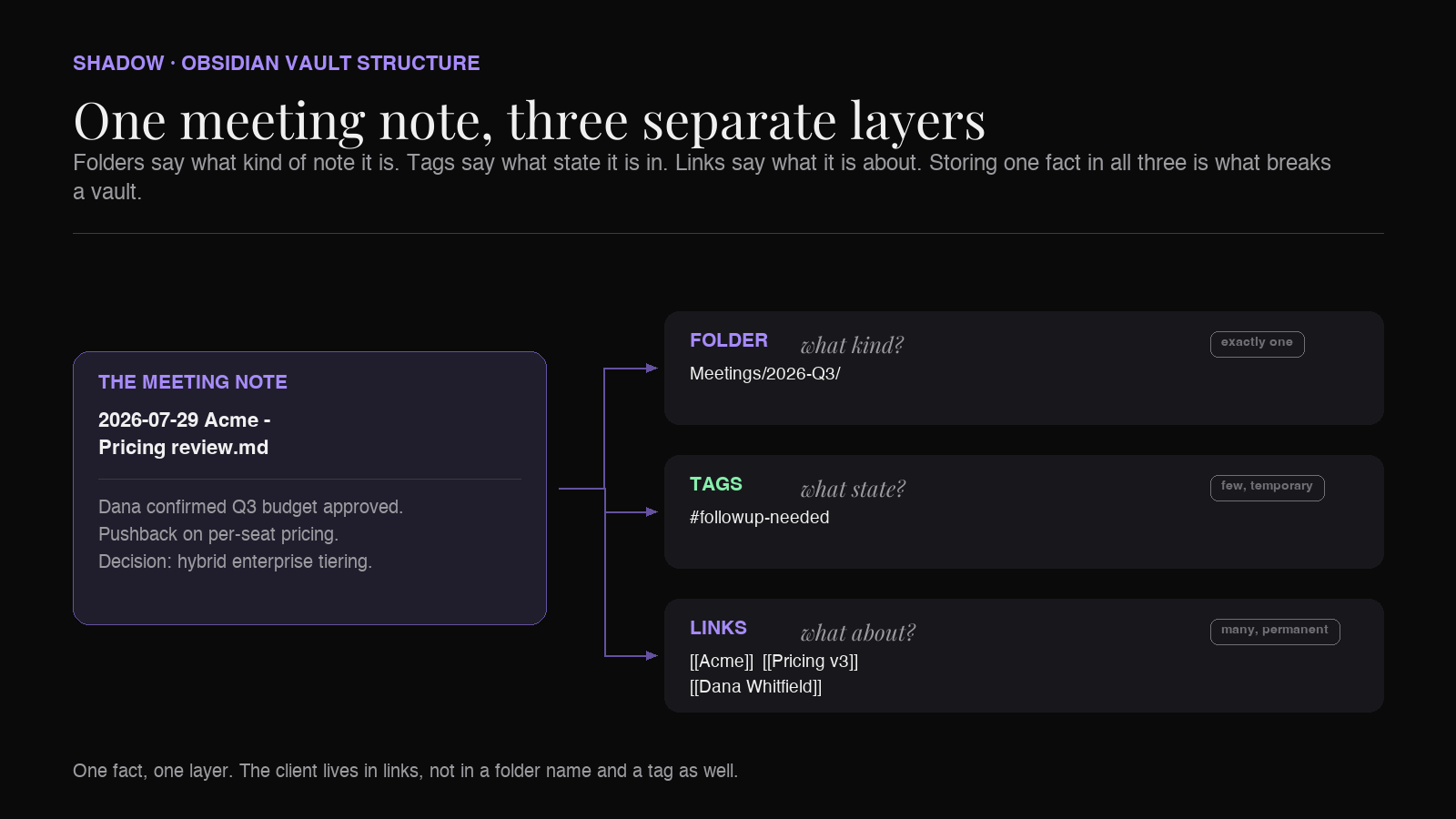
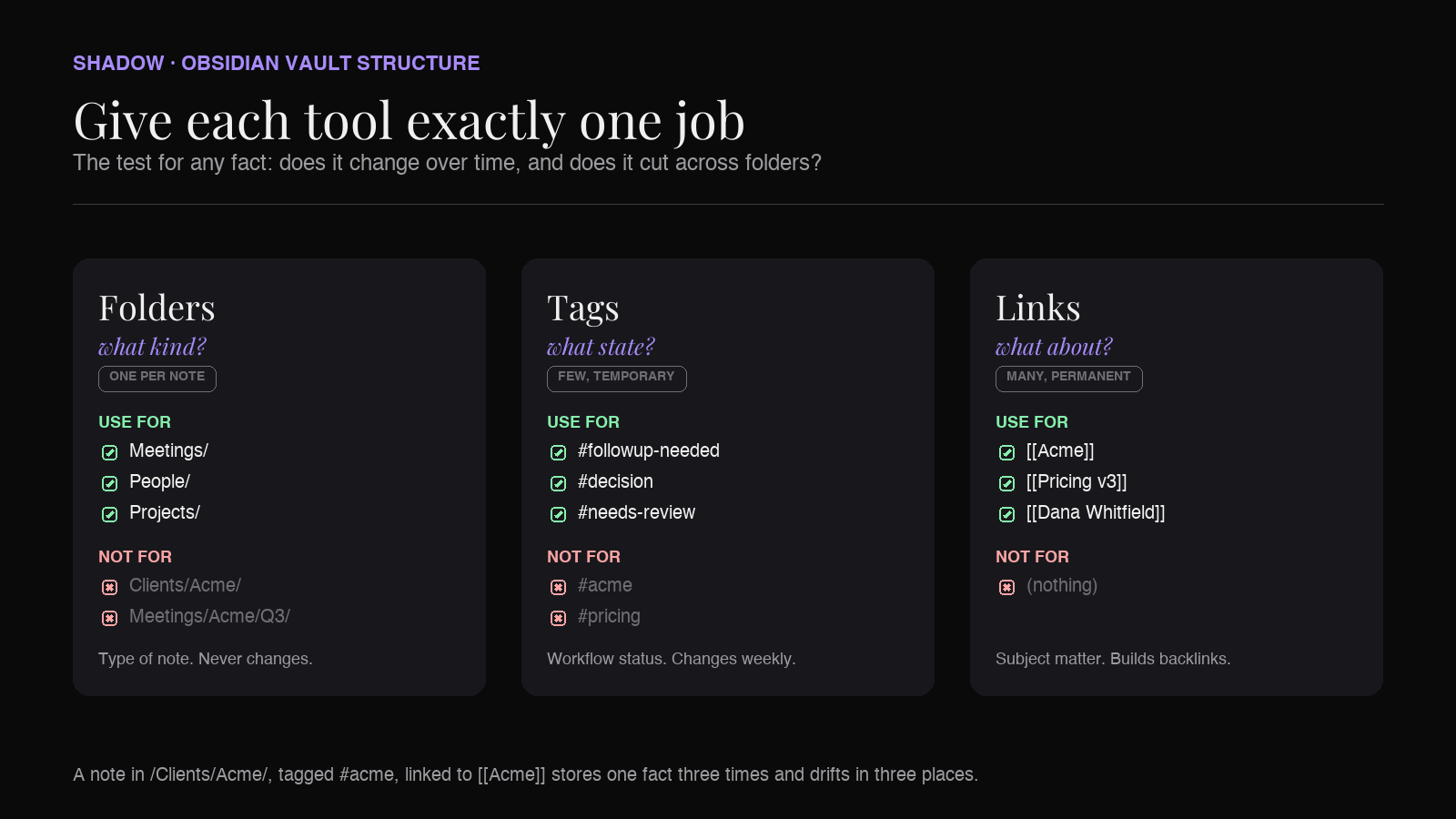
The most common vault mistake is using all three tools to express the same thing: a note in /Clients/Acme/, tagged #acme, linked to [[Acme]]. That is three systems storing one fact, which means three places to update and three chances to drift.
Give each layer a single job.
Folders: type, and nothing else
A note lives in exactly one folder. That constraint makes folders good for exactly one kind of fact: the answer to "what sort of thing is this note?" A meeting note is a meeting note whether it is about hiring, pricing, or a bug. It never becomes a book note.
Folders are also the only layer that governs where new files land by default, which matters because capture tools and templates write to a path.
Tags: status, and nothing else
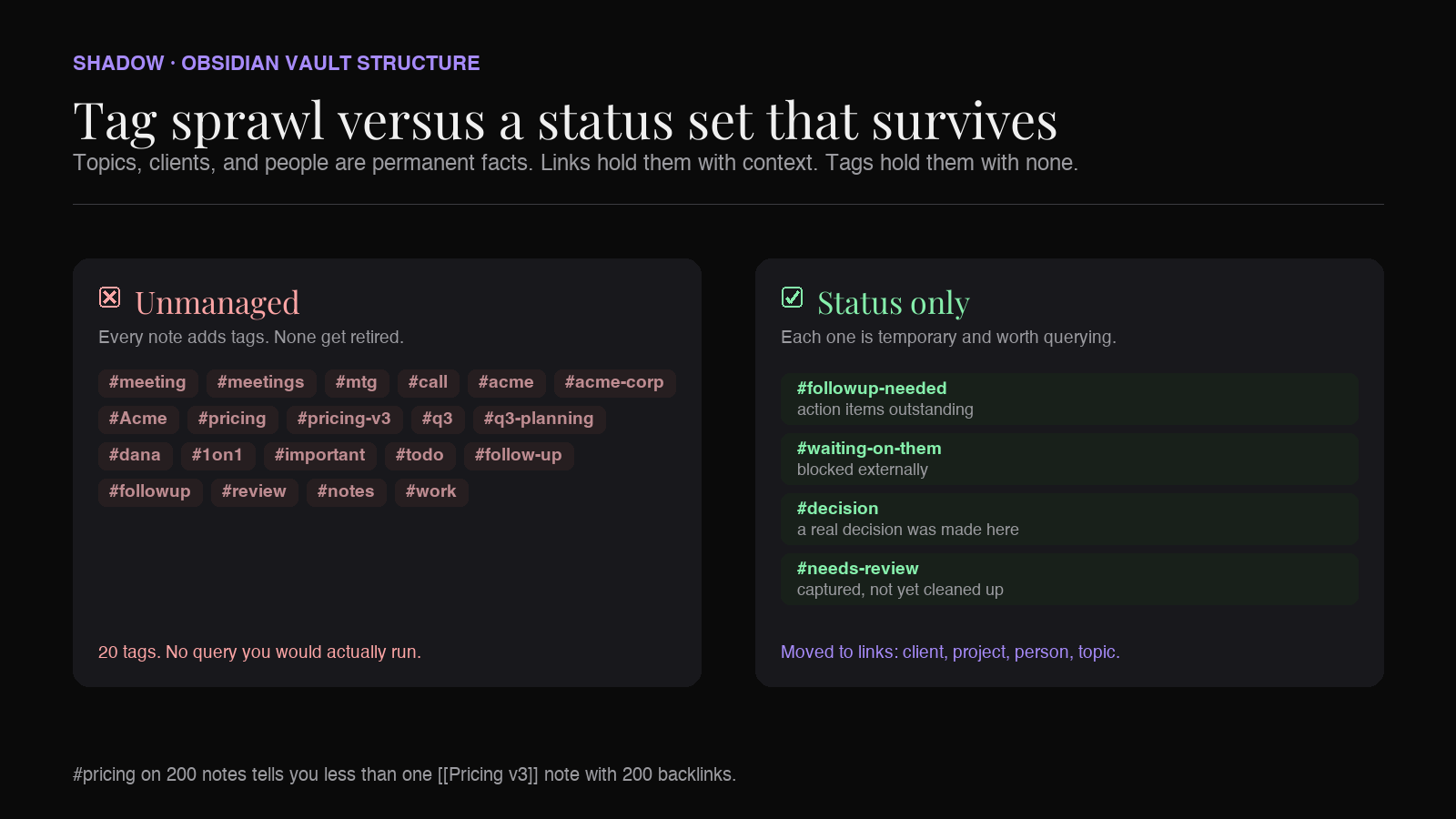
Tags are cheap to add, which is why they metastasize. A vault with #meeting, #meetings, #mtg, #call, #acme, #acme-corp, and #q3-planning has no working tag system.
Reserve tags for things that change over time and cut across every folder. Status is the canonical example: a note is #followup-needed this week and not next week. That is a genuine tag. A client name is not, because it never changes and links express it better.
Links: subject matter
Unlike folders, links have no cardinality limit, and unlike tags they do not drift into near-duplicates. One meeting can link to [[Acme]], [[Pricing v3]], [[Dana Whitfield]], and [[Q3 Roadmap]] at once, and every one of those notes gets the meeting back for free in its backlinks pane.
This is the layer that makes Obsidian worth using over a folder of Markdown in Finder. A [[Pricing v3]] note that accumulates every meeting where pricing was discussed is a genuine research artifact. No folder tree produces that.
The folder structure that holds
Deep nesting is the failure mode. If your tree is five levels deep, you are encoding relationships that links should carry, and you will spend real time deciding where a note goes.
Two levels is enough for a vault of thousands of meetings:
Vault/
├── Meetings/
│   ├── 2026-Q1/
│   ├── 2026-Q2/
│   └── 2026-Q3/
├── People/
├── Projects/
├── Clients/
├── Notes/
└── Templates/
The one decision worth explaining is the subfolder under Meetings/.
Do not create a folder per client. It looks organized and it fails at scale. A client folder implies every meeting belongs to exactly one client, which breaks the moment a call covers two accounts, an internal review, or a partner introduction. Client belongs in the link layer, where a note can carry several.
Use time buckets instead. Quarter or year subfolders exist for one purpose: keeping any single directory small enough that the file explorer and sync stay usable. They carry no meaning you need to reason about. A meeting from April 2026 goes in 2026-Q2/ and there is no judgment call.
If your meeting volume is low (under a few hundred a year), a flat Meetings/ folder with no subfolders is legitimate. Add time buckets when the folder gets unwieldy, not before.
People/, Projects/, and Clients/ hold the link targets. These are usually short notes: a few lines of context plus a backlinks pane that fills itself as meetings accumulate.
The naming convention
File names do more work in Obsidian than in most tools, because the name is what appears in backlinks panes, search results, quick switcher, and graph view. A note called Meeting notes.md is invisible in all four.
Use:
2026-07-29 Acme - Pricing review.md
2026-07-29 Internal - Q3 roadmap check-in.md
2026-07-30 Dana Whitfield - 1-1.md
Three components, in this order:
1. ISO date first (YYYY-MM-DD). Sorts chronologically in every file listing without any plugin. Also unambiguous across regions, unlike 07/29/26.
2. Client, project, or counterpart. The thing you will actually remember first.
3. Subject. Specific enough to distinguish it from the other four calls with the same client.
Obsidian blocks a set of characters in file names outright: [, ], #, ^, and | on every platform, plus \, /, and : on macOS. That is why the example above writes a one-on-one as 1-1 rather than 1:1. This is not a sync-only concern. Obsidian on macOS will not create the file, and Windows reserves the colon at the file system level as well.
Tags: the short list that survives
The test for whether something should be a tag: does it change over time, and does it cut across folders? If it fails either test, it is a link or a property.
A working meeting-notes tag set is small:
#followup-neededfor action items outstanding#waiting-on-themfor externally blocked#decisionfor a real decision made here, worth surfacing later#needs-reviewfor captured but not yet cleaned up
Topics, clients, projects, and people do not belong here. They are permanent facts, and links express them with backlinks that folders and tags cannot match.
Structured attributes (date, attendees, status, project) belong in frontmatter rather than tags. Obsidian Properties gives them typed fields that Dataview and Bases can query directly, which is a different and more powerful mechanism than the tag pane. We cover that schema in detail in Obsidian Properties for AI Meeting Notes.
Links are where the structure pays off
A meeting note that links nothing is a text file with a date on it. The links are the reason to keep it in a vault.
Inside a meeting note, link the things the meeting touched:
**Client:** [[Acme]]
**Attendees:** [[Dana Whitfield]], [[Marcus Reed]]
**Project:** [[Pricing v3]]

## Notes
Dana confirmed the Q3 budget is approved. Pushback on per-seat
pricing, so we walked through the [[Pricing v3]] tiering again.

## Decisions
- Moving to hybrid pricing for enterprise. See [[Pricing v3]].
Three things follow automatically. The [[Acme]] note accumulates every meeting with that client, in date order once the backlinks pane is sorted by file name and your names start with the ISO date. The [[Dana Whitfield]] note becomes a relationship history without you maintaining one. The [[Pricing v3]] note collects every conversation where that decision evolved, which is the artifact you actually want when someone asks how the pricing model got here.
None of that requires a community plugin. It is the backlinks pane, a core plugin that ships with Obsidian.
When the link layer gets dense enough that backlinks alone are noisy, a Map of Content note gives you a curated index on top. That pattern is covered in Maps of Content for AI Meeting Notes, and the underlying mechanics in Obsidian Backlinks for AI Meeting Notes.
The capture step
Structure only survives if filling it is close to free. A convention that requires ten minutes of manual cleanup per meeting gets abandoned in the third week, and the vault reverts to a folder of untitled transcripts.
This is where the capture tool matters more than the vault design. What you want out of a meeting is a Markdown file that already has the right name, the right folder, the frontmatter filled in, and the obvious links in place.
Shadow is an AI interface for Mac that sees, hears, and runs. It runs during Zoom, Google Meet, and Teams calls without a bot joining the meeting, transcribing audio on-device and capturing the screens that were shown. Its Meeting Skills run the moment the call ends, and the output is Markdown, which is the format Obsidian already speaks.
With a meeting summary Skill, that gets you a note with the date, the decisions, and the action items already written, into which the vault conventions above cost a few seconds rather than ten minutes. Shadow captures. Obsidian stores and connects. Neither replaces the other.
For the full capture-to-vault pipeline, see The Best AI Meeting Assistant for Obsidian.
Retrieval: what this buys you
The structure above answers the realistic questions:
"What did we agree with Acme about pricing?" Open [[Acme]], scan backlinks, or open [[Pricing v3]] and read the meetings that shaped it.
"What is outstanding from last week?" Search tag:#followup-needed.
"What happened in that April call?" Meetings/2026-Q2/, sorted by date, names readable at a glance.
"When did we last talk to Dana?" Open [[Dana Whitfield]], most recent backlink.
Obsidian's search supports path:, tag:, and file: operators, so these compose. path:Meetings tag:#decision returns every meeting where a decision was recorded. Note that path: matches any path containing the string, so a Meetings archive/ folder is caught by the same query. For standing dashboards rather than ad-hoc searches, Bases (a core plugin) and Dataview (a community plugin) turn the same structure into live tables.
Fixing a vault that is already messy
Migrating 400 existing notes by hand is not realistic, and it is not necessary. Work in this order:
1. Fix going forward first. Set up the folder, the template, and the naming convention for new meetings today. The backlog stops growing immediately. 2. Rename on contact. When you open an old note for any reason, rename it to the convention and add its links. Notes you never open again did not need fixing. 3. Batch the top twenty. Your most important clients and projects account for most retrieval. Fix those notes deliberately in one sitting and leave the long tail alone. 4. Collapse tags last. Obsidian has no built-in vault-wide tag rename. The Tag Wrangler community plugin does it in one operation per tag, which makes tag cleanup cheap enough to leave until the new set has settled.
The goal is a vault that is retrievable, not one that is uniform.
Pitfalls
A folder per client. The most common structure and the one that fails first. Clients belong in links, where one note can carry several.
Tagging topics. #pricing on 200 notes tells you less than one [[Pricing v3]] note with 200 backlinks, because the link target holds context and the tag holds none.
Nesting past two levels. Every level added is a filing decision per note and a longer path in every link.
Undated file names. Meeting notes without a date in the name are unsortable and ambiguous in backlinks panes.
Redesigning instead of capturing. The vault that captures every meeting with an imperfect structure beats the perfectly designed vault with fourteen meetings in it.
FAQs
How should I organize meeting notes in Obsidian?
Use one Meetings/ folder with optional time-based subfolders, name files YYYY-MM-DD Client - Subject, tag only workflow status, and link clients, people, and projects inside the note body. Folders express type, tags express state, links express subject.
Should I use folders or tags in Obsidian?
Both, for different jobs. Folders answer what kind of note something is and allow exactly one answer per note. Tags answer what state a note is in and allow many. Use folders for note type and tags for temporary status, and let links handle topics.
Should I create a folder for each client or project?
No. A per-client folder forces every meeting into exactly one client, which breaks for internal, multi-account, and partner calls. Keep one Meetings/ folder and link [[Client]] inside each note, so the client note collects every relevant meeting in its backlinks.
What is the best naming convention for Obsidian meeting notes?
YYYY-MM-DD Client or Project - Subject. The ISO date sorts chronologically in any file listing and is unambiguous across regions. The client and subject make the note identifiable in backlinks, search results, and the quick switcher without opening it.
How deep should my Obsidian folder structure be?
Two levels for meeting notes. Deeper trees add a filing decision to every note and encode relationships that links handle better. If you are nesting past two levels, the extra depth is usually a link layer in disguise.
Can an AI note-taker write into my Obsidian vault automatically?
Yes, if it exports Markdown. Shadow captures Mac meetings without a bot, transcribes on-device, and saves transcripts and Skill outputs as clean .md files that drop into a vault folder directly. Tools that export only PDFs or keep summaries on the web mean copying by hand.
How do I organize meeting notes I already have?
Fix new notes first so the backlog stops growing, then rename old notes to the convention whenever you happen to open one. Batch-fix only your top twenty clients or projects. Notes you never reopen do not need migrating.
Do tags or links work better for finding old meetings?
Links, for anything permanent. A [[Client]] note gathers every meeting in one backlinks pane with full context, while a #client tag returns a flat list with none. Tags earn their place for temporary states like #followup-needed that no permanent note can express.
The verdict
Obsidian gives you three organizing tools, and vaults fail when all three are used to store the same fact. Folders for type, tags for status, links for subject matter is the division that holds at 600 meeting notes and at 6,000.
The naming convention matters more than the folder tree, because names are what you read in every pane where a meeting note appears. The link layer matters more than both, because it is the only part that produces something a folder of Markdown files cannot: a client note, a project note, and a person note that assemble themselves out of meetings you already captured.
What makes the whole thing hold is that filing costs almost nothing. Shadow handles the capture end on Mac. It sees the screens shown in the call, hears the call locally on-device, and delivers clean Markdown. The structure above is what you build around it.
---
This article was written by Chad Oh, Shadow's AI writer. While we strive for accuracy, AI-generated content may contain errors. If you spot something off, let us know.