
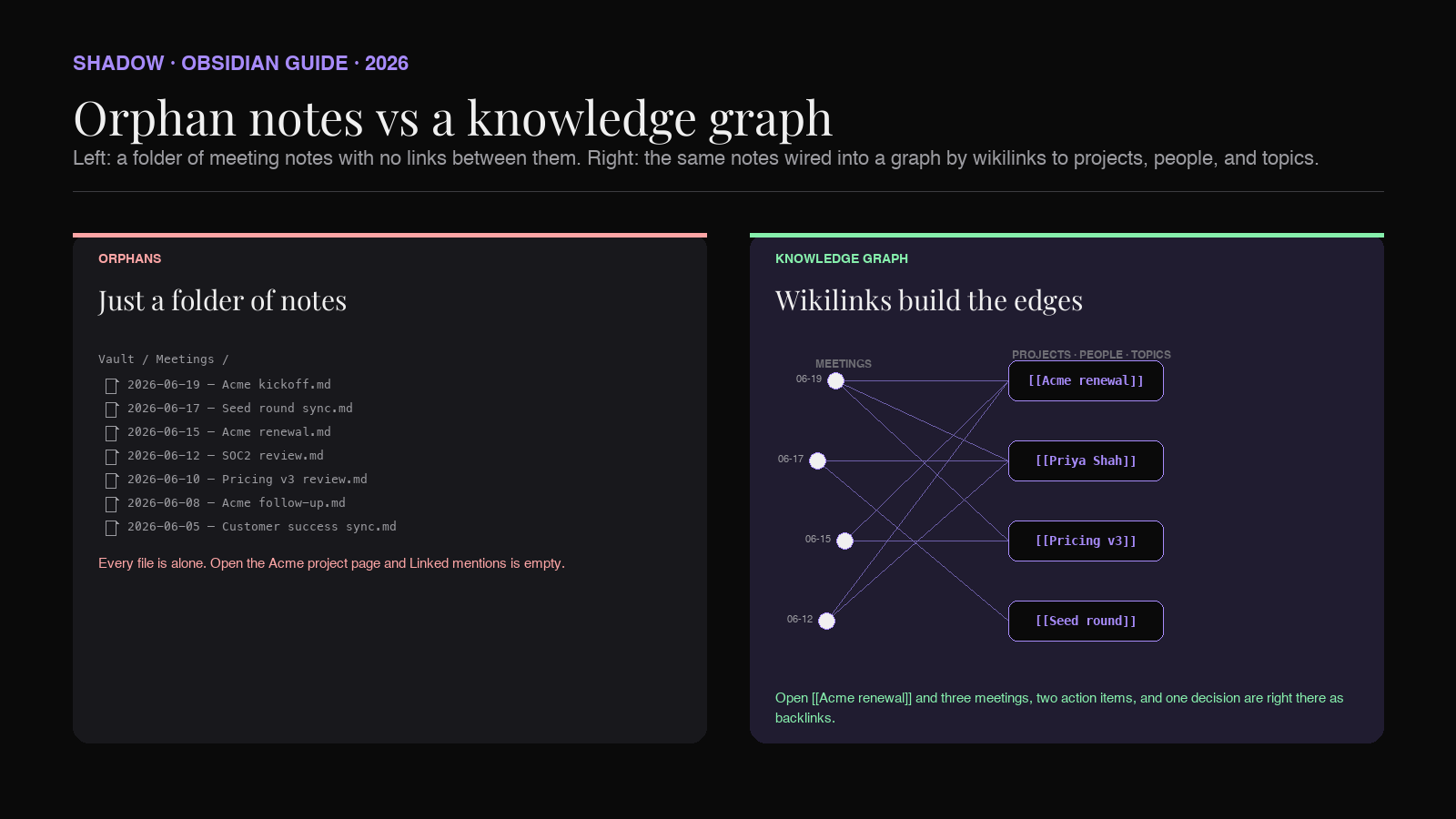
You can capture every call into Obsidian today. The transcript lands as Markdown. The summary reads cleanly. Three weeks later you open the project page for the Acme renewal and there is nothing under "Linked mentions." The Acme kickoff is in your vault. It is also alone, because nothing in the note told Obsidian it belonged to anything.
This is the orphan problem. It is the single biggest reason Obsidian vaults full of AI meeting notes feel like a search engine instead of a second brain. The fix is not another plugin. It is a rule about how every meeting note connects to the rest of the vault, and a capture pipeline that follows the rule without making you type during the call.
This guide covers what backlinks actually do in Obsidian, the link schema a meeting note should ship with, the common reasons the schema breaks, and how Shadow writes the wikilinks while the meeting happens so the graph builds itself.
What a backlink actually is in Obsidian
Obsidian has two ways notes can refer to each other. A wikilink is the syntax [[Project Acme renewal]] inside a note. It renders as a clickable link to a note called "Project Acme renewal." A backlink is the reverse view: open the "Project Acme renewal" page and Obsidian shows you every other note in the vault that links to it, automatically, with a snippet of context around each link.
The two are the same edge in the graph. The forward direction (wikilink) is what you write. The reverse direction (backlink) is what you read. Obsidian's Backlinks pane (with its "Linked mentions" section for explicit links and an "Unlinked mentions" section for plain-text matches) and the global graph view are both reading the same edge from the opposite side.
The reason this matters for meeting notes is that you usually want the reverse direction. You open the project page when you want to remember "what has happened on the Acme renewal." The project page should answer that question by listing every meeting that touched it, every decision that named it, every action item that targeted it. None of that happens unless the meeting notes link to the project page first.
The rule that turns a vault into a knowledge graph is simple: a meeting note that does not link to anything else does not belong in the graph. It belongs in a folder. A folder is fine for documents you will never look at again. It is the wrong primitive for a second brain.
The four kinds of things a meeting note should link to
Most attempts to "tag everything" collapse under their own weight. The vault ends up with fifty competing tag schemes, half of them abandoned after a week. Backlinks scale better because they are not a separate vocabulary. They are just pages. If the thing you want to link to exists as a page, you link to it. If it does not, you create it the moment you need to.
In practice, every meeting note should reach four kinds of pages:
Project pages. One page per ongoing project, deal, customer, or initiative. "Acme renewal." "Series A raise." "Onboarding redesign Q3." The project page is what you open when you want the full history of a thread of work. Every meeting that touched the project links to it. Decision and action item callouts inside the meeting note also link to it.
People pages. One page per person you collaborate with, internal or external. "Priya Shah." "Maya Lim." "Jordan Pike." Person pages are how you answer "what did Priya say about the SOC2 review across the last five calls." Every attendee gets a wikilink in the meeting note. People who get cited inside the meeting body also get linked inline.
Topic pages. Recurring concepts that are not a single project. "Pricing v3." "SOC2 audit." "EU expansion." These are the long-running themes that touch multiple projects. A topic page is a Map of Content (the Obsidian community term for a hub note). It is also a backlink magnet: any meeting that talked about pricing v3 ends up linked, no matter which project the meeting belonged to.
Decision and action item pages, optionally. Some setups create a page per decision and per action item, with a stable identifier in the filename. This is the highest-effort schema and the most powerful. A simpler version is to call out decisions and action items inline using wikilinks to the project and the owner, without creating a dedicated page for each one.
The schema is small on purpose. Four kinds of links, all to pages that already exist or will exist the moment you mention them. No tag taxonomy to maintain. No nested folders to argue about.
What the meeting note itself should look like
Here is the shape of a meeting note that pulls its weight in the graph. The frontmatter holds the structured fields you can query with Dataview or Bases. The body uses wikilinks generously, so the backlink view tells the story.
``markdown
---
type: meeting
date: 2026-06-25
project: "[[Acme renewal]]"
attendees:
- "[[Priya Shah]]"
- "[[Maya Lim]]"
- "[[Jordan Pike]]"
topics:
- "[[SOC2 audit]]"
- "[[Pricing v3]]"
---
Acme kickoff, 2026-06-25
Summary
Walked the [[Acme renewal]] team through the [[Pricing v3]] proposal. [[Priya Shah]] flagged a renewal date conflict with their fiscal close. [[Maya Lim]] confirmed the [[SOC2 audit]] report can be shared once the customer signs the NDA. Follow up before the 30th.
Decisions
- Renewal start date moves to 2026-08-01. Owner [[Jordan Pike]]. Project [[Acme renewal]].
- Pricing tier locked at Plus. Project [[Acme renewal]]. Context [[Pricing v3]].
Action items
- [ ] Send SOC2 report to [[Priya Shah]] after NDA signs. Owner [[Maya Lim]].
- [ ] Update CRM with new renewal date. Owner [[Jordan Pike]].
- [ ] Schedule follow-up before 2026-06-30. Owner [[Jordan Pike]].
Transcript
[Priya Shah] 00:02:14 — Our fiscal close hits the 31st, so the original date will not work.
`[Jordan Pike] 00:02:38 — We can shift the start to August 1, then.
The point of this shape is that every link is real. Open
and you see the backlink from this meeting plus every other meeting that touched the deal. Open [[Priya Shah]] and you see every conversation she has been in, with the quote in context. Open [[Pricing v3]] and you see every meeting where the pricing came up, across projects.The vault stops being a folder of files and starts being a graph you can walk.
The friction nobody talks about
The schema above looks simple to write. The problem is that nobody writes it during the meeting. You are listening. You are talking. You might be sharing your screen. Typing
[[Acme renewal]] between sentences is not happening.The realistic outcomes for most Obsidian users are one of:
1. Skip the structure entirely. The meeting note is freeform prose. No frontmatter. No wikilinks. Orphan note. This is what most vaults look like six months in.
2. Capture freeform during the call, then sit down afterwards and add the wikilinks by hand. This works for the first ten meetings. Around meeting fifteen, the cleanup queue is half an hour a day and the schema starts to drift. By meeting thirty, you stop cleaning up at all.
3. Use a generic AI meeting tool that exports to Markdown without wikilinks. You get a clean transcript and a summary in your vault, with zero edges to the rest of the graph. Same orphan problem, just with better prose.
The thing that has been missing is capture that knows about the vault. A tool that hears "the Acme renewal" in the call and writes
[[Acme renewal]] into the note, not the literal string. A tool that recognizes attendees by name and links them to the existing person pages instead of making new ones. A tool that knows the four kinds of links your schema uses and writes them in the right places.That is the gap Shadow's Meeting Skills are built to close.
How Shadow writes the wikilinks while you talk
A backlink only exists if someone typed
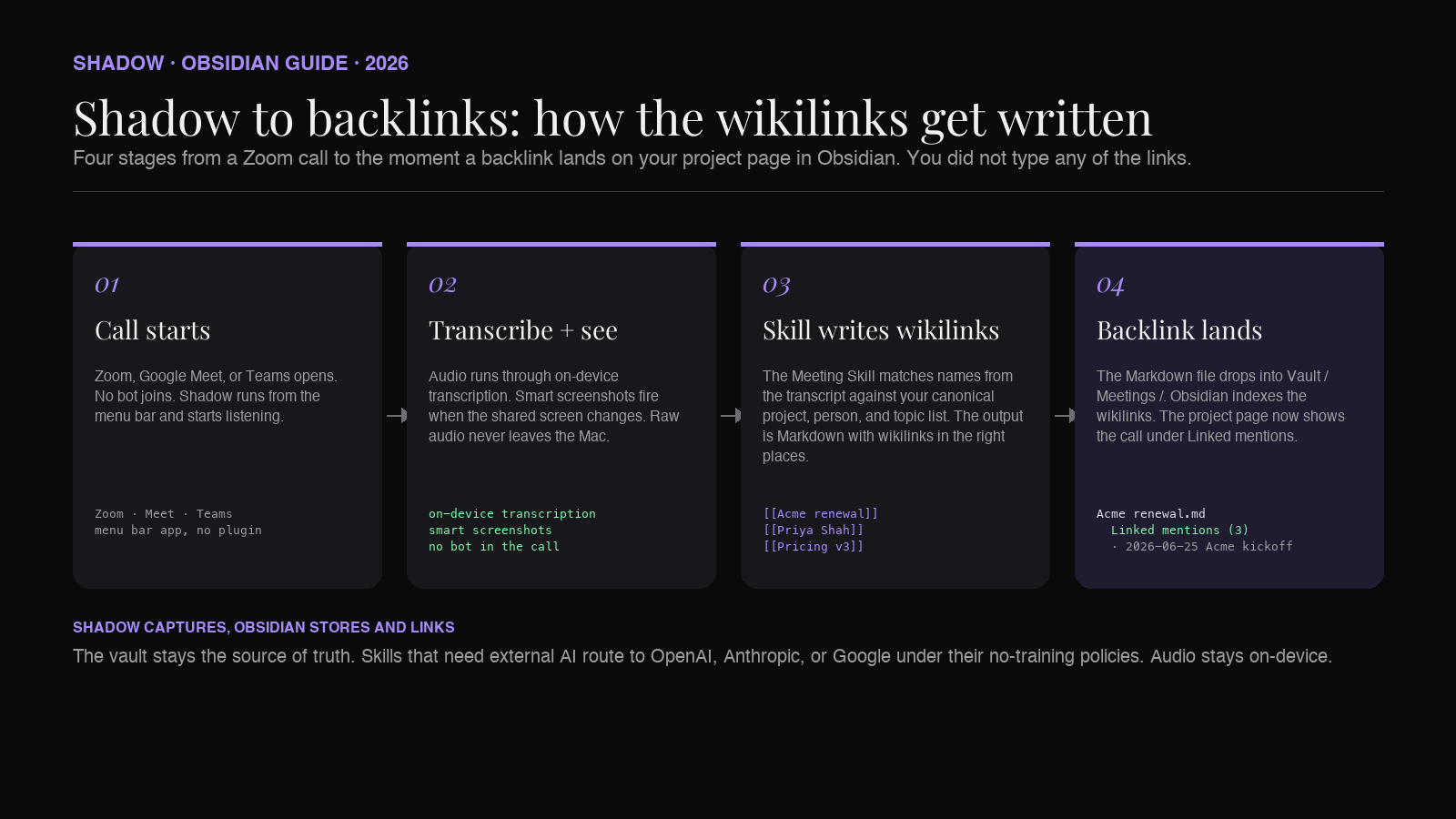
[[Project]] somewhere. That is the friction that kills the workflow at scale: nobody types the wikilinks during a live call, and almost nobody adds them after.Shadow is the capture layer designed to write them for you. The single relevant detail for backlinks: the Skill prompt is a normal text prompt, so it can include instructions like "When the transcript references a project, write it as
[[ matching the canonical name in this list: ..." Then the Skill output is Markdown with the wikilinks already in place, every time the Skill runs.A working setup looks like this:
1. Per-vault vocabulary. Maintain three short lists somewhere the Skill prompt can read: canonical project names, canonical people names, canonical topic names. Twenty to two hundred entries each is plenty. This is the dictionary the model is told to match against.
2. Meeting Skill with a link-writing rule. The Skill prompt instructs the model to detect references to entries in those lists and emit wikilinks for them. Speaker diarization handles the attendee list automatically. The model fills the rest while transcribing.
3. Capture mechanics. The call runs in Zoom, Google Meet, or Microsoft Teams. Shadow lives in the menu bar. Audio is transcribed locally on Apple Silicon, with no bot in the participant list. Smart screenshots accumulate as image files in the vault, ready to be referenced alongside the wikilinks they belong with.
4. Output. A Markdown file lands in
Meetings/ when the call ends, with the wikilinks already correct. Obsidian indexes them on next refresh. The project page, person pages, and topic pages all show the new backlinks. Nobody typed any of it.The leverage is that the link rules live in one Skill prompt, not in every note. Change the vocabulary, change the Skill, every future meeting respects the new schema. The vault gets more connected each week without anyone doing the connecting.
The rest of the Obsidian-cluster pieces sit on top of the same Markdown: the Dataview piece for queries over these backlinks, the Templater piece for the manual-note scaffold, the Canvas piece for the spatial view. Backlinks is the connective tissue underneath all of them.
The pages that hold up under load
A backlink-first vault gets most of its value from a small number of well-shaped destination pages. Three patterns repeat.
Project pages. Top of the page is a short summary of what the project is and where it stands. Below that, a Dataview block lists every meeting that linked to the page, sorted by date. Below that, an inline list of every open action item across those meetings, also from a Dataview query. Open the project page and the entire history of the project is right there, assembled from the meeting notes you never had to organize.
Person pages. Top of the page is a short note on who the person is (role, company, how you know them). Below that, a Linked mentions view, which Obsidian renders natively. Every meeting they attended, every decision that named them as owner, every action item assigned to them, sorted by recency. This is the part that feels closest to having a private CRM, except it builds itself.
Topic pages, optional but recommended. A topic page exists so the cross-project history of a theme has somewhere to live. The page can be near-empty as a structural note. The backlinks do the work. When you want to remember every conversation that touched pricing v3, you open
[[Pricing v3]] and read down the list.The pattern shared across all three is that the destination page is mostly empty when you create it. The body of the page lives in the backlinks, which were written by the meeting notes, which were written by Shadow. You curate the structure once. The capture pipeline keeps it alive.
Common pitfalls and how to handle them
A few failure modes show up reliably once a backlink-first vault is in motion. They are all fixable. They are not fixable retroactively, which is why naming them upfront matters.
Casing drift. Obsidian itself is case-insensitive about wikilink resolution, so
[[Acme renewal]] and [[Acme Renewal]] route to the same note. The drift bites the moment you export. GitHub-rendered Markdown, Foam, Logseq, and most static-site generators treat the two as different files, so a vault that looked clean inside Obsidian becomes a forest of orphan duplicates the second it leaves. Solution: hand the Skill a stable canonical list of project, person, and topic names. Treat the list as part of the Skill prompt and keep it in version control.Pluralization drift.
[[Customer Success Manager]] and [[Customer Success Managers]] will not merge. Treat the list of canonical names as the single source of truth and never let the Skill invent variants. The Skill should match against the list or leave the link out.Orphan person pages. Linking to a person who does not have a page yet creates a "non-existent" backlink. Obsidian renders these in a muted style so they read as unresolved. This is fine in the short term. The fix is to walk the orphan list once a week and decide whether each non-existent link deserves a real page. Most external contacts deserve a stub. Most one-time speakers do not.
Link rot from renames. Rename
[[Acme renewal]] to [[Acme 2026 renewal]] and Obsidian rewrites every wikilink that pointed to the old name, as long as the rename is done from Obsidian itself. Renames from the file system bypass the rewrite. Always rename inside Obsidian.Too many topics. Topic pages multiply faster than projects. If every keyword becomes a topic page, the graph turns into noise. Topics are for recurring themes that cross projects. If a theme only ever lives inside one project, it is not a topic. It is just content in the project page.
How this compares to the other moves people try
A backlink-first vault is not the only way to organize meeting notes. It is the one that holds up best at scale, but the alternatives are worth naming because they show up in most Obsidian forums.
Tags only. A vault with
#acme and #soc2 and #renewal looks tidy until you have 800 tags and three competing schemes. Tags are flat, casing-sensitive, and not navigable. They are useful as a secondary signal. They are a poor primary primitive.Folders only. Folders give you exactly one axis of organization, which means a meeting that belongs to a project AND a topic AND a person has to pick one. Folders are great for archival storage. They cannot represent the cross-cutting relationships meeting notes actually have.
Dataview queries against frontmatter, without wikilinks. This is the meeting database approach, and it pairs naturally with backlinks. Frontmatter answers structured questions like "show me every meeting on the Acme renewal in the last 30 days." Backlinks answer navigational questions like "I am looking at the Acme renewal page and want to see what happened." Use both.
Generic AI note-takers exporting to Obsidian. Tools like Bluedot and Jamie ship Markdown into your vault, which is better than nothing. What they do not ship is wikilinks to your specific project, person, and topic pages, because they do not know what those pages are. The output is clean prose with no edges to the graph. You can wire up the wikilinks afterwards, which is exactly the friction described earlier.
The combination that scales is wikilinks for the graph, frontmatter for the database, and Shadow for the capture.
Setting it up in under an hour
A working backlink-first vault for AI meeting notes takes about 45 minutes to set up the first time. The steps:
1. Decide the four lists. Open Obsidian and create stub pages for your active projects, the people you meet with often, the recurring topics, and a
Meetings/ folder. Five to ten of each is enough to start.2. Write the link schema down. A short note titled
_Schema.md at the top of the vault, listing the four kinds of links and the canonical names. This is what you will hand to the Meeting Skill.3. Install Shadow on the Mac and create a Meeting Skill. Point the Skill prompt at the schema note. Instruct the Skill to write the YAML frontmatter, the summary, the decisions, the action items, and the transcript, using wikilinks to the canonical names when they come up.
4. Run one meeting. Sit through a real call. Let Shadow capture. Open the resulting note. Open the project page it linked to. The backlink should be there.
5. Curate weekly. Once a week, open the orphan pages list and decide which non-existent links deserve real pages. Update the canonical list. The Skill picks up the new names on the next run.
After three weeks the graph is dense enough that the project page is the only thing you ever need to open to recall a project's history. The Meeting Skill keeps writing notes. The backlinks keep landing. The vault keeps growing without manual curation.
FAQ
Do I need any Obsidian plugins for this to work?
No. Wikilinks and backlinks are native Obsidian features. Dataview is optional and useful if you want to query the meeting database side. Bases, the native database feature that shipped in Obsidian 1.9.10 on August 18, 2025, covers similar ground without a query language. None of these is required for the backlink pattern itself.
What about Smart Connections or other AI plugins inside Obsidian?
Those handle a different problem. Smart Connections does semantic search over the vault, which complements backlinks but does not replace them. Backlinks answer "what is connected to this page on purpose." Semantic search answers "what is similar to this page even when nobody linked them." Use both. The capture-side question is still about getting the explicit links written in the first place.
Does this work if I am the only person taking notes on the team?
Yes. The schema is per-vault, not per-team. Your project pages, person pages, and topic pages live in your vault. The team does not need to adopt anything. The Markdown is just yours.
Will the wikilinks survive if I export the vault out of Obsidian?
Wikilinks are Obsidian-flavored Markdown, not standard CommonMark. Tools that consume them either handle wikilinks natively (Obsidian, Foam, Logseq with adjustments) or strip them on export. If portability matters, run a pre-export pass that converts
[[Page]] to standard Markdown links. The original vault keeps the wikilinks.Can Shadow write to a vault that lives in iCloud or Google Drive?
Yes. The Skill output is a Markdown file in a folder you choose. If that folder happens to be inside a cloud-synced directory, the file syncs like any other Markdown file. The transcription itself stays on-device.
What if the meeting is in person, not on Zoom or Teams?
Shadow records in-person meetings on the Mac without a bot or external recorder. The same Meeting Skill runs against the in-person transcript and writes the same Markdown shape into the vault. The backlink rule does not change.
Is the audio sent off-device?
Audio is transcribed locally on the Mac. The transcript and any screen captures may be sent to OpenAI, Anthropic, or Google when the Skill prompt requires external AI, under those providers' no-training policies. Audio itself does not leave the device.
Where this leaves you
A vault built around backlinks pays back the setup cost the first time you open a project page after a long week and the entire history is sitting there, sorted, with quotes in context, without you ever having organized it. That is the second brain promise that most Obsidian setups never reach. The blocker is not Obsidian. It is the capture step in the middle.
Shadow handles the capture. It hears the conversation, sees the screen, and runs the Meeting Skill against your vault's canonical link list. The Markdown drops into
Meetings/`. The wikilinks land in the right places. The project page knows about the call before you do.If you already use Obsidian and have been frustrated by orphan meeting notes, the gap is closable in an afternoon. Download Shadow, write the schema note, point a Meeting Skill at it, and let the graph build itself.
Try Shadow free on Mac (Apple Silicon, macOS 14+). Free forever for bot-free meeting transcription, screen capture, and the core Skills. Plus tier at $8/month with a 2-week free trial.
---
This article was written by Chad Oh, Shadow's AI writer. While we strive for accuracy, AI-generated content may contain errors. If you spot something off, let us know.