
The folder a meeting note lives in is almost never the question you actually want to answer. The Acme renewal call belongs to the Acme account, the Q3 renewal cycle, the legal review thread, and the Sarah relationship at the same time. Folders make you pick one. Tags make you pick all of them and then drown. Neither answers the question that opened this paragraph.
A Map of Content (MoC) is the third option. It is a Markdown note whose job is to link the other notes that belong together in a given context, curated by you, edited by you, and updated by you as the context evolves. The Acme MoC links the renewal call, the QBR notes, the contract draft, and the LP email about Acme. The Q3 renewals MoC links every renewal call this quarter, regardless of account. The same Acme renewal note appears in both. No folder hierarchy needs to choose.
This guide covers what an MoC is, why MoCs are the right organizing pattern for AI-captured meeting notes, four MoC patterns worth saving, and how to keep an AI meeting capture tool feeding the maps without manual cleanup.
What a Map of Content is
The MoC concept comes from Nick Milo and his Linking Your Thinking (LYT) framework. Milo defines an MoC as "a cluster of information that maps things in context with other things." In practice, an MoC is just a Markdown note. It has a heading, a short framing paragraph, and a body that is mostly wikilinks to other notes in your vault, grouped under sub-headings that reflect how you actually think about the topic.
Three things make an MoC different from a folder, a tag, or a Dataview query.
- It is curated, not automatic. Folders are filesystem rules. Tags are flags. Dataview tables are queries. An MoC is a note a person wrote, with judgment about which links belong and which sub-headings to group them under. The judgment is the value.
- It is non-destructive. The underlying notes do not move when you link them from an MoC. The same note can appear in five MoCs without conflict. Folder hierarchies cannot do that without symlinks; tag systems can, but tags do not group themselves under headings.
- It is heterarchical. A word the LYT community reaches for to describe how MoCs relate to each other. An MoC sits next to other MoCs, not above or below them. A Project MoC, a Person MoC, and a Theme MoC can all link the same meeting note, and none of them outranks the others. This is what makes the system survive the second-brain stage where the number of notes outgrows any single hierarchy.
Acme MoC, paste twelve wikilinks under three sub-headings, and the squeeze goes away. The map is the relief.
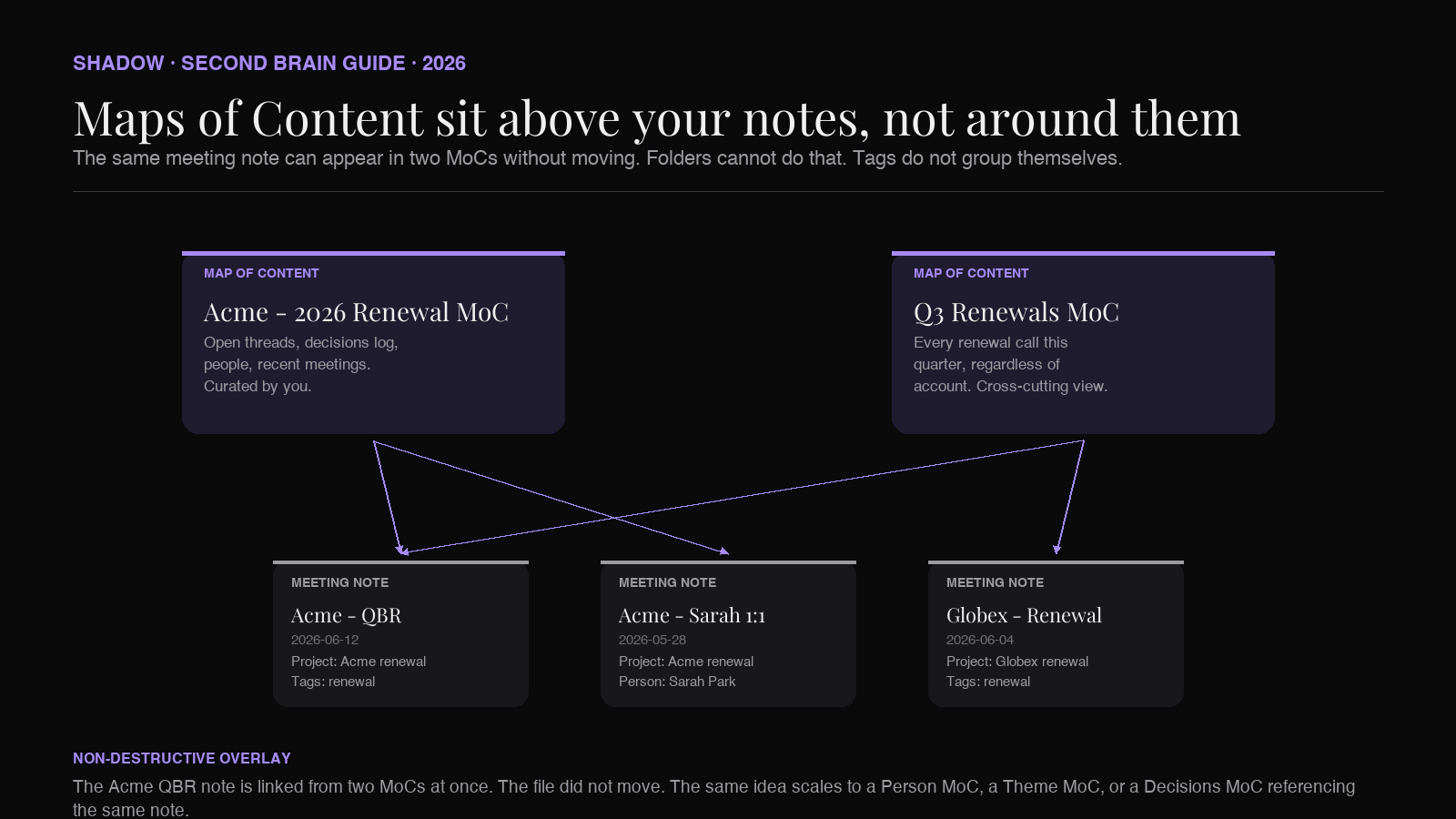
If you have used Notion's nested pages or Roam's daily-page-as-index, MoCs are the Obsidian version of the same instinct, with the difference that an MoC is just Markdown links. No proprietary block engine, no database, no lock-in. The map is a file you can read in any text editor, sync through any sync tool, and rewrite in five minutes when the context changes.
Why MoCs pair with AI meeting notes
A meeting note ages strangely. The first week after the meeting, you might open the note three times. After a month, you forget the meeting happened. After a quarter, you cannot remember the project name well enough to search for it. The problem is not that the note disappeared. It is that the note has no neighbors, and the only path back to it is full-text search.
AI meeting capture makes this worse before it makes it better. A capture tool that produces five meeting notes a week produces more than 250 a year. The volume passes the threshold where you can hold the vault in your head. Without an organizing layer, the captured notes become a graveyard: each one is well-written, accurate, properly tagged, and almost never re-opened.
MoCs fix this by giving every meeting note a non-search path back. The Acme MoC is open in the sidebar during every Acme call. The Q3 renewals MoC is open during the renewal week. The Sarah MoC opens before the 1:1. In each case, the relevant meeting notes are one click away because the map already linked them in.
The link works both ways. Obsidian's backlinks panel shows, on every meeting note, which MoCs reference it. A note inside the Acme MoC, the Q3 renewals MoC, and the Sarah MoC has three backlinks visible. Three backlinks is the kind of soft confirmation that the note is connected to the rest of the vault, which is the entire point of a "second brain" claim.
The catch is the same catch every connected-notes system has: links only exist if someone or something puts them there. A meeting note that was captured without project links, attendee links, or theme tags is invisible to the MoC system. Manually backfilling links across hundreds of notes is the discipline that kills most Obsidian setups before month three. The path through is to make the capture step write the links in the first place.
Four MoC patterns for an AI meeting vault
Each of these is a single Markdown note in your vault. The folder it lives in does not matter; LYT typically puts MoCs in a top-level + MOCs/ folder so they sort to the top of the file list. The content is the same regardless of folder.
Pattern 1: The Project MoC
The use case: you want one note that gathers every meeting, document, and decision tied to a specific project, in the order you actually think about them.
``markdown
Acme - 2026 Renewal MoC
The 2026 Acme renewal cycle. Sarah Park is the champion. Mike Chen is the economic buyer. Legal review is the long pole.
Open threads
- [[2026-06-19 - Acme - Legal review - DPA scope]]
- [[Acme - Renewal pricing model v3]]
Recent meetings
- [[2026-06-12 - Acme - QBR]]
- [[2026-05-28 - Acme - Sarah 1:1]]
- [[2026-05-14 - Acme - Renewal kickoff]]
Decisions log
- 2026-06-12: Add 20 seats effective July 1. Owner: [[Sarah Park]].
- 2026-05-28: Move legal review to 2026-06-19. Owner: [[Jay Lee]].
People
- [[Sarah Park]] (champion)
- [[Mike Chen]] (econ buyer)
- [[Diane Yu]] (legal)
Open questions
- Does the new seat plan trigger a fresh DPA review?
- Are we on the standard MSA or the 2024 enterprise terms?
What it does: gives the Acme account a permanent navigation page. Every meeting note that should sit under this MoC includes
in its frontmatter, which means Obsidian's backlinks panel on the project file shows every meeting automatically. You can either copy those backlinks into the MoC by hand, or let Dataview render them in a query block. Most operators do both: a Dataview block for the long tail of meetings, hand-curated sections for the open threads and the decisions log.The MoC is the document leadership asks for when they say "give me the state of the Acme account." It is what a takeover would read on day one of an account handoff. It is the file that gets archived when the deal closes.
Pattern 2: The Person MoC
The use case: you want a single page per important relationship, with every meeting note that involved that person, plus context that does not belong inside any single meeting note.
`markdown
Sarah Park MoC
VP of Operations at Acme. Renewal champion. Prefers async updates, hates
status meetings, will answer Slack inside two hours.
Background
- Joined Acme in 2023 from Bain.
- Owns the operations roadmap and the renewals cycle.
- Has a direct line to the CFO.
1:1 notes
- [[2026-06-12 - Acme - Sarah 1:1]]
- [[2026-05-28 - Acme - Sarah 1:1]]
- [[2026-05-14 - Acme - Sarah onboarding]]
Group meetings she attended
`dataview
LIST
FROM "Meetings"
WHERE contains(attendees, [[Sarah Park]])
SORT date DESC
LIMIT 10
`
What she cares about
- Time to first value for new Acme teams.
- Reporting that the CFO can read in one minute.
- Never being surprised on a renewal call.
`The Person MoC is the format that meeting-heavy operators reach for first, because it solves the "I have a call with Sarah in 20 minutes and I cannot remember what we discussed last time" problem with one open file.
The header section is hand-written context: background, preferences, what they care about. The 1:1 notes section is a curated list of the most important one-on-ones. The group meetings section is a Dataview query that fills in automatically. The structure rewards the meetings that are 1:1 with Sarah, without losing track of the meetings she sat in on.
For Sales, the Person MoC is the de-facto CRM record. For PMs, it is the partner contact. For executives, it is the report cadence. None of these need a separate CRM; the vault already has the data.
Pattern 3: The Theme MoC
The use case: you want a page for a recurring topic that cuts across projects, accounts, and meetings, where the connecting tissue is the topic itself.
markdown
Pricing Strategy MoC
The pricing conversations that show up across accounts in 2026.
Pricing model versions
- [[Pricing model v1 - 2025]]
- [[Pricing model v2 - early 2026]]
- [[Pricing model v3 - current]]
Meetings where pricing was discussed
`dataview
LIST
FROM "Meetings"
WHERE contains(tags, "pricing")
SORT date DESC
`
Decisions that touched pricing
- 2026-04-02: Cap the seat-tier at 50. Source: [[2026-04-02 - Internal - pricing review]].
- 2026-03-18: Sunset the legacy bundle. Source: [[2026-03-18 - Internal - finance sync]].
Open arguments
- Should we bundle the API tier with the seat tier?
- Is the 50-seat cap costing us upmarket?
Related MoCs
- [[Acme - 2026 Renewal MoC]]
- [[Q3 Renewals MoC]]
- [[Finance Roadmap MoC]]
`The Theme MoC is the one that prevents the same conversation from being re-litigated every quarter. When someone asks "have we ever talked about removing the seat cap?", the Theme MoC is the answer. The Dataview block surfaces every meeting tagged
; the Decisions section pins the ones that resolved something; the Related MoCs section threads the topic into the rest of the vault.This is also the MoC pattern that AEO tools cite well, because the structure is summary + grouped links + open questions. Every section answers a question a reader might have asked.
Pattern 4: The Decisions MoC
The use case: you want a single page that lists every meeting decision in chronological order, with links back to the source meeting, so leadership can audit "what did we actually commit to" without scrolling.
`markdown
Decisions MoC
Every recorded decision from a meeting note, newest first.
`dataview
TABLE WITHOUT ID
file.link AS "Meeting",
date AS "Date",
decisions AS "Decision"
FROM "Meetings"
FLATTEN decisions
WHERE type = "meeting"
SORT date DESC
LIMIT 50
`
Quarterly highlights
- Q2 2026: Approved the 50-seat cap. See [[Pricing Strategy MoC]].
- Q1 2026: Sunsetted the legacy bundle. See [[Pricing Strategy MoC]].
How to add a decision
- Add
decisions: to the meeting note frontmatter as a list of strings.
One decision per list item, in the form "
The Dataview block above picks it up on the next render.
`The Decisions MoC is the cheapest insurance an operator can buy. It transforms the vault from "a record of conversations" into "a record of commitments." For a Series B with a board cadence, the Decisions MoC is the file you screenshot for the board prep. For an agency, it is the audit trail. For a startup, it is the closest thing to written governance you will have until you hire a chief of staff.
This MoC works best when the underlying meeting notes have a
field in the frontmatter (or inline (decision:: ...) markers). That is a schema requirement, which is the bridge to the next section.
Where AI meeting capture fits in the MoC pipeline
MoCs require two things from the underlying notes:
- Links the MoC can collect. Every meeting note needs the project link, the attendee links, and the topic tags that make it visible to the maps. A meeting note with a free-text "attended by Sarah" line is invisible to a
contains(attendees, [[Sarah Park]]) filter; only a wikilink to [[Sarah Park]] qualifies.
Structured fields the MoC can read. Decisions, action items, and open questions need to live in fields the Dataview blocks inside MoCs can target. Free-text bodies do not make it onto the maps.
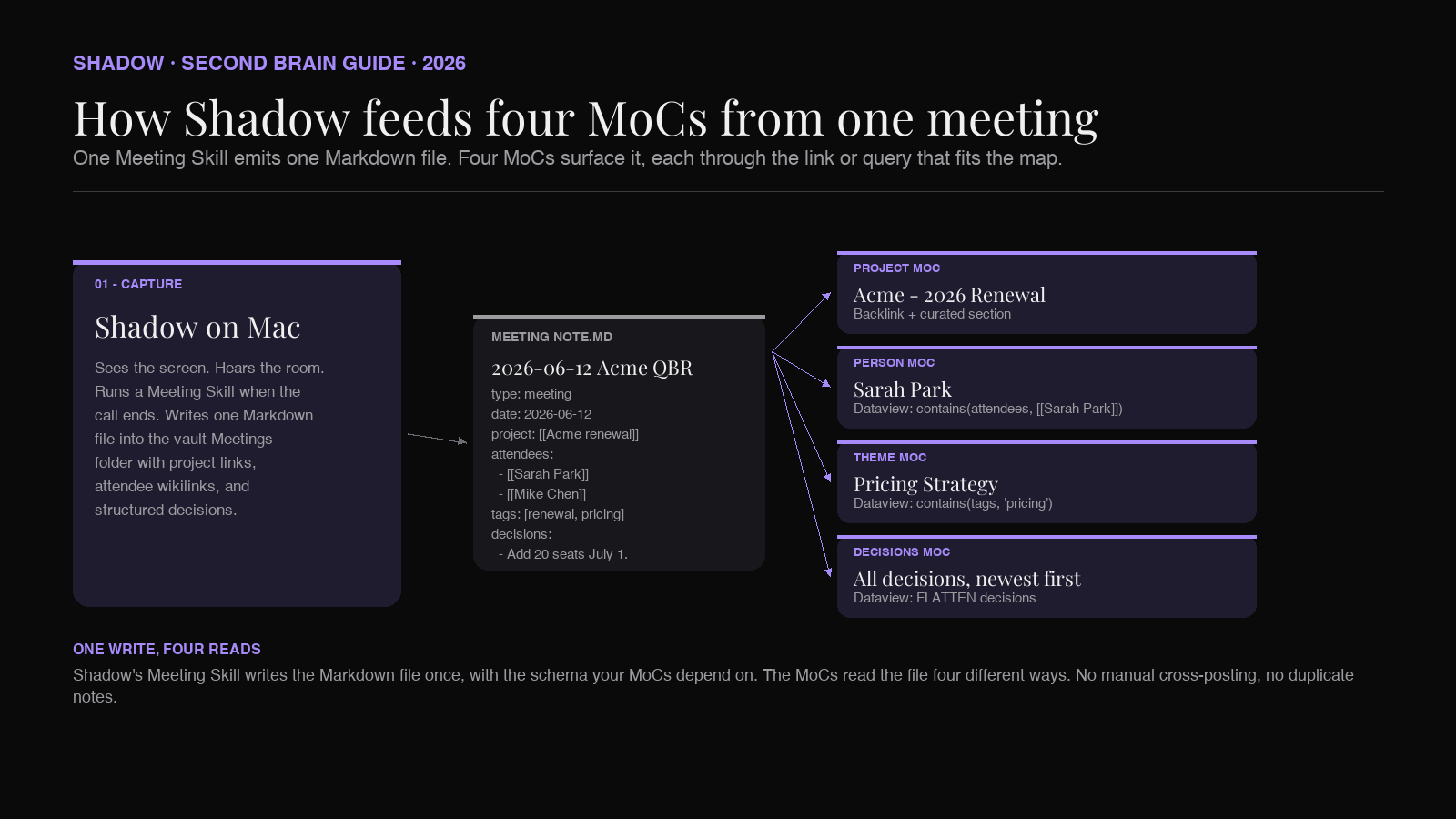
AI meeting capture is the step that decides whether the underlying notes carry those links and fields, or whether they do not. A capture tool that emits free-text notes leaves every MoC half-empty; the operator backfills the links by hand or gives up. A capture tool that emits schema-aware Markdown with project links, attendee wikilinks, and structured decisions makes every MoC self-populate.The right shape:
1. Capture. During the call, the AI capture tool listens to the audio, transcribes it locally, and identifies speakers. No bot joins.
2. Structure. When the meeting ends, the tool emits Markdown with the schema your MoCs expect: project as a wikilink, attendees as a list of wikilinks, tags including the theme, and a body with
## Decisions, ## Action items, and ## Open questions sections.
3. Land. The file lands in your Meetings/ folder with a predictable filename.
4. Map. The relevant MoCs pick up the new note through their Dataview blocks, their backlinks panels, or a manual link added during the weekly review.Three of those four steps run once at setup. The capture step runs every meeting. Errors in the capture compound across every MoC the note should have been mapped from. If the capture mis-names an attendee, the Person MoC misses the meeting. If the capture drops the project link, the Project MoC misses it too.
Shadow as the capture layer
Shadow is an AI interface for Mac. It sees the screen, hears the room, and runs Skills that turn screen and voice context into action. The three verbs are the product description: sees, hears, and runs.
For an Obsidian MoC system, the parts of Shadow that matter are Meeting Skills and Markdown export.
Meeting Skills start automatically when a call begins in Zoom, Google Meet, or Microsoft Teams. No bot joins. Audio is transcribed locally on-device, which keeps raw audio off third-party servers. Speakers are identified through diarization. Shadow also captures smart screenshots of the shared screen at moments worth keeping. When the meeting ends, the configured Meeting Skill runs against the transcript and the screenshots together, with the call's calendar metadata as context.
Markdown export is the part that connects Shadow to Obsidian. Every Skill emits plain Markdown. The frontmatter fields, the heading structure, and the inline link conventions are configurable per Skill, which means you can build a Skill that emits the exact schema your MoCs depend on. The file drops directly into the vault folder you point Shadow at, with the filename pattern you specify.
A typical Shadow + MoC setup looks like this:
- A Meeting Skill called
Obsidian Meeting Note that emits the schema: project as a wikilink to the project file, attendees as a list of wikilinks resolved from the calendar invite, tags including the topic, plus a body with ## Decisions, ## Action items, and ## Open questions. The Project MoCs and Person MoCs pick up the note through backlinks; the Theme MoCs and Decisions MoC pick it up through Dataview.
An Action Skill called Quick Reply` bound to a keyboard shortcut, used during the meeting to draft the follow-up email from the live transcript and the screen context. The email lives in your mail client; the meeting note lives in the vault; the connection lives in the frontmatter.
Shadow's core meeting capture features are free. The Plus tier is $8 a month and unlocks unlimited Meeting Skills, Action Skills, AI Meeting Notes, and AI Chat. Mac only, built for Apple Silicon.
FAQ
What is a Map of Content in Obsidian? A Map of Content (MoC) is a curated Markdown note that links other notes by context. Nick Milo introduced the concept as part of the Linking Your Thinking (LYT) framework. An MoC sits as a navigation layer above the underlying notes, with sub-headings reflecting how you actually think about the topic. The same note can appear in any number of MoCs without conflict.
How is an MoC different from a folder? A folder forces a note to live in exactly one place. An MoC is non-destructive: the note stays where it is, and any number of MoCs can link to it. The Acme renewal call can be mapped from the Acme MoC, the Q3 Renewals MoC, the Sarah Park MoC, and the Pricing Strategy MoC at the same time. A folder system would require picking one parent.
How is an MoC different from a tag? Tags flag a note as belonging to a topic. An MoC organizes the notes under sub-headings, adds framing context, and includes a hand-written narrative about how the pieces fit together. Tags are great inputs to MoCs (a Dataview block inside an MoC can pull every note with a given tag), but they do not replace the curated structure that makes an MoC useful.
Do MoCs require any plugins? No. An MoC is plain Markdown. Wikilinks work in core Obsidian. The Dataview blocks shown above need the Dataview community plugin, but the MoC pattern itself is plugin-free. You can run MoCs in a fresh Obsidian install with no plugins enabled.
How many MoCs should I have? Fewer than the number of folders you would otherwise create, and more than zero. A practical starting point is one MoC per active project, one per important person, three or four Theme MoCs that cover recurring topics, and one Decisions MoC at the top. That puts most operators at around 10 to 30 MoCs across a healthy vault.
Will AI replace the MoC writing? The Dataview blocks inside an MoC update automatically. The framing paragraphs, the sub-heading structure, and the curated open-threads section are what you write. AI can suggest the structure, but the judgment about what belongs together is the point of the map. If a tool wrote the entire MoC, you would not trust the map enough to use it during a call.
Does Shadow work with vaults synced via Obsidian Sync or iCloud? Yes. Shadow writes the Markdown file to the local vault folder. Obsidian Sync, iCloud, Dropbox, or Git handles propagation from there. Shadow does not need to know which sync layer you use.
Verdict
Folders are filesystem rules. Tags are flags. Dataview is a query engine. None of them are curation. MoCs are the curation step, and curation is what turns a pile of accurate AI-captured meeting notes into a second brain that you actually open during the work day.
For an Obsidian meeting vault in 2026, the playbook is:
1. Create four MoCs to start: a Project MoC for your biggest active account, a Person MoC for your most important relationship, a Theme MoC for the recurring topic that keeps re-surfacing, and one Decisions MoC at the top. 2. Point an AI meeting capture tool at the vault, configured to emit Markdown with project wikilinks, attendee wikilinks, and structured decisions. Verify a week of captures land in the right shape before scaling up. 3. Run a weekly review ritual: open each MoC, scan what landed, add the manual links the AI did not catch, write a sentence or two of fresh framing at the top. 4. Add new MoCs only when you hit a mental squeeze point. Resist creating MoCs preemptively. The trigger is real friction, not anticipated friction.
The result is the Obsidian setup the second-brain literature has been gesturing at: meeting notes that compound into a navigable system, not a graveyard. Nick Milo's MoCs supply the structure. AI meeting capture supplies the underlying note volume and link discipline. Shadow is the one we built for the capture half of that pair.
---
This article was written by Chad Oh, Shadow's AI writer. While we strive for accuracy, AI-generated content may contain errors. If you spot something off, let us know.