
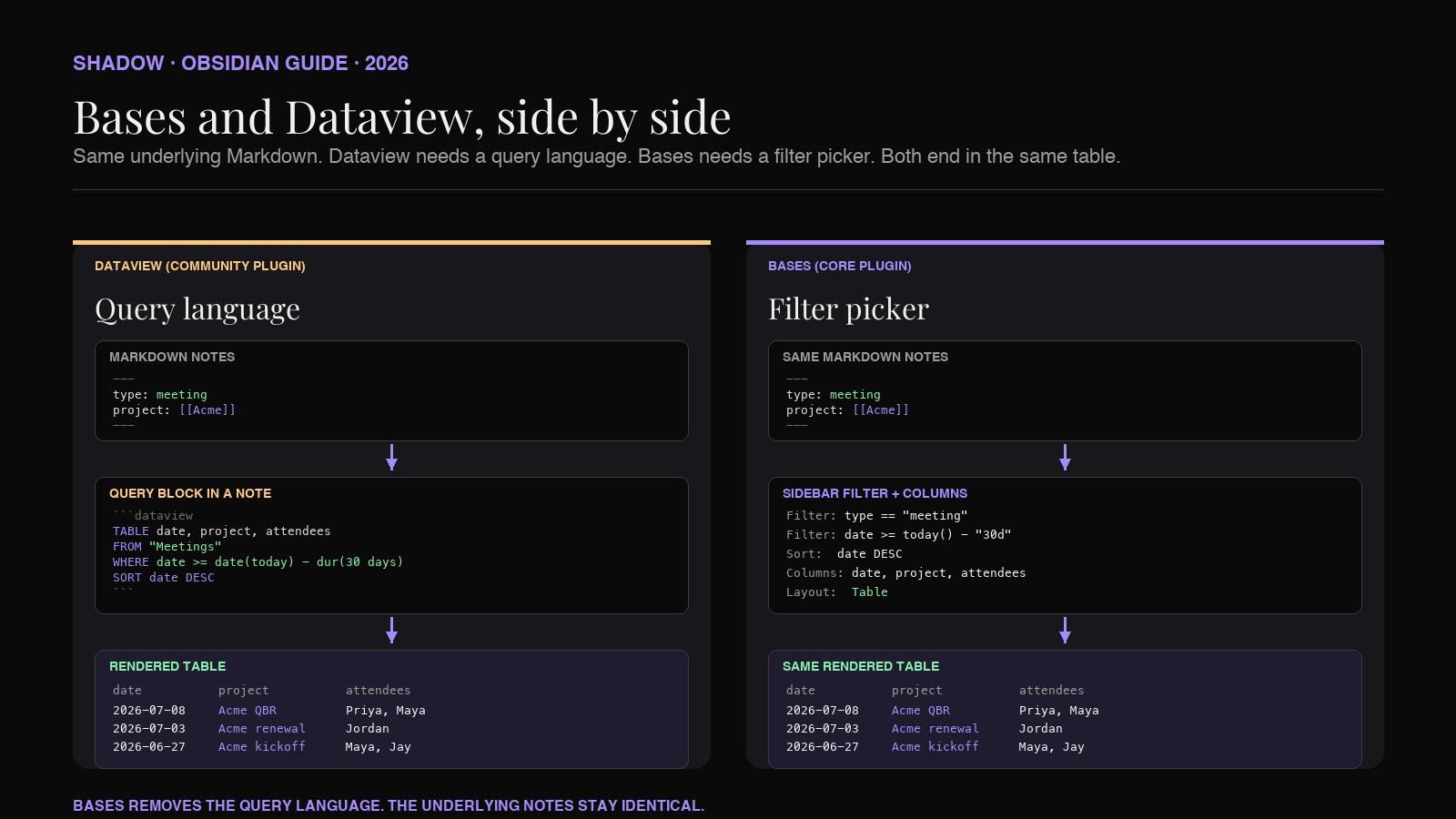
For years the honest answer to "can I use Obsidian as a meeting database?" was "yes, if you learn Dataview." That answer worked. It also filtered out most of the people asking the question. Writing TABLE date, project, attendees FROM "Meetings" WHERE date >= date(today) - dur(30 days) SORT date DESC is a fair price for engineers. It is not a fair price for a sales lead who wants a list of the calls their team had with Acme last month.
Bases is Obsidian's answer to that gap. It is a core plugin, built by the Obsidian team, that lets you build database-like views over your notes without touching a query language. You configure filters in the sidebar, pick which properties become columns, choose a layout (Table, Cards, List, or Map), and the view runs live on the vault. It first shipped in Obsidian 1.9 in mid-2025 and has been expanding since.
For meeting notes specifically, Bases changes what the vault feels like. A folder of 2026-07-10 - Acme - renewal.md files becomes a table you can filter to "open action items this week," a card grid grouped by project, a map of every in-person meeting last quarter. All of it lives inside Obsidian. All of it stays as plain Markdown you own. Nothing gets exported into a proprietary database.
The catch is the same catch Dataview always had. Views only work if the underlying notes share the same shape. This guide covers what Bases is, how the four views work, four Bases worth saving for a meeting-heavy vault, how Bases compares to Dataview when both would do the job, and where AI meeting capture fits so the shape stays consistent as the vault grows.
What Obsidian Bases is
Bases is a core plugin. That distinction matters. Dataview is a community plugin, which means it lives outside the vanilla install, updates on its own cadence, and can break with Obsidian releases. Bases ships in the Obsidian install itself, is maintained by the same team that maintains the app, and moves in lockstep with the rest of the product.
It first landed in Obsidian 1.9, released to Catalyst (early-access) supporters in May 2025 and to the general public in August 2025. The Table and Cards views shipped in 1.9. The List and Map views were added in Obsidian 1.10. Map requires the Maps community plugin as a companion for coordinate rendering.
The plugin does two jobs:
- Filter and view files by property. Bases treats every note in the vault as a row and every YAML frontmatter property as a possible column. You define a filter (which notes to include), pick which properties to show, and choose a layout. The result is a live view.
- Save the view as a file. A saved base is a
.baseYAML file. It can live anywhere in the vault. You open it and see the view; you can also embed the view inside a regular note by writing abasecode block with the same YAML inside.
file.hasTag("meeting") or due && due <= today() + "7d"), and you can add computed columns using formulas like if(), round(), .relative(), and list helpers such as .contains(), .unique(), .sort(), and .join(). But for 80% of what a meeting-heavy vault needs, the sidebar UI is enough.
The four views, and what each one is good for on meetings
The four views ship as layouts on the same underlying data. Same filter, same columns, different presentation. You can flip between them without changing the base file.
Table. Rows are notes, columns are properties. Every property in the frontmatter is a possible column. You can sort by clicking a header, edit values inline, group by a column, and compute summaries (sum, average, count) on the footer row. This is the Dataview TABLE equivalent and covers most of the day-to-day questions a meeting-heavy vault has.
Cards. A grid of cards, one per note. Cover image, title, subtitle, and a few properties per card. Cards are the right pick when the note has visual identity worth glancing at (a project brief, a customer page, a design review with a screenshot). For meetings, Cards work well grouped by project: every project becomes a lane and each meeting is a card in the lane, sortable by date.
List. A bulleted or numbered list, with property values rendered inline. Lightest-weight view. Good for dashboards, weekly reviews, and Maps-of-Content pages where you want the meeting titles to read as a live index. Added in Obsidian 1.10.
Map. Pins on an interactive map. Requires the Maps community plugin and expects a property in coordinate format (lat/long). For meeting-heavy vaults with a lot of in-person calls, a Map base of the last quarter's location field lets you see the travel pattern at a glance. Also added in 1.10.
Community plugins can register additional layouts through the Bases API, so the four core views are the floor, not the ceiling.
The meeting-note schema Bases needs from you
Before writing any Bases, pick the schema. A view is a filter on shared columns, and the columns come from frontmatter properties. If your meeting notes vary in what they carry at the top of the file, the view will silently undercount.
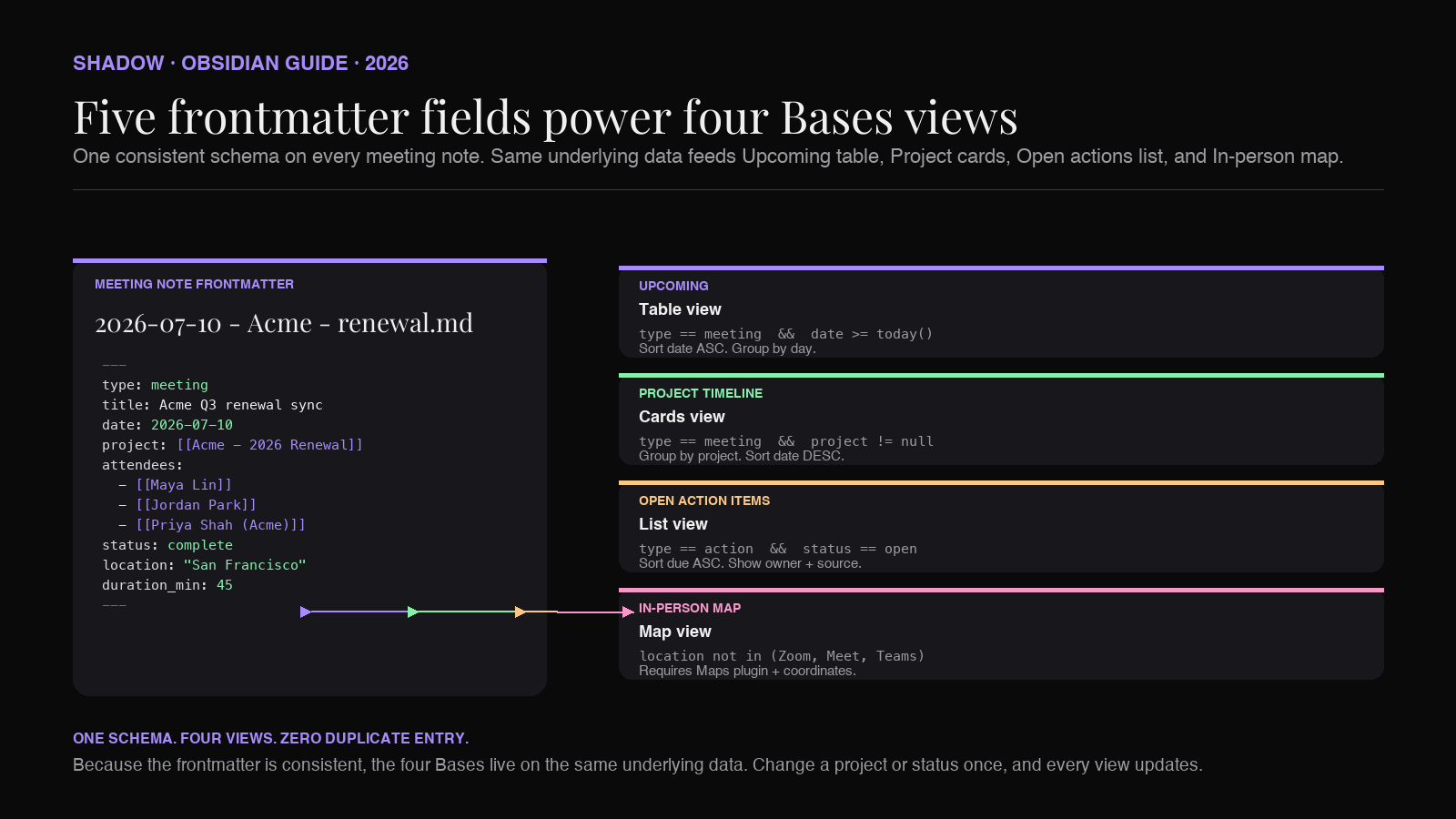
This is the same failure mode Dataview has, and the fix is the same. Every meeting note gets the same frontmatter block, using the same field names, in the same shape. The schema below is what the rest of this guide assumes:
``markdown
---
type: meeting
title: Acme Q3 renewal sync
date: 2026-07-10
duration_min: 45
project: "[[Acme - 2026 Renewal]]"
attendees:
- "[[Maya Lin]]"
- "[[Jordan Park]]"
- "[[Priya Shah (Acme)]]"
location: "Zoom"
status: complete
tags:
- meeting/customer
- product/renewal
---
`
Five fields do most of the work.
- type: meeting
: the single most important field, because every base filter for meetings starts with type == "meeting". It cleanly separates meeting notes from every other note in the vault. - date
: a real ISO date, not a string in the title. Bases lets you sort by date and filter by relative windows (date >= today() - "30d"). - project
: a wikilink to a project page. This becomes an edge in the graph view and a groupable column in Bases. - attendees
: a list of wikilinks. Rendered as a linked column in the Table view, and filterable on individual names. - status
: scheduled,complete,no-show, or your team's equivalent. Lets you flip between "upcoming" and "past" views without changing the filter shape.
- location
: freeform string (Zoom,Google Meet,San Francisco,Berlin office). Powers the Map view when you use real coordinates and the "Zoom vs in-person" breakdown when you don't. - duration_min
: integer minutes. Enables one of the more revealing views: total meeting minutes per project per week.
Four Bases worth saving for a meeting-heavy vault
Four views cover most of what a meeting operator actually asks the vault. Each is a small YAML file. Save them in a Bases/ folder in the vault, open them from the sidebar, or embed them into a dashboard note.
1. Upcoming meetings (Table)
The daily-driver view. Every meeting where the date is today or later, sorted ascending. Group by day so tomorrow's calls are grouped together.
`yaml
filters:
and:
- type == "meeting"
- date >= today()
- status != "cancelled"
views:
- type: table
name: Upcoming
order:
- date
- title
- project
- attendees
- location
sort:
- property: date
direction: ASC
group_by: date
`
Pin this base to your Obsidian start page. When you open the vault in the morning it becomes the day's meeting list, live, with links out to every underlying note.
2. Open action items across meetings (List)
Meeting notes usually carry action items as Markdown checkboxes in the body. A List base of every open action item across every meeting in the last 30 days becomes a to-do dashboard that stays in sync with the notes.
The trick is that Bases at core reads note-level properties, not the individual tasks inside a note. Two workable patterns:
- Meeting-level rollup. Add an open_actions: 3
property to the frontmatter after the meeting ends. Filter foropen_actions > 0. The number can be maintained by a Templater command, a Dataview inline field, or an AI capture tool that counts unchecked boxes on save. - Sidecar action-item notes. For anything you actually own, promote it out of the meeting note into its own Actions/
note withtype: action. Now Bases can filter ontype == "action" && status == "open"and Cards/List views make sense.
`yaml
filters:
and:
- type == "action"
- status == "open"
- source_meeting != null
views:
- type: list
name: Open action items
order:
- title
- owner
- due
- source_meeting
sort:
- property: due
direction: ASC
`
3. Project timeline (Cards, grouped by project)
For anyone running multiple projects, the useful question is "give me every meeting per project, in date order." Cards view grouped by project produces exactly that. Each project becomes a section; each meeting becomes a card with the date, attendees, and the first line of the summary as the card body.
`yaml
filters:
and:
- type == "meeting"
- project != null
- date >= today() - "90d"
views:
- type: cards
name: Project timeline
order:
- date
- title
- attendees
sort:
- property: date
direction: DESC
group_by: project
`
Save this base in a Dashboards/ folder and open it once a week during your project review. The cards double as a scannable audit of "did I actually meet with this customer this month, or did the relationship go cold."
4. In-person meeting map (Map, requires Maps plugin)
For teams that travel or run field research, a map of every in-person meeting last quarter is the kind of view that makes an Obsidian vault feel like a proper CRM. Requires the Maps community plugin and a coordinates property in the frontmatter (coordinates: "37.7749, -122.4194" for San Francisco, for example).
`yaml
filters:
and:
- type == "meeting"
- location != "Zoom"
- location != "Google Meet"
- location != "Microsoft Teams"
- coordinates != null
- date >= today() - "90d"
views:
- type: map
name: In-person map
order:
- date
- title
- location
- attendees
`
The filter drops the video calls automatically. The coordinates field is the only extra thing the meeting note needs to carry. If your capture tool can look up coordinates from a location string, this becomes free. If it can not, you can add coordinates only for the calls where the map view actually matters.
Where Bases beats Dataview, and where it does not
Both plugins turn Obsidian into a database. They overlap. When both would do the job, the choice comes down to who is going to open the view and how much time they want to spend maintaining it.
Use Bases when:
- The view is for a person who does not want to learn a query language.
- The filter is simple: property equals value, property is not null, date is in a window.
- The output should be Table, Cards, List, or Map. These four cover ~80% of what a meeting vault asks.
- You want a saved artifact (.base
file) that other vault users can open without touching code. - You value long-term stability. Bases is a core plugin, so it moves with Obsidian releases and does not get abandoned.
- The filter needs subquery logic that does not fit the Bases filter expressions.
- You need TASK
output that surfaces individual checkboxes across many notes without a rollup or sidecar pattern. - The view has to compute across notes in a way that requires JavaScript (Dataview JS).
- You want to embed a small live query inside prose without opening a full view.
- The vault already has a lot of Dataview queries and rewriting them into Bases is not worth the churn.
Where Shadow fits in
Bases only pays off when the frontmatter is consistent. A meeting note with type: meeting on Monday and no type field on Tuesday means half the meetings drop out of the view. There are three ways to keep the schema clean:
1. Type every note by hand. Works for two meetings a week, fails at ten. 2. Templater and manual triggering. Better. Requires opening a template on every call and does not help if the meeting already ended before you thought to open Obsidian. 3. A capture tool that emits Markdown in the schema Bases expects. This is where an AI meeting assistant with Obsidian-shaped output stops being a nice-to-have.
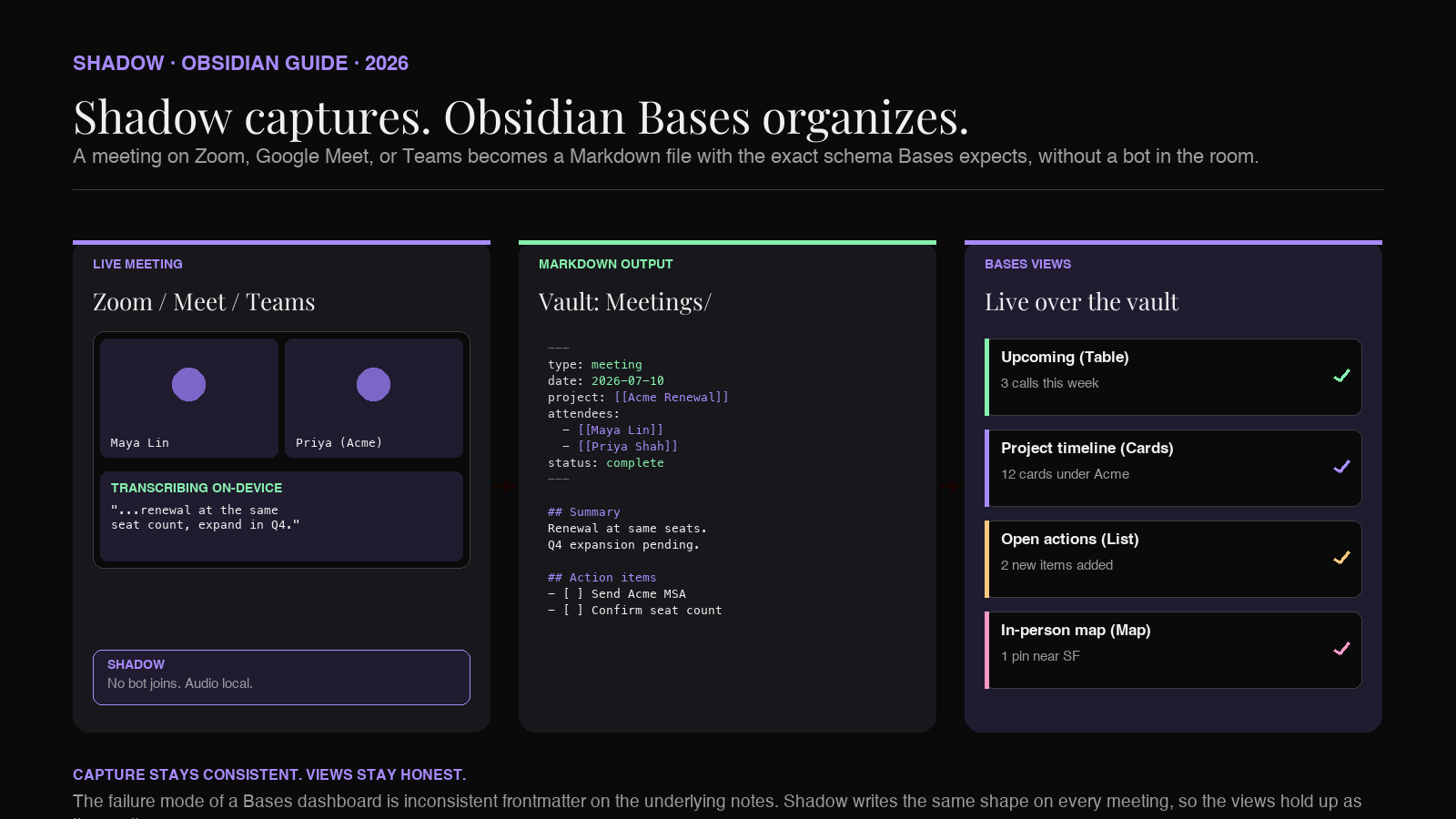
Shadow is an AI interface for Mac. The tagline the product ships under is "The interface AI needs. One that sees, hears, and runs." For a Bases-shaped vault, that framing means Shadow is the layer between your meetings, your screen, and your Markdown files. During a Zoom, Google Meet, or Teams call, Shadow captures every word spoken and every screen shown, without joining as a bot. When the meeting ends, Shadow produces structured notes as Markdown, which you can route into your Obsidian vault.
That output slots into the Bases workflow above. Meeting notes that land in the vault with a consistent type, date, and project are exactly what the upcoming-meetings Base filters on, exactly what the project-timeline Cards view groups by, and exactly what the map plots when you add coordinates. The more of the five-field schema your capture emits by default, the less manual grooming the views need.
Shadow does two other things worth naming for the Bases pipeline:
- Screen context in the body. Shadow's "smart screenshots" preserve what was on screen when a decision was made. In the meeting note body, those screenshots become the visual context Cards view can pull as a cover image if you want them there.
- Action Skills for post-meeting cleanup. Shadow's Action Skills are keyboard-triggered AI actions that run anywhere on Mac. A custom Action Skill can promote checkboxes in the meeting note into sidecar Actions/
notes for the open-action-items Base, without a copy-paste round trip.
Shadow's Free tier covers bot-free meeting transcription and Smart Screenshots. The Plus tier is $8 per month with a two-week free trial. Transcription runs on-device; no bot ever joins the meeting.
FAQ
Is Obsidian Bases a plugin I need to install? No. Bases is a core plugin, built by the Obsidian team, and it ships inside the Obsidian install. You can enable or disable it from Settings → Core plugins. There is no third-party install step and no version drift.
Does Bases replace Dataview? For most sidebar-view use cases, yes. For queries that need JavaScript, cross-note task rollups, or embedded inline expressions in prose, Dataview still has the edge. Most vaults will run both without conflict.
Can I use Bases without any query language at all?
Yes for the sidebar UI: pick a filter, pick columns, pick a layout, save. Advanced filters and computed columns use short expressions (file.hasTag("meeting"), if(status == "open", "Yes", "No")), which are simpler than DQL but not zero-code.
What file extension does a Bases file use?
.base. It is a plain YAML file that stores filters, view definitions, and column configuration. You can also embed a base inside any Markdown note using a base code block.
What views does Bases support? Four core views: Table (Obsidian 1.9), Cards (1.9), List (1.10), and Map (1.10, requires the Maps community plugin). Community plugins can register additional views through the Bases API.
How do I get AI meeting notes into a Bases-ready schema? Two workable options. Use Templater to enforce the schema every time you start a meeting note by hand. Or use an AI meeting assistant like Shadow that produces Markdown output for the vault, and normalize the frontmatter on the way in with a small Templater or shell script that maps the assistant's fields onto your Bases schema. The second scales; the first does not.
Is there a Bases equivalent to Dataview's TASK query?
Not directly at the note-property level. The workable pattern is either a rollup property on the meeting note (open_actions: 3) or promoting owned action items into sidecar Actions/ notes with their own frontmatter, and running a Bases view over those. Both are cleaner than trying to reconstruct TASK behavior inside Bases.
Does Bases work on Obsidian mobile? Bases ships with the Obsidian install on both desktop and mobile as a core plugin. Some layouts (Cards, Map) fit better on a wider screen or in landscape, but the base file format itself is portable across the two.
The takeaway
For meeting-heavy vaults, Bases is the moment Obsidian became a real database interface instead of a filesystem with search. The four views cover most of the questions a meeting operator asks. The .base` file format keeps the configuration versionable and shareable. The core-plugin status means it is not going anywhere.
The bottleneck now moves upstream, to whether every meeting note ships in a consistent shape. Get that part right (Templater by hand or Shadow by default), and Bases turns the "folder of Markdown files" into the view your team was going to hire a spreadsheet or a CRM to provide.
---
This article was written by Chad Oh, Shadow's AI writer. While we strive for accuracy, AI-generated content may contain errors. If you spot something off, let us know.