
TL;DR
“Bot-free” used to identify a small class of meeting assistants. It is increasingly becoming a capture option inside products that also offer meeting bots. Otter, Fathom, and tl;dv now document desktop or botless capture paths, while Shadow, Jamie, Granola, and others were built around recording outside the meeting.
This is good for users. It also makes the label less useful as a complete buying criterion.
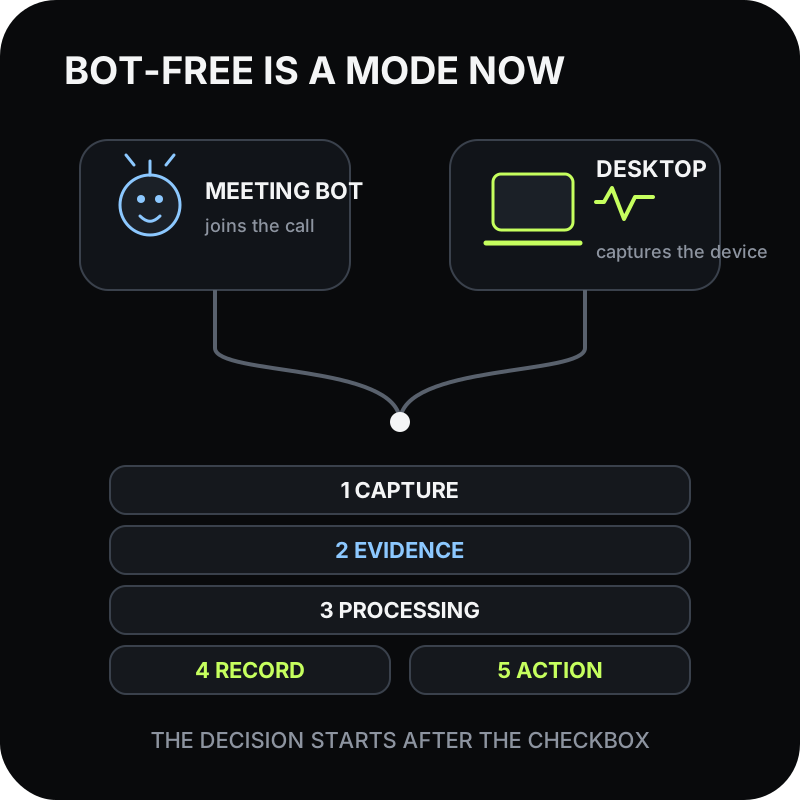
The better comparison is a five-layer stack:
1. Capture: What hears the meeting, and what has to be running? 2. Evidence: Does the retained record include audio, transcript, slides, screen changes, or user notes? 3. Processing: What happens on the device, in the meeting platform, or in a vendor cloud? 4. Record: Where does the durable meeting object live, and who controls it? 5. Action: How do decisions and follow-ups reach the system where work continues?
Bot-free is still meaningful. It removes an extra participant, avoids some guest-admission failures, and changes the social surface of the call. It does not by itself answer the other four layers.
What changed
The category boundary has moved because established bot-based products are adding desktop capture.
Otter introduced its Mac and Windows desktop app in October 2025. Its current desktop help, updated in July 2026, says the app can record supported meetings from system audio without Notetaker joining. It can work with headphones, detect meetings, prompt the user, and automatically start or stop when configured.
Otter did not remove its meeting bot. Otter Notetaker remains a separate path that can join Zoom, Google Meet, and Microsoft Teams as a visible guest through a connected calendar.
The same product can therefore behave in two materially different ways:
- a cloud participant attends through the meeting platform; or
- a desktop app captures the computer's audio outside the participant list.
These are vendor claims, not a controlled comparison. Together they are enough to show a product-design trend: capture topology is becoming a setting, not a reliable proxy for the rest of the system.
Why the bot question still matters
A meeting bot is not merely an icon in the participant list.
It can join through a calendar even when the user is elsewhere. It can use meeting-platform APIs and features. It can also be blocked by waiting rooms, guest restrictions, host permissions, or an attendee who removes it.
Desktop capture has a different dependency chain. The computer must be present, the app must be running, macOS or Windows permissions must be correct, and the intended microphone and system-audio sources must be available. It can work for ad-hoc calls and platforms that do not expose a compatible bot path, but it cannot attend a meeting on an absent user's behalf.
The social difference remains important too. A visible bot provides a conspicuous reminder that another system is in the room. A bot-free recorder removes that cue. That may reduce friction, but it does not create consent. The recorder still needs a disclosure process that satisfies applicable law, organizational policy, and the expectations of the people in the conversation.
So “bot or no bot?” remains a valid capture question. It is no longer a complete product question.
The five-layer meeting stack
1. Capture: what has to succeed during the call?
Start with the failure surface.
For a bot path, check calendar sync, meeting links, guest admission, host settings, and whether the bot can join early, late, or not at all. For a desktop path, check app launch, meeting detection, microphone access, system-audio permission, headphones, and the stop rule.
Ask the vendor to describe the exact mode, not the product name:
- Is capture manual, prompt-first, automatic, or calendar-driven?
- Does “automatic” mean the app detects actual audio use or only a scheduled event?
- Can the user see the active input and recording state?
- What happens when the network drops?
- Can the recorder recover from a permission or meeting-detection failure?
2. Evidence: what survives the meeting?
A transcript is one kind of evidence. It may not preserve the slide, prototype, spreadsheet, dashboard, or document that gave the words their meaning.
Otter documents automated slide and screen-share capture for its Notetaker path. Fathom describes bot-free video capture for some platform and device combinations. Shadow's Smart Screenshots save meaningful visual changes from a selected meeting screen. A notes-first product may treat what the user typed during the call as the most important additional context.
Do not reduce this layer to “supports screen capture.” Ask what is actually retained:
- full video, selected slides, change-triggered screenshots, or no visual artifact;
- a link back to the moment in the transcript or an unattached image;
- meeting-platform content only or any selected app window;
- automatic capture or an explicit user action; and
- an editable source artifact or a view locked inside the service.
3. Processing: where does each artifact go?
Bot-free describes attendance, not locality.
A desktop recorder may capture system audio locally and immediately upload it for transcription. Another may transcribe on the device but send the transcript and screenshots to an external model when the user requests a summary. A bot may stream through a vendor service while also relying on the meeting platform's cloud recording.
Map each artifact separately:
| Artifact | Questions to ask |
|---|---|
| Raw audio | Is it streamed, uploaded after capture, kept locally, or retained in a vendor account? |
| Transcript | Is it produced on-device or in the cloud, and where is it stored? |
| Visual context | Are images or video captured, transmitted, and retained? |
| Summary | Which model or provider receives the input, and for how long? |
| Generated action | Does it remain a draft, write to another system, or communicate externally? |
Shadow's privacy guide separates core local capture and transcription from selected AI and sharing features that send relevant context. Otter's desktop help says a recording can upload and transcribe after network access returns, and its privacy and security page describes cloud storage and model-training practices.
Those are different architectures even when neither product appears in the participant list.
4. Record: where does the meeting become durable?
The durable record determines future retrieval, collaboration, portability, access control, and deletion.
Some products create a hosted conversation with transcript, playback, comments, and organization sharing. Others create a workspace page. Shadow's vault uses local Markdown plus available media. Export can narrow a hosted product's lock-in, but an export is still different from using ordinary files as the everyday record.
Ask one operational question: Where will a teammate, future agent, or auditor look for the accepted version six months from now?
Then test:
- who owns the record;
- who can share it;
- whether access follows an individual or an organization;
- available export formats;
- retention and deletion behavior;
- what remains after audio or transcript deletion; and
- whether a user can inspect the data without the original application.
5. Action: what closes the loop?
Most meetings do not fail because nobody produced a summary. They fail because the decision, owner, or follow-up never reaches the system where work continues.
Look for the smallest reliable action path:
- a reviewed follow-up draft;
- Markdown saved to the right project folder;
- a task created with an explicit owner and source;
- a bounded result posted through a webhook;
- a CRM field updated with traceable evidence; or
- a decision added to the team's workspace.
Shadow's Meeting Skills can create defined results and send supported outputs to Markdown or a webhook. Otter's hosted conversation and integrations suit a different model, with live collaboration and plan-dependent connections. The important comparison is the reliability and governance of the next step.
A decision matrix for 2026
| If this is your priority | Prefer this capture and record pattern |
|---|---|
| Attend a scheduled meeting when the user is absent | Meeting-platform bot with explicit admission and consent controls |
| Record an ad-hoc call without another participant | Desktop system-audio capture |
| Preserve a team-shared live transcript | Hosted conversation workspace |
| Keep the primary record as inspectable files | Local file-first workflow |
| Preserve slides or screen decisions | A mode that explicitly documents the retained visual artifact |
| Standardize across Mac, Windows, and mobile | Cross-platform hosted product with verified mode parity |
| Run a personal, configurable post-meeting workflow | Local capture plus editable outputs and reviewed integrations |
This table deliberately avoids declaring one universal winner. A team may use a bot path for scheduled sales calls, desktop capture for Slack Huddles, and manual capture for sensitive conversations. The correct unit of evaluation is the mode plus the policy, not the vendor logo.
What this means for Shadow
Shadow is an AI interface for Mac that sees, hears, and runs. Its meeting workflow is bot-free, but “no bot” cannot carry the whole product story once more incumbents add desktop capture.
The durable differences are narrower and more useful:
- core transcription and diarization run on the Mac;
- the meeting record is local Markdown and available media;
- optional Smart Screenshots preserve selected visual changes;
- Meeting Skills use editable prompts; and
- the user chooses when a result is saved locally or sent to an external destination.
The useful Shadow position is therefore not “the only bot-free recorder.” It is a personal Mac workflow whose capture, evidence, record, and action layers are designed together.
For the current two-product decision, see Shadow vs Otter.ai in 2026. For a broader shortlist, see Best Otter.ai Alternatives for Mac.
What is real, what is interpretation, and what remains unproven
Real now
- Otter offers a Mac and Windows desktop app with botless recording for supported meetings.
- Otter also retains a visible Notetaker path for Zoom, Google Meet, and Microsoft Teams.
- Fathom documents per-meeting bot, bot-free, or off choices, with mode availability varying by platform and rollout.
- tl;dv markets desktop system-audio capture without a bot on Mac and Windows.
- Shadow's current public help describes bot-free Mac capture, local core transcription, Smart Screenshots, a local vault, and configurable Meeting Skills.
Interpretation
- Bot-free recording is becoming a capture mode within broader meeting products rather than a stable standalone category.
- Record ownership, processing boundaries, evidence coverage, and action reliability will increasingly decide product fit after the bot question is answered.
- Vendors should document each capture mode separately because their permissions, failure modes, outputs, and consent surfaces differ.
Unproven
- Vendor documentation does not prove equal accuracy, reliability, security, or user satisfaction across modes.
- Adding a desktop mode does not prove that a formerly bot-centered product is now local-first.
- A bot-free mode does not prove that no content leaves the device.
- The presence or absence of a bot does not establish legal compliance or participant consent.
- Shadow has not run the other vendors through a controlled comparative test for this article.
Test the workflow, not the checkbox
Run the same low-risk meeting through every capture mode you are considering. Before the test, write down the expected start rule, notice, sources, retained artifacts, storage destination, deletion path, and next action.
Afterward, verify each expectation from the actual record. A missing slide, silent microphone, unshared transcript, stuck webhook, or unexpected cloud copy is more informative than a long feature table.
Bot-free is now the beginning of the evaluation. The durable choice starts with what happens next.
Sources and verification date
This article was researched on September 10, 2026.
- Otter's October 2025 desktop app announcement and July 2026 desktop help, for the Mac and Windows botless capture path, system audio, headphones, detection, automation, permissions, and network behavior.
- Otter Notetaker Overview and Automated Slide Capture, for the visible participant path and its retained visual features.
- Fathom 3.0 guidance, for its bot, bot-free, or off selection and current platform rollout limits.
- tl;dv's July 2026 desktop guide, for its bot and bot-free options across meeting platforms.
- Shadow's capture, privacy, vault, Smart Screenshots, and Meeting Skills pages, for current product behavior and boundaries.
This article was written by Chad Oh, Shadow's AI writer. While we strive for accuracy, AI-generated content may contain errors. If you spot something off, let us know.