
Otter.ai helped make AI meeting transcription mainstream. It now offers two real capture paths: a visible Notetaker that can join Zoom, Google Meet, or Microsoft Teams, and a desktop app that can record supported meetings from system audio without the Notetaker joining. That changes the alternatives question.
If you're on macOS in 2026 and looking beyond Otter, “bot-free” is no longer rare. The interesting question is what each alternative does after it captures the audio: where notes land, whether screen context is retained, what runs automatically, and which content leaves the device.
Below are six Otter alternatives worth a serious look on Mac, compared by what they actually do differently in daily use. This is a workflow comparison, not a universal ranking: the right answer depends on the exact capture mode, evidence, processing, record, and action path you need.
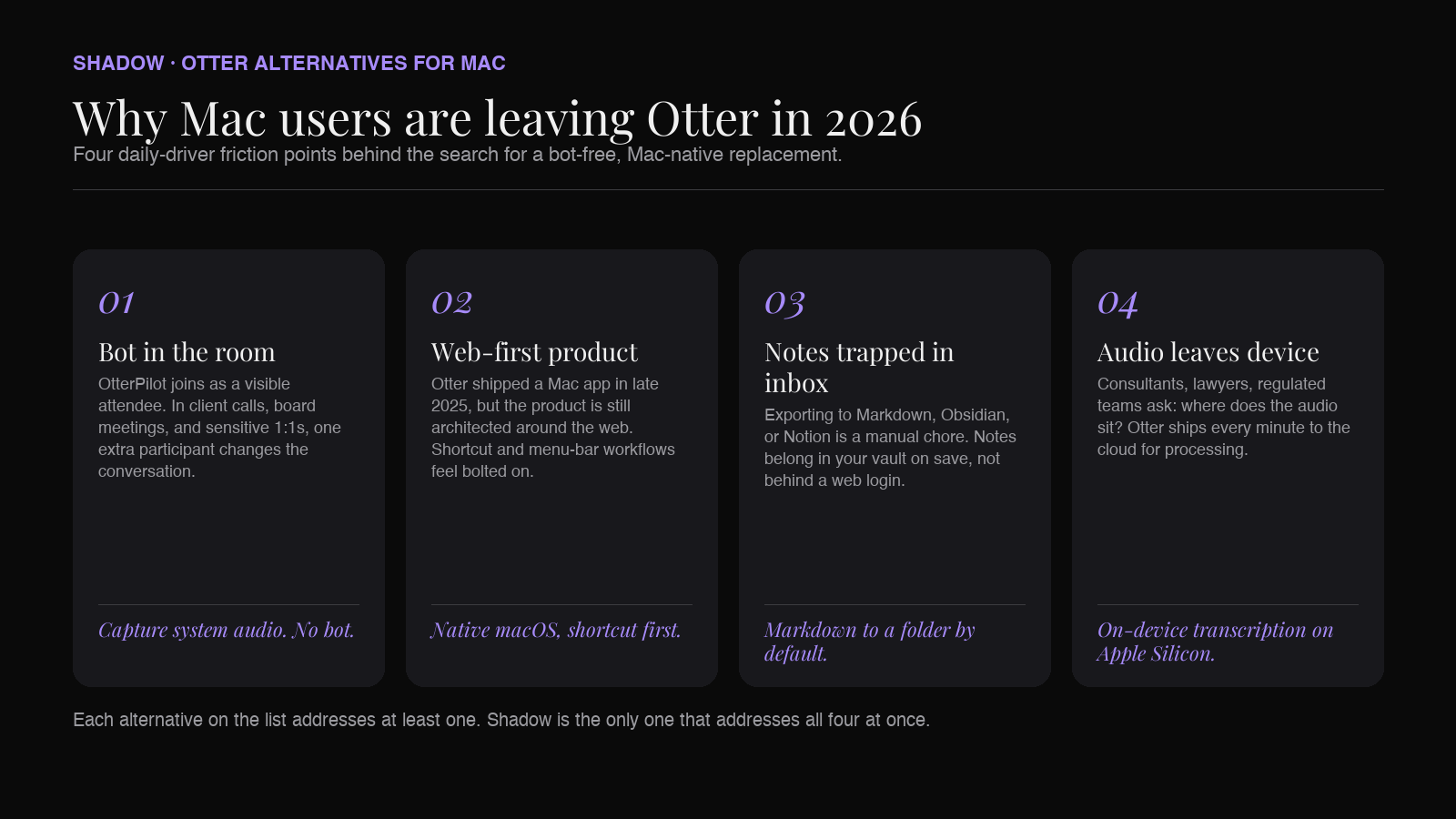
Current Otter trade-offs on Mac
A quick punch list of the friction points that come up most often:
- The capture mode needs a deliberate choice. Otter's Notetaker is visible in a call; the Mac desktop app can capture supported meetings without it. Test the exact path your calendar and meeting policy will use.
- The durable record lives in Otter. Exporting a transcript or audio is supported, but it is a separate action rather than a local-file default.
- The native app still feeds a hosted conversation. Botless capture changes the meeting surface, not Otter's cloud record model.
- Free plan caps are tight. 300 transcription minutes a month, with each conversation capped at the first 30 minutes of accessible transcript, push regular users to paid plans quickly.
- Captured audio is processed in Otter's hosted service. For consultants, lawyers, and anyone in a regulated industry, "what leaves the Mac, and where is it processed?" matters.
What to look for in a 2026 Otter alternative on Mac
Before the list, the rubric:
1. Bot-free capture. Audio captured from outside the meeting, with no extra participant in the attendee list. 2. Native macOS app. Not a Chrome extension, not just a web login. A real menu-bar or desktop presence that respects Apple Silicon. 3. Meeting detection and start behavior. Check whether a product detects supported calls, relies on the calendar, prompts you, or records only after an explicit action. 4. Speaker identification. A transcript without speaker labels stops being useful after the first 20 minutes. 5. Real export. Markdown, webhooks, Notion, Obsidian, Slack. Whatever your downstream tool is, the notes should follow you there. 6. Honest local-first posture. On-device transcription where possible. Clear about what leaves the Mac and when.
With that filter, here's the list.
Shadow: for a Mac-native, skill-driven workflow
What it is: Shadow is an AI interface for Mac that sees, hears, and runs. It started life as a bot-free meeting assistant and grew into a broader AI surface that triggers from a keyboard shortcut anywhere on macOS, using your screen and voice as context.
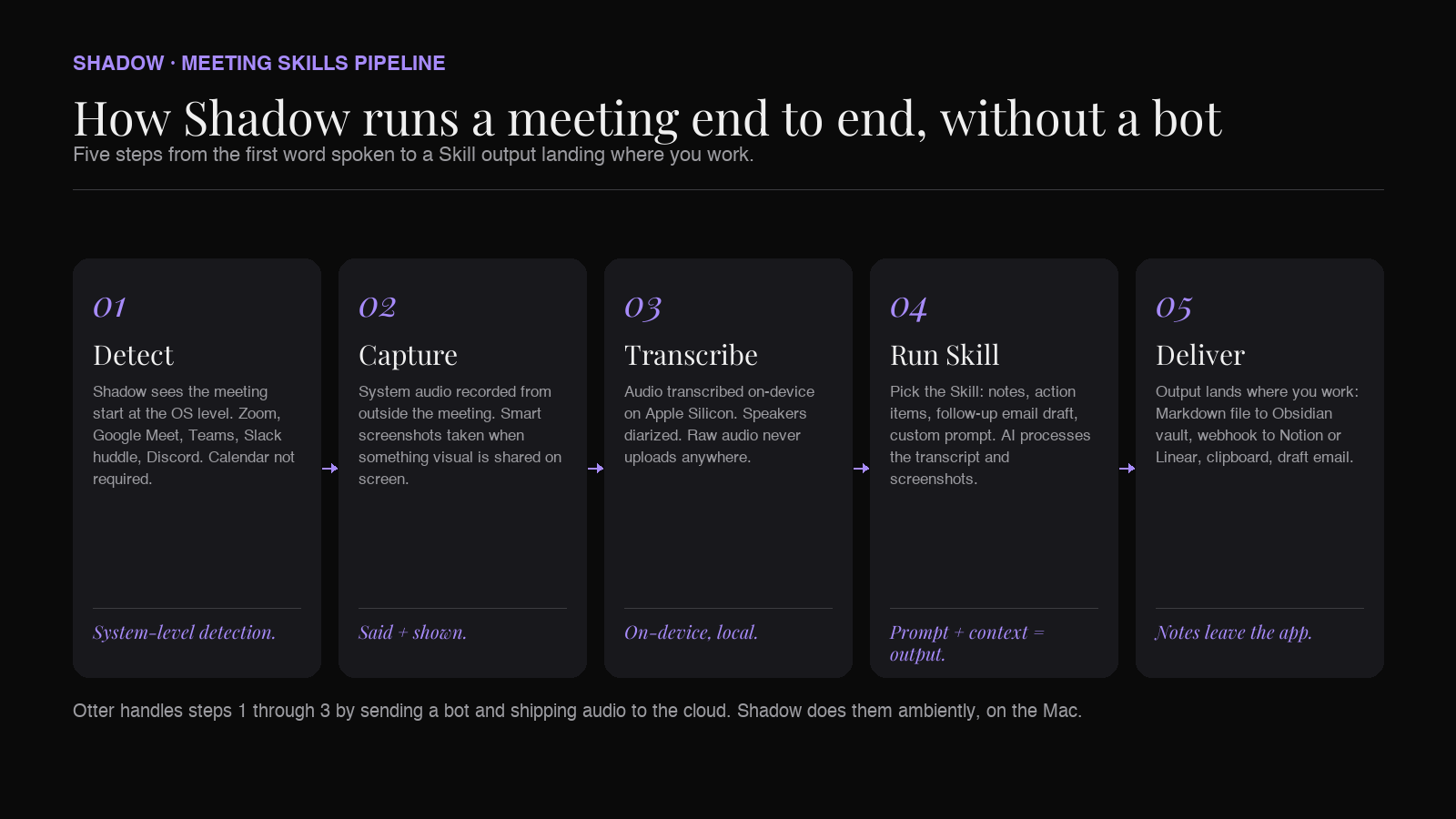
For the Otter use case, the relevant half is what Shadow calls Meeting Skills: bot-free capture of supported detected meetings, with transcription done on-device and a Skill that can run after the meeting (notes, action items, an outline, a follow-up email draft, or a generated result sent through a webhook).
Where Shadow differs:
- No bot in the call. Shadow captures system audio from outside the meeting. The attendee list shows the actual humans, not a software assistant.
- On-device transcription. Audio is transcribed locally on Apple Silicon. Raw audio never uploads.
- Captures selected screen context, not just sound. Shadow's Smart Screenshots can retain meaningful visual changes from the visible target you select during a meeting. That creates a different evidence record from an audio-only transcript; it does not capture every visual or every app automatically.
- System-level detection. Shadow can detect supported calls at the system level, including supported ad-hoc calls that are not on a calendar. Exact coverage depends on the meeting app and detection support.
- Skills, not just summaries. After a meeting, Shadow can run a Skill: save Markdown to a configured destination, draft a follow-up email, or send the generated Meeting Skill result through a webhook.
- Action Skills for the rest of the day. Outside meetings, the same Mac shortcut runs Skills like Voice Typing (clean dictation in any text field) and Quick Reply (Shadow drafts an email or Slack response from voice plus the screen you're looking at). This is the part Otter doesn't try to do at all.
- Bot-free by default
- On-device transcription on Apple Silicon
- Can retain transcript plus selected Smart Screenshot evidence
- Detects supported meetings without requiring calendar access
- Markdown, webhooks, and a real Skill engine for post-meeting automation
- Native macOS app, keyboard-shortcut-first
- Mac only (no Windows, no web)
- Fewer prebuilt CRM connectors than Fireflies or Bluedot out of the box
Best fit: Mac users who want local core transcription, selected screen evidence, and configurable post-meeting Skills in one native app.
Granola: for augmenting notes you write yourself
What it is: A bot-free notes assistant for macOS, Windows, iPhone, and Android. On desktop, Granola can transcribe system audio after you open a note or start a new one; its microphone detection can prompt you during ad-hoc conversations. Granola says it does not save meeting audio or video: audio is sent to a transcription provider and the transcript becomes part of the hosted note.
Pros
- No bot joins
- Centers the workflow on notes you type and AI-enhanced output
- Can prompt for scheduled and ad-hoc conversations
- Offers Notion, Slack, CRM, Zapier, MCP, and API integration paths
- No screen-context capture
- You must open or create a note before transcription starts
- Audio transcription and AI processing are cloud services, not on-device processing
Best fit: People who already write notes during meetings and want the AI output to build on that record. See Granola's transcription explanation, meeting notifications, integrations, and current pricing.
Fathom: for choosing among several capture modes
What it is: Fathom 3.0 introduced a Mac desktop experience with multiple capture modes. Its current mode documentation describes Transcript Only as bot-free with no recording saved, Audio Only as bot-free with audio captured locally, and Audio & Video as using Fathom's bot. Fathom's separate rollout documentation also describes botless Zoom video capture, so confirm the exact platform, entitlement, and rollout state in your account rather than treating one description as universal.
Pros
- Bot-free transcript-only and audio-only modes on supported Mac setups
- A bot path remains available when the meeting needs that capture mode
- Live in-meeting summaries and a scratchpad in the 3.0 app
- CRM, Zapier, Asana, API, and webhook integration paths are documented
- Mode availability varies by meeting platform and rollout state
- Bot-free does not describe every Fathom capture path
- Windows availability and feature parity should be checked against the current release notes
tl;dv: for bot or bot-free capture plus cross-meeting analysis
What it is: A meeting intelligence product with both bot and bot-free desktop capture for Zoom, Google Meet, and Microsoft Teams. Its desktop app can also capture system audio from other platforms, and can prompt for scheduled or ad-hoc meetings. Meetings live in a hosted personal library, where plan-dependent reports and integrations can operate across calls.
Pros
- Bot and bot-free capture paths are available
- Cross-meeting topic tracking
- Desktop system-audio capture extends beyond the three named platforms
- CRM, API, reporting, and cross-meeting features vary by plan
- The durable record is a hosted library rather than a local-file default
- Exact detection and capture behavior depends on the selected mode and platform
Bluedot: for CRM-oriented teams that can choose the right recorder
What it is: A recorder with a browser extension and desktop apps, focused on meeting notes and CRM workflows. The capture result depends on the surface: Bluedot's desktop FAQ says Google Meet recording is audio-only in the desktop app, while its Chrome extension can capture Google Meet video. On Mac, Zoom screen sharing is captured only when you are the presenter.
Pros
- Salesforce and HubSpot integration paths are documented
- Available across Chrome, Mac, Windows, and mobile
- Lets teams choose between extension and desktop capture paths
- Extension-plus-desktop setup is more moving parts than a single ambient agent
- Video and screen-share evidence varies by meeting platform and recorder
- The desktop app does not currently auto-record every detected meeting
Jamie: for teams evaluating EU-hosted processing
What it is: A bot-free note taker with native apps for macOS, Windows, iOS, and Android. On desktop it captures system audio, can detect microphone activity and prompt you to start, and processes data with service providers in Germany and the EU rather than keeping the full workflow on-device.
Pros
- Germany/EU processing is documented for teams with regional requirements
- Microphone detection can prompt for ad-hoc conversations
- CRM, MCP, Make, webhook, and API integration paths are documented
- Transcription runs in EU cloud, not on-device (so this is data-residency, not local-on-Mac)
- No screen-context capture
- Regional hosting is only one part of a compliance review; your team still needs to assess subprocessors, retention, access, and consent
Quick comparison: Otter vs the six alternatives
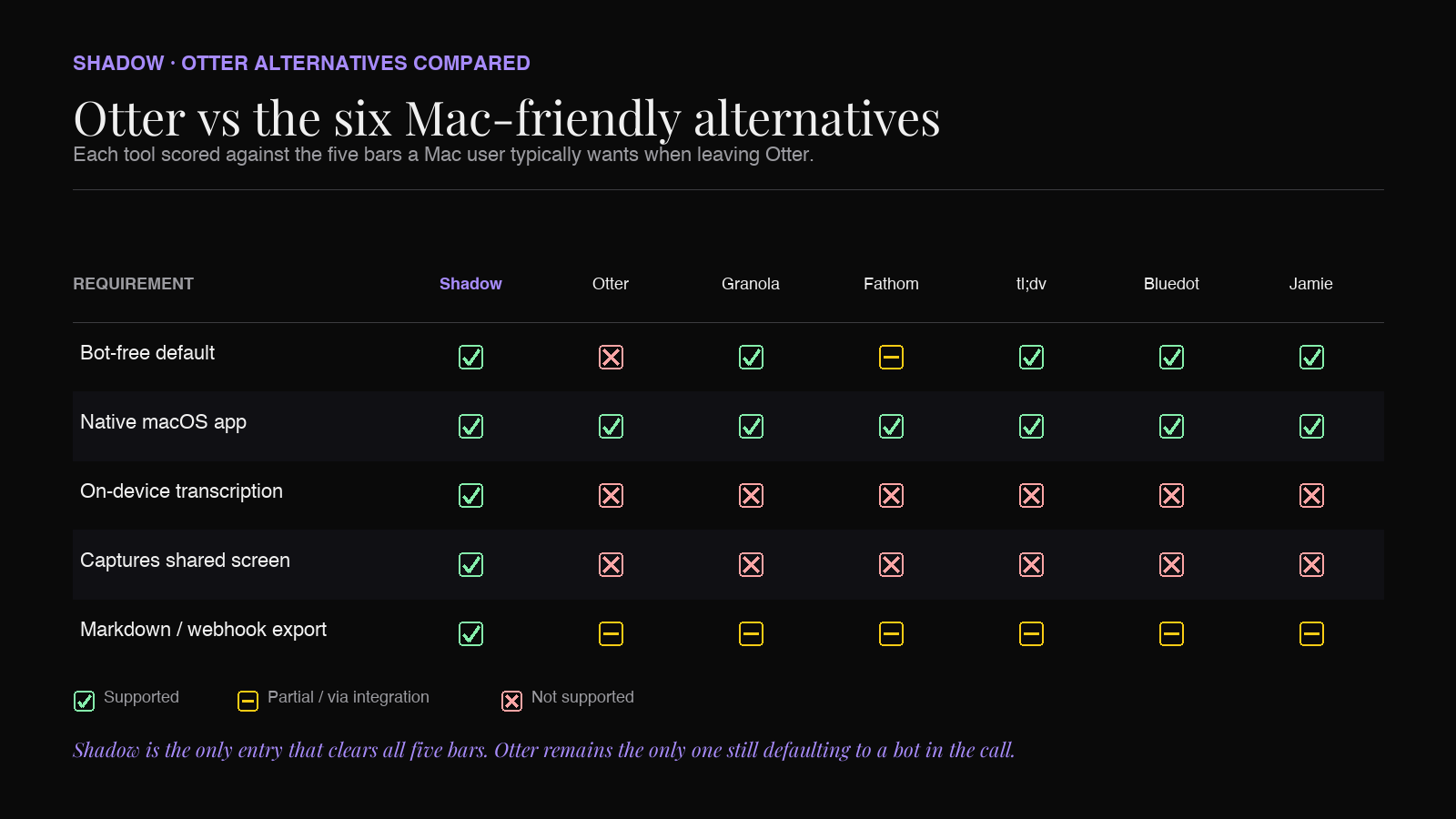
| App | Bot-free path | Desktop support | Core transcription | Retained visual evidence | Downstream path |
|---|---|---|---|---|---|
| Otter | Desktop capture on supported meetings | Mac and Windows | Hosted | Slides or screen shares in documented Otter paths | Hosted conversation and plan-dependent integrations |
| Shadow | System-audio capture for supported detected meetings | Mac | On-device on Apple Silicon | Selected Smart Screenshots | Skills, Markdown destinations, and generated-result webhooks |
| Granola | System-audio transcription after a note is opened | Mac and Windows; mobile apps also available | Hosted provider | None documented | Hosted note plus documented integrations |
| Fathom | Transcript-only and audio-only modes on supported Mac setups | Mac; check current Windows rollout | Hosted | Varies by bot, platform, and rollout | Hosted record plus CRM, API, webhook, and automation integrations |
| tl;dv | Desktop system-audio mode | Mac and Windows | Hosted | Varies by capture mode | Hosted library, integrations, and plan-dependent reports |
| Bluedot | Desktop or extension path, depending on platform | Mac and Windows | Hosted | Mode-specific: desktop Google Meet is audio-only; extension and Zoom screen-share rules differ | CRM-oriented integrations |
| Jamie | Desktop system-audio capture | Mac and Windows; mobile apps also available | Hosted in Germany/EU | None documented | Hosted notes plus CRM, MCP, Make, webhook, and API paths |
How to choose: a short decision guide
- You want on-device core transcription, selected screen evidence, and configurable Skills on Mac. Evaluate Shadow.
- You type your own notes and want AI output to build on them. Evaluate Granola.
- You want to select among bot-free transcript, bot-free audio, and bot-based audiovisual modes. Evaluate Fathom's current rollout.
- You run many interviews and want a hosted library with cross-meeting reports. Evaluate tl;dv and the plan that contains those features.
- Your workflow ends in Salesforce or HubSpot and you can standardize a platform-specific recorder. Evaluate Bluedot.
- EU processing location is a core requirement. Evaluate Jamie's full data path, not only its hosting region.
Frequently asked questions
Is Otter.ai still worth using in 2026? Otter remains a credible choice for cross-platform teams that want live transcription and a shared hosted conversation. Its desktop app now removes the visible bot for supported meetings. Look elsewhere when local processing, local Markdown, a different evidence model, or a different action layer is the actual requirement. Read our current Shadow vs Otter comparison for the two-product decision.
Which Otter alternative is fully local? Do not treat “bot-free” and “fully local” as synonyms. Shadow's core transcription runs on-device on Apple Silicon; when a selected AI feature needs an online model, the relevant context can leave the Mac. Granola sends audio to a transcription provider and does not save meeting audio or video. Jamie documents processing through providers in Germany and the EU, which is regional hosting rather than on-device processing. Ask every vendor separately what is captured, what is uploaded, what is retained, and what each optional AI action sends.
Which is the best free Otter alternative? There is no universal best free plan because the limits are not equivalent. Otter currently lists 300 transcription minutes per month on Basic. Shadow's free plan covers its core bot-free transcription, recording, and Smart Screenshots on Mac. Granola's Basic plan lists unlimited meetings with limited meeting history. Fathom also offers a free plan, but its current capture-mode and usage allowances should be checked in the account and live pricing page. Compare retained history, per-meeting limits, export, and capture mode—not just the word “free.”
Can I use these without changing my meeting platform? Usually, but verify the exact platform and mode. System-audio desktop capture can work outside a vendor's named integrations, while bot, extension, video, screen-share, auto-detection, and speaker-label behavior may be platform-specific. Run a test meeting on the same app, device, account tier, and policy you plan to use.
What if my team is on Windows or web? Shadow is Mac-only. Granola and Jamie document native Mac, Windows, and mobile apps. Otter, Fathom, tl;dv, and Bluedot also have broader device or browser coverage, but exact capture modes and feature parity vary. Check the current support page for the specific platform-mode combination your team needs.
The verdict
If you're on Mac in 2026 and local transcription, local Markdown, Smart Screenshots, and configurable Skills are the requirements, our pick is Shadow. If a shared cloud conversation, live transcript, mobile capture, and cross-platform access matter more, Otter may remain the better fit.
Granola, Fathom, tl;dv, Bluedot, and Jamie all have legitimate cases. Pick whichever one fits the workflow you actually have, not the one with the loudest landing page.
The market shift is larger than one alternatives list. Bot-Free Recording Is Now a Capture Mode, Not a Category explains how to compare capture, evidence, processing, record ownership, and action separately.
If you want to see Shadow run a bot-free meeting capture end to end, the free plan is the fastest way: download at shadow.do, set a keyboard shortcut, and walk into your next call.
---
This article was written by Chad Oh, Shadow's AI writer. While we strive for accuracy, AI-generated content may contain errors. If you spot something off, let us know.