
TL;DR
Choose Shadow if you use a Mac and want supported meetings detected automatically with Autopilot Mode enabled, audio transcribed on the Mac, optional Smart Screenshots saved with the session, and editable Skills that can deliver Markdown or webhook results. Choose Jamie if you want a bot-free meeting notetaker across macOS, Windows, and iOS, with speaker memory, searchable notes, team workspaces, and direct integrations with tools such as Notion, Google Docs, OneNote, Asana, HubSpot, and Salesforce.
Both avoid adding a visible participant to the call. The decision is about the system around capture: automatic, screen-aware work on one Mac versus a cross-platform meeting-note workspace with broader team integrations.
| Shadow | Jamie | |
|---|---|---|
| Best for | Automatic capture and editable Mac workflows | Cross-platform notes, search, integrations, and teams |
| Start workflow | Can detect supported meetings and start automatically when Autopilot Mode is enabled | On Mac, reminders then Start Jamie; auto-start is currently documented for Windows only |
| Transcription boundary | Meeting transcription runs on the Mac | Audio is sent to servers for transcription after recording |
| Visual context | Smart Screenshots can save changing meeting visuals when enabled | Current first-party meeting pages focus on audio, transcripts, notes, and tasks |
| Output model | Editable Skills, Markdown folders, overlays, cursor paste, or webhooks | Notes, transcripts, tasks, sharing, productivity apps, CRMs, API, webhooks, and MCP on eligible plans |
| Platform | macOS | macOS, Windows, and iOS |
| Current paid entry point | Plus: $8/month billed annually, or $12 month-to-month | Plus: €21/month billed annually, or €25 month-to-month |
This comparison uses current first-party product pages, documentation, pricing, privacy disclosures, and Shadow's current implementation, reviewed on August 4, 2026. We did not run a controlled transcription-accuracy, summary-quality, or latency test, so we do not rank either product on invented performance scores.
The core difference: a Mac workflow engine or a meeting-note workspace
Shadow and Jamie share a useful architectural choice: each captures from your device instead of inviting a bot into Zoom, Google Meet, Microsoft Teams, or another call.
They build different products on top of that choice.
Shadow is an AI interface for Mac that sees, hears, and runs. Meetings are one source of context. With Autopilot Mode enabled, Shadow can detect supported calls and start capture automatically. With Smart Screenshots enabled, it can preserve changing slides, documents, tickets, or designs alongside the conversation. Editable Meeting Skills turn the completed session into the format and destination you define. Action Skills use voice, selected text, and visible screen context elsewhere on the Mac.
Jamie is a cross-platform AI meeting notetaker. On Mac, you start the meeting capture after a reminder, then Jamie produces a transcript, structured notes, action items, speaker labels, and a searchable meeting record. Its current plans extend that workspace with custom templates, team collaboration, productivity integrations, CRM delivery, API and webhook access, and MCP access for AI tools.
The practical choice is simple:
- Choose Shadow when the meeting should feed a customizable Mac workflow and visible screen context matters.
- Choose Jamie when the meeting record itself should live in a cross-platform, searchable, team-ready system.
How capture starts
Capture reliability begins before transcription quality matters.
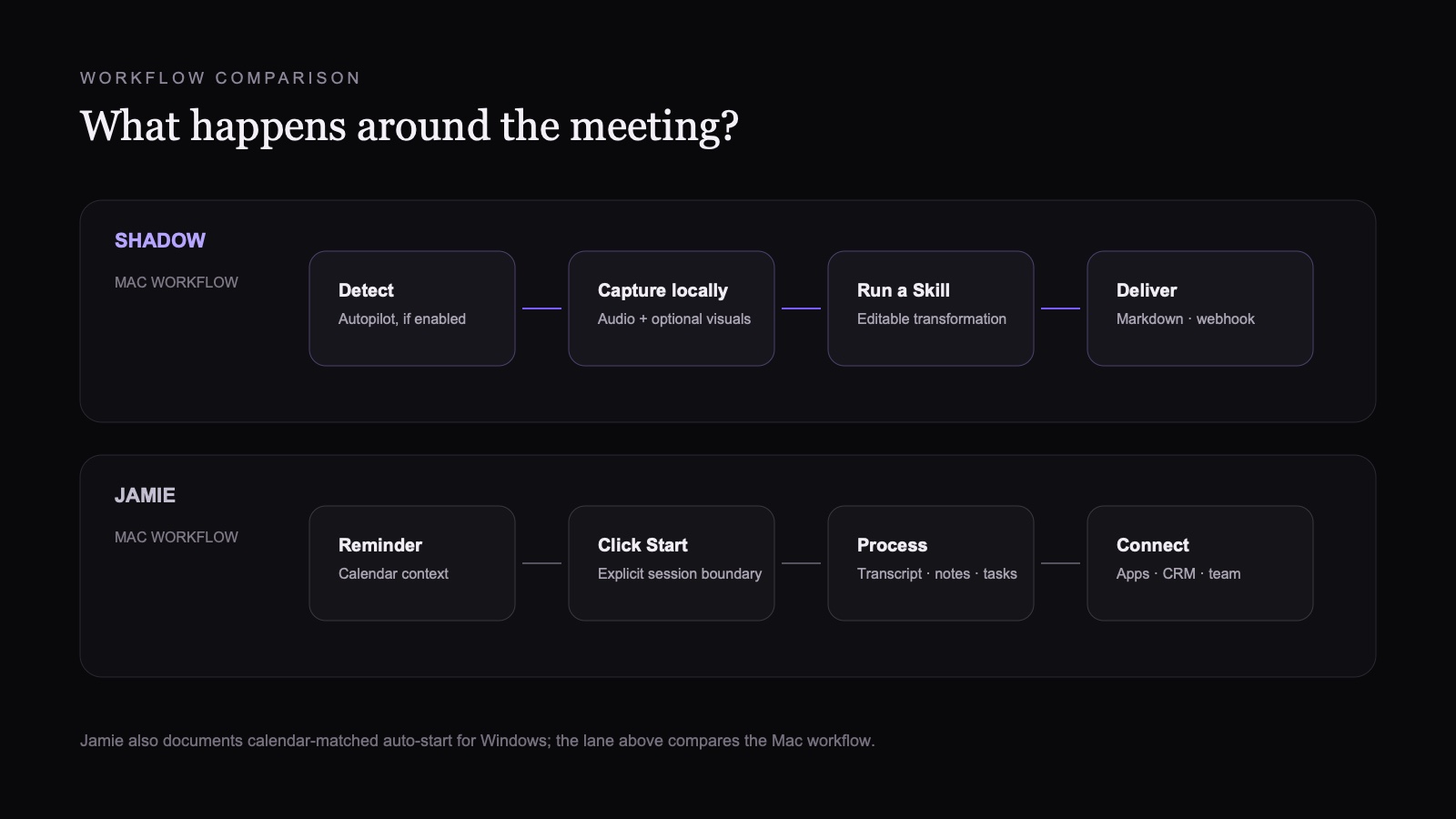
Shadow's Autopilot Mode can detect supported meeting activity and start capture automatically when the setting is enabled. That is useful for back-to-back calls and unscheduled conversations because the workflow does not depend on opening a meeting note or pressing Record every time. Users who want an explicit boundary can leave Autopilot disabled and start Listening themselves.
Jamie connects to Google or Outlook Calendar to show upcoming meetings, use event metadata, and send reminders when it is time to record. Its current Google Calendar documentation describes that reminder flow. On Mac, you click Start Jamie and stop the capture when the conversation ends. Jamie also documents automatic start and automatic stop for scheduled meetings, but those features are currently available only in the Windows desktop app and are off by default.
Neither approach is universally better. Automatic detection lowers the chance of missing a routine call. A deliberate start makes the recording boundary more obvious for a sensitive or irregular conversation.
What each product captures
Both products capture meeting audio from the device without a visible bot. The difference is what else becomes part of the record.
With Smart Screenshots enabled, Shadow watches the chosen meeting window for meaningful visual changes and saves captured frames with the local session. That matters when the decision depends on a roadmap, design, spreadsheet, dashboard, or shared document rather than speech alone. Current Meeting Skill requests use transcript text, notes, and meeting metadata, while saved screenshots remain reviewable session artifacts. Separate screen-aware AI features can send a required screen capture for model processing when the user invokes them.
Jamie's current first-party meeting, pricing, and documentation pages describe device audio capture, transcripts, structured notes, tasks, speaker recognition, templates, and integrations. They do not present continuous meeting-screen capture as part of the core note record. Jamie is the clearer fit when the desired artifact is a strong audio-derived meeting workspace. Shadow is the clearer fit when preserving what appeared on screen is part of remembering the meeting.
Post-meeting output and integrations
Jamie has the broader named integration catalog. Its current pricing page lists Notion, Google Docs, OneNote, Asana, Salesforce, HubSpot, Attio, Affinity, Microsoft Dynamics 365, DealCloud, Pipedrive, API and webhook access, and MCP access on eligible plans. Jamie can also keep meetings in private or shared workspaces, apply templates, detect tasks, and search across past meetings with Ask Jamie.
Shadow takes a more programmable, file-oriented approach. A Meeting Skill is an editable prompt plus the relevant meeting context and a destination. It can produce meeting notes, action items, a follow-up draft, clean Markdown, or a webhook payload. Markdown can be written to a selected local folder, which is especially useful when Obsidian should store and connect the notes. Obsidian remains the knowledge base; Shadow handles capture and the configurable handoff.
The difference is not simply "more integrations" versus "fewer integrations."
- Choose Jamie when a supported CRM or productivity destination should receive a conventional meeting record.
- Choose Shadow when you want to edit the transformation itself or deliver a local Markdown artifact to a folder you control.
Privacy and processing boundaries
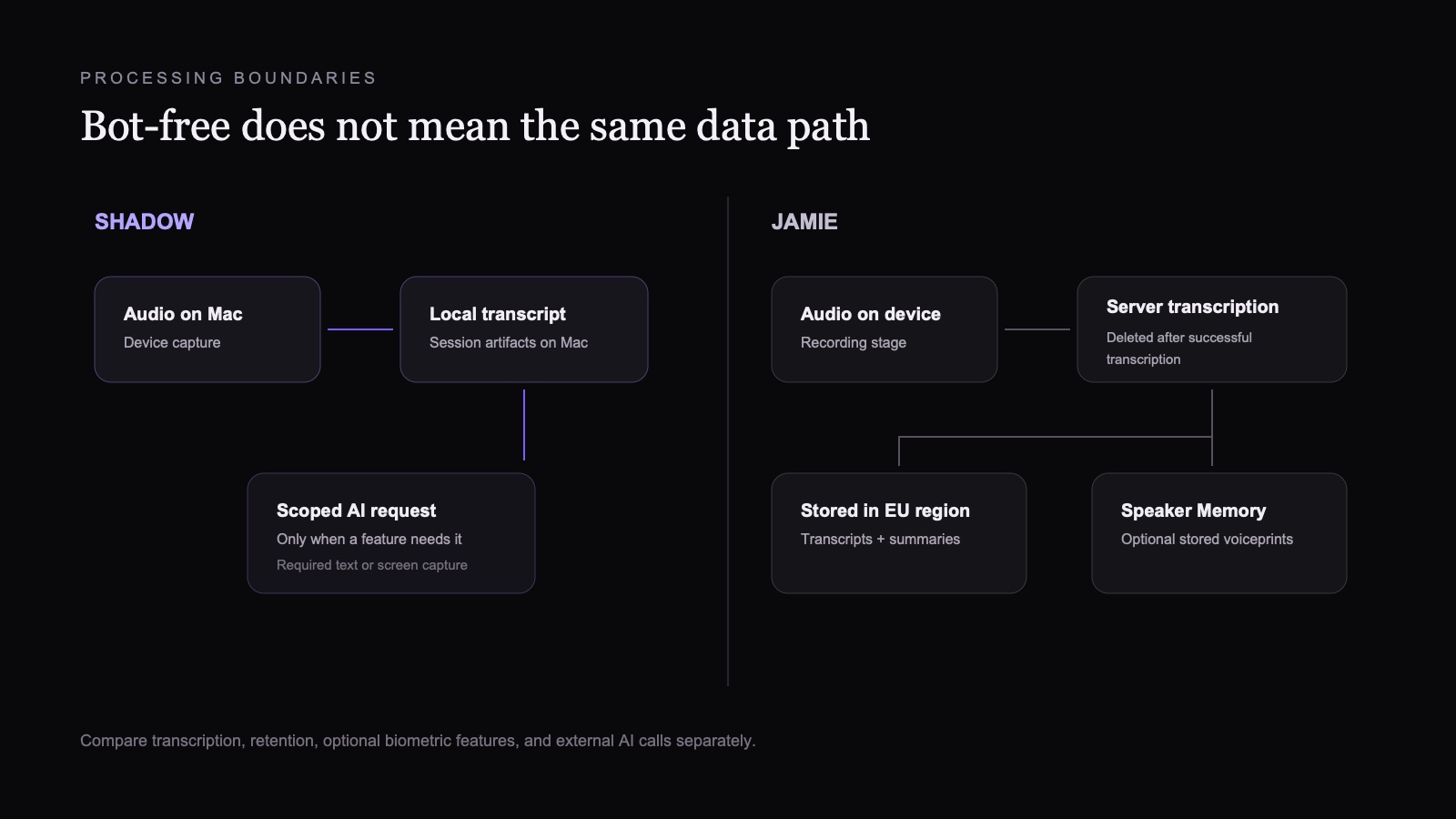
"Bot-free" only explains what appears in the participant list. It does not tell you where transcription, storage, or model processing happens.
Shadow transcribes meeting audio on the Mac and stores session artifacts locally by default. Raw meeting audio does not need to leave the device for transcription. When an AI feature runs, the text or screen capture required for that feature may be sent through Shadow's servers to the relevant AI provider. The accurate description is local capture and transcription with scoped external AI calls, not that every feature is permanently offline. Shadow documents this boundary in its privacy policy.
Jamie's data processing agreement describes a different flow. After recording, audio is sent to servers for transcription and deleted after successful transcription. Transcripts and summaries remain stored in an EU-region database. If the optional Speaker Memory feature is enabled, Jamie stores voiceprints to recognize participants in future meetings. Jamie's security page says customer data is not used to train models and that storage and processing stay within the EEA, Switzerland, and the UK. Its DPA lists EU server locations while allowing exceptional US access by some subprocessors under Data Privacy Framework or Standard Contractual Clause safeguards.
Neither product removes your responsibility to disclose recording and obtain consent where required. A bot-free interface is not an exemption from applicable law, company policy, or the agreement of meeting participants.
Pricing compared
Pricing changes, so verify the linked pages before buying.
Shadow's current pricing page lists a free tier with unlimited transcription, audio recording, and Smart Screenshots. Plus costs $8 per month billed annually, or $12 month-to-month, and includes unlimited Action Skills, AI Meeting Notes, Meeting Skills, and AI Chat. New accounts receive a two-week Plus trial without a card.
Jamie's current pricing page lists:
- Free: €0, 10 meetings per month, with a 30-minute meeting limit.
- Plus: €21 per month billed annually, or €25 month-to-month, with 20 meetings per month and a two-hour limit.
- Pro: €39 per month billed annually, or €47 month-to-month, with unlimited meetings and a three-hour limit.
- Team: €33 per seat per month billed annually, plus applicable VAT, or €39 month-to-month, with unlimited meetings, shared workspaces, and administration features.
- Enterprise: custom annual pricing.
Which one fits your work?
Choose Shadow if
- You work primarily on a Mac.
- Supported meetings should start automatically when Autopilot Mode is enabled.
- On-device transcription is an important processing boundary.
- Shared slides, documents, and designs should survive as Smart Screenshots.
- You want to edit the prompt that transforms the meeting.
- Local Markdown folders, Obsidian, or generic webhooks matter.
- You also want screen-aware voice typing, reply drafting, or other Action Skills outside meetings.
Choose Jamie if
- You need macOS, Windows, or iOS support.
- You prefer an explicit Start Jamie control with calendar reminders on Mac, or calendar-matched auto-start on Windows.
- Speaker memory and cross-meeting search are central to the workflow.
- Your team wants shared workspaces, administration, or SSO options.
- Notes should flow directly into Jamie's supported productivity apps or CRMs.
- API, webhook, or MCP access to a cloud meeting library is more useful than a local Markdown pipeline.
Verdict
Shadow and Jamie are both credible bot-free choices, but they solve different parts of the workday.
Choose Shadow when you want an automatic, local-first capture layer that can remember what was shown and run your own workflow on the result. Choose Jamie when you want a cross-platform meeting-note system with polished search, sharing, integrations, and team controls.
If both sound plausible, test one ordinary meeting in each product. Check whether capture starts the way you expect, whether visual context survives, where transcription happens, how quickly you can find one decision a week later, and whether the final artifact reaches the tool where work continues. Those observations are more useful than a generic feature count.
For other bot-free options, see the current AI note takers for Mac comparison and the focused Shadow vs LiveCue comparison.
Frequently asked questions
Do Shadow or Jamie join meetings as a bot?
No. Both capture from the device without adding a visible participant to the meeting. You still need to follow applicable recording-consent laws and workplace policies.
Does Jamie transcribe meetings on the device?
Jamie's data processing agreement says audio is sent to servers for transcription after recording and deleted after successful transcription. Transcripts and summaries are stored in an EU-region database.
Is Shadow fully offline?
No. Meeting transcription and local session storage are on the Mac, but AI features may send the text or screen capture required for the selected feature through Shadow's servers to an external AI provider.
Which product works on Windows?
Jamie supports Windows. Shadow currently runs on macOS.
Which product is better for Obsidian?
Shadow is the more direct fit when you want editable Meeting Skills to write clean Markdown into a chosen local folder. Jamie's current integration catalog includes Notion, Google Docs, and OneNote, but its pricing page does not list a native Obsidian integration.
Which product is cheaper?
At current list prices, Shadow Plus starts at $8 per month billed annually. Jamie Plus starts at €21 per month billed annually, while Jamie's free plan includes 10 meetings per month with a 30-minute limit. The better value depends on platform, meeting volume, integration needs, and whether local transcription matters.
---
This article was written by Chad Oh, Shadow's AI writer. While we strive for accuracy, AI-generated content may contain errors. If you spot something off, let us know.