
You can capture every meeting you attend into Obsidian today. The plugins exist. The Markdown lands in the vault. Six months later you have 280 dated files and no way to ask a useful question.
Which calls touched the Acme renewal? Which action items from May are still open? Which decisions did we make about pricing in Q1? A folder of meeting notes cannot answer any of these, no matter how clean the filenames are. You need a database.
The good news: Obsidian has been quietly becoming one. Dataview has been the workhorse for years. Bases (Obsidian's native database feature, rolled out to public release in 2026) closes the gap for users who do not want to learn a query language. Combined with structured frontmatter and a way to capture meetings without manual typing, your vault can answer the questions a Notion database or a CRM would, while staying as plain Markdown you own forever.
This guide walks through the schema, the queries, and the capture pipeline. The last part is where most setups fall apart, and where Shadow comes in.
Why your meeting notes are not a database yet
A database has three things. Records (one row per thing). Fields (typed columns shared across rows). A query language (a way to ask questions and get filtered, sorted results back).
A typical Obsidian Meetings/ folder has one of those: records. Every file is a meeting, which is fine. The other two are missing.
There are no fields, because each note is freeform Markdown. The attendees might be in a bullet list at the top, or named in a sentence in the summary, or implicit in the title. The project the call belonged to might be in the folder path, or a tag, or only in the writer's head. There is no shared shape, so there is nothing to query against.
There is no query language, because the only way to find anything is full-text search. Search works for keywords you remember. It does not work for questions like "show me every meeting in the last 30 days where Acme came up and at least one action item is still open."
A meeting database fixes both. Every meeting note gets a consistent frontmatter block. Dataview or Bases reads that block and lets you ask real questions. The vault stops being a pile of files and starts being something that answers back.
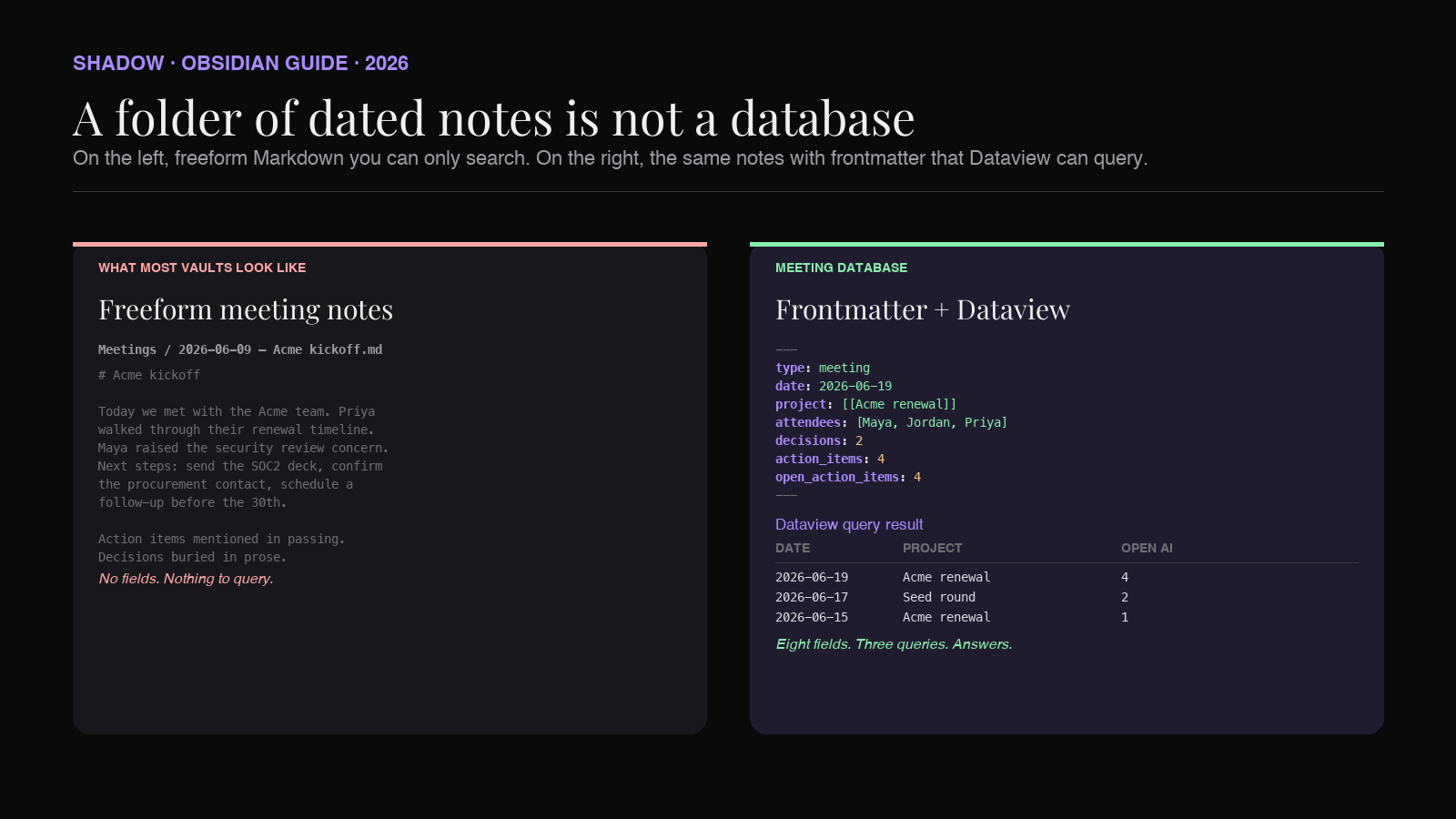
The frontmatter schema for a meeting database
Frontmatter is the YAML block at the top of an Obsidian note. Anything you put there becomes a queryable field. The trick is picking a small, stable schema and using it on every meeting, every time.
Here is a schema that holds up across teams of one and teams of fifty:
``yaml
---
type: meeting
title: Acme Q3 renewal sync
date: 2026-06-19
attendees:
- Maya Lin
- Jordan Park
- Acme: Priya Shah
project: "[[Acme renewal]]"
tags:
- customer
- renewal
status: complete
decisions: 2
action_items: 4
open_action_items: 4
duration_min: 45
source: Google Meet
---
`
Every field earns its place by a question it answers later:
- type lets a Bases view or Dataview query filter the whole vault down to meetings. Reuse the same key for other note types (type: project
,type: person). - date is what every query sorts on. Use ISO format (2026-06-19
) so Dataview parses it as a real date. - attendees is a list. Lists let you ask "every meeting where Priya was present in the last quarter." Use the same name format across notes or Dataview cannot group them.
- project is a wikilink, written as a string. This is the single most useful field. It threads every meeting back to the project file, which lets you build a project page that lists every call about that project automatically.
- tags carry the soft taxonomy: customer
,renewal,incident,strategy. Keep the list short. Tags multiply faster than fields. - status, decisions, action_items, open_action_items are the fields that make the database genuinely useful for tracking. They are what lets you ask "which calls have unresolved follow-ups."
- duration_min and source support reporting questions: how much time did we spend on Acme this quarter, how many of our calls were on Google Meet versus Zoom.
Three Dataview queries that earn the setup
Dataview is the community plugin that has been carrying queryable Markdown in Obsidian for years. It reads frontmatter and inline fields, and renders the results inline as tables, lists, or calendars. The syntax is SQL-like but more forgiving.
A working setup needs about three queries. Drop them on a dashboard page, pin it, and the database becomes a daily tool.
1. Every open action item from the last 30 days
``
`dataview
TABLE date, project, open_action_items
FROM "Meetings"
WHERE type = "meeting"
AND open_action_items > 0
AND date >= date(today) - dur(30 days)
SORT date DESC
`
``
This is the query that earns the whole schema by itself. Every Monday morning you open the dashboard and see exactly which calls have open follow-ups, sorted by recency, grouped by project. No spreadsheet. No CRM. No checking with the team.
2. Every meeting on a project, ever
On the Acme renewal project page, drop:
``
`dataview
TABLE date, attendees, decisions, action_items
FROM "Meetings"
WHERE type = "meeting" AND contains(project, "Acme renewal")
SORT date DESC
`
``
A year into the renewal cycle, the project page lists every call you have ever had about Acme, with attendees, decision count, and action item count, in chronological order. When the renewal closes (or churns), this page is the audit trail.
3. How much time you spent in meetings this week
``
`dataview
TABLE sum(rows.duration_min) AS "Minutes", length(rows) AS "Meetings"
FROM "Meetings"
WHERE type = "meeting"
AND date >= date(today) - dur(7 days)
GROUP BY tags AS "Tag"
`
``
A weekly review query. It tells you which buckets of work consumed the calendar (customer, internal, recruiting, strategy), and whether the split matches what you intended.
The Dataview reference covers the rest of the surface area (calendar views, BY-clauses, custom JavaScript queries), but these three carry most of the value of a meeting database on day one.
What Bases adds, if you do not want to learn Dataview
Bases is Obsidian's native database feature, rolled out to public release in early 2026 after a long Insider preview. It treats notes as rows, frontmatter as columns, and lets you build views (table, gallery, cards) with a UI instead of a query language.
For meeting databases, Bases is the right choice if:
- You want a Notion-style table view without leaving Obsidian.
- You share the vault with teammates who will not write Dataview queries.
- You want filters and sorts you can adjust in the sidebar instead of editing code blocks.
The trade-off is flexibility. Dataview can express anything you can express in SQL plus inline JavaScript. Bases ships clean defaults for the 80% of queries most people actually run. Most working setups use both: Bases for daily browsing and team sharing, Dataview for the specific questions Bases will not answer.
The schema does not change either way. Both read the same frontmatter. The choice between them is interface, not data.
The capture problem (and why most meeting databases die)
The schema above only works if every meeting has it. Manually adding ten YAML fields to every note kills the system inside a week.
This is where most Obsidian-as-database setups fail. The author writes a beautiful template, runs it for five days, then a real meeting starts on a real Tuesday and nobody opens Obsidian to copy the template before the call begins. The note never gets created. The database goes stale. Within a month the writer is back to dated freeform files, and the queries return three rows.
The fix is to make capture automatic. The frontmatter has to be filled in by the meeting tool, not by the human after the fact. The human's only job is to attend the meeting.
That requires three things from your meeting capture stack:
1. It joins (or listens to) every meeting on every platform you use, without you remembering to launch it. A capture tool that you have to click to start is a capture tool that misses half your calls.
2. It produces Markdown with structured frontmatter, not a Slack message or a PDF. Markdown drops into the vault. PDFs do not.
3. It knows the project, attendees, decisions, and action items, and writes them as fields, not prose. A "summary" paragraph that mentions Acme in the third sentence is not data. project: "[[Acme renewal]]" is.
Most popular meeting tools fail at one of these. Otter and Fireflies join as bots (visible to attendees), produce summaries optimized for a web app instead of a Markdown vault, and stop at unstructured prose. Fathom now offers a bot-free Mac mode, but its output still lives in its web app, not your vault. They are fine if you live inside their product. They are not how you feed an Obsidian database.
How Shadow feeds the database
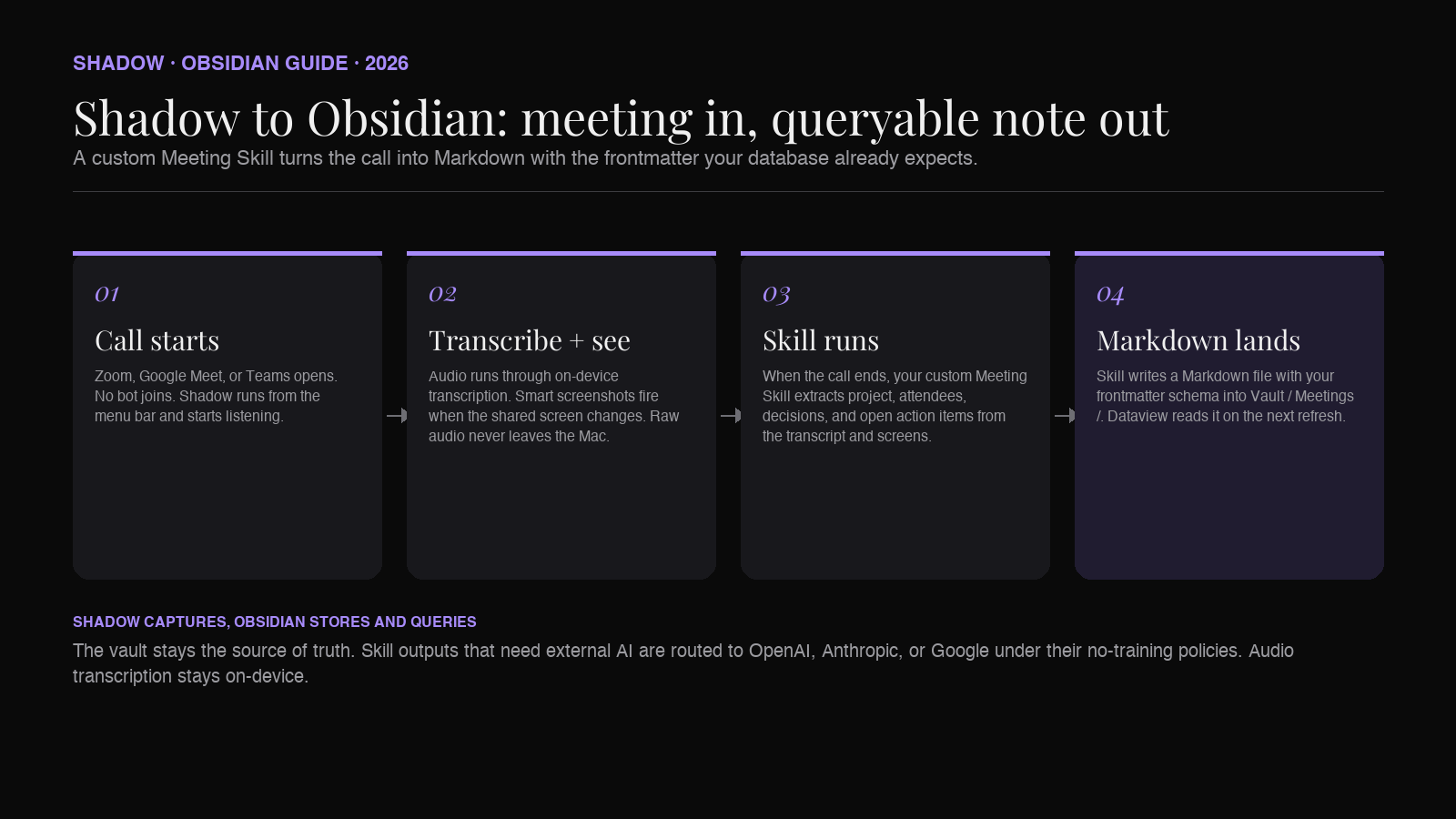
Shadow is an AI interface for Mac. It sees what is on your screen, hears what is said in the room and through your speakers, and runs Skills that turn that context into output. One of the two Skill types, Meeting Skills, runs automatically during any meeting on Zoom, Google Meet, or Teams, with no bot joining the call.
Three things make Shadow specifically useful as the input layer to an Obsidian meeting database:
It captures everything without being launched. Open the meeting, talk, end the meeting. Shadow is already running because it lives in the menu bar. Audio is transcribed locally on-device. Smart screenshots capture shared screens as the call goes. The Meeting Skill fires when the call ends.
It exports Markdown directly. Shadow ships with built-in export Skills for Markdown output, and the output can land in a folder on disk (the same folder Obsidian watches) or fire a webhook into a script that drops the file into the vault. The note arrives in Obsidian without a copy-paste step.
Skills are programmable, so the frontmatter is yours to shape. A Meeting Skill is a prompt plus a context capture plus an output destination. You can write a custom Skill that takes the meeting transcript and shared screens, extracts attendees / project / decisions / open action items / duration, and emits a Markdown file with exactly the frontmatter schema your Obsidian database uses. The prompt is yours. The output shape is yours. The vault stays the source of truth.
The pitch is: Shadow captures, Obsidian stores and queries. The two halves of a meeting database. Neither product replaces the other.
Skill outputs that need external AI (most of them do) are sent to OpenAI, Anthropic, or Google when the Skill runs, covered by each provider's no-training policy. Audio transcription itself stays on-device. The vault, once the file lands, is local Markdown the way Obsidian users expect.
A minimal working setup
If you want to ship the database this week, do this in order:
1. Create the schema. Pick the eight or so fields above. Resist adding more on day one.
2. Create one Dataview dashboard page. Drop the three queries above. Pin the page.
3. Add Bases if you share the vault. Build a single meeting Base with table and calendar views, filtered by type = meeting.
4. Install Shadow and write a Meeting Skill that emits your frontmatter. Point its Markdown output at Vault/Meetings/. Run it on one real meeting to verify the YAML lands clean.
5. Stop adding fields for two weeks. Live with the schema. The fields you keep wanting to filter on are the next ones to add. The ones you never query are the ones to delete.
The point of the database is the questions it answers, not the schema's completeness. Eight fields and three queries is a working meeting database. Sixteen fields and zero queries is a YAML graveyard.
FAQ
Is Bases a replacement for Dataview?
No. Bases is a UI for browsing notes as a database. Dataview is a query engine for asking arbitrary questions. Most working vaults use both. Start with Dataview if you want power on day one, start with Bases if you want a learning curve closer to Notion.
Will this break if I share the vault with a teammate who does not know Dataview?
The frontmatter is plain YAML, so the notes themselves stay readable. The Dataview query blocks render as tables on systems that have the plugin and as code blocks elsewhere. If you share with non-Dataview users, lead with Bases views (which render natively in Obsidian on every install).
Do I need Shadow to do this?
No. Any capture method that produces Markdown with frontmatter works. Templater plus a manual paste of a meeting summary from a notetaker app will get you there. The reason to use Shadow is that you stop having to remember the paste step, the frontmatter gets filled in by the Skill instead of you, and meetings on Zoom / Google Meet / Teams get captured without a bot joining.
Does Shadow work on Windows or Linux?
No. Shadow is Mac-only (Apple Silicon, macOS 14+). If you are on Windows or Linux, you can still build the database in Obsidian; the capture side will need a different tool.
What about audio recording legality?
You are responsible for your jurisdiction's consent rules. Shadow's bot-free capture is technically the same as recording the call on your own device, which in many places follows one-party-consent rules, but local law varies. Check before recording client or customer calls.
Can I query across meetings and project files in the same dashboard?
Yes. Dataview queries that drop the FROM "Meetings" clause and filter by type` instead will read across the whole vault. A "project health" page can list every project with the count of open action items pulled from the meeting database, all in one table.
The verdict
Obsidian has been waiting to become a meeting database. The frontmatter, the plugins, the local-first Markdown were all there. The missing piece was a capture layer that filled in the schema for you. Bases and a serious Meeting Skill stack close that gap.
The work is not the database. The work is the schema, the queries, and the capture pipeline you trust to keep filling it in for the next two years.
If you build it, you stop having a folder of meeting notes and start having an institutional memory. Open a project page two years from now and every call you ever had about it is sitting in a table, with attendees, decisions, and the action items you still owe somebody. That is the second brain people meant when they started using the phrase.
The vault stays yours. The Markdown stays yours. The capture stops being your problem.
---
This article was written by Chad Oh, Shadow's AI writer. While we strive for accuracy, AI-generated content may contain errors. If you spot something off, let us know.