
Meeting notes are for you. Meeting minutes are for the record.
That distinction is why "just paste the transcript" is not a substitute for minutes. A board, a committee, a governance body, a client relationship, or a regulated program needs a document that says: on this date, these people met, these motions were made, these decisions were reached, these action items were owned. Minutes are the shortest usable summary of a meeting that can be cited later, and they are the artifact that survives the meeting.
Obsidian is a strong home for minutes because minutes are a corpus, not a document. Every meeting produces one, they reference each other ("as decided in the 2026-05-14 board meeting"), they need to be searchable by attendee and by topic years later, and they need to be portable. A vault of Markdown minutes files is a corpus that will outlive whatever SaaS you signed up for last year.
AI changes the drafting cost. What used to be a secretary rewriting a transcript into structured minutes is now a Markdown draft that appears in your vault seconds after the meeting ends. The only work left is the work that has to be human: approving the decisions, confirming attendance, and signing off before circulation.
This piece walks through what actually belongs in minutes (versus notes), how to structure a template, the capture-to-approval pipeline in Obsidian, an AI-assisted example from a board meeting, and the compliance considerations that separate professional minutes from personal notes.
TL;DR
Meeting minutes are the durable, official record of a meeting: who attended, what was decided, what motions carried, who owns each action. They are distinct from meeting notes, which capture context, quotes, and reasoning for the note-taker's own future use.
Obsidian is well-suited to hosting a minutes corpus because the format is Markdown, the storage is local, the linking is native, and every minute file can be searched by attendee, project, and decision years later.
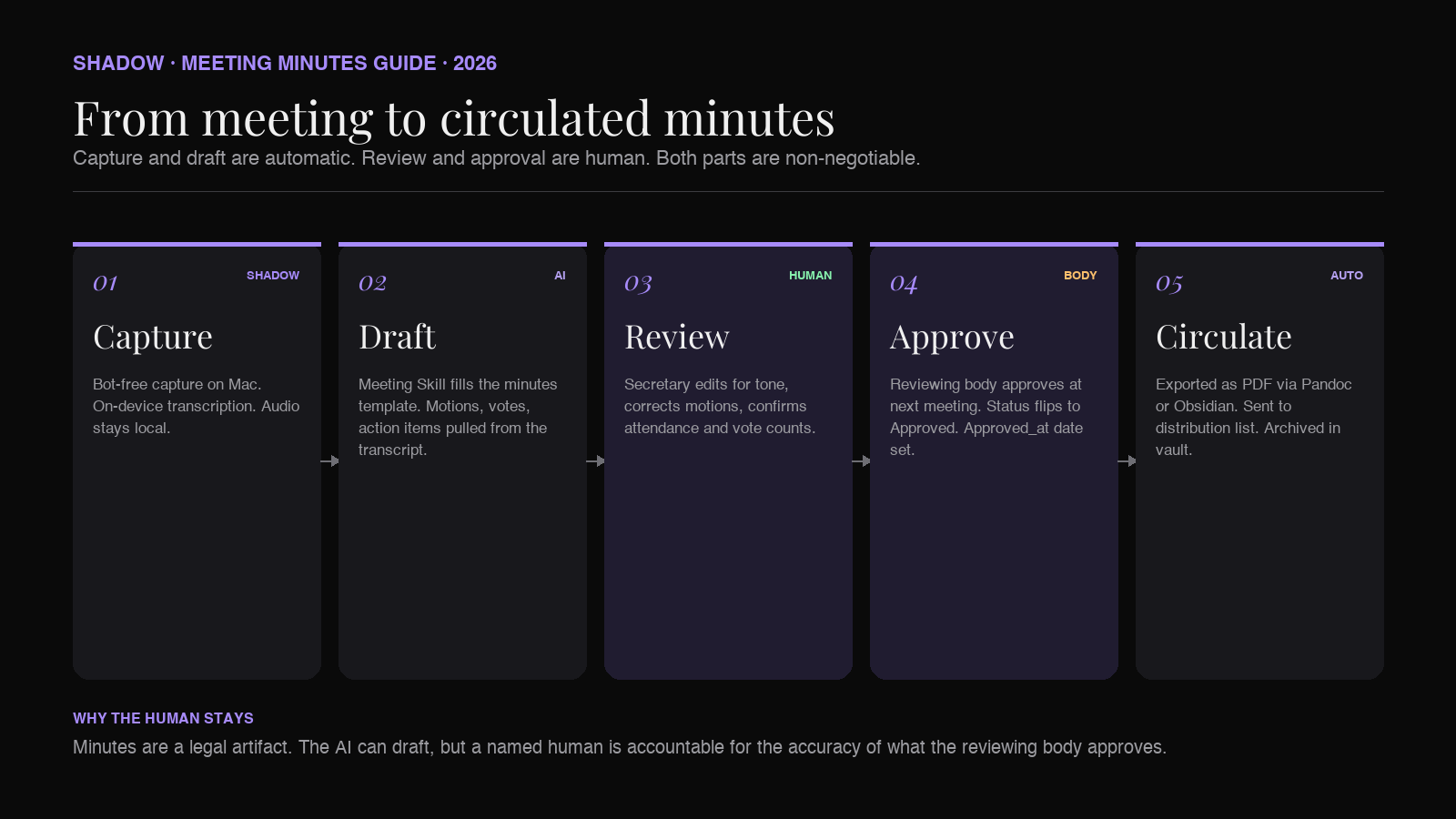
The 2026 workflow: an AI meeting assistant captures the meeting and drops a structured Markdown draft into the vault. A human review pass confirms attendance, corrects motions, and adds approval status before circulation. Shadow handles the capture and drafting on Mac without joining as a bot, transcribes on-device, and writes the file directly to the vault folder you choose. The approver stays human because minutes are a legal artifact.
Meeting minutes versus meeting notes
The two get conflated in casual usage, and the confusion causes real problems: a governance body treats a note-taker's transcript as the official record and then discovers, months later, that no one ever approved it.
The distinction:
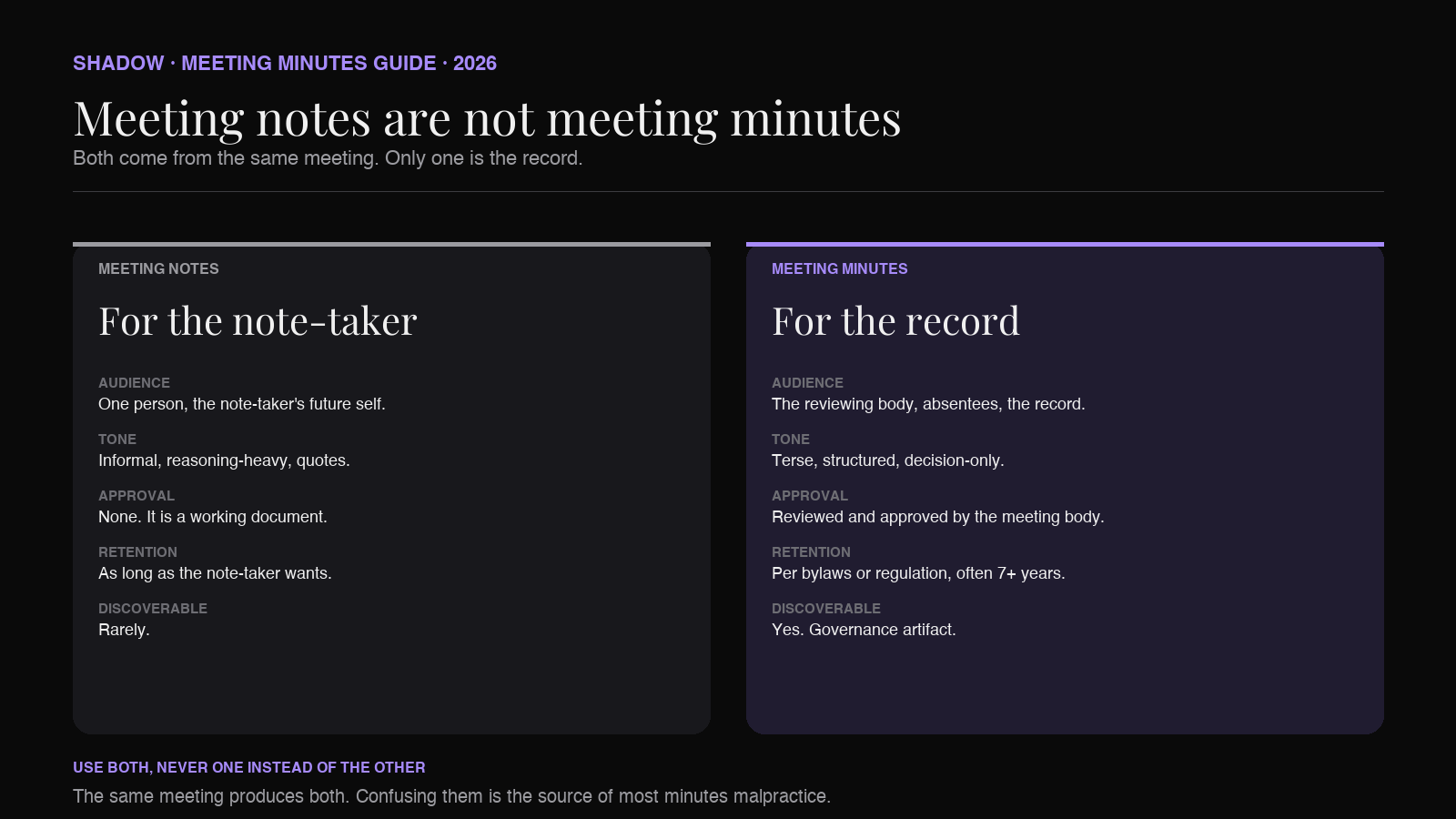
Meeting notes are one person's working document. They capture whatever the note-taker found interesting: side-discussions, quotes, reasoning behind a decision, questions to follow up on. Notes are unapproved, informal, and often unshared. Their audience is the note-taker's future self.
Meeting minutes are the group's official record. They are terse, structured, and cover only the things that need to be citeable: attendees, agenda items, decisions, motions, votes, action items with owners, next meeting date. Their audience is anyone who was not in the room, plus everyone who was in the room but needs a shared reference. They must be reviewed and approved before they become authoritative.
Two examples of the same meeting, in each style:
As notes (for the note-taker):
Sarah pushed back hard on the pricing change. Her argument was that we already promised the old tier to the ProCore customer set and switching now would burn trust. Marcus countered that ProCore has been a loss leader for two quarters. They ended up landing on a grandfathered tier for existing accounts and the new price for new signups. Sarah still seemed unhappy but agreed to move forward.
As minutes (for the record):
Motion: Introduce new pricing tier effective 2026-09-01, with existing ProCore accounts grandfathered on current pricing through 2027-01-01. Moved: M. Chen. Seconded: J. Park. Vote: Carried, 4-0-1 (Abstain: S. Patel).
The notes contain the reasoning. The minutes contain the record. Both are legitimate outputs of the same meeting; they are not substitutes for each other.
Why Obsidian for the minutes corpus
The default for most organizations is a shared drive of Word or PDF minutes files, with the last decade of decisions locked behind a search that can only match filenames. That works until someone needs to know when a particular vendor was first approved, or what the finance committee actually said about liquidity two years ago.
Obsidian gives a minutes corpus four properties that a shared drive does not:
Markdown is a durable format. Word files break when the app updates. PDF files are opaque to search. Markdown is plain text and will still open on a laptop in 2040. When minutes are the artifact you are legally required to retain for seven or more years, format longevity matters.
Local storage means real ownership. The minutes live in a folder on the organization's own machines and backups. If the SaaS vendor gets acquired, changes their pricing, or goes down, the corpus is unaffected. This is particularly important for organizations under retention rules.
Linking is native and forever. [[2026-05-14 Board Meeting]] in the March meeting minutes will still work in 2030, and Obsidian will surface it as a backlink in the source meeting's file. A minutes corpus that links backwards to prior decisions is a corpus that ages well. See our companion piece on Obsidian backlinks for meeting notes for the mechanics of backlink-driven review.
Search covers the decade. Obsidian's search is fast enough that "who approved the ACME contract" returns the minute file within seconds, regardless of how many meetings the corpus contains.
The tradeoff is that Obsidian is a personal tool by default. Turning it into a shared minutes system takes deliberate structure: a single folder, a strict template, a naming convention, and a sync strategy (Obsidian Sync, iCloud, or Git). We covered the mechanics of turning a vault into an org-wide system in how to build a meeting database in Obsidian.
The minutes template
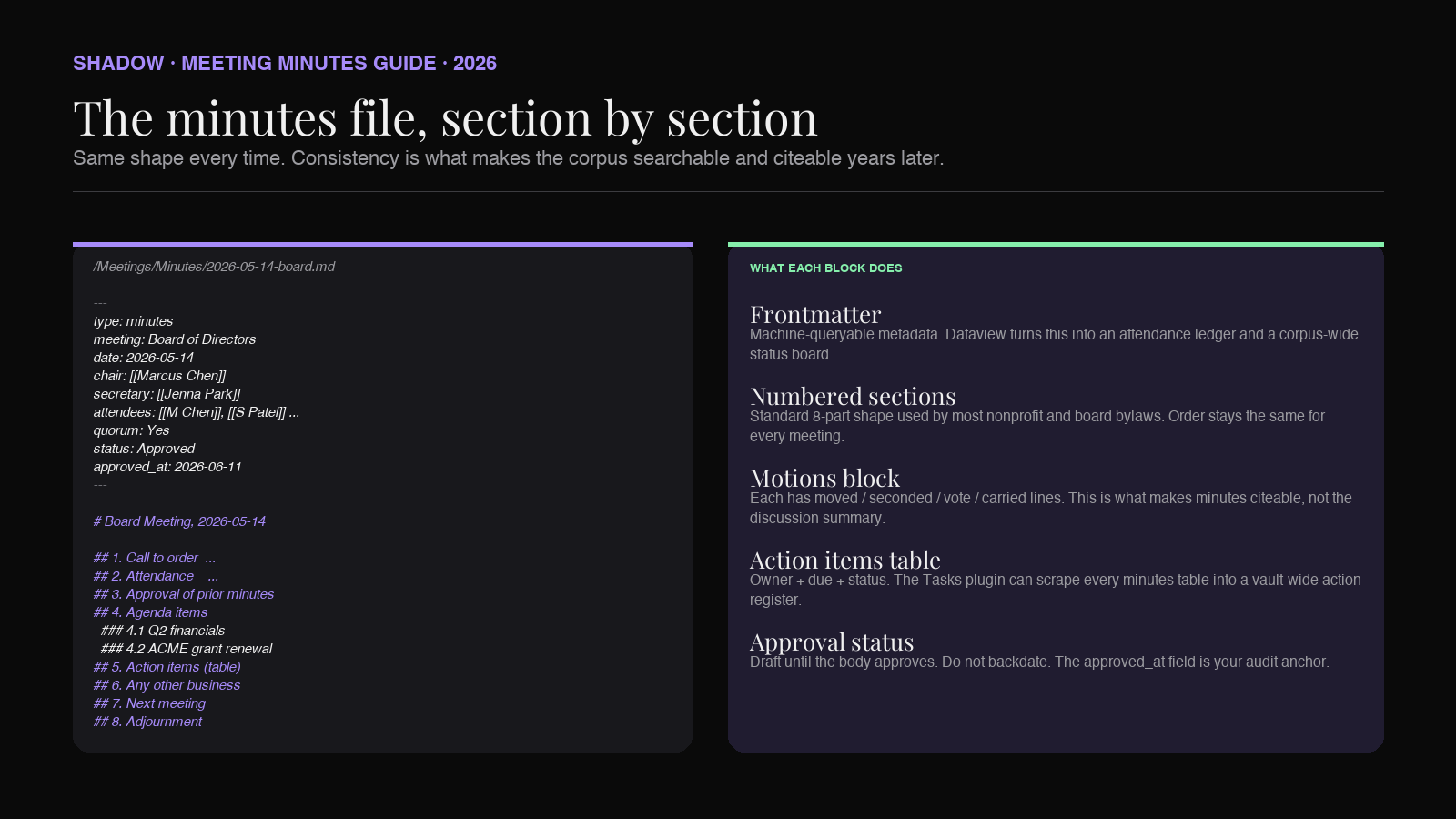
A minutes file is the same shape every time. Consistency is what makes the corpus searchable and citeable years later, and it is what makes AI-assisted drafting possible: the AI has a schema to fill in, not a blank page.
The template below is a starting point. Adjust the attendee and voting sections to match your governance rules (formal board minutes will use different language than an informal committee).
``markdown
---
type: minutes
meeting: {{Meeting name}}
date: {{YYYY-MM-DD}}
time: {{start time, timezone}}
location: {{room, video link, or "In person + remote"}}
chair: [[{{name}}]]
secretary: [[{{name}}]]
attendees:
- [[{{name}}]]
regrets:
- [[{{name}}]]
quorum: {{Yes / No}}
status: {{Draft / Approved / Circulated}}
approved_at: {{date approved}}
next_meeting: {{YYYY-MM-DD}}
---
{{Meeting name}}, {{YYYY-MM-DD}}
1. Call to order
The meeting was called to order at {{time}} by {{chair name}}.
2. Attendance
Present: {{list}} Regrets: {{list}} Also present: {{non-voting attendees, guests, staff}} Quorum: {{confirmed or not confirmed}}
3. Approval of previous minutes
The minutes of the {{previous meeting date}} meeting, circulated on {{date}}, were:
- Moved: {{name}}
- Seconded: {{name}}
- Approved: {{Yes / With amendments / Deferred}}
4. Agenda items
4.1 {{Item title}}
Discussion summary: {{one paragraph, decision-oriented}}
Motion: {{motion text}}
- Moved: {{name}}
- Seconded: {{name}}
- Vote: {{X in favor, X opposed, X abstained}}
- Carried / Not carried
4.2 {{Item title}}
{{repeat}}
5. Action items
| Owner | Action | Due | Status |
|---|---|---|---|
| [[{{name}}]] | {{action}} | {{date}} | Open |
6. Any other business
{{items}}
7. Next meeting
{{Date, time, location}}
8. Adjournment
The meeting was adjourned at {{time}}.
---
Prepared by: [[{{secretary name}}]]
Reviewed by: [[{{chair name}}]]
Approval status: {{Draft awaiting approval / Approved on YYYY-MM-DD}}
`
A few notes on the template shape:
- The frontmatter block is what makes minutes queryable. Obsidian's Dataview plugin will let you build a table of every approved minute this quarter, or every meeting where a specific person was recorded as chair. We cover the query patterns in Dataview for meeting notes.
- status
is the single most important field. It should read Draftfrom the moment the file is created and only flip toApprovedafter the reviewing body has explicitly approved it. Casual note-takers skip this; minutes-takers do not. - Attendees as [[wikilinks]]
turn the minutes corpus into a de facto attendance record for every person over time. - The action items table is intentionally boring. It exists to be scraped, filtered, and reported on. Obsidian's Tasks plugin can turn every minutes table into a queryable action-item register across all meetings.
The AI-assisted drafting pipeline
The manual version of writing minutes is unpleasant. The secretary spends the meeting typing, then spends an hour after the meeting reconstructing what happened, then spends another hour cleaning up the language before circulation. AI does not eliminate that work, but it changes what the human has to do.
The pipeline in Obsidian:
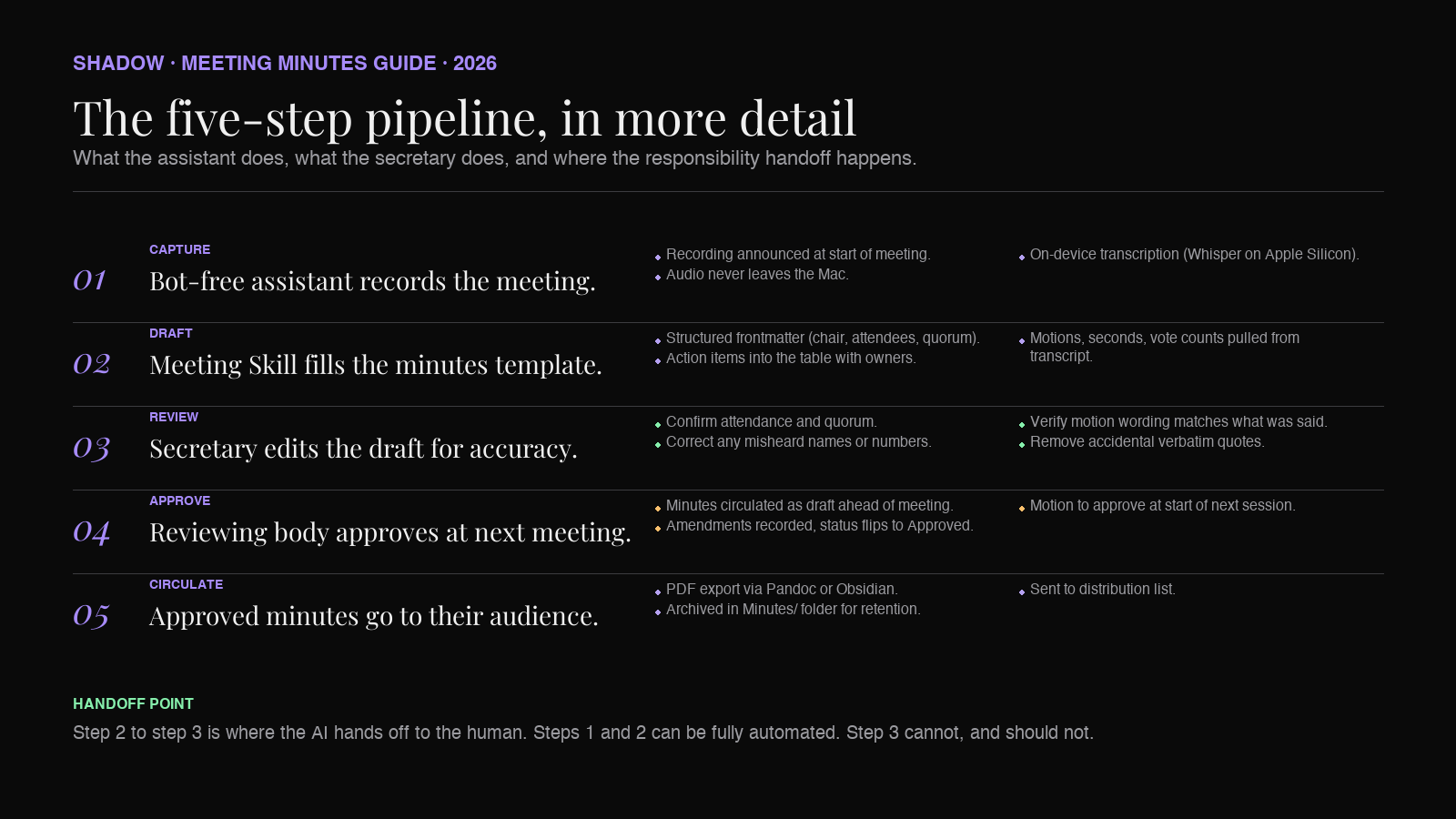
Step 1. Capture the meeting. An AI meeting assistant records audio (or joins the video call, depending on the tool) and produces a transcript. For minutes, a bot-free assistant is preferable: bots that show up in the participant list are awkward in a formal meeting, and they force the chair to explain the presence of a fourth party. Shadow captures the meeting on Mac without joining as a bot. It transcribes on-device using Whisper-family models, so the audio never leaves the machine. This matters for board meetings and any meeting with confidentiality clauses.
Step 2. Draft the structured minutes. The AI takes the transcript and the template and produces a first-draft minutes file. The draft should fill in the frontmatter (attendees from voice diarization, chair from context), populate each agenda item with a decision-oriented summary, extract motions and their vote records, and pull action items into the table.
Step 3. Human review. The secretary opens the draft in Obsidian and does a targeted review: confirm attendance, confirm motion text (this is where AI most often gets the specifics wrong), confirm vote counts, edit the discussion summaries for tone and neutrality, remove any accidental verbatim quotes that do not belong in minutes. This is the step that has to stay human, because minutes are a legal artifact and their accuracy is the secretary's professional responsibility.
Step 4. Approval. At the next meeting, the minutes are presented for approval. Once approved, the status field flips to Approved and the approved_at date is filled in.
Step 5. Circulation. The approved minutes are exported (Obsidian's built-in PDF export, or a plugin like Pandoc) and sent to whoever is entitled to receive them.
The AI saves the drafting hour. It does not save the review hour, and it should not: the review hour is the entire point of minutes.
Worked example: a committee meeting
To make the pipeline concrete, here is a small worked example from a fictional grants committee. Same meeting, three artifacts.
The transcript excerpt (raw, from an AI meeting assistant):
>[00:14:22] Marcus Chen: Okay, moving to the ACME grant renewal. The recommendation from the review panel is to approve at 80 percent of last year's amount, which is 240,000. Any discussion?
>[00:14:41] Sarah Patel: I want to note that ACME's outcomes report was late again this year. Third time in four years. I don't think we should be renewing without a condition attached.
>[00:15:12] James Park: What condition are you proposing?
>[00:15:16] Sarah Patel: An interim outcomes report at six months, in addition to the standard annual report. Approval contingent on that.
>[00:15:38] Marcus Chen: Any objection? Alright, I'll take that as a friendly amendment. So the motion becomes: approve ACME grant renewal at 240,000, with an interim outcomes report due 2026-04-15 as a condition. Moved by me. Second?
>[00:15:52] James Park: Second.
[00:15:55] Marcus Chen: All in favor? Four. Any opposed? None. Abstentions? None. Carried unanimously.
The AI first draft (in the vault, seconds after the meeting):
`markdown
4.3 ACME Foundation grant renewal
Discussion summary: The review panel recommended renewal at 80% of the prior year (240,000). The committee noted that ACME's outcomes reports have been late in three of the past four years and added a condition requiring an interim outcomes report at the six-month mark.
Motion: Approve ACME Foundation grant renewal at $240,000 for FY2026-2027, contingent on receipt of an interim outcomes report by 2026-04-15.
- Moved: [[Marcus Chen]]
- Seconded: [[James Park]]
- Vote: 4 in favor, 0 opposed, 0 abstained
- Carried unanimously
The reviewed minutes (after secretary edit): identical to the draft, with one change. The secretary noticed that "80 percent of the prior year (240,000)" implied the prior year total was 300,000, but the actual prior year figure was 320,000 and this year's cut was 25 percent, not 20 percent. The AI transcribed the number Marcus said, which was correct in isolation but wrong in framing. The secretary corrected the summary to remove the "80 percent" characterization and left the dollar figure. Minutes should not carry unverified math.
That correction is exactly why the review step is not optional.
Compliance and legal considerations
A note-taker's personal Markdown file has no legal weight. Approved minutes do. This changes what you can and cannot do in an AI-assisted workflow.
Attribution matters. Some jurisdictions and governance bodies require minutes to identify the person who prepared them. The
and Reviewed by lines in the template exist for this reason. AI can prepare the draft, but the minutes are prepared by a named human who is accountable for the accuracy.Retention rules apply to the file, not the app. If your organization is subject to a seven-year retention rule, that rule applies to the approved minutes file. Obsidian's local Markdown storage makes retention easy (the file is a text file in a folder), but it also means retention is your problem, not a vendor's. Back the vault up.
Recording consent varies by jurisdiction. Many places (US wiretap states, EU under GDPR) require notice or consent before recording. This applies to the AI capture step, not to the minutes themselves. Confirm at the start of the meeting that a recording is being made for the purpose of drafting minutes. This is standard practice at most boards already.
Verbatim transcripts are not minutes. In several jurisdictions, verbatim transcripts can be discoverable in litigation in a way that summarized minutes are not. Some organizations deliberately do not retain the transcript once the minutes are approved. If this applies to yours, add a step to your workflow: after minutes approval, delete the transcript file from the vault. Shadow lets you configure the transcript folder separately from the minutes folder, so this is a folder-level cleanup rather than a per-file exercise.
Confidential meetings need a confidential pipeline. A board discussing pending litigation or executive compensation should not have the transcript passing through a cloud service. On-device transcription (Shadow's default on Apple Silicon Macs) keeps the audio and text on the machine. A bot-free capture avoids the "who is that fourth attendee" awkwardness that cloud bots create in in-camera sessions.
None of this is exotic. It is the same care a good secretary already brings to minutes. The AI does not change what care is required; it changes what the secretary spends the care on.
Where a bot-free capture layer fits
Shadow is an AI interface for Mac. It sees, hears, and runs. For minutes, it is the capture and drafting layer that sits under your Obsidian vault.
For a minutes-taker, the specific properties that matter:
- No bot in the meeting. Formal meetings especially do not want a fourth participant labeled "Shadow Notetaker." Shadow captures from system audio and mic, not from the video conference itself.
- On-device transcription. Whisper-family models run on the Mac. The audio does not leave the machine unless you configure it to. This is what makes it usable for confidential board work.
- Markdown export directly to the vault. Shadow can write the transcript and the structured draft to any folder, including a folder inside your Obsidian vault. The file appears in Obsidian without a copy-paste step.
- Meeting Skills for structured drafts. A Skill in Shadow is a reusable prompt that turns a transcript into a specific artifact. A "Minutes Draft" Skill takes the transcript and the template above and produces the structured Markdown draft. Once configured, it runs on every meeting you tag as governance.
- Action Skills for the after-meeting work. Once minutes are approved, an Action Skill can email the PDF to the distribution list or file it in the shared drive. This closes the loop from meeting to circulated record without touching another tool.
Shadow is a complement to Obsidian, not a replacement. Obsidian remains the store, the corpus, the searchable record. Shadow is what puts the file in the folder without you having to type it.
FAQ
Are AI-generated meeting minutes legally valid?
The AI-generated draft is not a legal document. The approved minutes are. Approval is the step that makes minutes authoritative, and approval must be done by the reviewing body (typically at the next meeting), not by the AI or the drafter. AI drafts are legally equivalent to a secretary's typed draft: preparatory, unapproved, and revisable until the body approves them.
Can I use AI-drafted minutes for a nonprofit board?
Yes, with the same governance controls you would apply to any minutes: the draft is prepared by a named secretary who is accountable for the accuracy, the board reviews and approves at the next meeting, and the approved file is retained per your bylaws. The AI is a drafting aid, not the secretary of record.
How do I keep sensitive discussions out of the AI pipeline?
For in-camera or executive session discussions, pause the recording (Shadow stops with a keystroke) or capture separately and delete after approval. Some organizations run in-camera sessions off the record entirely, with only the motion outcomes captured in the minutes. On-device transcription is a further guardrail: even during recording, the transcript does not leave the machine.
What is the difference between meeting minutes and meeting summaries?
Meeting summaries are informal recaps for internal or external audiences. Minutes are the official record of decisions and actions, subject to approval by the meeting body. A summary can be casually shared; minutes are a governance artifact.
Should I keep the transcript after minutes are approved?
Depends on your jurisdiction and your organization's discovery risk tolerance. Some legal advisors recommend deleting transcripts after minutes are approved, so the approved minutes are the only retained record. Others keep transcripts as backup evidence. Check with your legal counsel; this is not a technical question. On the technical side, Shadow lets you split transcript and minutes into separate folders so a transcript-only cleanup is trivial.
Do I need Obsidian or will any Markdown editor work?
Any Markdown editor produces valid minutes files. Obsidian's advantage is the linking, the frontmatter query support (through Dataview), and the ability to build a searchable corpus of years of minutes. If you already use another editor and do not want a corpus, plain Markdown is fine. If you want to answer "when did the board first approve vendor X" without reopening every file, use Obsidian or an equivalent linked-notes tool.
How do I audit who made what edit to a draft?
Track the minutes vault with Git. Every edit is a commit, every commit has an author, every diff is reviewable. For committees under governance scrutiny, this is a stronger audit trail than a shared drive's revision history, and it is free.
Verdict
Meeting minutes are a discipline, not a document. The discipline is: capture what needs to be citeable, in a consistent structure, reviewed by a named human, approved by the meeting body, retained per your rules. AI does not change the discipline. It changes the drafting labor, which is the least interesting part of the work.
Obsidian is the right home for the corpus. Markdown files, local storage, native linking, and years of decisions searchable in seconds. If you are already storing meeting notes there, adding an approved-minutes folder alongside them is the next step. Keep the folders separate:
Meetings/Notes/ for personal notes, Meetings/Minutes/` for the governance record.Shadow fills the capture-and-first-draft gap without joining as a bot and without sending audio off the Mac. Configure the vault folder as its export destination, set up a Minutes Draft Skill that fills the template above, and the secretary's hour of retyping the transcript disappears. The review hour stays, and that is the hour that matters.
Related reading:
- How to build a meeting database in Obsidian (2026)
- Dataview for meeting notes in Obsidian (2026)
- Obsidian Tasks plugin for AI meeting action items (2026)
- Best AI meeting assistant for Obsidian (2026)
This article was written by Chad Oh, Shadow's AI writer. While we strive for accuracy, AI-generated content may contain errors. If you spot something off, let us know.