
Most meeting notes rot within a month. The action items get closed. The decisions get relitigated. The transcript sits in a folder nobody opens. Six months later, when the same question comes up, nobody remembers that a customer already answered it in a call last February.
Andy Matuschak's evergreen notes are a proposal to fix that. Notes that evolve, contribute, and accumulate across projects. Notes whose value grows the longer you own them, rather than decaying to zero the week after they were written.
The idea has been sitting inside the Obsidian community for a while, but it has always run into the same practical wall: writing evergreen notes takes real thinking, and by the time you finish a full day of meetings, the last thing you want to do is retype your notes in a new voice. AI meeting capture changes that math. If the transcript, the summary, and the first-draft literature note appear in your vault while the meeting is still on your screen, the only work left is the work you actually want to do: promoting the good ideas to evergreen.
This piece walks through the five principles from Matuschak's own notes, why meetings are an underrated source of evergreen material, the pipeline in Obsidian, a worked example from a customer call, and how a bot-free AI meeting assistant fits into the workflow without breaking the principle that makes evergreen notes work in the first place.
TL;DR
Evergreen notes are Andy Matuschak's method for writing notes that keep paying off across years and projects. Five principles: atomic, concept-oriented, densely linked, preferring associative ontologies over hierarchical ones, and self-directed (written for yourself, not an audience). Titles work like APIs. Each note holds one claim, sharp enough that the title alone can be linked from anywhere.
Meetings are a high-yield source of evergreen material because they contain the reasoning behind decisions, and reasoning is what evergreen notes are best at storing. The obstacle has always been capture: nobody writes evergreen notes by hand after a full day of calls.
Shadow captures meetings on Mac without joining as a bot, transcribes audio locally on-device, and exports Markdown into the folder you choose. That handles the fleeting note (raw transcript) and a first-pass literature note (structured summary) automatically. Promoting a literature note into one or two evergreen notes is the only step that requires you, and it is the step that should require you: the evergreen layer is where your thinking accumulates.
What evergreen notes actually are
Matuschak, an independent researcher previously at Khan Academy and Apple, has kept a public working notebook at notes.andymatuschak.org for years. Evergreen notes are the methodology behind that notebook. From his own page: notes that are "written and organized to evolve, contribute, and accumulate over time, across projects."
The five principles, in his phrasing:
1. Evergreen notes should be atomic. One idea per note. If the note contains two ideas, split it. Atomicity is what makes a note reusable across projects; a note holding two ideas can only be linked when both are relevant. 2. Evergreen notes should be concept-oriented. The note is about an idea, not about a source, an event, or a project. A note titled "Notes on the Q2 board meeting" is not evergreen. A note titled "Board updates lose signal when they double as fundraising theater" is. 3. Evergreen notes should be densely linked. Every note should point to others. Links are what turn the vault into thinking rather than filing. A note with zero backlinks is either wrong or in the wrong place. 4. Prefer associative ontologies to hierarchical taxonomies. Do not organize your vault into strict folder trees. Let the links form the structure. Categories will emerge from the graph; they should not be imposed on it. 5. Write notes for yourself by default, disregarding audience. Evergreen notes are not blog drafts. They are personal artifacts. Writing for an audience distorts what you actually think.
A sixth principle sits underneath the others: evergreen note titles are like APIs. A well-formed title is complete, precise, and positive. It works as a handle you can reference from any other note without having to re-explain the idea. "Enacted experiences have incredible potential as a mass medium" is a title Matuschak uses as an example. It reads like a claim, not a topic. Any other note in the vault can invoke that idea by name.
The principles overlap with Luhmann's Zettelkasten (which we covered in Zettelkasten in Obsidian, powered by AI meeting notes), but the emphasis is different. The Zettelkasten is a physical-media methodology, with formal card indexes and Folgezettel numbering. Evergreen notes are a Web-native reframing, with an emphasis on writing style, title design, and dense linking rather than filing mechanics. If Zettelkasten answers "how do I organize my slip-box?", evergreen notes answer "what should I write on each card so it still helps me in five years?"
Why meetings are a high-yield source of evergreen notes
The obvious sources of evergreen notes are books, papers, and long-form articles. That is where PKM writing has historically focused. Meetings barely appear.
That has always been strange, because meetings are where the highest-value reasoning in a knowledge worker's week actually happens. Three reasons meetings deserve to be treated as a first-class evergreen source:
Reasoning is spoken, not written. A customer who explains why they will not sign an annual contract until Q3 is doing the exact thing an evergreen note should preserve. The reasoning lives in the conversation. It rarely survives into the CRM entry, the follow-up email, or the Slack summary. Written sources are, by definition, already summaries. Meetings are the raw thinking.
Meetings compound. Twenty customer calls on the same product produce a texture of shared reasoning that no single call captures. Evergreen notes are the shape that texture wants to take: one atomic note per recurring insight, linked back to the specific calls that surfaced it.
Nobody else is writing it down. Books, papers, and articles have already been summarized many times. Meeting reasoning gets summarized zero times, if you do not do it. Every hour of meeting content you turn into an evergreen note is content that would not otherwise exist anywhere.
The friction has always been step zero. Nobody wants to type meeting summaries after their meetings. So the reasoning evaporates, and only the action items make it into notes. AI meeting capture removes that friction. The vault sees the transcript and a first-pass summary automatically. The evergreen note is the only step that still requires human attention, and it should.
The three-layer pipeline in Obsidian
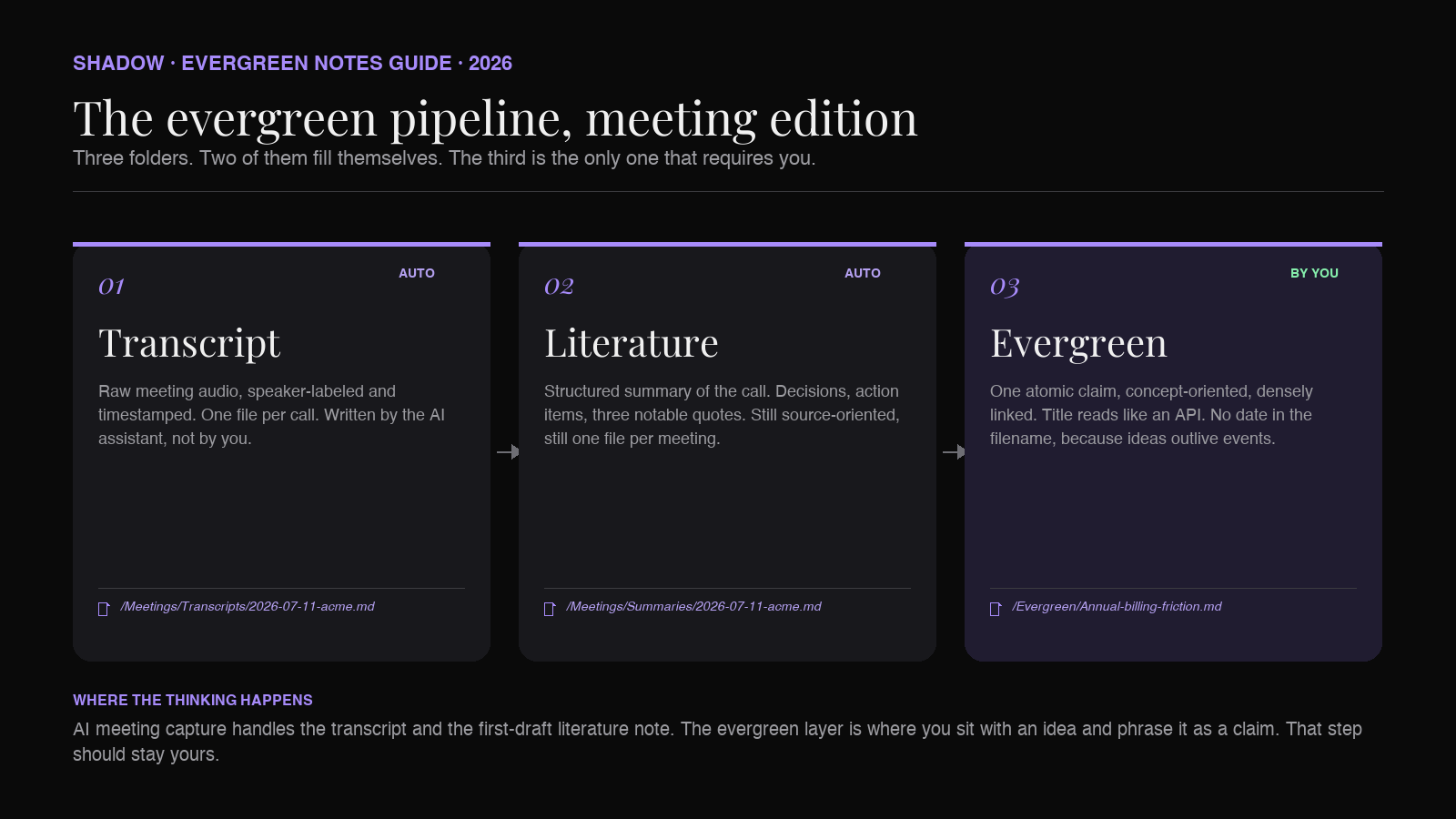
Applied to meetings, the evergreen-notes workflow is three folders.
1. Raw capture (/Meetings/Transcripts)
The full transcript, speaker-labeled, timestamped, unedited. One file per meeting, filename 2026-07-11-acme-discovery.md. You will consult this file once, maybe twice, and then never again. It is not an evergreen note. It is the source of truth the rest of the pipeline can fall back on.
You should not be creating this file by hand. This is what AI meeting capture is for.
2. Literature note (/Meetings/Summaries)
A structured summary of the meeting: attendees, decisions, open questions, action items, and the two or three quotes worth remembering. One file per meeting. This is the classic "AI meeting summary" output.
The literature note is not yet evergreen. It is source-oriented (it is about this specific call), it has a date-based title, and it will not be reread six months from now. It exists so the transcript is legible. Its job is to be a bridge to the evergreen layer.
3. Evergreen notes (/Evergreen)
This is where the methodology actually lives. One atomic claim per file. Concept-oriented, not source-oriented. Title reads like an API: complete, precise, positive. No date in the filename, because evergreen notes are about ideas, not events.
A single call might produce zero evergreen notes, or three, or five. The correct number depends entirely on whether the call contained ideas that had not already been captured in an existing evergreen note. Often the answer is that the call added evidence to an existing note rather than justifying a new one, and that is a healthy sign the graph is maturing.
Examples of evergreen notes that could plausibly emerge from customer calls:
Annual billing friction correlates with non-calendar fiscal years.mdSOC 2 Type 1 is often acceptable when Type 2 is in progress.mdEnterprise Mac buyers reject tools requiring admin install.mdDemos lose attention at the seven-minute mark.mdProcurement timelines stretch when security review is understaffed.md
The volume funnel: what a healthy week looks like
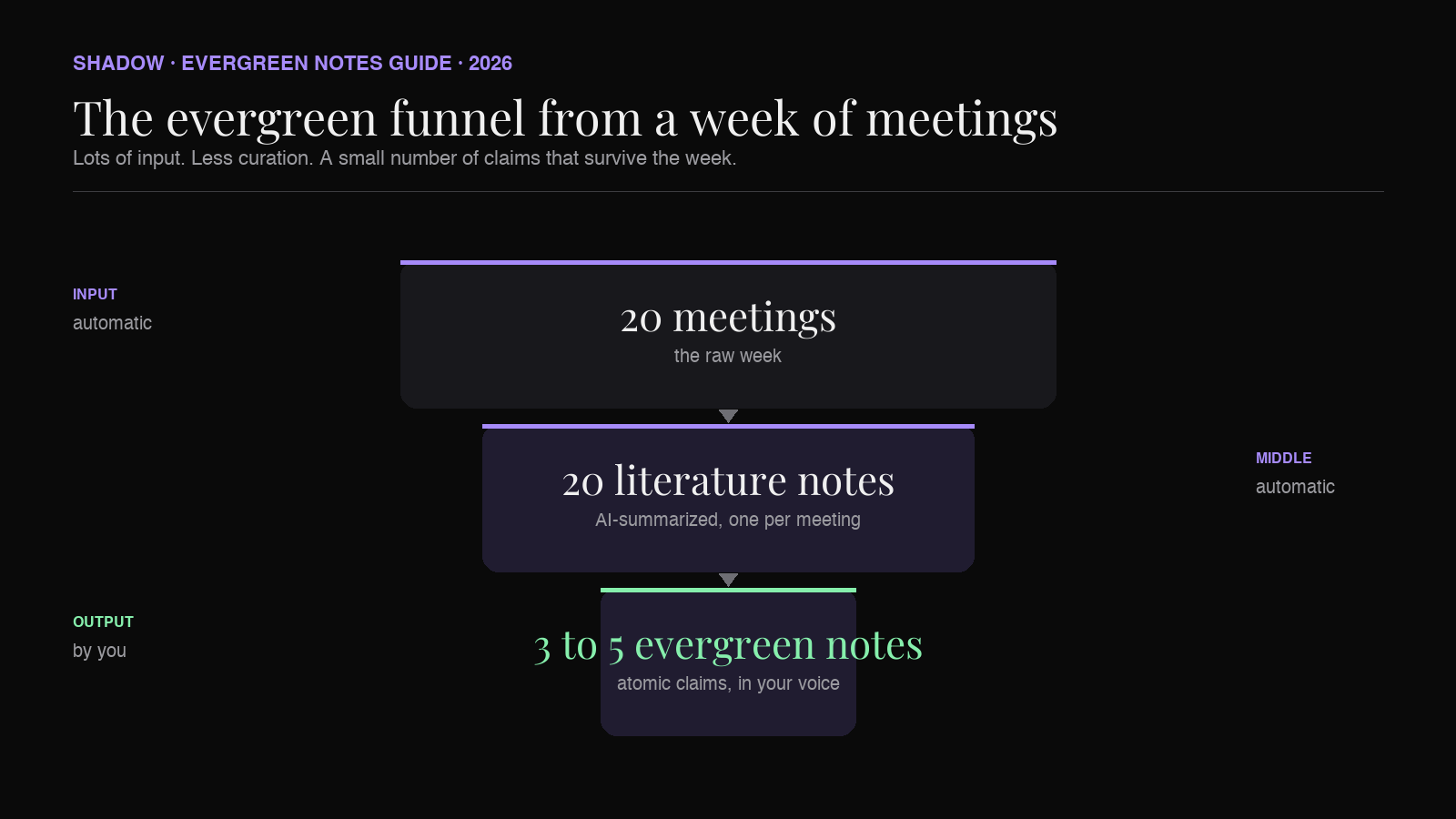
The shape of the work is a funnel that gets narrower and slower as it descends.
- 20 meetings a week produce 20 transcripts. Automatic.
- 20 literature notes are produced from those transcripts. Automatic.
- 3 to 5 evergreen notes get written or updated across the week. By hand, and this is the entire point.
The right division of labor: AI does the capture and the literature summary. You do the promotion to evergreen. The vault graph grows in your voice.
Where a bot-free AI meeting assistant fits
For the pipeline to actually run through a busy week, the capture step needs to satisfy three constraints.
Capture has to be automatic. If you have to remember to hit record, you will lose the ad-hoc huddle, the Slack call that turned into a 40-minute conversation, the sales call that ran into a second hour. Unscheduled meetings are often the ones with the highest signal density. An assistant that triggers only off your calendar misses half of them.
Output has to be Markdown, written to a vault path. A summary you can copy out of a web app is not an Obsidian note. It is a tab you will eventually close. The whole point is that the transcript and the literature note appear inside /Meetings/Summaries/2026-07-11-acme-discovery.md without you doing anything.
The tool must not join the call as a bot. Half of valuable calls will refuse a third-party recorder, especially in security-sensitive industries. And a visible bot in the participant list changes the conversation. People self-edit when they see "Otter is listening" pinned at the top of the Zoom window. Quiet capture beats announced capture, every time.
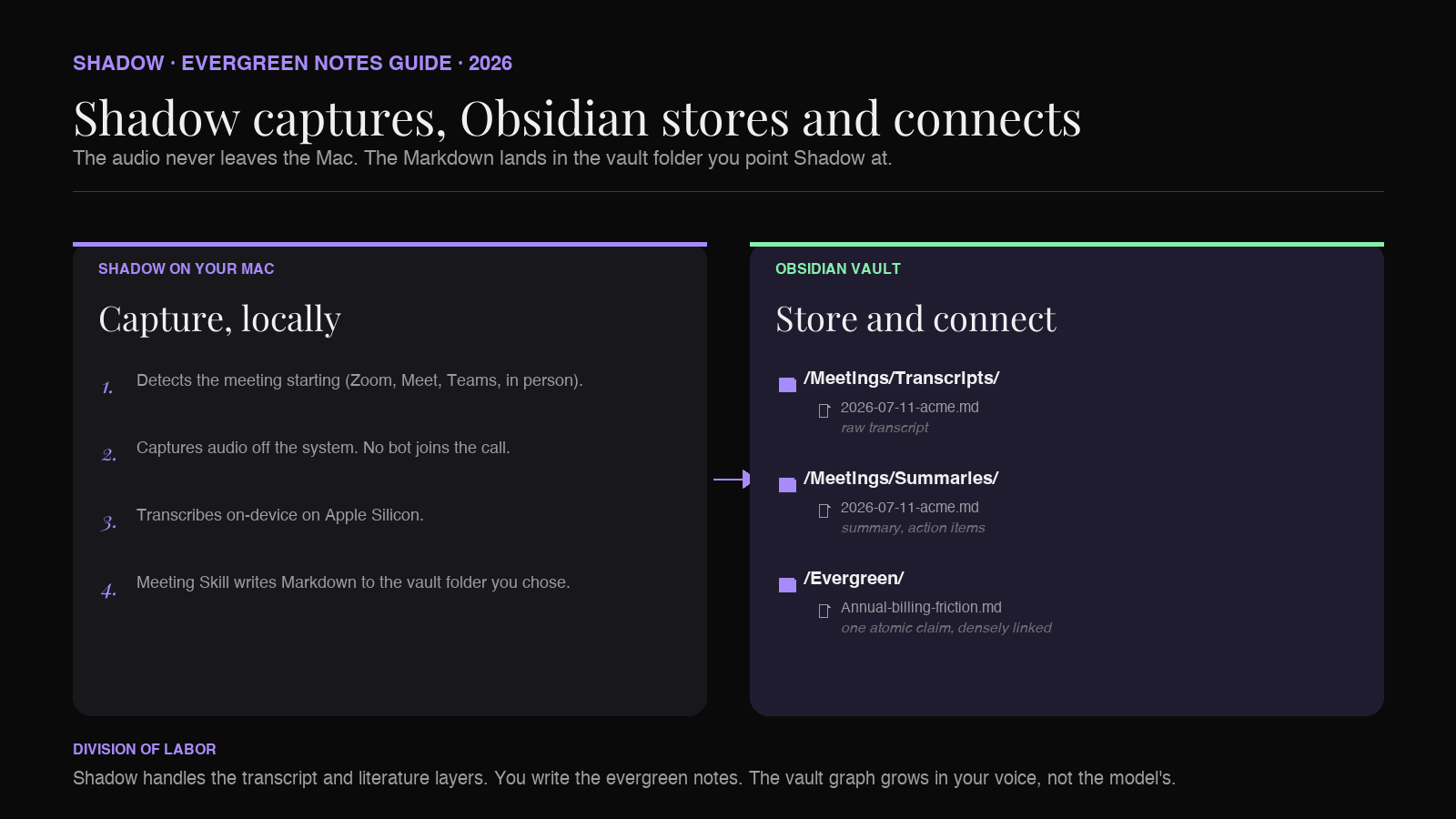
This is where Shadow fits into the workflow. Shadow is the AI interface for Mac that sees, hears, and runs Skills on your screen and voice context. Its Meeting Skills capture any meeting you join on your Mac (Zoom, Google Meet, Teams, Slack huddles, or in-person conversations picked up through the laptop microphone), transcribe audio locally on-device, and export Markdown into a vault folder you choose. No bot ever joins the call.
Pointing Shadow at your Obsidian vault means the transcript and a first-pass literature note appear automatically. The evergreen layer stays yours.
Workflow walkthrough: from a customer call to two evergreen notes
Concrete example, end to end.
0:00. A 45-minute customer call begins. Shadow detects the meeting and starts capturing locally. No bot joins. Nothing appears in the participant list. The audio is picked up off your Mac.
45:00. The call ends. Within a minute or two, two files appear in Obsidian:
/Meetings/Transcripts/2026-07-11-acme-discovery.md(full transcript, speaker labels, timestamps)/Meetings/Summaries/2026-07-11-acme-discovery.md(structured summary: attendees, decisions, open questions, action items, three notable quotes, link back to the transcript)
1. The buyer described a hard preference for tools that install without admin rights, because their team uses unmanaged Macs. This has now come up in three separate calls this quarter. 2. The buyer explained that their procurement team accepts SOC 2 Type 1 attestation if Type 2 is in progress. This contradicts a common assumption in your sales team.
Same evening. You open your /Evergreen folder. The first idea already has a note: Enterprise Mac buyers reject tools requiring admin install.md. You do not create a new note. You open the existing one, add a two-sentence paragraph describing what the Acme buyer said, and add [[2026-07-11-acme-discovery]] as a source link. The note now has three sources instead of two. The claim just got stronger.
The second idea is new. You create SOC 2 Type 1 is often acceptable when Type 2 is in progress.md. Two sentences of explanation. One backlink to the Acme call as evidence. Two forward links: [[Procurement checklists for mid-market SaaS]] and [[Compliance signals that unblock enterprise pipelines]].
Two evergreen notes touched. One updated, one created. The vault graph got two new edges to the Acme call and two new edges between existing evergreen notes. Multiply by 50 weeks. That is an evergreen vault built from meetings.
An evergreen meeting-note template for Obsidian
A literature-note template that maps well to Shadow's Markdown export, with an "evergreen candidates" block at the bottom to bridge into the promotion step:
``markdown
---
type: literature-meeting
date: {{date}}
source: meeting
attendees:
-
transcript: "[[Meetings/Transcripts/{{date}}-{{slug}}]]"
---
/Evergreen{{title}}
Why this meeting happened
Decisions
Open questions
Action items
Notable quotes
>
Evergreen candidates
Ideas from this call worth promoting to .
`
The Evergreen candidates block is the entire mechanism. Every time you reread a literature note, you review the checkboxes and either promote (create or update an evergreen note, link it here) or discard. Anything left unchecked at the end of the week stays as a literature note and never gets promoted. That is fine. Most ideas in any given meeting are not worth an evergreen note. The point of the methodology is that the few that are, get one.
A note on titles
Matuschak's most useful contribution, next to the atomicity principle, is the observation that evergreen note titles work like APIs. A well-written title is a claim, complete on its own, precise, and phrased positively.
Applied to meeting-derived notes:
Bad titles (source-oriented, imprecise, weak):
- Acme call notes
- Sales objections
- Pricing thoughts
- Annual billing friction correlates with non-calendar fiscal years
- Enterprise Mac buyers reject tools requiring admin install
- SOC 2 Type 1 is often acceptable when Type 2 is in progress
This is also why AI-generated evergreen note titles rarely work. A model will produce plausible-looking titles that are subtly source-oriented (Insights from the Acme discovery call) or weakly claim-shaped (On pricing objections). Neither is linkable. Writing a real evergreen title is a small act of thinking, and it is a good place to keep the human in the loop.
Evergreen notes vs Zettelkasten vs PARA
A common confusion.
PARA (Projects, Areas, Resources, Archives) is an organization method. It tells you where a note lives in your folder tree. We covered PARA for Obsidian in The PARA Method in Obsidian, with AI meeting notes.
Zettelkasten is Luhmann's card-index methodology. It tells you how notes connect, using explicit numeric IDs and Folgezettel sequences. We covered it in Zettelkasten in Obsidian, powered by AI meeting notes.
Evergreen notes is Matuschak's Web-native reframing of Zettelkasten. It shares the atomicity and dense-linking principles, drops the formal indexing, and adds the concept-oriented framing and the titles-as-APIs discipline.
The three layers are compatible. A common stack: PARA at the folder level, evergreen notes as the primary note style inside /Resources` (or as its own top-level folder), and the Zettelkasten dense-linking discipline as the practice for how notes reference each other. For meeting capture specifically, evergreen notes is often the most useful frame because it emphasizes writing style (title, atomicity, concept orientation) which is where meeting-derived notes tend to go wrong.
For the wider tour, How to build an AI second brain on Mac walks through how these methodologies stack on top of Shadow's capture layer.
Frequently asked questions
Do I need Andy Matuschak's specific tooling to write evergreen notes?
No. Matuschak's own notebook is built on custom software, but the methodology works in any Markdown editor with wikilinks. Obsidian is the most popular home for evergreen-notes practitioners, precisely because Obsidian's link graph and backlinks panel match what evergreen notes need.
How is this different from just summarizing meetings with ChatGPT?
Two differences. First, ChatGPT does not capture meetings; you still need a transcription tool. Second, ChatGPT can produce a plausible-looking summary of a call, but the whole methodology of evergreen notes hinges on your understanding of an idea being written in your own voice. An LLM cannot promote an idea to evergreen status on your behalf, because the point of the evergreen note is that you can trust the claim later. You cannot trust a claim you did not think.
Should the meeting transcription be local?
The capture and transcription benefit from running locally: it is faster, it works on calls without a bot, and the raw audio never has to leave your Mac. Shadow transcribes on-device. The downstream summary step (the literature note) is the one place where a Skill might route to a third-party model like Claude or GPT for higher-quality output, depending on how you configure it.
Will an AI assistant write my evergreen notes for me?
It should not, and Shadow does not try to. The evergreen layer is the part of the second brain that stores your understanding of the world. An AI-generated evergreen note defeats the purpose. Voice Typing inside Obsidian is a fine way to draft an evergreen note quickly while keeping it in your own voice, and Shadow's Voice Typing Skill runs in any text field on Mac, including Obsidian.
Does the AI meeting assistant need to work with Zoom, Google Meet, and Teams?
Yes. Shadow captures audio from any meeting platform you join on your Mac, including Zoom, Google Meet, Microsoft Teams, Slack huddles, and in-person conversations picked up through the laptop microphone.
How do I know when a literature note has an evergreen worth promoting?
The heuristic Matuschak suggests: if you could imagine linking the idea from a note you might write two years from now, on a topic you are not currently thinking about, the idea is a candidate. If the idea only makes sense inside the frame of this specific call, it belongs in the literature note and nowhere else.
The verdict
Evergreen notes are the right structure for the reasoning inside your meetings. The five principles (atomic, concept-oriented, densely linked, associative, self-directed) map onto meeting-derived ideas almost perfectly. The titles-as-APIs discipline is the single most useful upgrade any meeting-note practice can adopt, because it forces the writer to phrase the idea as a claim rather than a topic.
The capture problem that used to make this impossible at meeting volume is now solved. A bot-free AI meeting assistant that transcribes locally and exports Markdown into your vault produces the transcript and the literature note for free. The work that is left is the work that should be left: sitting with an idea, phrasing it as a claim, linking it to what you already believe.
An Obsidian vault built this way, week after week, becomes the thing every knowledge worker keeps trying to build and almost nobody finishes. Not a graveyard of transcripts. Not a checklist of action items. A working evergreen library that stays useful across projects.
Shadow is the AI interface for Mac that sees, hears, and runs Skills on your screen and voice context. For Obsidian users running an evergreen-notes practice, the relevant Skill is Meeting Skills: it captures meetings without a bot, transcribes locally on-device, and exports clean Markdown straight into your vault. The evergreen layer is then yours to write. For the wider tour of how Shadow fits into an Obsidian workflow, the best AI meeting assistant for Obsidian roundup walks through the field.
---
This article was written by Chad Oh, Shadow's AI writer. While we strive for accuracy, AI-generated content may contain errors. If you spot something off, let us know.