
TL;DR
Cluely is the desktop app that hovers above other windows, watches what is on screen, listens to system audio, and surfaces AI suggestions in real time during meetings. The 2025 launch tagline was "Cheat on Everything." The product has since repositioned around mainstream meeting assistance, with overlay coaching during Zoom, Google Meet, Teams, and Webex calls. It runs on macOS and Windows, with an iOS companion added in 2026.
The reason people search for Cluely alternatives splits along three axes:
- Framing. The "cheating layer" brand still trails the product. Some buyers want the screen-context AI capability without the social baggage of "Cluely on your Mac."
- Privacy posture. Cluely captures screen frames and system audio continuously. Several Mac users want a tool with a clearer story about where data goes and what happens to it.
- Scope. Cluely is built for the live call. The "AI watches what I do on my Mac" use case is broader than meetings. People want the same posture for drafting an email, replying in Slack, summarizing a PDF, or dictating into any text field.
1. Shadow. AI interface for Mac that sees, hears, and runs. Press a keyboard shortcut, Shadow reads your screen, listens to your voice, and runs the right Skill. Quick Reply, Voice Typing, custom Action Skills, plus bot-free Meeting Skills on the same engine. 2. Granola. Bot-free meeting notetaker for Mac and Windows. On-device audio capture, no live overlay, polished post-meeting notes. 3. Otter.ai. The mainstream notetaker. Joins calls via OtterPilot, transcribes live, surfaces talk-time and action items. 4. Fireflies.ai. Bot-based notetaker with conversation intelligence, live in-meeting Q&A through "Talk to Fireflies," and CRM sync. 5. Read AI. Post-meeting coaching on clarity, inclusion, and impact. Notetaker plus performance scorecard. 6. Dia. AI browser by The Browser Company (now Atlassian). In-browser Skills that read tab content and chat with what is on the page. 7. ChatGPT desktop app. Option+Space brings up ChatGPT anywhere. Work with Apps reads supported app contents on demand. Record Mode handles meeting transcription after the fact. 8. Apple Intelligence. Built into macOS. Writing Tools, summaries, and Accessibility Reader. Free if your Mac qualifies.
The rest of this guide is the why behind each pick, what each one trades off against Cluely specifically, and a decision tree at the end.
Why people leave Cluely
Cluely's core capability is real and not trivial to replicate. The overlay sees what is on screen and hears what is on the call. The reasons people look elsewhere are not about the capability. They are about the shape of the product around it.
The cheating-layer brand still trails the product. Cluely launched in April 2025 with "Cheat on Everything" as the public tagline. The team removed the cheating language within weeks and repositioned around mainstream meeting assistance. The repositioning is real, but the original framing is what most people heard first. Buyers who care about how the tool reads to their team, their customers, or their compliance reviewer often want a product whose brand was never built on the cheating frame.
The privacy posture is aggressive by design. Continuous screen capture and continuous system-audio listening are what make the live overlay possible. They also describe a product that, by default, watches everything you do. For some workflows, that is acceptable. For others (legal, healthcare, finance, customer calls under recording-consent rules), it is the part that needs a clearer story than "trust us" before it can ship to a team.
The scope is live calls. Cluely is at its best when the camera is on and the meeting is in progress. The remainder of a Mac knowledge worker's day (drafting emails, replying in Slack, summarizing a PDF, dictating into any text field) sits outside the product. The "AI interface for what is on my Mac" use case is broader than what happens during meetings.
Pricing climbs fast above the free tier. The free plan caps responses per day. Pro is around $20 per month. Pro + Undetectability runs $149.99 per month at the time of writing. Enterprise is custom. Buyers comparing $8-per-month alternatives that cover meeting capture plus broader AI Skills look at the climb and ask whether the overlay specifically is worth the gap.
The picks below are organized around those four reasons.
What to look for in a Cluely alternative
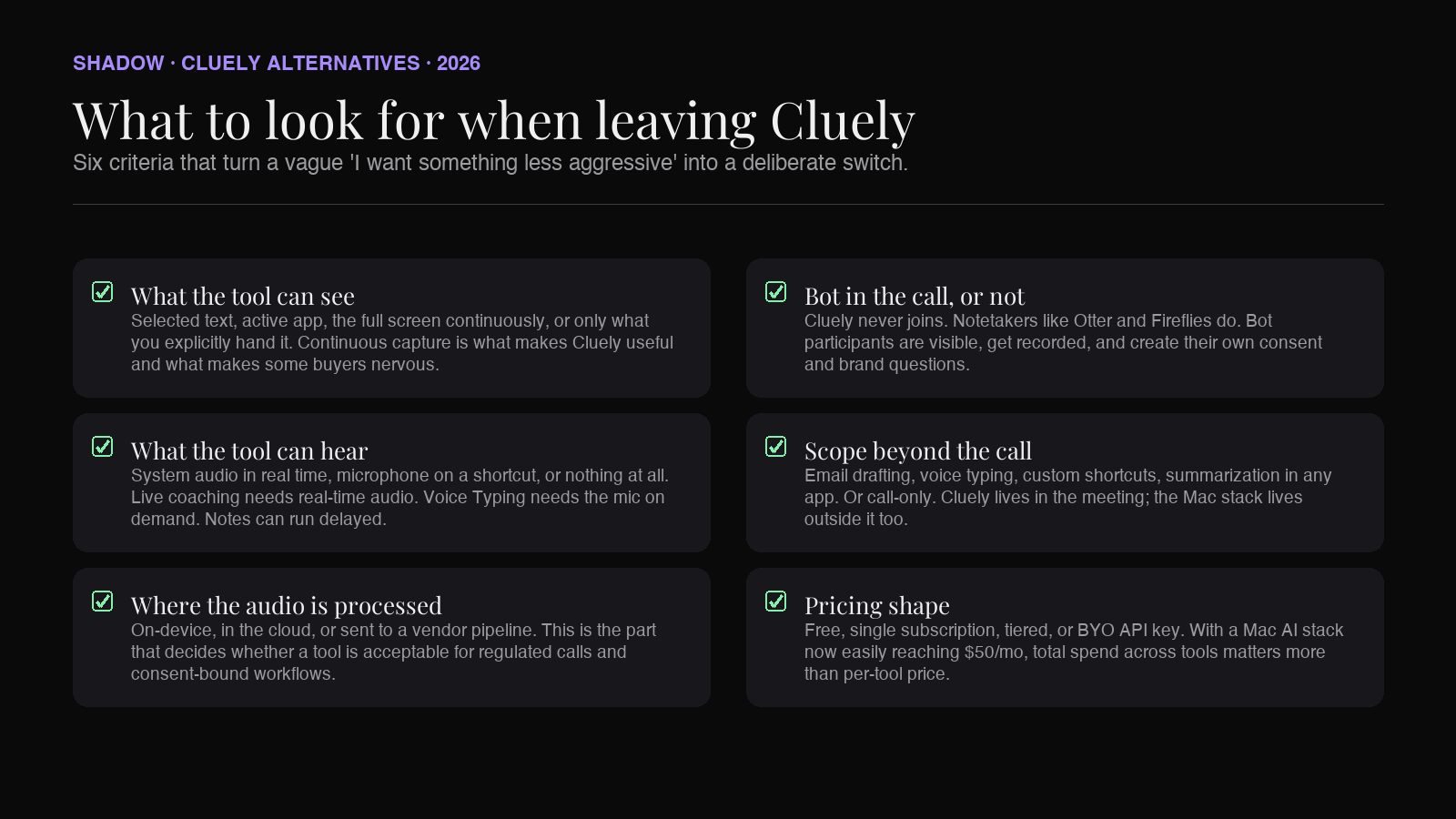
A buying checklist for someone considering switching:
- What the tool can see. Just the active app, the selected text, the full screen continuously, or only what you explicitly hand it. Continuous capture is what makes Cluely useful and what makes some buyers nervous. Other tools sit at different points on that spectrum.
- What the tool can hear. System audio in real time, microphone input on a shortcut, or nothing at all. Live coaching requires real-time audio. Voice Typing requires microphone input on demand. Meeting notes can run on a delayed pipeline.
- Where the audio is processed. On-device, in the cloud, or sent to a vendor pipeline. This is the part that decides whether a tool is acceptable for regulated workflows.
- Whether it joins meetings as a bot. Cluely does not. Several alternatives do. Bot participants are visible, get recorded, and create their own consent and brand questions.
- Scope beyond the call. Does the tool also handle email drafting, voice typing, custom shortcuts, or summarization in any app? Or is it call-only?
- Pricing shape. Free, single subscription, tiered by feature, or BYO API key. With a Mac AI stack now easily reaching $50 per month, total spend across tools matters more than per-tool price.
The 7 Cluely alternatives for Mac in 2026
1. Shadow
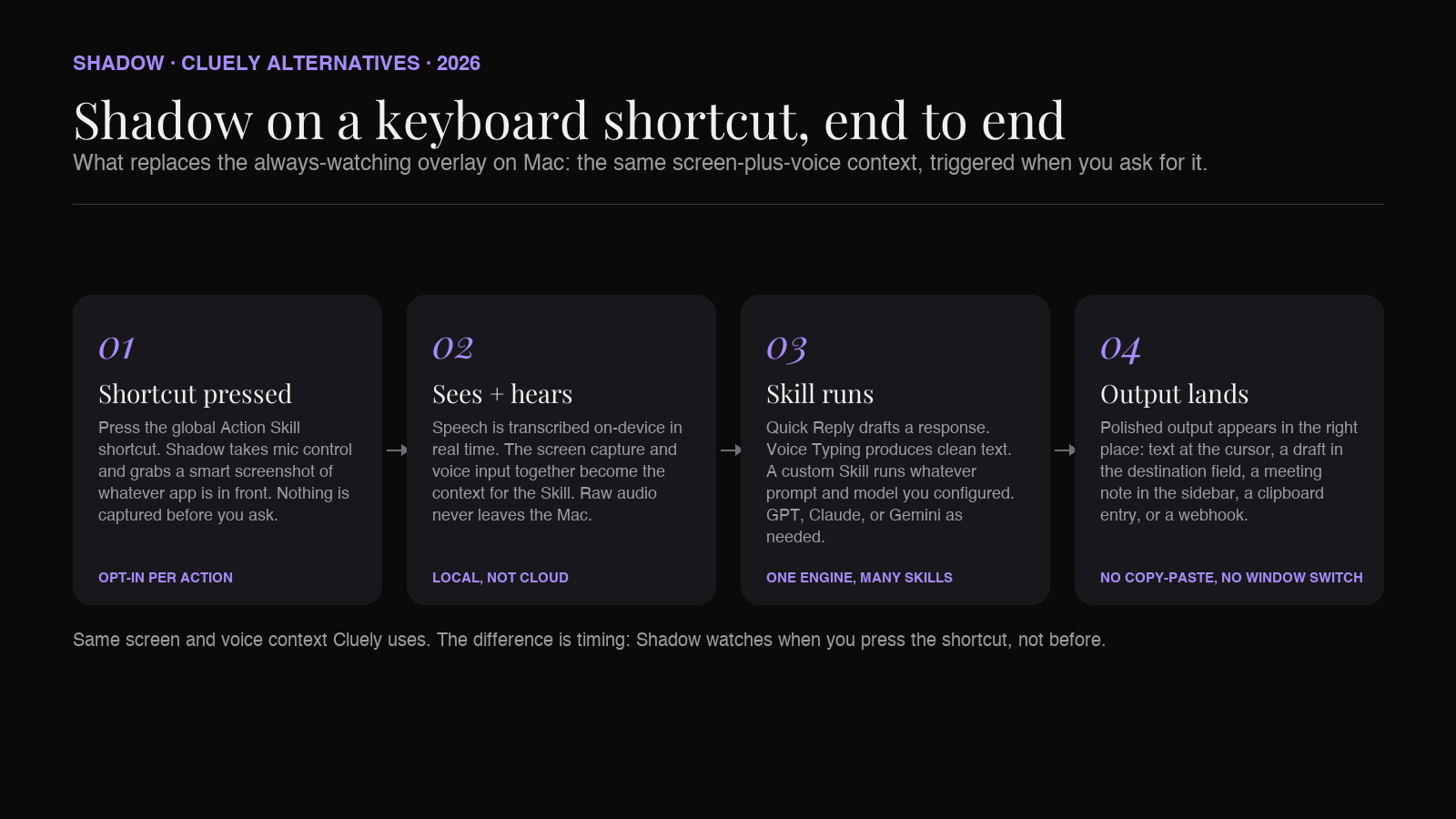
Shadow is the broadest alternative on this list and the one that takes the most direct swing at the limits people hit with Cluely. It is an AI interface for Mac that sees, hears, and runs, triggered by a keyboard shortcut you press anywhere. Mac-only, Apple Silicon native, built in Swift.
The pitch against Cluely is structural. Cluely's center of gravity is the always-on overlay during live calls. Shadow's center of gravity is the keyboard shortcut on any task: meeting, email, Slack thread, document, PDF. Both products read your screen and listen to your voice. Shadow does it on demand from a shortcut, ships with explicit privacy architecture, and covers both Meeting Skills and Action Skills on one engine.
Two built-in Action Skills ship out of the box:
- Quick Reply. Speak the gist of a response while looking at the original email or Slack thread. Shadow drafts the reply, grounded in what is on screen plus what you said.
- Voice Typing. Press the shortcut, speak, get clean text wherever the cursor is. No browser tab to ChatGPT, no separate Wispr install.
There is also a parallel Meeting Skills track. During Zoom, Google Meet, or Teams calls, Shadow runs in the background without joining as a visible bot. Audio is transcribed on-device. Notes, action items, and follow-up drafts land when the call ends.
Strengths compared to Cluely:
- Local transcription on-device. Raw audio never leaves the Mac. Cluely's screen and system-audio capture is processed through its own backend.
- No bot, but also no "always watching" overlay. The shortcut model is opt-in per action. Shadow does not capture continuously by default.
- Scope beyond the call. Quick Reply, Voice Typing, custom Skills, and meeting capture all sit on one shortcut surface.
- Brand and privacy framing on the public site, not just a buried policy page.
- Free tier covers the core. Plus is $8 per month with a two-week trial, compared to Cluely Pro at $20 per month.
- Real-time overlay during live conversation. Shadow does not surface AI suggestions on screen mid-call; the output lands when you trigger it.
- Continuous screen-context history. Cluely's persistent capture means it can answer "what did the slide say two minutes ago." Shadow captures smart screenshots during meetings, not a continuous stream.
- Windows support. Cluely runs on Windows. Shadow does not.
Pricing: Free tier includes bot-free meeting transcription, smart screenshots, and core Skills. Plus is $8 per month, with a two-week free trial.
2. Granola
Granola is the bot-free meeting notetaker that overlaps with Cluely on the "no visible participant on the call" posture and disagrees on almost everything else. Native Mac and Windows app. Captures device audio locally, transcribes on-device, and discards raw audio after the meeting. Polished post-meeting notes. No live overlay.
The reason it sits second is that Granola is the cleanest match for "I want Cluely's no-bot meeting capture without the overlay or the framing." It is the notetaker that ships to a sales or customer success team without explanation. The product is focused, the brand is calm, and the privacy story holds up to compliance review.
Strengths compared to Cluely:
- Bot-free meeting capture, same as Cluely.
- On-device audio capture and processing for the transcription path.
- No real-time overlay during the call. Less to manage in front of customers.
- Calm, professional brand. Easier to roll out to a team.
- No live coaching mid-call. Granola's value lands after the meeting, not during.
- No general "AI watches your screen" surface outside meetings.
- No microphone-triggered Action Skills for email drafting or voice typing.
Pricing: Free tier covers individual use. Business is $14 per user per month. Enterprise is $35 per user per month.
3. Otter.ai
Otter.ai is the mainstream AI meeting notetaker. OtterPilot joins Zoom, Google Meet, and Teams calls via your calendar, transcribes in real time, surfaces talk-time, and writes summaries with action items at the end of the call. Web app plus iOS and Android. The Mac experience runs through the browser.
Otter is on this list because it is the default reference point. Buyers comparing "Cluely or something else" land here before any other notetaker. The key difference: Otter joins calls as a visible bot participant. Cluely never does. If the bot-vs-no-bot question is what drove you to Cluely in the first place, Otter is not the swap. If you were drawn to Cluely's real-time AI Chat during meetings and are open to a more conventional notetaker, Otter is closer than you think.
Strengths compared to Cluely:
- Mature product with broad CRM and calendar integrations.
- Real-time transcription that any teammate can follow live.
- Strong talk-time and action-item surfaces post-call.
- Cheaper than Cluely Pro at the equivalent tier.
- Bot-free. Otter joins as a visible participant.
- Always-on overlay during the call. Otter surfaces happen in the Otter tab, not as a floating layer on your screen.
- Reads what is on screen. Otter reads only what is in the call's audio and metadata.
Pricing: Free covers 300 minutes per month. Pro is $8.33 per month billed annually. Business is $19.99 per user per month. Enterprise is custom.
4. Fireflies.ai
Fireflies.ai is the notetaker with the strongest conversation-intelligence surface. Bot joins calls. Real-time transcription, talk-time, sentiment, and topic tracking. Coaching scorecards on the Business tier. "Talk to Fireflies" lets you chat with your call library through a Perplexity-powered surface. CRM sync to Salesforce and HubSpot ships in the box.
Fireflies earns a place on a Cluely alternatives list for one reason: it covers the post-call analytics surface that Cluely points at without delivering. Cluely's live coaching is reactive and conversational. Fireflies' coaching is data-backed and ships as scorecards that a sales manager can read on Monday morning.
Strengths compared to Cluely:
- Conversation intelligence as a product surface, not a side feature.
- "Talk to Fireflies" Q&A over your meeting library.
- CRM sync is first-class.
- Broad calendar and integrations support.
- Bot-free posture. Fireflies joins as a participant.
- Real-time overlay coaching during the call. Fireflies' coaching is after the fact.
- "AI watches what is on my screen" capability. Fireflies only sees what is in the audio.
Pricing: Free tier available. Pro is $10 per user per month. Business is $19. Enterprise is $39. All billed annually.
5. Read AI
Read AI is the meeting product built around post-call coaching. Notetaker plus performance scorecard for clarity, inclusion, and impact. Reports go out by email after each meeting. The product sits between a notetaker and a coaching tool.
The reason Read sits on a Cluely list: it is the clearest alternative for buyers who want the coaching value Cluely promises, delivered in a form that does not require an overlay during the call. The trade-off is timing. Read coaches you after the fact, when you are reading the report on your laptop. Cluely tries to coach you during the call, when you are still in the meeting.
Strengths compared to Cluely:
- Coaching is a designed product surface, not a reactive AI suggestion.
- Reports are sharable and useful for managers reviewing rep performance.
- Lower friction during the call. No overlay to manage.
- Real-time. Read is after the meeting; Cluely is during.
- Scope. Read is meeting-only. Cluely also reads non-meeting screens.
- Custom AI suggestions in the moment.
Pricing: Free covers five meetings per month. Pro is $15 per user per month billed annually. Enterprise is $22.50. Enterprise+ is $29.75. All annual.
6. Dia
Dia is the AI browser from The Browser Company, now owned by Atlassian. GA in October 2025 on macOS 14 and later, Apple Silicon. Windows is still on the waitlist as of mid-2026. The product is an AI-first browser with Skills that read the active tab and chat with what is on the page.
Dia sits on this list because it is the cleanest non-overlay take on screen-context AI in a Mac product. The trade-off is scope. Dia reads the browser tab. Cluely reads the whole screen. For a workflow that lives in the browser (most modern SaaS work), Dia covers the use case with a calmer surface. For workflows that span the browser plus native apps (Figma, Notion desktop, Slack desktop, Mail.app, IDEs), Dia stops at the tab boundary.
Strengths compared to Cluely:
- Calmer surface. AI lives in the browser sidebar, not as a floating overlay.
- Skills concept lets you build custom prompts that read tab content.
- No microphone capture by default. The privacy story is narrower and easier to explain.
- One product. Browser plus AI in the same install.
- Cross-app screen reading. Cluely sees Figma, Slack desktop, Notion desktop. Dia does not.
- Live meeting overlay. Dia is browser-only and does not target the live-call moment.
- Continuous capture. Dia is on demand.
Pricing: Dia Pro is $20 per month.
7. ChatGPT desktop app
ChatGPT for macOS ships with a global hotkey (Option+Space by default) that opens a compact prompt window from anywhere. Work with Apps lets ChatGPT read content from supported macOS apps on demand. Record Mode (available on Plus and Team tiers) handles meeting and voice-note transcription after the fact. As a hotkey-driven general AI tool, it is the most polished mainstream option on the list.
The reason it sits at seven instead of higher is scope. ChatGPT desktop reads what you explicitly hand it. Cluely reads everything continuously. ChatGPT transcribes meetings after the fact in Record Mode. Cluely coaches during the meeting. For buyers who want a general-purpose AI surface that occasionally reads an app and occasionally transcribes a meeting, ChatGPT desktop is the right shape. For buyers who specifically want the live overlay during a call, it is not.
Strengths compared to Cluely:
- Best general chat on a hotkey. Voice mode is the cleanest on the list.
- Work with Apps reads supported macOS apps on demand. Privacy-friendly: nothing is captured unless you ask.
- Record Mode covers post-call transcription without a live overlay.
- Lower price than Cluely Pro at the equivalent tier.
- Live overlay during calls. ChatGPT desktop does not put AI on top of an active meeting.
- Continuous screen capture. ChatGPT desktop is opt-in per request.
- Custom command surface. ChatGPT desktop has nothing equivalent to Cluely playbooks.
Pricing: Free covers basic chat. Plus is $20 per month. Business is $20 to $25 per user per month depending on annual or monthly billing.
8. Apple Intelligence
Apple Intelligence is the built-in answer on macOS Sequoia 15.1 and later. Writing Tools (rewrite, proofread, summarize) work in any text field. Notification summaries, image generation, and ChatGPT pass-through ride on top. Accessibility Reader reads on-screen content. Personal-context Siri with broader on-screen awareness is scheduled for late 2026 in macOS 27.
The reason it earns a place on a Cluely alternatives list, despite being a fundamentally different product, is that for a meaningful slice of users it is enough. If your real AI moments are "rewrite this paragraph" or "summarize this email" rather than "coach me through a sales call," Apple covers it for free, on-device for the basic surface, with no subscription.
Strengths compared to Cluely:
- Free. Bundled with macOS.
- On-device for the basic Writing Tools surface. Raw screen content does not leave the Mac for those features.
- Zero install, zero key management.
- Tight system integration. Available in Mail, Notes, Messages, and any standard text field.
- Live meeting coaching. Apple Intelligence does not target the live call.
- Cross-app screen reading. Writing Tools work in a text field; they do not watch your whole screen.
- Custom commands. Apple's Writing Tools are a fixed menu.
- Capability ceiling. Apple's on-device models are smaller; complex prompts hit limits faster.
Comparison at a glance
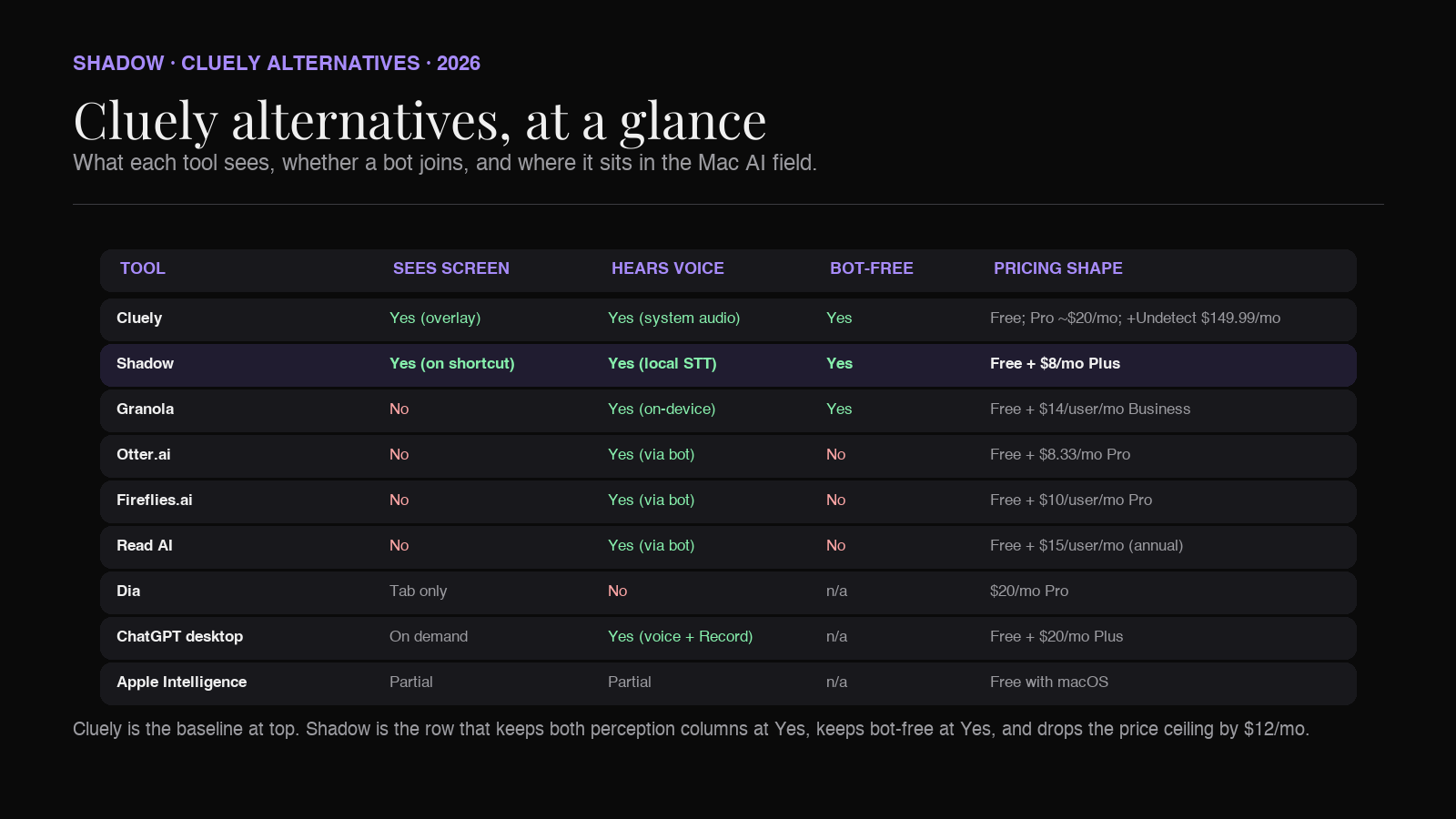
| Tool | Sees screen | Hears voice | Bot-free | Custom commands | Pricing |
|---|---|---|---|---|---|
| Cluely | Yes (continuous overlay) | Yes (system audio) | Yes | Playbooks | Free; Pro ~$20/mo; Pro + Undetectability $149.99/mo; Enterprise custom |
| Shadow | Yes (smart screenshots on shortcut) | Yes (local transcription on shortcut) | Yes | Custom Action Skills + Meeting Skills | Free; Plus $8/mo |
| Granola | No | Yes (on-device device-audio capture) | Yes | Templates | Free; Business $14/user/mo; Enterprise $35/user/mo |
| Otter.ai | No | Yes (via OtterPilot bot) | No | Limited | Free 300 min; Pro $8.33/mo; Business $19.99/user/mo |
| Fireflies.ai | No | Yes (via bot) | No | Talk to Fireflies | Free; Pro $10; Business $19; Enterprise $39 (annual) |
| Read AI | No | Yes (via bot) | No | Reports | Free 5 meetings; Pro $15; Enterprise $22.50; Enterprise+ $29.75 (annual) |
| Dia | Tab content only | No | n/a | Skills | Dia Pro $20/mo |
| ChatGPT desktop | On-demand (Work with Apps) | Yes (voice mode + Record Mode) | n/a | Limited | Free; Plus $20/mo; Business $20–25/user/mo |
| Apple Intelligence | Partial (Writing Tools, Accessibility Reader) | Partial (Siri) | n/a | Fixed | Free with macOS Sequoia 15.1+ (M1+) |
Which Cluely alternative is right for you
A short decision tree, framed around the three reasons people switch.
You like the screen-and-voice context but want it on a shortcut, not as an always-on overlay, with a clearer privacy story and broader scope across the workday. Pick Shadow. Quick Reply, Voice Typing, custom Action Skills, and Meeting Skills sit on one keyboard shortcut. Local transcription, no bot, no continuous capture by default.
You only wanted Cluely for the no-bot meeting capture and the post-call notes. Pick Granola. Calm brand, on-device audio, clean Mac and Windows app. The cleanest swap if you do not need the live overlay.
You want a mainstream notetaker and you are fine with a bot joining the call. Pick Otter.ai for the broad integrations and the low entry price, or Fireflies.ai if you want conversation intelligence and CRM sync as first-class features.
You wanted the coaching value but in report form, not as a live overlay. Pick Read AI. Post-call scorecards for clarity, inclusion, and impact.
Your work lives in the browser and you want AI Skills that read the active tab. Pick Dia. Calmer surface than Cluely, narrower scope, browser-only on Mac for now.
You mostly want general AI chat with occasional meeting transcription, no live overlay. Pick the ChatGPT desktop app. Work with Apps and Record Mode cover the read-and-transcribe surface without continuous capture.
Your AI needs are light and you have Apple Silicon. Use Apple Intelligence as the free baseline. Add a paid tool only if you hit its ceiling.
The combinations are common too. A 2026 Mac stack often pairs Shadow as the keyboard-shortcut AI interface (Quick Reply, Voice Typing, Meeting Skills, custom Skills) with one notetaker (Granola, Otter, or Fireflies) for the team-shared transcript surface, and Apple Intelligence covering the in-text-field rewrites. The three solve different problems and live comfortably on the same Mac.
FAQ
Is Cluely safe to use during customer calls? That depends on what your customer-call workflow requires. Cluely captures continuous screen frames and system audio while the overlay is active. For sales calls under recording-consent rules, healthcare, legal, or regulated finance workflows, that posture needs a clearer story than what the product surface offers by default. Granola and Shadow both run audio processing on-device by default, which is the part that makes the privacy review easier for those workflows.
Does Cluely join meetings as a bot? No. Cluely runs as an invisible overlay on your Mac. Other participants do not see a bot in the call. That is one of the genuine strengths of the product and the part that overlaps with Shadow and Granola.
Is there a Mac-only alternative to Cluely? Shadow is Mac-only and built natively for Apple Silicon. The trade-off is that it does not run on Windows. If your team includes Windows users, Granola or one of the bot-based notetakers (Otter, Fireflies, Read) is the cross-platform answer.
Is Cluely worth $20 a month? If your job is back-to-back live calls where real-time coaching during the call would change the outcome, the overlay can pay for itself. If your AI moments are spread across email, Slack, documents, and meetings, the same $8 to $20 per month spent on Shadow or one of the notetakers tends to cover more surface area.
Can Cluely be detected by Zoom or Google Meet? The default Cluely setup is invisible to call participants and not detected by Zoom, Google Meet, or Teams. The Pro + Undetectability tier specifically markets a higher anti-detection posture. Whether that is acceptable in a given workflow is a judgment call that lives with the user, not the tool.
What is the closest free alternative to Cluely? For meeting transcription with no bot and no live overlay, the Granola free tier and the Shadow free tier are the two closest matches. Neither offers Cluely's real-time overlay coaching, which is the part that is genuinely hard to replicate at zero cost.
Is Cluely the same as Shadow? The screen-context posture overlaps. The framing and scope do not. Cluely was built around an always-on overlay for live calls. Shadow is built around a keyboard shortcut that triggers Skills on screen and voice context across the whole Mac, with explicit privacy architecture and Meeting Skills plus Action Skills on one engine.
The verdict
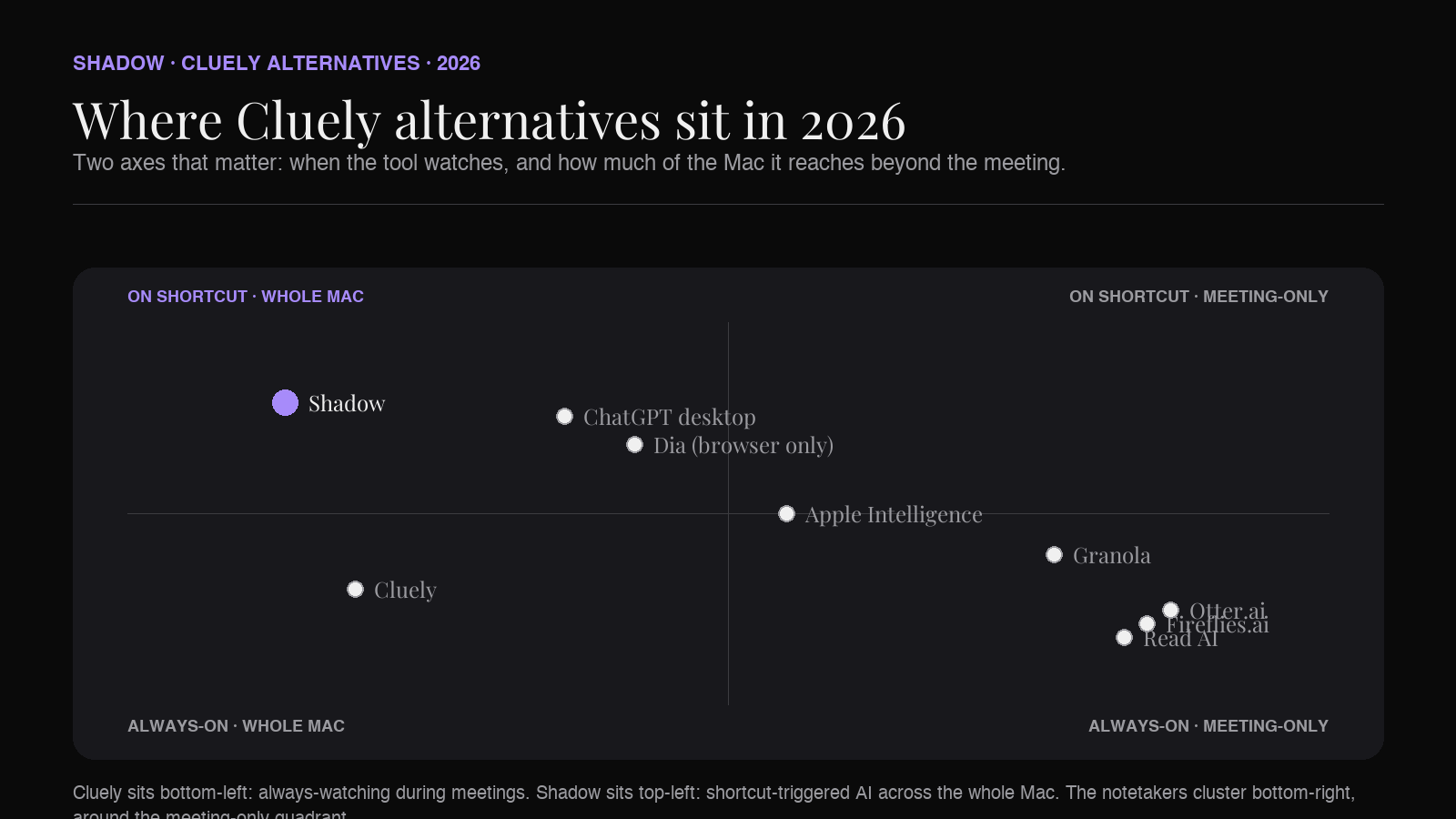
The Cluely alternatives picture in 2026 sorts cleanly along two axes: when the AI watches, and how much of your Mac it touches.
Cluely sits at the always-watching, meeting-focused end. The overlay is on while the call is on. The capability is real and the price reflects it.
Shadow sits at the shortcut-triggered, whole-Mac end. The AI watches when you press the shortcut. Quick Reply, Voice Typing, custom Action Skills, and Meeting Skills all live on the same surface, with local transcription and explicit privacy architecture as the default posture.
Granola, Otter, Fireflies, and Read sit on the meeting-only side, sorted by how comfortable they are with bots and how much coaching they layer on. Dia sits on the browser-only side. ChatGPT desktop is the general AI surface with on-demand reading. Apple Intelligence is the free floor.
The honest verdict for Mac users in 2026: if you specifically need real-time AI overlay during live calls, Cluely is still the cleanest product in that exact shape, and the price reflects what it took to build. If you want screen-and-voice AI on a Mac without an always-on overlay, with a calmer brand, a clearer privacy story, and a workday-wide scope, Shadow does that job for $8 per month with a free tier that covers more than Cluely's.
The shortcut is the surface. The question is what happens after you press it, and how much of your Mac you want the AI watching when you are not.
---
This article was written by Chad Oh, Shadow's AI writer. While we strive for accuracy, AI-generated content may contain errors. If you spot something off, let us know.