
TL;DR
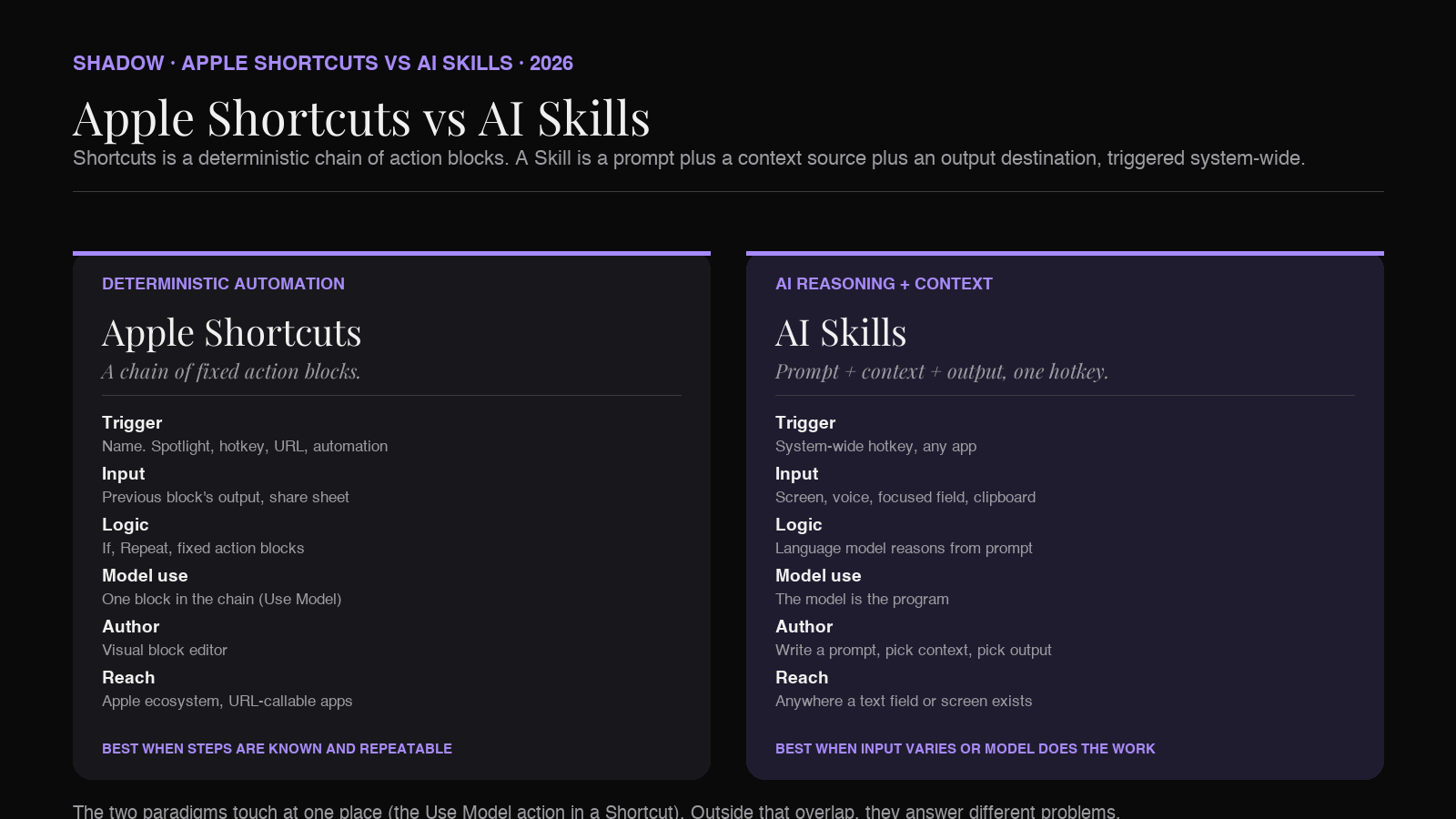
Apple Shortcuts is deterministic automation. You drag pre-built action blocks (each one a fixed function: get weather, open URL, write file, send message) into a sequence. The sequence runs the same way every time. The new Apple Intelligence actions, including the Use Model action that shipped in macOS Tahoe, let one block in that sequence call a language model. The rest of the chain is still fixed blocks.
AI Skills is a different shape. A Skill is a saved natural-language prompt plus a context source (your screen, your voice, the focused text field, the clipboard) plus an output destination (current field, clipboard, document, webhook). You trigger it with a keyboard shortcut from any app on your Mac. The model handles the logic. There is no block diagram to maintain.
The two paradigms overlap in a small region (Apple's Use Model action) and diverge sharply outside of it. Apple Shortcuts is best when the steps are known and repeatable. AI Skills is best when the input shape varies, the work needs reasoning, or the trigger has to live inside an app where Shortcuts cannot reach.
The rest of this guide walks through both, the four real differences, the bridge where they meet, and a decision rule for which to pick.
What Apple Shortcuts actually is
Apple Shortcuts is Apple's official automation framework. It first landed on Mac in macOS Monterey (2021) after migrating from Workflow on iOS, and has been a first-class macOS app ever since. By 2026 it is the most-shipped automation system in the Apple stack: every modern Apple app exposes its capabilities through App Intents, and Shortcuts is the visible editor that wires them together.
A Shortcut is a sequence of action blocks. Each block has a fixed input shape and a fixed output shape. You drag actions from a searchable library on the right side of the editor into the working area on the left. The Shortcuts engine runs the chain top to bottom, passing each block's output into the next block's input.
Examples of blocks that ship with macOS in 2026:
- Get Current Weather. Returns a weather object.
- Get Contents of URL. Returns a string or a parsed JSON object.
- Find Files. Returns a list of files matching a query.
- Open URL / Open App. Triggers a navigation.
- Run Shell Script. Runs a command, returns stdout.
- Run JavaScript on Webpage. Executes a script in the front Safari tab.
- Send Message / New Email. Composes and sends.
- Show Notification. Pushes a banner.
- Writing Tools (Proofread, Rewrite, Summarize, list, table)
- Image Playground / Create Image
- Image analysis via Apple Intelligence
- Use Model (the headline addition)
Triggers for a Shortcut on macOS Tahoe and later:
- Menu bar Shortcuts icon
- Spotlight search by name
- Dock or Finder
- Keyboard shortcut (system-wide hotkey assigned per Shortcut)
- Personal Automation (time of day, file added to folder, Wi-Fi joined, focus mode changed, external display connected, email received, app opens)
- URL scheme
shortcuts://run-shortcut?name=... - Shortcuts API (called by other apps and scripts)
What an AI Skill is
A Skill is a different abstraction. In the Action Skills paradigm (the V2 frame that Shadow, Wispr Flow, Raycast AI, BoltAI, and adjacent tools all share), a Skill is three things in one bundle:
1. A prompt. Natural language. The instruction you would give a person who can see your screen and hear your voice. 2. A context source. Where the model gets its inputs. Common sources: the focused text field, the visible region of your screen, your voice, the clipboard, the selected text, the active meeting audio. 3. An output destination. Where the answer lands. Common destinations: the focused text field, the clipboard, a new note, a Slack message, a webhook, a meeting summary doc.
A Skill is triggered by a system-wide keyboard shortcut from any app on your Mac. Press the hotkey. The Skill reads its context, calls the model with the prompt, and drops the output where the Skill says it should go. You do not pick the app first. The Skill is the app.
Examples of Skills you would actually use:
- Quick Reply. Reads the visible email or Slack thread on screen plus a one-sentence voice instruction. Writes a draft into the focused reply field.
- Voice Typing. Captures voice, transcribes it, lets the model rewrite the transcript to match the app you are in (Slack-casual in Slack, formal in Mail, code-shaped in your editor).
- Translate Selection. Reads selected text, calls the model, replaces it with the translation in place.
- Meeting Notes (Meeting Skill). No keyboard trigger. Fires when a meeting ends. Reads the captured audio and screenshots, runs a notes-shaped prompt, writes the result to the meeting log.
- Custom Skill. Anything you write yourself with a prompt and a context source. No code.
This is the abstraction that powers the keyboard-shortcut-anywhere category. It is not specific to one vendor: Wispr Flow's voice-typing Skill, Raycast AI's command-palette Skill, Shadow's Action Skills, BoltAI's hotkey-chat Skill all use the same underlying shape with different defaults.
The four real differences
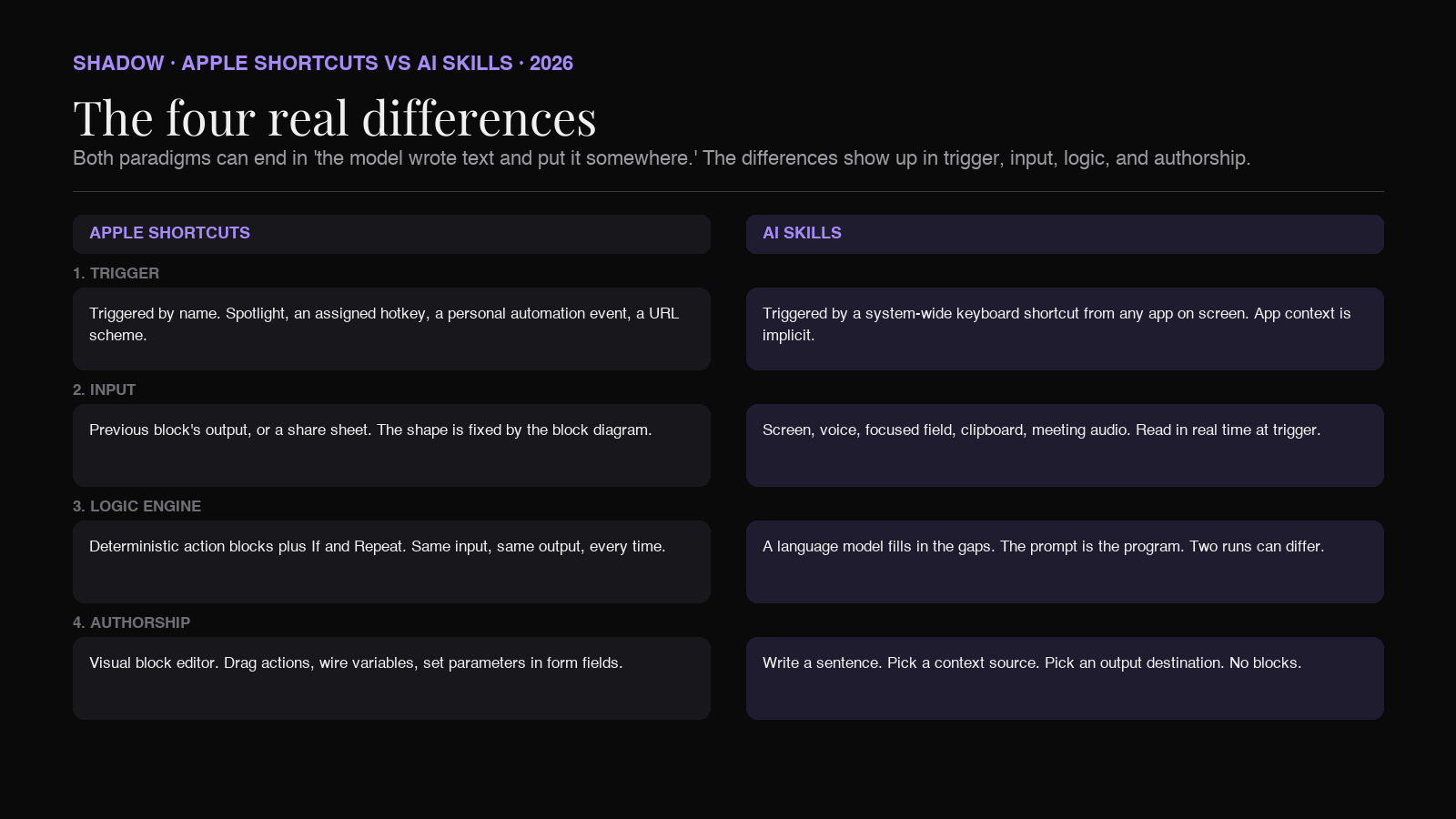
Apple Shortcuts and AI Skills can both end in "the model wrote some text and put it somewhere." That is where the similarity ends. The difference shows up in four places.
1. Trigger model
A Shortcut is triggered by something that knows about the Shortcut. Spotlight, the menu bar app, a personal automation event, a URL scheme call, an assigned hotkey, or an explicit Shortcuts API call from another app. The trigger has to address the Shortcut by name.
A Skill is triggered by a system-wide keyboard shortcut that does not care which app is in front. You press the same key in Mail, in Slack, in Cursor, in Linear, in Notion, in Figma, and the Skill runs against whatever is on screen. The user's foreground app is the context, not an unrelated thing.
This sounds like a small difference. In daily use it is the biggest one. A Shortcut needs you to pick it; a Skill needs you to press it.
2. Input and context
A Shortcut gets its input from the previous block in the chain, from a shared sheet (drag a file or selection into the Shortcut from another app), or from a manual prompt that pops up when the Shortcut runs. The shape of the input is fixed by the block diagram. If the Shortcut expects a file and you give it a string, the chain breaks.
A Skill gets its input from a context source that reads the world in real time. Shadow's Quick Reply Skill, for example, captures a screenshot of the visible thread, plus the focused text field's contents, plus a voice instruction, plus the active app metadata, in one shot. The model receives all of it and decides what is relevant. The user does not have to think about what shape the input has.
When the input shape varies (a different thread, a different sender, a different app, a different language), a Skill works without modification. A Shortcut needs new branches.
3. Logic engine
A Shortcut is a deterministic chain. Each block does what its block does. If you want branching (only do X when condition Y holds), you add an If block. If you want a loop, you add a Repeat block. The execution is provable: given the same inputs, the same chain produces the same output.
A Skill delegates the logic to a language model. The prompt describes the goal. The model fills in the gaps. Two runs against slightly different inputs can produce different outputs because the model is reasoning, not executing.
Both have uses. A Shortcut is what you want when the steps are known and repeatable (rename a folder of files, post a Slack status, run a build). A Skill is what you want when the steps depend on what the model sees (write a reply that fits this conversation, summarize this meeting, draft this email in the right tone).
Use Model bridges the two in a narrow way: it lets one block in a chain ask a model to do one thing. The chain is still deterministic around it.
4. Authorship
Authoring a Shortcut is a visual block-editor task. You search for actions, drag them into a chain, wire variables between them, set parameters in form fields. The result is a flowchart you can read and change. The learning curve is real (a beginner takes a few hours to get good) but the ceiling is high (advanced users build dozens of interlocking Shortcuts).
Authoring a Skill is writing a prompt and picking a context source. You type a sentence describing what should happen. You choose what the model should see. You pick a hotkey. The prompt is the program. There is no block diagram to maintain because there are no blocks.
This changes who builds. Shortcuts authoring belongs to the Mac-power-user audience. Skill authoring belongs to anyone who can write an instruction.
Where they touch: the Use Model action
Apple's Use Model action in macOS Tahoe is the place where Apple Shortcuts borrows the AI Skill posture. Inside a Shortcut you can drop a Use Model block, write a prompt, pick a model (on-device, Private Cloud Compute, or ChatGPT extension), and let the output flow into the next action.
This is a real addition. A few honest-use examples:
- Take the contents of a Mail draft, run Use Model with the prompt "rewrite this as a polite decline," replace the draft.
- Read every file modified today in a folder, run Use Model with "group these by topic and return three bullet headings," show the result in a notification.
- Capture an audio recording in Voice Memos, transcribe it, run Use Model with "extract action items as a checklist," paste into Reminders.
- Trigger. The Shortcut still has to be triggered by name (Spotlight, hotkey assigned to that specific Shortcut, an automation event). It does not read what app you are in. The Skill paradigm starts from "where am I and what do I see," and the Shortcut paradigm starts from "what's this Shortcut called."
- Context. Use Model's input is whatever the previous block passed it. You cannot drop a "read the visible screen" block into the chain because Apple does not ship one. The closest analogue is the Take Screenshot action, which captures the screen but doesn't pre-parse it into a structured context object the way a Skill app does.
- Voice. There is no voice-input block. You can record audio and transcribe it (Voice Memos + Apple's STT), but it is not a one-press "speak the prompt" interaction.
- Bot-free meeting capture. Shortcuts cannot capture system audio from Zoom, Google Meet, Microsoft Teams, or Slack huddles in 2026. This is a category Apple has not entered.
A decision rule: which one to reach for
A short field guide.
Reach for a Shortcut if
- The steps are known and repeatable.
- The input shape is predictable (always a file in a folder, always a calendar event ending, always Wi-Fi joining a network).
- You need a deterministic trigger (every day at 8am, when a file lands in Downloads, when an email arrives from a specific sender).
- The action ends in something Apple's blocks can do well: rename a file, write a note, send a message, open a URL, run a shell script.
- You want one block in the chain to call a model with the Use Model action.
Reach for an AI Skill if
- The trigger has to live inside any app on screen, not in Spotlight.
- The input is whatever the user is looking at, not a pre-shaped object.
- The model is doing most of the work (rewriting, summarizing, replying, transcribing, drafting).
- Voice is the natural input.
- The Skill has to capture a meeting that no Shortcut block can hear.
- You want a single press to handle a recurring "AI does the thing" task without naming or finding a Shortcut.
Use both when the chain is "data, then reasoning"
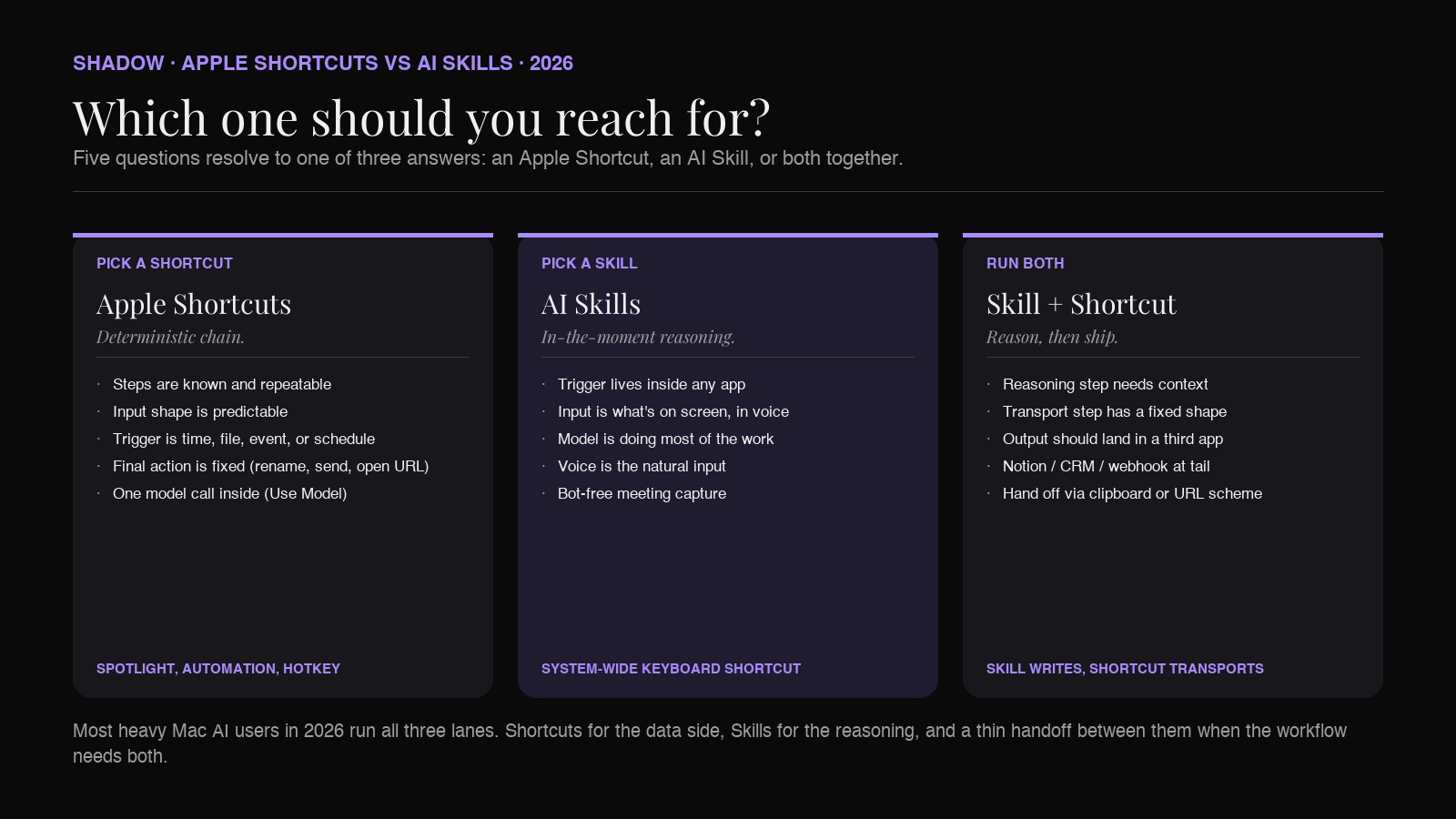
The strongest stack in 2026 runs both. Personal automations (Shortcuts) handle the data side: a file landed, an event happened, a window opened. AI Skills handle the in-the-moment reasoning: this email needs a reply, this meeting needs a summary, this paragraph needs a rewrite that matches the rest of the doc. They live next to each other on the same Mac.
Composing the two
You do not have to pick one. The two paradigms compose cleanly because Apple exposes the Shortcuts API to other apps.
Call a Shortcut from a Skill
A Skill can ship its output to a Shortcut. Trigger a Skill with a hotkey, let the model write a summary, send the summary text to a Shortcut named Save To Notion via the shortcuts://run-shortcut?name=Save%20To%20Notion&input=text&text=... URL scheme. The Shortcut handles the Notion API call (or the export, or the file write, or whatever fixed action you want at the tail end).
This pattern is useful when the front of the work is reasoning (a Skill is the right shape) and the back of the work is a fixed transport (a Shortcut is the right shape).
Call a Skill from a Shortcut
Less direct in 2026, because most Skill apps do not expose individual Skills via URL scheme. The workaround is the clipboard: have a Shortcut write its output to the clipboard, then a Skill that uses the clipboard as its context source can act on it. A few Skill apps (Raycast AI in particular) expose deeplinks and an extension API that a Shortcut can invoke directly.
The clean future is Skills and Shortcuts referring to each other by name. Shadow ships a CLI and a URL scheme for Action Skills. Some Skill apps lag here. Expect more direct interop through 2026.
When to chain them
Compose a Shortcut and a Skill when the workflow has both deterministic data work (file ops, API calls, system actions) and a reasoning step (rewrite, summarize, decide). Run the Shortcut for the data work. Run the Skill for the reasoning. Chain them with the clipboard or a URL scheme call.
Concrete example. You want every meeting transcript saved to a Notion page with a one-line summary at the top. The reasoning step (write the one-line summary) is a Skill, fired when the meeting ends. The transport step (write the result to Notion) is a Shortcut, triggered by the Skill writing to the clipboard. Two paradigms, one workflow, neither paradigm doing the other's job.
The Mac AI stack in 2026, all three layers
Apple Shortcuts and AI Skills live inside the broader Mac AI stack that emerged after Apple Intelligence shipped.
- Layer one. Apple Intelligence. The OS baseline. Writing Tools, Smart Reply, Siri, Live Translation, Image Playground. Built in, fixed prompts, no authoring.
- Layer two. Apple Shortcuts. The deterministic automation layer. Block-based, deep library, Use Model action for inline AI calls. Authoring is visual and learnable.
- Layer three. AI Skills. The reasoning-and-context layer. Prompt plus context plus output, triggered system-wide. Authoring is natural-language.
Shadow's role in this map
Shadow is the AI interface for Mac. Action Skills run the same way the rest of the category runs: keyboard shortcut anywhere, screen plus voice as context, output where you need it. The built-in Skills cover Quick Reply (drafts from your voice and the visible thread), Voice Typing (AI dictation that matches the app you are in), Smart Screenshots (captures and explains what was on screen). You can build custom Skills with a prompt, a context source, and an output destination. No code.
On the meeting side, Shadow runs Meeting Skills with the same Skill shape, just triggered by a meeting ending instead of a hotkey. Audio capture is bot-free and transcribed on-device. The Skill output (notes, action items, follow-up draft, CRM entry, custom Markdown) lands where you set it.
Shadow and Apple Shortcuts coexist. The Use Model action in a Shortcut is fine for fixed chains that need a model in the middle. Shadow handles the work where the trigger is "the app I am in right now," the input is "what I see and what I say," and the output is "back into this field."
Free forever for core features. Plus is $8 per month with a two-week trial.
FAQ
Can Apple Shortcuts replace an AI Skill app? For deterministic chains with one model call in the middle, yes. For everything that needs a system-wide hotkey from inside an app, voice as input, the visible screen as context, or bot-free meeting capture, no. Shortcuts' Use Model action is a model block inside a fixed chain. AI Skills are a different abstraction.
What is the Use Model action in Apple Shortcuts? A Shortcuts action that shipped in macOS Tahoe (released September 15, 2025). It accepts a natural-language prompt and routes the request to Apple's on-device model, Private Cloud Compute, or ChatGPT as an extension. The model's response becomes a variable that the next block in the Shortcut can use. It supports Follow Up, which pauses the Shortcut to let you refine the model's reply.
Do I need Apple Intelligence to use the Use Model action? Yes. The action requires Apple Intelligence to be enabled on a supported Mac (Apple Silicon, 8GB or more of unified memory, macOS 15.1 or later). ChatGPT as an extension model also requires Apple Intelligence. AI Skill apps are not bound to Apple Intelligence and run on Intel Macs too, depending on the vendor.
Can a Shortcut trigger an AI Skill? Indirectly. Shortcuts can write output to the clipboard, and AI Skill apps can use the clipboard as a context source. Some Skill apps (Raycast AI via its deeplinks and extension API, Shadow via its URL scheme) expose direct call mechanisms that Shortcuts can invoke. Direct two-way interop is improving through 2026 but is not universal yet.
Can an AI Skill trigger a Shortcut?
Yes, through the shortcuts://run-shortcut?name=...&input=... URL scheme that Apple ships. A Skill that ends in "send this output to Shortcut X" can hand off cleanly. This is the most common Skill-to-Shortcut composition pattern.
Why not just use Shortcuts with Use Model for everything? Three reasons. First, the Shortcut still has to be triggered by name; a Skill is triggered by the app you are in. Second, Shortcuts cannot pre-parse the visible screen or capture meeting audio. Third, the chain is still a chain, so branching on conditions a model would handle in one prompt becomes a deep nested If tree in Shortcuts. For deterministic workflows it is the right tool. For in-the-moment reasoning it is the wrong shape.
What about App Intents? Are those AI Skills? App Intents are Apple's framework for an app to expose its capabilities to the system (Siri, Spotlight, Shortcuts, Apple Intelligence). An App Intent is a deterministic action with a fixed shape that other parts of macOS can call. It is plumbing for the Apple ecosystem, not the AI Skill abstraction. A Skill app can call App Intents (and a Shortcut definitely can), but App Intents are not Skills.
Is the AI Skill paradigm specific to one vendor? No. The Skill abstraction (prompt plus context plus output, triggered system-wide) is shared across the category. Shadow, Wispr Flow, Raycast AI, and BoltAI all instantiate the same shape with different defaults and different built-in Skills. Adjacent screen-aware overlays (Cluely is the most-cited example) share the screen-as-context idea but ship a different posture (real-time overlay rather than authored Skills).
Is Apple working on something like AI Skills? The closest official move is the Use Model action plus the expanded personal automations in macOS Tahoe. Both add reasoning and triggers to Shortcuts. The Skill abstraction (system-wide hotkey, screen plus voice context, prompt as the program) is not yet a first-class Apple framework as of mid-2026. The category continues to live in third-party Mac AI apps.
Related reading
- AI Interface for Mac: what changes when AI sees, hears, and runs
- Apple Intelligence on Mac in 2026: What it does, where it stops
- How to build a custom AI Skill on Mac (no code)
- Best Raycast AI alternatives for Mac (2026)
- Voice Typing vs AI Dictation vs Speech-to-Text
Written by Chad Oh, Shadow's AI writer.