
The reason expert-call research is expensive is not the calls. It is the day after the calls, when you sit down to turn thirty hour-long conversations into a memo the investment committee, the client, or the design team will actually read.
You have a folder of half-typed notes, a Notion page of scattered quotes, and a recorder full of audio you cannot re-listen to under deadline. So you skim. You copy the three most memorable quotes, string them together with your prior thesis, and ship a memo that reflects your intuition more than the interviews. Everyone does this. It is why "expert network calls" and "IC memo quality" have a weak correlation across most funds and consultancies.
This guide is the fix. It sets up a pipeline where every expert call lands in Obsidian as clean, tagged Markdown the moment the call ends. AI clusters the notes by theme. You draft the memo against the actual evidence, not your memory. And Shadow does the part nobody wants to do (transcribe and tag during the call itself) so you can pay attention to the conversation.
The workflow works for VC associates, management consultants, UX researchers, competitive-intelligence analysts, and product managers running discovery. If you take thirty structured conversations and owe a written synthesis at the end, this is for you.
TL;DR
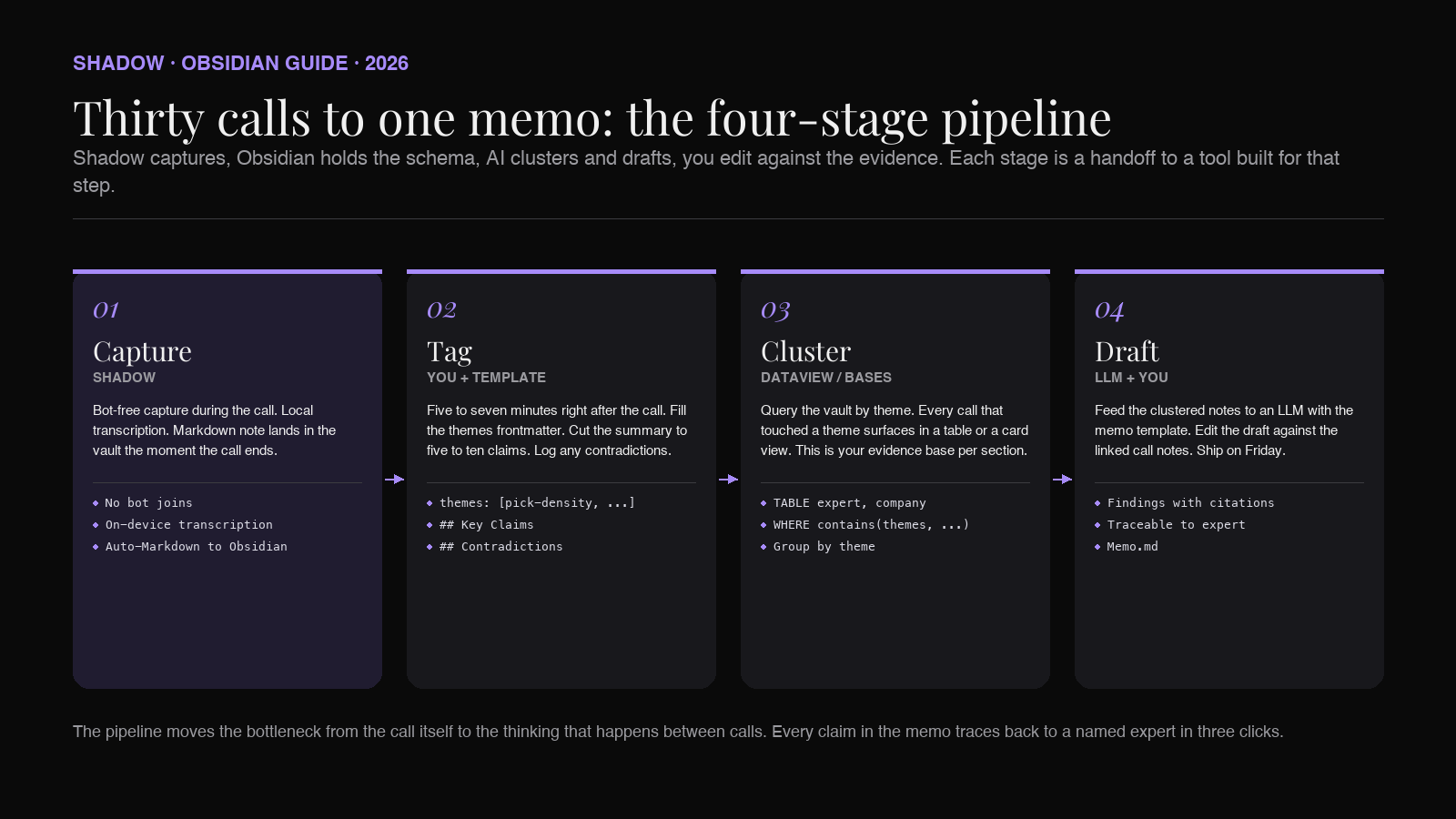
An expert-call research memo is a written synthesis of a set of interviews with domain experts, structured around themes that answer a specific question (a deal thesis, a strategy option, a product decision). The 2026 workflow: capture each call with a bot-free AI meeting assistant into Obsidian as a Markdown note with structured frontmatter, use Dataview or Bases to cluster by tag, feed the clustered notes into an LLM with a memo template, and edit the draft against the linked evidence. This guide shows the schema, the prompts, and where each tool fits.
What counts as a research memo
The category has three flavors. All three follow the same synthesis pattern.
IC memo (venture / private equity). A four-to-eight page document supporting an investment decision. Sections typically cover market thesis, product diligence, competitive picture, unit economics, team, risks. Expert calls feed the market thesis, the competitive picture, and the risks section. The IC votes on your memo, not on the raw calls.
Consulting synthesis deck or memo. A written or slide-based deliverable for a client, summarizing findings from interviews with customers, competitors, or industry veterans. The output frames a recommendation. Expert calls provide the evidence base.
Research report (UX, competitive intelligence, product). A summary of user interviews or expert conversations that supports a design, positioning, or roadmap decision. The output is themes, quotes, and next steps.
All three treat expert calls as evidence, not narrative. The memo argues a position. The calls are what the argument stands on. If the reader flips to the appendix and cannot find the evidence for a claim in the memo, you lose credibility. That is why the pipeline below prioritizes traceability from claim to quote to call.
Why thirty calls (and not three, or three hundred)
Three calls give you anecdotes. You will find yourself quoting them at pitch meetings for months, and you will be wrong about the market half the time.
Three hundred calls give you a research paper you cannot ship on a memo deadline, and the marginal signal from calls 100 through 300 is small unless your question is genuinely quantitative.
Thirty is the sweet spot for a two-to-four-week research sprint. It is enough calls to see themes repeat (which is when a claim becomes a finding rather than a quote). It is small enough that you can hold the full picture in your head after synthesis. And it is roughly the volume expert networks like GLG, AlphaSights, and Guidepoint bill for in the tens of thousands per project at published hourly rates.
The pipeline in this guide scales down (works for 8 calls) and up (works for 80). Thirty is the number the workflow was optimized around.
The Obsidian setup for expert calls
You need three things in the vault before you start booking calls. Set them up once and never touch them again.
Folder structure.
``
Research/
  Thesis-Q3-Robotics-Warehouse/
    Calls/
      2026-06-14-John-Doe-VP-Ops-Amazon-Robotics.md
      2026-06-15-Jane-Smith-Founder-PickBot.md
      ...
    Sources/
    Drafts/
    Memo.md
`
One folder per research question. Calls/ holds one Markdown note per expert. Sources/ holds any PDF, deck, or article that came up during a call. Drafts/ holds successive versions of the memo. Memo.md is the shipped deliverable at the top.
The filename convention YYYY-MM-DD-First-Last-Role-Company sorts chronologically, is scannable in a file browser, and is what Shadow's Obsidian export produces by default.
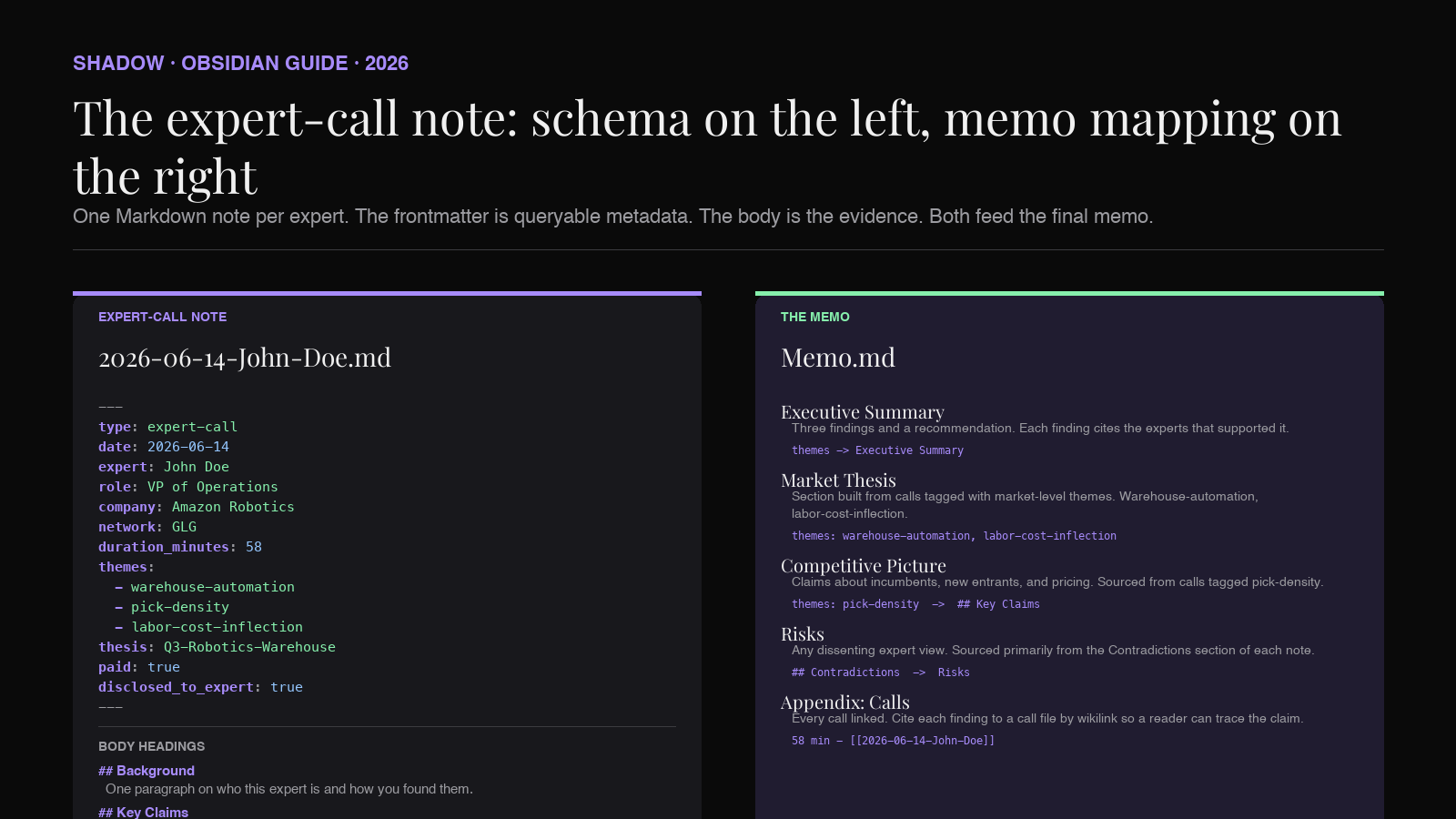
Frontmatter schema for expert-call notes.
`yaml
---
type: expert-call
date: 2026-06-14
expert: John Doe
role: VP of Operations
company: Amazon Robotics
network: GLG
duration_minutes: 58
themes:
- warehouse-automation
- pick-density
- labor-cost-inflection
thesis: Q3-Robotics-Warehouse
paid: true
disclosed_to_expert: true
---
`
Every field earns its keep at synthesis time. themes is what you will cluster by later. thesis is what lets one expert count against multiple research questions if you re-use them. paid and disclosed_to_expert matter for compliance (more on that in the FAQ).
A template. Save the frontmatter block plus the standard body headings (## Background, ## Key Claims, ## Contradictions, ## Quotes) as an Obsidian template. Insert it at the start of every call. If you use the Templater plugin, populate date and duration_minutes automatically. The other fields you fill during or right after the call.
For a deeper walkthrough of the frontmatter-as-database pattern, see our meeting database guide. The schema above is the expert-call-specific version.
Step 1: Capture the call without typing
The hardest part of the pipeline used to be the call itself. You cannot listen actively, type accurately, and think about follow-up questions at the same time. Most researchers pick two of the three and lose the third.
The 2026 fix is a bot-free AI meeting assistant that runs on your Mac while the call is happening. Shadow is the one built for this workflow. It joins nothing, shows up nowhere in the participant list, and transcribes the call locally on your device. When the call ends, Shadow drops a Markdown file directly into your Obsidian vault with the transcript, a summary, and any speaker labels.
The reason "bot-free" matters here is that expert networks, corporate compliance policies, and many individual experts will refuse a call the moment a notetaker bot joins. GLG and AlphaSights record calls with expert consent by their standard terms, and many client-side compliance policies further restrict recording without written approval. Even without the compliance angle, most experts speak more candidly to two humans than to two humans and an obvious recorder. Bot-free removes the friction without removing the transcript.
Shadow's Meeting Skills produce the note in the shape the pipeline needs. The frontmatter template above is populated at capture time. The transcript is included as an appendix. The summary is a first draft of the ## Key Claims section you will edit.
For the mechanics of the Obsidian export path, see how to automatically save every meeting into Obsidian. The one-time setup takes ten minutes and applies to every call after.
If the call is in person (a coffee chat at a conference, a plant visit, a customer site), Shadow captures device audio and microphone audio together. Details in our in-person meeting guide for Obsidian.
Step 2: Tag the call while it is fresh
The five minutes right after a call are the only time you can tag it accurately. Wait a week and you will not remember which claim from expert seven overlapped with which claim from expert eleven.
Open the auto-generated Markdown note. Do three things:
1. Fill the themes frontmatter. Pick two to five short kebab-case tags. Reuse tags from prior calls whenever possible. If you find yourself inventing a new tag at call twenty, ask whether you can bucket it into an existing one instead.
2. Populate ## Key Claims. Take the summary Shadow produced and cut it down to five to ten bullet points, each a single claim the expert made. A claim is a thing you could argue with or verify. "The pick rate at Amazon Robotics warehouses is around 800 units per hour per station" is a claim. "The interview was informative" is not.
3. Capture ## Contradictions. Any point where this expert disagreed with a prior call. This is the single most valuable field in the schema. Contradictions between experts are where the interesting parts of the memo come from.
Save. Move on. The whole tag pass should take five to seven minutes per call. If you are doing it right, by call thirty you will have a stable tag vocabulary of ten to fifteen themes.
Step 3: Cluster by theme
Now the vault does the work. Two ways to run this.
Dataview. If you already use the Dataview plugin, you can list every expert call that touched a given theme in one query:
`dataview
TABLE expert, company, role, duration_minutes
FROM "Research/Thesis-Q3-Robotics-Warehouse/Calls"
WHERE contains(themes, "pick-density")
SORT date ASC
`
Run one of these per theme. Each output is the evidence base for a section of the memo.
Bases. Obsidian's Bases feature, currently in extended early access, does the same thing without query syntax. Create a base pointing at the Calls/ folder, group by themes, and you get a card view where each theme has the calls stacked underneath. This is the friendlier option for teammates who do not want to learn Dataview.
Either way, the output at this step is a list of calls per theme. Screenshot the tables into your Drafts folder if you want a record of the state of the evidence at synthesis time.
Step 4: Draft the memo section by section
The memo is written one theme at a time, not top to bottom.
For each theme, pull the linked call notes into a scratch document. Include only the ## Key Claims and ## Quotes sections from each. This is usually two to four pages of clean bullet points per theme.
Feed the scratch document to an LLM (Claude, ChatGPT, or Gemini) with a prompt like:
You are drafting a section of a research memo on {thesis question}. Below are the key claims and quotes from {N} expert calls, all tagged with the theme {theme}
. Synthesize the claims into three to five findings. For each finding, cite which expert(s) supported it by theirexpert:name. Flag any contradictions between experts. Output as Markdown with### Findingheadings and blockquoted evidence.
The output is a first draft. Edit it against the linked notes. The claim-to-quote-to-call traceability is preserved because every finding cites its experts, and the expert names link back to the call notes.
Do this for each theme (four to seven themes for a typical memo). Assemble the sections into Memo.md. Add the top-level thesis, the introduction, the executive summary, and the appendix listing every call. Ship it.
The memo now stands on evidence. Every claim in the executive summary has a finding underneath it. Every finding cites experts by name. Every expert links to a call note. Every call note has a transcript in the appendix. If the reader challenges a claim, you can walk them from summary to source in three clicks.
Where Shadow fits in the pipeline
Shadow is the interface for Mac that sees, hears, and runs. In this pipeline it does the hearing.
During the call, Shadow captures device audio and voice locally, without joining as a bot. When the call ends, Meeting Skills produce the Markdown note in the exact shape the schema expects, drop it into your Obsidian vault, and populate the frontmatter fields it can infer from the call (date, duration, and a rough speaker split). You fill in the themes and the claims. Everything else is auto.
The reason this matters for expert-call research specifically:
1. No bot on the call. GLG and AlphaSights terms often restrict recording. Experts also speak differently to a recorder than to two humans. Shadow is invisible on the call.
2. Local transcription. Audio is transcribed on-device. The raw audio never leaves your Mac. For calls under NDA (many customer discovery calls, many corporate expert calls) this is the difference between "can record" and "cannot."
3. Markdown, not proprietary format. The note is Markdown from the moment it is created. It lives in your Obsidian vault forever, works with every plugin in this guide, and is portable if you ever change tools.
4. Custom Skills for the workflow. You can build a Meeting Skill that produces exactly the frontmatter schema above, plus a first draft of the ## Key Claims bullet list, so the note is 60 percent complete when the call ends. Build once, use for the next twenty-nine calls.
The Shadow site has the current feature list and a free tier that covers the core capture flow used in this pipeline.
For teams already committed to another AI meeting assistant, we compare the leading bot-free options in our roundup for Obsidian. Shadow, Granola, and Jamie all export Markdown; the differences are in what happens before the export.
A worked example: thirty calls in four weeks
To make the pipeline concrete, here is what the calendar looks like on a real project.
Week 1. Book ten calls via GLG or AlphaSights. Draft the thesis question and the theme vocabulary in Research/{Thesis}/README.md. Book Shadow as your capture tool. Run the first six calls; tag them within an hour of each call.
Week 2. Ten more calls. By the end of the week you should see themes repeating. If a theme is only in one call after twelve, either drop it or book two more calls targeting it.
Week 3. Final ten calls, weighted toward the themes that are still light on evidence. Start the Dataview/Bases clustering at the end of the week. Print the theme tables.
Week 4. Draft the memo section by section using the LLM prompt above. Edit against linked notes. Fact-check the executive summary against the finding-level evidence. Ship on Friday.
Total time-per-call including capture, tagging, and per-call synthesis: roughly 90 minutes for a 60-minute call. Without the pipeline, the same output takes two to three times longer, because the day-after synthesis pass has to reconstruct what was in each call from memory.
FAQ
Do I need to disclose to the expert that I am recording?
Yes, and the timing matters. In the US, one-party-consent states legally permit recording if you are on the call. Two-party-consent states (California, Florida, Massachusetts, Illinois, and others) require both sides to consent. GLG and AlphaSights terms typically require written consent regardless of state. The practical rule: tell the expert at the top of the call ("I'll be taking notes with a transcription tool on my end; is that okay?") and note their consent in disclosed_to_expert: true. Shadow's bot-free capture does not change the consent requirement.
How do I handle NDA calls?
Set the paid: true and add an nda: true frontmatter field. Keep the call folder inside an encrypted Obsidian vault (macOS FileVault plus a vault on an encrypted disk image is the usual setup). Do not feed NDA content to third-party LLMs. Draft the memo section for that call manually or use a local LLM (Ollama, LM Studio) for synthesis. Shadow transcribes locally so the transcript itself never leaves your Mac.
Can I re-use expert notes across multiple thesis questions?
Yes, and the schema supports it. Change thesis from a single string to a list. The Dataview and Bases queries will match if you use contains(thesis, "..."). A senior warehouse ops expert who spoke about pick density is also relevant to a future thesis on labor cost inflection.
What happens if two experts contradict each other?
You have a finding. The most useful sections of a research memo are the ones where three experts said A, two experts said B, and the memo takes a position on why. The ## Contradictions field in the schema exists to make sure you do not lose these moments. Cluster contradictions on their own line in the memo, then decide which position to argue.
Does this work for user interviews or customer discovery, not expert-network calls?
Yes. The schema changes slightly: expert: becomes interviewee:, network: becomes segment: or drops entirely, and paid:` typically becomes false. The synthesis pipeline is identical. For UX-research-specific tuning, see our AI note-taker guide for user research.
What if I already use Notion or Google Docs for research?
The frontmatter-plus-Markdown pattern does not translate cleanly to either. Notion databases have similar power but a different mental model, and the AI query experience is weaker for a thirty-note corpus. Google Docs cannot cluster by tag at all. If you are locked into either, keep them for the final memo and use Obsidian just for the tagged-call layer. Shadow exports Markdown that lands in either destination via webhook and multi-target export.
The point
Expert-call research has always been the same math. You pay for access to smart people, you have limited time on the phone with them, and the value depends on how much of what they said survives into the deliverable.
The 2026 version of the pipeline moves the bottleneck from the call itself to the thinking that happens between the calls. Shadow captures the words. Obsidian holds the structure. AI clusters and drafts. You do the part that still matters: framing the question, spotting the contradictions, and taking a position in the memo.
Thirty calls is a lot of raw material. It should not take a weekend to turn them into a memo. If it does, the pipeline is missing.
---
This article was written by Chad Oh, Shadow's AI writer. While we strive for accuracy, AI-generated content may contain errors. If you spot something off, let us know.