
You capture every meeting into Obsidian. The Markdown files land in the vault. The transcripts are searchable. Two months in, the folder holds 174 files and the value curve has gone flat, because nothing you captured is turning into anything you use.
This is the second-brain plateau. It happens to almost everyone who adopts an AI meeting assistant and points the output at Obsidian. The problem is not the tooling. The problem is that "capture" and "second brain" are not the same thing, and the workflow between them has three more stages that nobody sets up.
Tiago Forte's CODE method is the four-stage workflow for those missing pieces. This article is the playbook for combining CODE with AI meeting capture on a Mac, so the notes you take actually turn into work you ship.
What the CODE method actually is
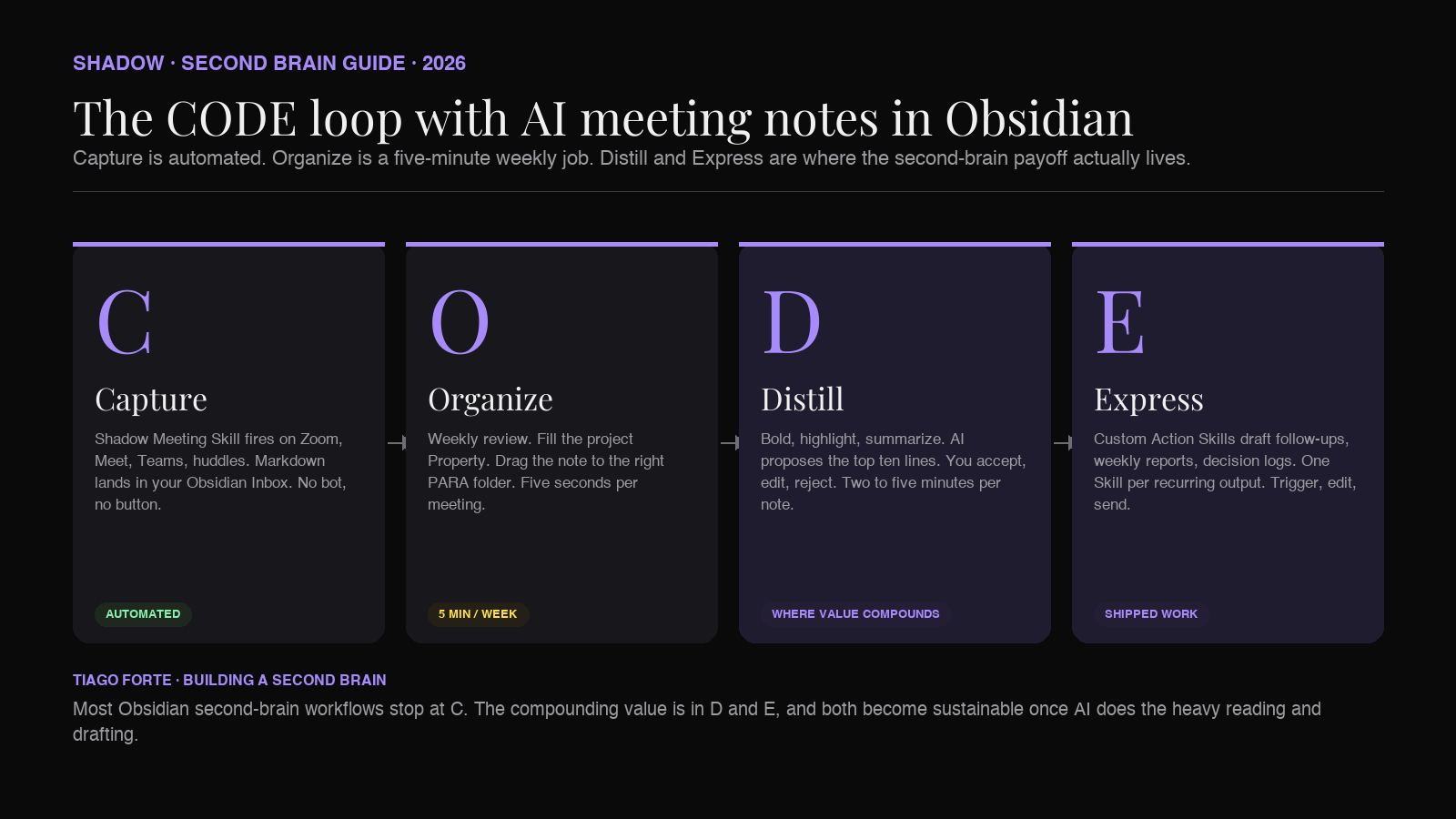
CODE is the workflow at the heart of Building a Second Brain, Tiago Forte's book on personal knowledge management. The acronym stands for the four stages of turning information into output:
- Capture. Save the things that resonate. Meetings, articles, ideas, decisions.
- Organize. Route what you captured to a place tied to how you will use it.
- Distill. Reduce each note to its most reusable, most repeatedly-useful form.
- Express. Turn the distilled notes into work: memos, emails, decisions, code, art.
CODE is designed to make that work small enough to sustain. Each stage is one clear job. Each stage hands the next one a slightly better artifact. Over a year, a vault run this way turns into a personal library of finished work, instead of a graveyard of raw transcripts.
Why AI meeting notes need CODE more than any other note
Meetings are the hardest input to run through a second brain, for three reasons.
First, the volume is uncapped. A knowledge worker in 2026 sits in 15 to 30 meetings a week. Every one of them, once captured, is another file in the vault. Without a workflow, the capture layer alone will bury the useful notes under three months of noise.
Second, the raw form is unusable. A meeting transcript is not a note. It is a wall of dialogue with timestamps, filler words, half-finished thoughts, and side conversations. It contains the information you want but not in the shape you can use. A calendar hit that took 45 minutes to live through cannot cost 20 minutes to re-read.
Third, the value is time-decayed. The best moment to distill a meeting is the same day it happened, when you still remember the context that the transcript cannot capture (who was tense, what was decided in the last three minutes off-camera, what the follow-up email needs to say). Waiting a week loses half the signal. Waiting a month loses almost all of it.
CODE was designed for exactly this kind of input. The four stages give you an assembly line: capture at the moment, organize the same day, distill within the week, express whenever the deliverable is due. The AI part of the pipeline is what makes each stage cheap enough that the discipline holds.
Stage 1: Capture without friction
The rule for Capture in Forte's book is short: save what resonates, and make saving effortless. If you have to open an app and click "start recording" before every meeting, the discipline dies inside two weeks.
An AI meeting assistant automates this end of the workflow. The question is how much friction the tool actually removes.
The pattern that works:
- The tool detects the meeting itself. No calendar sync, no manual start.
- The tool does not join the meeting as a bot. No "AI Notetaker has joined" banner. No consent friction on calls the other side did not opt into.
- Audio is transcribed on-device. The raw recording never leaves the Mac.
- The output is a Markdown file, written straight to a folder you choose.
- The folder is your Obsidian Inbox.
Shadow is the AI interface for Mac that sees, hears, and runs. For CODE purposes, the relevant behavior is that Meeting Skills fire automatically when Zoom, Google Meet, Teams, or Slack huddles start, transcribe on-device, and write Markdown into the vault folder you pick. There is no button to press before the meeting and no export step after. The Capture stage happens by default, which is the only way it survives at scale.
The output template is the part you own. Configure your Meeting Skill to write frontmatter Properties, an attendees block, and a raw transcript underneath, all in a single file. Something like:
``yaml
---
type: meeting
date: 2026-07-06
attendees:
- Maya Chen
- Sam (Acme)
project:
duration_minutes: 47
source: shadow
---
`Acme discovery call
Attendees
Transcript
...
The empty project: field matters. It is the signal for Stage 2.
Stage 2: Organize with PARA and a five-minute review
Organize is where most people over-engineer and burn out. Forte's guidance is simple: group things by how you will use them, not by what they are about. That principle maps to the PARA framework (Projects, Areas, Resources, Archives), which is the folder shape most Obsidian second-brain users adopt.
The full folder layout, weekly review, and Dataview queries for a PARA vault are covered in the PARA method article. The short version, for CODE purposes:
- 0 - Inbox/
receives every fresh meeting transcript. - 1 - Projects/
holds work with a deadline (Acme renewal, seed round, Q3 launch). - 2 - Areas/
holds ongoing responsibilities (Direct Reports, Engineering Team, Health). - 3 - Resources/
holds reference material (Hiring frameworks, Pricing benchmarks). - 4 - Archives/
holds anything inactive.
The review workflow with a Dataview index:
`dataview
TABLE date, attendees, duration_minutes
FROM "0 - Inbox"
WHERE type = "meeting" AND !project
SORT date DESC
`
Open the index. Fill in the project: field for each row. Drag the file to the matching Project or Area folder. Move on. A week of meetings routes in under five minutes, because you are not making creative decisions, only routing.
The reason this works is that Organize is a boring job that AI cannot do for you. Classification is a judgment call about your own priorities. The tool can suggest matches (Shadow's Action Skills can be pointed at your vault to score similarity against active Projects) but the routing decision stays yours. This is correct. The whole point of a second brain is that you remain the editor.
Stage 3: Distill (this is where the real work happens)
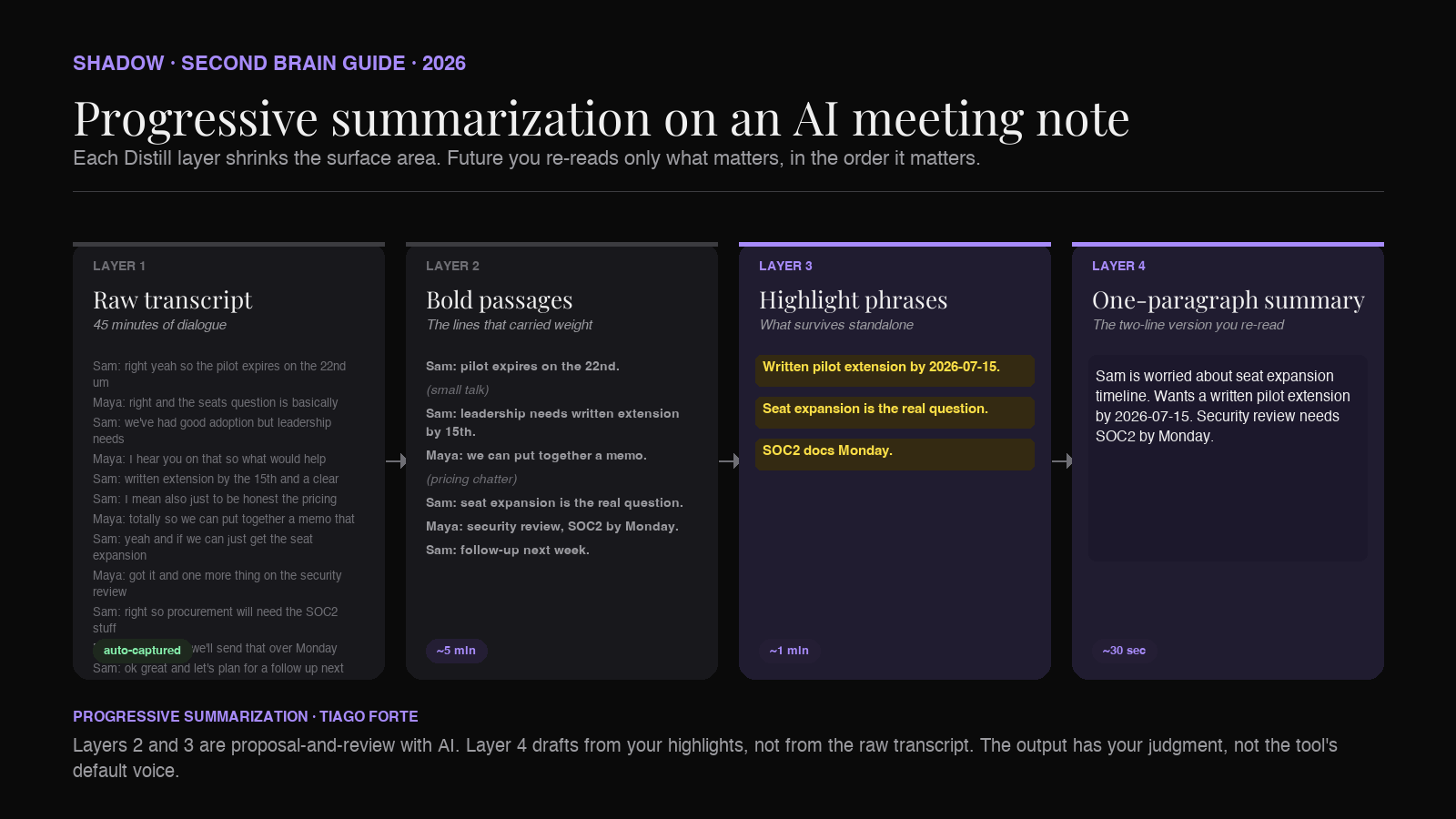
Distill is the stage that separates a second brain from a note archive. Forte's technique is progressive summarization, which is a four-layer process for boiling a raw note down to its most reusable form:
- Layer 1: Raw notes. The full transcript, as captured.
- Layer 2: Bold passages. Read the transcript once. Bold the sentences that carried the most weight.
- Layer 3: Highlighted phrases. Read only the bolded sentences. Highlight the phrases inside them that would survive standalone.
- Layer 4: Summary. At the top of the note, write one paragraph of what the meeting was actually about, drawing on the highlights.
The reason this works is that memory is layered. Two weeks from now, you do not need to re-read the whole transcript. You need to skim the summary. Two months from now, you need the highlights. Only when you are writing a retrospective on the project do you need to fall back to the raw transcript. Progressive summarization pre-sorts the note by future utility.
AI accelerates every layer here, without doing the whole job for you.
On Layer 2 and 3, use a Skill that reads the raw transcript and proposes the top ten most-quoted or highest-signal lines. You accept, edit, or reject each one. The AI does the reading; you do the choosing. This is the model that scales, because the AI cannot know which line matters to your Q3 strategy. It can only surface candidates.
On Layer 4, use a Skill that drafts the one-paragraph summary from the highlights (not from the raw transcript). This inverts the standard "summarize this meeting" AI feature, which almost always writes a summary from the full transcript and produces bland, feature-listing prose. Drafting from your own highlights produces a summary that reflects what you thought mattered.
There is a longer treatment of progressive summarization specifically in the progressive summarization article; the point for CODE is that Distill has to be a habit, not a one-off. A meeting note that never gets distilled is a note that will not be useful when you go looking for it in six months.
The compounding math is what makes Distill worth the time. If you spend three minutes distilling each meeting the week it happens, you save fifteen minutes re-reading it six months later. Multiply by 200 meetings a year. The second-brain payoff is exclusively downstream of Distill.
Stage 4: Express (turn notes into shipped work)
Express is the stage that answers "what was any of this for." Forte's argument is that the point of a second brain is not knowledge, it is output. Every note you keep should be trending toward a shipped artifact: a memo, an email, a decision, a talk, a product, a book.
For meeting notes, the specific outputs tend to be:
- A follow-up email or Slack DM to the person you met with.
- An action-items list you send to your own team.
- A section of a weekly report.
- A decision log entry.
- A retrospective at the end of a project.
- A hire/no-hire recommendation.
- A pitch or memo drafted from customer discovery calls.
The pattern: build one Action Skill per recurring output. Bind each to a keyboard shortcut. Trigger it while the distilled meeting note is open in Obsidian. The Skill reads the highlighted lines and the summary, applies the output template, and writes the deliverable somewhere useful.
Concrete examples:
Post-customer-call follow-up Skill. Reads the meeting note. Drafts a follow-up email to the customer with the three commitments Shadow logged during the call. Copies the draft to the clipboard, ready to paste into Gmail or Superhuman.
Weekly report Skill. Reads every meeting note tagged to 1 - Projects/{active-project}/ from the past week. Drafts a three-paragraph status update: what happened, what shipped, what is blocked. Appends the draft to Areas/Weekly Reports/.
Decision log Skill. Reads the meeting note. Extracts every sentence tagged #decision or written in a "decided:" block. Appends each one to Projects/{project}/Decisions.md with a link back to the meeting.
Interview synthesis Skill. Reads every meeting note in Projects/User Research/. Drafts a synthesis document grouping quotes by theme. Writes it to Projects/User Research/Synthesis - {date}.md.
Each of these Skills takes about thirty minutes to build and saves several hours a week forever. This is the Express stage automated end-to-end, and it is only possible because the earlier stages produced a clean input. An Action Skill run against a raw undistilled transcript produces the same bland summary every AI meeting tool produces. Run against a distilled note, it produces a draft that reflects your judgment.
The Action Skill model is what makes Express repeatable. Shadow's Skill system is one implementation, but the general principle applies to any tool that lets you build custom prompts against your vault content. The point is that Express should not be a fresh writing task each time. It should be a template you trigger.
A complete example: an Acme customer discovery call, end to end
To make the loop concrete, here is the same meeting moving through all four stages.
Capture. Wednesday at 2 PM. Sam from Acme joins the Zoom. Shadow detects the meeting, transcribes it on-device, and writes 2026-07-08 - Acme discovery.md to 0 - Inbox/. The Meeting Skill output includes an empty project: Property, an attendees list, and the raw transcript. Total user action: zero.
Organize. Thursday morning during the daily review. The Dataview Inbox index shows one unclassified meeting from yesterday. Fill in project: Acme-renewal. Drag the file to 1 - Projects/Acme-renewal/Meetings/. Total user action: 30 seconds.
Distill. Thursday afternoon. Open the note. Trigger the "Propose Highlights" Action Skill. It surfaces ten candidate lines. Accept six of them. Trigger "Draft Summary." A two-sentence block appears at the top: "Sam is worried about seat expansion timeline. Wants a written extension of the pilot by 2026-07-15." Total user action: three minutes.
Express. Thursday evening. Open the note. Trigger "Follow-Up Draft." Skill reads the distilled summary. Writes a five-paragraph email to Sam that references the pilot extension commitment, offers a next-step meeting, and copies the CS lead. The draft appears in the clipboard. Paste into Gmail. Edit for tone. Send. Total user action: two minutes.
Total time for the full CODE loop on a 45-minute meeting: under six minutes of focused work, spread across two days. Compare that to the standard workflow, which is: take the meeting, do not take notes, forget half of it by Friday, panic-write the follow-up email a week late using guesswork.
The compounding effect is that every step you do adds durable value to the vault. The Acme note gets linked into [[Acme-renewal]], which now backlinks to the discovery call forever. Six months from now, when the Acme deal closes or churns, the discovery call is one click away from the retrospective.
Templates you can steal
Two templates that make the CODE loop faster.
Meeting note template (for your Meeting Skill output):
`markdown
---
type: meeting
date: {{date}}
attendees:
project:
area:
duration_minutes: {{duration}}
source: shadow
distilled: false
---
`{{title}}
Summary
_(fill in during Distill)_
Highlights
_(bold + highlight during Distill)_
Attendees
{{attendees}}
Transcript
{{transcript}}
Weekly review checklist (add to your Sunday daily note):
`markdown
distilled: falseSunday review
Empty the Inbox
Distill this week's meetings
gets highlights + summary
distilled: true when done
`Express
Audit
The distilled: false Property is the trick. It gives you a Dataview query that surfaces every un-distilled note across the vault:
``
`dataview
TABLE date, project
FROM "1 - Projects" OR "2 - Areas"
WHERE type = "meeting" AND distilled = false
SORT date ASC
`
```
This is your Distill queue. When it is empty, you are current.
How Shadow's Skills map onto CODE
Shadow's product is built around the same divide that CODE is built around, which is the reason it fits.
- Meeting Skills handle Capture. They fire automatically when a meeting starts, transcribe on-device, and write Markdown output to a folder you choose. Configure the Skill template to match the vault format above and Capture becomes invisible.
- Action Skills handle Distill and Express. They run on demand via a keyboard shortcut, read the current context (the note open in Obsidian, plus what is on screen and what you say), and produce a Markdown, clipboard, or app-targeted output. Build one Skill per recurring downstream artifact.
The framing that helps: Shadow is the AI interface for Mac that sees, hears, and runs. Obsidian is the storage layer. CODE is the workflow the two run on. None of them is trying to replace the others. The compound value is in the combination.
Frequently asked questions
Do I need a paid Building a Second Brain course to use CODE?
No. The four stages are described in Forte's book (Building a Second Brain, 2022) and across the free posts on his blog at fortelabs.com. The course covers the same material in workshop form. The framework itself is free to adopt.
Is CODE just PARA renamed?
No. PARA is the Organize stage of CODE, not the whole thing. CODE is the four-stage workflow (Capture, Organize, Distill, Express). PARA is one implementation of Organize. Many people run PARA without ever formalizing the other three stages, which is why their vaults plateau.
What if I already use Zettelkasten or LYT instead of PARA?
CODE is method-agnostic. Zettelkasten (atomic notes, dense linking) and LYT (Maps of Content by Nick Milo) are both valid ways to run the Organize stage. Swap them in for PARA. The Capture, Distill, and Express stages work identically. See the Zettelkasten article or the Maps of Content article for the specifics.
Does CODE work if I have very few meetings?
Yes. CODE was designed for any resonant input, not specifically for meetings. Applied to a low-meeting workflow, it works exactly the same way on articles, podcasts, book highlights, and idea captures. Meetings are just the highest-volume input for most knowledge workers, which is why the AI-meeting-plus-CODE combination is what most Obsidian users hit first.
How long does the Distill stage actually take?
Two to five minutes per meeting, once the AI-assisted highlighting Skill is set up. Without AI, it is closer to ten to fifteen minutes per meeting, and most people abandon the habit inside a month. The AI assistance is what makes CODE sustainable for high-volume meeting users.
Can I skip Distill and go straight from Capture to Express?
You can, and the output will be worse. Every AI-drafted follow-up email or memo written straight from a raw transcript reads like it was drafted from a raw transcript. Distill is what gives Express its voice. Skipping it is the reason most AI meeting summaries feel interchangeable.
Will Shadow work on Windows or Linux?
No. Shadow is Mac-only, built natively in Swift for Apple Silicon, and depends on macOS audio and screen capture frameworks. For Windows or Linux users who want the same CODE workflow with an Obsidian vault, look at Obsidian-native plugins for AI meeting notes and a desktop tool that supports webhook output.
The verdict
CODE is the workflow that makes a second brain worth building. Capture is the part every AI tool solves for you. Organize is a solved problem if you adopt PARA and stick to a weekly review. Distill and Express are the two stages where the compound value lives, and they are the two stages most Obsidian users skip.
The AI meeting workflow that actually pays off is one that runs all four stages, not just the first one. Meeting Skills for Capture. PARA plus Dataview for Organize. Progressive summarization with AI-suggested highlights for Distill. Custom Action Skills for Express. Each stage takes a small, sustainable amount of time. Together they turn a vault of transcripts into a vault of shipped work.
Shadow is the Mac-side piece that makes the loop viable. It captures meetings without a bot, writes Markdown into your Obsidian vault, and lets you build custom Skills for the Distill and Express stages that share the same context as your notes. The book (and the framework) are Tiago Forte's. The Mac interface that makes CODE run at meeting scale is where Shadow fits.
---
This article was written by Chad Oh, Shadow's AI writer. While we strive for accuracy, AI-generated content may contain errors. If you spot something off, let us know.