
TL;DR
Raycast AI took a familiar pattern (the command palette) and bolted AI onto it. Press the Raycast hotkey, type a prompt or pick a command, get an answer. The shortcut surface is great. The economic and conceptual ceiling shows up the moment you want AI to actually look at what you are working on instead of just answering a typed question.
The headline limits people run into:
- AI is paywalled. Quick AI, AI Chat, and AI Commands sit behind the Raycast Pro plan ($8 per month billed annually). Advanced AI (frontier models, more usage) is an additional $8 per month on top.
- Context is what you type. Raycast AI knows what you type into the bar. It does not see the document, the meeting, or the email you are looking at. The "AI for what is on my screen" use case lives elsewhere.
- Voice is not a first-class input. You type to Raycast. Dictation is a separate workflow, often a separate app.
- Mac-flavored, not Mac-only. Raycast is great on Mac, but the core mental model is the same Linear-style command launcher that exists on Windows too. It is not pushing toward a screen-and-voice AI surface.
1. Shadow. Mac-native AI interface that sees, hears, and runs. Press a keyboard shortcut, Shadow reads your screen, listens to your voice, and runs the right Skill. Quick Reply, Voice Typing, custom Action Skills, plus bot-free Meeting Skills on the same engine. 2. Cluely. Hotkey-triggered AI that reads what is on your screen in real time. Closer to Shadow's posture than to Raycast's. Originally launched with an "AI cheating layer" tagline, since repositioned toward live meeting assistance. 3. ChatGPT desktop app. Option+Space brings up ChatGPT anywhere. Strong general chat, voice mode, and macOS app awareness in Sequoia. Limited custom-command surface. 4. BoltAI. Mac-native AI client with inline-in-any-app AI and bring-your-own API key support across OpenAI, Anthropic, and others. Lifetime license shape. 5. MindMac. Similar shape to BoltAI. Mac-native, multi-provider, one-time license, deep keyboard shortcut customization. 6. Alfred + Powerpack workflows. The classic launcher. No native AI, but a thriving workflow ecosystem connects it to any AI API you want. 7. Spotlight + Apple Intelligence. Built into macOS. Writing tools, rewrite, summarize, on-device for the basic surface. Free if your hardware qualifies.
The rest of this guide is the why behind each pick, what each one trades off against Raycast AI specifically, and a decision tree at the end.
Why people leave Raycast AI
Raycast itself is excellent. Most people who switch are not leaving the launcher; they are reaching the edges of what "AI in a launcher" can do for them. Four patterns repeat:
Context-shaped work. A launcher is text-in, text-out. The real AI moments on a Mac happen when you are looking at something: a half-finished email, a long PDF, a Figma frame, a Slack thread, a meeting on screen. Telling Raycast about that document by typing it into a prompt is the long way around. Tools that watch the screen close that gap.
Voice-shaped work. When you have a paragraph of thought to dump, typing it into a prompt is friction. Voice is faster. Raycast does not put voice on the same surface as its AI commands; you stack Wispr Flow or Apple Dictation on top. The shortcut-driven AI tool that handles voice natively wins on this loop.
Subscription stacking. Raycast Pro is $8 per month for the launcher plus base AI features. Advanced AI is another $8 on top for frontier models. Layer on ChatGPT Plus, Wispr Flow, a meeting tool, and you are at $50 per month easily, with overlap. Mac users who already pay several AI subscriptions look for tools that consolidate, not add.
One-time license preference. Several Mac power users prefer to pay once and own the software. BoltAI, MindMac, and Alfred's Powerpack scratch that itch. Raycast does not offer a lifetime tier.
The picks below are organized around those four axes.
What to look for in a Raycast AI alternative
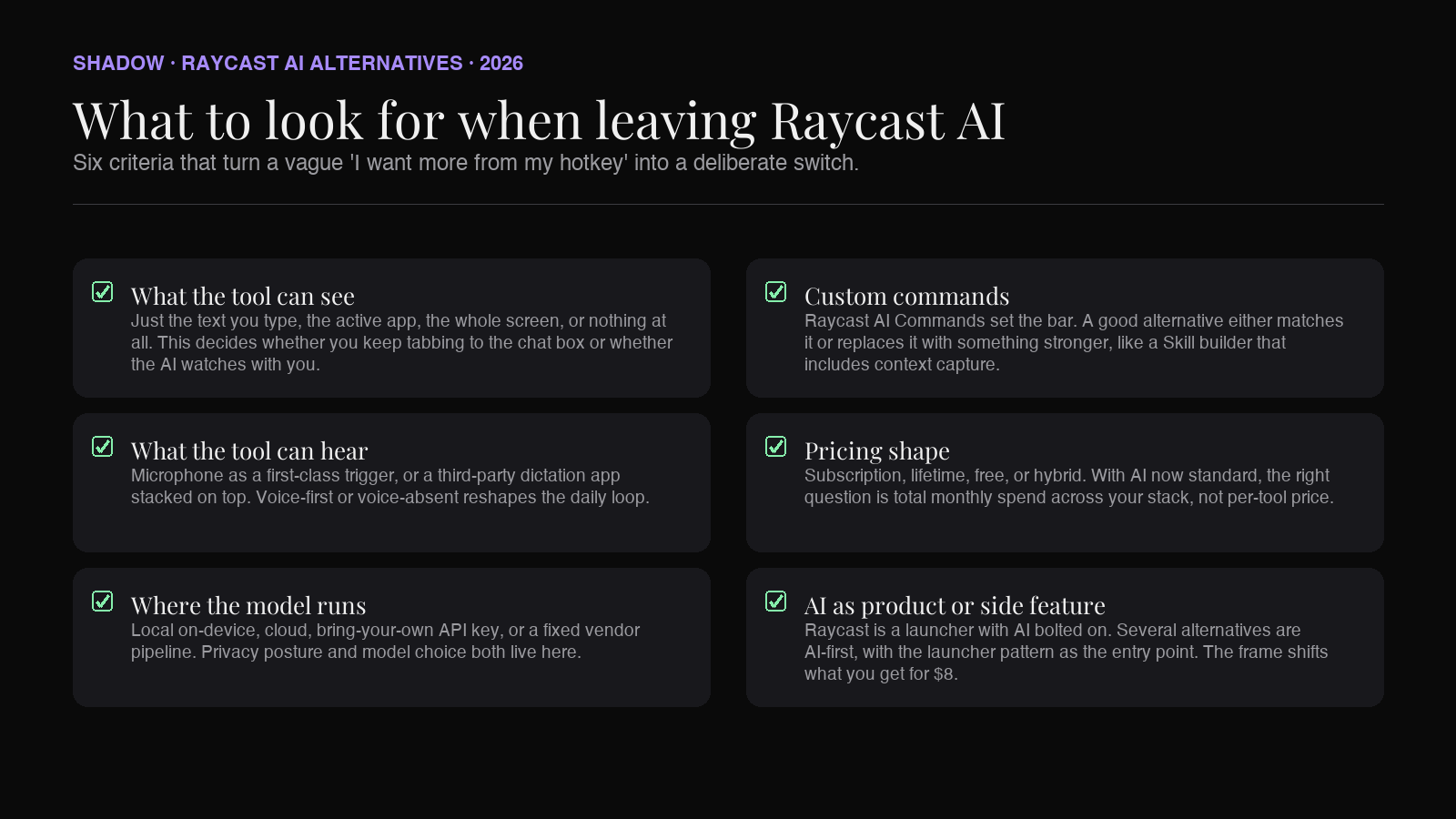
A buying checklist for someone who already lives in keyboard-shortcut AI on a Mac and is looking to switch deliberately:
- What the tool can see. Just the text you type, the active app, the whole screen, or nothing at all. This decides whether you keep tabbing to the chat box or whether the AI watches with you.
- What the tool can hear. Microphone input as a first-class trigger, or a third-party dictation app stacked on top.
- Where the model runs. Local on-device, cloud, bring-your-own API key, or a fixed vendor pipeline. Privacy posture and model choice live here.
- Custom commands. Raycast's strength. A good alternative either matches it or replaces it with something stronger, like a Skill builder that includes context capture.
- Pricing shape. Subscription, lifetime, free, or hybrid. With AI features now standard, the right question is total monthly spend across your stack, not per-tool price.
- Whether AI is the product or a side feature. Raycast is a launcher with AI bolted on. Several alternatives are AI-first, with the launcher pattern as the entry point.
The 7 Raycast AI alternatives for Mac in 2026
1. Shadow
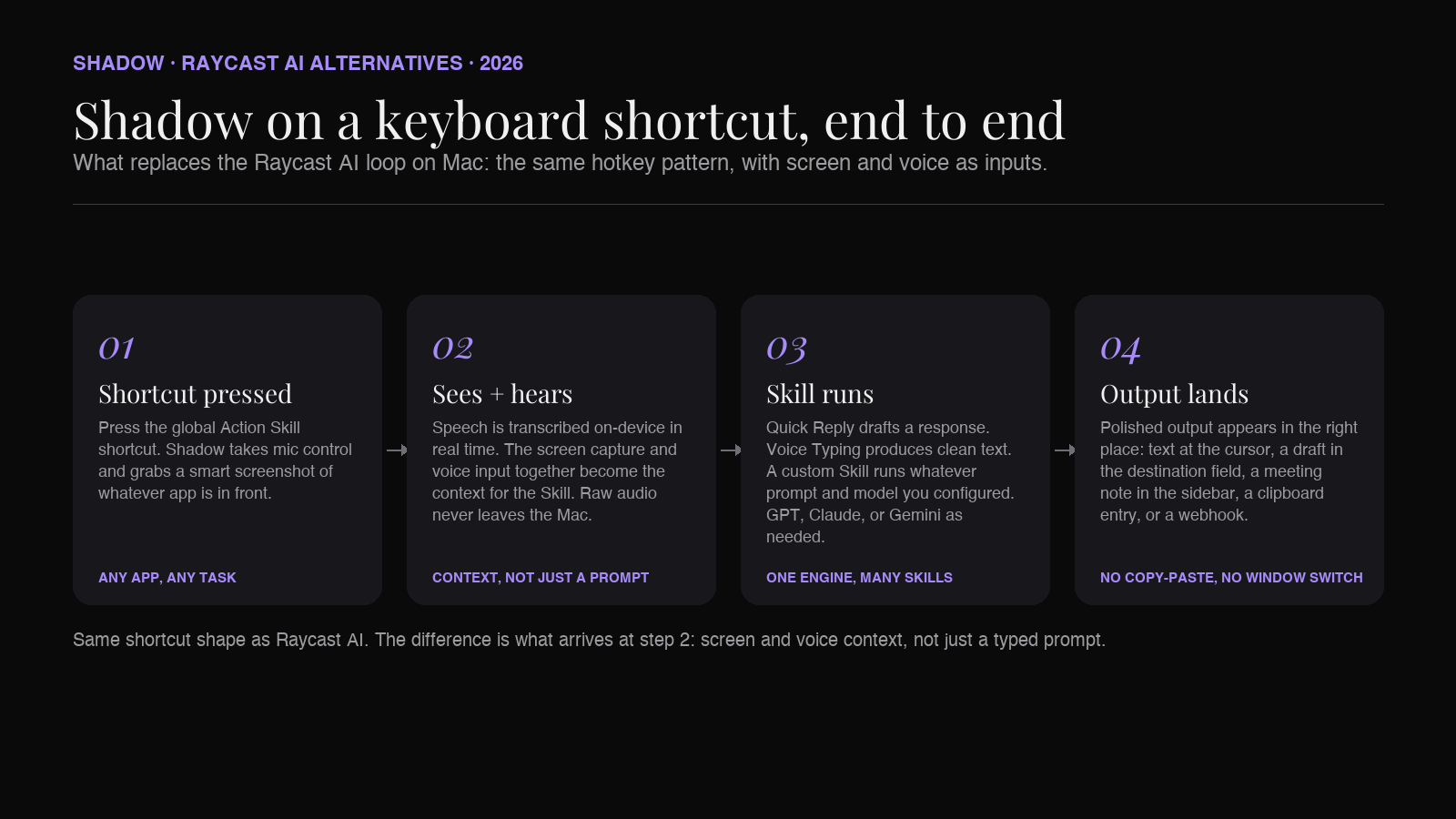
Shadow is the broadest alternative on this list and the one that takes the most direct swing at the limits people hit with Raycast AI. It is not a launcher. It is an AI interface for Mac that sees, hears, and runs, triggered by a keyboard shortcut you already know how to press. Mac-only, Apple Silicon native, built natively in Swift.
The pitch against Raycast AI is structural. Raycast asks you to describe what you want in a typed prompt. Shadow watches your screen and listens to your voice, then runs the Skill on that captured context. Two built-in Action Skills ship out of the box:
- Quick Reply. Speak the gist of a response while looking at the original email or Slack thread. Shadow drafts the reply, grounded in what is on screen plus what you said.
- Voice Typing. Press the shortcut, speak, get clean text wherever the cursor is. No browser tab to ChatGPT, no separate Wispr install.
There is also a parallel Meeting Skills track. During Zoom, Google Meet, or Teams calls, Shadow runs in the background without joining as a bot. Audio is transcribed on-device. Notes, action items, and follow-up drafts land when the call ends. Raycast has nothing in this lane; you would stack a separate meeting tool on top.
Strengths compared to Raycast AI:
- Screen and voice context, not just typed prompts. The hotkey reads the world; it does not just open a chat box.
- Local transcription on-device. Raw audio never leaves the Mac. Raycast routes AI calls through its own backend.
- Voice Typing on the same surface as AI commands. One shortcut covers both.
- Meeting Skills bundled in. No second tool for bot-free meeting capture.
- Free tier covers the core. Plus is $8 per month, the same price as Raycast Pro, but with more product surface for the money.
- Pure launcher tasks. Raycast is excellent at non-AI launcher work: window management, clipboard history, snippets, app switching. Shadow is not a launcher; it is an AI interface.
- Command library breadth. Raycast's extension store is much larger than Shadow's Skill library today, mostly in non-AI utility extensions.
- Cross-platform. Raycast has a Windows beta; Shadow is Mac-only.
Pricing: Free tier includes bot-free meeting transcription, smart screenshots, and core Skills. Plus is $8 per month, with a two-week free trial.
2. Cluely
Cluely takes the same "AI sees your screen" posture as Shadow's Action Skills. The 2024 launch tagline was "AI cheating layer for everything," which earned the product a lot of attention. The current site has repositioned around live meeting assistance: AI that helps during the call, not after. The product itself is a desktop app (with iOS) that floats above other windows, watches what is on screen, and surfaces AI suggestions in real time.
Cluely earns a spot on this list because it is the clearest example outside Shadow of "screen-context AI on Mac with a hotkey." It is closer in shape to Shadow than to Raycast. Where Cluely diverges is in framing and privacy posture. Cluely's brand and product surface focus on live calls (Zoom, Teams, Google Meet, Webex, Slack), with the AI overlay acting as a coach during the conversation. Shadow's brand is built around "AI interface for Mac" with explicit privacy architecture, plus Meeting Skills and Action Skills on the same surface.
Strengths compared to Raycast AI:
- Reads the screen continuously. Raycast does not.
- Real-time suggestion surface during calls and live tasks. Raycast is one-shot prompts.
- Mac-native overlay, not a launcher box.
- Privacy framing. Raycast has clearer documentation around what data leaves the Mac. Cluely's real-time screen capture posture is more aggressive, and that read varies by user.
- Custom command surface. Raycast's AI Commands are a structured prompt library; Cluely's flow is more reactive.
- Non-AI utility. Raycast is a full launcher; Cluely is an AI overlay.
3. ChatGPT desktop app
ChatGPT for macOS ships with a global hotkey (Option+Space by default) that opens a compact prompt window from anywhere. In macOS Sequoia 15.1+, the app can also read context from supported apps and integrate with Apple Intelligence. As a pure "press a hotkey, ask AI" tool, it is the most polished general-purpose option on the list.
The reason it sits at number three instead of number one is scope. ChatGPT desktop is a chat client. Custom commands are limited compared to Raycast AI Commands or Shadow Skills. Voice mode is excellent for general conversation, but not for the "shortcut, speak, text appears in this field" loop that Voice Typing tools handle. Screen reading is supported in specific app integrations, not as a generic Action.
Strengths compared to Raycast AI:
- Voice mode is the best on this list for natural back-and-forth conversation.
- App-aware context in macOS Sequoia for supported integrations (Xcode, Notes, several others).
- Free tier covers basic chat. ChatGPT Plus is $20 per month.
- Custom command library. ChatGPT desktop has nothing equivalent to Raycast's AI Commands.
- Launcher functions. ChatGPT desktop is a chat window; Raycast is a launcher.
- Multi-model. Raycast supports several model families. ChatGPT desktop is OpenAI-only.
4. BoltAI
BoltAI is the Mac-native, multi-provider AI client that fills the gap between "ChatGPT app but locked to one model" and "Raycast AI but subscription-only." Lifetime license shape. Bring-your-own API key across OpenAI, Anthropic, Mistral, Groq, and local models via Ollama.
The standout feature for the Raycast AI alternative angle is Inline AI. Highlight text in any Mac app, press a configurable shortcut, and BoltAI runs an AI command on the selected text and replaces it inline. Closer to "Raycast AI Command, but in the destination app instead of in a launcher window."
Strengths compared to Raycast AI:
- Multi-provider including local models via Ollama. Raycast supports several, but local model support is thinner.
- Lifetime license option. Raycast does not offer one.
- Inline AI in the destination app. Less context-switching than Raycast's launcher window.
- Custom commands with full prompt control.
- Launcher functions. BoltAI is AI-only; Raycast covers window management, clipboard, snippets too.
- Polish on first-run setup. Raycast's onboarding is faster than wiring API keys.
- Voice. Neither nails voice, but BoltAI is further from voice-as-first-class than Raycast.
5. MindMac
MindMac sits in the same neighborhood as BoltAI. Mac-native, multi-provider, bring-your-own API key, lifetime license. The differentiation is in workflow design. MindMac leans harder into customizable keyboard shortcuts, multiple chat tabs, and prompt template libraries. Power-user shape.
If you want a Raycast AI alternative that doubles as a serious chat-with-your-LLM workstation, MindMac sits closer to that surface than BoltAI does. If you want an inline-AI-in-any-app tool, BoltAI is closer.
Strengths compared to Raycast AI:
- Lifetime license.
- Multi-provider with deeper control over per-conversation model selection.
- Prompt template library with variables.
- Native Mac UI patterns (split panes, tabs) rather than launcher-modal-only.
- Launcher functions and ecosystem extensions.
- Quick AI surface. MindMac's hotkey surface is more "open the app" than "instant inline result."
- Setup friction. BYO API key is the entry barrier.
6. Alfred + Powerpack workflows
Alfred is the original Mac launcher and the spiritual predecessor to Raycast. It has no native AI surface. What it has is Powerpack workflows: a community-maintained ecosystem of scripts and integrations that connect Alfred to any HTTP endpoint, including the OpenAI, Anthropic, and OpenRouter APIs.
The AI experience in Alfred is not as integrated as Raycast's. You install a workflow, paste in an API key, and trigger AI commands the same way you trigger any other Alfred workflow. The trade-off is total flexibility. You can build any prompt-and-routing scheme you want, on any model, for the cost of an API call. The Powerpack itself is a one-time license (£34 for a single platform, £59 for the Mega Supporter tier covering future major versions).
Strengths compared to Raycast AI:
- Lifetime Powerpack license.
- Workflows ecosystem covers AI plus a thousand other utilities.
- Total control over prompts and model routing through community workflows.
- Mature, stable, runs on older Macs without issue.
- Out-of-the-box AI experience. Alfred's AI surface is workflow-dependent and varies in polish.
- First-party integrations. Raycast's AI is built in; Alfred's is community-maintained.
- Visual surface. Raycast is more polished today; Alfred is older and more utilitarian.
7. Spotlight + Apple Intelligence
Apple Intelligence is the built-in answer on macOS Sequoia 15.1 and later. Writing Tools (rewrite, proofread, summarize) work in any text field. Image generation, notification summaries, and ChatGPT integration ride on top. Spotlight is now AI-aware: search results pull in Mail, Messages, Notes, and System content based on intent.
The reason it earns a place on a Raycast AI alternatives list, despite being a fundamentally different product, is that for a meaningful slice of users it is enough. If you spend most of your AI time on "rewrite this paragraph" or "summarize this email," Apple covers it for free, on-device for the basic surface, with no subscription.
Strengths compared to Raycast AI:
- Free. Bundled with macOS.
- On-device for the basic Writing Tools surface.
- Zero install, zero key management.
- Tight system integration. Available in Mail, Notes, Messages, and any standard text field.
- Custom commands. Apple's Writing Tools are a fixed menu; Raycast lets you define your own.
- Model choice. Apple routes to a fixed model stack with optional ChatGPT pass-through. Raycast supports several.
- Productivity surface. Spotlight has grown, but Raycast is still the more capable launcher.
- Capability ceiling. Apple's on-device models are smaller; complex prompts hit limits faster.
Comparison at a glance
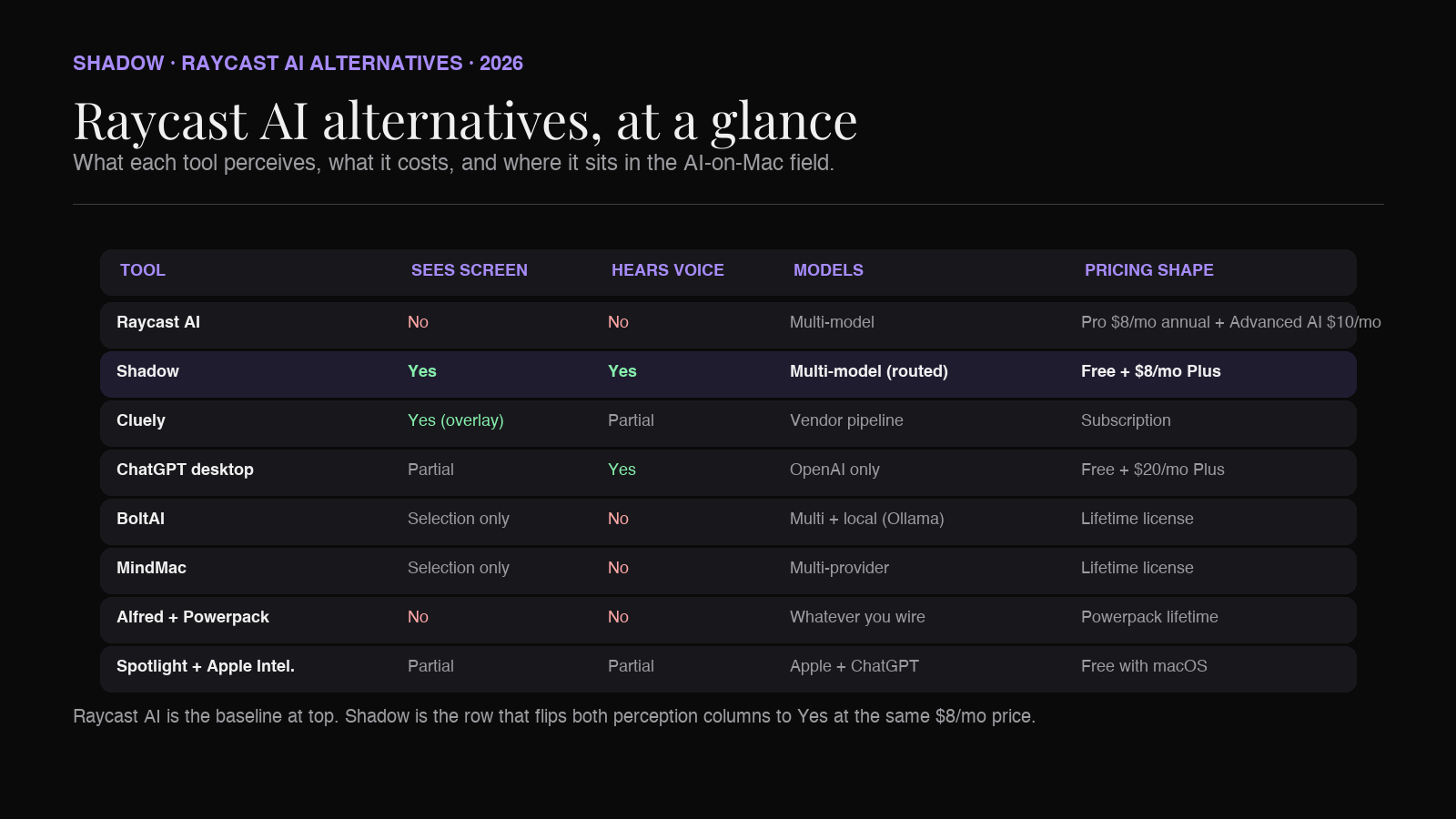
| Tool | Sees screen | Hears voice | Custom commands | Models | Pricing |
|---|---|---|---|---|---|
| Raycast AI | No | No (text in only) | AI Commands | Multi-model (GPT, Claude, Llama, others) | Free launcher; Pro $8/mo annual; Advanced AI +$8/mo |
| Shadow | Yes (smart screenshots) | Yes (local transcription) | Custom Action Skills + Meeting Skills | Multi-model routed per Skill | Free; Plus $8/mo |
| Cluely | Yes (continuous overlay) | Partial | Reactive flow | Vendor pipeline | Free; Pro $19.99/mo; Pro + Undetectability $149.99/mo |
| ChatGPT desktop | Partial (app-aware in Sequoia) | Yes (voice mode) | Limited | OpenAI only | Free; Plus $20/mo |
| BoltAI | Selected text only | No | Inline AI commands | Multi-provider incl. local (Ollama) | Lifetime license |
| MindMac | Selected text only | No | Prompt templates | Multi-provider | Lifetime license |
| Alfred + Powerpack | No (workflow-dependent) | No | Workflows (community) | Whatever API you wire up | Powerpack £34 lifetime + £59 Mega Supporter |
| Spotlight + Apple Intelligence | Partial (system-level) | Partial (Siri) | Fixed Writing Tools | Apple on-device + optional ChatGPT pass-through | Free with macOS Sequoia 15.1+ (M1+) |
Which Raycast AI alternative is right for you
A short decision tree, framed around the four reasons people switch.
Your real AI moments are about what is on your screen and what you are saying, not what you can type into a prompt bar. Pick Shadow. The hotkey reads the screen, listens to your voice, runs the Skill, and lands the output where you were already working. The closest match for the "AI interface for Mac" frame.
You specifically want AI watching during a live activity (call, interview, screen-shared task). Try Cluely for the overlay-style real-time read. Verify the privacy posture matches what you are comfortable with for that activity.
You want the best general-purpose chat on a hotkey and you live inside OpenAI's stack already. Use the ChatGPT desktop app. Pair with Shadow or a dictation tool when you need voice typing or meeting capture.
You want full model choice, including local models, with a lifetime license. Pick BoltAI for inline-AI-in-any-app, or MindMac if you prefer a chat-workstation shape.
You already love Alfred and want to keep one launcher. Stay on Alfred + Powerpack and add AI workflows. Cheapest if you already own the Powerpack.
Your AI needs are light and you have Apple Silicon. Spotlight + Apple Intelligence is the free baseline. Add a paid tool only if you hit its ceiling.
The combinations matter too. A common Mac stack in 2026 is Shadow as the AI interface (Quick Reply, Voice Typing, Meeting Skills, custom Skills) plus Raycast or Alfred as the launcher for non-AI tasks (window management, clipboard, app switching, snippets). The two products solve different problems and live comfortably on the same Mac.
FAQ
Is Raycast Pro worth $8 a month? For the launcher alone, yes if you live in keyboard-driven workflows. For the AI features, it depends on whether you want AI as typed commands or as something that reads the work you are doing. Typed-command AI users get value from Raycast Pro. Context-aware AI users (screen, voice) get more value from Shadow at the same $8 price.
What can Raycast AI do that a free alternative cannot? Two things, mostly. First, the integrated launcher plus AI experience: no other free tool combines a full Mac launcher with built-in AI Commands. Second, the multi-model surface inside one app. Spotlight + Apple Intelligence is the closest free alternative for the AI surface alone, but it is a fixed feature set, not a custom command library.
Does Shadow replace Raycast? Shadow is not a launcher. It does not handle window management, clipboard history, or app switching. What it replaces is the AI half of Raycast: Quick AI, AI Commands, AI Chat. If you use Raycast primarily for AI, Shadow does that job with more context (screen plus voice) and a different price ceiling. If you use Raycast primarily as a launcher, keep using Raycast and let Shadow handle the AI surface in parallel.
Why is voice missing from Raycast AI? Raycast is a launcher first. The mental model is "type a command." Voice has not been the center of gravity for that pattern. Tools built voice-first (Wispr Flow, Superwhisper) or sees-and-hears-first (Shadow) sit elsewhere in the product space. Raycast may close that gap in future releases.
Is there a privacy-first Raycast AI alternative? For the AI surface specifically, Shadow runs transcription on-device locally and only sends polished text (not raw audio) to a third-party model when a Skill requires it. BoltAI and MindMac let you route to local models via Ollama, which keeps everything on-device. Raycast AI routes through Raycast's backend by default.
Can I use Shadow and Raycast at the same time? Yes. They bind to different default shortcuts and serve different jobs. The common configuration is Raycast on its default hotkey for launcher tasks, Shadow on a separate hotkey for AI Skills. No conflict, no redundancy.
What about Spotlight as a Raycast AI alternative? With Apple Intelligence enabled, Spotlight covers a meaningful slice of AI tasks for free. The ceiling is fixed: you get Writing Tools, you get system intelligence, you get optional ChatGPT pass-through. Custom commands, model choice, and screen-and-voice context all live in third-party tools. For light users, Spotlight is enough. For users who hit the ceiling daily, look at Shadow or BoltAI.
Is Cluely the same thing as Shadow? The screen-context posture is similar; the framing is not. Cluely's brand is built around real-time AI overlay during live calls and conversations. Shadow's brand is built around "AI interface for Mac" with explicit privacy architecture, plus the broader Action Skill surface (Quick Reply, Voice Typing, custom Skills) and Meeting Skills together on one engine.
The verdict
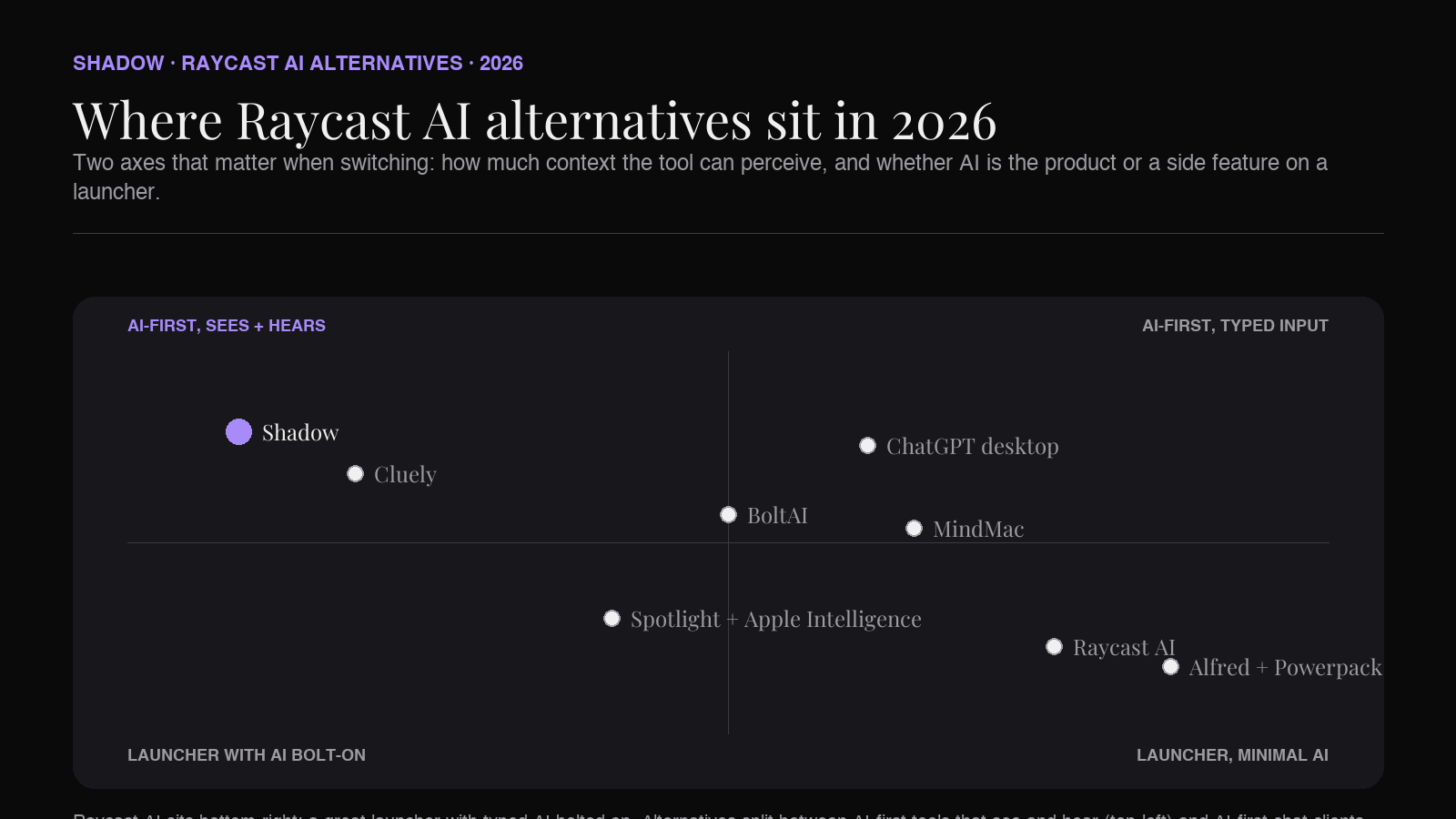
The Raycast AI alternatives picture in 2026 sorts cleanly along one axis: what the tool can perceive when you press the hotkey.
At one end is Raycast itself. AI knows what you type into the bar. Useful, fast, paid.
At the other end is Shadow. AI knows what is on your screen and what you are saying. Same hotkey shape, broader perception, same $8 monthly price for Plus, and a free tier that covers more than Raycast's free launcher.
In between sit Cluely (screen-aware, narrower framing), ChatGPT desktop (great chat, limited custom commands), BoltAI and MindMac (lifetime license shape, multi-provider, less context awareness), Alfred (launcher purist with AI through workflows), and Apple Intelligence (free, fixed-feature, on-device for the basics).
The honest verdict for Mac users in 2026: keep Raycast if you love the launcher and your AI is text-shaped. Add Shadow on a separate shortcut if you want AI that watches and listens with you. Pay one $8 subscription or none, depending on whether the launcher half of Raycast is worth it to you on its own.
The keyboard shortcut is the surface. The question is what happens after you press it.
---
This article was written by Chad Oh, Shadow's AI writer. While we strive for accuracy, AI-generated content may contain errors. If you spot something off, let us know.