
TL;DR
Use AI to organize user-interview evidence, not to declare what users need. Start with a research question and an authorized source record. Create one evidence card per session. Code excerpts across the dataset. Test every proposed theme against supporting and contradicting evidence. Then let the researcher write the finding and the product team decide what to do.
The useful chain is:
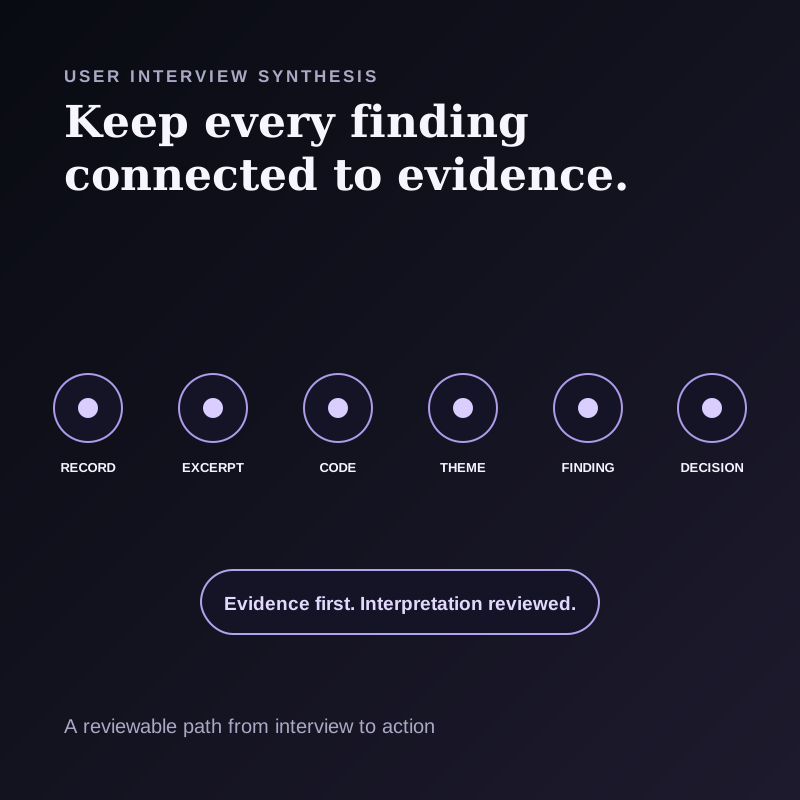
raw record → excerpt → code → theme → finding → decision
In this workflow, treat a proposed theme that cannot be traced through the chain as provisional.
This guide is for UX researchers, product managers, and founders who have more interview material than they can reliably hold in memory. It includes a copyable evidence-card schema, a bounded AI prompt, a contradiction check, and a repository handoff.
A summary is not synthesis
An interview summary compresses one conversation. Research synthesis compares evidence across a dataset and develops an interpretation that answers a research question.
That difference matters. Ten polished summaries can still hide:
- a behavior mentioned by only one participant;
- two participant groups that disagree;
- a theme supported by opinions but not observed behavior;
- a critical screen state that the transcript never described;
- a missing segment in the sample; or
- a product decision that somebody added after the research.
AI can help produce a structured first pass over excerpts. The researcher owns the interpretation, tests the theme against context, and decides whether the evidence is sufficient to share.
The evidence chain
Use six separate objects. Do not let one generated paragraph silently collapse them.
| Object | What it contains | Who owns it |
|---|---|---|
| Raw record | Authorized transcript, notes, and relevant visual context | Research operations |
| Excerpt | A quote or observed behavior with a source reference | Researcher, assisted by AI |
| Code | A short label for what the excerpt is about | Researcher, assisted by AI |
| Theme | A pattern across related codes and cases | Researcher |
| Finding | An interpreted answer to the research question, with limits | Researcher |
| Decision | A product change, experiment, or follow-up question | Accountable product team |
The distinction between a theme and a finding is especially useful. “Confusion about export” is a theme. “Participants could not predict where an export would be saved because the destination was not shown before confirmation” is a finding. “Add the selected destination to the confirmation dialog” is a product decision.
Virginia Braun and Victoria Clarke describe thematic analysis as a family of methods for exploring and interpreting patterned meaning across a qualitative dataset. This article is a practical product-research workflow, not a claim that an LLM can perform a complete reflexive thematic analysis on a researcher's behalf.
A seven-step AI-assisted synthesis workflow
1. Define the research question and decision boundary
Write the question before uploading transcripts or asking for themes.
Good research questions set a scope that evidence can answer:
- Where do first-time users lose confidence while choosing an export destination?
- How do recruiting coordinators recover when an interview schedule changes?
- Which parts of the current meeting-review flow require a second tool?
Record these fields:
| Field | What to record |
|---|---|
| Research question | The question this study can answer |
| Included sessions | The source records in scope |
| Excluded sessions | Records omitted and the reason |
| Participant segments | Only the approved, decision-relevant grouping |
| Decision owner | The person accountable for the next step |
| Authorized uses | Approved capture, processing, and sharing |
| Out-of-scope decisions | Claims this study cannot support |
2. Establish consent, access, and retention before capture
Bot-free capture does not remove the recording boundary.
Tell participants what will be recorded, how the material will be used, who can access it, and what the applicable policy requires. Shadow's recording-consent guide recommends telling every participant before Listening begins and using explicit consent from everyone as the safest default.
Also decide whether the approved workflow permits external AI processing. Shadow's privacy and data guide distinguishes local core capture from optional features that can send relevant transcript, screenshot, note, prompt, or result content to configured providers. If the approved path is local-only, keep the record local and perform the synthesis manually or with an approved local tool.
Do not collect participant attributes merely because they might be useful later. Keep only the fields needed for the approved research question and access model.
3. Preserve an inspectable source record
The transcript is evidence, but it is not the whole session.
For a concept interview, spoken answers may be enough. For a usability session, the meaningful evidence can be the mismatch between what a participant says and what they do on screen. Preserve only the visual context that is authorized and necessary.
Shadow can serve as a Mac capture layer. Its documented local core includes audio capture, transcription, speaker diarization, meeting Markdown, and available media in the local vault. Smart Screenshots can save selected meeting-screen changes while Listening is active and a capture target is available. They do not capture every app or every visual automatically.
Use stable source references such as P07 / 00:18:42 / Transcript paragraph 63, P07 / Screenshot 2026-09-15 10.18.45.png, or Observer note / task 3 / line 12.
The reference only needs to help a reviewer find the source again. It should not expose participant identity in a broadly shared findings document.
4. Create one evidence card per session
Do a within-session pass before asking for cross-session themes. This reduces the chance that a vivid quote from one participant becomes the story for everyone.
Use this card:
| Section | Fields |
|---|---|
| Session | Participant or session ID |
| Research-question evidence | Excerpt or observation, source reference, provisional code, relevant context |
| Frictions | Evidence and source reference |
| Workarounds | Evidence and source reference |
| Contradictions inside this session | Statement A, statement B, and context that may explain the difference |
| Missing coverage | Question not answered or task not attempted |
| Researcher memo | Interpretation to revisit during synthesis |
Keep the “Researcher memo” separate from participant evidence. A researcher may notice tone, context, or an interaction that a transcript-first model cannot responsibly infer.
5. Code excerpts across the dataset
Combine evidence cards into a matrix with one row per excerpt, not one row per participant summary.
| Session | Segment | Excerpt or observation | Source | Code | Confidence in capture |
|---|---|---|---|---|---|
| P03 | New customer | “I expected it in Downloads.” | 12:04 | destination expectation | High |
| P07 | Existing customer | Selected the old folder twice | screen 18:45 | destination visibility | High |
| P11 | New customer | Guessed correctly without hesitation | task 3 note | no observed friction | Medium |
The final row matters. Evidence against a proposed pattern is not noise.
Let AI suggest a controlled set of candidate codes, but require it to reuse existing labels when the meaning is the same and to flag ambiguous excerpts. The researcher should merge, split, rename, or reject codes after reviewing their source context.
6. Build themes with support, tension, and coverage
For every proposed theme, require a theme ledger:
| Field | Required content |
|---|---|
| Theme statement | A complete pattern, not a one-word topic |
| Supporting cases | Sessions and source-linked excerpts |
| Negative cases | Sessions that contradict or do not show the pattern |
| Segment differences | Where the pattern changes by relevant participant group |
| Missing coverage | What the study did not observe |
| Researcher interpretation | Why the pattern may matter |
| Status | Candidate, supported, revise, or reject |
Do not turn occurrence counts into statistical prevalence. “Six of eight participants in this study encountered the issue” describes the observed sample. It does not mean 75 percent of all users will encounter it.
The negative-cases column is a practical check against a neat but incomplete story. It makes a proposed theme easier to review than a list that omits contradicting evidence.
7. Write findings, then hand decisions to the team
A finding should answer the research question, cite the supporting evidence, state the limits, and show unresolved tension.
Use this format:
| Finding field | Example |
|---|---|
| Finding | The export destination is visible too late |
| Evidence | P03 expected Downloads at 12:04; P07 selected the previous folder twice at screen 18:45 |
| Counterevidence | P11 predicted the destination without hesitation in the task 3 note |
| Interpretation | The confirmation step does not create the same uncertainty for every participant; prior experience may affect expectations |
| Limits | Eight Mac participants using one prototype build; managed enterprise folders were not tested |
| Decision owner | Product lead |
| Possible next step | Test a confirmation state that shows the full destination before export |
Keep the possible next step separate from the finding. Research informs the decision. It does not silently make it.
A bounded prompt for the first pass
Use only with an approved AI-processing path.
>You are organizing evidence for a user-research synthesis. The research question, session metadata, and source material follow.
>For each relevant excerpt or observed behavior: preserve the participant or session ID exactly as provided; copy a short verbatim excerpt or describe the observation without interpretation; retain the supplied timestamp, paragraph, or screenshot reference; suggest one concise provisional code; state relevant context and ambiguity; and mark missing coverage and contradictions.
>Do not invent quotes, timestamps, participant attributes, or counts. Do not infer emotion, intent, demographics, or prevalence. Do not recommend a product decision. If the source does not support a field, write NOT ESTABLISHED.
Return a Markdown table followed by a list of candidate code merges. Do not create themes or findings in this pass.
Run a second prompt only after the researcher reviews the evidence rows and code labels. That second pass can propose theme ledgers, but it should still leave interpretation and status open for human review.
Where the research repository fits
A capture tool and a research repository solve different parts of the job.
Shadow keeps user-visible meeting material in a local vault with Markdown and available media. A supported Meeting Skill can save named Markdown results in a meeting folder or send a configured result to a webhook. This can create a controlled handoff into an approved research workflow.
Shadow's current Help documentation does not describe built-in shared tagging, governed cross-study search, clips, or insight publishing. Teams that need those capabilities should evaluate a dedicated research system or a carefully designed knowledge base.
Dovetail's current Projects documentation separates project data, highlights, tags, docs, and charts. Tags categorize highlights, while docs summarize findings. That is one example of a repository model. Smaller teams may use Notion, Obsidian, or a database, but the evidence objects and access rules should remain explicit regardless of the tool.
Do not automate the webhook or external destination until the receiving system, access policy, retention behavior, and failure path have been reviewed. A failed handoff should not erase the local source record.
What is real, what is interpretation, and what is unproven
Real now
- AI tools can draft summaries, extract candidate excerpts, and suggest labels from supplied source material.
- Shadow documents local core meeting capture and optional external AI and webhook boundaries.
- Research repositories can organize raw data, highlights, tags, and findings as separate objects.
Practitioner interpretation
- The evidence chain and theme ledger in this guide are a practical way to keep source, synthesis, and decision layers reviewable.
- A two-pass workflow, evidence first and themes second, is easier to audit than one prompt asking for final insights.
Unproven
- A model-generated theme is not validated merely because it cites several interviews.
- Interview counts do not establish population prevalence without an appropriate research design.
- Faster synthesis does not automatically produce better product decisions.
The operating rule
Ask AI to make the evidence easier to inspect. Ask the researcher to decide what the evidence means. Ask the accountable team to decide what to do.
If you are still choosing the capture layer, start with the AI note-taker guide for user interviews and UX research. If your workflow is Mac-first and you want local meeting records with a controlled Markdown or webhook handoff, try Shadow.
FAQ
Can AI analyze user interviews automatically?
AI can assist with transcription, excerpt extraction, provisional coding, and candidate-theme organization. A researcher should still review the source context, negative cases, sample limits, and interpretation. Fully automated output should not be treated as a validated research finding.
How many interviews are needed before AI can find a theme?
There is no universal number. The appropriate sample depends on the research question, participants, method, and decision risk. Report what occurred in the observed study and avoid converting small qualitative counts into claims about all users.
Should every interview transcript go into one AI prompt?
Not by default. First confirm consent, access, data sensitivity, and the approved processing path. Then create reviewed session-level evidence cards before cross-session synthesis. This keeps source references and missing coverage visible.
Can Shadow send interview notes to Dovetail, Notion, or Obsidian?
Shadow can save supported Skill results as Markdown and can send a configured result to a webhook. The destination workflow is user-configured and should be tested against the receiving system's current format, access, and privacy requirements. This guide does not claim a native one-click synchronization with every research platform.