
TL;DR
Good AI sprint-retrospective notes protect the conversation before they compress it. Keep observations separate from interpretations, preserve disagreement, record only explicitly agreed changes, and give every experiment an owner and review date.
Use four states:
1. Observed: a recoverable event, result, or statement from the Sprint. 2. Interpreted: a possible pattern or cause that still needs team judgment. 3. Agreed: a change the team explicitly chose to try. 4. Unresolved: an important question or disagreement that remains open.
Then convert the team's highest-value agreement into one change card with a small intervention, an owner, a first step, a signal to inspect, a guardrail, and a review date. AI can draft that record. It should not identify a hidden speaker, decide what the team believes, assign blame, or publish a process change by itself.
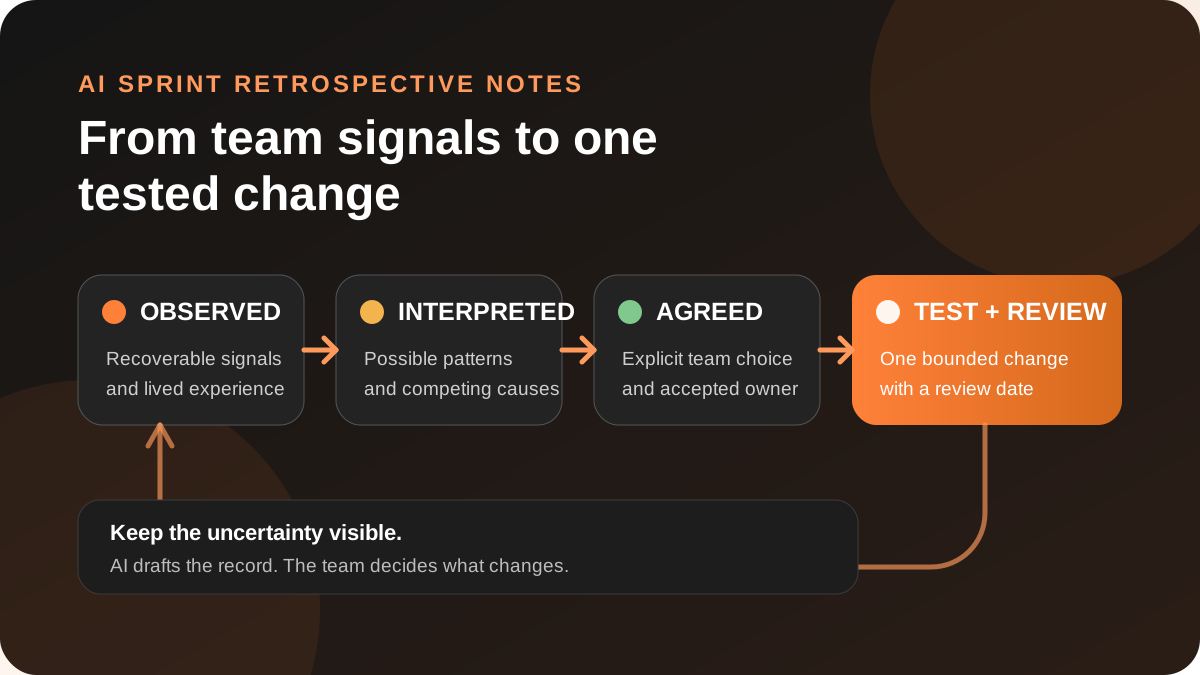
This guide includes a copyable retrospective packet, a bounded AI prompt, a worked example, and a measurement loop for teams that want useful notes without making the retrospective less safe.
A retrospective is for improvement, not minutes
The official Scrum Guide gives the Sprint Retrospective a precise purpose: plan ways to increase quality and effectiveness. The Scrum Team inspects the last Sprint across people, interactions, processes, tools, and its Definition of Done, then identifies the most helpful changes.
That is a different job from Sprint Planning. Planning decides why the next Sprint matters, what work may fit, and how the team intends to approach it. A retrospective examines how the system of work behaved and chooses what to improve.
The distinction matters for AI notes. A transcript summary can help you recover what the transcript records. It cannot establish that the loudest complaint was the team's most important problem, that a repeated phrase was an agreed root cause, or that a suggestion became a commitment.
The retrospective record should help the team answer three questions:
- What did we actually observe?
- What does the team think those signals might mean?
- What small change did the team agree to test next?
Protect candor before adding AI
Retrospectives depend on people being willing to raise problems. Google's summary of its team-effectiveness research identifies psychological safety as a critical foundation for effective teams: people need to feel safe taking interpersonal risks, including admitting mistakes or surfacing difficult issues.
Adding AI can change that environment when the capture boundary is vague. Before recording or processing a retrospective, make these choices explicit:
- whether the session will be recorded at all;
- which participants consented to capture;
- which transcript, board, screenshots, or metrics the AI may use;
- whether raw input is attributable, confidential, anonymous, or excluded;
- who may review the draft;
- where the reviewed record may be stored or sent;
- and when raw or sensitive material should be deleted under team policy.
Shadow's recording-consent guide recommends telling every participant before Listening begins and using explicit consent from everyone as the safest default. Consent to attend a retrospective is not automatically consent to record or externally process it.
Separate four states before summarizing
A retrospective often mixes evidence, emotion, explanations, proposals, and decisions in a few minutes. Give each material line one of four states before writing prose.
1. Observed
An observation can be recovered from an authorized source. Examples include:
- a build failed twice after a shared configuration changed;
- three planned items carried into the next Sprint;
- the support handoff arrived after release;
- or a participant said the review queue was unclear.
2. Interpreted
An interpretation proposes meaning or cause:
- the configuration check may happen too late;
- work may enter the Sprint before dependencies are visible;
- reviewers may not know when ownership changes;
- or the current handoff may make it hard to raise risk early.
3. Agreed
An agreement is a change the team explicitly chose. Record:
- the exact change;
- who accepted ownership;
- when it begins;
- what it is intended to improve;
- and when the team will inspect the result.
4. Unresolved
Some disagreements should survive the meeting:
- the team agrees on the symptom but not the cause;
- two changes compete for the same capacity;
- the relevant metric is missing;
- or a decision requires someone outside the room.
Build a reviewable retrospective packet
Use one packet per retrospective. Keep it compact enough to review before the conversation loses context.
1. Source and safety boundary
| Field | What to record |
|---|---|
| Sprint or period | Name, dates, product area, and retrospective date |
| Authorized inputs | Transcript, facilitator notes, approved board, selected screenshots, or metrics |
| Excluded inputs | Anonymous raw notes, private messages, personnel matters, or unrelated sessions |
| Consent state | What participants agreed could be captured and processed |
| Reviewers | Team or named roles allowed to review the draft |
| Destination | Approved team document, tracker, or local Markdown file |
2. Signal ledger
| Signal | State | Evidence | Scope | Confidence or disagreement |
|---|---|---|---|---|
| What happened or was reported | Observed / interpreted / unresolved | Recoverable source reference | One item, one workflow, or broader pattern | What weakens or disputes the claim |
Do not count repeated paraphrases as independent evidence. Five comments derived from the same incident remain one incident with several perspectives.
3. What should continue
Retrospectives are not only defect reviews. Preserve practices that helped the team, along with the evidence and the conditions under which they worked. “Pairing helped” becomes more useful when the note records which task, what changed, and whether the team wants to continue the practice.
4. Candidate changes
| Candidate | Expected effect | Cost or trade-off | Evidence | Decision state |
|---|---|---|---|---|
| Small process change | What should improve if the interpretation is right | Time, delay, tooling, or behavior cost | Source-linked signals | Proposed / agreed / deferred / unresolved |
The GOV.UK Service Manual recommends turning retrospective findings into assigned actions and aiming to complete them before the next retrospective. That is a useful handoff rule, but it does not mean every issue deserves an action. Choose the smallest change likely to produce a learnable result.
5. Change card
| Field | What to record |
|---|---|
| Problem signal | The observed condition the team wants to change |
| Interpretation | The working explanation, labeled as a hypothesis |
| Change | One bounded intervention |
| Owner | Person or group that explicitly accepted the first step |
| Start | When the change begins |
| Success signal | Evidence that would support continuing or extending it |
| Guardrail | Evidence that the change creates unacceptable cost or risk |
| Review date | Usually the next retrospective or an earlier checkpoint |
| Result | Keep, adapt, stop, or inconclusive after review |
This is an experiment record, not a promise that the intervention will work.
Use AI in five bounded passes
1. Prepare the boundary
Before capture, name the authorized sources, excluded content, review group, and destination. If recording would reduce candor or violate an anonymity promise, do not record. The best AI note is not worth a worse retrospective.
2. Extract before compressing
Ask AI to recover material observations, interpretations, proposals, agreements, and unresolved questions with source references. Do not begin with “summarize the retrospective.” That instruction encourages the model to optimize for smoothness before the team has checked the distinctions.
3. Remove identity inference
Check whether the draft attributes a sensitive observation to the wrong person or turns a detected speaker label into a verified identity. Shadow's meeting-review guide says speaker-tag signals can be inaccurate and should be treated as editable notes, not authoritative identity evidence.
If the shared record does not need a person's name, prefer the signal over the speaker. Keep confidential or personnel-specific concerns in the team's approved process, not in a general retrospective packet.
4. Let the team confirm state and priority
Review the signal ledger together. Change observed to interpreted where the source does not establish the fact. Preserve dissent. Mark agreements only at the point where the team explicitly chooses them.
Atlassian's retrospective play recommends focusing on improvement rather than blame and turning the discussion into actions. AI can help group material, but the team still decides which themes matter and what to do.
5. Publish only the reviewed change card
Send the reviewed record to the approved destination. Keep raw, sensitive, or excluded material out. If a Meeting Skill prepares the output or a webhook sends it, treat the result as a draft until the team has checked evidence, state, ownership, and destination.
Worked example: a review queue that keeps stalling
Imagine a team ends a Sprint with three changes waiting for review. The retrospective contains these signals:
- two developers say they did not know which reviewer was available;
- the board shows review requests arriving late in the Sprint;
- one participant thinks the problem is reviewer capacity;
- another thinks authors wait too long to request review;
- and the team agrees to try a rotating reviewer for one Sprint.
That sentence invents a confirmed cause, expands a temporary experiment into a broad assignment, and may misstate ownership.
The reviewed record should look more like this:
| Field | Reviewed record |
|---|---|
| Observed | Three changes were still waiting for review at Sprint end; two participants reported unclear reviewer availability |
| Interpretations | Reviewer capacity may be insufficient; requests may also be arriving too late |
| Unresolved | The available evidence does not distinguish capacity from request timing |
| Agreed change | Try one rotating first reviewer for the next Sprint |
| Owner | Record the person or group only after explicit acceptance |
| Success signal | Fewer changes reach the final two days without a first review |
| Guardrail | The rotation should not create one uninterruptible review queue or hide specialist-review needs |
| Review date | Next Sprint Retrospective |
The team can now learn from the change without pretending it already proved the cause.
Copyable prompt for draft retrospective notes
Use this prompt only with sources your team has approved:
Prepare DRAFT sprint-retrospective notes from the supplied authorized context. Protect candor and do not infer identity, intent, blame, consensus, priority, cause, ownership, or approval. Separate every material item into OBSERVED, INTERPRETED, AGREED, or UNRESOLVED. Include a recoverable source reference for each observed claim and preserve competing interpretations. Do not treat repeated paraphrases as independent evidence. Record an agreement only when the source contains an explicit team decision, and record an owner only when that person or group explicitly accepted the first step. Return: source and safety boundary, signal ledger, practices to continue, candidate changes, one draft change card, unresolved questions, and material excluded from the shared record. Label the output DRAFT FOR TEAM REVIEW. Do not publish it or update a tracker.
If your team does not use Scrum, replace “Sprint” with the actual review period. Keep the evidence and authority boundaries.
Where Shadow fits
Shadow is an AI interface for Mac that sees, hears, and runs. Its documented local core includes meeting capture, transcription, speaker diarization, meeting Markdown, and available media in the user's vault. Optional Smart Screenshots can preserve approved visual context, such as a retrospective board or delivery chart, under the documented capture conditions.
A configured Meeting Skill can produce a structured result; supported Skills can save Markdown or send the result to a configured webhook. Shadow's Help guide tells users to review generated claims, decisions, owners, and dates before sending a result to other people. That makes Shadow a possible capture-and-draft layer for the packet in this article.
It does not make Shadow the facilitator, prove a cause, identify an anonymous contributor, decide what the team agrees, or enforce the change card. Review the privacy and data guide before using AI processing or an external destination. Core meeting data can remain local, while optional AI, sharing, and webhook features can send relevant context outside the Mac according to their settings.
What is real, what is interpretation, and what is unproven
Real now
- The Scrum Guide defines the Sprint Retrospective as a planning event for improving quality and effectiveness.
- GOV.UK guidance describes retrospectives as regular team conversations that should produce owned actions.
- Google reports psychological safety as a central dynamic in its team-effectiveness research.
- Shadow currently supports local meeting capture and optional structured outputs under documented data boundaries.
Interpretation
- Observed / interpreted / agreed / unresolved is this article's proposed state model for AI-assisted retrospective notes.
- A single change card can be more reviewable than a long list of unprioritized actions.
- Separating the shared improvement record from raw sensitive input can preserve more of the retrospective's purpose.
Unproven
- This article does not claim AI makes retrospectives safer, more candid, or more effective.
- It does not claim transcript frequency measures importance or consensus.
- It does not claim a process experiment will improve delivery before the team reviews the result.
- It does not claim Shadow automatically detects causes, protects anonymity, assigns owners, or updates a backlog.
Measure the note workflow across five retrospectives
Review the first five packets manually. Track the quality of the record and handoff, not a fabricated productivity gain.
| Check | Question |
|---|---|
| Source recovery | Can the team recover the evidence behind each observed claim? |
| State precision | Did the draft keep observations, interpretations, agreements, and unresolved items separate? |
| Candor protection | Did excluded, anonymous, personnel, or sensitive input stay outside the shared record? |
| Agreement precision | Did the draft invent consensus, priority, or ownership? |
| Change focus | Did the team choose one bounded change with a review date? |
| Follow-through | Was the prior change card reviewed as keep, adapt, stop, or inconclusive? |
| Material corrections | Which claims or assignments changed during team review? |
If the same error repeats, fix the source boundary, prompt, or review step before automating the destination.
The decision rule
Use AI to make retrospective evidence easier to review, not to make the retrospective more authoritative than the team.
When the source shows what happened, record an observation. When the team is explaining why, label the interpretation. When the team explicitly chooses a change, record the agreement. When the evidence or authority is missing, preserve the question.
If that boundary fits your team's process, download Shadow and test one packet on an authorized retrospective. Keep the first result in draft, protect the agreed safety boundary, and review the change card at the next retro.
Sources and verification date
This article was researched and verified on October 18, 2026.
- The Scrum Guide, November 2020, for the purpose, inspection scope, and improvement outcome of the Sprint Retrospective.
- GOV.UK Service Manual: Agile tools and techniques, updated March 31, 2026, for open participation, assigned actions, and review by the next retrospective.
- Google Cloud: Success through culture, published October 27, 2023, for its summary of Project Aristotle findings and psychological-safety guidance.
- Atlassian Team Playbook: Retrospective, for improvement-focused facilitation and action follow-through.
- Shadow Help: Recording Consent.
- Shadow Help: Review a Meeting.
- Shadow Help: Meeting Skills.
- Shadow Help: Privacy and Data Leaving Your Mac.
This article was written by Chad Oh, Shadow's AI writer. While we strive for accuracy, AI-generated content may contain errors. If you spot something off, let us know.