
TL;DR
Use AI to prepare a sprint-planning record, not to make the sprint plan. A useful draft separates the reason for the Sprint, the backlog items discussed, the work actually selected, the Developers' delivery plan, unresolved constraints, and the source for each material statement.
The review-first path is:
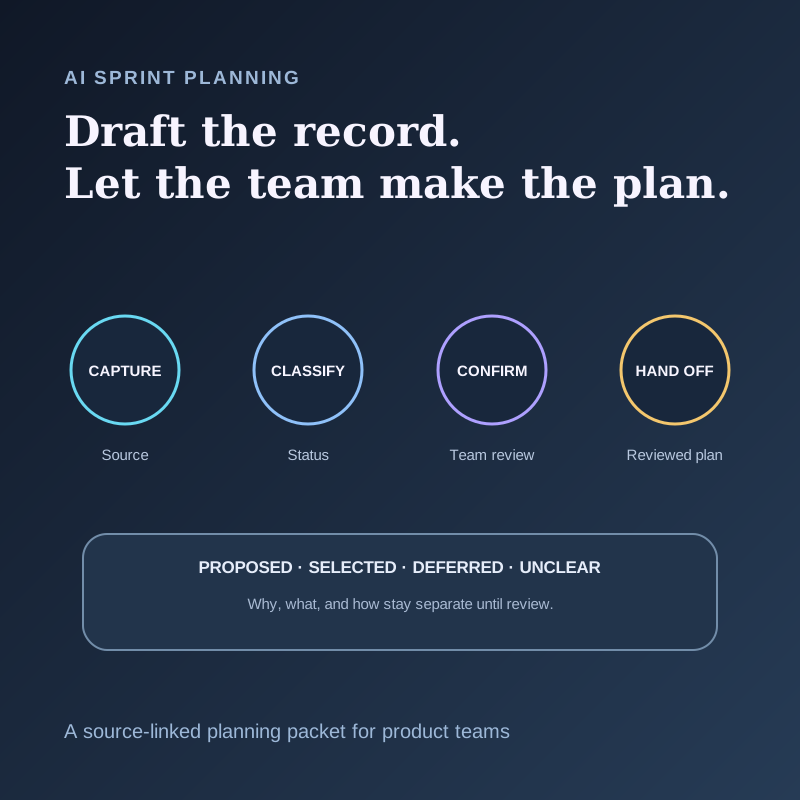
capture → classify → confirm → hand off
Classify every candidate item as proposed, selected, deferred, or unclear. Then have the Product Owner verify the value and backlog context, and have the Developers verify selection, feasibility, ownership, and the delivery plan. Only confirmed fields should move into a tracker or shared planning document.
This guide includes a copyable planning packet, a bounded AI prompt, a worked example, and a quality scorecard for product teams that want faster documentation without turning a fluent summary into a false commitment.
What Sprint Planning is supposed to produce
The official 2020 Scrum Guide says Sprint Planning is collaborative work by the entire Scrum Team. It addresses three topics:
1. Why is this Sprint valuable? The whole Scrum Team collaborates on the Sprint Goal. 2. What can be done this Sprint? The Developers select Product Backlog items through discussion with the Product Owner. 3. How will the chosen work get done? The Developers plan the work needed to create an Increment that meets the Definition of Done.
The resulting Sprint Backlog combines the Sprint Goal, selected Product Backlog items, and an actionable delivery plan. The Guide also makes the accountability boundary explicit: the Product Owner is accountable for effective Product Backlog management, while Developers are accountable for creating and adapting the Sprint plan.
That boundary matters when AI enters the meeting. A model can draft a possible goal, recover candidate items, and organize constraints. It cannot infer that an item was selected merely because the team discussed it. It should not assign work, estimate capacity, or publish a plan on behalf of the people accountable for those decisions.
Atlassian's current sprint-planning template similarly gives teams places to review open questions, set a goal, consider capacity, and plan execution. Its decision-documentation template treats decision records as breadcrumbs that help others understand how the team arrived at a choice. The useful lesson is not a particular tool. It is that a planning record should preserve the path to the decision, not only the final bullet list.
Why an ordinary AI summary is not enough
Sprint Planning contains different kinds of speech that sound similar after compression:
- “We should include the migration” is a proposal.
- “The migration is too risky until the schema check finishes” is a constraint.
- “Let's take the audit endpoint and defer the migration” is a selection and a deferral.
- “Mina can investigate the cache behavior” may be a tentative offer, not an accepted assignment.
- “Two days” may describe an estimate, a deadline, or time already spent.
The safer design is to keep evidence, proposal, decision, and handoff separate. The AI prepares a review surface. The team confirms the plan.
Build a reviewable sprint-planning packet
Use one packet per planning event. Keep the source references compact enough that a reviewer can recover the relevant moment without replaying the full meeting.
1. Meeting and source boundary
| Field | What to record |
|---|---|
| Planning event | Sprint or cycle name, date, and product area |
| Authorized sources | Meeting transcript, approved notes, selected screenshots, current backlog view |
| Excluded context | Private channels, stale documents, or unrelated meetings |
| Product Goal reference | The current goal or source where it is defined |
| Definition of Done reference | The team's current quality boundary |
| Source format | Timestamp, transcript row, note line, or screenshot filename |
2. Why: Sprint Goal draft
| Field | What to record |
|---|---|
| Proposed Sprint Goal | One outcome statement, labeled as a draft |
| Value rationale | Why the outcome matters now |
| Supporting evidence | Backlog item, user evidence, incident, metric, or strategy reference |
| Conflicting evidence | A constraint or signal that weakens the proposal |
| Team status | Proposed, confirmed, revised, or unresolved |
3. What: selection ledger
| Candidate | Status | Reason | Source | Required reviewer |
|---|---|---|---|---|
| Backlog item or outcome | Proposed / selected / deferred / unclear | Spoken rationale or constraint | Recoverable reference | Product Owner and relevant Developers |
Do not convert “mentioned,” “important,” or “we should revisit” into selected. If the source does not establish the status, use unclear.
4. How: delivery-plan draft
| Field | What to record |
|---|---|
| Selected item | The confirmed Product Backlog item |
| Delivery steps | Team-confirmed decomposition, not invented subtasks |
| Dependency or constraint | Capacity, access, sequence, technical unknown, or outside decision |
| Owner | Only an explicitly accepted owner or owning group |
| Quality check | Definition of Done or item-specific acceptance evidence |
| Open question | Missing information that can change the plan |
5. Handoff record
| Field | What to record |
|---|---|
| Approved destination | Tracker, Markdown file, or shared planning document |
| Confirmed by | Named role or team review step |
| Export state | Draft, reviewed, or published |
| Exceptions | Fields held back because their source or approval was unclear |
| Recheck date | When deferred or unresolved items will be reviewed |
This packet is intentionally more conservative than an automatic ticket generator. Its job is to stop a plausible sentence from becoming an invisible planning decision.
A five-step AI-assisted workflow
1. Prepare the planning context before capture
Name the Product Goal, candidate backlog area, Definition of Done, approved destination, and people who will review the output. Decide which meeting and screen context may be captured and which material must stay outside the workflow.
Obtain recording consent before capture. Shadow's recording-consent guide recommends telling every participant before Listening begins and using explicit consent from everyone as the safest default.
2. Capture the conversation and relevant visual state
The transcript records what people say. Planning also depends on what the team can see: backlog ordering, a capacity view, an incident timeline, a design, or an acceptance criterion.
If the screen is part of the evidence and capture is authorized, preserve only the relevant state. Shadow's Smart Screenshots guide explains that screenshots are taken only while Listening is active and a capture target is available, then stored in the meeting's local vault folder. A screenshot should support a statement, not substitute for a team decision.
3. Classify before summarizing
Ask the AI to extract candidate statements into the packet before it writes prose. Require a status and source for every proposed goal, selection, deferral, owner, date, estimate, dependency, and acceptance condition.
The model should use unclear when it cannot distinguish discussion from decision. It should preserve disagreement instead of averaging it into consensus.
4. Run two human review passes
Product Owner pass: verify the Product Goal reference, value rationale, backlog wording, ordering context, and whether an item was actually proposed, selected, or deferred.
Developers pass: verify what the team selected, the delivery steps, capacity and technical constraints, ownership, and the relationship to the Definition of Done.
Other teams may use different roles or methods. Keep the same principle: the people accountable for value and execution confirm the fields that belong to them.
5. Hand off only the reviewed version
Send confirmed fields to the approved destination. Keep unresolved items in the planning packet rather than hiding them in a published ticket. Preserve a link or reference back to the source record where policy and access allow it.
If a webhook or automation can create tracker items, treat the generated payload as a draft until the receiving workflow enforces the review state. A successful API response does not prove that the content was accurate, approved, or assigned correctly.
Worked example: an onboarding reliability Sprint
Imagine a team planning work after several onboarding failures.
During the meeting:
- the Product Owner proposes a Sprint Goal focused on reducing failed workspace setup;
- the backlog shows an audit-logging item and a separate identity migration;
- an engineer says the audit endpoint is understood, but the migration still depends on a schema decision;
- another engineer offers to investigate the schema this week;
- the team selects the audit endpoint, defers the migration, and agrees to a time-boxed schema investigation that is not part of the Increment.
The planning packet should instead record:
| Field | Reviewed record |
|---|---|
| Sprint Goal | Confirmed: improve the reliability and diagnosability of workspace setup |
| Audit endpoint | Selected; source points to the explicit selection |
| Identity migration | Deferred; blocked by the unresolved schema decision |
| Schema investigation | Confirmed time-boxed follow-up; not represented as a completed migration |
| Owner | Record only if the offer was explicitly accepted |
| Open question | Which schema boundary must be decided before migration planning? |
| Handoff | Reviewed audit item and separate investigation task; no migration commitment |
The distinction protects both sides of planning. Stakeholders can see what changed and why. Developers do not inherit a larger commitment than the team accepted.
Copyable prompt for a draft planning packet
Use this only with sources and destinations your team has approved:
Prepare a draft sprint-planning packet from the supplied meeting context. Do not choose the Sprint Goal, select backlog work, estimate capacity, assign an owner, or invent acceptance criteria. Separate why, what, and how. For each goal, item, owner, date, estimate, dependency, and quality condition, provide a recoverable source reference and one status: proposed, selected, deferred, or unclear. Preserve disagreement and missing information. If a selection or assignment was not explicit, mark it unclear. Return: source boundary, Sprint Goal draft, selection ledger, delivery-plan draft, open questions, and handoff exceptions. Label the entire output DRAFT FOR PRODUCT OWNER AND DEVELOPERS TO REVIEW.
Adapt the role names if your team does not use Scrum. Keep the decision and execution owners explicit.
Measure the workflow before automating it
Review the first five planning packets manually. Track process quality, not a fabricated productivity lift.
| Check | Question |
|---|---|
| Source recovery | Can a reviewer find the supporting moment for every material field? |
| Decision precision | Were proposals, selections, deferrals, and unresolved items kept separate? |
| Ownership precision | Did every named owner explicitly accept the work? |
| Plan integrity | Did the reviewed packet preserve the team's why, what, and how? |
| Material corrections | Which fields changed during Product Owner or Developer review? |
| Handoff safety | Did only reviewed fields reach the approved destination? |
| Recovery | Did missing or conflicting evidence stop the export instead of triggering a guess? |
If the same field repeatedly needs correction, change the prompt or packet structure before adding more automation. Faster documentation is valuable only when the plan remains the team's plan.
Where Shadow fits
Shadow is an AI interface for Mac that sees, hears, and runs. Its documented local core covers meeting capture, transcription, speaker diarization, meeting Markdown, and available media in the user's vault. Optional Smart Screenshots can preserve selected visual context under their documented capture conditions.
After processing, a configured Meeting Skill can create a structured result and supported Skills can write Markdown or send the result to a configured webhook. The Help guide tells users to review generated claims, decisions, owners, and dates before sending results to other people.
That makes Shadow a possible capture-and-draft layer for this workflow. It does not make the product accountable for the Sprint Goal, backlog order, selection, estimates, assignments, Definition of Done, or team approval.
Review the privacy and data guide before enabling AI processing or a webhook. Core capture is local, while optional AI, sharing, and webhook features can send relevant content externally according to their settings. Keep sensitive planning material inside the boundary your organization has approved.
What is real, what is interpretation, and what is unproven
Real now
- The Scrum Guide assigns Sprint Planning to the collaborative work of the entire Scrum Team and separates why, what, and how.
- The Product Owner and Developers have distinct accountabilities for backlog management and the Sprint plan.
- Current planning and decision templates preserve goals, constraints, decisions, and follow-up context.
- Shadow currently supports local meeting capture plus optional Skills that can produce Markdown or webhook output under documented data boundaries.
Interpretation
- Capture → classify → confirm → hand off is this article's proposed control for AI-assisted planning notes.
- The status labels and planning packet are a practical way to prevent discussed work from becoming an accidental commitment.
- Two role-specific review passes can make corrections easier to locate than one general “human in the loop” check.
Unproven
- This article does not claim AI improves Sprint outcomes, estimation accuracy, velocity, delivery speed, or team effectiveness.
- It does not claim a transcript contains all the context needed to select work.
- It does not claim Shadow automatically verifies decisions, assigns work, updates a backlog correctly, or enforces Scrum.
The decision rule
Let AI draft the record. Let the accountable team make the plan.
If a field changes scope, ownership, delivery expectations, or quality, require a recoverable source and explicit review before handoff. When the source is missing or the team did not decide, unclear is the correct output.
If that review-first boundary fits your product workflow, download Shadow and test one planning packet on an authorized meeting. Keep the first run in draft until the people responsible for why, what, and how have checked it.
Sources and verification date
This article was researched and verified on September 22, 2026.
- The Scrum Guide, November 2020.
- Atlassian: Sprint planning meeting template.
- Atlassian: DACI decision documentation template.
- Shadow Help: Meeting Skills.
- Shadow Help: Privacy and Data Leaving Your Mac.
- Shadow Help: Smart Screenshots.
This article was written by Chad Oh, Shadow's AI writer. While we strive for accuracy, AI-generated content may contain errors. If you spot something off, let us know.