
TL;DR
Good AI requirements-gathering notes preserve the path from a business need through confirmed elicitation evidence into separately reviewed and approved requirements. They do not turn every stakeholder request into approved scope.
Use this traceability chain for every material item:
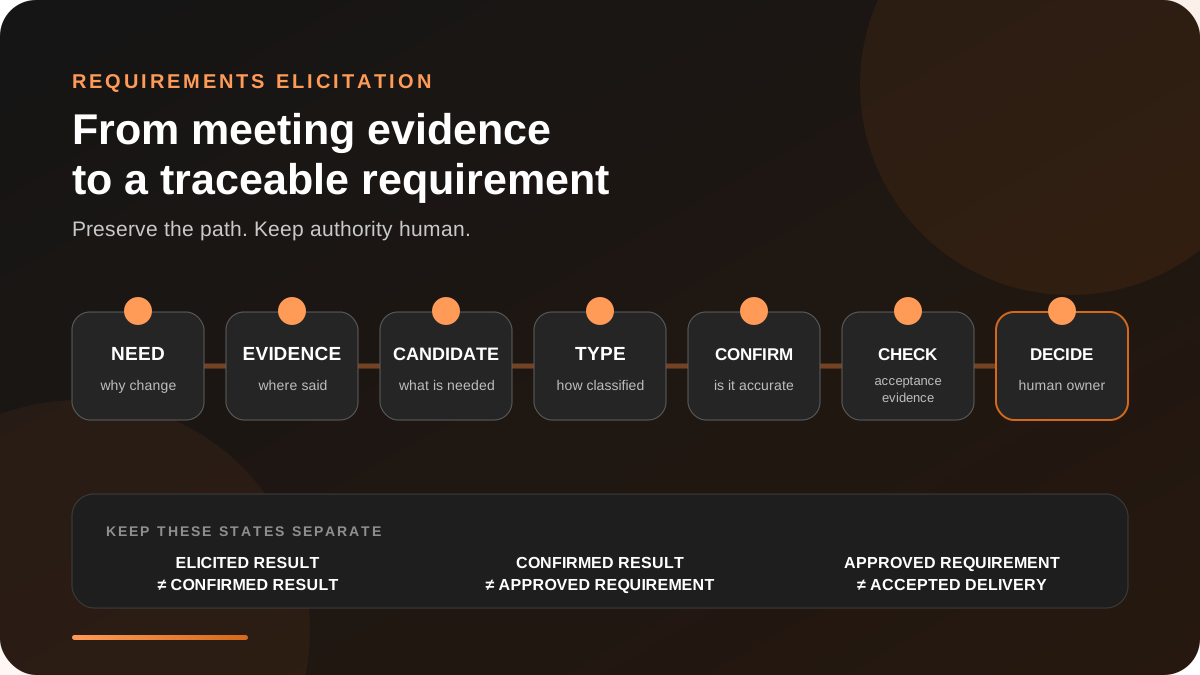
business need → source evidence → requirement candidate → type → confirmation state → acceptance evidence → next decision
Keep three distinctions visible:
1. elicited results are not confirmed results; 2. confirmed elicitation evidence is not a verified, validated, or approved requirement; 3. an approved requirement is not an implemented or accepted delivery.
An AI can draft the structure, retrieve supporting moments, and flag missing fields. An authorized human or governance group still needs to resolve conflicts, approve scope, and decide whether the delivered result satisfies the requirement.
A meeting transcript is evidence, not a requirements baseline
Requirements work begins by learning what stakeholders need, but it does not end when the call ends.
The International Institute of Business Analysis (IIBA) describes elicitation as drawing out information relevant to a change. Its 2025 Business Analysis Standard explicitly labels the immediate output of conducting elicitation as unconfirmed elicitation results. A separate confirmation task checks the gathered information for accuracy and consistency and looks for errors, omissions, conflicts, and ambiguity.
That separation matters when AI drafts the notes. A smooth paragraph can hide whether a statement was:
- a current-state fact;
- a stakeholder need;
- one proposed solution;
- a functional behavior;
- a quality or policy constraint;
- an assumption that still needs evidence;
- a decision made by someone with authority;
- or an unresolved disagreement.
Asana's 2026 requirements-gathering guide places interviews and documentation inside a longer process that includes stakeholder approval and ongoing monitoring. The meeting is an input to requirements management, not a substitute for it.
If the project itself is not yet authorized, first use the approval-ready project-kickoff brief. This guide starts one level deeper: turning elicitation evidence into requirements that can be reviewed and traced.
Define the output before the conversation
Do not ask an AI to “summarize the requirements meeting” without telling it what the meeting is allowed to produce.
Before capture, name:
- the business problem or change being explored;
- the decision this session should inform;
- the stakeholders whose knowledge is needed;
- the existing artifacts that govern the work;
- the requirement types in scope;
- the person or group allowed to confirm the record;
- the person or group allowed to approve scope;
- and where approved requirements will be maintained.
For a workflow redesign, supporting material might include a current process diagram, policy, service-level target, support ticket, or prototype. For a software change, it might include an existing specification, interface contract, analytics definition, or accessibility requirement. Link the authoritative artifact. Do not paste private material into a service that is not approved to process it.
Build a seven-link traceability chain
IIBA defines requirements traceability as tracking relationships from the original stakeholder need to the implemented solution. The following seven-link chain adapts that principle to meeting notes.
| Link | What to record | Failure to avoid |
|---|---|---|
| Business need | Problem, opportunity, affected outcome, and owner of the need | Starting with a favorite feature |
| Source evidence | Meeting time reference, speaker label or role, visible artifact, and external document | A requirement with no recoverable origin |
| Requirement candidate | One testable statement, kept separate from rationale and design | Combining several needs into one fluent paragraph |
| Type | Business, stakeholder, solution, transition, assumption, constraint, or open question | Treating every sentence as a functional requirement |
| Confirmation state | Unconfirmed, confirmed, disputed, or withdrawn | Treating capture as agreement |
| Acceptance evidence | The observation or check that could show the requirement is satisfied | Using “looks good” as the only standard |
| Next decision | Approver, decision needed, due point, and destination record | Letting the meeting note become silent approval |
The type labels are a working classification, not a claim that every organization must use the same taxonomy. IIBA's current overview distinguishes business, stakeholder, solution, and transition requirements. Teams can extend that vocabulary when assumptions, constraints, risks, or open questions need their own review lanes.
Why source evidence needs more than a speaker name
A transcript line shows what the transcript recorded. When wording is material, review the audio and surrounding context. A transcript line cannot by itself prove that:
- the speaker label identifies the right person;
- the person had authority to approve the requirement;
- the statement describes the present system correctly;
- a screenshot shows the final version of an artifact;
- silence from other attendees means consent;
- or the request survived later conflict resolution.
Why confirmation and approval need separate fields
Confirmation checks elicited information for accuracy and consistency with other information. Approval is the governed authorization for subsequent work. Neither step proves that a requirement was implemented or that the delivered result was accepted.
A stakeholder can confirm, “Yes, that is the rule I described,” while the authorized decision-maker later rejects the change because it conflicts with policy, cost, or another requirement. Preserve confirmation, requirement review, approval, implementation, and delivery acceptance as separate states instead of compressing them into a single checkbox.
Capture requirements without choosing the design too early
A meeting often jumps from a need to a solution:
Agents miss urgent requests, so add a red priority button.
The first clause describes a problem. The second proposes one design. A useful note separates them:
| Field | Draft |
|---|---|
| Business need | Urgent requests must reach an available agent before the response target expires. |
| Current evidence | Two participants described manual escalation; ticket data has not yet been reviewed. |
| Requirement candidate | The intake flow must identify requests that meet the approved urgency rule. |
| Proposed design | Red priority control in the intake form. |
| Open alternatives | Automatic classification, required urgency field, or queue-level rule. |
| Missing evidence | Approved urgency definition, false-positive tolerance, accessibility review, and baseline response time. |
This is not an argument against prototypes or design discussion. It keeps the need visible so the team can compare alternatives without losing the reason for the change.
Copyable requirements-brief template
Use one brief per elicitation session, then move confirmed elicitation results and separately approved requirements into the team's governed requirements system.
``markdown
`Requirements elicitation brief
Session boundary
Current-state evidence
ID Observation Source and time reference Confidence Needs verification Requirement candidates
ID Requirement candidate Type Need or evidence ID Confirmation state Approver Destination Acceptance evidence
Requirement ID Proposed check Data or artifact needed Reviewer Status Assumptions, constraints, and dependencies
ID Item Evidence Impact if wrong Owner of follow-up Conflicts and open questions
ID Question or conflict Positions heard Decision owner Due point Review log
Date Item Change Confirmed by Approved by Reason
The review log should record material corrections and decisions. It is not a substitute for version control, a governed backlog, or the organization's formal approval process.
A bounded prompt for AI requirements notes
`text
Draft a requirements-elicitation brief from the supplied meeting context.
Preserve separate sections for current-state evidence, requirement candidates, proposed designs, acceptance evidence, assumptions, constraints, dependencies, conflicts, and open questions.
For every material item, include a recoverable source reference and status. Use only these confirmation states: unconfirmed, confirmed, disputed, withdrawn. Keep confirmation separate from scope approval and implementation acceptance.
Do not infer identity, authority, consensus, priority, approval, requirement type, technical feasibility, policy compliance, deadline, or acceptance. If the source does not support a field, write "not confirmed" and add a review question.
Split compound requirements. Preserve competing interpretations. Separate the business need from any proposed design. Do not add facts from general knowledge.
End with a human review queue ordered by decision risk, not by transcript order. ``
The prompt is deliberately conservative. Its purpose is to create a review surface, not an autonomous specification.
Worked example: support-request intake
Imagine a team reviewing its customer-support intake process. During the meeting:
- the support lead says urgent requests are sometimes missed;
- an operations manager proposes a red priority control;
- an engineer says the system already stores an urgency field, but nobody verifies the current values;
- a compliance partner asks who may view health-related details in submitted requests;
- the product owner says the group should return with evidence before choosing a design.
Add a red priority button and route urgent requests faster. Engineering will implement the workflow after compliance review.
That sentence invents approval, ownership, sequence, and a chosen design.
A traceable brief instead records:
| ID | Item | State | Evidence or next step |
|---|---|---|---|
| NEED-1 | Urgent requests need a reliable escalation path. | Unconfirmed | Support-lead statement; validate with queue and response-time data. |
| CUR-1 | The current system may already store urgency. | Unconfirmed | Engineer statement; inspect the current schema and populated values. |
| DES-1 | Add a red priority control. | Proposed design | Operations-manager statement; compare with automated and queue-level options. |
| CON-1 | Sensitive request details need an approved access boundary. | Open constraint | Compliance question; identify the governing policy and reviewer. |
| DEC-1 | Select the intake design. | Deferred | Product owner requested evidence first; no design approved in the meeting. |
| ACC-1 | Demonstrate reliable urgent-request identification without exposing restricted details. | Draft acceptance evidence | Define response target, test data, false-positive tolerance, and authorized reviewer. |
The second version is longer, but each row can be checked, corrected, approved, or rejected without rewriting the entire meeting story.
Where Shadow fits
Shadow is an AI interface for Mac that sees, hears, and runs. Its current meeting review brings the recording, transcript, notes, available screenshots, Skills, and Ask into one record. That can make it easier to recover the spoken and visual context behind a requirement candidate.
The documented boundaries matter:
- a detected Speaker is a meeting-local voice group, not a verified person;
- a screenshot is context to review, not proof that the shown design was approved;
- a Meeting Skill can draft structured Markdown, but generated claims, decisions, owners, and dates still need review;
- a webhook transmits a result to a configured destination; it does not approve scope or confirm implementation;
- local meeting records can remain in the Shadow vault, while optional AI and sharing features can send relevant context outside the Mac depending on the feature and its settings, as explained in Privacy and data. Automated Meeting Skills may send configured meeting context without a separate per-meeting click.
What is real, what is interpretation, and what is unproven
Real now
- IIBA's 2025 standard separates unconfirmed elicitation results from confirmed results and describes confirmation as a check for accuracy, consistency, errors, omissions, conflicts, and ambiguity.
- IIBA documents traceability from stakeholder need toward solution components and related requirements or designs.
- Shadow's Help documentation describes local meeting capture and vault records, reviewable transcripts and screenshots, AI features, Markdown Skill results, and optional webhook delivery.
Practitioner interpretation
- The seven-link chain in this article is an operating model for making AI-drafted meeting notes reviewable.
- Separating elicitation confirmation, requirement verification and validation, scope approval, and delivery acceptance is a practical governance choice. Your organization may use different state names or approval artifacts.
- Ordering the review queue by decision risk is a workflow recommendation, not an IIBA requirement.
Unproven
- That AI-generated requirements are complete because every template field is filled.
- That a transcript or screenshot establishes identity, authority, correctness, or consent.
- That using this template reduces rework or improves delivery outcomes without measuring the team's actual process.
Review the first five briefs as a starting heuristic
Before automating the workflow, audit five sessions manually.
Track:
- percentage of material requirements with a recoverable source;
- number of compound requirements split during review;
- unconfirmed items incorrectly presented as agreed;
- confirmation-to-approval mismatches;
- conflicts or constraints recovered after the first draft;
- and requirements that reach implementation without defined acceptance evidence.
When the brief is reliably traceable, download Shadow and test the workflow on a low-risk internal session. Before applying it to sensitive or regulated work, establish the required recording consent, access controls, retention rules, and an approved path for any external AI processing.
Sources and verification date
Sources were checked on October 14, 2026:
- IIBA, The Business Analysis Standard (2025 PDF)
- IIBA, Understanding Requirements and Designs
- IIBA, Elicitation and Collaboration
- Asana, Requirements Gathering: 6 Steps for Project Success (2026)
- Shadow Help, Review a Meeting
- Shadow Help, Meeting Skills
- Shadow Help, Your Vault and Local Files
- Shadow Help, Privacy and Data Leaving Your Mac