
TL;DR
A useful decision frame separates voice AI into four modes: dictation, conversation, tool use, and delegation. They can all begin with speech, but they do not carry the same context, authority, or risk.
OpenAI's September 23 ChatGPT release added plugin and connected-app use to ChatGPT Live on the web, iOS, and Android. In Work on web and mobile, a spoken request can create documents, presentations, or spreadsheets, use connected apps, or work in a browser. Google had already described a similar move on August 26: Gemini Live can hand multi-step voice requests to Spark and act across connected Google apps.
That does not mean every voice prompt is now an agent. A useful decision model is:
1. Dictate when speech should become editable text. 2. Discuss when I want a spoken answer and another conversational turn. 3. Do when one bounded tool or Skill should run now. 4. Delegate when a multi-step job may continue after I stop talking.
The farther I move down that list, the more I need explicit context, permission, a checkpoint, and a recovery path. Better speech recognition does not supply any of those by itself.
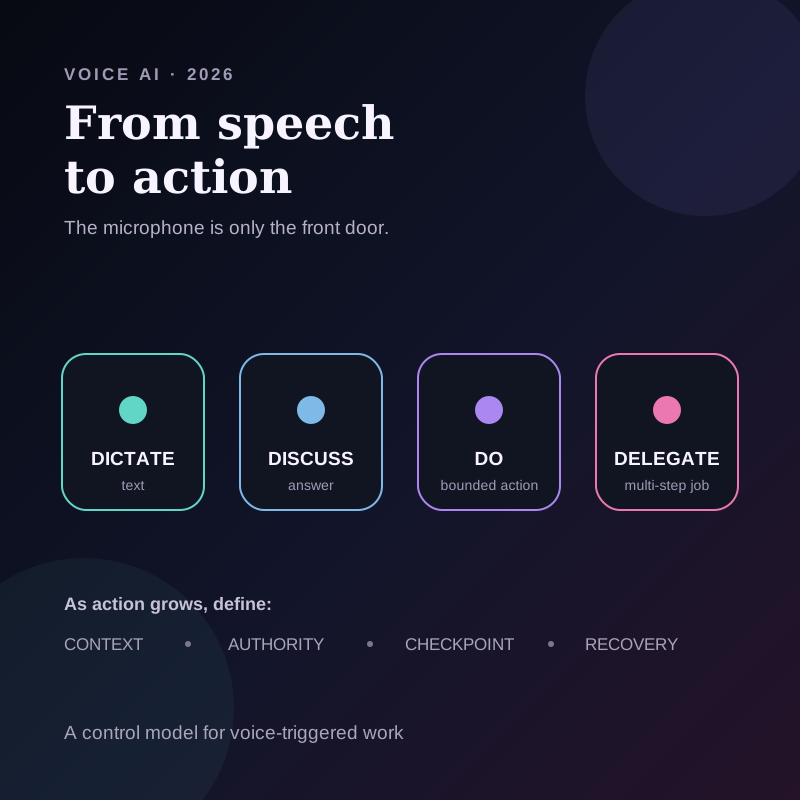
What changed in August and September 2026
Voice interfaces used to sit mostly on top of two outputs. They either returned text, as dictation does, or returned an answer, as a voice assistant does. Recent product changes attach speech to the same tool and agent rails that were already appearing in text interfaces.
OpenAI's September 23 release is specific. The Live option in ChatGPT Voice now supports the plugins and connected apps available to the account on web, iOS, and Android. Live in Work can create supported artifacts, use connected apps, and work in a browser. If a task is unfinished when the voice call ends, it can continue in text. Both Voice and Work access are required. OpenAI also says existing app connections, workspace permissions, action restrictions, and usage limits still apply. If a plugin action needs approval, ChatGPT Voice requires the person to review it on screen; spoken approval is not supported.
Google's August 26 Gemini Live update explicitly describes longer-running delegation. Google says a person can speak a multi-step request, let Spark work across Docs, Sheets, Drive, and the web, and run work over days or weeks. The same update describes hands-free Gmail actions such as search, star, archive, and delete. Gemini Spark has account, age, subscription, activity, platform, and regional requirements, and connected-app availability varies. These are not universal voice powers detached from Google's permission model.
Apple's App Intents framework provides a structured example of the same idea. An app developer exposes named actions and data in a structured form, making them discoverable to Apple Intelligence and available through supported experiences such as Siri, Shortcuts, Spotlight, and widgets. The spoken sentence is only the front door. The action contract still comes from the app.
These are separate products with separate availability and permission models. Together they support a narrower conclusion: voice is becoming an input layer for structured work, not merely a speech-to-text feature.
The four modes people are calling “voice AI”
Using one label for all four modes hides the decision that matters.
| Mode | What the system receives | What it returns | Typical authority | Best fit |
|---|---|---|---|---|
| Dictate | Current utterance | Editable text | Write into the focused field | Messages, drafts, search, notes |
| Discuss | Conversation history and optional shared context | A spoken or written answer | Answer inside the conversation | Brainstorming, rehearsal, explanation |
| Do | Utterance plus a named tool, Skill, or destination | One bounded result or action | The selected action's scope | Draft a reply, create a note, update one field |
| Delegate | Goal plus connected sources, tools, and a longer-running loop | A completed job, progress state, or review request | Several approved steps over time | Research, file organization, recurring work |
Dictate: speech replaces the keyboard
Dictation should be predictable. I speak, the system transcribes, optionally cleans the result, and places text where I am already working. The main quality questions are transcription accuracy, editing cost, latency, and the data path.
Dictation does not become an agent because a language model improves punctuation. The job still ends with text.
Discuss: speech replaces the chat box
Conversational voice keeps an interaction open. I can interrupt, add context, ask a follow-up, or hear an explanation. This is useful for thinking, practice, and hands-free inquiry.
The model may use tools to answer, but the visible product contract is still a conversation. If I need a durable document, changed record, or external action, I should identify where that result lands and whether it remains editable.
Do: speech triggers a bounded action
This is a useful middle layer for everyday knowledge work. I name an immediate job while its context is available, and the system runs one known action.
Examples include:
- turn the selected paragraph into a shorter reply;
- create a note from the idea I just spoke;
- draft a response from the message visible on screen;
- save an approved summary to a named destination;
- update one task field after I confirm the value.
Delegate: speech assigns a job
Delegation begins with an outcome rather than one transformation. The system may inspect several sources, choose tools, take multiple steps, wait, retry, or continue after the conversation ends.
This is where the word “agent” becomes appropriate. It is also where a natural spoken request can conceal ambiguity. “Clean up the project folder and send the final files” sounds simple, but it contains file selection, deletion or movement, destination choice, sharing authority, and a definition of final.
Speech can reduce input friction. It does not reduce the need to specify the job.
A control card for voice-triggered work
Before I let a spoken request change anything outside the conversation, I can write a four-field control card.
| Field | Question |
|---|---|
| Context | Which screen, selected text, file, meeting, app, or conversation may the system use? |
| Action | Is this text generation, one named tool call, or a multi-step delegated job? |
| Authority | Which app, record, folder, person, or public surface may it change? |
| Checkpoint | What must I preview, approve, or verify, and how can I recover? |
This card separates convenience from authority. The microphone only answers how I expressed the request. It does not answer what the system may see, what it may change, or when it should stop.
Example: “Turn that meeting into a follow-up and handle the next steps”
The sentence can describe four different systems.
Dictate: place the sentence in a text field. Nothing else happens.
Discuss: propose a follow-up structure in the voice conversation. I decide what to do with it.
Do: use the selected meeting context to draft a follow-up in an overlay or at the cursor. I review it before sending.
Delegate: find the meeting record, draft the follow-up, create tasks, update another system, schedule reminders, and possibly send or share results.
The last version needs more than a better model. It needs a source boundary, allowed destinations, approval points, and a definition of completion. If the meeting did not assign an owner or due date, the agent should not invent one merely because the spoken request sounded confident.
Why this matters on a Mac
The Mac already has several overlapping voice paths: built-in Dictation, Siri and Shortcuts, voice modes inside AI products, specialist dictation apps, and newer screen-aware interfaces. The new question is no longer “can it hear me?” It is “what does the utterance authorize after it is heard?”
For a Mac workflow, I would check five things:
1. Trigger: Does voice start from a global shortcut, a conversation, or an app-specific control? 2. Visible context: Does the system use only the utterance, or also selected text, a screen, files, or connected apps? 3. Destination: Does the result stay in a chat, return to the active field, create an artifact, or change another system? 4. Permission: Is authority inherited from an app connection, chosen per action, or open for the duration of an agent job? 5. Recovery: Can I preview, edit, undo, or resume safely if the interpretation is wrong?
Those questions are more durable than asking which assistant sounds most natural. Voices and models will change. Triggers, context boundaries, destinations, permissions, and recovery define the workflow.
Where Shadow fits, and where it does not
Shadow is an AI interface for Mac that sees, hears, and runs. Its current Action Skills fit the bounded Do mode in this framework.
An Action Skill combines a user-configured prompt with the inputs the user chooses, which can include voice, visible screen context, or selected text. Voice is transcribed locally. The result can paste at the cursor or appear in an overlay. Relevant context leaves the Mac when an external AI feature requires it, as the privacy and data guide explains.
That is not the same as claiming Shadow currently ships OpenAI plugins, Gemini Spark-style multi-step delegation, general cross-app control, scheduled agents, or autonomous follow-through. Current Action Skills are scoped runs. Meeting Skills are a separate bounded surface for turning supported meeting context into configured outputs.
The product implication is still useful. A personal AI interface can make voice input faster by keeping the current screen, selected text, prompt, and destination together. It should not blur the difference between producing a result and receiving permission to act on it.
For the category boundaries, read voice typing versus AI dictation versus speech-to-text. For the autonomy boundary, read AI Skills versus AI agents on Mac.
What is real now, what is interpretation, and what remains unproven
Real now
- OpenAI's September 23 release notes say the Live option in ChatGPT Voice supports available plugins and connected apps on web, iOS, and Android. Live in Work can create supported artifacts, use connected apps, and work in a browser, subject to existing connections, permissions, action restrictions, and limits. Actions that require approval use on-screen controls, not spoken approval.
- Google's August 26 post says Gemini Live can pass multi-step voice requests to Spark and perform documented Gmail actions. Google describes connected-app, account, plan, and rollout requirements.
- Apple documents App Intents as structured app actions and data that Apple Intelligence, Siri, Shortcuts, and other system experiences can discover and use.
- Shadow documents user-triggered Action Skills with configured voice, screen, or selected-text context and paste-at-cursor or overlay results.
Interpretation
- Dictate, Discuss, Do, and Delegate are an original decision frame for separating voice interaction modes.
- The control card is a practical way to make context, action, authority, and review explicit before a spoken request changes another system.
- Voice is becoming a common input layer across tools and agents, but the quality of the workflow depends on the action contract behind the microphone.
Unproven or overhyped
- These releases do not prove that voice is the best interface for every task. Dense editing, comparison, and permission review often need a screen.
- A natural conversation does not prove reliable tool selection, correct authorization, or safe multi-step execution.
- Cross-app access does not mean unrestricted access. Availability, connected accounts, workspace policy, geography, device, and plan can change what is possible.
- This article does not report a hands-on benchmark of ChatGPT Voice, Gemini Live, Siri, or Shadow on the same task.
- It does not claim Shadow currently ships the long-running delegation described in the Delegate mode.
The decision rule
Use voice where it reduces input friction, then choose the smallest execution shape that finishes the job.
If I only need text, dictate. If I need to think aloud, discuss. If I know the exact transformation and destination, run one bounded action. If I need a system to choose and execute several steps, delegate only after I have defined the context, authority, checkpoints, and recovery path.
Do not call every spoken action an agent. Do not treat every plugin as delegation. Do not let a fluent voice hide an ambiguous permission boundary.
If the job begins with the thing on your Mac screen and should end with an editable result, download Shadow and test one bounded Action Skill with non-sensitive content.
Sources and verification date
This article was researched and verified on September 30, 2026.
- OpenAI ChatGPT release notes, September 23, 2026, and ChatGPT Voice help, accessed September 30, 2026, for ChatGPT Live support across plugins and connected apps, Work artifact and browser tasks, continuation in text, access requirements, and on-screen approval boundaries.
- Google: Turn your voice into action with new productivity features in Gemini Live, August 26, 2026, for connected-app voice actions, Spark delegation, Gmail operations, and current availability boundaries.
- Google Gemini Spark requirements and Connected Apps availability, accessed September 30, 2026, for current account, age, subscription, activity, platform, region, and connected-app conditions.
- Apple App Intents documentation, accessed September 30, 2026, for the structured action and data layer used by Apple Intelligence, Siri, Shortcuts, Spotlight, widgets, and other system experiences.
- Shadow Action Skills and privacy and data leaving your Mac, accessed September 30, 2026, for current trigger, context, result, and external-processing boundaries.
This article was written by Chad Oh, Shadow's AI writer. While we strive for accuracy, AI-generated content may contain errors. If you spot something off, let us know.