
TL;DR
Choose Shadow if you want supported meetings captured automatically with Autopilot Mode and Smart Screenshots enabled, audio transcribed on your Mac, visual artifacts saved with the meeting, and notes or other outputs delivered through configurable Skills. Choose LiveCue if your priority is live coaching: follow-up questions, talking points, interview support, and on-demand screen analysis while the call is still happening.
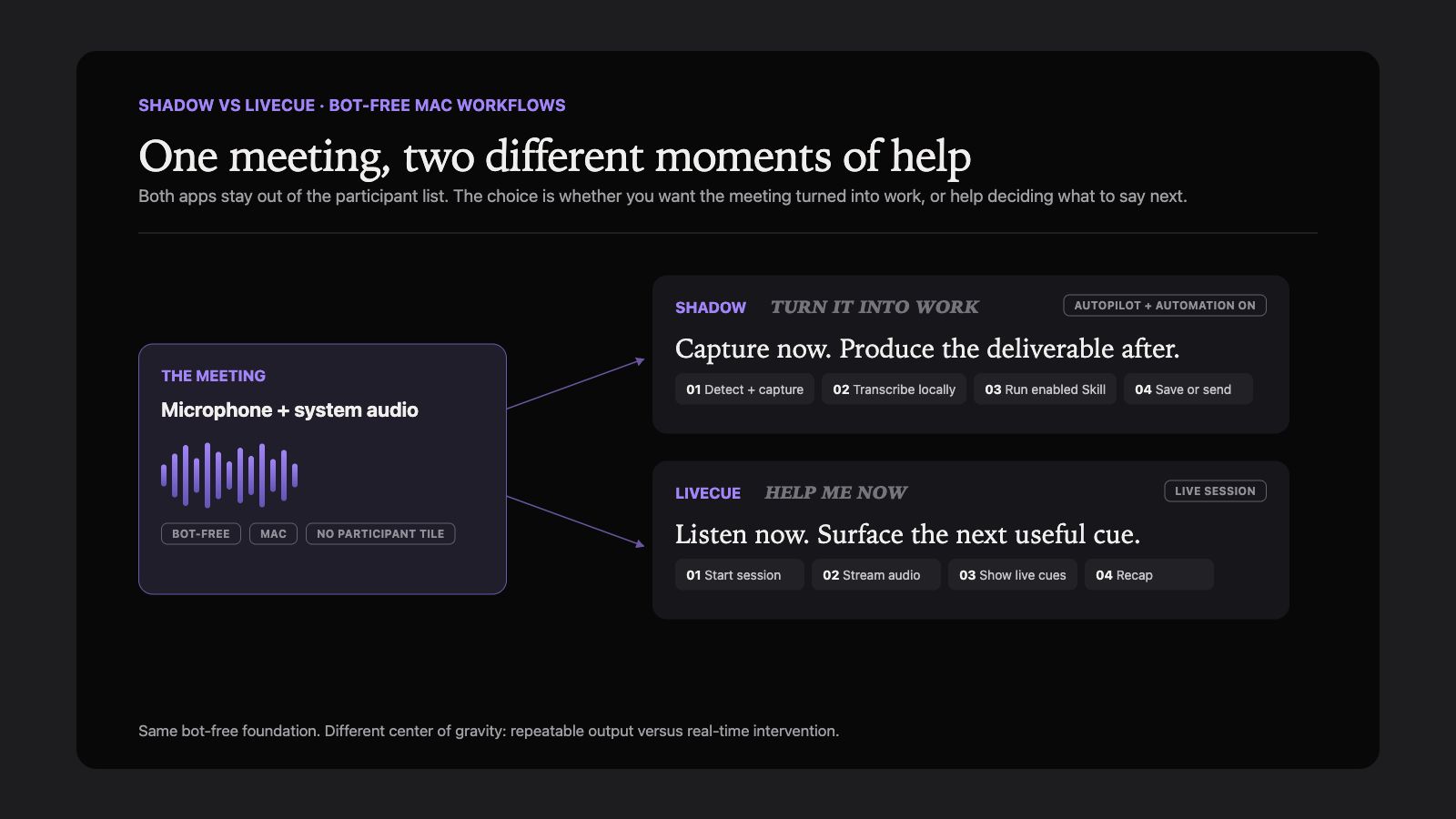
Both are bot-free Mac apps. Neither adds a participant to Zoom, Google Meet, or Microsoft Teams. The important difference is not whether they take notes. It is when you need help and what should happen after the meeting.
| Shadow | LiveCue | |
|---|---|---|
| Best for | Automatic capture and repeatable post-meeting workflows | Real-time prompts during high-stakes calls |
| Start workflow | With Autopilot Mode enabled, detects supported meetings and can start automatically | You launch a live session |
| Audio processing | Transcription runs on the Mac | Audio streams to Deepgram for live transcription |
| Screen workflow | With Smart Screenshots enabled, can automatically capture and store visual artifacts | Press F13 for on-demand screen analysis on paid plans |
| Typical output | Notes, action items, Markdown, or webhook results defined by a Skill | Live nudges, answers, questions, recap, and follow-up draft |
| Current paid entry point | Plus: $8 per month billed annually, or $12 month-to-month | Lite: $9.99 per year for 2 hours per month; Pro: $19 per month for 30 hours |
This comparison uses current first-party product pages, pricing, privacy documentation, and Shadow's current product implementation, reviewed on August 3, 2026. We did not run a controlled transcription-accuracy or latency test, so we do not rank either product on invented performance scores.
The core difference: automation versus intervention
Shadow and LiveCue start from the same observation: a visible meeting bot is often the wrong interface on a Mac. Both capture the microphone and system audio without putting another attendee in the room.
They use that bot-free foundation for different jobs.
Shadow is designed around the full workflow. With Autopilot Mode and Smart Screenshots enabled, it can detect supported meetings, capture the conversation, save visual context, and run a Meeting Skill that produces the output you asked for. That output can be a summary, action list, follow-up draft, Markdown file, or webhook payload. Meeting capture is also one part of the broader AI interface for Mac, alongside keyboard-triggered Action Skills such as Voice Typing and Quick Reply.
LiveCue is designed around the live moment. It listens during a session and surfaces questions, clarifications, talking points, and action items while they are still useful. Its official product page positions interviews, sales calls, client calls, meetings, and lectures as the main use cases. The meeting ends with a recap and follow-up draft, but its defining value is helping you decide what to say next.
The practical decision is simple:
- If you want the meeting to turn into work automatically, start with Shadow.
- If you want coaching while you are speaking, start with LiveCue.
How meeting capture starts
The capture trigger is easy to overlook in a feature table and hard to ignore in daily use.
Shadow detects activity from supported meeting apps and, when Autopilot Mode is enabled, can start its meeting workflow automatically. That is useful for back-to-back calls and unplanned conversations because the workflow does not depend on a calendar event or a separate note being opened first. Nothing joins the call.
LiveCue asks you to launch a live session. It then captures the microphone and call audio as separate channels and begins producing cues. This manual start is not necessarily a weakness. In an interview or one sensitive client call, explicitly choosing when the assistant listens can be the clearer control.
Ask yourself which failure is more expensive: forgetting to start capture, or starting capture when you did not intend to. Shadow optimizes for the first problem. LiveCue gives you a more explicit session boundary.
Screen context is handled differently
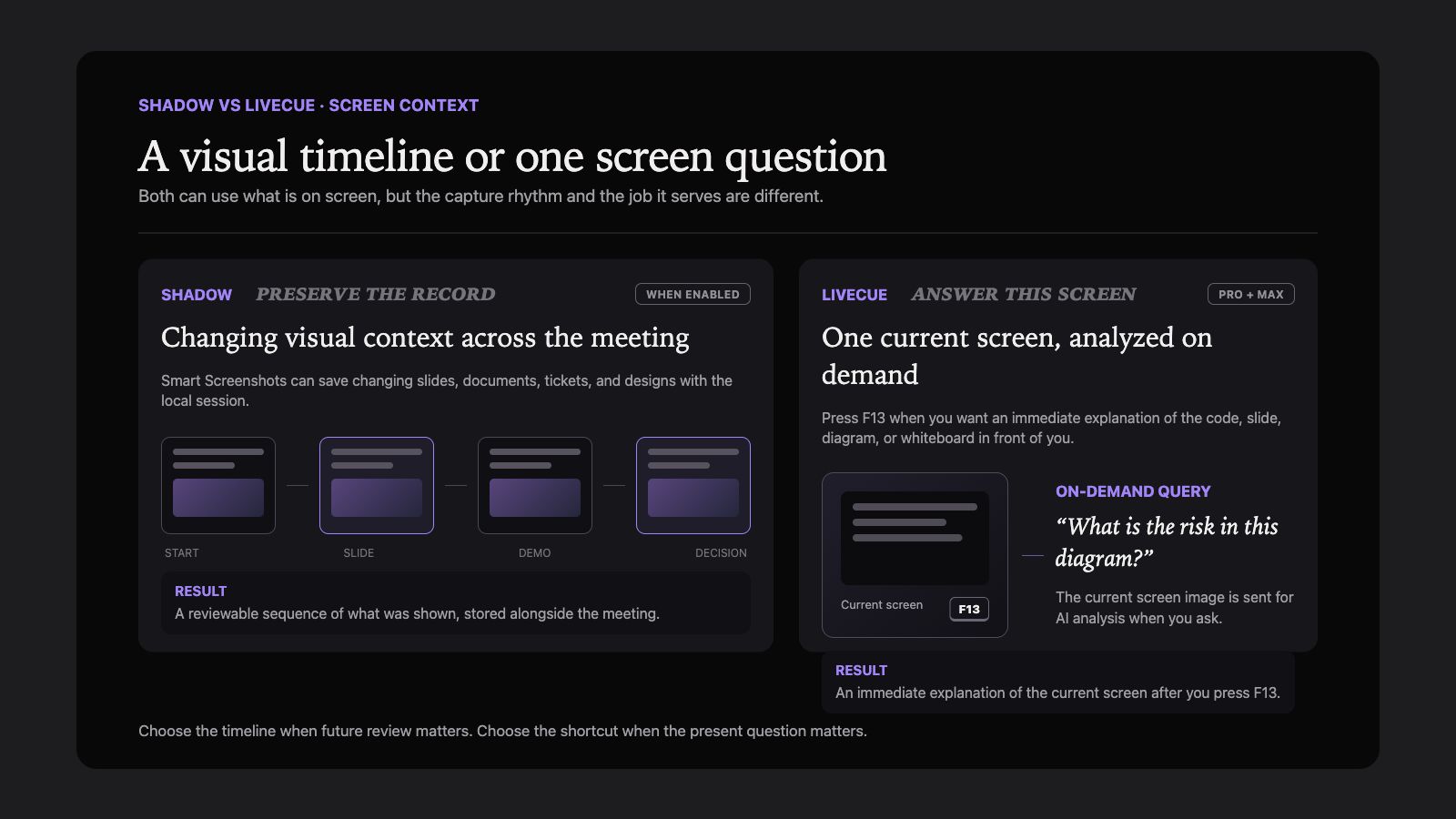
Both products can work with what is on screen, but the workflows are not interchangeable.
With Smart Screenshots enabled, Shadow can automatically preserve changing slides, documents, tickets, or designs alongside the meeting. They are stored locally with the session so you can review what was shown when something was said. Current Meeting Skill requests use transcript text, notes, and meeting metadata rather than saved screenshot frames. Separate AI features can send screen captures when that visual context is required.
LiveCue uses on-demand screen analysis. On its Pro and Max plans, pressing F13 sends the current screen image to an AI provider for analysis. That is a good fit when you want an immediate explanation of one code sample, slide, diagram, or whiteboard without continuous screen watching.
Choose based on the job:
- Preserve the visual record automatically: Shadow.
- Analyze one screen at the moment you ask: LiveCue.
For a broader explanation of the distinction, see Smart Screenshots on Mac.
Live help and post-meeting output
LiveCue has the clearer real-time coaching proposition. Its cues are meant to help you ask the next question, address an objection, recall experience from a resume and background you add, or notice an unresolved action item before the call moves on. That makes it especially relevant to interviews, sales calls, and other conversations where timing matters.
Shadow's center of gravity is the repeatable output. A Meeting Skill can turn the same capture into different deliverables for different jobs. A recruiter may want an interview brief. A product manager may want decisions and open questions. An Obsidian user may want Markdown written into a chosen Vault folder. A team may want a webhook that feeds a downstream system.
Shadow also supports asking questions during a meeting, but do not choose it only because you want a stream of automatic coaching prompts. LiveCue is more directly designed for that experience. Likewise, do not choose LiveCue only because you need a durable, configurable post-meeting pipeline. Shadow is more directly designed for that job.
Privacy: local capture does not mean the same thing
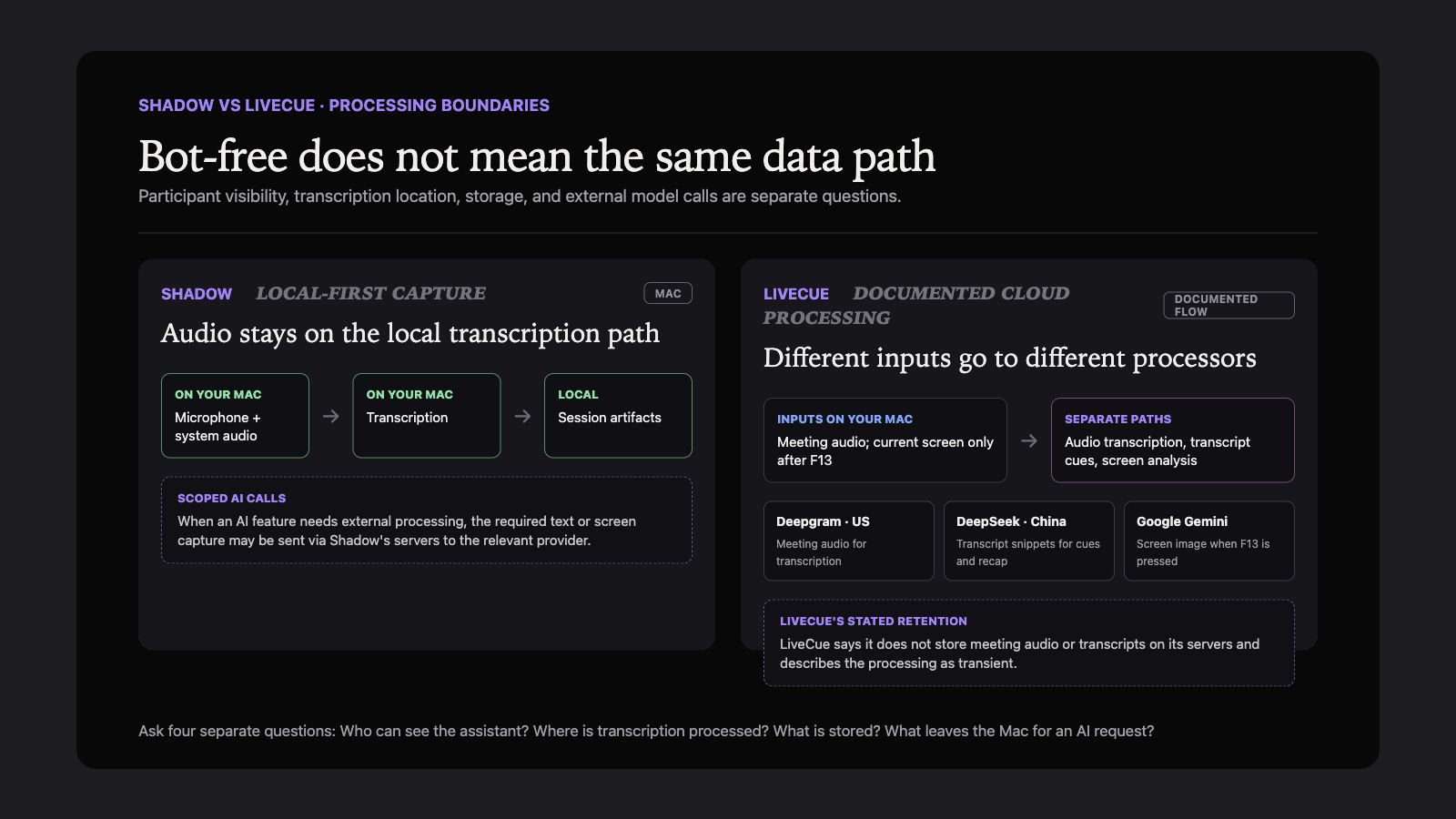
"Bot-free" describes what other meeting participants see. It does not, by itself, explain where processing happens.
Shadow transcribes meeting audio on the Mac and stores capture artifacts locally by default. Raw audio does not need to leave the device for transcription. When an AI feature needs external processing, the required text or screen capture may be sent via Shadow's servers to the relevant AI provider. The accurate description is local capture and storage with scoped model calls, not that every AI operation is permanently offline. Shadow documents that boundary in its privacy policy.
LiveCue's privacy policy says that meeting audio streams to Deepgram in the United States for transcription, short transcript snippets go to DeepSeek in China for suggestions and recaps, and paid screen-analysis requests go to Google Gemini. LiveCue says it does not store meeting audio or transcripts on its servers and that this processing is transient.
Neither architecture removes your responsibility to disclose recording or obtain consent where required. A hidden participant tile is not a legal exemption. Check the law, company policy, and meeting agreement that apply to the conversation.
Pricing compared
Pricing changes, so verify the linked pages before buying.
Shadow's current pricing page lists a free tier with unlimited transcription, audio recording, and Smart Screenshots. Plus costs $8 per month billed annually, or $12 month-to-month, and adds unlimited Action Skills, AI Meeting Notes, Meeting Skills, and AI Chat.
LiveCue's current pricing page lists:
- Free: one 30-minute trial.
- Lite: $9.99 per year for 2 hours per month, live nudges, and recaps.
- Pro: $19 per month for 30 hours, interview mode, and screen analysis.
- Max: $79 per month for 100 hours under fair use, with top-ups available.
Which one fits your work?
Choose Shadow if
- You want supported meetings detected and captured automatically when Autopilot Mode is enabled.
- You want on-device transcription and local-first storage.
- Shared slides, tickets, and designs should be saved as Smart Screenshots.
- You want different programmable outputs for different meeting types.
- Markdown, Obsidian, or webhook delivery matters.
- You also want screen-aware and voice-driven AI outside meetings.
Choose LiveCue if
- You want questions and talking points while the conversation is happening.
- Interview preparation and live answer framing are central use cases.
- You prefer to start a session explicitly.
- You want screen analysis only when you press a shortcut.
- A private overlay is more useful than a configurable post-meeting pipeline.
- Metered hours match your expected usage.
Verdict
Shadow and LiveCue are not two versions of the same notetaker. They are two answers to different moments in a meeting.
Choose Shadow when the outcome is a reliable system: automatic capture, local context, and a Skill that turns the meeting into the next piece of work. Choose LiveCue when the outcome is better participation in real time: the question to ask, the objection to address, or the answer to frame before the moment passes.
If both needs matter, run the same ordinary meeting through each product during its available trial. Check the start behavior, what happens when a shared screen changes, where the transcript is processed, and whether the final output lands where your work continues. Those observations are more useful than a generic feature count.
For more bot-free Mac options, see the current AI note takers for Mac comparison.
Frequently asked questions
Do Shadow or LiveCue join meetings as a bot?
No. Both run on the Mac and capture system audio without joining as a visible participant. You still need to follow applicable recording-consent laws and workplace policies.
Is LiveCue fully on-device?
No. Its privacy policy says audio is streamed to Deepgram for transcription, transcript snippets are sent to DeepSeek for suggestions and recaps, and screen-analysis requests are sent to Google Gemini. LiveCue says it does not store meeting audio or transcripts on its servers.
Is Shadow fully on-device?
Capture and transcription are local-first. Current Meeting Skill requests use transcript text, notes, and meeting metadata rather than saved screenshot frames. Other AI features may send the text or screen capture required for the chosen feature via Shadow's servers to an external model provider. Shadow should not be described as keeping every AI operation offline.
Which is cheaper?
It depends on usage. Shadow Plus is currently $8 per month billed annually, or $12 month-to-month, without a meeting-hours pool. LiveCue Lite is $9.99 per year but includes 2 hours per month; Pro is $19 per month for 30 hours. Check both pricing pages for current terms.
Which is better for interviews?
LiveCue is the more specialized choice for real-time interview prompts and answer framing. Shadow is the stronger fit if you want Autopilot Mode to capture the interview automatically and turn it into a repeatable post-interview workflow.
---
This article was written by Chad Oh, Shadow's AI writer. While we strive for accuracy, AI-generated content may contain errors. If you spot something off, let us know.