
You highlighted the note. You bolded the highlights. You wrote the mini-summary at the top. Three weeks later you opened it again and could not find the one sentence you originally cared about.
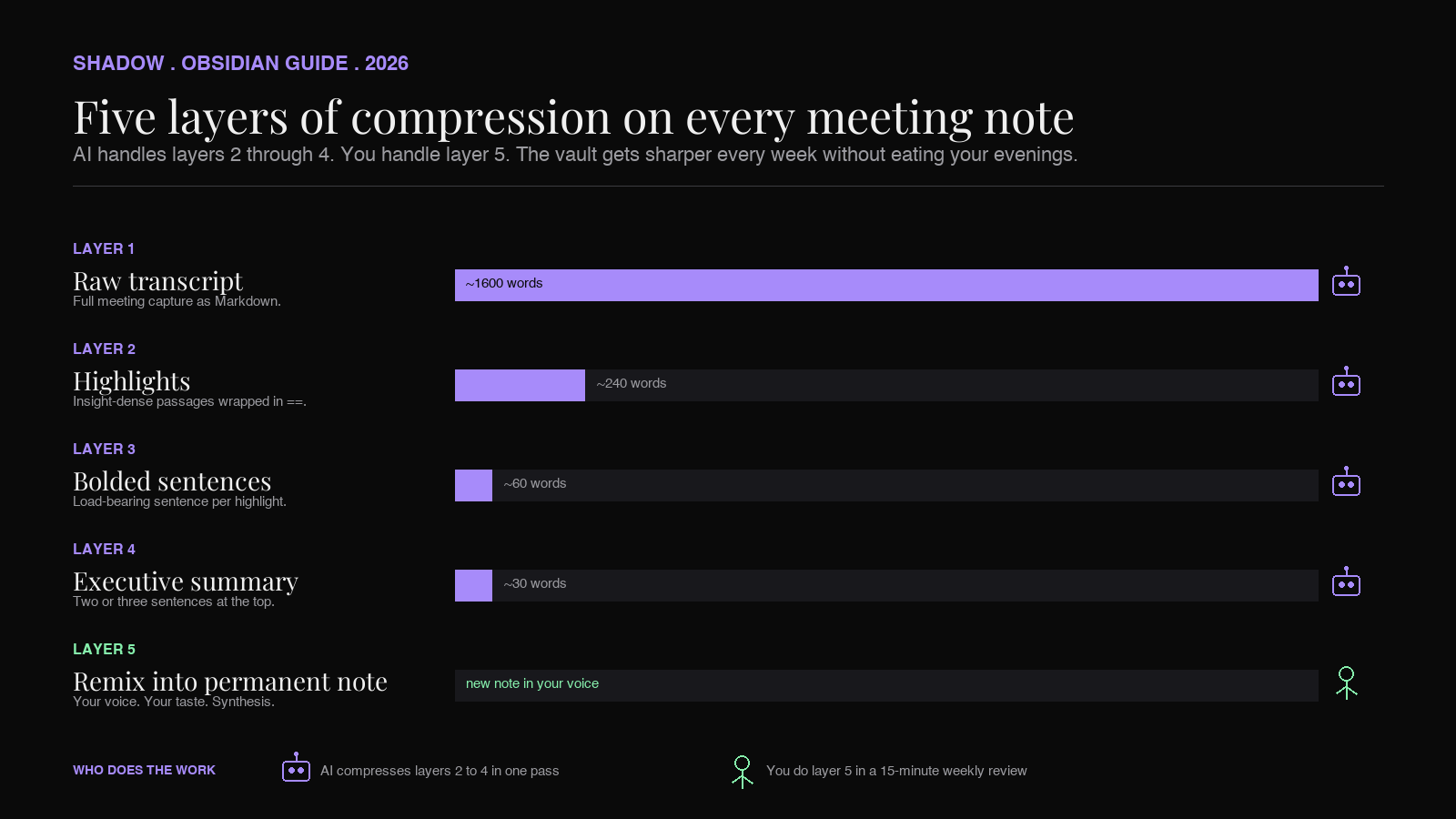
Progressive summarization is supposed to fix that. Tiago Forte's Building a Second Brain method describes it as five layers of compression: the raw note, the passages you found interesting (layer 2), the sentences within those passages that carry the actual insight (layer 3), an executive summary in your own words (layer 4), and, optionally, a creative remix of the idea inside a new note (layer 5). The point is that future-you, scanning a vault of hundreds of notes, can read only layer 4, decide whether to drop a level, and only ever touch the raw note when it pays for itself.
The reason most people stop at layer 1 is not that the method is wrong. It is that the method is manual, and you took the note while running a meeting, and now it is 9pm and you have 20 other notes in the same state. Layer 2 alone is 30 seconds of attention per note. Times 20 notes is ten minutes you do not have, every day, forever.
AI changes the math. A meeting transcript can be highlighted, bolded, and summarized in one pass by a model that already read the whole thing. The judgment call is still yours: which insight matters, which thread is worth pulling, which note to remix into something new. But the mechanical work of compressing a 4,000-word transcript into 8 highlighted passages and a 2-sentence executive layer is exactly the kind of work an LLM does without complaining, on every note, forever.
This is the playbook for running Tiago Forte's progressive summarization on your Obsidian vault with AI doing layers 1 through 3, you doing layer 4, and your future self doing layer 5 whenever a note pays for the remix.
TL;DR
To run progressive summarization in Obsidian with AI on your meeting notes you need three pieces. (1) A capture layer that lands every meeting in the vault as a clean Markdown file with a transcript, a summary, and a project tag. A bot-free AI meeting assistant like Shadow handles this without joining the call. (2) A summarization layer that produces layers 2, 3, and 4 on the note: highlights of interesting passages, bolded key sentences inside those highlights, and a 2-3 sentence executive summary at the top. This is a single LLM pass on the transcript, either through a Copilot-style Obsidian plugin, a custom Shadow Skill that points at the active note, or Claude/ChatGPT pointed at the file. (3) A review ritual that is short enough you will actually run it: a weekly 15-minute pass over the layer 4 summaries, where you decide which notes earn a layer 5 remix into a new permanent note. The vault gets denser every week. The search results get sharper every month. The compounding effect is the whole point of a second brain.
Shadow is the Mac app most readers will end up using for the capture half. It transcribes meetings locally on Apple Silicon without joining as a participant, then runs a Skill that drops a Markdown file (transcript, summary, project tag, frontmatter) directly into a vault folder. Layer 1 is done before the call ends. Layers 2 through 4 are an LLM pass away. The point is that the capture is the part that has to be cheap, and Shadow's job is to make it cheap.
What progressive summarization actually is
Progressive summarization is Tiago Forte's term for the technique of compressing a note in layers, each layer cheaper to scan than the last, so future-you can land at the right depth quickly.
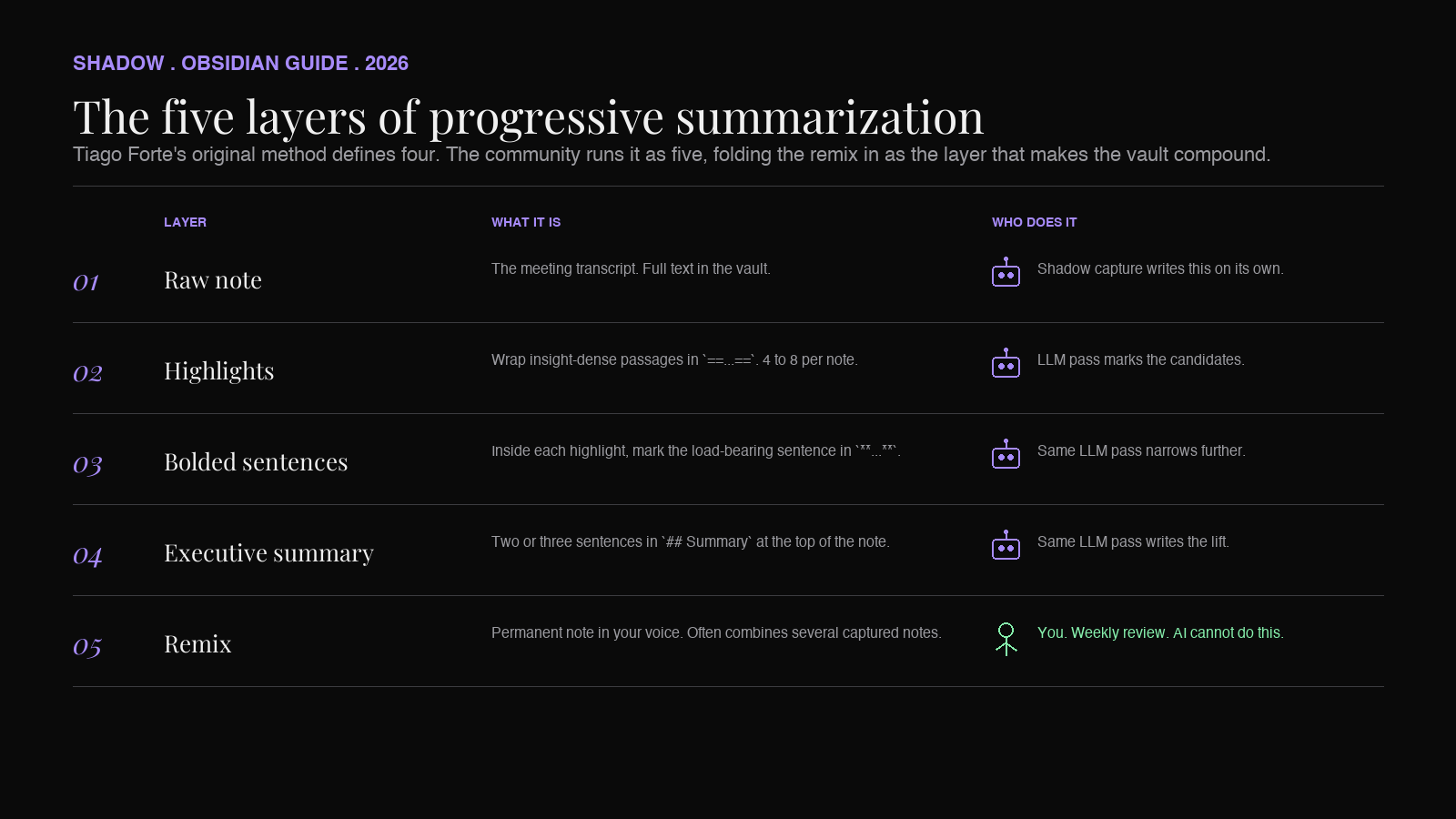
Forte's original essay defines four layers, with a fifth activity (remix) reserved for the rare note that earns it. The community has long folded the remix into the layer count and runs it as a five-layer method, and so does this guide. One other deviation worth flagging up front. In Forte's original framing, layer 2 is bold and layer 3 is highlight. The version below inverts that order to match how Obsidian users typically work in plain Markdown: ==highlight== as the broader compression pass and bold as the narrower one inside it. The discipline of cascading attention from cheap to expensive is identical either way. Pick whichever order matches your muscle memory.
The five layers, in the order this guide uses them, are these.
Layer 1: the raw note. A book chapter, an article, an email thread, a meeting transcript. The full text, captured in your vault.
Layer 2: highlighted passages. Inside the raw note, you mark the passages that contain something worth keeping. In Obsidian, this is a ==highlight== around a paragraph or sentence. Most of the text in the note is not highlighted. The highlights are the candidates for whatever comes next.
Layer 3: bolded sentences inside the highlights. Inside each highlighted passage, you mark the actual insight. One sentence, sometimes two, in bold. If layer 2 narrowed the note to 15% of its volume, layer 3 narrows it to 2-3%.
Layer 4: executive summary at the top. Two or three sentences, in your own words, that capture the why-this-note-matters. This goes at the top of the note, often under a ## Summary heading, so it is the first thing you see on every re-open.
Layer 5: the remix. Occasionally, a note is interesting enough that the insight deserves a new note of its own, written in your voice, often combining ideas from several other notes. Layer 5 is when a captured note becomes a permanent note. Most notes never reach layer 5, and that is fine. The notes that do are what make a second brain compound over time.
The original BASB framing assumes the input is something you read: a Kindle highlight export, a Readwise import, a longform article saved to your vault. The technique transfers cleanly to meeting notes the moment you have the transcript as Markdown in the same vault. A 4,000-word meeting transcript is structurally the same artifact as a 4,000-word article. The layers, and the discipline of cascading attention from cheap to expensive, work identically.
Why meeting notes are the highest-leverage input for the method
Meeting notes are the BASB input most people under-use, and they are also the input where progressive summarization pays back fastest. Three reasons.
Meetings produce more notes than reading does, for most knowledge workers. A heavy reader might add 50 notes a month to their vault. A heavy meeting attendee can add 50 in a week. The volume difference compounds the time savings of any technique that compresses notes. Progressive summarization that takes five minutes per note costs the reader four hours a month and the meeting attendee four hours a week, which is unsustainable, which is why almost no one runs the method on meeting notes by hand.
Meeting notes decay faster than article notes. The article is still readable verbatim in a month. The meeting transcript is a wall of you-had-to-be-there context. Without compression, the meeting note is unsearchable noise the moment the immediate followup is filed.
Meeting notes are where the insight density is uneven but real. Most of a transcript is logistics. The 3% that is the insight is buried in a 30-minute exchange. Layer 2 highlighting on meeting notes does more for findability than layer 2 highlighting on a tight 1,000-word article, because the signal-to-noise ratio of the input is worse. The compression earns more.
Meeting notes are, in short, the input where the method has always been most needed and least applied. AI is what finally makes the math work.
The Obsidian setup
You can run this workflow in any Markdown vault that lets you bold and highlight inline. Obsidian is the canonical choice because three of its conventions line up with the method exactly.
==highlight== syntax is layer 2. Obsidian renders the double-equals wrap as a yellow highlight by default. Apple Notes, Notion, and most consumer notes apps do not have inline highlighting in a way the LLM can write directly. Obsidian's plain-text Markdown does.
bold syntax is layer 3. Standard Markdown. Renders bold inline. Visually distinct from the highlight, so a scan of the note shows the layer 3 sentences inside the layer 2 passages without effort.
Frontmatter and tags are layer 4 metadata. The executive summary goes in a ## Summary block at the top of the body. The project tag, kind tag (kind: meeting), and any participant backlinks live in the YAML frontmatter or just after the H1, so Dataview can query them.
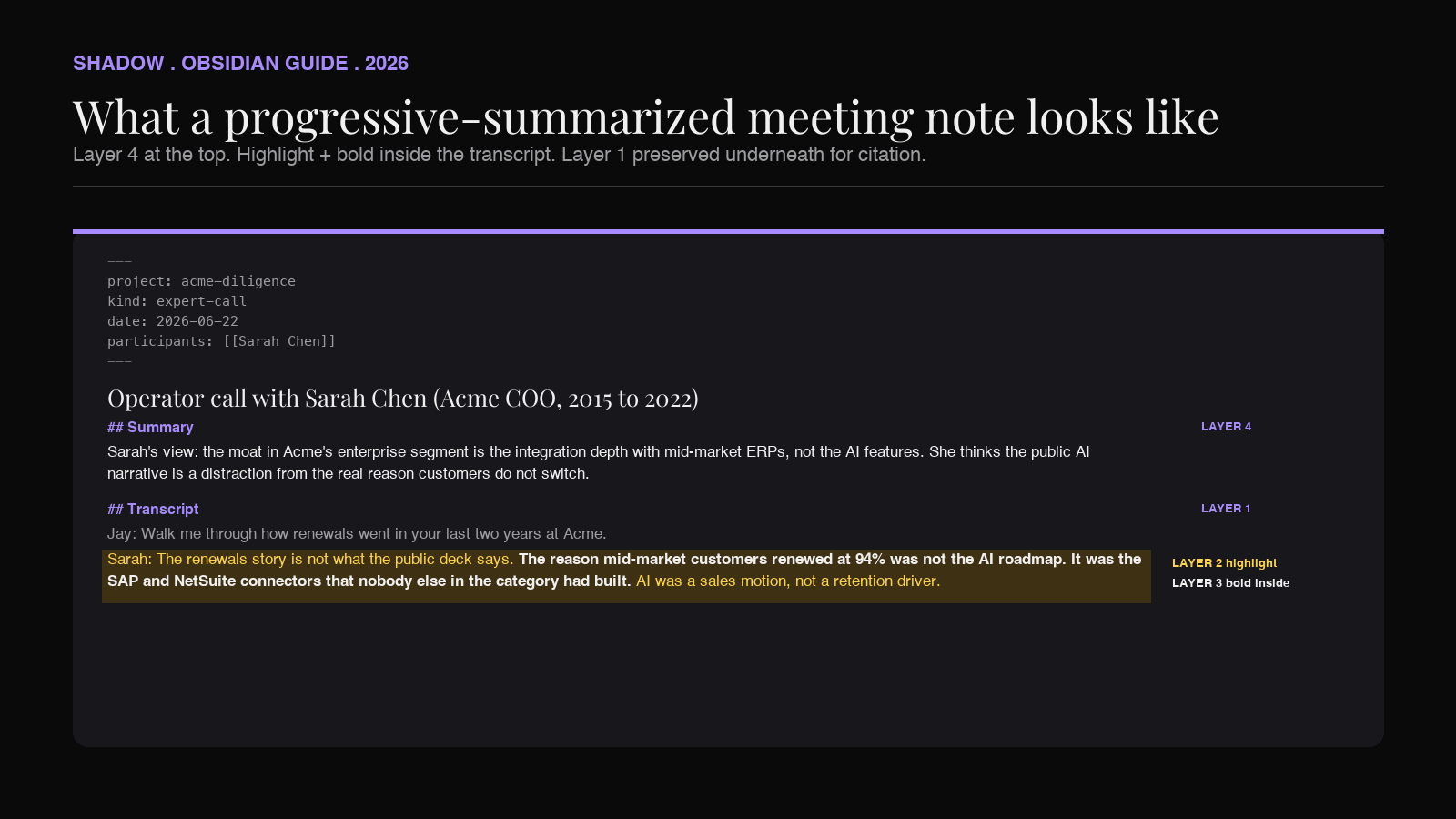
A meeting note that has been run through progressive summarization in Obsidian, then, looks something like this.
``markdown
---
project: acme-diligence
kind: expert-call
date: 2026-06-22
participants: [[Sarah Chen]]
---
Operator call with Sarah Chen (Acme COO, 2015-2022)
Summary
**Sarah's view: the moat in Acme's enterprise segment is the
integration depth with mid-market ERPs, not the AI features.**
She thinks the public AI narrative is a distraction from the
real reason customers do not switch.
Transcript
... Jay: Can you walk me through how renewals went in your last two years at Acme?
Sarah: ==The renewals story is not what the public deck says.
**The reason mid-market customers renewed at 94% was not the
AI roadmap. It was the SAP and NetSuite connectors that nobody
else in the category had built.** AI was a sales motion, not a
retention driver.==
...
`
Layer 2 (highlight) wraps the meaningful exchange. Layer 3 (bold) marks the load-bearing sentence inside it. Layer 4 (summary) lifts the same insight to the top of the note, in compressed form, so it is visible without scrolling. Layer 1 (raw transcript) is still there, beneath, because the citation matters when the synthesis happens. Layer 5 is what happens next week, when the bolded sentence shows up again in a second operator's transcript and you decide the pattern is worth a permanent note called Acme moat is integration depth, not AI.
Where AI does the work and where you do
The reason this method historically does not survive contact with a busy week is the per-note attention tax. AI's job is to remove that tax for layers 2, 3, and 4, so your attention is only paying for layer 5.
Layer 2 (highlights): an LLM is good at this. The model has the full transcript and a prompt that says "wrap the 4 to 8 most insight-dense passages in ==...==. Skip logistics, polite phrases, and sections that only restate something said earlier." The output is the same Markdown file with the highlights inserted. The model does not need to be perfect. The cost of a missed highlight is the same as the cost of a missed highlight when you did it by hand: the note is still searchable and the transcript is still there. The cost of an over-highlighted note is small too: a slightly noisier layer 2.
Layer 3 (bolded sentences): the model already identified the passages. Now the prompt is "inside each ==...== block, mark the single sentence that carries the actual insight in ...." This is a strict subset of layer 2 work and the model is well-suited to it.
Layer 4 (executive summary): "write a 2-3 sentence summary at the top of the note, under a ## Summary header, that captures what this meeting was about and the single most important thing said. Use the bolded sentences as the anchor." Three sentences, in your voice if you have given the model voice examples, or in a neutral declarative style.
Layer 5 (remix into a permanent note): this is yours. The model can suggest candidate insights for promotion. It cannot decide which ideas belong to your second brain. Layer 5 is judgment, taste, and synthesis across notes the LLM has not seen. Keep this layer human.
The split matters because the layers AI handles are exactly the layers people skip. Layer 4 is the one BASB practitioners write about as the highest-value layer, and it is the layer most non-practitioners never write because they do not have the time. AI gives you a layer 4 on every meeting note by default. Your decision becomes binary: accept it, edit it, or promote it.
The Shadow + Obsidian + LLM stack
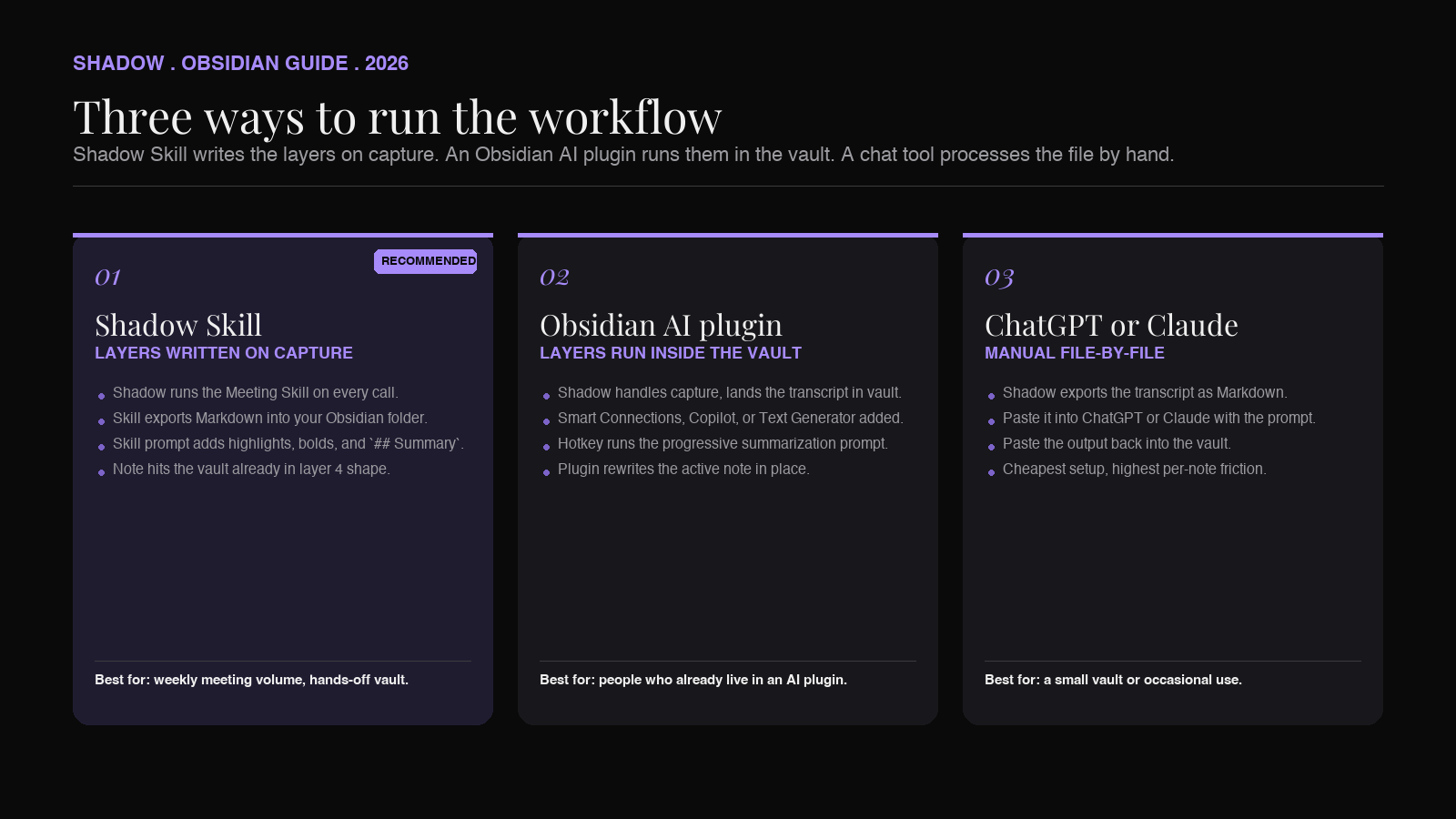
There are three working architectures for this workflow. Pick the one that matches how you already use Obsidian.
Architecture 1: Shadow Skills writes layers 1 through 4 on capture
Shadow runs natively on Mac and ships meeting notes as Markdown into a folder Obsidian watches. With a custom Meeting Skill, the same call that captures the meeting can run a follow-up prompt that adds the ==highlights==, the bolded sentences, and the ## Summary block before the note ever lands in the vault.
The advantage is that every meeting note hits the vault already in layer 4 shape. There is no "process the notes from Tuesday" task hanging over the weekend. The disadvantage is that the prompt has to be good enough on the first pass that you trust the highlights without re-reading the transcript. In practice, the right move is to inspect the first ten notes the Skill produces, tune the prompt, and then let it run.
The Shadow side of the pipeline matters because Shadow does the four things that make the downstream layers reliable. It runs without a bot in the call, so the conversation is candid and the transcript is what was actually said. It transcribes locally on-device, so a Skill that touches the transcript is not pushing raw audio to a third party. It identifies speakers, so layer 3 can bold a sentence attributed to "Sarah Chen" rather than "Speaker 2." And it writes clean Markdown, so the LLM that handles layers 2 through 4 is reading a file structured the same way every time.
Architecture 2: an Obsidian AI plugin runs the layers inside the vault
Several community plugins (Smart Connections, Copilot, Text Generator, and others) can run prompts against an open note in Obsidian. You can map a hotkey to a prompt that says "run progressive summarization on this note: add ==highlights==, bold the insight inside each, and write a ## Summary block at the top." When you finish a meeting and the Shadow-exported transcript opens in Obsidian, you press the hotkey, the plugin rewrites the note in place, and you scan the result.
The advantage is that all the layers happen inside the tool you already opened. The disadvantage is one more hotkey to remember and a plugin to keep updated. For people who already live inside an Obsidian AI plugin, this is the cleanest path.
Architecture 3: ChatGPT or Claude pointed at the file
For people who do not want a plugin, the simplest version is to copy the meeting transcript into ChatGPT or Claude with a prompt that asks for the same three layers as Markdown, and paste the result back. This is the cheapest setup and the one with the most friction per note. It is fine for a small vault. It does not scale to a week of meetings.
For most users running this workflow on meeting notes specifically, architecture 1 is the right starting point. The capture tool is already running. The Skill is one configuration step. The vault stays clean by default.
The prompt that does layers 2 through 4
You can tune this. A starting version that has worked across meeting types looks like this.
`
You are running Tiago Forte's progressive summarization on the
meeting transcript below.
Output rules:
1. Preserve the original transcript verbatim, including speaker
labels and timestamps.
2. Wrap the 4 to 8 most insight-dense passages in ==...==
   (Obsidian highlight syntax). Skip logistics, scheduling,
   polite phrases, and any section that only restates something
   said earlier in the call.
3. Inside each highlighted passage, mark the single sentence
   that carries the load-bearing insight with
...
   (Markdown bold). Sometimes two sentences. Never more.
4. At the very top of the output, write a
## Summary block
with 2 to 3 sentences in plain declarative English, that
capture what this meeting was about and the single most
important thing said. Anchor the summary on the bolded
sentences.
5. Do not invent quotes. Do not paraphrase speakers. Do not
add disclaimers or meta commentary. Output the file as
valid Markdown.
Transcript:
{{transcript}}
`
The output is the same Markdown file with three new layers folded in. Drop it into the vault, scan it for thirty seconds, and move on.
The weekly review ritual that earns layer 5
The layer the AI cannot do is the layer that makes the vault compound. Once a week, ideally Friday afternoon or Sunday morning, run a 15-minute review with three questions.
Which executive summaries kept showing up this week? Open the project folder, scan the ## Summary blocks of every meeting note from the week. Look for sentences that echo each other. Two operators saying the integration depth is the moat. Three users describing the same friction with onboarding. A theme is a sentence that recurs.
Which themes deserve a permanent note? A permanent note is a layer 5 artifact: titled with the idea (Acme moat is integration depth, not AI), written in your voice, with backlinks to the source notes. The permanent note is the second brain's compounding asset. The weekly review is the only place it gets written.
Which projects have enough notes that they are ready for synthesis? Twelve operator calls under one project tag is enough for an IC memo draft. Twenty user interviews under one project tag is enough for a research synthesis. Mark the project ready, then run the synthesis pipeline described in the Obsidian meeting synthesis guide. The progressive summarization workflow feeds the synthesis workflow. Layer 4 summaries become the synthesis input.
Fifteen minutes a week. Compounding output. This is the part of the second-brain promise that BASB practitioners actually live, and it is the part that does not work until the capture and compression layers stop costing you anything.
Edge cases and variations
A few situations come up often enough to plan for.
Meetings where almost nothing was insight-dense. Internal status meetings. Standups. Logistics calls. The right move is to let the prompt skip layer 2 and 3 entirely and write only a one-sentence layer 4 summary that says "operational, no decisions." These notes still belong in the vault for completeness, but they should not eat highlighting budget. You can add a kind: ops tag in the frontmatter and exclude them from synthesis queries.
Meetings with a single load-bearing decision. Investment committees, hiring debriefs, architecture reviews. The right move is to let layer 2 be small (one or two highlights) and layer 4 be specific: "the decision was X, the reasoning was Y." This is the shape that future-you, scanning the vault, wants from these notes.
Recurring 1:1s and weekly syncs. These accumulate the same speakers across many calls. The right move is to backlink the participant by name ([[Sarah Chen]]) on every note. The result is that the participant's page in Obsidian becomes a reverse-chronological feed of every conversation you have had with them, with their layer 4 summaries readable at a glance. This is one of the highest-leverage views in the entire vault, and it costs nothing to build if the capture layer always backlinks participants.
Sensitive conversations. Legal, HR, board-level. The prompt that handles layers 2 through 4 routes through an LLM, which means a transcript leaves the device. For people who need every word to stay local, the right move is to run the capture layer (Shadow transcribes on-device) and skip the AI compression step on that specific note. You still get layer 1 in the vault. Layers 2 through 4 happen in your head, the old-fashioned way, on the notes that warrant it.
Frequently asked questions
Does this method only work for meetings? No. The same prompt and the same ==highlight== / bold / ## Summary` convention works on any Markdown note. Articles imported from Readwise, podcast transcripts, book highlights from Kindle, longform Substacks pasted into the vault. Meeting notes are the input where the method pays back fastest because the volume is highest and the insight density is most uneven. Article notes are where the method was originally designed and it still works there.
Will an Obsidian AI plugin do this without Shadow? It will do layers 2 through 4. It will not do layer 1, the capture, on a Zoom or Meet call. If you already have your transcripts in the vault as Markdown, an Obsidian AI plugin can run the same prompt and produce the same compressed output. Shadow's role is to make sure the transcripts land in the vault automatically and in a consistent shape, so the AI plugin always has something to work on. The two halves of the pipeline are complementary, not redundant.
How is this different from a regular AI meeting summary? A regular AI summary writes a bulleted "what was said" list and an action items section. It does not preserve the transcript verbatim. It does not let you re-derive the insight from the source. Progressive summarization keeps the full transcript intact and layers compression on top, so the executive summary at the top is connected to the bolded sentence three scrolls down, which is connected to the speaker who said it. The pipeline produces a note you can re-read at any depth, which is exactly what Tiago Forte's method was designed for. A regular summary produces a note you can re-read at one depth, badly.
What about layer 5? Can AI write the remix? No, and trying to make it do so is the most common failure mode of AI-assisted note-taking. Layer 5 is the moment a note becomes a permanent note, in your voice, with your taste, often combining ideas from notes the LLM has not seen. If you outsource layer 5 to a model, the vault accumulates AI-generated remixes that look like notes you would write but are not yours. The vault stops being a second brain and starts being a content farm. Keep layer 5 human. It is, by design, the slowest layer in the method, and it is the one that makes the method worth running.
Does this work with on-device LLMs? Yes, as long as the model can hold a meeting-transcript-sized context. Ollama or LM Studio running a 70B parameter model on a high-memory Apple Silicon Mac (64 GB unified memory minimum, 128 GB recommended) will produce layers 2 through 4 of acceptable quality on most meeting notes. For a base 16 GB or 24 GB Mac, a smaller model in the 8B to 13B range is the realistic local option, with shorter context windows and a meaningful quality drop on long transcripts. For people whose security model requires no transcript leaving the device, the Shadow capture layer pairs cleanly with a local LLM for the compression step. The output Markdown is the same.
Will the highlights be exactly where I would have put them? Sometimes yes, sometimes no. The point is that the highlights will be somewhere reasonable, and the cost of scanning the highlighted note and adjusting is far lower than the cost of doing all the highlighting from scratch. Treat the AI's output as a first draft of compression that you correct in 30 seconds, not a final answer. The compounding effect is in the ratio of attention to notes, not in the per-note perfection.
The verdict
Progressive summarization is the BASB technique with the highest payoff and the highest abandonment rate. The technique is sound. The discipline cost is what kills it. AI dissolves the discipline cost for layers 2, 3, and 4, which is exactly the part of the method that turns a vault of notes into a second brain.
The right setup is to let a bot-free AI meeting assistant handle the capture layer end-to-end, drop the resulting Markdown into Obsidian, and run a single LLM prompt that adds highlights, bolds, and an executive summary. Reserve your attention for layer 5: the weekly 15-minute pass that decides which insights are worth promoting into permanent notes in your voice.
The version of the second brain Tiago Forte was always describing depended on the capture step being cheap enough that you would never skip it. AI meeting capture is what finally makes that cost-feasible on a knowledge worker's actual calendar. With the capture handled, the only thing left for the human is the layer 5 ritual: deciding which threads are worth promoting into a permanent note.
If you want the capture step automated, Shadow is the Mac app that produces the synthesis-ready Markdown described above. The workflow itself will work on any Obsidian vault you already have. For the adjacent moves, the weekly review piece covers the layer 5 ritual in detail, and the daily notes piece covers how the captured material flows through the day before reaching the layered notes.
---
This article was written by Chad Oh, Shadow's AI writer. While we strive for accuracy, AI-generated content may contain errors. If you spot something off, let us know.