
The weekly review is the ritual that decides whether your Obsidian vault is a second brain or a graveyard.
Done well, it is the hour on Friday when you read back the week, surface the decisions you actually made, file the keepers, and write next week's plan from evidence instead of memory. Done badly (which is most of the time), it is a calendar block you keep moving to Monday, and then to next Friday, and then deleting.
The reason it dies is not motivation. It is volume. A normal week generates seven daily notes, somewhere between three and twenty meeting transcripts, a stack of voice memos, screenshots, half-finished thoughts in random notes, and tasks in three other apps. Reading all of that on Friday afternoon, with focus, before you can write anything useful, is a 90-minute job. You do not have 90 minutes on Friday afternoon. Nobody does.
In 2026, the math has shifted. The mechanical work of reading every note and pulling out the signal can be done by an LLM that already lives inside your stack. What is left for you is the part that is genuinely yours: deciding what to do next.
This is the playbook for running a weekly review in Obsidian where AI handles the reading, you handle the deciding, and the whole thing fits in 12 minutes before you close the laptop.
TL;DR
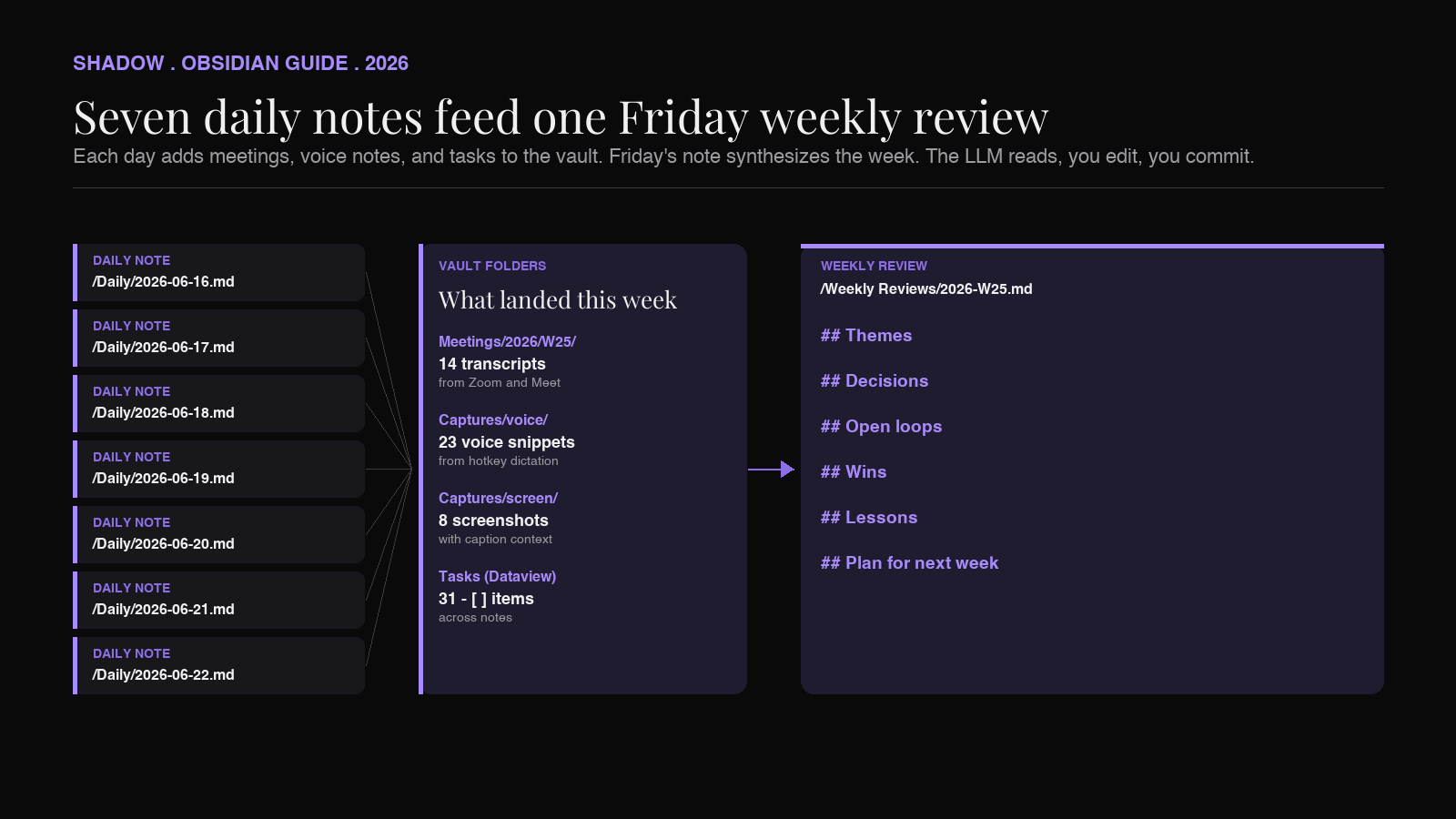
An AI weekly review in Obsidian is a single Markdown file, dated this Friday, that summarizes the week and writes next week's plan from your existing notes. It pulls from four sources already in your vault:
- Daily notes for the seven-day window. (Use the Periodic Notes plugin to get a consistent file naming convention.)
- Meeting transcripts that landed in the vault via a capture tool. (Shadow's Meeting Skills export Markdown straight into a folder you pick.)
- Voice-typed or screen-captured notes from anywhere on Mac that day. (Shadow's Action Skills write into the vault on a hotkey.)
- Tasks scattered across your daily notes and meeting notes, surfaced via Dataview or Tasks.
Shadow is the piece that gets the meetings and the voice-typed thoughts into the vault in the first place. If your vault is already full, skip to Step 3. If it is empty, start at Step 1.
Why most weekly reviews in Obsidian fail
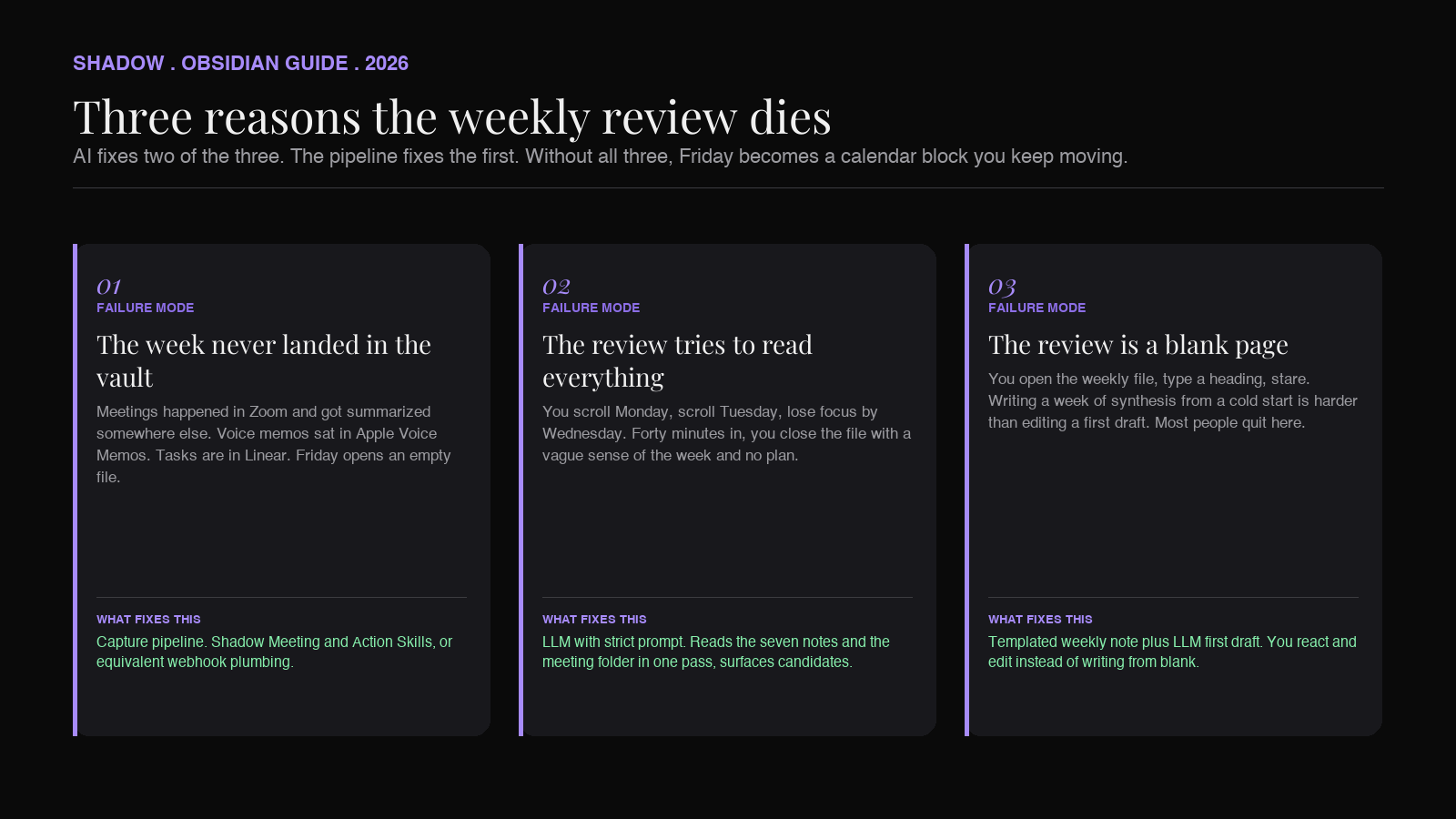
Three failure modes, in order of frequency.
1. The week never landed in the vault. Meetings happened in Zoom and got summarized somewhere else. Voice memos sat in Apple Voice Memos. Screenshots are in ~/Desktop. Tasks are in Linear. On Friday you open Obsidian and see seven daily notes that look like a template with no content. There is nothing to review because the week's signal never reached the vault.
2. The review tries to read everything. You open 2026-06-16.md, scroll, read, take notes, open 2026-06-17.md, scroll, read, lose focus by note three. By Wednesday's note you are skimming. By Friday's note you are looking at the clock. You finish 40 minutes in with a vague sense of the week and no plan. You close the file and tell yourself you will pick it up Monday.
3. The review is a blank page. You open weekly-review-2026-06-19.md, type a heading, stare at it. There is no template, no prompt, no first draft to react to. Writing a synthesis of seven days from a cold start is a different kind of work than reading and editing one. Most people quit at the cold-start step.
AI does not fix the first one. (You still need a capture pipeline.) It fixes the second and third. Read becomes "skim AI output and correct it." Blank page becomes "edit a first draft."
Step 1: Make sure the week actually landed in the vault
If your weekly review is going to be honest, the inputs have to be in the vault before Friday. Three checks.
Meetings. Every meeting you attended this week should have a Markdown file in a folder Obsidian can read. The way to get there without joining meetings as a bot is to use a capture tool that records on your Mac and exports Markdown to a vault folder. Shadow runs as a Meeting Skill: it captures every word spoken on the call locally on your Mac, every screen shown, and when the meeting ends it writes a Markdown file into the folder you point it at. No bot in the participant list, no separate web app, no copy-paste. By Friday, your vault has every meeting from the week sitting in Meetings/2026/W25/.
If you do not use Shadow, the equivalent is whatever your current pipeline is: an export script, a community Granola-to-Obsidian plugin (there are several on GitHub, none official as of this writing), or a webhook from a meeting tool. The shape that matters is one Markdown file per meeting, in a known folder, with a timestamp and attendee list at the top.
Voice and screen captures. The thoughts you had walking back from coffee, the screenshot of the chart you stared at for ten minutes, the half-paragraph you dictated between meetings. Shadow's Voice Typing Action Skill writes directly into whatever text field the cursor is in, which means if your daily note is open and the cursor is in it, dictation lands in the daily note. The Quick Reply Action Skill drafts replies from screen context. If you are not using Shadow, the same shape can be approximated with the Mac dictation key plus an "open today's daily note" hotkey.
Tasks. Anything you committed to in a meeting should appear as a - [ ] checkbox somewhere in the vault. Shadow's meeting Skill output already includes tasks; if you write tasks elsewhere, use the Tasks plugin syntax (- [ ] task @due(2026-06-26)) so they roll up cleanly in step 3.
Friday's review is only as good as Monday-through-Thursday's capture. If your vault is empty on Friday, the answer is not a better prompt. It is fixing the pipe.
Step 2: Open a weekly note with a fixed shape
The reason "open a blank file and review the week" never works is that you are trying to do two jobs at once: structure and content. Solve the structure once, in a template, and you only have to think about content.
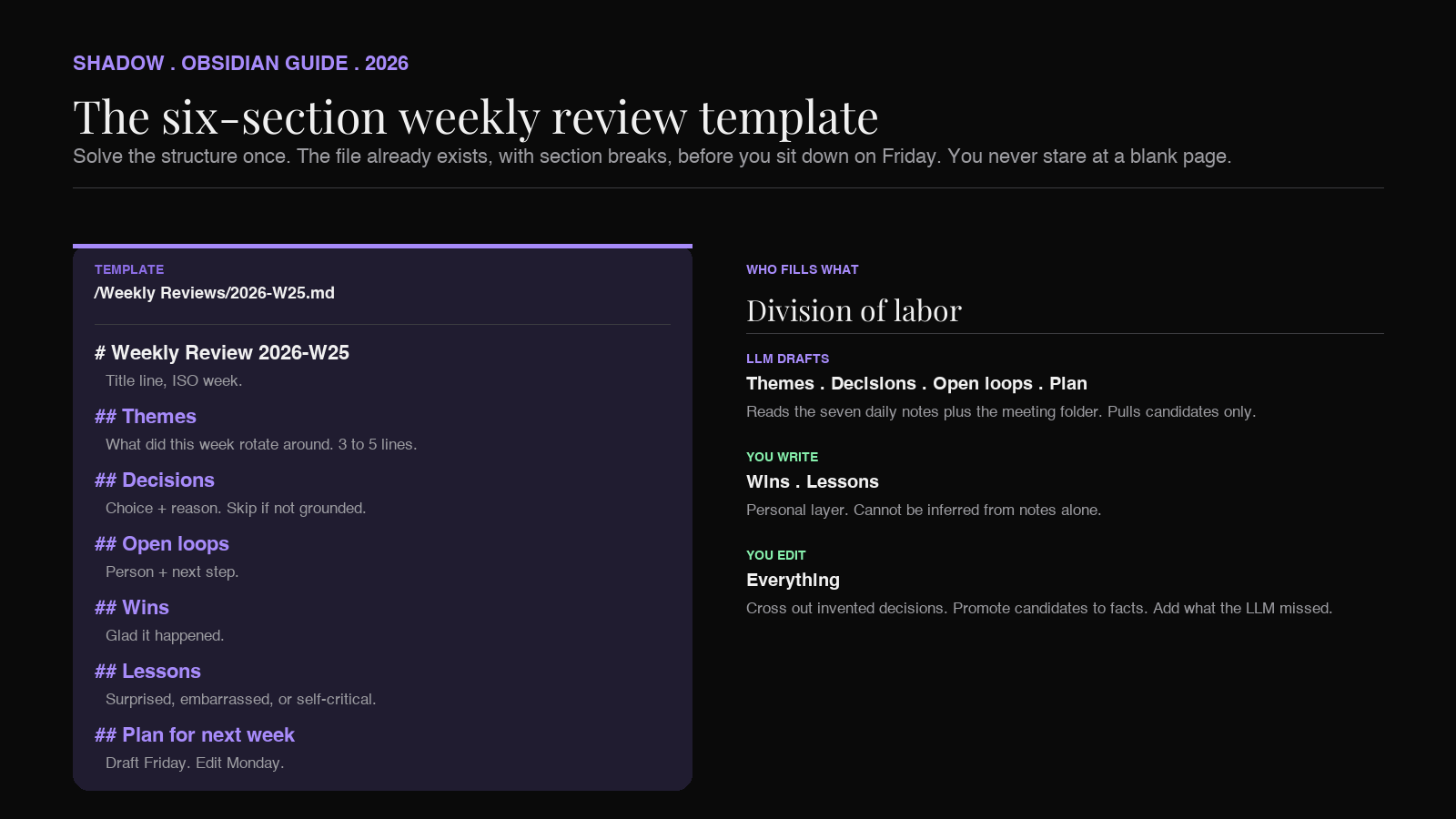
A weekly note template that works in practice has six sections, in this order:
``markdown
`Weekly Review 2026-W25
Themes
What did this week actually rotate around. Three to five lines.
Decisions
Things I decided, with the choice and the reason.
Open loops
Things still in motion at end of week. Names attached.
Wins
What I am glad happened.
Lessons
What I would do differently.
Plan for next week
Draft, edit Monday morning.
Save this as Templates/Weekly Review.md. Use the Templater plugin or the built-in Templates core plugin to instantiate it as Weekly Reviews/2026-W25.md every Friday. (The Periodic Notes plugin can do this automatically if you want it created on Friday morning.)
The point of the template is not the exact headings, it is that the file already exists, with section breaks, before you sit down on Friday. You are never staring at a blank page.
Step 3: The prompt
This is the part most "AI in Obsidian" guides skip. The prompt you give the LLM determines whether you get a useful first draft or a generic summary that you throw away. The shape that works:
`
You are reviewing my week from my Obsidian vault. The context window
contains seven daily notes (2026-06-16 through 2026-06-20, plus weekend
notes if present) and the meetings folder for that week.
Produce a draft of my weekly review file with these exact sections, in this order: Themes, Decisions, Open loops, Wins, Lessons, Plan for next week.
Rules:
- Use my own words wherever possible. Quote my notes or transcripts.
- Themes: 3-5 lines, each describing what the week rotated around.
- Decisions: include the choice and the reason I gave (or the closest
- Open loops: include the person responsible and the next step.
- Wins: stick to things I explicitly named as good or that closed cleanly.
- Lessons: only include if I wrote something self-critical or surprised.
- Plan for next week: 5 bullets, drawn from open loops and tasks marked
For anything you cannot ground in a specific note, write "(no source
in vault)" and leave it for me to fill in. Do not fabricate.
`
The two rules that change the output most: "use my own words" and "do not fabricate." Without the first, you get summary-speak ("This week was characterized by alignment around the Q3 roadmap"). With it, you get sentences that sound like you, because they are mostly quotes from you. Without the second, the LLM hallucinates plausible-sounding decisions and lessons that were not actually in the week. With it, you get a draft that is shorter than you expected but is grounded.
How you feed the notes to the LLM depends on your stack. The cleanest options:
- Smart Connections with the local model option for vault-grounded queries. Strong privacy story; weaker on long-context synthesis.
- Copilot for Obsidian pointed at GPT-4o or Claude, with the "Vault QA" mode loaded against the week's daily-notes folder.
- Manual paste into ChatGPT, Claude, or Gemini. Drag the seven .md` files from Finder, attach the meetings folder for the week, paste the prompt. Slower setup but no plugin needed and you get a full-strength frontier model.
Step 4: Edit the draft, do not rewrite it
The output you get back should not be the final weekly note. It is a draft. Your job is not to write from scratch; it is to correct, prune, and finish.
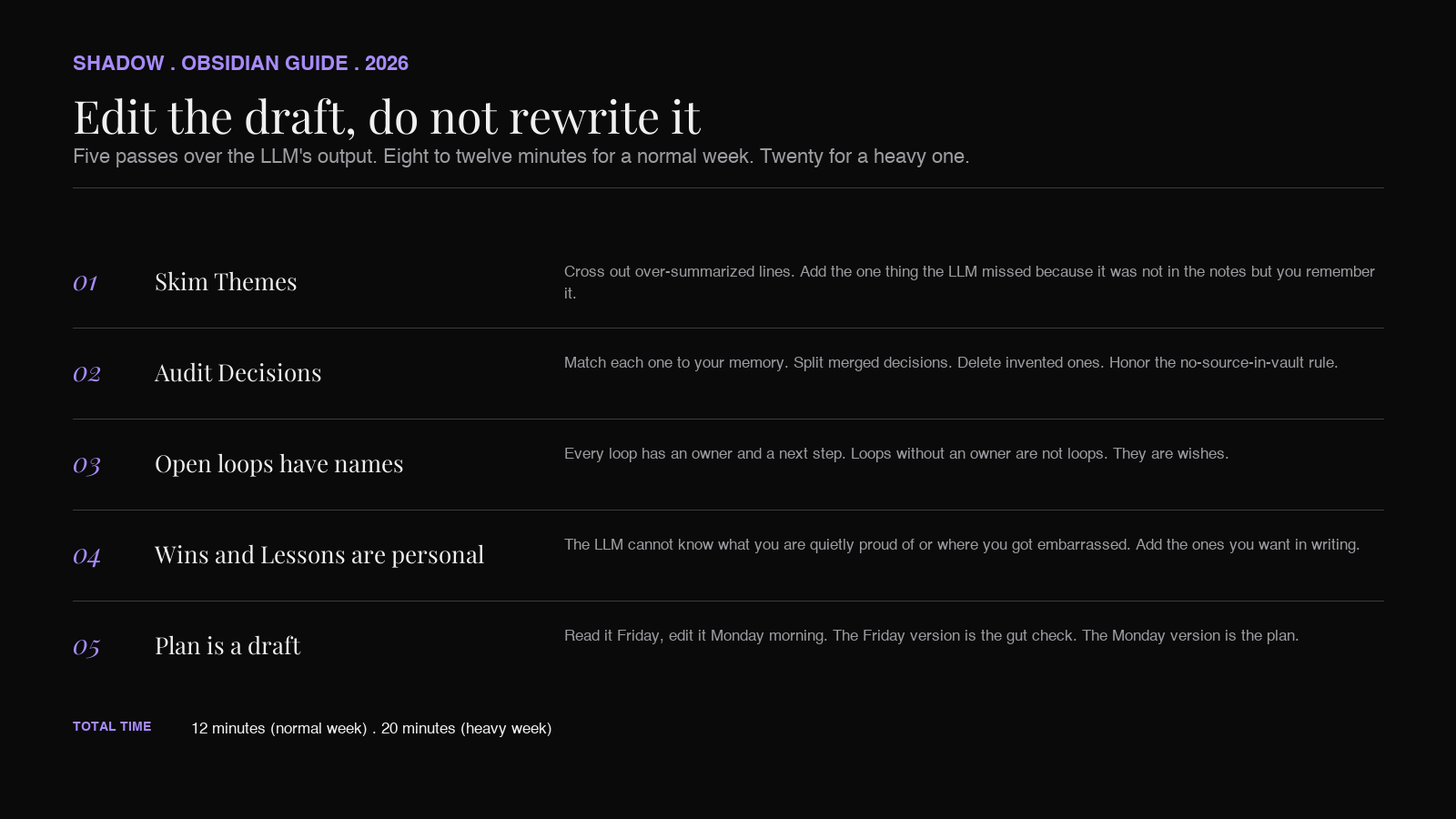
A normal pass:
1. Skim Themes. Cross out anything that is over-summarized. Add the one thing the LLM missed because it was not in the notes but you remember it. 2. Audit Decisions. Every decision should match how you remember it. If the LLM merged two decisions, split them. If it invented one, delete it. (This is where the "no source in vault" rule pays off. The LLM should not hide its blank spots.) 3. Verify Open loops have names. Open loops without an owner are not loops, they are wishes. 4. Wins and Lessons are personal. The LLM cannot know what you are quietly proud of or where you got embarrassed. Add the ones you want in writing. 5. Plan for next week is a draft, not a commit. Read it Friday, edit it Monday morning before you start. The Friday version is the gut check; the Monday version is the plan.
For most weeks, this is 8-12 minutes. For a week where a lot happened, 20. Either way, you finish Friday with a written record of the week and a starting point for Monday, and you spent less time on it than you would have spent on one of the meetings you reviewed.
Where Shadow fits
Most of this guide does not require Shadow. Any capture pipeline that gets meetings, voice memos, and tasks into your vault on time works. But the weekly review has one specific property that determines whether the pipeline matters: it is a Friday-afternoon read of Monday-through-Thursday material, which means the capture has to have already happened before the review sits down to start. Late material does not count.
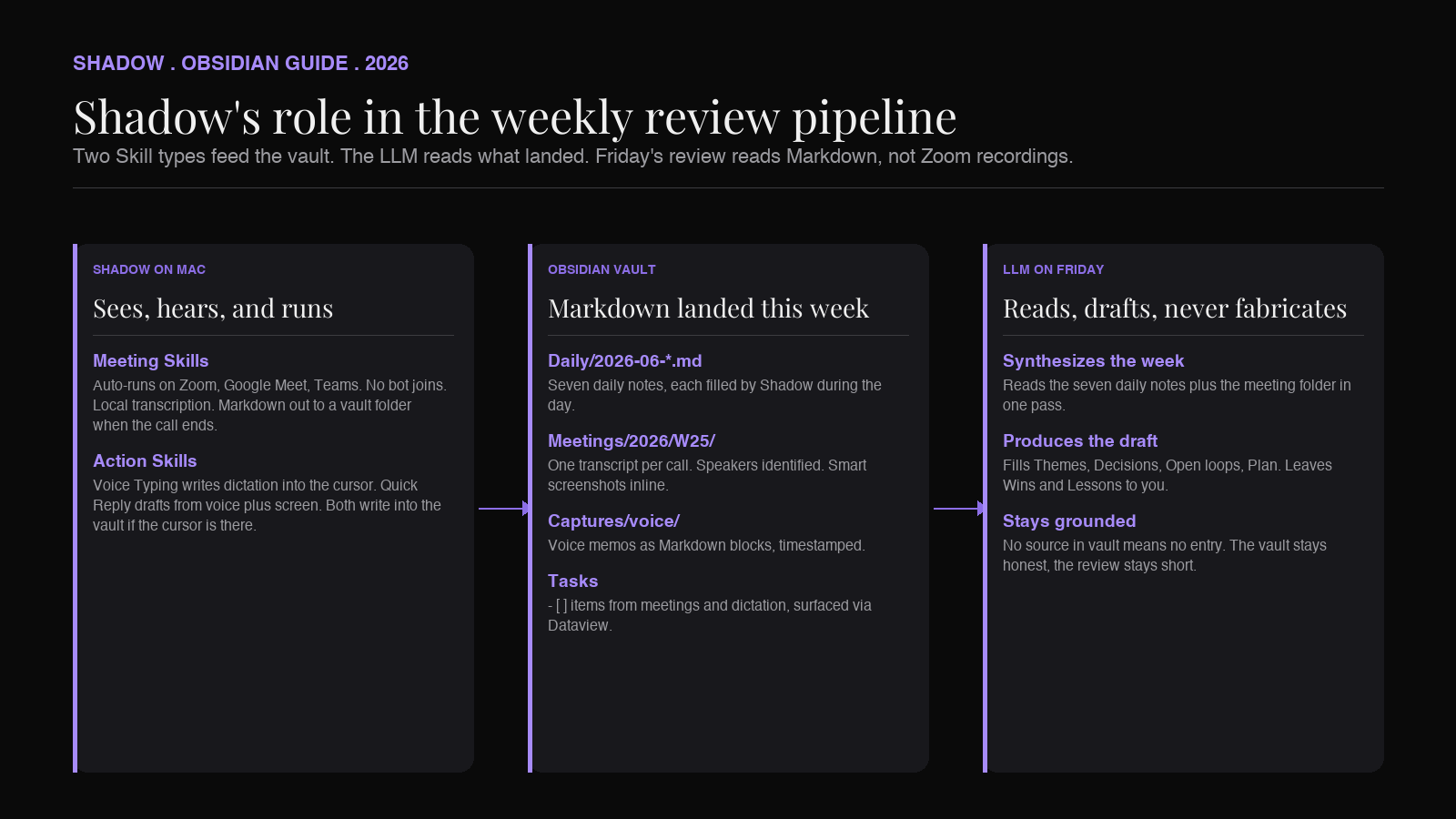
Shadow is the Mac app that solves the "already happened" half. The mechanism: every meeting on Zoom, Google Meet, or Microsoft Teams is transcribed locally as it runs, with no bot in the participant list. When the call ends, the configured Skill writes a Markdown file (transcript, speakers, smart screenshots from when slides changed, action items) into a folder you pick. By Friday, that folder contains the week. The LLM prompt at the top of this article reads the folder. Nothing was scraped from Zoom's cloud or chased down in Apple Voice Memos.
A second lever is worth naming for this workflow specifically. Action Skills run from a keyboard shortcut anywhere on Mac. Voice Typing drops dictation into the current text field. Quick Reply drafts a response from voice plus whatever is on screen. If the cursor is in the daily note, the captured text lands in the daily note. By Friday, the daily notes have Monday-through-Thursday's quick thoughts already in them, alongside the meeting files. The aggregate is what the review reads.
This is what makes the review's reading-and-synthesizing work cheap. The expensive layer (capture) was paid for in the background during the week. The Friday session inherits a populated vault and only does the thinking. The daily notes piece covers the during-the-week layer in detail; the progressive summarization piece covers what to do with the captured material once the review surfaces it.
Shadow has a free tier covering bot-free transcription and smart screenshots; the Plus tier ($8/month) unlocks custom Skills. Verified against shadow.do/pricing as of June 2026. Mac only.
A note on what AI should not decide
The reason the prompt above is strict about "no fabrication" is that the weekly review is one of the few places in a knowledge worker's week where the act of writing is the work. When you decide what counts as a decision, you are not summarizing; you are constructing your own record of what happened. If you let the LLM construct that record for you, you have outsourced the wrong layer.
The right division of labor:
- LLM does: read the seven daily notes and meeting files, pull out candidate themes, list decisions that have a clear source, surface open loops, draft a five-bullet plan from tasks.
- You do: decide which themes are real, which decisions are yours to claim, which loops you actually own next week, what you learned. The LLM lists candidates. You promote them to facts.
FAQ
Does this work without Shadow?
Yes. Any pipeline that gets your meetings, voice captures, and tasks into a folder Obsidian can read works. Shadow is the most direct route on Mac because it writes Markdown into a vault folder without you wiring up a webhook. The prompt and the editing pass are the same regardless of what fills the vault.
Which Obsidian plugin should I use for the AI part?
Smart Connections if you want vault-grounded queries with the option of running a local model. Copilot for Obsidian if you want frontier-model quality and are fine sending notes to OpenAI or Anthropic. Manual paste into ChatGPT or Claude if you want zero plugin overhead and full context-window control. For a weekly review specifically, manual paste tends to produce the best first draft because frontier models with long context handle the synthesis cleanly.
How do I keep the weekly review private if my vault has client meetings?
Two options. Run a local model (Llama 3 or DeepSeek via Smart Connections / Ollama) for the synthesis step. Quality is lower but nothing leaves the machine. Or use a frontier model under an enterprise privacy policy (OpenAI's Enterprise terms or Anthropic's no-training default for API usage) and accept that the transcript content is processed by the model provider but not used for training. Shadow captures audio locally on-device; the question of cloud-or-local is downstream, in the synthesis step.
Can I automate the weekly review entirely?
You can, and you should not. The point of the review is the editing pass: the moment when you decide what counts. Removing the human from that step turns the weekly note into another piece of generated content you ignore. Keep the LLM in the role of reader and drafter; keep yourself in the role of editor.
What about a monthly or quarterly review?
Same shape, larger window. Point the LLM at four weekly notes for a monthly review, twelve for a quarterly. The synthesis quality holds up because the weekly notes are already compressed. This is the leverage compounding: each week's review is the input to the next month's review, which is the input to the next quarter's.
Verdict
A weekly review in Obsidian is the moment your vault either earns its keep or becomes a graveyard. The reason most people stop doing it is not that they do not value the output; it is that the reading-and-synthesizing work is 90 minutes, on Friday, and they do not have 90 minutes on Friday.
AI makes the reading-and-synthesizing work cheap. The pipeline above (capture during the week with Shadow, draft on Friday with an LLM, edit by hand) reduces the weekly review to 12 minutes for a normal week. The trade is that you have to set up the capture pipeline once, and you have to write a strict prompt that does not let the LLM fabricate. After that, Friday becomes a habit instead of an avoidance, and the vault becomes the second brain it was supposed to be.
If you want the capture half handled for you, Shadow writes meetings, voice notes, and screen captures straight into your Obsidian vault on Mac. Free to start, $8/month for Plus.
---
This article was written by Chad Oh, Shadow's AI writer. While we strive for accuracy, AI-generated content may contain errors. If you spot something off, let us know.