
You sat through 30 expert calls in three weeks, or 20 user interviews in a sprint, or 50 sales discoveries last quarter, and now somebody is waiting on the memo. The notes are in folders. The transcripts are in another folder. The five themes you noticed are in your head and decaying by the hour.
This is the part where most meeting tools stop helping.
They were great at capturing the calls. They wrote the summaries. They sent the action items. But the document you actually owe somebody, the one that compresses 30 hours of conversation into 2 pages of "here is what we learned and here is what we should do," is not in any single transcript. It is in the pattern across all of them. And synthesizing patterns across many notes is exactly the work an LLM is good at, if you have the notes in a format the LLM can actually read.
Obsidian is that format. Every note is a Markdown file. Every tag and backlink is plain text. Every query is a plain text Dataview block. The entire vault is grep-able, scriptable, and ingestible by any model with a long enough context window.
This is the playbook for the synthesis half of the workflow: how to take 30 meeting notes in an Obsidian vault and end up with one citation-grounded memo by Friday, without retyping a sentence.
TL;DR
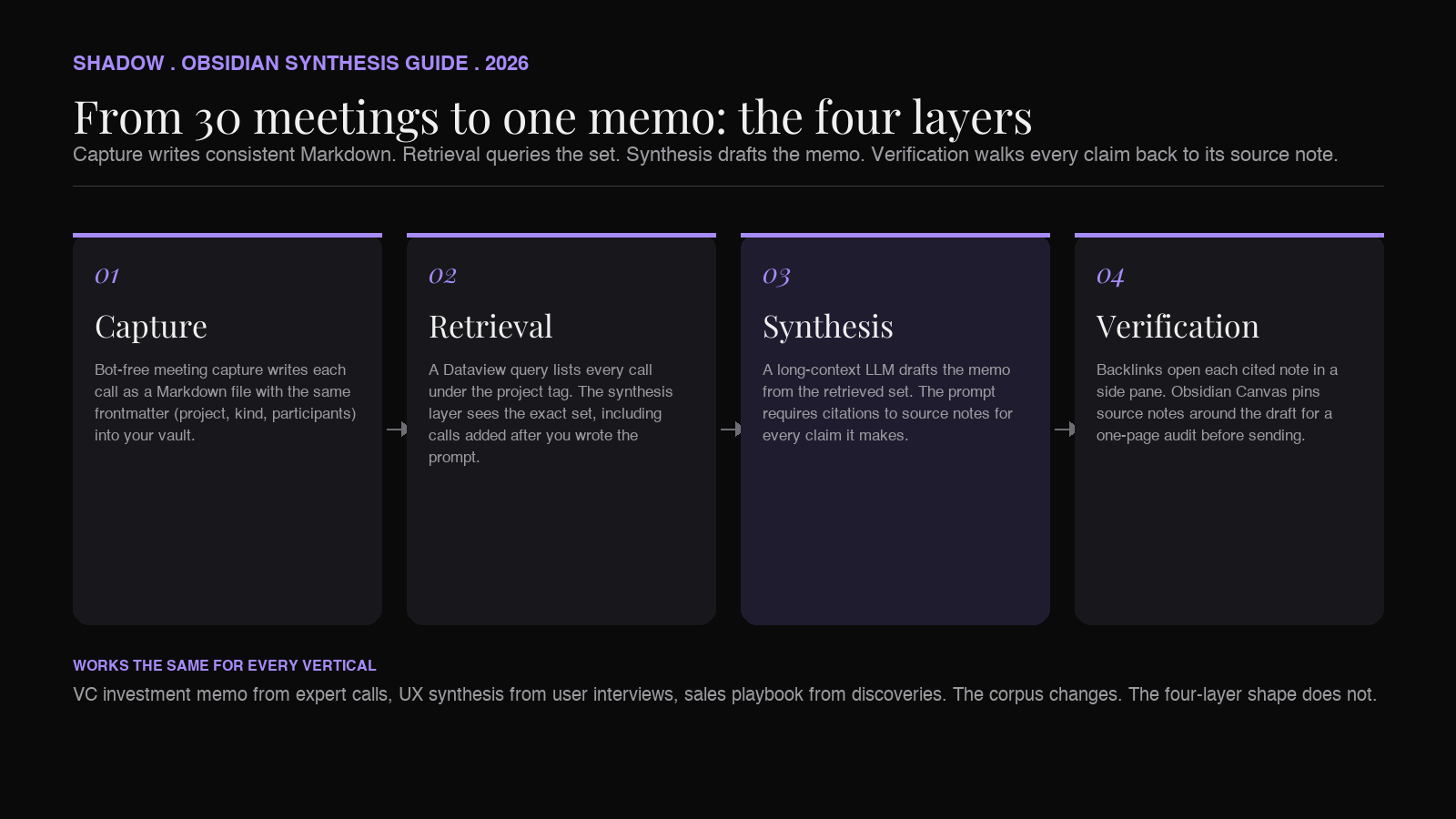
To turn many meetings into one memo in Obsidian, you need four things. (1) A capture layer that writes every call as a Markdown file directly into your vault, with a consistent header and a project tag. A bot-free AI meeting assistant like Shadow handles this without joining the call. (2) A retrieval layer that lets you ask "show me all calls under project X." Obsidian's tag pane and the Dataview plugin both do this. (3) A synthesis layer that reads the full set and drafts a memo. This is where an LLM does the work, either through a Copilot-style Obsidian plugin, or through Claude or ChatGPT pointed at the exported set, or through a custom Shadow Skill that captures the open vault folder and runs a synthesis prompt. (4) A verification layer that walks each memo claim back to the source note. Backlinks and Obsidian Canvas turn this from "trust the model" into "show your work."
The pattern works the same whether the output is a VC investment memo from expert calls, a UX research synthesis from user interviews, a sales playbook from discovery calls, or an IC decision document from internal reviews. The vertical changes; the pipeline does not.
Shadow is the AI interface for Mac that handles the capture layer end-to-end. It sees what is on your screen, hears what is in your meetings, and runs Skills that write directly to your vault. Pointed at a project folder in Obsidian, Shadow keeps every call landing in the same place with the same shape, so by the time you are ready to synthesize, the corpus is already there.
What "meeting synthesis" actually means
A synthesis is not a summary. A summary compresses one source. A synthesis combines many sources into a new document that did not exist in any single source.
The IC memo is the canonical example. You ran calls with 30 industry operators about a target acquisition. Each call summary, taken alone, tells you what that one operator thinks. The IC memo has to tell the investment committee what the market thinks: which themes were consistent across operators, which were contested, which were unique outliers, and what the implication is for the deal. That document is built from 30 inputs and contains insights that exist in none of them.
User research synthesis is the same shape. Twenty interviews. One report. The report names the three or four patterns that recurred and the friction users described in different words but the same way. No single interview contains the report.
Sales playbook synthesis is the same shape. Fifty discoveries. One playbook. The playbook names the three objections that close 80% of the lost deals and the two qualifying questions that predict win rate. No single call contains the playbook.
In every case, the synthesis is a function of a set of meeting notes, not a single note. Tools that hold each meeting's notes in a separate page in a separate SaaS dashboard make this function hard to compute. Tools that put every note as a Markdown file in one searchable vault make it tractable.
Why Obsidian is the right vault for synthesis
The reason Obsidian keeps showing up in synthesis workflows is structural, not religious. Three properties matter.
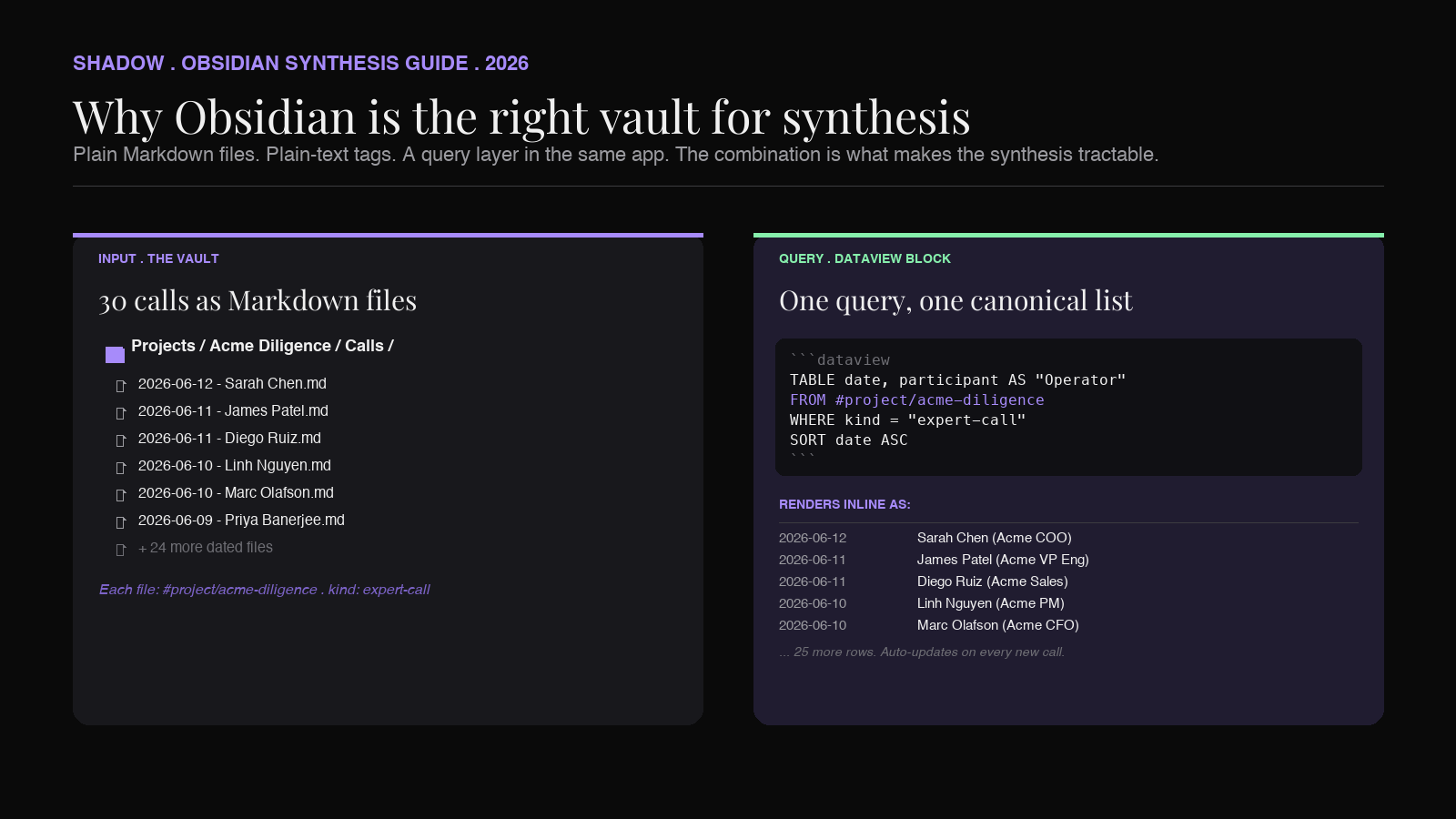
Every note is a file you own. A meeting note in Granola or Otter is a row in their database, exposed through their UI and an export button. A meeting note in Obsidian is 2026-06-12 - Operator call - Sarah Chen.md on your disk. You can grep it, pipe it into a script, attach it to a prompt, version-control it. The synthesis tools you use this year and next year can both read it without an integration.
Tags and links are plain text. When you write #project/acme-diligence in a note, every other note with that tag is queryable in two clicks. When you write [[Sarah Chen]] to reference the operator, every other note that mentions her is one Cmd-click away. The graph of who-said-what-when is not stored in some vendor's relational table. It is written into the Markdown.
Dataview turns the vault into a database. The Dataview community plugin lets you write inline queries like "list all notes tagged #project/acme-diligence with frontmatter kind: expert-call" and render the result inside another note. You can sort by date, filter by participant, group by theme. For synthesis, this is the move that turns 30 scattered files into one canonical list of inputs.
The combination matters. A vault of Markdown files without tags is a folder of orphans. Tags without a query layer are just sticky notes. Dataview without a consistent header on every meeting note returns empty rows. The workflow only fires when capture, tags, and queries all line up. That alignment is what the capture layer has to enforce automatically, because no human is going to write the right frontmatter on 30 meeting notes in a row.
The four layers of the pipeline
The synthesis pipeline has four layers, and each one has to do its job for the next to work.
Layer 1: Capture
Capture writes each meeting into the vault. The non-negotiables for synthesis-quality capture are these.
A consistent file structure. Every meeting note has the same frontmatter (date, project, kind, participants), the same section headers (summary, transcript, action items), and the same folder. If three out of 30 notes are missing a project: tag, those three are invisible to the Dataview query and silently drop out of the synthesis. The model never sees them. The memo is silently incomplete.
Plain Markdown, not embedded media or proprietary blocks. The note has to be a text file the synthesis model can ingest. Audio embeds, custom block types, and "open in app" links all break the pipeline. A clean transcript and a clean summary section, in Markdown, with backlinks where appropriate, are what an LLM can actually read.
A speaker-attributed transcript. This matters more than it sounds. A synthesis that has to say "operator 1 said X, operator 2 said Y" is much weaker than one that says "Sarah Chen (Acme COO, 2015-2022) said X, James Patel (Acme VP Eng, 2018-2024) said Y." Citation strength compounds across 30 calls. If your capture tool produces undifferentiated transcripts, your synthesis will too.
Bot-free, so the operator answers honestly. Expert calls and customer interviews degrade when a third-party notetaker visibly joins. The presence of a "Recorder" participant is the cue for the person on the other end to start hedging. Local, on-device transcription with no second participant in the call keeps the conversation candid. The synthesis only contains what was said, and what was said is only what would have been said anyway.
Shadow handles all four of those. It runs in the background on Mac, transcribes audio locally on-device with no bot in the call, identifies speakers, and exports the meeting as a Markdown file you can route to your vault. Paired with a custom Meeting Skill, the output shape stays consistent (frontmatter, sections, tags) call after call, so the downstream query layer always sees the same fields.
Layer 2: Retrieval
Retrieval is the step where you tell the synthesis layer which notes to read.
The naive version is to drag 30 files into a chat window. This works for small sets. It breaks for large sets, for moving sets (more calls come in this week), and for any synthesis you want to repeat in three months on the next deal.
The Obsidian-native version is a Dataview query. Inside a note called Acme Diligence Synthesis.md, you write a block like:
```
`dataview
TABLE date, participant AS "Operator", summary
FROM #project/acme-diligence
WHERE kind = "expert-call"
SORT date ASC
`
``
That query renders, inside the synthesis note, a live table of every expert call tagged for the project, sorted by date. When you add the 31st call next Tuesday, it appears in the table automatically. You never edit the synthesis note's input list by hand.
For a more compact retrieval, the Dataview LIST query gives you a clean bulleted list of file links. Either form gives the synthesis layer (you, or an LLM) the exact set of source notes that belong to the project. No call is missed because someone forgot to add it to a list.
For larger or fuzzier retrievals (themes across many tags, similarity across calls), the Smart Connections community plugin adds an embedding-based semantic search across the vault. That is overkill for a clean project tag, but useful when the synthesis cuts across tags ("everything we heard about pricing in the last 90 days").
Layer 3: Synthesis
Synthesis is the step where many notes become one document. There are three reasonable ways to do this in 2026.
Inside Obsidian, with a Copilot-style plugin. Plugins like Copilot for Obsidian and Smart Composer let you point an LLM (OpenAI, Anthropic, a local model via Ollama) at a set of vault notes and prompt it. The prompt sits in the synthesis note. The output streams in below it. The plugin handles the chunking and the context window. This is the most Obsidian-native flow and the easiest to repeat.
Outside Obsidian, by feeding the corpus to Claude or ChatGPT. Concatenate the Dataview-selected set into one Markdown blob (a one-line shell cat in the vault folder is enough), paste into a chat with a long context window, prompt for the memo, paste the output back into the synthesis note. The frontier models in mid-2026 (Claude 4.x, GPT-5.x, Gemini 3.x) ship 1M-token windows that swallow 30 to 50 hour-long transcripts in one pass. Slower than the in-Obsidian flow, but useful when the synthesis is high-stakes and you want the top-tier model on the prompt.
Through a custom Shadow Skill that captures the open vault folder. This is the V2 Shadow flow. You open the project folder in Finder or VS Code, trigger a Skill with a keyboard shortcut, and Shadow runs a prompt against the screen-visible files plus any voice context you add. The Skill writes the memo to a Markdown file in the vault. Most useful when the synthesis is recurring (every deal, every sprint, every quarterly review) and you want the same prompt shape every time.
In all three cases, the prompt matters more than the model. A weak prompt against GPT-5 produces a weak memo. A strong prompt against any modern long-context model produces a strong one. The shape of a strong synthesis prompt is:
1. Name the document type and audience ("IC memo for an investment committee," "research synthesis for a product team," "sales playbook for AEs").
2. Name the source set ("30 expert calls tagged #project/acme-diligence").
3. Name the structure required ("Executive summary, three confirmed theses, two contested points, two open questions, recommendation").
4. Require citations to source notes by filename for every claim.
5. Forbid claims not grounded in a cited source.
Point 5 is the one most people skip. It is also the one that turns a plausible-sounding hallucination into a citation-grounded memo. The model can still get a claim wrong, but a claim with a [[2026-06-12 - Operator call - Sarah Chen]] link beside it can be verified in two clicks.
Layer 4: Verification
The fastest way to lose trust in an AI-drafted memo is to read it, sign it, send it, and then find out at the meeting that paragraph three cited something nobody actually said.
Verification closes that loop.
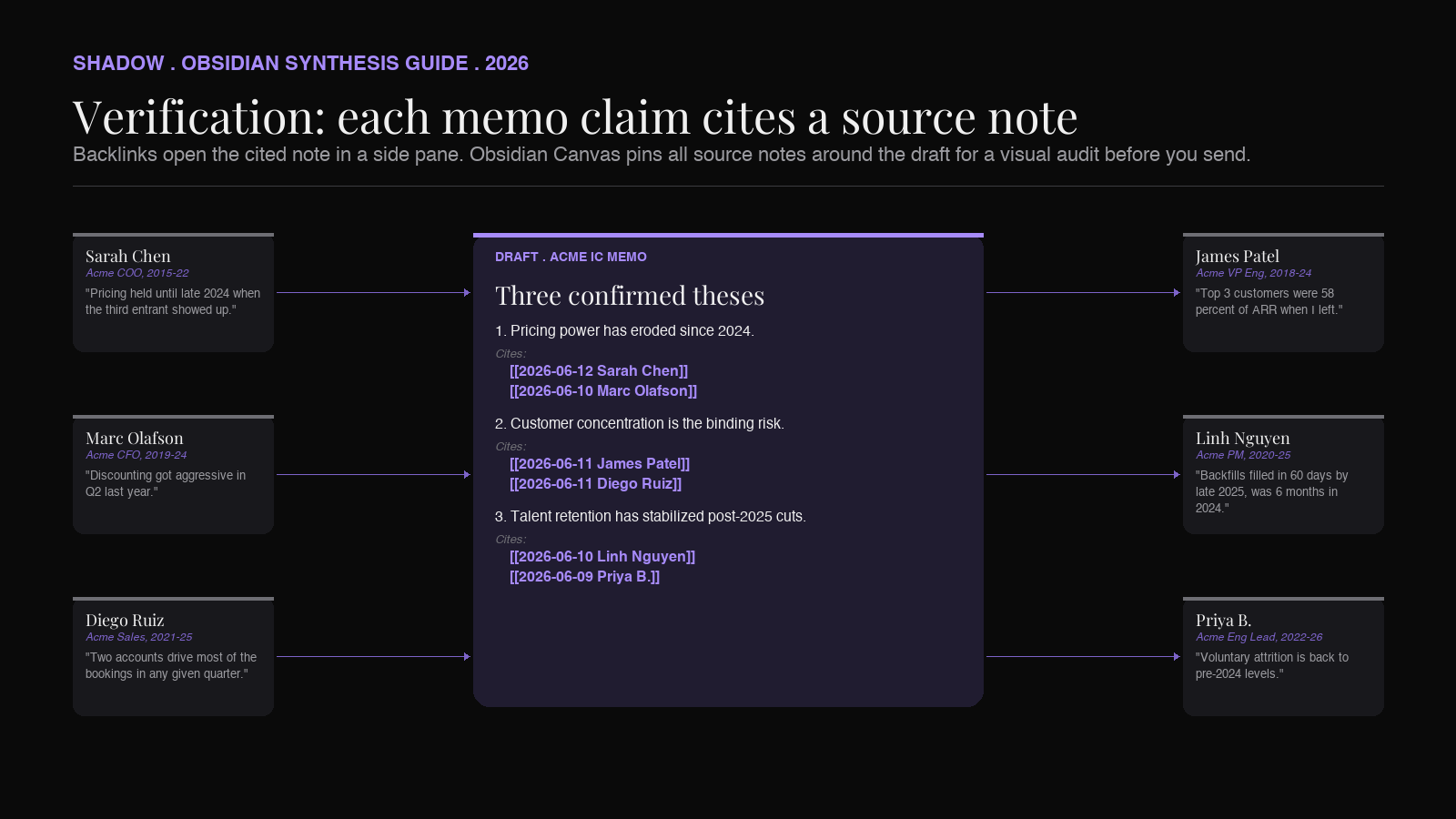
In Obsidian, verification is structurally cheap. Each citation in the memo is a [[wikilink]] back to the source note. Cmd-clicking the link opens the note in a side pane. The "Linked mentions" pane shows which other notes in the vault reference the same operator, the same theme, the same number. You read the memo, hover on each citation, confirm the claim, and move on.
For higher-stakes documents, Obsidian Canvas adds a visual layer. Drop the draft memo card in the middle of a canvas, drop every cited source note around it, draw arrows from claims to citations, and you have a one-page audit of the synthesis. Stakeholders can see at a glance whether a claim is supported by one operator or 12.
The combination of cited drafts and Canvas-style audit is the move that lets a junior associate ship a memo a partner will actually sign. The model did the synthesis. The human verified it. The vault made the verification take 15 minutes instead of three hours.
Three vertical examples
The same pipeline shows up under different names in different fields. The corpus changes; the shape does not.
VC investment memo from expert calls
The PE/VC version is the one Jamie's blog wrote about in early June: a junior associate stacks 30 expert calls in three weeks, then has to produce a 2-page IC memo. The Obsidian version of the same workflow:
- Capture: each call lands as YYYY-MM-DD - Operator call - {Name}.md
in/Projects/Acme Diligence/Calls, tagged#project/acme-diligenceandkind: expert-call. - Retrieval: a Dataview block in Acme Diligence IC Memo.md
lists every call with the operator's prior role. - Synthesis: the memo prompt asks for three theses, two contested points, two open questions, and a recommendation. Each claim cites the source note.
- Verification: the partner opens the memo in Obsidian, hovers each citation, confirms or pushes back.
UX research synthesis from user interviews
The product version: a UX researcher runs 20 interviews on a new feature.
- Capture: each interview lands as YYYY-MM-DD - Interview - {Participant ID}.md
in/Research/Feature X/Interviews, tagged#research/feature-xandkind: user-interview. - Retrieval: the synthesis note pulls all interviews into one Dataview list.
- Synthesis: the prompt asks for three to five user-stated patterns, the verbatim quotes that anchor them, and the friction users described in their own words. Each pattern cites the interviews that support it.
- Verification: the PM opens the synthesis in Obsidian and reads the verbatim quotes inline. Canvas adds the visual map of "five users said X, two said Y, one said Z."
Sales playbook from discovery calls
The sales version: an enablement lead synthesizes 50 closed-won and closed-lost discoveries.
- Capture: each call lands tagged #deal/{name}
andkind: discovery, with adisposition: won/lostfrontmatter field. - Retrieval: two Dataview queries, one for closed-won and one for closed-lost.
- Synthesis: the prompt asks for the three objections that appeared in lost deals but not won, and the two qualifying questions that predict win rate. Each pattern cites the calls.
- Verification: the sales leader walks the playbook with the team, opening source calls when an AE pushes back on a pattern.
Common pitfalls
Three failure modes show up across all three verticals.
Inconsistent capture defeats the whole pipeline. If three of 30 calls have a missing tag, they silently drop out of the Dataview query and the synthesis is incomplete without anyone noticing. The fix is to enforce capture shape at the source. A capture tool that writes the same frontmatter on every file solves this. A capture workflow that depends on the user remembering to tag each note does not.
Synthesis without citations is worse than no synthesis. A model will happily draft a confident-sounding memo with three fabricated quotes. The cost of catching that in a review meeting is high. The fix is to require citations in the prompt and reject any synthesis that lacks them. If the model cannot point to a source note for a claim, the claim is not in the memo.
Treating the vault as write-only. A vault full of meeting notes that nobody opens after the day they were captured produces nothing. The synthesis layer is what gives the capture layer its value. Build the synthesis loop early, before you have 200 unread meeting notes and no will to read them.
Where Shadow fits
Shadow is the AI interface for Mac. The product description that matters here is the three-verb one: it sees what is on your screen, hears what is in your meetings, and runs Skills that act on both.
For Obsidian synthesis, that resolves to three concrete jobs.
Meeting Skills handle the capture layer. Shadow runs in the background on every Zoom, Google Meet, Teams, and in-person conversation on a Mac. No bot joins. Audio is transcribed locally on-device. When the call ends, a Meeting Skill writes the note to a folder you choose, with the frontmatter shape you specify, including the project tag and kind` field a downstream Dataview query needs. The same shape, every time. The Layer 1 problem (inconsistent capture defeating synthesis) goes away.
Action Skills handle ad-hoc capture. A voice memo on the walk back from the meeting goes into the vault through Voice Typing, a Skill that converts spoken thought into clean Markdown in any text field. The screenshot of the dashboard you stared at during the call goes into the vault through a smart-screenshot Skill that captures the image plus the surrounding context. Both land in the project folder, both are picked up by the same Dataview query, both end up cited in the synthesis.
Custom Skills handle the synthesis layer. Shadow lets you build your own Skills. A "Draft IC Memo" Skill can capture the open Obsidian folder, prompt a long-context model with the synthesis structure you defined, and write the output to a Markdown file in the vault. The same Skill works for the next deal. The prompt becomes a reusable institutional asset, not a one-off chat.
Shadow does not replace Obsidian. It feeds Obsidian. The vault stays the source of truth. The model stays a tool you point at the vault.
Pricing for context: Shadow's core meeting capture is free forever, and Plus is $8/month. Check shadow.do/pricing for the current Plus feature list.
FAQ
Can I run the synthesis locally without sending notes to OpenAI or Anthropic?
Yes, with caveats. The Copilot for Obsidian plugin and Smart Composer both support Ollama as a backend, so you can point them at a local Llama 3, Mistral, or Phi-class model. The quality of the synthesis on a local model in the 7B to 14B range is materially below frontier hosted models on the same prompt, especially for long contexts. For low-stakes synthesis, local is fine. For an IC memo a partner will sign, the current trade-off favors the hosted top tier. Shadow's audio transcription is local on-device regardless of which model handles the synthesis.
What if my meetings are not on Mac?
The capture layer described here is Mac-specific because Shadow is Mac-only. Other bot-free capture tools exist on Windows and Linux. The retrieval, synthesis, and verification layers are platform-agnostic, because they run inside Obsidian. The pipeline shape works on any OS; the capture tool that fills the first layer changes.
Does the synthesis quality fall off after a certain number of meetings?
For prompts that fit inside the model's context window (modern 1M-token models handle hundreds of hour-long transcripts in one pass), quality is steady. Past that, you have to chunk: cluster the notes by theme first (Smart Connections can do this), then synthesize per-cluster, then synthesize the clusters. The vault structure supports both flows because every note is a file. There is no per-tool limit beyond the model's.
Can I use this with Notion or Apple Notes instead of Obsidian?
The same shape works in any tool that stores notes as queryable text. Notion's database views can substitute for Dataview queries, with the cost of being slower to set up and locked to Notion's storage. Apple Notes lacks the tag-and-query layer entirely, so it works for small sets (under 10 meetings) but breaks down at the scale where synthesis matters. The Obsidian property that nothing else fully replicates is the combination of plain Markdown files, plain-text tags, and a query layer in the same app.
How is this different from the "Ask AI across all my meetings" feature in {tool}?
Most bundled "ask across all meetings" features are scoped to that tool's own database and return a chat answer, not a document. For one-off questions ("what did Sarah say about pricing?") this is fine. For a deliverable somebody else will read, you need a structured document with citations, version history, and the ability to edit before sending. Obsidian gives you that document. The bundled feature gives you a chat reply.
Verdict
Synthesis is the work the meeting felt like the start of, and it is the work most meeting tools quietly skip. The 30 expert calls do not turn themselves into the IC memo. The 20 interviews do not turn themselves into the research report. The 50 discoveries do not turn themselves into the playbook.
Obsidian plus an AI capture layer is the cleanest 2026 stack for closing that gap. Capture every call as a Markdown file with consistent frontmatter, query the set with Dataview, synthesize with the strongest long-context model you have access to, verify through backlinks and Canvas. The pipeline shape is the same across deals, sprints, and quarters. The institutional knowledge stays in your vault, not in a vendor's database.
Shadow handles the capture layer end-to-end on Mac: bot-free meeting transcription, consistent vault writes, custom Skills for the synthesis prompt. Free forever for the capture. The synthesis layer runs in Obsidian or in your model of choice. The work that used to be a weekend of retyping becomes an afternoon of verifying.
Open the vault. Run the query. Draft the memo. Hover the citations. Send.
---
This article was written by Chad Oh, Shadow's AI writer. While we strive for accuracy, AI-generated content may contain errors. If you spot something off, let us know.