
The daily note is supposed to be the pulse of an Obsidian vault. Open the app, hit the hotkey, get a fresh Markdown file dated today, write down what happened, link out to the things that mattered. By Friday, you have a week of pages that read like a working journal of your knowledge work. By next year, you have a searchable record of every meeting, decision, and idea you handled.
That is the theory. The practice is that most daily notes die in week three.
What kills them is friction. The meetings you attended are not in the daily note unless you typed them in. The voice memo you dictated walking back from lunch is in a separate app. The screenshot from the dashboard you stared at for ten minutes is in ~/Desktop. The tasks you committed to are in Linear, Asana, Things, somewhere. The daily note ends up as a half-empty file that you stop opening, because the cost of populating it is higher than the value of having it.
In 2026, that math has changed. The pieces that used to require discipline can be captured automatically: meetings without joining as a bot, voice-typed thoughts straight into the cursor, screenshots with the surrounding context already attached. Point all of that at your Obsidian vault and the daily note writes itself by 6pm.
This is the playbook for building it on a Mac.
TL;DR
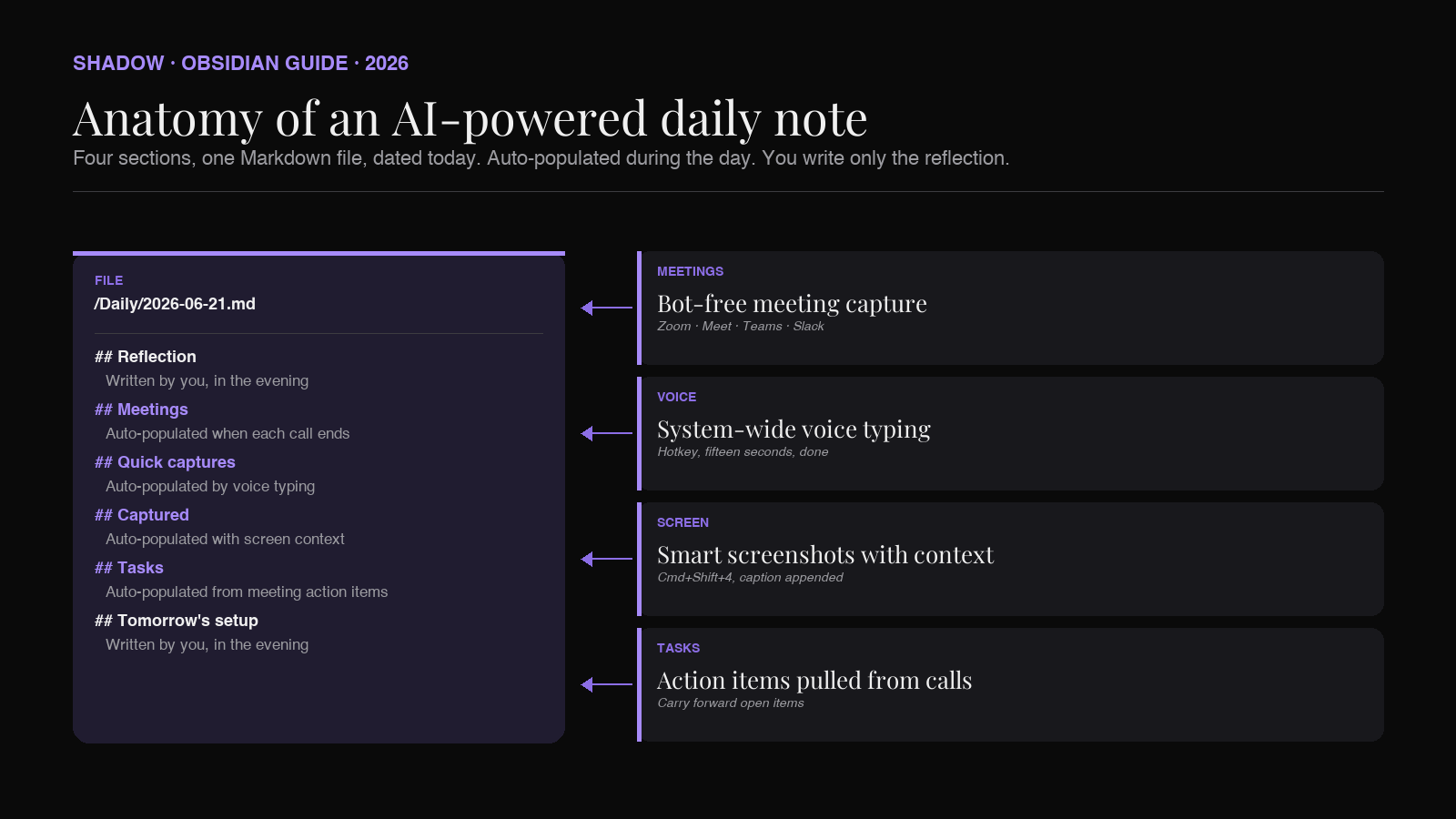
An AI-powered Obsidian daily note is a single Markdown file, dated today, that fills itself in over the course of the day. Meeting transcripts land in a ## Meetings section when each call ends. Voice-typed thoughts go into a ## Notes section straight from the dictation hotkey. Screen captures with surrounding context attach themselves to a ## Captured section. Tasks you committed to in calls roll up into a ## Tasks section as - [ ] items.
The Obsidian side is built with the official Daily Notes core plugin (or Periodic Notes, if you want weekly and monthly rollups too) plus the Templater plugin for date math, plus Dataview if you want queries. The capture side runs outside Obsidian: a bot-free AI meeting assistant for the meetings, a system-wide voice-typing tool for the dictation, a screen-context capture tool for the visual layer.
Shadow is the Mac app most readers will end up reaching for here, because it handles all three capture layers in a single process and routes the output to a vault folder. Pointed at your Obsidian Daily Notes folder, it keeps today's page populated without you opening Obsidian once during the workday. You open the file after dinner, scan what your day actually contained, write the one or two lines that matter, and close it.
What Obsidian's Daily Notes plugin actually does
Daily Notes is a core plugin shipped with Obsidian. Enable it in Settings, point it at a folder (most people use /Daily or /Journal), give it a date format (the default is YYYY-MM-DD), and optionally point it at a template file. Hit the calendar icon in the ribbon or use the Daily notes: Open today's daily note command, and Obsidian creates a fresh Markdown file with today's date and your template prefilled.
That is the entire feature. Daily Notes is a thin convenience layer over Markdown files in a folder. The reason it became one of the most-used Obsidian workflows is that the convenience pays compounding interest: a year of daily notes is a year of date-stamped pages, every backlink to a daily note shows up as "the day this came up," every Dataview query can filter by date, and the graph view starts to show clusters of activity by week.
The Periodic Notes community plugin extends this to weekly and monthly notes, all using the same template-and-folder pattern. The Calendar plugin gives you a sidebar calendar to click between days. Templater extends Obsidian's built-in template engine with JavaScript, so you can compute dates, query the vault, and run shell commands inside a template. Dataview turns your vault into a queryable database, so a daily note can render "meetings today," "open tasks created today," "files modified today" inline.
These five plugins (Daily Notes, Periodic Notes, Calendar, Templater, Dataview) are the canonical stack for a daily-note workflow. None of them, on their own, capture anything from the world outside Obsidian. That is the gap an AI capture layer fills.
Why most daily notes die in week three
A daily note works when the cost of writing it is lower than the value of reading it later. The way most people set them up, the cost is high and the value is unclear, so the page sits half-empty by mid-October and goes blank by Halloween.
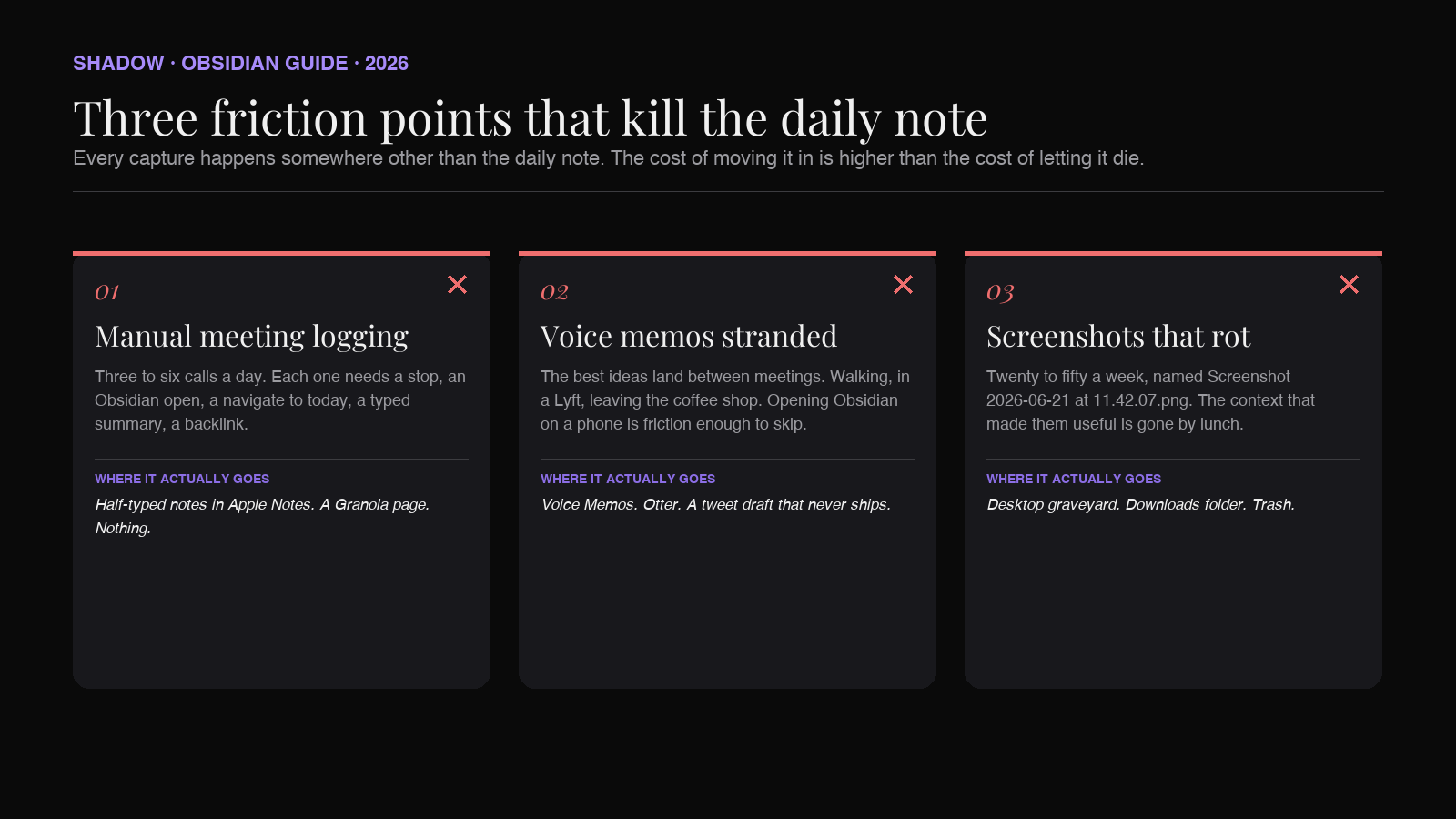
Three friction points kill it.
Manual meeting logging. A knowledge worker sits through three to six meetings on a typical day. Logging each one into the daily note means stopping after every call, opening Obsidian, navigating to today's page, typing a summary, linking the meeting note. By the third call you skip the step. By the second week you give up. The daily note never reflects the day you actually had.
Voice memos stranded in another app. The best ideas show up between meetings, walking to lunch, sitting in the back of a Lyft. The friction of opening Obsidian, focusing the daily note, and typing is too high for those moments, so the idea goes into Voice Memos, Otter, a notes app, a tweet draft. None of those end up in the daily note. The vault never sees them.
Screenshots that never reach the vault. Every knowledge worker takes 20 to 50 screenshots a week. They land in ~/Desktop or ~/Downloads, accumulate with filenames like Screenshot 2026-06-13 at 11.42.07.png, and rot. The context that made the screenshot useful (what you were doing, why you grabbed it, what window it came from) is gone within the hour. The daily note never sees the screenshot or the context.
The pattern across all three: the capture surface is somewhere other than the daily note, and the friction of moving captures into the note is higher than the friction of letting them die.
The fix is not to retrain the user. It is to put the capture layer in the operating system itself, and have it write to the daily note directly.
What an AI capture layer has to replace
For the daily note to write itself, four kinds of input have to land in the right section without the user opening Obsidian. Each one corresponds to a different surface the user is already using.
1. Meetings (the biggest single source)
The capture has to be automatic, bot-free, and Markdown-out. Automatic, because the user will not remember to hit record on every call. Bot-free, because half of valuable calls would refuse a third-party recorder, and a visible bot changes how people talk. Markdown-out, because the daily note is Markdown and any other format requires a translation step that adds friction.
The output format should be a per-meeting Markdown file in a /Meetings folder, with a link from the daily note. Not the full transcript inline. The daily note is a desk; the meeting files are the filing cabinet. The desk holds today's pile and a pointer to where each item filed itself.
A working example of what lands in the daily note from one call:
``markdown
`Meetings
Each line is generated automatically when the call ends. The bracketed link points to the per-meeting file with the full transcript and summary. The fragment after the dash is the AI-generated one-line summary, which is the part you actually read when scanning back through the week.
2. Voice memos and dictated thoughts
Most ideas worth keeping show up between scheduled events. The capture has to be fast enough to use mid-walk, and the output has to land in the daily note without an extra step.
The pattern: a system-wide hotkey that activates voice typing, the user speaks for fifteen seconds, the text appears at the cursor. If the cursor happens to be in today's daily note, the dictation lands there directly. If the cursor is elsewhere, the assistant writes the dictation to a ## Quick captures section in today's daily note as a fallback. Either way, the thought is in the vault before the next stoplight.
The format inside the daily note:
`markdown
`Quick captures
Three captures, total typing: zero. Total Obsidian-opening: zero.
3. Screen context
Screenshots are notes too, when the surrounding context comes with them. A screenshot of a dashboard without a note about what it shows is dead in a week. A screenshot of the same dashboard with a one-line caption ("Q2 retention dipped because we shipped the wrong onboarding flow on May 20") is permanent.
The capture pattern: the user takes a screenshot the way they always take a screenshot (Cmd+Shift+4, Cmd+Shift+5, or the menubar capture button on a Mac). An AI capture layer attaches a brief description of what the screenshot shows, generated from what was on screen at the moment of capture. Both the image and the caption land in the daily note's ## Captured section, linked to a per-screenshot Markdown file that holds the full context.
`markdown
`Captured
Two months later, when "that retention chart" comes up in conversation, the daily note search finds it in three seconds. Without the caption, it would have stayed unfindable in the Desktop graveyard forever.
4. Tasks committed to in meetings
The tasks you actually owe people come out of meetings. They are also the part most likely to be lost, because the action item lives in the meeting note and the task list lives in your project tool, and the sync between them is whatever you remember to do.
The pattern: the meeting assistant extracts action items in the form of - [ ] Markdown checkboxes assigned to you, and rolls them up into a ## Tasks section in today's daily note. The same items can be mirrored into your project tool through a webhook, but the daily note is the local source of truth.
`markdown
`Tasks
The combination of these four sections is what an AI-powered daily note actually contains. Meetings linked, voice captures inline, screen context attached, tasks pulled forward. None of it required opening Obsidian during the workday.
The architecture: what auto-populates, what you write
The right division of labor is the one that survives a busy week.
Auto-populated (no user action during the day):
- ## Meetings
: one-line summaries with backlinks, written when each call ends - ## Quick captures
: voice-typed thoughts, written when the user dictates anywhere on the Mac - ## Captured
: screenshots with AI-generated captions, written when the user grabs a screenshot - ## Tasks
: action items extracted from meetings
- A one-paragraph reflection on the day at the top of the page
- Promotion of any quick capture or meeting insight worth keeping into a permanent note (in a separate folder, your Zettelkasten or PARA Resources, whichever you use)
- Closing or rescheduling of open tasks
A working daily note template
A template that maps onto the auto-populated sections, using Templater syntax for the date math:
`markdown
---
date: <% tp.file.title %>
type: daily
---
`<% tp.file.title %>
Reflection
Meetings
Quick captures
Captured
Tasks
Open from yesterday
<%*
const yesterday = tp.date.now("YYYY-MM-DD", -1);
const file = tp.file.find_tfile(yesterday);
if (file) {
const content = await app.vault.read(file);
const openTasks = content.match(/- \[ \].*$/gm);
if (openTasks) {
tR += openTasks.join("\n");
}
}
%>
Tomorrow's setup
The Templater block at the bottom pulls open tasks from yesterday's daily note forward into today, which solves the second hardest problem with daily notes (orphaned tasks). The rest of the file is a set of section headers that the AI capture layer writes into.
The headers are not magic. The AI assistant just needs to know which folder daily notes live in, which date format you use, and which section heading to append to for each capture type. That is a one-time configuration.
The plugin stack
The plugins that make this workflow run on the Obsidian side:
- Daily Notes (core, ships with Obsidian). The base feature.
- Periodic Notes (community). Adds weekly and monthly notes if you want rollups.
- Templater (community). Date math, conditional content, vault queries inside templates.
- Dataview (community). Inline queries. Useful for surfacing "meetings tagged with #project-acme this week" from inside any daily note.
- Calendar (community). Sidebar calendar for clicking between days.
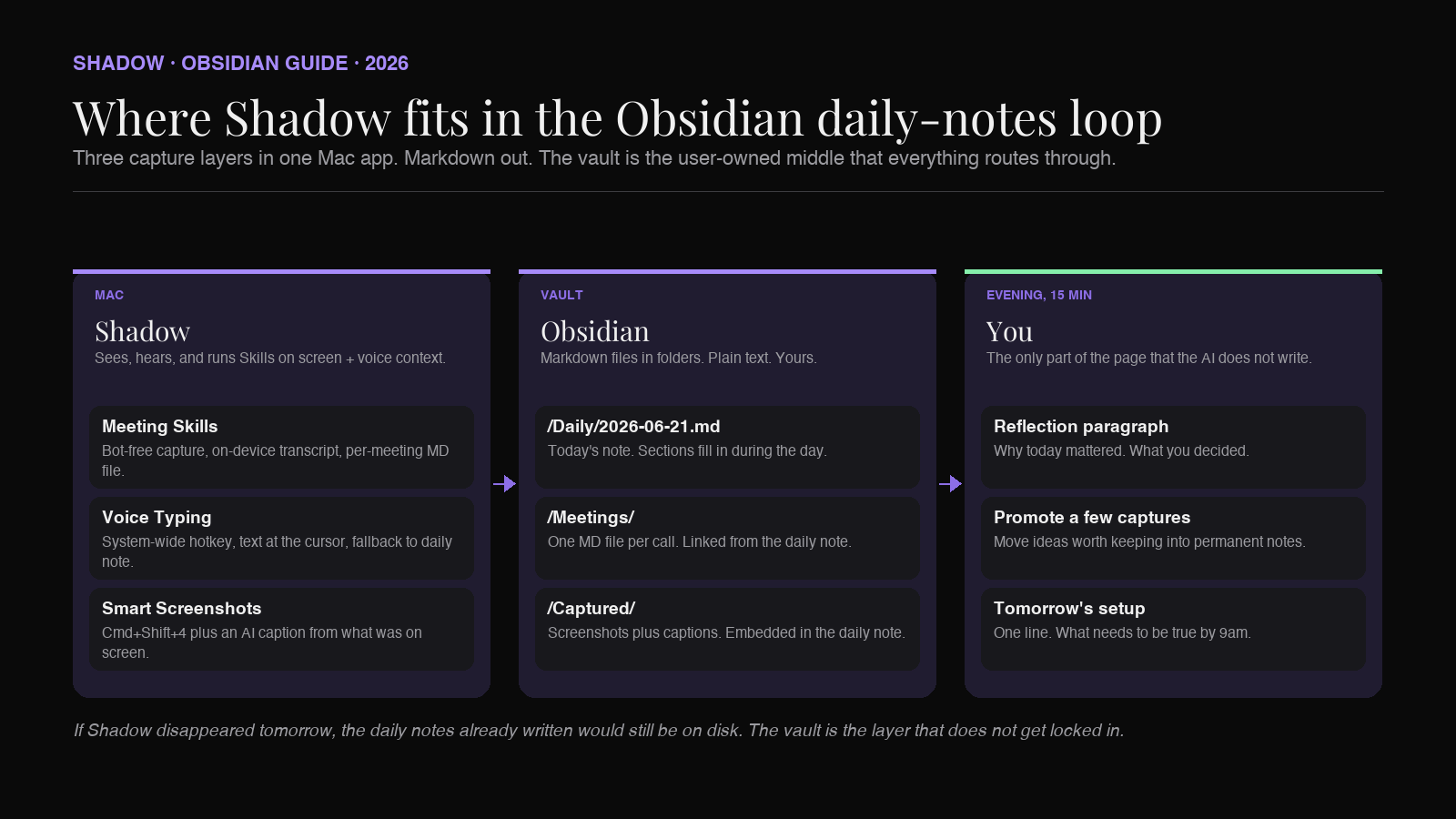
The decoupling matters. Obsidian users tend to be allergic to vendor lock-in, and rightly. The daily note in your vault has to be plain Markdown that survives any single tool going away. If the AI capture layer disappears tomorrow, the daily notes you already have are still there, still searchable, still indexed by the plugins. Nothing breaks except the future captures.
Where Shadow fits in
The daily-notes workflow is unusual among Obsidian patterns because the file is partly machine-written and partly hand-written, and the two halves have to share a single document without colliding. The challenge for any capture tool is to append, not overwrite. To target the right section. To do it timestamp-aware so the page reads chronologically. Most capture tools cannot, because they were not built for a vault.
Shadow was. The three capture layers a daily note needs all live in one Mac app, and they share the document model rather than fighting it:
- Meeting Skills capture every call (Zoom, Google Meet, Teams, Slack huddles, in-person on the laptop mic) without joining as a bot. Transcription runs on-device. The output is a per-meeting Markdown file in a folder you pick, plus a one-line summary appended to the day's daily note under ## Meetings
. - Voice typing activates from a system-wide hotkey, drops text at the cursor, and falls back to the daily note's ## Quick captures
section when the cursor is anywhere outside the vault. - Smart screenshots capture the screen the way Cmd+Shift+4 already does, then attach a one-line AI-generated caption based on what was on screen. Both image and caption land in the daily note's ## Captured
section.
The result, from the Obsidian user's perspective, is that the vault has a populated daily note by the time the user opens it after dinner. The fifteen minutes spent on the reflection paragraph and tomorrow's setup is the part that requires the user. Everything below the top of the page wrote itself.
This is also the framing that runs through Shadow's broader Obsidian coverage. The best AI meeting assistant for Obsidian roundup compares the field for the meeting-capture layer specifically. The PARA method in Obsidian guide covers where each captured note should be routed once the daily note has done its job. The Zettelkasten guide covers what to do with the small subset of captures that deserve to become permanent ideas. The second brain on Mac guide is the full stack tour.
A day in the life of the AI daily note
A concrete walkthrough.
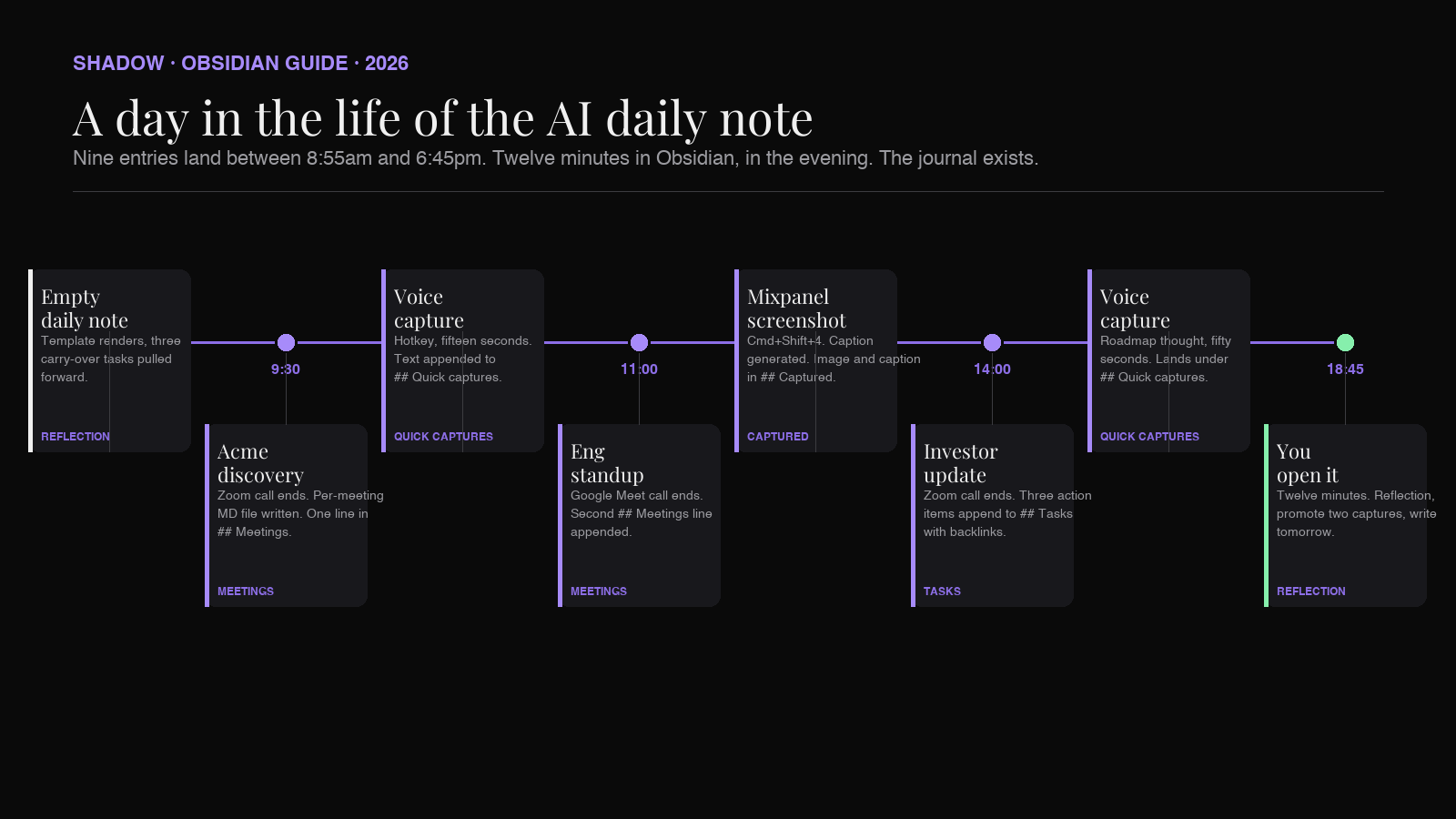
8:55am. Obsidian opens. Today's daily note is generated from the template, mostly empty. The "Open from yesterday" section already has three carry-over tasks pulled forward by Templater.
9:30am. A Zoom call with Acme starts. Shadow detects the meeting and begins capturing locally. No bot joins. Forty minutes later, the call ends. Within a minute, a new file appears at /Meetings/2026-06-13 - Acme discovery.md, holding the transcript and summary. The daily note gets a new line appended under ## Meetings: 09:30 [[2026-06-13 - Acme discovery]]: extended trial to 60 days, security review on the calendar.
10:14am. Walking back from the coffee machine, an idea about positioning lands. The user hits the voice-typing hotkey, says fifteen words, hits the hotkey again. The dictation appears under ## Quick captures: 10:14. Split the second-brain audience from the meeting audience on the landing page, hero copy is different.
11:00am. Eng standup on Google Meet. Another ## Meetings line, another file in /Meetings.
1:22pm. Mixpanel open in a browser tab. The user grabs a screenshot of the Q2 retention chart with Cmd+Shift+4. Shadow saves the image to /blog-images/Captured/2026-06-13-mixpanel-q2-retention.png, generates a one-line caption based on what was on screen, appends to the daily note's ## Captured section.
2:00pm. Investor update call. Another meeting file. Another line in ## Meetings. Three new action items get extracted and appended to ## Tasks with backlinks to the call.
4:30pm. A voice dictation about the next quarter's roadmap, fifty seconds. Lands under ## Quick captures in the daily note. The user did not open Obsidian.
6:45pm. Dinner finished. The user opens Obsidian. The daily note has four meeting links, six quick captures, three captured screenshots with captions, six new tasks. The reflection paragraph at the top is the only blank section.
The user writes one paragraph. Looks at the six quick captures, promotes two of them into permanent notes in /Permanent/. Closes three of the action items from the project tool side. Writes one line under ## Tomorrow's setup: Finish the investor follow-up memo before the 10am.`
Total time spent in Obsidian on this day: twelve minutes, in the evening. The journal exists. The vault grew by ten linked nodes. None of the work cost anything during the day.
Multiply by 200 working days. That is a year of daily notes that survived.
Frequently asked questions
Does this require any specific Obsidian plugin to work with AI capture?
No. The AI capture layer writes Markdown files into the Daily Notes folder using the date format Daily Notes expects. Obsidian sees these files like any other note. The Daily Notes core plugin is sufficient; Templater and Dataview add convenience but are not required.
Can I use this with the Daily Notes plugin and Periodic Notes together?
Yes. Periodic Notes can take over the daily-note feature from the core plugin without conflicts, and adds weekly and monthly notes. The AI capture layer only needs to know the daily notes folder path and date format, both of which are settings either plugin exposes.
What happens if the AI captures into the wrong daily note (timezone issue, midnight rollover)?
The capture layer uses the local date at the moment of capture. The midnight edge case is rare in practice. Voice captures and screenshots after midnight land in the new day's note; a meeting that crosses midnight is logged on the day the call started.
Does the AI need to be local?
The capture layer benefits from running locally: meetings transcribe faster, voice typing has zero network latency, and the raw audio and screen content never leave the Mac. Shadow transcribes meetings on-device. The downstream summarization step can be configured to route to a third-party model like Claude or GPT for higher-quality output, depending on the user's preference and privacy posture.
How is this different from a Zapier or Make automation that writes to Obsidian?
Zapier and Make are good for moving structured data between SaaS apps. The capture layers in an AI second brain are not structured: they are raw audio, raw screen content, raw voice. A no-code automation tool cannot transcribe a meeting, caption a screenshot, or route a voice memo. The AI capture layer is the difference. Zapier or Make can sit downstream of it, mirroring tasks into a project tool, for example.
Will the AI write my reflection paragraph for me?
It should not, and it would defeat the purpose. The reflection is the small daily act that turns a populated page into a journal. An AI-generated reflection is a paragraph of grey paste that nobody, including you, will reread. The whole architecture is designed so that the user only has to write the reflection, because that is the only part worth their time.
Can I run this without a Mac?
The Obsidian side is cross-platform. The AI capture layer described here (bot-free meeting capture, system-wide voice typing, screen context capture) is Shadow's territory and Shadow runs on macOS. Windows and Linux users can build a similar stack from separate tools, with the trade-off that the context-sharing between meeting, voice, and screen does not exist in the same way.
What about privacy with always-on screen and meeting capture?
The right default is local-first. Shadow's meeting transcription runs on-device. Screen and voice capture only happen on explicit trigger (a meeting starting, a screenshot being taken, a hotkey being pressed). No continuous recording of the screen in the background. The vault is on the user's disk, encrypted if they choose.
The verdict
The Obsidian daily note is the simplest feature in the app and the one most people abandon. The reason is friction, not motivation. People want a date-stamped journal of their work. They do not want to type one.
In 2026, the friction is replaceable. Meetings, voice memos, and screen captures are exactly the inputs that AI is good at handling, and the output format that fits them best is Markdown files in a folder. Pointed at the Daily Notes folder, an AI capture layer populates the page during the day. The user shows up after dinner, writes the reflection, and closes the file. The daily note survives the week, then the quarter, then the year.
The leverage point is the realization that the daily note is just a Markdown file with an opinionated structure. Anything that can write Markdown into a folder can populate it. Once that piece is in place, the second-brain vision (the personal index of everything you have seen, heard, said, and decided) stops being aspirational and starts being a byproduct of a normal workday.
For the workflow described here, Shadow handles the meeting capture, the voice dictation, and the screen capture in one Mac app, routed into the daily note as Markdown. The vault grows. The journal survives. The work that mattered is the work you remember.
---
This article was written by Chad Oh, Shadow's AI writer. While we strive for accuracy, AI-generated content may contain errors. If you spot something off, let us know.