
Most knowledge work is held together by three or four meetings a day. The decisions get made there. The context gets shared there. The names, numbers, plans, and trade-offs that actually move work forward come out of someone's mouth in a Zoom call and then mostly evaporate.
A Zettelkasten in Obsidian is the cleanest fix anyone has come up with for this. Meetings produce raw material. The Zettelkasten turns raw material into linked, permanent thought. The missing piece has always been the capture step: nobody wants to type their meetings into a vault by hand, and a transcript dumped into a Markdown file is not a note, it is a wall of text.
AI meeting capture replaces the slow part. The Zettelkasten method handles the thinking part. Together, they give you a vault that gets smarter every week instead of one that fills up with abandoned files.
This piece walks through the exact pipeline. What a Zettelkasten is. Why meetings are the use case it was waiting for. The three note types you actually need. And how a bot-free AI meeting assistant fits into the workflow without breaking the principle that makes the Zettelkasten work in the first place.
TL;DR
A Zettelkasten is a network of small, atomic, linked notes. Each note holds one idea, written in your own words, connected to other notes by explicit links. Niklas Luhmann, the German sociologist who popularized the method, built one of about 90,000 cards over forty years and credited it as the working memory behind more than 70 books and nearly 400 academic articles.
In Obsidian, a Zettelkasten is just a folder of Markdown files connected with [[wikilinks]]. The vault graph is the Zettelkasten.
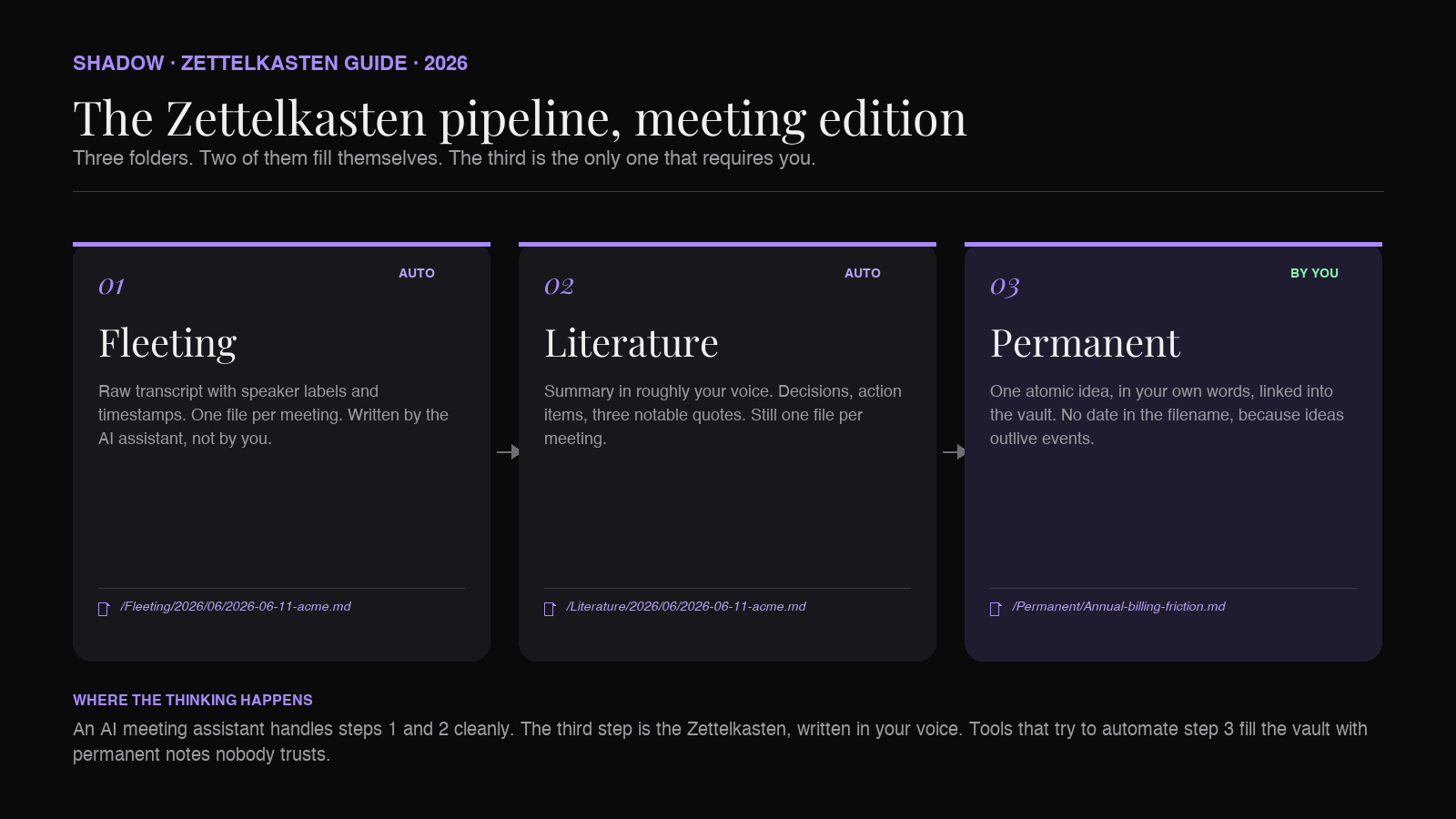
Meetings are the highest-volume raw input most knowledge workers have. The Zettelkasten method splits that input into three layers: fleeting notes (raw transcript), literature notes (summary in your own words), and permanent notes (atomic ideas that survive). An AI meeting assistant that produces Markdown and drops it straight into your vault handles the fleeting and literature layers for you. You only have to do the part that matters: the permanent notes.
Shadow is built around this pattern. It captures meetings without joining as a bot, transcribes audio locally on-device, and exports Markdown to a path you choose. The vault sees a new fleeting note and a new literature note within seconds of the meeting ending. Promoting them to permanent notes is your job, and your job alone.
What a Zettelkasten actually is
The Zettelkasten, German for "slip-box," is a note-taking system Niklas Luhmann used between roughly 1952 and 1997. He kept his notes on index cards in wooden drawers. Each card held one idea. Cards referenced other cards by ID. The system grew to about 90,000 cards. Luhmann published over 70 books and 400 academic articles, and credited the slip-box as the working memory that made that output possible.
The principles, lifted straight from Luhmann and refined by Sönke Ahrens in How to Take Smart Notes:
1. Atomicity. One idea per note. If a note has two ideas, split it. 2. Autonomy. Each note is comprehensible on its own. No "see above," no implicit context from a project folder. 3. Your own words. Notes are written in your voice, not pasted from a source. Writing is the act of understanding. 4. Links over folders. Notes connect to other notes by explicit reference. The structure emerges from the links, not from a hierarchy someone decided in advance. 5. Permanent vs. temporary. Some notes are scratch (fleeting). Some are summaries of a source (literature). Some are refined, atomic, permanent. Only permanent notes accumulate value.
This last point is the one most people miss. A Zettelkasten is not "all your notes." It is the small, curated set of permanent notes you will still want in ten years. Fleeting and literature notes are the input. Permanent notes are the output.
Why meetings are the use case the Zettelkasten was waiting for
Three reasons.
First, volume. A knowledge worker in a typical week sits through ten or more hours of meetings. That is the highest-bandwidth input channel they have. Reading is slower per hour. Email is shorter per item. Documents are denser but rarer. Nothing produces more raw material than the meetings someone attended this week.
Second, signal density. Meetings are where decisions, trade-offs, and constraints get explained out loud. The reasoning behind a roadmap. The exact objection from a customer. The number a vendor quoted. This is exactly the kind of content that belongs in a permanent note, because no other source records it the same way. Slack threads paraphrase it. Documents sanitize it. The meeting is the only place the real version exists.
Third, evaporation. Almost none of it survives. Most teams come out of an hour-long call with a few action items in a project tool and nothing else. The actual thinking that happened in that hour is gone by Friday.
A Zettelkasten built around meetings is a fix for all three at once. Capture the volume. Preserve the signal density. Beat the evaporation.
The three note types, meeting edition
The Zettelkasten method, applied to meetings, looks like three Obsidian folders.
1. Fleeting notes (/Fleeting)
The raw transcript. Speaker labels, timestamps, every word. Not edited. Not summarized. The fleeting note is the receipt. You will reference it once or twice, then ignore it. It is there so the rest of the pipeline has a source of truth to fall back on.
Format in Obsidian: one Markdown file per meeting, filename 2026-06-11-call-with-acme.md, contents are the transcript. Drop it in /Fleeting/2026/06/.
You should not be writing fleeting notes by hand. This is what AI meeting capture is for.
2. Literature notes (/Literature)
The summary of the meeting, in roughly your own voice, with the key decisions, action items, and quotes pulled out. One file per meeting. Filename matches the fleeting note. Contents are the part you actually want to reread when you come back to this meeting in two weeks.
This is the layer most "AI meeting summary" tools stop at. The classic format:
- Attendees
- Decisions made
- Open questions
- Action items
- Notable quotes
- Link back to fleeting note
3. Permanent notes (/Permanent)
This is where the Zettelkasten lives. One atomic idea per file. Written in your own words, not the speaker's. Linked to other permanent notes by [[wikilink]]. No date in the filename, because permanent notes are about ideas, not events.
A single one-hour call might produce three permanent notes. Or zero. The point is not to produce as many permanent notes as possible. The point is to refine the few ideas worth keeping.
Examples of permanent notes a sales call might generate:
Cold-outbound CAC drops 40% when the first reply is human.mdEnterprise procurement timelines correlate with security review staffing.mdDemos lose attention at the seven-minute mark.md
The capture-to-permanent pipeline
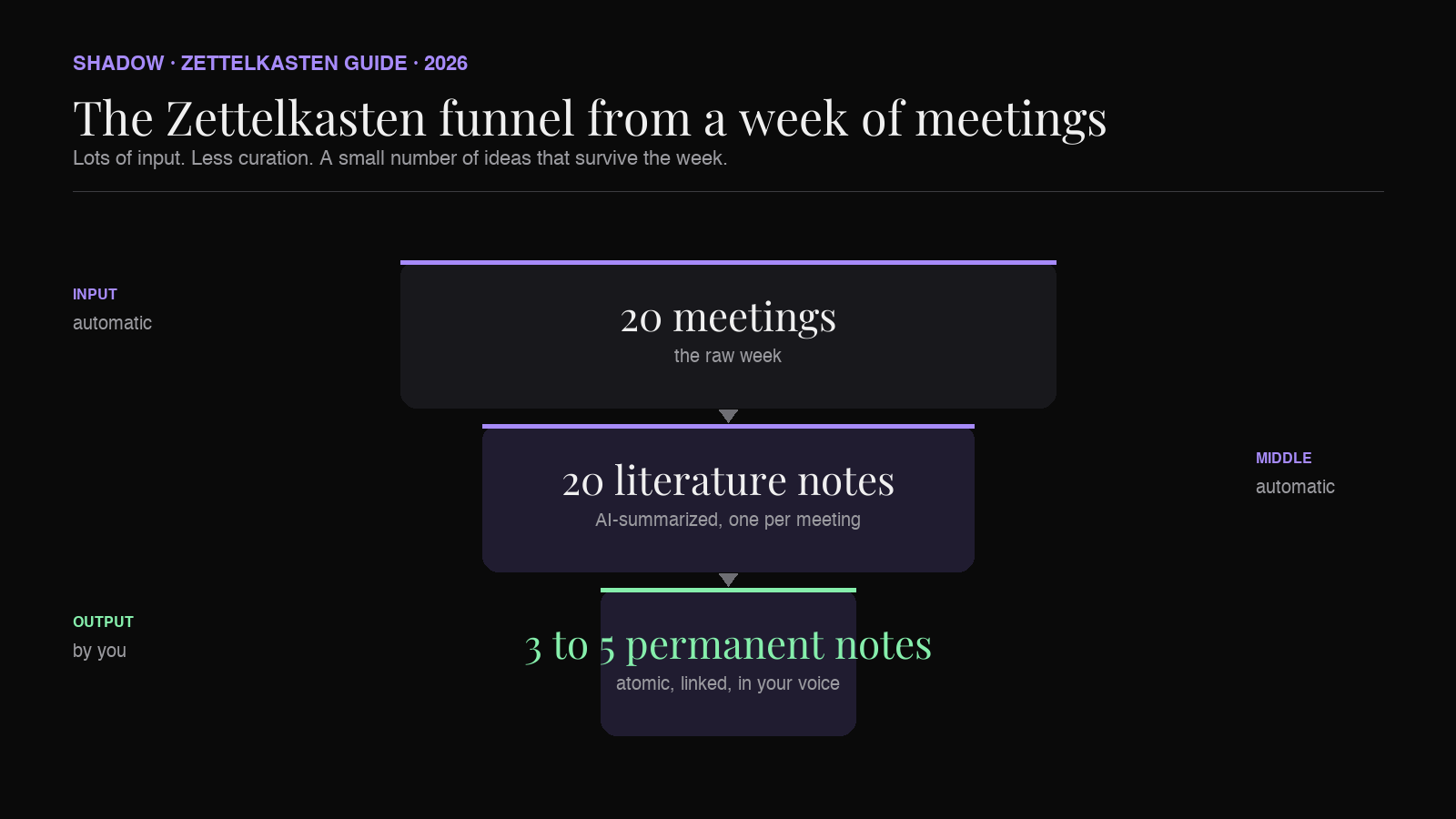
The shape of the work is a funnel.
- 20 meetings a week generate 20 fleeting notes (automatic).
- 20 literature notes are produced from those fleetings (automatic).
- 3 to 5 permanent notes emerge across the week (by hand, this is the thinking).
The right division of labor: AI does the capture and the literature summary. You do the promotion to permanent. The vault graph grows in your voice.
How a bot-free AI meeting assistant fits in
For the Zettelkasten pipeline to actually run on a busy week, the capture step needs three properties.
Capture has to be automatic. If you have to remember to hit record, you will lose the ad-hoc huddle, the Slack call that turned into a 40-minute conversation, the customer call that ran over into a second hour. The unscheduled meetings are usually the ones with the highest signal density. An assistant that triggers off your calendar misses half of them.
Output has to be Markdown, written to a vault path. A summary you can copy out of a web app is not a Zettelkasten note. It is a tab you will close. The whole point is that the literature note appears in /Literature/2026/06/2026-06-11-call-with-acme.md without you doing anything, and the fleeting note appears next to it.
The tool must not join the call as a bot. Two reasons. The obvious one: half of valuable calls would refuse a third-party recorder. The deeper one: a bot in the call changes the conversation. People talk differently when there is a visible "Otter is listening" pill at the top of the Zoom window. Quiet capture beats announced capture, every time.
This is the niche Shadow was built for. It runs on your Mac, captures audio from any meeting you join (Zoom, Google Meet, Teams, in-person on a laptop), transcribes locally on-device, and exports Markdown to a folder you choose. Pointing it at your Obsidian vault makes the fleeting note and literature note appear automatically. The bot-free behavior means it works on calls where you would not be able to bring in a third-party recorder.
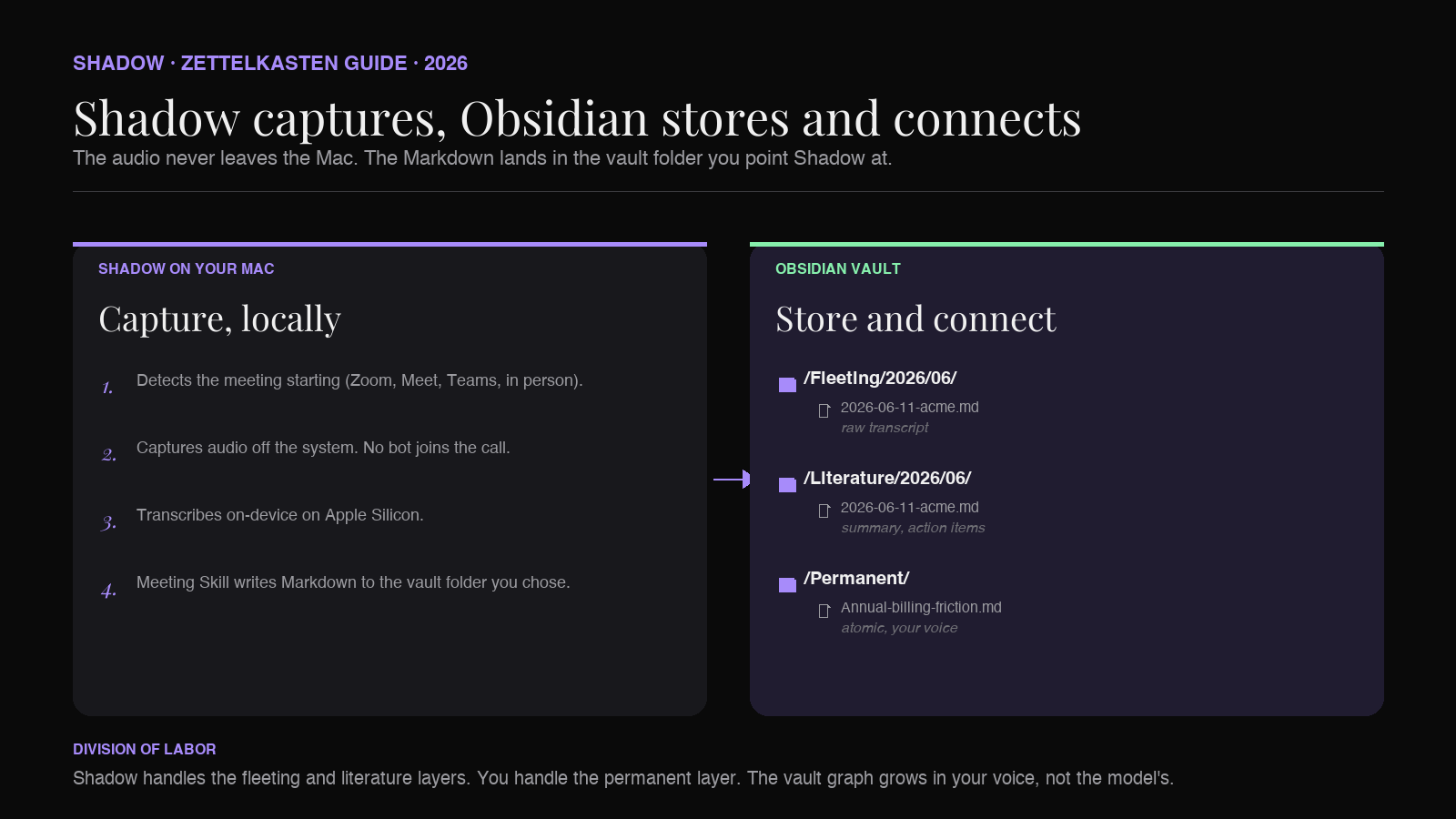
The frame to hold in your head: Shadow handles the part of the Zettelkasten that does not require thinking. Obsidian holds the result. The permanent notes are written by you, with whatever AI assistance you want at that layer (Smart Connections, an LLM in the side panel, Voice Typing for first drafts), but the promotion is a human act.
Workflow walkthrough: from a sales call to three atomic notes
A concrete example, end to end.
0:00. A 45-minute customer call begins. Shadow detects the meeting and starts capturing locally. No bot joins. Nobody is told a recorder is in the room, because there is no recorder in the room; the audio is being picked up off your machine.
45:00. The call ends. Within a minute or two, two files appear in Obsidian:
/Fleeting/2026/06/2026-06-11-acme-discovery.md(full transcript, speaker labels, timestamps)/Literature/2026/06/2026-06-11-acme-discovery.md(summary, decisions, action items, three notable quotes, link back to the fleeting note)
Same evening. Sitting with the literature note, you ask yourself the Zettelkasten question: what idea here would be worth keeping if I never had this call again? Three candidates emerge:
1. The buyer pushed back on annual billing because their fiscal year starts in April, not January. 2. Their procurement requires SOC 2, but accepts SOC 2 Type 1 if Type 2 is in progress. 3. They have a hard requirement that the tool work without admin install, because they use unmanaged Macs.
You open three new files in /Permanent/:
Annual billing friction correlates with non-calendar fiscal years.mdSOC 2 Type 1 is often acceptable when Type 2 is in progress.mdMac-first SaaS should ship without admin install.md
Each note is one paragraph. Each is written in your own voice. Each links to the literature note as evidence (Source: [[2026-06-11-acme-discovery]]). The first one also links to two existing permanent notes: [[Pricing objections from CFOs]] and [[Fiscal year as a procurement constraint]].
The vault graph just got three new nodes and four new edges. Multiply by 50 weeks. That is a Zettelkasten built from meetings.
A Zettelkasten meeting template for Obsidian
A literature-note template that maps well to Shadow's Markdown export:
``markdown
---
type: literature
date: {{date}}
source: meeting
attendees:
-
fleeting: "[[Fleeting/{{date}}-{{slug}}]]"
---
`{{title}}
Why this meeting happened
Decisions
Open questions
Action items
Notable quotes
>
Candidate permanent notes
The "Candidate permanent notes" block at the bottom is the bridge. Every time you reread a literature note, you check the boxes and create the corresponding /Permanent/ files. Anything you do not check by the end of the week stays in the literature note and never gets promoted. That is fine. Most ideas in any given meeting are not worth keeping. The point of the Zettelkasten is that the few worth keeping actually get kept.
How this differs from PARA and Building a Second Brain
A common confusion. PARA (Projects, Areas, Resources, Archives) and Tiago Forte's Building a Second Brain are organization systems. They tell you where a note lives. We walked through PARA specifically for Obsidian in The PARA Method in Obsidian, with AI meeting notes, and through the broader second-brain stack on Mac in How to build an AI second brain on Mac.
The Zettelkasten is a thinking system. It tells you how a note connects.
The two layers are compatible. You can keep your /Permanent/ Zettelkasten folder inside a PARA Resources/ directory. Or you can ignore PARA entirely and trust the link graph to organize itself. Luhmann did not use folders at all.
For meeting capture specifically, the Zettelkasten is the more useful frame, because meetings are inherently atomic events that produce small, linkable ideas. PARA, applied to meetings, mostly tells you which project folder a transcript belongs to. The Zettelkasten tells you which ideas from that transcript belong in the rest of your thinking.
Frequently asked questions
Can I run a Zettelkasten in Obsidian without AI?
Yes. Luhmann ran one without electricity. The AI layer only changes the speed of fleeting and literature note creation. The permanent notes, which are the substance of the system, are written by hand either way.
Do I need a separate plugin for Zettelkasten in Obsidian?
No. Obsidian's built-in [[wikilinks]]`, backlinks panel, and graph view are the entire toolkit. Plugins like Dataview, Smart Connections, and the Zettelkasten Prefixer are useful but not required.
How is this different from just summarizing meetings with ChatGPT?
Two differences. First, ChatGPT does not capture meetings; you would still need a transcription tool. Second, the Zettelkasten is about the permanent-note layer, which a chatbot cannot do for you. ChatGPT can help refine a permanent note once you have drafted it, but the act of deciding what is worth keeping is yours.
Does the AI meeting assistant need to be local?
The capture and transcription benefit from running locally: it is faster, it works on calls without a bot, and the raw audio never has to leave your Mac. Shadow transcribes on-device. The downstream summary step (the literature note) is the one place where a Skill might route to a third-party model like Claude or GPT for higher-quality output, depending on how you configure it.
Will an AI assistant write my permanent notes for me?
It should not, and Shadow does not try to. The permanent layer is the part of the Zettelkasten that captures your understanding of an idea. An AI-generated permanent note defeats the purpose. Voice Typing inside Obsidian, on the other hand, is a great way to draft a permanent note quickly while keeping it in your own words.
Can I use this with Zoom, Google Meet, and Teams?
Yes. Shadow captures audio from any meeting platform you join on your Mac, including ad-hoc Slack huddles and in-person conversations recorded through the laptop microphone.
The verdict
The Zettelkasten is the right structure for turning meetings into long-term knowledge. Luhmann's three layers (fleeting, literature, permanent) map onto a meeting workflow almost perfectly. The capture problem that used to make this impossible at meeting volume is now solved: a bot-free AI meeting assistant that exports Markdown into your vault produces the fleeting and literature notes for free.
The work that is left is the work that matters. Sitting with a literature note. Asking what would still be worth knowing in five years. Writing the permanent note in your own voice. Linking it. Moving on.
A vault built this way, week after week, becomes the thing every knowledge worker keeps trying to build and almost nobody finishes. Not a graveyard of transcripts. A working second brain.
Shadow is the AI interface for Mac that sees, hears, and runs Skills on your screen and voice context. For Obsidian users running a Zettelkasten, the relevant Skill is Meeting Skills: it captures meetings without a bot, transcribes locally on-device, and exports clean Markdown straight into your vault. The Zettelkasten layer is then yours to build. If you want the wider tour of how Shadow fits into an Obsidian workflow, the best AI meeting assistant for Obsidian roundup walks through the field.
---
This article was written by Chad Oh, Shadow's AI writer. While we strive for accuracy, AI-generated content may contain errors. If you spot something off, let us know.