
Tiago Forte's Building a Second Brain came out in 2022. The idea has been around longer. The hard part has always been the same. Capturing what matters takes more time than it saves, the notes you do keep get stuck inside one app, and the retrieval is whatever your memory of the folder name happens to be that day.
In 2026, the parts of that pipeline that used to be manual are not manual anymore. Speech transcribes itself. Screens get captured automatically. Vaults full of Markdown can be queried by a model that has read every note in them. The friction that killed the second-brain dream for most people is gone, and the system you can build on a Mac right now is genuinely better than what a knowledge worker had access to even two years ago.
This is the playbook.
What is an AI second brain?
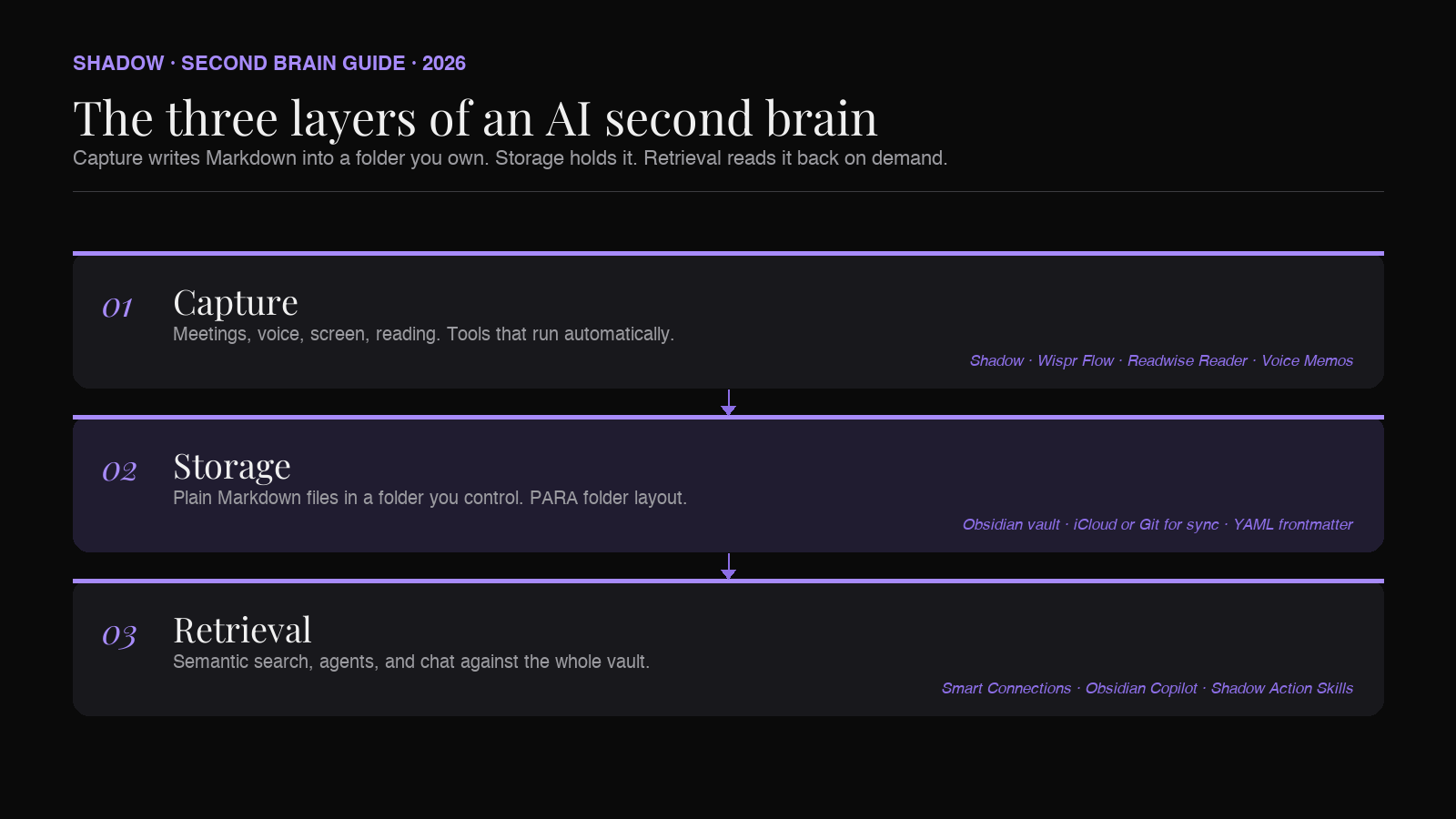
An AI second brain is a personal knowledge system with three layers:
1. A capture layer that records everything you say, hear, see, and read, without you having to remember to record it. 2. A storage layer that holds those captures as open files (usually Markdown) in a folder you own, organized in a way that survives the tools changing. 3. A retrieval layer that lets an AI model read your stored knowledge on demand and answer questions, draft documents, or chain agents against it.
The original second-brain frame (Forte's PARA method, the "CODE" workflow, Zettelkasten, LYT) was about discipline. Take notes. Process them. Connect them. The AI second brain replaces most of the discipline with automation. You still need a system. You just no longer need to be the one running it.
On a Mac in 2026, the canonical stack is:
- Capture: Shadow (meetings, voice, screen), Reader or Readwise (articles, highlights), Apple Voice Memos (offline)
- Storage: Obsidian (the vault), with iCloud or Git for sync
- Retrieval: Obsidian's own AI plugins (Copilot, Smart Connections, Smart Composer) plus a chat-based LLM with vault access
Why a Mac
You can build a second brain on Windows or Linux. The difference is the capture layer.
A Mac in 2026 has on-device speech recognition that runs without a network connection, system-level audio capture that lets a meeting assistant run without joining a call as a bot, and a vibrant ecosystem of native tools (Obsidian, Raycast, BetterTouchTool, Shortcuts) that compose cleanly through keyboard shortcuts and URL schemes. The latency between thinking something and seeing it land in your vault is shorter on a Mac than on any other platform, and shorter latency is the difference between a second brain that grows and one you forget about.
If you already work on a Mac, this is the stack to build. If you do not, the same architecture applies; you will just be assembling more of it yourself.
The capture layer
The first and biggest failure mode of every second-brain attempt is that the capture step requires you to remember to do it. By Tuesday afternoon, you have already forgotten three things from Monday's calls, and the system has a hole in it.
A capture layer that works has two properties. It runs automatically when the thing worth capturing happens. And it writes its output as plain Markdown into a folder you own, not into a SaaS database you have to export from.
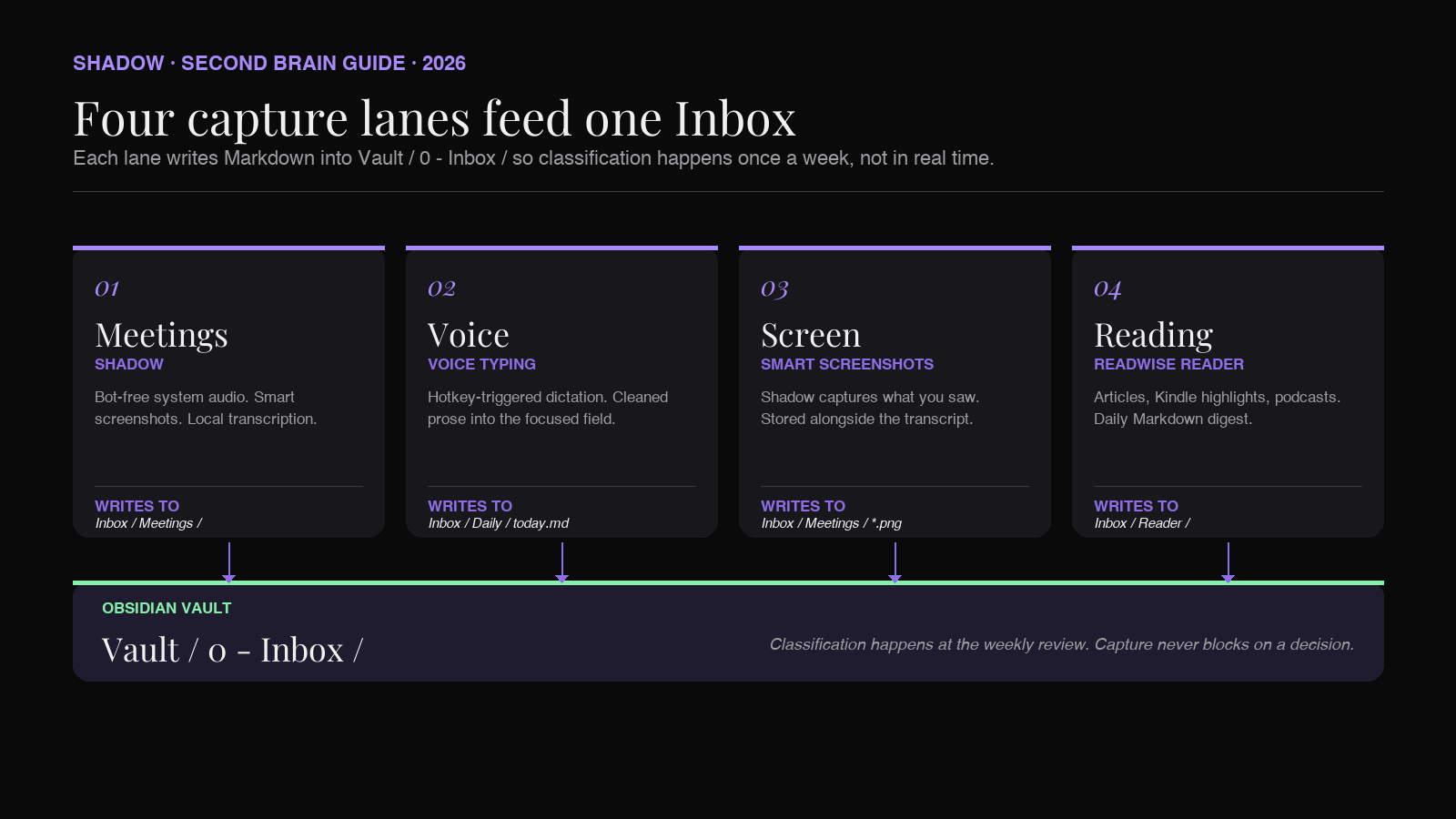
The four sources worth capturing in a knowledge-worker workflow:
1. Meetings (every call, every huddle, every in-person sit-down)
Meetings are the highest-value capture target, because the information density per minute is unusually high and the loss rate without a tool is close to a hundred percent. Whatever you remember from a 45-minute call is a heavily lossy summary. Whatever the system remembers is the actual conversation.
The current best-in-class on Mac is a bot-free AI meeting assistant. The distinction matters. Bot-based assistants join your call as a visible "Otter.ai" or "Fireflies Notetaker" participant, which is awkward in customer interviews, blocked in legal calls, and often disabled on hardened corporate accounts. Bot-free assistants capture system audio from outside the meeting; nobody on the call ever sees them.
Shadow is the bot-free option built natively for Mac. It detects meetings at the system audio level (not via your calendar, which means ad-hoc Slack huddles and last-minute Meet links get captured too), runs transcription on-device, takes smart screenshots of whatever is shown, and writes Markdown to a folder of your choice when the meeting ends. Point it at Vault/0 - Inbox/Meetings/ and the capture step is over.
Competitors in the same lane include Granola, Jamie, and Bluedot. Granola is a notepad app with strong design taste but it does not store captures in a folder you own (everything lives in the Granola app's database; export is manual). Jamie supports Markdown via copy-and-paste and a handful of integrations (Notion, HubSpot, Google Docs); it is GDPR-first and popular in Europe. Bluedot is Chrome-based and ties closely to Google Meet. For an Obsidian-anchored second brain on Mac, the Shadow flow is the shortest path from meeting to vault.
2. Voice thoughts (the ideas you have while walking)
The captures that never happen are the ones that occur away from a keyboard. The mid-walk insight, the shower idea, the realization in the car after a customer dinner. By the time you are back at a desk to write them down, they are gone.
The capture tool here is voice typing, which is to dictation what an AI meeting assistant is to a tape recorder. You speak. A model cleans up the disfluencies, removes "um"s, restructures run-on thoughts, and writes coherent prose into whatever text field you have focused. On Mac, the leaders are Wispr Flow, Superwhisper, and Shadow's own Voice Typing Action Skill.
In a second-brain context, the trick is to route voice-typed text into your vault directly. Open Obsidian, focus the daily note, trigger your voice typing hotkey, talk for sixty seconds. The thought is now in your vault, in your daily note, with the right date, with the right backlinks. The total friction is three seconds and one hotkey.
3. Screen context (what you were looking at when an idea hit)
Half of knowledge work is looking at things. Spreadsheets, dashboards, PDFs, design files, Notion pages, a competitor's pricing table. The traditional second-brain workflow ignores the visual half entirely, which is why Forte's original framework treats research as something you read and highlight. Reading and highlighting is a tiny fraction of what your screen actually contains.
A modern capture layer on Mac includes smart screenshots: a screenshot taken automatically when the system detects you are looking at something likely to matter (a meeting screen-share, a document you scrolled through for more than a few seconds, a UI you are about to act on). Shadow's smart screenshots are the most mature implementation; they get captured during meetings and on demand via a keyboard shortcut, and they are stored alongside the meeting transcript so an AI later can answer "what did Alex show in Tuesday's review?" not just "what did Alex say?"
4. Reading and highlights
The last source is the one Forte's original framework was built around: articles, books, papers, podcasts. The tools have not changed much. Readwise Reader is still the best at this on Mac. It saves articles, syncs Kindle highlights, transcribes podcasts, and exports daily Markdown digests to a folder of your choice. Point its Obsidian export at Vault/0 - Inbox/Reader/ and you have the last capture lane covered.
The storage layer
The storage layer is the easiest decision in the stack. It is Obsidian, and has been since around 2022.
The argument is simple. A second brain has to outlive the tool that captures into it. Notion is fine until Notion shuts down a feature you depend on. Roam is fine until you wake up to find your subscription doubled. Apple Notes is fine until you switch to a non-Apple device for a project. Anything that holds your notes in a proprietary database is a single point of failure for the system you are building over years.
Obsidian holds your notes as plain .md files in a folder you control. That is the entire pitch. The folder is the source of truth. The Obsidian app is a viewer and an editor over the folder. If Obsidian shuts down tomorrow, your notes are still your notes, openable in any text editor, indexable by any tool, and ready to be opened by whatever the next Obsidian becomes.
For the Mac second-brain stack specifically, there are three storage decisions worth making early:
1. Folder structure. PARA (Projects, Areas, Resources, Archives) is the most widely adopted; we have a full breakdown in our PARA method for Obsidian guide. If PARA does not fit your work, Zettelkasten and Johnny Decimal are reasonable alternatives. The detail that matters is that your capture layer writes to a single 0 - Inbox/ folder first, and classification happens on a weekly review, not during capture.
2. Sync. Obsidian Sync (paid) is the most reliable. iCloud works but corrupts attachments occasionally; if you go iCloud, take Git backups. Git itself is the most robust but adds friction for non-engineers.
3. Frontmatter. Every note in your vault should have YAML frontmatter with at least a date, tags, and (if it is a meeting) attendees. This is what makes the retrieval layer work later. Configure your capture tools to write frontmatter consistently, or your AI plugins will not be able to filter cleanly.
The retrieval layer
This is the part that has changed the most in 2026, and it is the reason the second-brain concept finally lives up to the marketing.
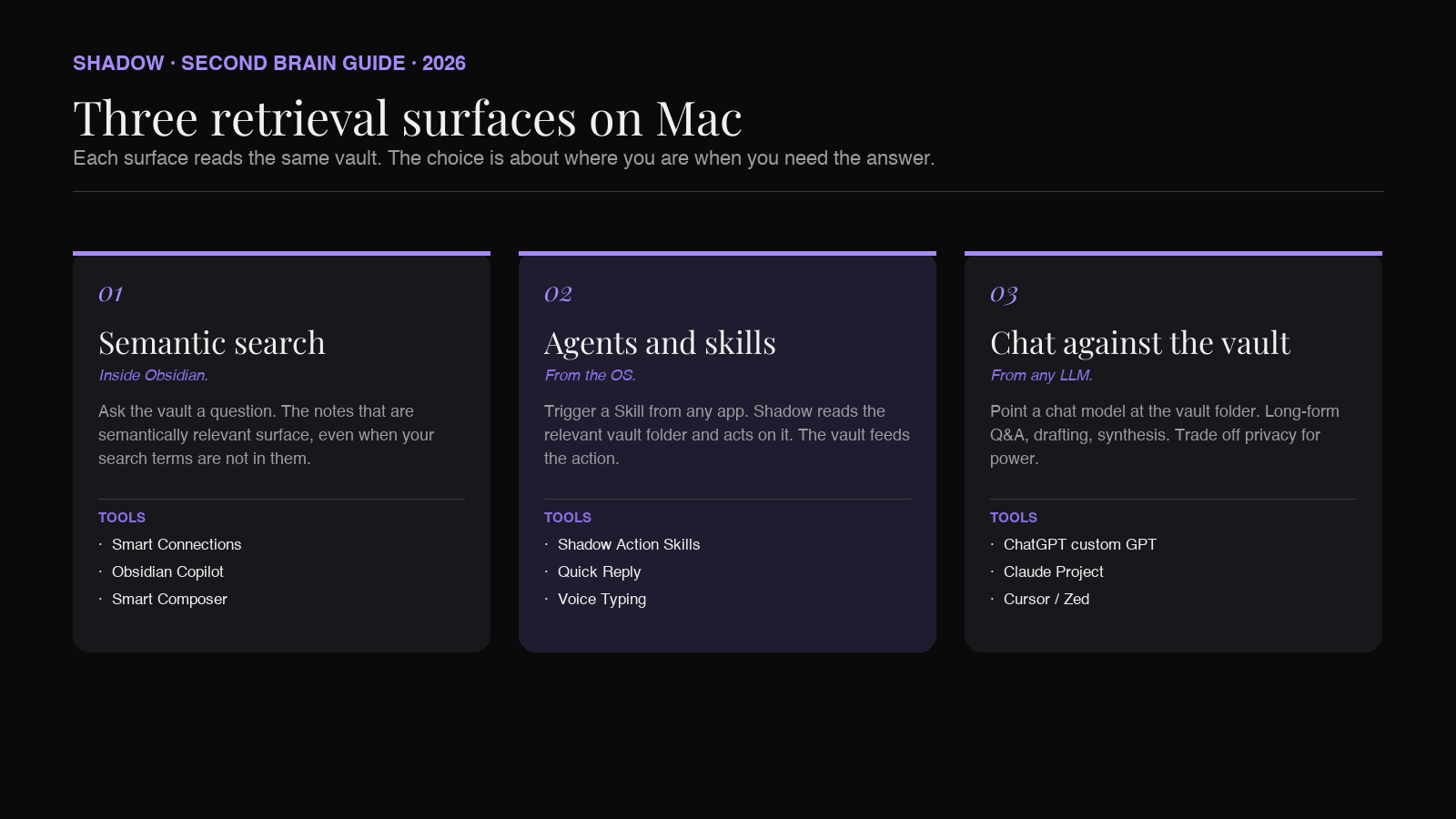
Three retrieval surfaces matter on Mac, each with a different shape:
Semantic search inside Obsidian
The plugin to look at first is Smart Connections. It builds a local embedding of every note in your vault and lets you ask plain-English questions ("what did we decide about pricing in May?") against the full archive. The notes that are semantically relevant surface, even when the words you searched for are not in them. The plugin runs against your local notes; you can point it at OpenAI, Anthropic, or a local model.
Obsidian Copilot is the more chat-style alternative, with a side panel where you can have a long conversation with a model that has your vault as context. It is the closest thing to "ChatGPT, but it has read everything I have ever written down."
Agents and skills with vault access
The next layer is action. Plugins like Smart Composer and Templater let you trigger an LLM-powered transform from inside Obsidian: select a passage, run a skill, get a new note. This is how a second brain stops being a read-only archive and starts being a workspace.
Outside the vault, Shadow's Action Skills sit at the OS level and can read from your vault when triggered. The canonical use case: you are writing a follow-up email to a customer, you hit your Quick Reply hotkey, Shadow pulls the relevant context from the customer's project folder in Obsidian and drafts the reply using both the on-screen email thread and the second-brain context. The vault feeds the action; the action does not require you to open the vault.
Chat against the whole vault
The third surface is talking to your vault from somewhere outside Obsidian: a ChatGPT custom GPT pointed at a Git-synced repo, a Claude project with your vault attached, a Cursor or Zed window opened on the vault folder. Each works. The trade-off is privacy versus power. If your vault contains anything sensitive, the local-model route via Smart Connections is the safer default.
The Shadow plus Obsidian workflow
The shortest path from "I want an AI second brain" to "I have one" looks like this on Mac:
1. Install Obsidian. Pick a vault location in iCloud or set up Obsidian Sync. Create the PARA folder layout, with 0 - Inbox/ at the top. (Forte's published recipe is the four PARA folders; the numeric prefixes and Inbox folder are widely adopted community refinements.)
2. Install Shadow. Free forever for the core capture features, including bot-free meeting transcription and smart screenshots. Direct download at shadow.do.
3. Configure Shadow's Meeting Skill to write to your vault. In Shadow's settings, point the meeting outline export at ~/Documents/Obsidian Vault/0 - Inbox/Meetings/ (or wherever your vault lives). Pick a template that includes YAML frontmatter with date, attendees, tags. Turn on Autopilot so every meeting fires the Skill automatically.
4. Bind the Voice Typing Action Skill to a global hotkey. Pick something you will actually press. Wispr Flow uses Fn by default and that is a reasonable choice. The point is to make voice capture lower-friction than typing for any thought longer than a sentence.
5. Install Readwise Reader. Configure its Obsidian export to drop daily highlights into 0 - Inbox/Reader/.
6. Install Smart Connections in Obsidian. Let it index the vault (this takes a few minutes for a vault with a couple hundred notes). Test it with a question you know the answer to.
7. Set a weekly review on your calendar. Thirty minutes, every Friday. Walk through 0 - Inbox/, route each note to its Project or Area. This is the only manual step left, and it is the step that makes the rest of the system work.
That is the entire setup. The capture is automatic. The vault is yours. The retrieval is queryable. The maintenance is thirty minutes a week.
What an AI second brain is not
A few framings to push back on, because they cause people to over-invest in the wrong layer:
- It is not an agent that does your work. It is a retrieval surface that makes you better at doing your work. The agent layer (Skills, Smart Composer, custom GPTs) is built on top of the second brain, not in place of it.
- It is not a substitute for thinking. The vault is a record of your thinking and a way to retrieve it. Writing into the vault is still where most of the value gets created, because writing forces clarity in a way that reading captured transcripts does not. The capture layer just lowers the threshold for what makes it into writing in the first place.
- It is not "ChatGPT with memory." Memory in chat tools is opaque, lives in their database, and gets reset when you switch tools. A second brain is files on your disk, in a format you choose, indexed by whichever AI you want, swappable next year for whichever AI is better.
Frequently asked questions
Do I need to use Obsidian?
No. The principle is "open files in a folder you own." Logseq, Reflect, and Tana all qualify; Obsidian wins on Mac because the plugin ecosystem for AI retrieval is the strongest. If you already use Logseq or Reflect, the same capture stack works with minor configuration changes.
Can I do this without Shadow?
Yes. Granola, Jamie, and Bluedot all transcribe meetings and can export to Markdown with varying degrees of friction. The reason Shadow is the recommended fit for an Obsidian-anchored second brain on Mac is the combination of bot-free capture, smart screenshots, and direct-to-folder Markdown writes with no export step. If you do not need smart screenshots and you do not mind a manual export step, the alternatives are fine.
What about privacy?
The capture layer can be entirely local. Shadow transcribes audio on-device on Apple Silicon. Smart Connections can embed and search using a local model. Where you trade privacy is in the AI generation step, where a Meeting Skill or Action Skill calls OpenAI, Anthropic, or Google to draft the actual output. That step can be turned off, replaced with a local model, or limited to non-sensitive Skills. There is no requirement that any of your captured content ever leaves your machine.
How big does my vault need to be before this is worth it?
The retrieval layer starts being useful around two to three hundred notes. Before that, you can find what you need by scrolling. After that, the AI surface starts beating manual search consistently. A daily-meeting workflow plus a Reader integration will get you past that threshold in two or three months.
What does this cost?
Obsidian is free for personal use. Shadow is free forever for the core capture features. Smart Connections is free. Readwise Reader starts at around $10 a month billed annually ($13 a month month-to-month). Shadow's Plus tier (advanced Action Skills) is $8 a month. The total for a full stack is roughly $20 a month, less than the price of one SaaS note-app subscription.
Will this replace my note-taking habit?
Eventually, partially. The capture layer replaces the routine "take notes during the meeting" habit, which most knowledge workers do badly. What does not get replaced is the synthesis writing: the weekly review, the strategy doc, the email draft, the post-mortem. Those are still where thinking happens. The second brain just stops them from starting from a blank page every time.
The verdict
The argument for building an AI second brain in 2026 is no longer the futurist argument it was in 2022. The pieces are off-the-shelf, the cost is low, and the workflow is the difference between knowing what was decided in last week's meeting and having to ask.
If you work on a Mac, the recommendation is concrete: Obsidian for the vault, Shadow for the capture, Smart Connections for the retrieval. Build it in an afternoon. Review it weekly. The compounding starts about a quarter in, when you ask your vault a question for the first time and get back the answer from a meeting six months ago that you had forgotten existed.
The rest is just typing.
---
This article was written by Chad Oh, Shadow's AI writer. While we strive for accuracy, AI-generated content may contain errors. If you spot something off, let us know.