
You can capture every meeting you attend into Obsidian. The plugins exist. The Markdown lands in the vault. The transcript is searchable. And six months later you still cannot find the call where your co-founder talked through the Q3 reorg, because it is in a folder called Meetings along with 412 other files and the only thing distinguishing them is the date.
This is the part of the second-brain conversation nobody writes about. Capture is solved. Organization is not.
The PARA method is the most widely adopted way to fix that, and meetings are the place it breaks first. This article is the playbook for combining the two on a Mac: how PARA maps onto a vault that already holds AI meeting notes, where the notes should actually go, and how to wire it up so the routing happens without you thinking about it.
What PARA actually is
PARA is a four-folder organizational system coined by Tiago Forte, the author of Building a Second Brain. The acronym stands for:
- Projects. Active work with a defined outcome and a deadline. "Launch v2 onboarding." "Raise the seed round." "Write the Q3 strategy doc."
- Areas. Ongoing responsibilities with no end date. "Engineering team." "Health." "Personal finance." "Customer success."
- Resources. Reference material you might want later. "Pricing benchmarks." "Hiring frameworks." "Design inspiration."
- Archives. Anything inactive. Finished projects. Areas you no longer own. Resources you stopped caring about.
Projects/Acme-renewal/ while you are working on the renewal, and moves to Archives/Projects/Acme-renewal/ when it closes. Two months later, when Acme churns and you start a save campaign, you open a new folder under Projects/.Topic-based folders ("Customers," "Strategy," "Engineering") look organized for a week and become unusable by month three. PARA stays useful at the scale of years because every folder answers a single question: what is this note for, right now?
This is the framework. The interesting part is what happens when you point a bot-free AI meeting assistant at it.
Why meeting notes break most Obsidian vaults
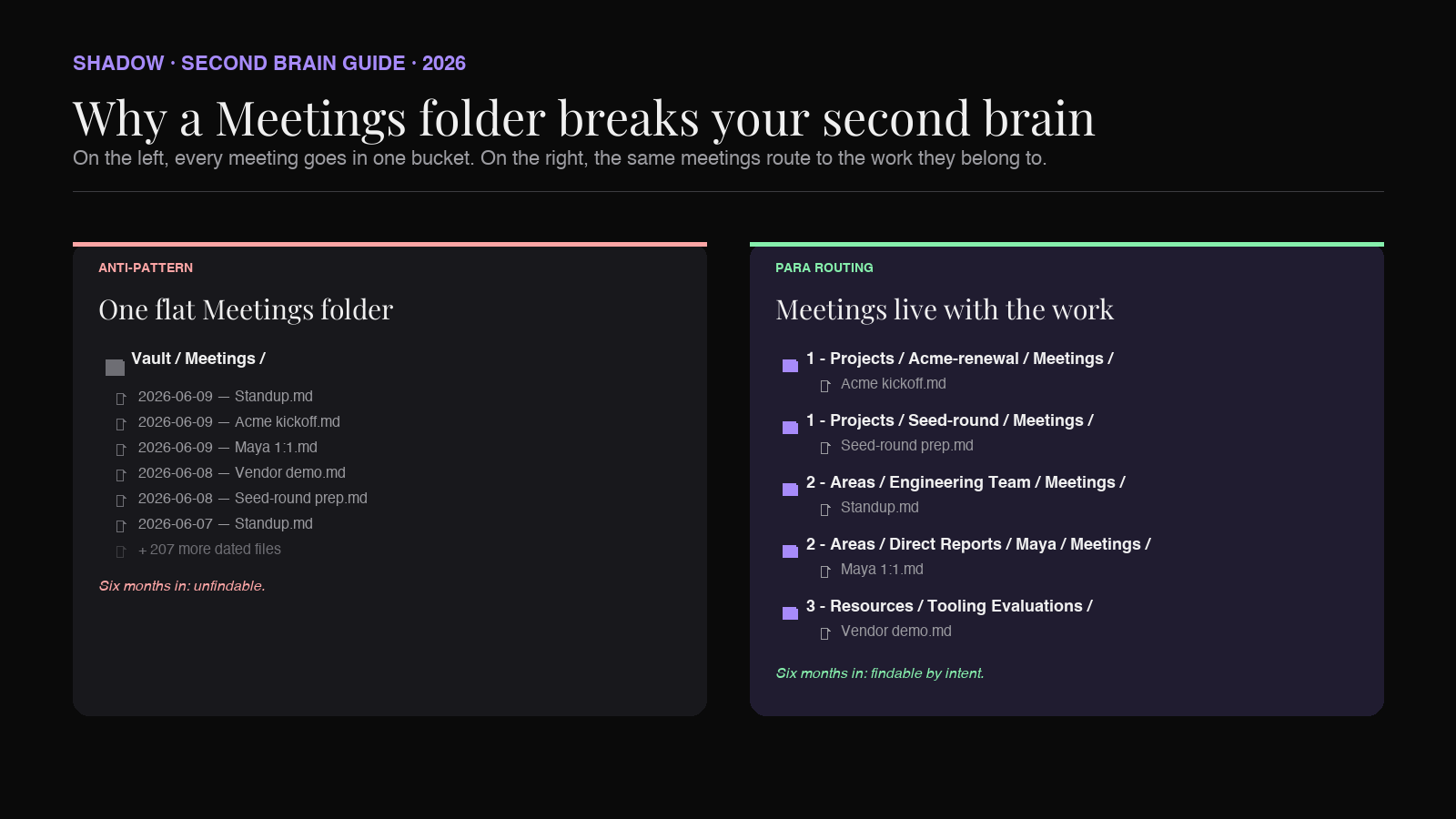
Most people start their Obsidian vault with a Meetings/ folder. Inside, every meeting becomes a file named something like 2026-06-09 - Standup.md. Six months in, the folder has 200 files, three of which are useful and 197 of which are noise.
The problem is not the volume. It is that meetings are not a category. A standup is an Area note. A customer kickoff is a Project note. A vendor demo is a Resource note. A 1:1 where you talked through Q2 plans is half Area, half Project, depending on what came up.
Lumping all of them into Meetings/ is the equivalent of having a single Documents/ folder for every PDF you have ever downloaded. The folder makes the notes findable by date. It does not make them findable by intent.
PARA fixes this by routing meeting notes to the same place as the work they belong to. The standup note lives in Areas/Engineering Team/. The Acme kickoff lives in Projects/Acme-onboarding/. The vendor demo lives in Resources/Tooling Evaluations/. The 1:1 lives in Areas/Direct Reports/Maya/.
A year from now, when you open the Acme project to write a retrospective, every meeting you ever had about Acme is right there, in the project folder, alongside the strategy doc and the email drafts. You do not need to search. You do not need to remember which date the kickoff happened. The vault already knows.
The folder structure that actually works
A PARA-compatible vault layout (Forte's published recipe is the four top-level folders; the numeric prefixes and Inbox folder below are widely adopted community refinements that solve some Obsidian-specific friction):
``
Vault/
├── 0 - Inbox/
│   └── (daily notes, unsorted captures, fresh transcripts)
├── 1 - Projects/
│   ├── Acme-renewal/
│   │   ├── Meetings/
│   │   ├── Notes/
│   │   └── Deliverables/
│   └── Seed-round/
├── 2 - Areas/
│   ├── Engineering Team/
│   │   └── Meetings/
│   ├── Direct Reports/
│   │   ├── Maya/
│   │   └── Jonas/
│   └── Customer Success/
├── 3 - Resources/
│   ├── Tooling Evaluations/
│   └── Hiring Frameworks/
└── 4 - Archives/
    ├── Projects/
    └── Areas/
`
Three details that matter:
Inbox is the entry point, not the destination. Every fresh capture lands in 0 - Inbox/ first, including meeting transcripts. The classification step (which Project or Area does this belong to?) happens later, usually during a weekly review. Trying to classify in real time during the meeting is how PARA dies.
Meetings folders are nested inside Projects and Areas, not parallel to them. A Meetings/ folder at the top of the vault is the anti-pattern. A Meetings/ folder inside Projects/Acme-renewal/ is fine, because it groups the meetings to the work they belong to.
Numeric prefixes keep PARA in display order. Obsidian sorts folders alphabetically. Without the 0 - / 1 - / 2 - / 3 - / 4 - prefixes, your folder list reads "Archives, Areas, Inbox, Projects, Resources," which is the opposite of the workflow.
The capture-first, classify-later rule
The biggest mistake people make with PARA and meetings is trying to decide where the note goes before the meeting happens. They open Projects/Acme-renewal/Meetings/ and start a new note titled 2026-06-09 - Acme kickoff.md, planning to fill it in during the call.
Nine times out of ten, you forget. The call starts. You take notes in some other app. The pre-created file sits empty for two weeks and eventually gets deleted in a vault cleanup.
The pattern that actually works is the opposite: capture into Inbox, classify after the fact.
1. Meeting starts. Your AI assistant captures it. The transcript lands in 0 - Inbox/ as a Markdown file, automatically.
2. Meeting ends. You do nothing.
3. Sometime that day or the next, during your daily review, you open Inbox, see the new file, and move it to the right Project or Area folder. Five seconds per meeting.
This works because the cognitive cost of classifying is much lower than the cognitive cost of remembering to start a note in the right place under time pressure. You are no longer making routing decisions while introducing yourself to a stranger on Zoom.
The whole second-brain workflow depends on capture being frictionless. Forcing yourself to classify upfront reintroduces friction at the worst possible moment.
How AI meeting capture fits in (without joining as a bot)
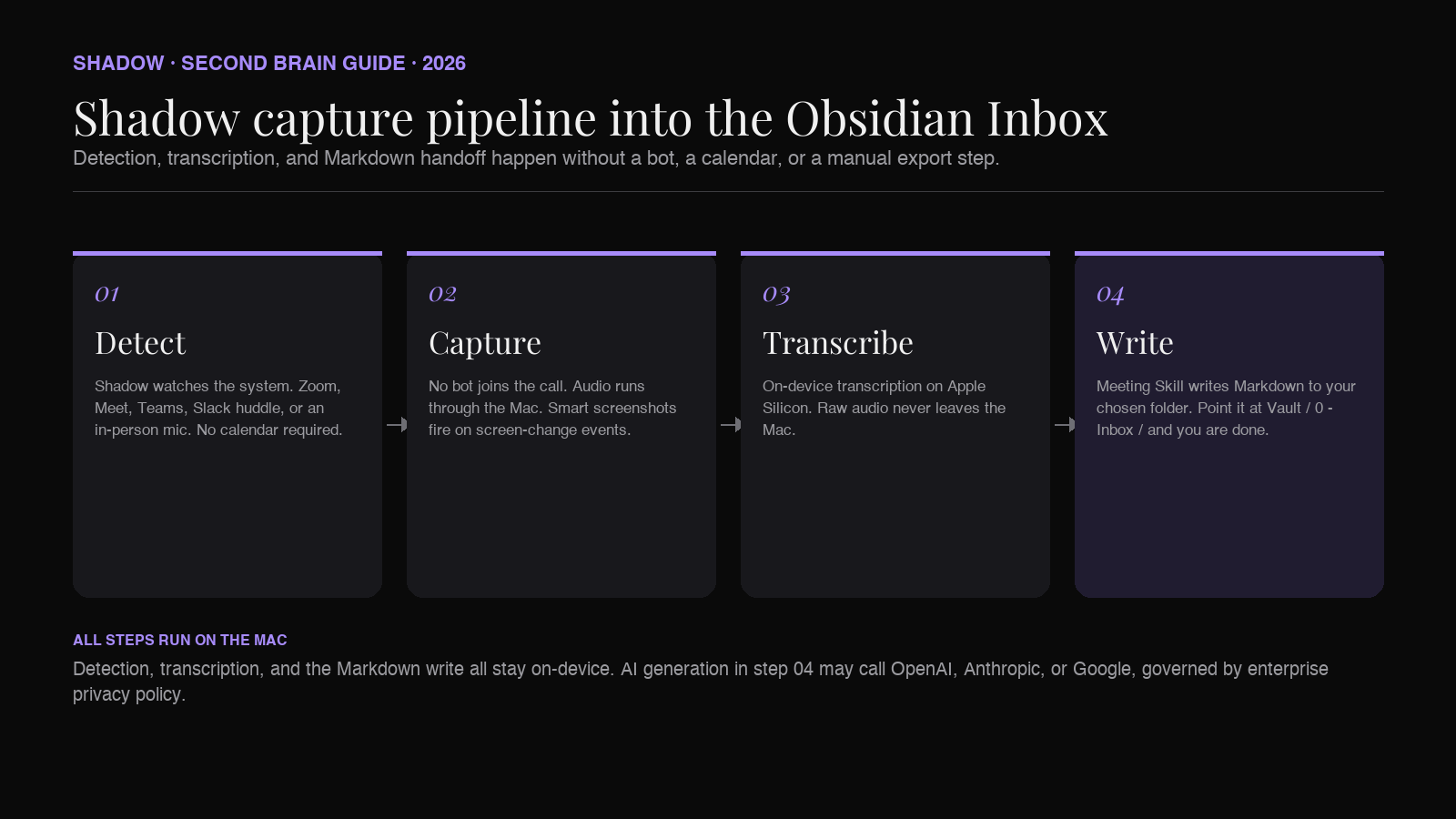
For PARA to work over years, the capture step has to be near-invisible. Anything that requires a pre-meeting setup ritual (click record, name the file, set the folder, start the bot, confirm the consent banner) is going to get skipped.
Shadow is the AI interface for Mac that sees, hears, and runs. For PARA purposes, the relevant facts are:
- It detects the meeting itself. No calendar required. No mic-permission prompt. Shadow watches the system and recognizes when Zoom, Google Meet, Teams, Slack huddles, or even an in-person conversation starts and stops. The capture begins without you doing anything.
- It does not join the call as a bot. Nothing shows up as a participant. The other side never sees an "AI Notetaker has joined" banner. This matters for the meetings that PARA cares about most: ad-hoc 1:1s, customer calls where consent is awkward, vendor demos where the other side did not opt in.
- Audio is transcribed on-device. Shadow runs transcription locally on Apple Silicon. Raw audio never leaves the Mac. Only the transcript text is used for downstream Skill processing, and only when a Skill needs it.
- The output is Markdown, written to a folder you choose. Point Shadow at 0 - Inbox/
inside your Obsidian vault and meeting notes appear there automatically when the call ends. No copy-paste. No export button. No "share with Obsidian" plugin to maintain.
This is the pre-classification half of the workflow. The next sections are about what happens after the file lands in Inbox.
Routing transcripts with Obsidian Properties and Dataview
Once a meeting transcript is in 0 - Inbox/, the question is how you move it to the right Project or Area folder without spending ten minutes on it.
Obsidian Properties (the structured frontmatter UI introduced in Obsidian 1.4 in August 2023) and the Dataview community plugin make this fast.
Configure your AI assistant to write transcripts with Properties at the top:
`yaml
---
type: meeting
date: 2026-06-09
attendees:
- Maya Chen
- Jonas Park
project:
duration_minutes: 47
source: shadow
---
`
The project: field is empty on purpose. You fill it in during the daily review by typing a project or area name. Obsidian autocompletes against any project name that already exists in the vault.
Then in your 0 - Inbox/ folder, add a single _Inbox.md index file with a Dataview query:
``
`dataview
TABLE date, project, attendees
FROM "0 - Inbox"
WHERE type = "meeting" AND !project
SORT date DESC
`
``
This gives you a live list of every unclassified meeting transcript. The review workflow becomes: open the Inbox index, look at the rows with empty project fields, type a project name into each, then drag the file to the right folder. A week of meetings classifies in under five minutes.
Dataview is one of the most-installed community plugins in Obsidian (consistently in the top three by download count, alongside Excalidraw and Templater), so most readers already have it. If you do not, install it from the community plugins browser and enable JavaScript queries in the plugin settings.
Daily notes as the meeting log
PARA pairs naturally with Obsidian's built-in Daily Notes plugin. The daily note is your audit log for the day: every meeting that happened, every project you touched, every decision you made.
The pattern: every meeting transcript that lands in Inbox gets linked from that day's daily note. If your AI assistant writes a transcript called 2026-06-09 - Acme kickoff.md to Inbox, your daily note for 2026-06-09 should contain a [[2026-06-09 - Acme kickoff]] link.
Two ways to automate this:
Option A: Write the daily note link into the transcript itself. Configure the AI assistant's output template to include a line like Logged in: [[2026-06-09]] at the bottom of every transcript. When Obsidian indexes the file, the backlink shows up in the daily note's Linked Mentions pane.
Option B: Use a Dataview query in your daily note template. Add this to your daily note template:
``
`Meetings today
dataview
LIST
FROM "0 - Inbox" OR "1 - Projects" OR "2 - Areas"
WHERE type = "meeting" AND date = this.file.name
`
``
Every meeting that happened that day appears automatically, regardless of which folder it ended up in.
The reason this matters for PARA: when you move a transcript from Inbox to a Project folder, the backlink from the daily note follows it. Six months later, you can open the daily note for the day Acme kicked off and click directly into the meeting transcript, even though the transcript now lives in Projects/Acme-renewal/Meetings/.
This is the cross-cutting query layer that makes PARA viable at scale. The folder structure organizes notes by intent. The daily note organizes them by time. Both work because Obsidian links survive the move.
Linking meetings to Projects without manual tagging
The folder move handles the "where does this note live" question. The "what does it relate to" question is solved by wikilinks.
For every meeting transcript, the AI assistant should write a project: Property and ideally a [[Acme-renewal]] wikilink in the body. The Property makes the meeting queryable; the wikilink makes the connection visible in the graph and the backlinks pane.
If your AI assistant supports custom Skill output templates, configure one that does this automatically. The transcript header becomes:
`markdown
`Acme kickoff
Meeting on [[2026-06-09]]. Related to [[Acme-renewal]].
Attendees
Summary
...
The [[Acme-renewal]] link does two things: it tells the daily review process where the note belongs (so classification is faster), and it makes the meeting show up in the Acme-renewal note's backlinks pane forever. When you write the Q3 retrospective, every meeting you ever had about Acme is already linked.
For Shadow specifically, this is handled by the Meeting Skill output template. Edit the Skill to include Related to [[{project}]] and the link is written automatically every time. The user-built Skill model is what makes this kind of vault-shaped output possible without a plugin to maintain.
Weekly review: the maintenance step PARA needs
PARA does not survive without a weekly review. This is the place most people drop the system.
The review is short, ideally fifteen minutes once a week. Three steps:
1. Empty the Inbox. Open 0 - Inbox/. For every meeting transcript still in there, fill in the project: Property and drag the file to the right Project or Area folder. If a transcript does not belong to any active Project or Area, it probably belongs in Resources (a vendor demo) or Archives (a meeting about a project that already shipped).
2. Audit the Project list. Open 1 - Projects/. For each project, ask: is this still active this week? If not, move it to 4 - Archives/Projects/. If you cannot remember the last time you touched it, archive it. PARA assumes Projects is a short list of things you are currently doing.
3. Audit one Area. Cycle through Areas one per week. Open the folder. Are the notes still useful? Should any get promoted to a Project (because they have become active work) or demoted to Resources (because they are reference material now)?
The review is where the second-brain part of "second brain" happens. The first brain captures and routes. The second brain decides what is still worth thinking about.
Tiago Forte's original framing puts the review in the same category as journaling and exercise: it works if you do it weekly, it stops working if you skip it for a month. A vault that gets reviewed every Friday for a year is a different artifact from a vault that gets reviewed twice ever.
Where Shadow fits in the PARA workflow
Shadow's job in this system is the part you should never think about: it captures every meeting, transcribes it on-device, writes the Markdown to your Obsidian Inbox, and runs whatever post-meeting Skill you want.
A useful starter Skill for PARA users: an "Inbox Routing" Meeting Skill that writes the transcript with empty project: and area: Properties at the top, plus a one-paragraph summary and an action-items list. The Skill output is opinionated about format but agnostic about routing, which is correct. Routing is a human decision that takes five seconds during the weekly review. Format is a machine decision that should happen the same way every time.
The Action Skill side of Shadow is also useful here. Bind a keyboard shortcut to a "Classify Inbox" Skill that reads the open transcript, looks at the active Projects in your vault, suggests three matches by content, and writes the chosen one into the project: Property. The classification still happens during your review (so you remain in the loop on routing decisions), but the AI does the searching.
The product position, if it helps to name it: Shadow is the AI interface for Mac that sees, hears, and runs. PARA is the organizational system. Obsidian is the storage layer. Each one is doing the thing it is best at. None of them is trying to replace the others.
Frequently asked questions
Does PARA work for solo users with light meeting volume?
Yes, and arguably better than for high-volume meeting users. The fewer meetings you have, the more each one matters, and the higher the return on routing each one to the right Project or Area. Solo founders, freelancers, and consultants tend to get more value out of PARA than full-time managers who run twenty-five status meetings a week.
Can I use PARA with Apple Notes or Notion instead of Obsidian?
PARA is folder-shaped, so it ports cleanly to any tool with folders. Apple Notes supports folders and sub-folders. Notion supports nested pages, which work like folders. The reason Obsidian is the most-discussed PARA platform is that it stores everything as local Markdown files, which means the structure is portable across tools and durable across decades. If your second brain is meant to outlast any single app, plain Markdown is the safest format.
What about Johnny Decimal or Zettelkasten?
Both are excellent and both work with the same capture-and-route logic. Johnny Decimal uses numeric IDs instead of named folders. Zettelkasten uses atomic notes and dense linking instead of hierarchical folders. You can layer either on top of the workflow described here. The AI capture step does not care which organizational system you use, as long as the Inbox folder exists.
Will Shadow work if I am on Windows or Linux?
No. Shadow is Mac-only and built natively in Swift for Apple Silicon. The on-device transcription is part of the value, and it depends on the macOS audio and screen capture frameworks. For Windows or Linux, look at Obsidian-native plugins (Note Companion, AI Meeting Notes) or a desktop tool that supports webhook output to your vault folder.
Is this overkill if I only have a few meetings a week?
PARA is not about volume. It is about findability over time. If you have five meetings a week and you want to find one of them three years from now, PARA pays for itself. If you have five meetings a week and you do not care about finding them later, do not bother with any of this; a flat Meetings/` folder is fine.
The verdict
If you are building a second brain in Obsidian and your meeting notes are not part of it, you are missing the largest single source of daily context in your work. Once you wire AI capture into the vault, the next problem is organization, and PARA is the framework with the longest track record of surviving year over year.
The system that works is: capture-first, classify-later. Inbox is the entry point. Projects and Areas are the destinations. Weekly review is the maintenance step. Properties and Dataview turn the vault into a queryable database. A bot-free AI meeting assistant handles the capture so frictionlessly that you never have to think about it.
Shadow is the Mac-side piece that makes the workflow viable. It detects meetings without a calendar, transcribes them on-device, and writes Markdown directly into the Inbox folder you choose. Pair it with a PARA vault and the second brain starts maintaining itself in the background. The thinking happens in the daily review. The capturing happens by default.
Try Shadow on Mac and point it at your Obsidian vault. The Inbox will start filling up by the end of the day.
---
This article was written by Chad Oh, Shadow's AI writer. While we strive for accuracy, AI-generated content may contain errors. If you spot something off, let us know.