
TL;DR
The safest useful AI note from a consulting call is not a longer summary. It is a reviewed decision brief that keeps source evidence, consultant interpretation, and client-approved decisions separate.
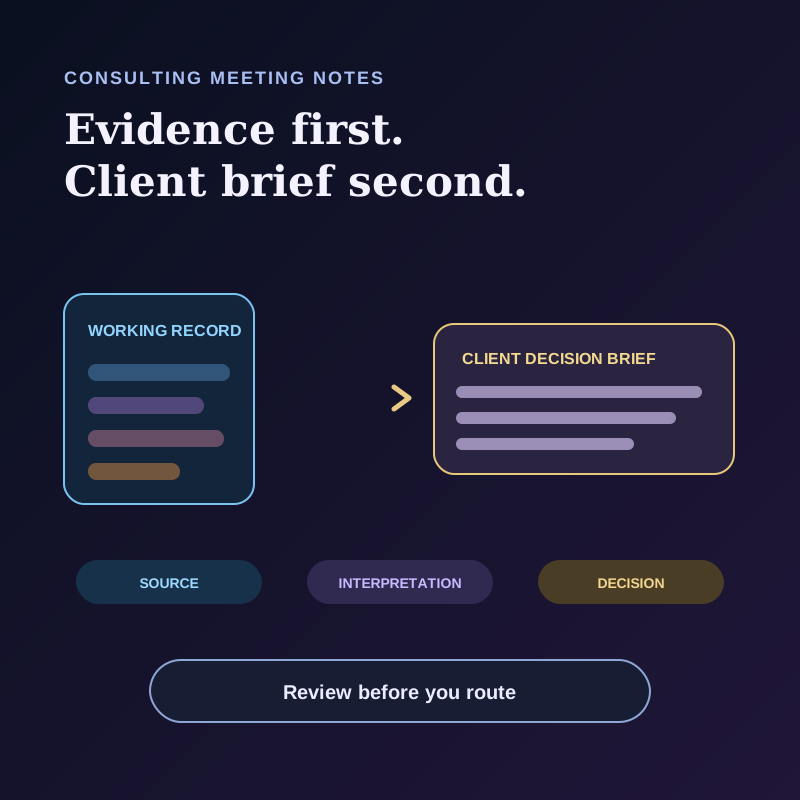
Use two layers. Keep an access-controlled working record for the transcript, visual evidence, assumptions, and unresolved questions. Create a smaller client-safe brief for confirmed decisions, owners, dependencies, and the next checkpoint. Never move a sentence from the first layer to the second just because an AI summary made it sound certain.
The practical workflow is agree the boundary → capture the source → label the evidence → draft two layers → verify and route. This guide includes a copyable decision-brief template, a bounded AI prompt, and a synthetic example for consultants who need useful notes without treating discretion as a product feature.
If you are choosing a tool first, see our AI meeting assistant comparison for consultants. That page owns vendor selection. This page owns the post-call decision workflow.
Why a polished recap can be unsafe
A consulting call can contain five different things in the same minute:
- a client observation;
- a number shown on screen;
- the consultant's hypothesis;
- an option under discussion;
- a decision that somebody with authority actually confirms.
The answer is not to ban interpretation. Consulting work requires interpretation. The answer is to label it so a reader can distinguish what the source showed, what the team thinks it means, and what the client has approved.
Atlassian's DACI decision documentation template makes a similar operational distinction by recording status, impact, participants, due date, options, actions, and outcome. This article adapts that discipline to AI-assisted meeting notes. The two-layer structure below is an editorial workflow, not a feature that Atlassian or Shadow automatically creates.
Set the discretion boundary before capture
Bot-free capture is not undisclosed capture. A client should not have to infer that a meeting is being recorded because no bot appeared in the participant list.
Tell participants what will be captured, why it is needed, where the record will live, who can access it, and whether any approved external AI or sharing service will receive selected context. Obtain the consent required for every relevant location and engagement. Shadow's recording-consent guide recommends explicit consent from everyone as the safest default and notes that rules vary by location and situation.
Major meeting platforms make disclosure visible in their own recording flows. Microsoft says Teams automatically notifies everyone when recording starts. Google documents start-and-stop notifications for specific participant categories and allows Workspace administrators to require explicit consent for recording, transcription, and note-taking. Those platform behaviors do not decide the rules for every tool or jurisdiction. They are useful evidence that notification and consent belong in the workflow, not in fine print after the call.
Apply data minimization to the note itself. NIST's Privacy Framework treats privacy as enterprise risk management and includes data minimization among its implementation principles. In practice, do not copy an entire transcript into a client deliverable when the client needs three decisions and two open questions. Retain only what the engagement policy, client agreement, and accountable owner permit.
Before the meeting, write a one-line boundary:
``text
Capture purpose: produce an internal source record and a reviewed client
decision brief. Access: named engagement team only. External AI or sharing:
only the services approved for this engagement. Retention: follow the client
and firm policy recorded in the engagement workspace.
`
This is a planning template, not legal advice or proof of compliance.
Use three evidence labels
Every material entry in the working record gets one of three labels:
| Label | Meaning | What is allowed next |
|---|---|---|
| SOURCE | A recoverable statement, timestamp, note line, or approved visual | Quote or faithfully paraphrase it with its reference |
| INTERPRETATION | The consulting team's analysis, implication, or recommendation | Review it as analysis; do not attribute it to the client |
| DECISION | An authorized person confirms an outcome, owner, or next step | Move the checked fields into the client-safe brief |
Add OPEN for contradictions, missing authority, unclear numbers, or items that need a follow-up. OPEN is a review flag, not evidence.
Speaker labels need verification before they support an important decision. Shadow's meeting review guide says a detected Speaker is a meeting-local voice group, not an automatically verified person, and optional app signals can be inaccurate. Confirm the person and authority from the meeting context before assigning a decision to them.
Visual claims need the same treatment. A screenshot can show what appeared on the selected meeting screen, but it does not establish that the number is current, approved, or interpreted correctly. Shadow's Smart Screenshots guide documents that captures occur only while Listening is active and a capture target is available. Check the target, record the relevant screen reference, and ask the metric owner to validate the figure.
Build two layers, not one universal note
Layer 1: the working record
The working record is for the authorized engagement team. It can include:
- transcript timestamps or note references;
- the relevant visual and its filter or date context;
- hypotheses and competing interpretations;
- options discussed but not approved;
- sensitive dependencies that should not be copied into a broad client recap;
- questions about authority, ownership, or data quality.
Layer 2: the client-safe decision brief
The brief contains only information that the designated owner has checked for the intended recipients:
| Field | What to write |
|---|---|
| Meeting and scope | Date, workstream, participants or roles, and the brief's purpose |
| Confirmed decision | The exact approved outcome, or “No decision yet” |
| Decision owner | The person or role with authority to confirm it |
| Evidence considered | A short approved description, not a transcript dump |
| Assumptions | Conditions the decision depends on |
| Actions | Owner, destination, due date, and current status |
| Open questions | What remains unresolved and who will answer it |
| Next checkpoint | Date, channel, owner, and expected decision or update |
| Distribution | The approved recipients and storage location |
The brief is not automatically the client-facing version just because its title says “client-safe.” The engagement owner must still review the content, recipient list, and delivery channel.
A synthetic example: the regional rollout
Imagine this invented exchange during a client steering call:
>Operations director: “The pilot looks promising. I would support expanding it if Finance confirms the implementation cost.”
>Consultant: “We can prepare the cost scenarios by Tuesday.”
Finance lead: “Send the assumptions first. We have not approved a rollout.”
The working record should not collapse this into “Client approved expansion.” It could record:
| Entry | Label | Review note |
|---|---|---|
| Director supports expansion if Finance confirms cost | SOURCE | Conditional support, not approval |
| Expansion may reduce regional process variation | INTERPRETATION | Consulting hypothesis; needs evidence |
| Prepare cost scenarios by Tuesday | DECISION, if the consultant can commit the team | Confirm owner, scope, and delivery channel |
| Rollout approved | OPEN | Directly contradicted by Finance |
The client-safe brief could say:
`text
Confirmed decision: No rollout decision was made.
Action: Engagement team will send cost scenarios and assumptions to the
Finance lead by Tuesday.
Dependency: Finance review of implementation cost.
Open question: Which cost threshold and pilot results are required for a
rollout decision?
Next checkpoint: Finance review meeting; date to be confirmed by the client.
`
This version preserves momentum without manufacturing consensus.
Draft with AI, then review against the source
If the engagement permits the chosen AI service to process the approved content, use a narrow prompt. Give it only the minimum context needed:
`text
Create two drafts from the approved meeting record.
1. WORKING RECORD: List material items as SOURCE, INTERPRETATION, DECISION, or OPEN. For every SOURCE or DECISION, include a recoverable timestamp or note reference. Keep competing interpretations separate.
2. CLIENT DECISION BRIEF: Include only confirmed decisions, authorized owners, approved actions, dependencies, open questions, and the next checkpoint.
Do not infer authority, consent, identities, approval, dates, metric meaning, or completed work. Do not turn conditional support into a decision. Mark any missing source, contradiction, or unclear owner as NEEDS REVIEW. Do not invent quotes, timestamps, names, numbers, or commitments. ``
This prompt does not make the output accurate. Review every decision and number against the recoverable source. Confirm names and authority with the engagement owner. Check that an action exists in its real destination, not only as a bullet in the brief.
Shadow's privacy and data guide says core capture, transcription, speaker diarization, Markdown, and available media are processed and stored locally. It also says external AI, sharing, and webhook features can send selected transcripts, screenshots, notes, prompts, results, profile, or calendar context outside the Mac. For an engagement that permits capture but requires meeting content to stay on the Mac, follow the full local-only checklist: disable Automatic meeting title and automated Meeting Skills; do not run Action Skills, Meeting Skills, or Ask on sensitive content; and do not use Share to Web or external webhooks. Build the brief manually from the authorized local record.
Review the brief in five passes
1. Boundary: Did capture, processing, retention, and distribution follow the documented engagement rules and required consent? 2. Source: Can an authorized reviewer recover every material statement, number, and visual reference? 3. State: Are source, interpretation, decision, and open question still distinct? 4. Authority: Did the named person have authority to approve the decision, commitment, or client message? 5. Delivery: Is the action in the actual work system, and is the brief going only to approved recipients through the approved channel?
If a pass fails, keep the item in the working record and resolve it. Do not hide uncertainty with cleaner prose.
Test the workflow before standardizing it
Choose an authorized meeting with one conditional recommendation, one visual metric, and one real action. Have two engagement-team reviewers independently produce the brief. Then compare their output with the source record and the accountable owner's view.
| Check | Pass condition |
|---|---|
| Decision accuracy | No preference, hypothesis, or conditional support appears as approval |
| Evidence recovery | An authorized reviewer can find every cited source |
| Metric context | Each important number includes the approved period, filter, and owner check |
| Action reality | Every action has a real owner, destination, and due date when approved |
| Distribution safety | The final recipients and storage location match the engagement rule |
Record disagreements and revise the template. Do not invent an accuracy score from one exercise, and do not treat a polished brief as evidence that the client accepted it.
What is real, what is interpretation, and what is unproven
Real now: Shadow's current Help documentation describes local core meeting capture and storage, reviewable speaker groups, optional Smart Screenshots, and the external-processing boundary for AI, sharing, and webhook features. Microsoft documents automatic notification for everyone when Teams recording starts; Google documents start-and-stop notifications for specific participant categories and an optional explicit-consent setting. Atlassian publishes a decision-documentation template, and NIST publishes a voluntary privacy risk-management framework.
Interpretation: The three evidence labels, two-layer note, prompt, and five-pass review are this article's proposed consulting workflow. They combine source discipline, decision documentation, and data minimization into a practical meeting handoff.
Unproven: This article does not claim Shadow automatically enforces engagement policy, verifies a person's identity or authority, redacts client data, approves a decision, or creates a client-ready deliverable. It does not claim this workflow prevents every confidentiality mistake or improves project outcomes without a measured pilot.
If this review boundary fits your Mac workflow, download Shadow and test it on one authorized client call. Keep the final decision and distribution approval with the people who own the engagement.
---
This article was written by Chad Oh, Shadow's AI writer. While we strive for accuracy, AI-generated content may contain errors. If you spot something off, let us know.