
The interview transcript template most researchers copy from the internet is a Google Doc with a table at the top, a list of questions in the middle, and a "notes" section at the bottom that fills up with unformatted text over the course of ten interviews and then gets abandoned. It works for one interview. It stops working at fifteen, because the moment you need to pull a quote from an interview you did six weeks ago, you are opening thirteen Docs one at a time to find the right one.
The template that actually holds up over a full research cycle is not a Doc. It is a Markdown file with structured frontmatter, consistent speaker tags, timestamps at the pause boundaries, and a link back to the participant, the study, and the theme it contributes to. In Obsidian, that shape gives you something a Doc cannot: a searchable, queryable record of every interview you have ever run, with quotes one backlink away from the themes they support.
This is the interview transcript template we use, the AI capture layer that fills it in, and the queries that let you read across fifty interviews without opening a single file by hand.
TL;DR
A good interview transcript template does three jobs at once: it captures the conversation faithfully, it makes a single interview readable weeks later, and it lets you read across every interview in the study without opening files one at a time.
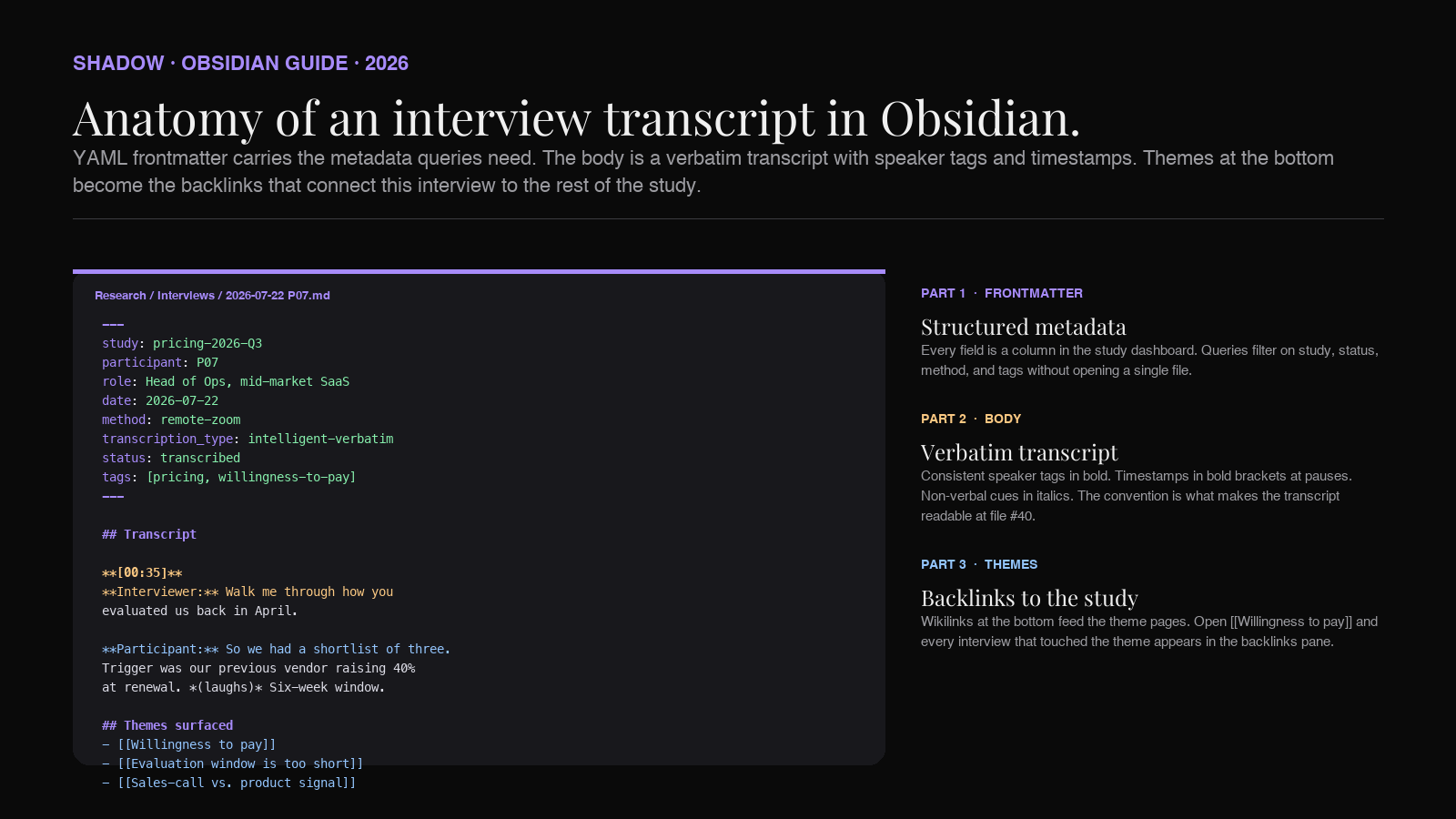
The template below does all three. YAML frontmatter carries the structured metadata every downstream query needs (study, participant, date, method, consent). The Markdown body carries the verbatim transcript with consistent speaker tags, timestamps at natural pause points, and non-verbal cues in italics. A short "Themes" block at the bottom lists the [[wikilinks]] that connect the interview to the theme pages in your vault. Dataview queries then read the frontmatter across every interview file and produce study-wide tables (all P07 quotes, all interviews tagged #pricing, all interviews with pending analysis).
The 2026 change is the capture step. A bot-free AI note-taker that transcribes on-device, identifies each speaker, and writes the finished Markdown into your Obsidian vault means you can spend the interview watching your participant instead of typing during it. Shadow is the Mac app most researchers reach for: it captures without joining the call as a bot (participants forget the recording is happening, which is what you want in a candid interview), transcribes locally, and exports Markdown into a folder your vault is watching. The template below is what it lands in.
Why interview transcripts belong in a local vault
Every interview transcript template on the first page of Google is a Doc, and every one of those Docs treats the transcript as a leaf: a self-contained artifact that lives in a folder, gets read a few times, and never talks to any other transcript.
That model is the reason UX research and qualitative studies are so hard to compound. The value in interview data is not in any single conversation. It is in the pattern that shows up across ten conversations. Fifteen participants complaining about the same onboarding friction is a finding. One participant complaining about it is a data point. A folder full of Docs cannot tell the difference. You have to remember to look.
A vault of Markdown files can tell the difference, because every mention of [[Onboarding friction]] inside a transcript appears on the Onboarding friction.md theme page under Backlinks. You do not have to remember which interviews raised the theme. You open the theme page and the interviews come to you.
Three things fall out of moving transcripts into Obsidian.
Plain text you own. The transcripts sit in a folder on your Mac. Interview recordings are some of the most sensitive documents a research team handles (they contain participants' voices, opinions, and sometimes personal details). Keeping the primary record in local Markdown, not in a cloud service you did not vet for research consent, is a defensible default. If the research tool of the year changes, the transcripts do not have to move.
Backlinks as a theme index. Every quote you tag with [[Willingness to pay]] becomes part of the willingness-to-pay theme page. When it is time to write the report, the theme pages are already assembled. You are editing, not searching.
Queries across the whole study. Dataview (or the newer built-in Bases view) reads the YAML frontmatter across every transcript and returns a table: all interviews for study: pricing-2026-Q3, sorted by date, with participant, method, and analysis status. That table is the dashboard you check on a Friday to see which transcripts still need coding.
You give up two things.
No live collaboration on the transcript itself. If your team wants to comment on a transcript in real time, Obsidian is not the tool. What we do instead: keep the master transcript in the vault, export a Markdown copy to a shared Notion or Google Doc for the analysis pass, then paste the final coded themes back into the vault. Vault stays canonical; comments stay collaborative.
No built-in coding UI like Dovetail or Atlas.ti. If you are running a formal coding cycle with a codebook and inter-rater reliability, dedicated qualitative research tools do that better than Obsidian ever will. The vault is where the transcripts and themes live. The coding tool is where the frames get applied. Point them at the same Markdown files if the coding tool supports Markdown import.
The interview transcript template
Copy this block. Paste it into a new note in your Obsidian vault at /Research/Interviews/2026-07-22 P07.md (or whatever your naming convention is). Fill the frontmatter before the interview starts. Let the capture layer fill the body.
``markdown
---
study: pricing-2026-Q3
participant: P07
participant_name: "(redacted for shared vault; kept in participant registry)"
role: Head of Ops, mid-market SaaS
date: 2026-07-22
duration_min: 47
method: remote-zoom
interviewer: Jay
recorder: Shadow (on-device)
consent: recorded, transcribed, quotable with pseudonym
transcription_type: intelligent-verbatim
status: transcribed
tags: [pricing, onboarding, willingness-to-pay]
---
P07 — Head of Ops, mid-market SaaS
Session context
Transcript
[00:00] Interviewer: Thanks for joining. Before we start — you're okay with me recording this, and any quotes we use will be attributed to "Head of Ops at a mid-market SaaS," not to you or your company?
Participant: Yeah, that's fine. Go ahead.
[00:35] Interviewer: Walk me through how you and your team evaluated us back in April.
Participant: So we had a shortlist of three. You, [Competitor A], and [Competitor B]. The trigger was that our previous vendor was raising prices about forty percent at renewal, and we had a six-week window to decide.
(laughs) Which, in hindsight, was way too short.
[02:10] Interviewer: What made the six weeks too short?
Participant: We didn't get to a real pilot with any of you. We got to demos. We got to sales conversations. But nobody in our team actually used any of the three tools in production during the eval. So the decision came down to what the sales calls felt like, and honestly the pricing page.
[04:47] [speaker gap — participant looking up a document]
Participant: Here it is. So the annual number for you came out at $18,400 for our seat count. [Competitor A] came in at $14,900. We picked [Competitor A].
[05:30] Interviewer: If pricing had been at parity, would the decision have gone the same way?
Participant: Honestly, probably not. Because the demo you gave had a couple of features [Competitor A] didn't show us. But at the time, saving three and a half grand felt more important than a feature we hadn't tried yet.
[07:12] [...transcript continues...]
Themes surfaced
- [[Willingness to pay]] — participant chose the cheaper of two shortlisted tools despite preferring our demo.
- [[Evaluation window is too short]] — six-week window between renewal notice and decision blocked a real pilot.
- [[Sales-call vs. product signal]] — decision was driven by pricing page and sales-call feel, not product use.
Follow-ups
- [ ] Send [[pricing-benchmark-2026]] draft to the recruiter as a thank-you.
- [ ] Cross-check with [[P04]] and [[P09]] — both mid-market, both mentioned renewal windows.
Analysis notes (written after)
- The renewal window pattern is showing up in every mid-market interview. Worth breaking out as its own theme.
- P07's "sales-call feel" comment is the third instance of participants weighing subjective sales experience above product features. See [[Willingness to pay]] backlinks.
That is the whole template. Everything below is what each part does and why it is shaped that way.
The frontmatter, field by field
The YAML block at the top is the difference between a folder of transcripts and a queryable study. Every field pays for itself the first time you want to read across interviews.
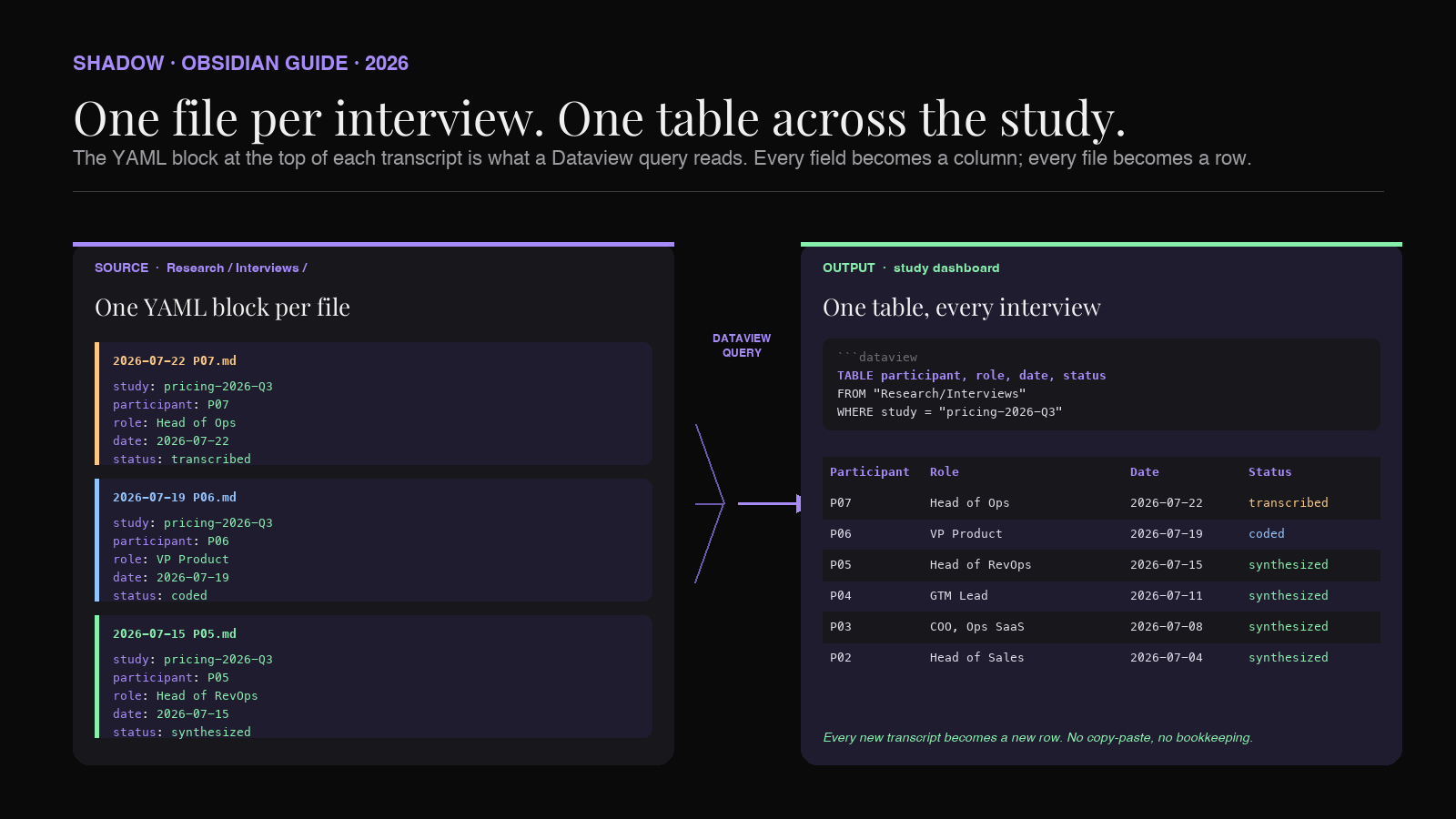
groups every interview that belongs to the same research question. A Dataview query on study: pricing-2026-Q3 returns exactly the interviews you need to synthesize the report for that study. If you run three studies a quarter, this is the field that keeps them from bleeding together.
participant is a pseudonym (P01, P02, ...). Never put the real name in the transcript file if the vault is ever going to be seen by anyone besides you. Keep the real names in a separate participant registry file (/Research/Recruiting/participants.md) with the mapping. If you have to publish or share the transcript, redact by pseudonym only. This is the same discipline academic IRB reviews demand and it costs almost nothing to hold to it from day one.
participant_name is optional and only present if you keep unredacted transcripts for internal use. If your vault syncs to iCloud or a shared team drive, leave this blank or omit the field.
role is a short, publishable description ("Head of Ops, mid-market SaaS"). This is what you will quote as attribution in the final report. Writing it now, at the top of the transcript, saves a decision later.
date, duration_min, method are the housekeeping fields that let you filter interviews by recency, length, and channel (remote-zoom, in-person, phone). Do not skip them; they cost two seconds to fill and unlock every "how much research have we actually done this quarter" question a research lead ever asks.
interviewer and recorder are provenance. Six months from now, when someone asks "who ran this interview" or "what tool captured the audio," the answer is in the file. The recorder field is also useful for reproducibility: if you switch capture tools mid-study, you can filter interviews by capture method and check whether the transcript quality changes.
consent is a short free-text summary of what the participant consented to. "Recorded, transcribed, quotable with pseudonym" is a typical entry. This field exists to make the answer to "can we quote this?" a two-second lookup instead of a scramble through a signed consent form six weeks later.
transcription_type is one of verbatim, intelligent-verbatim, edited, or summary. It records the fidelity level so a reader knows whether the transcript preserves every "um" or has been cleaned. More on this in the next section.
status moves through recorded → transcribed → coded → synthesized → archived. Dataview queries filter on this field to build the "what still needs to be coded" dashboard.
tags are the theme tags used across the whole study. They complement the [[wikilinks]] in the body: tags are for study-level dashboards; wikilinks are for narrative connections between quotes and themes.
The body, field by field
The Markdown body is the transcript itself. Four rules make it hold up over hundreds of interviews.
Consistent speaker tags in bold. Use
Interviewer: and Participant: (or P07:) and never change the convention mid-file. If you have two interviewers, use their initials. Bold makes the speaker visually scannable when you skim; consistency makes speaker-level analysis possible later.Timestamps in bold brackets at natural pauses.
[00:35] on its own line before a new question or topic shift. You do not need a timestamp on every turn (that gets noisy). Aim for one every 30 to 90 seconds of audio, or at any pause, topic change, or important moment. This is enough to let you jump back to the audio if you ever need to verify a quote.Non-verbal cues in italics inside parentheses.
(laughs), (long pause), [speaker looking up a document]. This is the standard convention in qualitative research and it survives export to any other format. Non-verbal cues carry a lot of signal in an interview — the pause before answering a pricing question is often more informative than the answer — and they cost almost nothing to preserve.Themes surfaced as
[[wikilinks]] at the end. Every theme you notice while reading through the transcript gets a bullet in the "Themes surfaced" block with a [[wikilink]] to the theme page. This is the step that makes the transcript queryable by topic later. The theme pages do not have to exist yet — Obsidian will create the file when you click the link — but the link has to exist in the transcript for the backlink pane to work.
Verbatim, intelligent verbatim, edited, or summary
The
transcription_type field in the frontmatter picks one of four fidelity levels. Which one you choose depends on what the interview is for.Verbatim preserves everything: every filler word ("um," "uh," "you know"), every repetition, every stutter, every non-verbal cue. Use it for interviews you will analyze linguistically (discourse analysis, communication research, medical intake studies where hesitations matter). It is the highest-fidelity option and the slowest to read.
Intelligent verbatim removes filler words and false starts but preserves the substantive content, including non-verbal cues and pauses. This is the default for most product research, user interviews, and journalism. It reads cleanly, preserves the voice of the participant, and cuts about 20 percent of the word count.
Edited goes further: it fixes grammar, tightens run-on sentences, and reorders for clarity while preserving meaning. Use it for published transcripts (a blog Q&A, a report appendix) where readability is the goal and no one is going to code the text for research signal. Do not use edited transcripts as research data; you cannot code a transcript that has already been shaped by an editor's judgment.
Summary is not a transcript at all — it is a short paragraph capturing the outcome of the interview. Use it for interviews that never needed a full transcript (a five-minute recap call, a background chat). The transcription_type field records that the file is a summary, not a transcript, so downstream analysis does not confuse the two.
Pick one, put it in the frontmatter, and stick to it for the study. Mixing verbatim and edited transcripts inside the same study makes coding results incomparable.
Auto-filling the template with a bot-free AI note-taker
The bottleneck for most interview-heavy research is not the template. It is the transcription. Twenty 45-minute interviews is fifteen hours of audio, and manually transcribing intelligent-verbatim runs about four hours of work per hour of audio. That is a working month you do not have.
The 2026 shift is that this bottleneck is gone if you set it up right. A bot-free AI meeting assistant on your Mac captures the audio directly (without joining the call as a visible bot), transcribes on-device, applies speaker diarization, and writes the result as Markdown into a folder your Obsidian vault is watching.
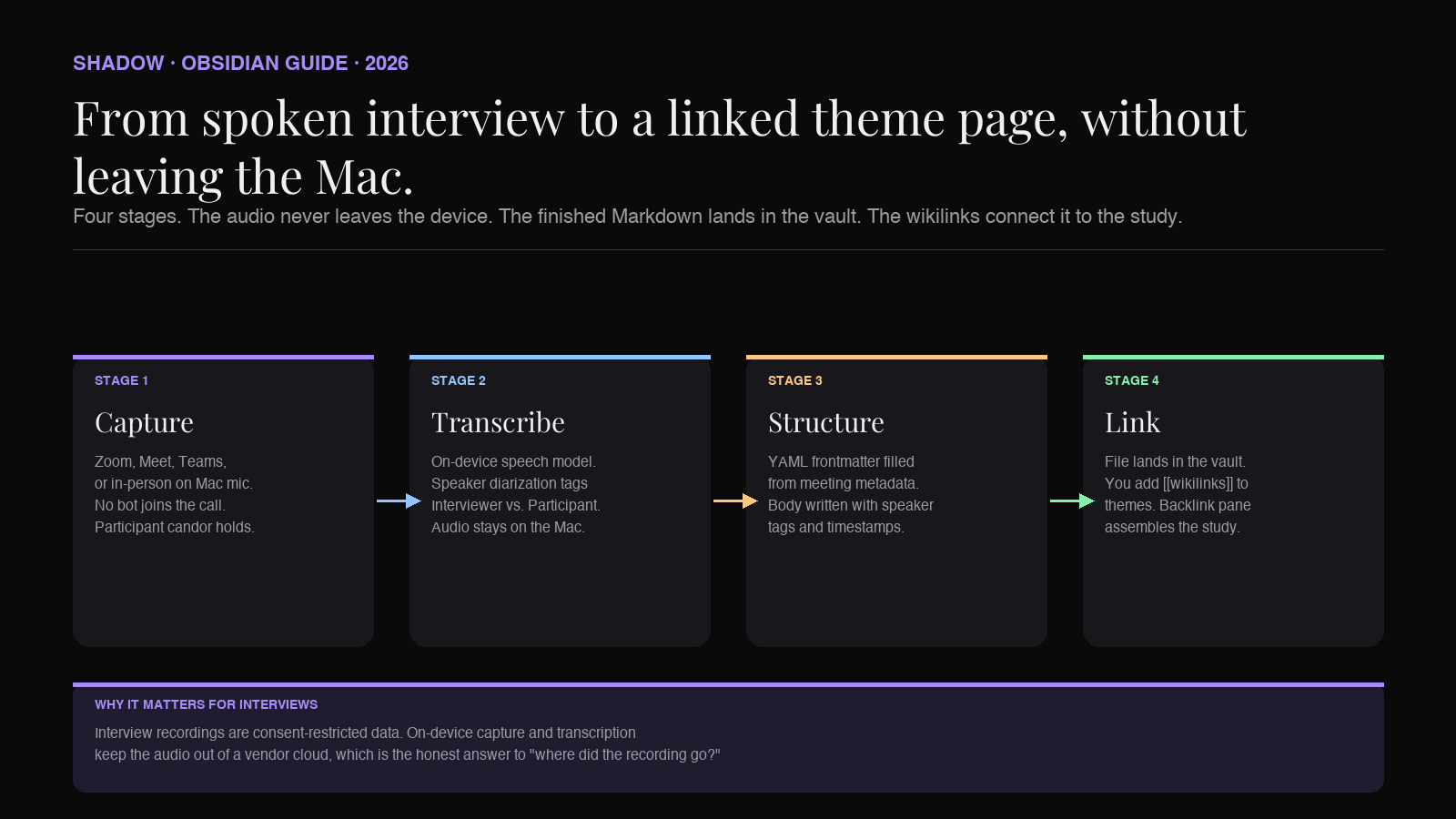
Two things about this flow matter for interview research specifically.
Bot-free capture changes what participants say. A visible AI bot ("[Bot Name] is recording this meeting") in an interview is a signal to the participant that a third party (the AI vendor, the manager, the compliance team) is listening. Candor drops. You get the interview a participant gives to a room; you do not get the interview they would give to just you. A tool that captures locally without appearing as a participant in the call reads to the interviewee as a personal recorder, not a corporate observer. This is the same reason clinical research uses handheld recorders instead of Zoom cloud recording, and it applies to product research just as directly.
On-device transcription keeps the audio out of a vendor cloud. Interview recordings are consent-restricted data. Most participant consent forms say the recording will be used for research; they do not say the audio will be sent to a third-party transcription service for model training. On-device transcription (audio never leaves the Mac) makes the answer to "where did the recording go" honest and simple: it went to your local vault and nowhere else.
Shadow does both of these, which is why it is the Mac app most researchers who care about the ethics of their capture chain end up on. The finished Markdown lands in a vault folder with speaker tags and timestamps, ready for you to paste under the frontmatter block above. You do a fifteen-minute cleanup pass (fill in the
themes surfaced block, confirm the transcription_type, adjust any misattributed speaker turns), and the file is study-ready.The rest of this piece is how to read across the resulting folder.
Reading across interviews with Dataview
One transcript is a note. Fifty transcripts are a study. Dataview is the plugin that turns the folder into the study.
Put this query in a file called
/Research/pricing-2026-Q3/dashboard.md:``markdown
`dataview
TABLE participant, role, date, duration_min, method, status
FROM "Research/Interviews"
WHERE study = "pricing-2026-Q3"
SORT date DESC
`
``You now have a live table of every interview in the study, with the status column making it obvious which ones still need coding. Every field is filterable, every row is a link to the transcript.
Three more queries turn the dashboard into a research workspace.
Every quote tagged with a theme. Not a Dataview query directly, but a Backlinks pane on the theme page. Open
and every interview whose "Themes surfaced" block links to that theme appears with the surrounding context. Read the excerpts, decide which quotes make the final report, done.Unfinished analysis by interviewer. A
WHERE status != "synthesized" AND interviewer = "Jay" query returns the list of interviews still on your plate. Point one of these at each researcher's dashboard and you have a per-researcher backlog that updates automatically.Cross-study patterns. A
TABLE length(rows) AS interviews GROUP BY study query reveals which themes and studies are compounding across quarters. If #pricing appears in three separate studies, it might be worth its own longitudinal report. This is the kind of insight a folder of Docs cannot produce and a folder of Markdown files with structured frontmatter produces for free.If you have not adopted Dataview yet, the newer built-in Bases view does the same job with a table-editor UI instead of a query. Same underlying data — every transcript file is a row, every frontmatter field is a column, every column is filterable.
Common mistakes
Five patterns show up over and over when researchers first move interview transcripts into a vault. All are cheap to avoid.
Putting real participant names in the transcript file. Once the name is in the file, every downstream export, share, or backup contains it. Use pseudonyms in the transcript from day one, keep the mapping in a separate participant registry, and share only the pseudonymized files.
Skipping the frontmatter "just for one interview." The one interview with no frontmatter is the one that will not show up in the Dataview query later, and you will spend an hour trying to figure out why the count is off. Fill the frontmatter. Every time.
Coding themes inline instead of at the bottom. Some templates put tags next to every quote. This looks good in the file but makes the transcript hard to read and hard to compare across interviews. Keep the transcript clean; put the theme wikilinks in the "Themes surfaced" block at the bottom. If you want per-quote coding, use a dedicated coding tool that reads Markdown; do not do it inline in the transcript.
Mixing verbatim and intelligent-verbatim inside one study. Coded results are only comparable across transcripts at the same fidelity level. Pick one for the study, put it in the frontmatter of every file, and hold to it.
Never running the weekly read-across. The value in a vault of interview transcripts compounds only if someone actually opens the dashboard. Put a recurring calendar block on Friday afternoon: fifteen minutes, open the study dashboard, read the new interviews, update the theme pages. Without that ritual, the folder just grows.
FAQ
Does this template work for user interviews, expert calls, and job interviews?
Yes, with small adjustments. For expert calls, add an
expertise field to the frontmatter and drop the study field (or repurpose it as topic). For job interviews, replace consent with role_being_hired_for and add scorecard_ref linking to the hiring scorecard. The bones — YAML frontmatter, verbatim body, themes at the bottom, backlinks — are the same across all three.Is this compatible with Dovetail, Atlas.ti, Reduct, or Marvin?
The Markdown transcript is portable. Dovetail imports Markdown; Reduct can ingest transcripts with speaker tags; Atlas.ti reads plain text. Keep the vault as the source of truth for the raw transcript. Use the dedicated coding tool when you need formal coding cycles. Do not try to do everything in Obsidian — it is a note-taking app, not a qualitative research suite.
How do I handle in-person interviews with no video call?
Same template,
method: in-person. Capture with a Mac laptop or phone recorder positioned to catch both voices, then run the audio through the same AI transcription pipeline. See our guide on recording in-person meetings on Mac for the mechanics. The template does not care whether the audio came from Zoom or a room microphone; it cares about consent and fidelity, both of which live in the frontmatter.What about interviews conducted in a language other than English?
Add a
language field to the frontmatter. Most modern transcription models handle major languages; some support code-switching within a single interview. If you translate quotes for the final report, keep the original-language transcript as canonical and add a translation block for the quotes you actually use. Do not overwrite the original.Where does the participant consent form itself live?
In a separate
/Research/Consent/ folder, one file per participant, with a filename that references the pseudonym (P07 consent.md). Link it from the transcript's frontmatter with a consent_form` field if you want the two files to be one click apart. Keep the signed PDF in a separate archive with restricted access; the Markdown consent note is a summary of what was consented to, not the legal document.How is this different from the templates on other AI note-taker blogs?
Most of them assume you will keep transcripts in the vendor's app. That gives you a nice single-interview experience and no way to read across a study. The Obsidian template puts the transcripts in a folder you own, with structured metadata that a query engine can read. The difference shows up at interview twenty, when you can produce a study-wide table in five seconds and the vendor-app version cannot.
Verdict
An interview transcript template is not a piece of markup. It is a decision about where the primary record of your research lives and how much work it will take to read across it six months from now.
The Doc-based templates on the first page of Google are optimized for the first interview. They cost nothing to start and everything to compound. The Obsidian template is the reverse. It costs ten minutes of setup and pays back on every interview after the fifth, because the frontmatter you filled in on day one becomes a queryable study on day thirty.
The 2026 shift is that the capture cost is gone. A bot-free AI note-taker on your Mac transcribes the interview locally, applies speaker diarization, and writes the finished Markdown into your vault. You spend the interview watching the participant. You spend fifteen minutes after cleaning up the file. The rest of the study — the theme index, the study dashboard, the cross-interview patterns — writes itself as a byproduct of the template you chose.
Copy the template block above. Point the capture layer at your vault. Run five interviews. Open the dashboard. The pattern you were hoping to find in your research is one Dataview query away.
---
This article was written by Chad Oh, Shadow's AI writer. While we strive for accuracy, AI-generated content may contain errors. If you spot something off, let us know.