
You met someone six weeks ago. You know the meeting was a Tuesday. You know they were interested in the design system project. You cannot remember their name, their company, or the follow-up they asked for.
Every knowledge worker runs into this. LinkedIn is a rolodex, not a memory. HubSpot is for accounts your team owns, not for the analyst you met at a dinner or the candidate you talked to in April. Notes apps solve the write-down step and then bury the person under a wall of transcript.
Obsidian is quietly one of the best homes for a personal CRM anyone has built. It is already about linking one thing to another. [[Anna Chen]] is a valid link whether Anna has her own note or not. Every meeting note that mentions Anna becomes a backlink on her page. The person page becomes a living dossier: every conversation, every commitment, every context.
The only reason more people do not run their contacts inside Obsidian is the capture step. Nobody wants to retype a call into a Markdown file so they can [[link]] the names by hand. That is what an AI meeting assistant is for, and if it exports Markdown into your vault, the CRM builds itself.
TL;DR
A personal CRM in Obsidian needs three record types, one convention, and one capture pipeline.
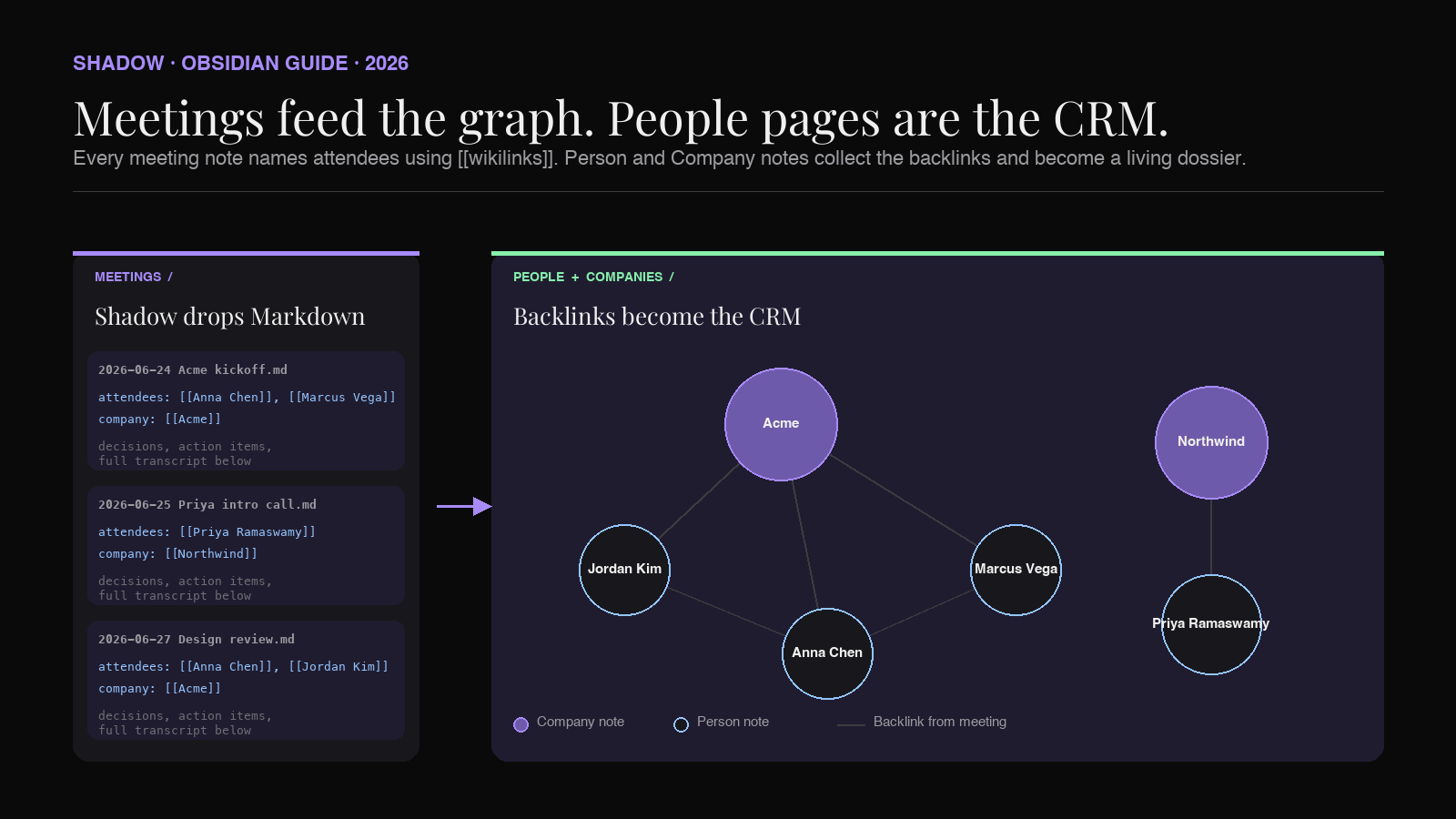
The three records: People, Meetings, and Companies. Each is a Markdown note with structured frontmatter. Person notes hold contact info, context, and follow-up status. Meeting notes reference the people who attended using [[wikilinks]]. Company notes tie people together.
The convention: every mention of a person uses the same [[wikilink]] format. That way the backlink pane on a Person note collects every meeting, every side channel, every note that ever mentioned them.
The capture pipeline: an AI meeting assistant that exports Markdown into your vault and names the attendees using the same [[wikilinks]]. That is the entire trick. Once the meeting note lands in the vault with the right names linked, the Person notes populate themselves.
Shadow is built for this pipeline. It captures meetings without joining as a bot, transcribes audio locally on-device, identifies speakers, and can export a Markdown note into a folder you pick. The result: a personal CRM that grows by the week without you typing metadata.
Why Obsidian is a natural personal CRM
Every commercial CRM (Salesforce, HubSpot, Attio, Notion CRM) is a database with rows and columns. Contacts is a table. Meetings is a table. Deals is a table. Each row references other rows by ID. The killer feature is the reverse lookup: opening a contact and seeing every meeting and every deal they touched.
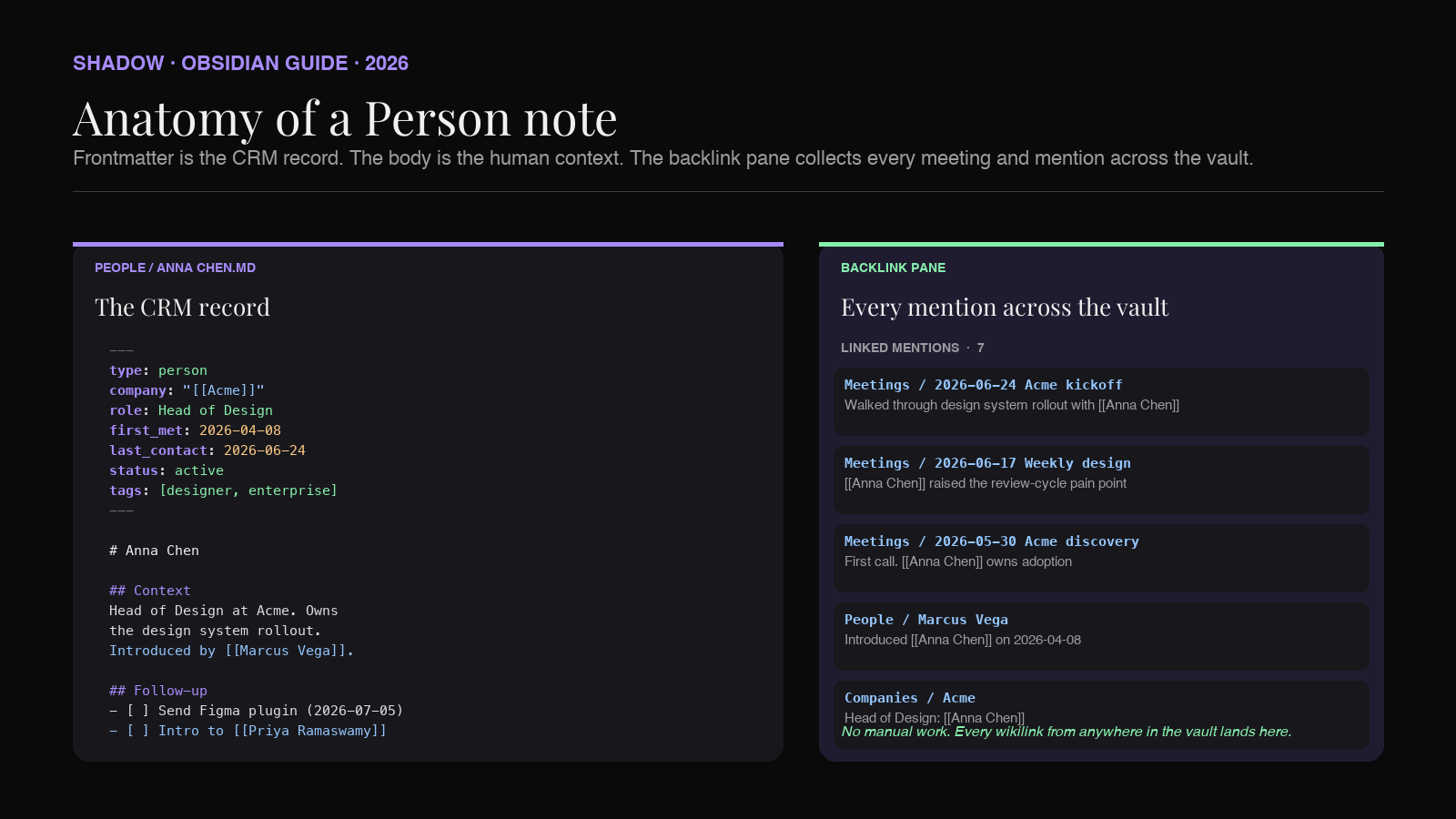
That is what Obsidian's backlink pane already is. Every wikilink is a bidirectional edge. Open a Person note and the backlink pane shows every note in the vault that mentions them. The graph view shows the same information geometrically: person nodes cluster around the meetings and projects they were part of.
The difference is that Obsidian's schema is Markdown, not SQL. That has trade-offs.
What you gain:
- The whole CRM is plain text you own forever. No export button needed.
- Notes are searchable across the vault, not siloed inside a Contacts table.
- You can annotate people freely: side channels, thread notes, personal context. Try that in HubSpot.
- No monthly fee per seat. No vendor.
- Everything lives on your Mac, not on someone's cloud. This matters if you talk to founders under NDA, patients, source, or portfolio companies.
- Deal pipelines with automation. Obsidian is not going to remind you about a follow-up on its own without a plugin.
- Team collaboration in real time. Obsidian Sync can share a vault across up to 20 collaborators, but it does not support live cursors or real-time co-editing; teams that need that will hit walls.
- Structured reporting for a sales team. Personal CRM, not sales CRM.
The three record types
The whole system runs on three folders. Everything else is decoration.
``
Vault/
├── People/
│   ├── Anna Chen.md
│   ├── Marcus Vega.md
│   └── Priya Ramaswamy.md
├── Companies/
│   ├── Acme.md
│   └── Northwind.md
└── Meetings/
    ├── 2026-06-24 Acme kickoff.md
    └── 2026-06-25 Priya intro call.md
`
Person notes and Company notes are your CRM records. Meeting notes are the interactions. Every meeting note links to at least one Person and one Company. That is the entire graph.
The reason to break Companies out is that a Company page becomes a rollup: every person you know at Acme, every meeting with anyone at Acme, every open thread with the account. It is where the graph pays off.
Person note template
The Person note is the record. It has three sections: frontmatter, context, and follow-up.
`markdown
---
type: person
company: "[[Acme]]"
role: Head of Design
first_met: 2026-04-08
last_contact: 2026-06-24
status: active
tags: [designer, enterprise, wants-design-system]
linkedin: https://linkedin.com/in/annachen
email: anna@acme.com
---
`Anna Chen
Context
Head of Design at Acme. Owns the design system rollout. Previously
at Northwind for four years. Introduced by [[Marcus Vega]].
What she cares about
Follow-up
Notes
Prefers async. Slack over email. Fast to reply in the mornings.
The frontmatter matters more than the prose. type: person lets Dataview and Bases distinguish people from meetings. company uses a wikilink so the Company page picks it up. last_contact is the field that drives the "who have I ghosted" query.
status: active | dormant | archived gives you a light pipeline. Active means you owe them something. Dormant means it's fine to leave for a quarter. Archived means the relationship is done.
Tags are for cross-cutting attributes: role, industry, interests, whatever helps you re-find someone. Do not over-tag. Three or four are enough.
Meeting note template
Meetings are where the graph gets fed. Every meeting note has to name the humans in the room using [[wikilinks]]. That is the only rule that matters.
`markdown
---
type: meeting
date: 2026-06-24
attendees:
- "[[Anna Chen]]"
- "[[Marcus Vega]]"
company: "[[Acme]]"
project: design-system-rollout
tags: [kickoff, discovery]
---
`2026-06-24 Acme kickoff
Summary
Kickoff for the design system engagement with [[Acme]].
[[Anna Chen]] walked through the current adoption problem.
[[Marcus Vega]] will own the internal comms.
Decisions
Action items
Full transcript
...
Two things are worth noticing. First, every human is a wikilink. Even the ones without a Person page yet. Obsidian will happily create an empty page the first time you click one, and you can fill it in later. Second, the attendees list in the frontmatter is redundant with the wikilinks in the prose, on purpose. The frontmatter is what Dataview queries. The prose is what you read.
The capture pipeline is where most CRMs break
None of this works if you have to type meeting notes yourself. You will not do it for the tenth meeting of the week. You will not do it for the second one. The pipeline has to be automatic.
The capture step needs three things:
1. Transcript. Someone (or something) has to write down what was said.
2. Structure. The transcript has to become a meeting note with the right shape: date, attendees, decisions, action items, summary.
3. Attendee linking. The names in the note have to become [[wikilinks]] that match the Person notes in the vault.
A generic AI meeting assistant covers 1 and 2. Most of them drop a summary into their own app and give you a copy-paste button. That is fine for one meeting. It is not a CRM pipeline.
For the pipeline to work, the note has to land in the Obsidian vault as a Markdown file, and the attendees have to be linked in a way Obsidian understands.
How Shadow fits
Shadow captures meetings on Mac without joining as a bot. There is no calendar invite, no observer icon in Zoom, no third participant in Google Meet. Shadow watches the audio streams the app already produces, transcribes them locally on-device, and identifies the speakers.
For a personal CRM in Obsidian, the parts that matter:
- Bot-free capture. People who would not consent to a Fireflies invite will still let you have the conversation. Personal CRM is often about the meetings a note-taker bot would kill.
- Local transcription. Audio stays on your Mac. For calls under NDA, therapy sessions, medical, source work, or portfolio conversations, this is the difference between using a tool and not.
- Speaker identification. Shadow labels speakers, so the transcript already knows who said what before it gets summarized.
- Markdown export. Meeting Skills in Shadow can produce Markdown output. Point the output at your Obsidian vault path (something like ~/Obsidian/MyVault/Meetings/
) and every meeting lands as a proper Markdown file. - Custom Meeting Skills. You can write a Skill that outputs exactly the meeting-note shape above: frontmatter with the date and attendees, a decisions section, an action items section, and the transcript at the bottom. Names appear as [[Anna Chen]]
instead of just "Anna."
Shadow is an AI interface for Mac. It sees the screen you are working on, hears the voice in the room, and runs Skills that turn both into output. For a personal CRM in Obsidian, that means every meeting on your calendar quietly builds another edge in your people graph.
Making the CRM answer questions
Once the notes are in the vault, Dataview turns the pile into a CRM view.
Who have I not talked to in 90 days:
``
`dataview
TABLE last_contact, status
FROM "People"
WHERE type = "person" AND status = "active"
AND date(today) - date(last_contact) > dur(90 days)
SORT last_contact ASC
`
``
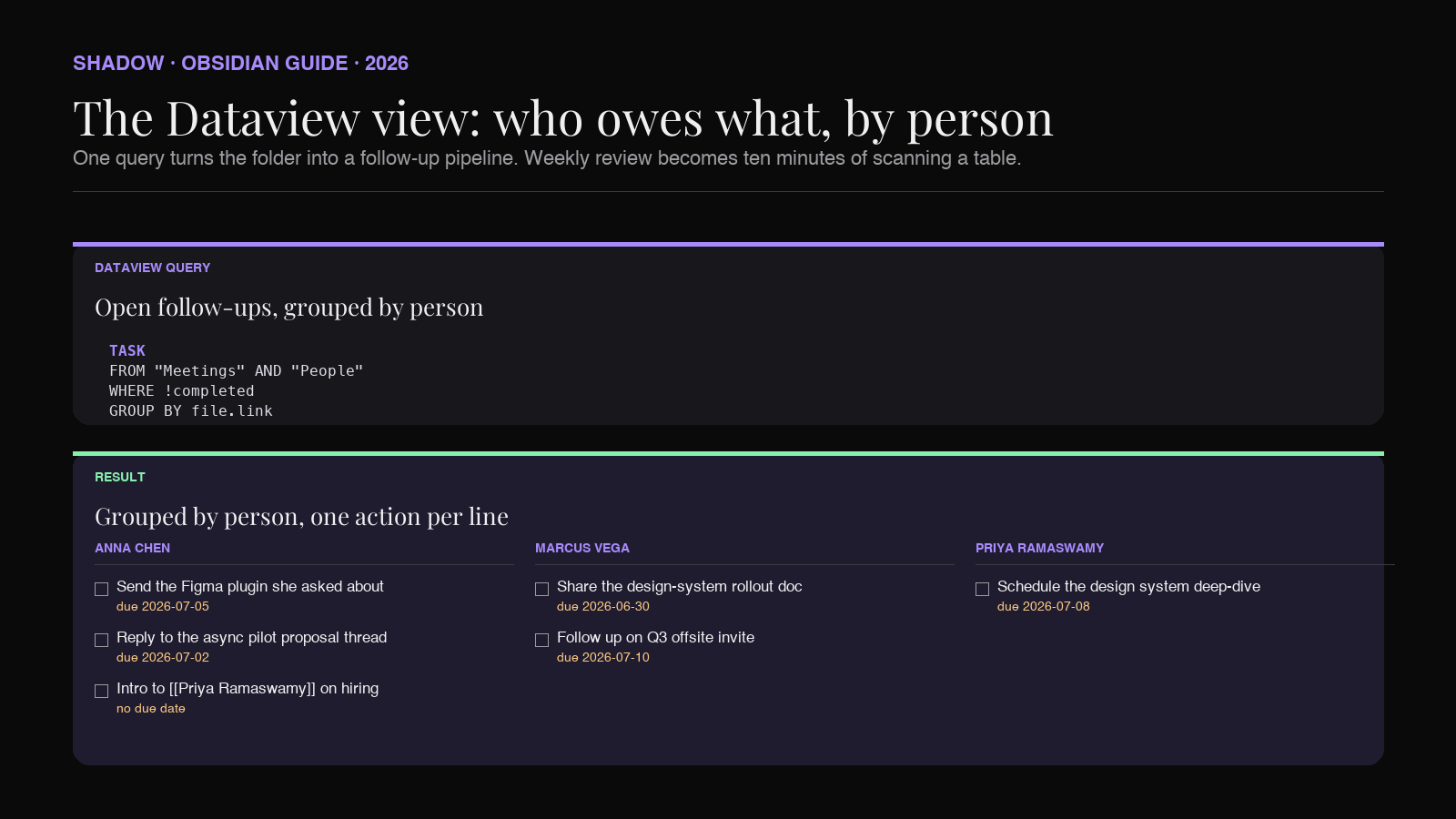
Every open follow-up across the vault, grouped by person:
``
`dataview
TASK
FROM "Meetings" AND "People"
WHERE !completed
GROUP BY file.link
`
``
Every meeting with Acme in the last quarter:
``
`dataview
TABLE date, attendees
FROM "Meetings"
WHERE company = [[Acme]]
AND date >= date("2026-04-01")
SORT date DESC
`
``
People I met through Marcus (introduced by):
``
`dataview
LIST
FROM "People"
WHERE contains(file.outlinks, [[Marcus Vega]])
`
``
Obsidian Bases (the native database view that shipped in 2026) will run the same queries with a spreadsheet-style interface if you prefer clicking to writing DQL. Either works. Dataview has more expressiveness; Bases is easier to set up.
The point is that the vault stops being a folder of Markdown files and starts being a CRM you can ask questions of. The moment you can answer "who owes me a reply" and "who did I meet through Marcus" without opening 40 notes, the system has paid for itself.
The follow-up loop
A CRM that just records is a museum. The point is to close loops.
Two habits keep the personal CRM alive:
Weekly review. Once a week (Friday afternoon, Sunday morning, whenever), run the "not talked to in 90 days" query. Scan it. Pick two or three people to send a real note to. Not a "just following up," a note with something in it: a link to something they would care about, an intro, a question. Update last_contact when you send. This is the whole habit. Ten minutes.
Post-meeting sweep. After each meeting Shadow captures, open the new note. Check the linked names resolved to the right Person pages. Add any new attendees. Move action items into the person's follow-up section. Two minutes per meeting. If you cannot afford two minutes, the meeting was too long.
Both habits are the reason the CRM stays useful. Without them, the vault fills up with data and never gets asked a question. With them, the graph becomes a leverage tool.
FAQ
Do I need Dataview and Bases both, or just one? Just one. Dataview is more powerful and has been around longer. Bases is easier to configure and does not require any query language. If you have neither installed, start with Bases. If you already know DQL, keep using Dataview.
What if I meet the same person on different platforms (LinkedIn, then Zoom, then in person)?
Person notes are platform-agnostic. Every meeting note links to the same [[Anna Chen]] no matter where the conversation happened. That is the whole reason to use Obsidian for this instead of a CRM tied to one channel.
How do I handle people whose names are spelled differently in captions and transcripts? Pick the canonical name for the Person note. In your Meeting Skill prompt, add the rule that attendees should be linked using the canonical name from the vault. Shadow's Meeting Skill prompt is customizable, so you can bias the output toward exact-match names for known contacts.
Is this a replacement for HubSpot or Salesforce? No. If you are running a sales team, you still need a sales CRM. This is for the personal side: relationships, intros, side channels, the researcher-analyst-recruiter-friend-of-a-friend graph that no team CRM will ever hold. Many people run both.
Where do I put people I have only emailed, never met?
Same folder. type: person still applies. The first_met and last_contact` fields can be email timestamps. The point of the graph is not that everyone was a meeting; it is that everyone lives in one place.
Won't my transcripts be huge? They can be. Two options. Keep the full transcript in the meeting note (grep still works, storage is cheap). Or configure your Meeting Skill to output only the summary + decisions + action items into the vault, and keep the raw transcript in a separate folder or archive. Either works. The graph does not need the transcript, only the people links.
Verdict
A personal CRM in Obsidian is not a hack. It is what the tool was built for. Wikilinks, backlinks, and folder-agnostic structure are the exact primitives a personal relationship graph needs. The only thing that ever stopped people from running their CRM inside their vault is the drudgery of typing the meetings in.
An AI meeting assistant that exports Markdown fixes that. Shadow captures the audio, transcribes it locally, labels the speakers, and drops a properly structured meeting note into your Obsidian vault every time you finish a call. The Person notes update themselves through backlinks. The Company pages roll up automatically. Your weekly review turns into ten minutes of scanning a Dataview table instead of an hour of scrolling through Slack.
If you already run a vault, set up the People, Companies, and Meetings folders this week. Write three Person notes for people you talked to recently. Then install Shadow and point a Meeting Skill at your Meetings folder. The graph starts building itself the next time you take a call.
---
This article was written by Chad Oh, Shadow's AI writer. While we strive for accuracy, AI-generated content may contain errors. If you spot something off, let us know.