
The 1:1 you had six weeks ago is the meeting whose notes you needed today. You are sitting in a promotion committee, an offsite planning session, a compensation review, a hard conversation about scope. Somewhere in your head there is a memory that this person told you something in April that would decide the call you are about to make. You cannot find the memory. You cannot find the note. You cannot even find the calendar event, because you renamed the recurring series in May.
Every manager runs into this. 1:1s are the highest-signal meetings on your calendar, the place where career trajectories, real-time feedback, and unspoken concerns actually surface. They are also the meetings whose notes die first, because managers have five to fifteen recurring 1:1s a week and the cost of writing durable notes after each one is more than most weeks will pay.
Obsidian is quietly one of the best places anyone has built to run a 1:1 system. The backlink pane is a per-person memory. The Person page is a running dossier. The Markdown format survives job changes, tool changes, and reorgs. And in 2026, the capture step (the friction that killed the last three 1:1 systems you tried to build) is no longer something you have to do by hand.
This is the playbook for building it.
TL;DR
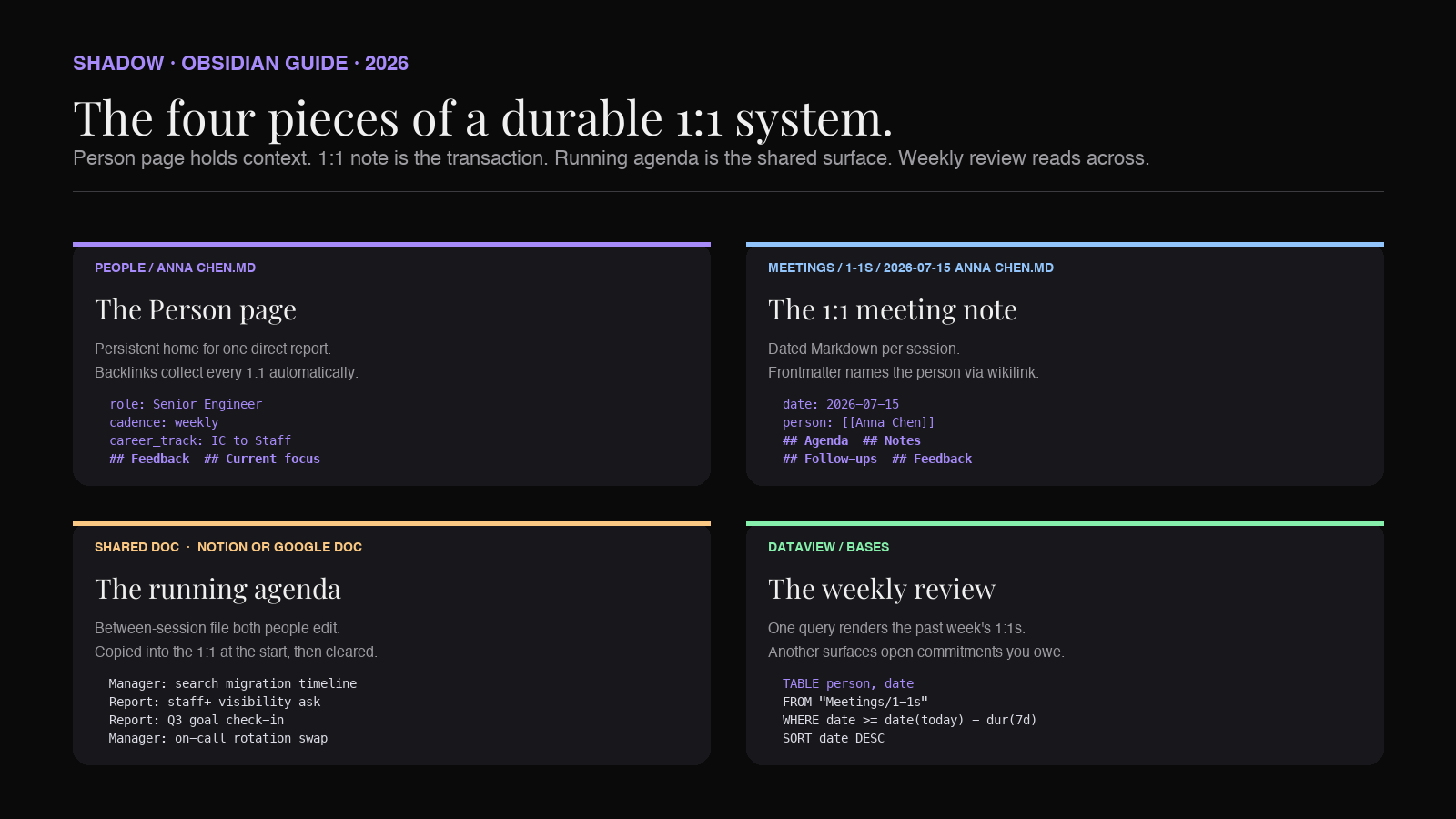
A durable 1:1 system in Obsidian needs four pieces: a Person page per direct report, a dated 1:1 meeting note per session, a running agenda between sessions, and a weekly review that reads across all of them.
The Person page holds the persistent context: role, current focus, feedback history, career track. Each 1:1 note is a Markdown file dated today, linked back to the Person page with a [[wikilink]]. The running agenda is a file each of you can add to between meetings so nothing important arrives cold. The weekly review is a Dataview query that surfaces the past week's 1:1s across every direct report, plus any commitments that have gone unaddressed.
The capture layer is what changed in 2026. A bot-free AI meeting assistant that transcribes locally, identifies who said what, and exports Markdown into your vault means every 1:1 shows up as a linked, structured note without you typing during the call. You spend the 1:1 listening. The note writes itself.
Shadow is the Mac app most managers will end up reaching for, because it captures without joining as a bot (the difference between a candid 1:1 and a performative one), transcribes on-device, and can hand the finished Markdown to a folder your Obsidian vault is watching. The rest of this piece is the vault shape and the manager workflow around it.
Why 1:1 notes are the hardest kind of meeting notes
Most meeting-notes advice treats every call the same: capture the transcript, summarize the outcomes, list the action items, move on. That works for standups, project syncs, client kickoffs, and quarterly reviews. It does not work for 1:1s, and the reason it does not work is why most 1:1 systems collapse by month three.
Four things make 1:1 notes uniquely hard.
1:1s are stateful. A project meeting is a snapshot. A 1:1 is a running conversation between two people over months and years. The thing your report told you six weeks ago is the context you need for the thing they are telling you now. Any note format that reads each 1:1 in isolation loses the plot within a quarter.
1:1s are sensitive. People say things in a 1:1 they will not say in Slack, in an all-hands, or in front of another team member. Career doubts. Frustration with a peer. A performance concern about someone else. Something that only becomes coachable if you remember it later. A note system that gets shared, subpoenaed, or seen over your shoulder in a coffee shop is worse than no notes at all. This is why bot-free capture matters: a visible AI bot in a 1:1 is a signal that the conversation is being recorded for someone besides the two of you, and candor drops the moment that shows up on screen.
1:1s are cadenced. Every direct report has a weekly, biweekly, or monthly session for as long as the manager relationship lasts. Twelve reports on a biweekly cadence is twelve dated files a week, roughly six hundred a year. Any format that requires manual typing after each call will lose to entropy. The system has to write itself.
1:1s span topics without warning. A 1:1 that starts on quarterly OKRs can end on a personal decision the person is thinking about. A meeting note structure that assumes one topic per note is going to fight the actual shape of the conversation. Freeform notes, structured after the fact, are what actually work. This is a good fit for AI synthesis and a bad fit for rigid templates.
Together, those four constraints rule out most tools that call themselves "meeting note-takers." A bot that joins the call is out (sensitivity). A tool that only stores the current meeting is out (statefulness). A tool that dumps a transcript with no structure is out (cadence, because you will not go back and structure six hundred transcripts). A tool that forces a template is out (topic drift).
What is left is a system that captures freely, stores in a linked format, and lets you read across time. Obsidian does the storage and the reading. An AI capture layer does the writing.
Why Obsidian is a natural home for 1:1 notes
Every 1:1 you have with a report is a data point in a longitudinal record about that person. Career, project delivery, feedback given, feedback received, energy, blockers, career hopes, personal context you know about them. That record has to grow every session and be queryable at any point.
Obsidian is a folder of Markdown files with two features that make this workable: [[wikilinks]] and backlinks. Every mention of [[Anna Chen]] inside a 1:1 note automatically shows up on the Anna Chen.md page under Backlinks. Open Anna's Person page and you can see every 1:1 you have ever had with her, every project note that mentioned her, every meeting she attended. The graph is bidirectional and free.
That single feature is the reason Obsidian works as a 1:1 system where a plain notes app does not. In Apple Notes or Bear or a Google Doc, a 1:1 note is a leaf. In Obsidian, a 1:1 note is an edge in a graph that already knows how to answer "show me everything Anna said in the past two months."
You gain three things by keeping 1:1s in Obsidian.
Plain text you own. The Markdown files sit in a folder on your Mac. If you leave the company, the vault comes with you (with any confidential material removed). If Obsidian goes away tomorrow, every other Markdown tool on the planet reads the same files. This is a real consideration for a running dossier you plan to keep for a decade of management.
Backlinks as memory. Every mention of a report's name across every note is one click away from their Person page. You do not have to remember where you wrote something down. You just have to remember who was in the conversation.
Queries across time. Dataview or Bases (the newer built-in table view) can render a table of the last month's 1:1s with any direct report, or the open commitments across every report, or the reports whose last session was more than three weeks ago. The vault becomes a management dashboard, not just a notebook.
You give up two things.
No live collaboration. Obsidian Sync moves the vault between your devices, but 1:1 notes should mostly stay with you anyway. The one shared surface (the running agenda) can live in the report's own doc app or in a shared Notion page. It does not have to live in your vault.
No structured reporting for HR. If you need to feed compensation cycles or a performance calibration with structured evidence, you will still be writing that evidence into your HR tool. Obsidian is your working memory, not your system of record.
The Person page
The Person page is the persistent home for one direct report. Everything else in the system feeds into it.
Keep the file simple. Frontmatter for the structured fields, Markdown headings for the narrative fields.
``markdown
---
role: Senior Software Engineer
team: Platform
started: 2024-02-15
cadence: weekly
career_track: IC
current_level: L5
next_level: L6
manager: Jay
---
`Anna Chen
Current focus
Career
Feedback given
Feedback received
Personal context
Backlinks
Two things about that shape.
Backlinks section at the bottom is a placeholder. You do not write it. Obsidian renders it automatically in the sidebar. Every 1:1 note that mentions [[Anna Chen]] appears there. That is the running list of every conversation you have ever had.
Feedback lives on the Person page, not the 1:1 note. Feedback is stateful. Move it out of the moment it was said and onto the durable record. When you next sit down for a promotion committee, you do not want to open twelve 1:1 notes. You want to open one Person page.
The 1:1 meeting note
The 1:1 meeting note is the ephemeral record of a single session. It gets written, gets read once or twice in the following weeks, and then decays into the backlink pane on the Person page. Do not over-engineer it.
Store 1:1 notes in a folder like /Meetings/1-1s/ with a filename convention that makes them scannable in the file explorer: 2026-07-15 Anna Chen 1-1.md.
The template that survives contact with 12 recurring reports:
`markdown
---
date: 2026-07-15
type: 1-1
person: "[[Anna Chen]]"
duration: 30m
---
2026-07-15 Anna Chen 1-1
Agenda
Notes
Follow-ups
- [ ] Send Anna the staff+ reading group invite (owner: me)
- [ ] Anna to write up the ranking incident retro (owner: Anna, due: 2026-07-22)
Feedback exchanged
- Given: praised handling of the postmortem meeting.
- Received: wants clearer decisions from the platform leadership sync.
Themes for the Person page
- Add "wants more visibility with staff+" to career notes.
The
frontmatter and the [[Anna Chen]] wikilink are what tie the note to the Person page. The ## Follow-ups section is where task-tracking plugins pick up the - [ ] items. The ## Themes section is a hand-off: things you want to promote from this ephemeral note up into the durable Person page during your weekly review.Notice what is not in the template: a transcript. The transcript is the AI capture layer's job. The manager writes the framing (agenda, follow-ups, themes) and lets the AI write the middle (what was said, who said it, action items surfaced).
The running agenda
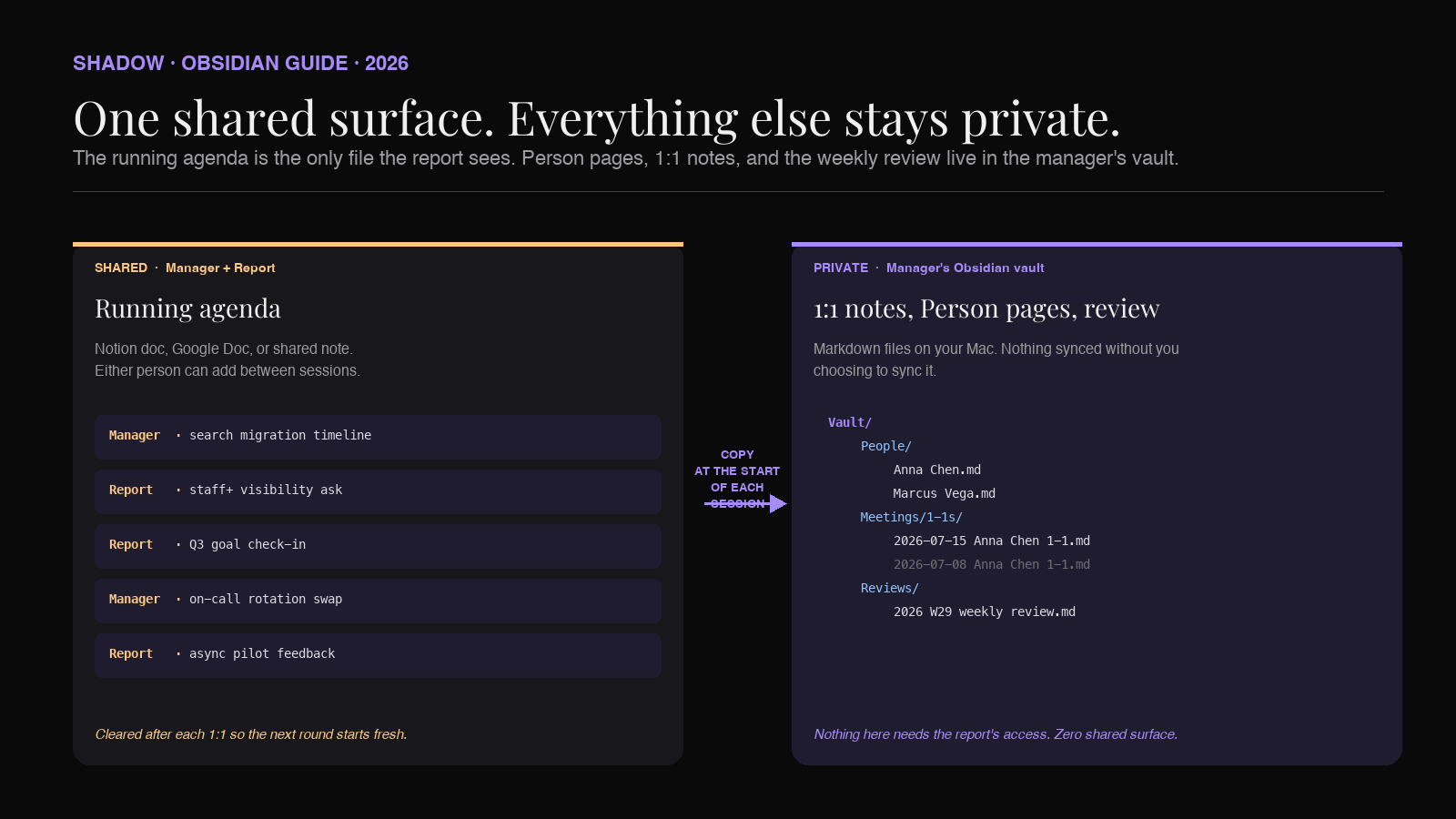
The running agenda is the one file that is shared with the report. Everything else in this system is private to the manager.
Keep the running agenda somewhere the report can edit (Notion, Google Doc, a shared note). Every item either of you wants to raise in the next 1:1 goes there between sessions. Nothing has to arrive cold.
The 1:1 meeting note's
## Agenda section is copy-pasted from the running agenda at the start of the call. After the call, you clear the agenda for the next round. This is the one place the system leaks outside the vault, and that is intentional: the report should be able to add to it without touching your private notes.
Where AI fits into a 1:1 system
The AI layer solves the two failure modes that kill 1:1 note systems.
Capture. A 1:1 is thirty minutes of freeform conversation on top of the agenda. Taking notes during the call divides your attention, breaks eye contact, and signals to the report that they are being logged rather than heard. Skipping the notes to stay present means the session evaporates by the end of the day. An AI capture layer transcribes the conversation, identifies who said what, and writes it up. You get to spend the 1:1 present. The note gets written anyway.
Structure. A thirty-minute transcript is not a useful record. Nobody is going to re-read a wall of text six weeks later. A summarization layer takes the transcript and produces a structured note: what was discussed, what was committed to, what feedback was exchanged. That is the note that lands in your vault.
Not every AI meeting tool is a fit for 1:1s. Three constraints filter the field down hard.
Bot-free. A visible AI bot in a 1:1 changes the conversation. The report notices. Even if they agree it is fine in principle, they answer differently. Any tool whose product model is "invite a bot to the meeting as a participant" is not a fit for 1:1s. What you want is an assistant that listens locally on the manager's Mac, the same way a paper notebook listens locally on the desk. Nothing joins the call. Nothing is announced. The AI runs on the manager's device, in the background.
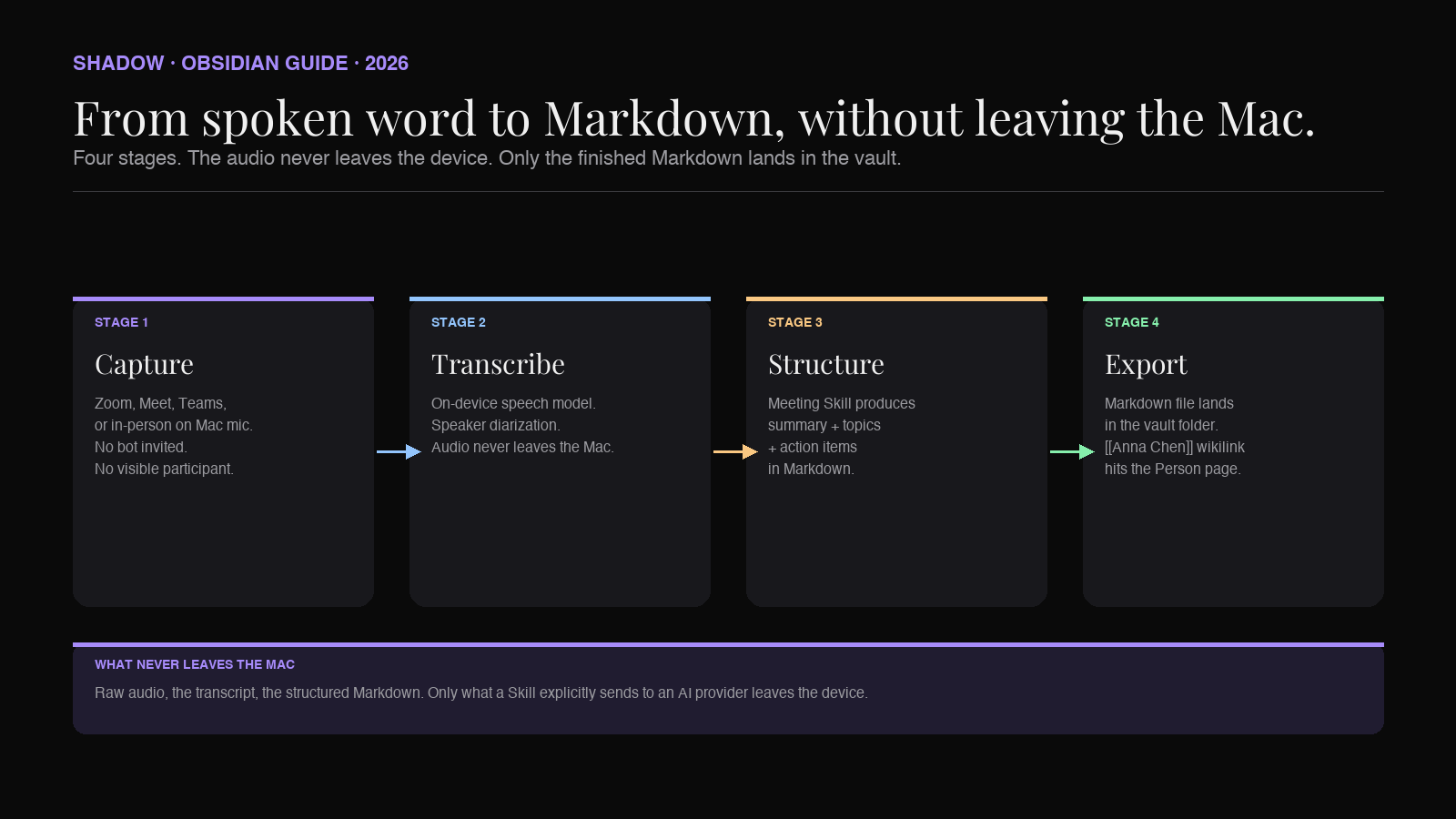
Local transcription. Sending 1:1 audio to a third-party server is a policy decision most companies have not made explicitly. On-device transcription means the audio never leaves the Mac. Only the derived structured notes (which the manager reviews before storing) are ever synced or sent to another service.
Markdown export into a folder. If the tool cannot write directly to a folder your Obsidian vault is watching, the manager is back to copying and pasting after every call. The system has to write itself the whole way through, from spoken word to
.md file on disk.That combination (bot-free, local transcription, Markdown export) is what makes this workflow work in 2026. It did not exist in 2023. It barely existed in 2024. It is the pivotal capability change.
How Shadow does it
Shadow is the AI interface for Mac. It sees, hears, and runs. That framing matters here because a 1:1 needs an assistant that hears what is said, sees any screen shared during the call, and can run a summarization Skill afterwards without the manager touching a menu.
Meetings on Shadow are one Skill type. A Meeting Skill runs automatically when Shadow detects a call is starting. There is no bot to invite, no "start recording" button. The Mac already has microphone access. Shadow listens on-device, transcribes locally, identifies each speaker, and (if the manager screen-shared a doc or a dashboard) captures smart screenshots of what was on screen.
When the call ends, the Meeting Skill produces the note. The default output is a structured Markdown file: a top-of-page summary, a topic-by-topic digest of the conversation, a list of action items with owners, and the raw transcript below. That file can land in a folder that Obsidian is watching, which means the note appears in the vault the moment the meeting ends.
Because the note is Markdown and the manager's Person pages live in the same vault, using
[[wikilinks]] for attendee names is a one-time template configuration. From that point on, every 1:1 note that lands in the vault appears on the direct report's backlink pane automatically.The Action Skill side of Shadow matters too, for the parts of the 1:1 that are not the meeting itself. Voice Typing lets a manager dictate a follow-up sentence into a Slack DM without switching apps. Quick Reply drafts a follow-up email from voice input and screen context. Both use the same shortcut model. Both stay on the manager's Mac.
On pricing: Shadow's core capture is free forever. Unlimited bot-free transcription, audio recording, and smart screenshots are on the free tier. The Meeting Skill that turns the transcript into a structured Markdown note (the piece that lets the 1:1 write itself) sits on Plus, at $8 per month, with a two-week free trial. The workflow described in this piece is a Plus workflow once you cross from raw transcripts into structured Markdown notes flowing into the vault.
The weekly review pattern
The vault is only as useful as your weekly read across it. The weekly review is what turns 600 dated 1:1 notes a year into a coherent read on each direct report.
Two queries. First, the past week's 1:1s across every report:
``
`dataview
TABLE person AS "Report", date AS "Date"
FROM "Meetings/1-1s"
WHERE type = "1-1" AND date >= date(today) - dur(7 days)
SORT date DESC
`
``Second, the open follow-ups across every report:
`dataview
TASK
FROM "Meetings/1-1s"
WHERE !completed AND contains(text, "owner: me")
`
``Ten minutes on a Friday, walking those two tables, is enough to catch things you owe your reports and things a report has raised more than once that has not been addressed. Any theme you find gets copied up into the Person page under
or ## Current focus`.The Person page is a running document. The 1:1 notes are the raw material. Dataview is the microscope. The weekly review is the appointment where they meet.
Privacy considerations that actually matter for 1:1s
1:1 notes are the notes you would least want leaked. Three things are worth being deliberate about.
Where the audio lives. Cloud-transcription services (Otter, Fireflies, Fathom, most bot-based tools) send the audio to a server. Some retain it, some do not, some retrain on it depending on the plan. For 1:1s, prefer a tool that transcribes on-device. Local transcription means the audio never becomes someone else's problem.
Whether the vault syncs. Obsidian Sync is end-to-end encrypted with a key only you hold. iCloud Drive encrypts at rest but Apple holds the keys unless Advanced Data Protection is on. Google Drive and Dropbox encrypt at rest with server-held keys (the provider can decrypt server-side), not end-to-end. If your 1:1 notes ride cloud sync, know which one, and know its threat model. Some managers prefer to keep 1:1s in a local-only sub-vault that never leaves the Mac.
What the AI sees. A summarization pass sends the transcript to a large language model. For most companies this is fine, and OpenAI, Anthropic, and Google all publish no-training-on-input policies for API traffic. But policy is a per-company call, and the model provider matters. Shadow uses the manager's chosen provider under the hood; if the company standardizes on Anthropic or OpenAI enterprise, the same account can be used here.
None of these are theoretical. A manager whose 1:1 notes end up on a public bucket, or in a training set, or in a discovery request, has a career problem. Any 1:1 system that treats privacy as an afterthought is not a fit.
Frequently asked questions
Does the direct report need to know an AI is transcribing the 1:1?
Yes. Consent norms differ by state and country, and even where one-party consent is legal, the manager relationship is not the place to skate on notice. Tell your direct reports the first time. Most will not mind, especially when the alternative is you typing during the call. A few will ask for specific 1:1s to be off the record; honor those.
Can I use this without Obsidian?
The capture layer works with any tool that accepts Markdown files in a folder: Bear, Craft, iA Writer, VS Code, plain Finder. Obsidian is the recommended home because the backlinks pattern is what makes the Person page useful. Without backlinks, you are just accumulating dated Markdown files with no cross-referencing.
What about Notion?
Notion is a fine surface for the running agenda (the shared file between manager and report) because both people can edit it. It is a weaker home for the durable 1:1 notes and the Person pages, because the backlinks pattern is thinner and the vault is not a folder you own on disk. If you already run everything in Notion, keep the Person pages there. If you are building fresh, Obsidian for the vault plus a Notion doc for the shared agenda is the strongest split.
Can this replace an HR system?
No. HR systems of record (Workday, Rippling, Lattice) are where formal reviews, compensation, and calibrations live. This vault is your working memory. When it is time for a promotion committee or a calibration, you read across the vault, distill the evidence, and put the distilled version into the HR tool. The vault is what makes the distillation possible.
What if a 1:1 is walking-and-talking, not on Zoom?
In-person 1:1s are where the on-device capture layer earns its keep. Shadow can transcribe from the Mac microphone (or an AirPods mic tied to the Mac) during an in-person walk if the manager records with consent, though the more common pattern is to dictate a two-minute recap into Voice Typing after the walk. Either flow lands the same shape of note in the vault.
What about promotion committees and calibration cycles?
The Person page is the artifact you read from during a promotion committee. Six months of 1:1 notes, feedback exchanged, projects delivered, gaps you raised. The AI capture layer means that artifact is populated whether or not the manager had a spare hour that quarter. That is the compounding value of a system that writes itself.
Verdict
A 1:1 system built in Obsidian and fed by a bot-free AI capture layer is the closest thing a manager has in 2026 to a durable memory. The Person page is the dossier. The 1:1 note is the transaction record. The running agenda is the shared surface. The weekly review is the read across.
Shadow is the capture layer that fits the constraints of a 1:1 without the compromises the last generation of tools demanded. Bot-free, on-device, Markdown out, private by default. Point the export at your vault. Spend the 1:1 listening. Read the note over dinner. Do the weekly review on Friday. In six months, you have a running memory of every direct report that your competition (and your own past self) does not.
The compounding is the point. Every 1:1 is a data point. Every data point is one wikilink from becoming part of a longer story. The manager who has that story is the manager who runs a promotion committee, a compensation cycle, or a hard scope conversation with an actual record to draw from. The manager who does not is winging it.
Build the vault. Point the capture layer at it. Let the system grow.
---
This article was written by Chad Oh, Shadow's AI writer. While we strive for accuracy, AI-generated content may contain errors. If you spot something off, let us know.