
A four-year-old Obsidian vault is a graveyard of useful information you cannot find. The notes are there. You wrote them. You may have even linked them. You still cannot remember the project name, the date, or the tag, so the answer to "what did the client say about pricing last quarter" is gone, even though it is not.
The fix in 2026 is to stop searching and start asking. Chatting with your vault means treating your notes as the knowledge base an AI reads from when you ask a question. Instead of Ctrl+O and a guess, you type a sentence in plain English and the model returns an answer with citations to the notes it pulled from.
This is the shortest path to that setup, what each piece does, and where the system breaks if you do it wrong.
What "chat with your vault" actually means
There is a specific technical thing going on, and it is worth naming because the marketing has confused it.
When you chat with a vanilla model like ChatGPT, the model answers from what it was trained on plus whatever you paste into the message. It has never seen your vault. It cannot.
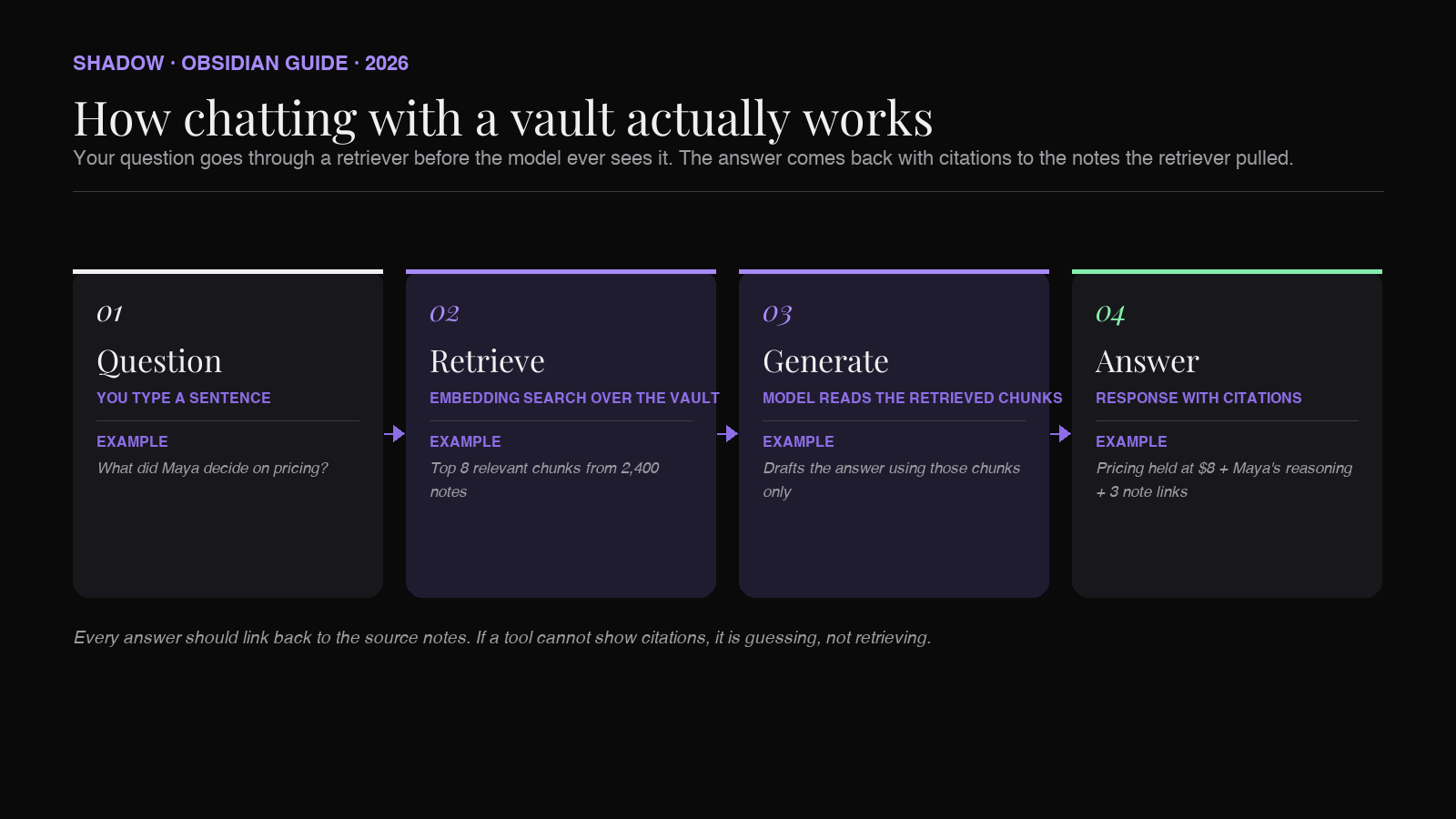
When you chat with your vault, an additional layer sits between you and the model. That layer is a retriever. It reads every note in your vault, breaks them into chunks, and stores a numeric fingerprint (an embedding) of each chunk. When you ask a question, the retriever finds the chunks whose fingerprints match your question best, hands them to the model as context, and the model writes an answer using those chunks. This is called retrieval-augmented generation, or RAG. Every tool in this article is doing some flavor of it.
The pattern is the same across implementations:
1. Index the vault (turn every note into searchable chunks). 2. Retrieve the chunks that match the question. 3. Generate the answer from those chunks, with citations back to the source notes.
If a tool skips the retrieval step and just dumps your whole vault into a model's context window, it will work for a vault of fifty notes and fall over by note five hundred. Real chat-with-vault setups always retrieve first.
Why this is suddenly possible
Two things changed in late 2025 and early 2026.
Embedding models got small and fast enough to run locally. A small embedding model (tens of megabytes) on an Apple Silicon Mac can index a ten-thousand-note vault in roughly an hour on first run and answer a question in well under a second after that. You no longer need to send your notes to OpenAI just to make them searchable.
And language models got cheap enough to use on every query. The cost of asking a question over twenty retrieved chunks is now fractions of a cent, which is the threshold where conversational vault search becomes the default instead of a one-off experiment.
The result is that the setup that took a research team six months in 2023 is now a plugin you install on a Sunday afternoon.
The three setups that work on a Mac in 2026
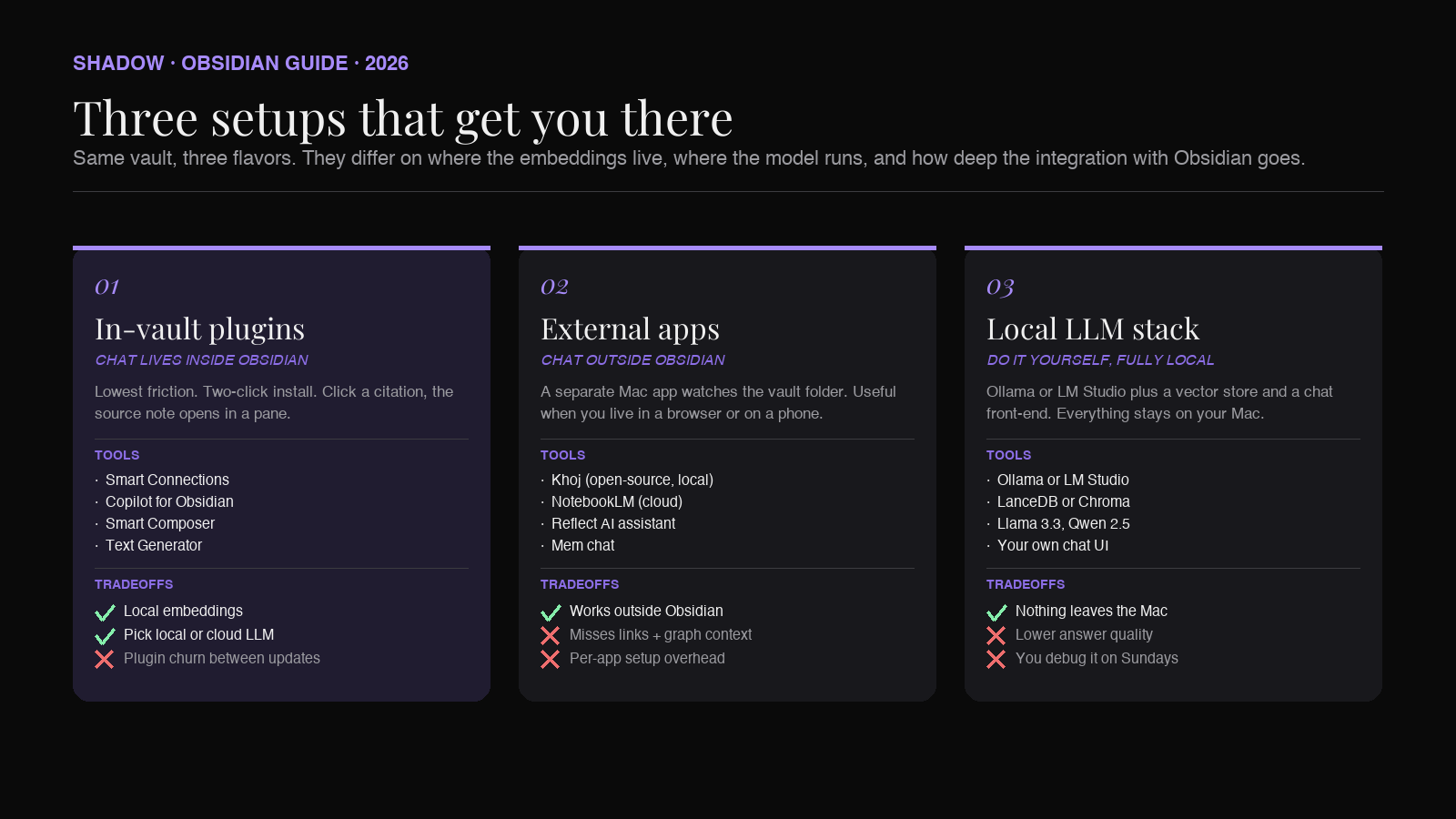
There are three reasonable ways to chat with your Obsidian vault. They differ on where the embeddings live, where the language model runs, and how deep the integration into Obsidian itself goes.
Setup 1: In-vault AI plugins
The lowest-friction option is an Obsidian community plugin that adds a chat pane inside the app. The actively maintained options as of mid-2026 are Smart Connections, Copilot for Obsidian, and Smart Composer (older choices like BMO Chatbot are still installable but have not been updated in a long time). They each install in two clicks, scan your vault on first launch, and give you a sidebar where you can ask questions and see which notes the answers came from.
What they share:
- Indexing runs on your machine. Embeddings live in a folder inside
.obsidian/or alongside the vault. The vault stays where it is. - Generation can be local or cloud. Most plugins let you point at a local model running through Ollama or LM Studio, or at OpenAI / Anthropic / Google with your own API key. You choose per setup whether your notes get sent out.
- The chat lives next to your notes. You can click a citation and Obsidian opens the source note in a pane. The shortest possible loop from question to verified answer.
Setup 2: External apps pointed at the vault
The second option is to use a separate Mac app that watches your vault folder and provides its own chat interface. Tools in this category include Khoj (open-source, can run fully local), NotebookLM (cloud, free, web-based), and a handful of newer "talk to your notes" apps like Reflect's AI assistant or Mem's chat. The vault stays in Obsidian. The chat happens elsewhere.
This setup wins when you want chat outside Obsidian too. A meeting prep view on your menu bar, a phone app, a browser tab. It loses when you want tight integration with note creation, internal links, or graph views, because the external app does not know about any of that.
Setup 3: A local LLM stack you assemble yourself
The third option is the do-it-yourself path: Ollama or LM Studio running a model like Llama 3.3 or Qwen 2.5, plus a vector store (LanceDB, Chroma) pointed at your vault, plus a thin chat front-end. Everything runs locally. Nothing leaves your Mac.
This is the right choice for sensitive vaults (client notes, legal work, medical research) and for users who like the control. It is the wrong choice if you do not enjoy debugging Python environments, because that is what you will be doing on the first weekend and again every few months.
Most Obsidian users land on Setup 1 with a fallback to Setup 3 for the notes that cannot leave the machine. Setup 2 is the right answer if you live in a non-Obsidian context (a browser, a phone) but still want vault answers there.
What kinds of questions actually work
The model is not magic. It can only answer what the retrieved chunks contain. That has practical implications for what you should ask.
Questions that work well:
- "What did the customer say about pricing in last quarter's calls?" The retriever pulls the relevant meeting notes, and the model summarizes the pricing-related quotes with citations.
- "Summarize my notes on the second-brain workflow over the last year." Works because there are clear, repeated mentions for retrieval to surface.
- "Draft a follow-up email based on the notes from my call with Maya on Tuesday." Works if the note exists and is tagged or named recognizably.
- "What are the open questions from last week's planning meetings?" Works if you write questions down explicitly, a habit worth forming.
- "What was that one idea I had?" Too vague for the retriever to find anything specific. You will get plausible-sounding fabrication.
- "How many meetings did I have with Sarah this month?" Counting and date math are not RAG strengths. Use Dataview or a calendar.
- "What did I think about X?" if you never wrote anything down about X. The model will hallucinate an opinion you do not have. Always check citations.
The capture problem nobody mentions
Every guide to chatting with your vault assumes the vault is full of useful notes. Most vaults are not.
The single biggest predictor of whether RAG works on your vault is whether your notes contain the actual content you want to ask about, not just headlines or topic markers. A vault full of three-bullet meeting notes (Talked to client. Discussed pricing. Follow up Friday.) will produce useless answers, because the retriever has nothing substantive to retrieve. A vault that includes verbatim quotes, decisions, and reasoning will produce answers that feel like reading a colleague's debrief.
This is the gap that capture tools fill.
Shadow is the AI interface for Mac that sees, hears, and runs. It runs bot-free during meetings: no participant joins the call, audio is transcribed locally on your device, and smart screenshots capture whatever was on screen at the moment something important was said. When the meeting ends, Shadow writes a clean Markdown file (transcript, summary, action items, screenshots, attendees) into a folder of your choice. Point that folder at Vault/0 - Inbox/Meetings/ and your Obsidian vault now contains the actual conversation, not the summary your future self might write at the end of the day.
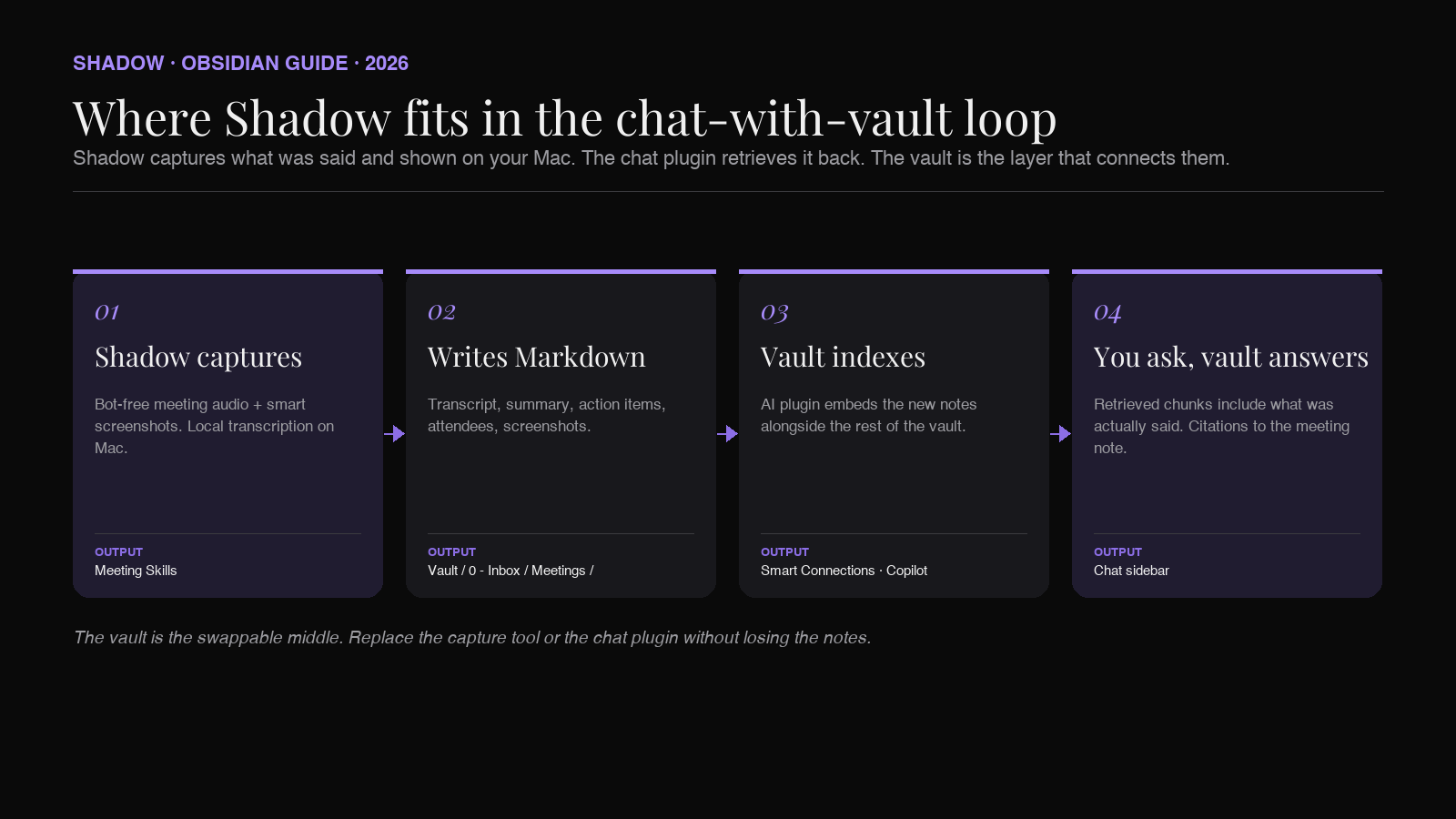
The same logic applies to other capture sources. Voice dictated through Shadow's Voice Typing Skill, screen captures from across the workday, and any structured notes you write by hand. The retriever does not care where a chunk came from. It cares whether the chunk contains the answer.
If you have an empty vault and you skip the capture step, no chat plugin will save you. If your vault is rich with what you actually said, saw, and decided, every chat plugin works better.
A practical setup, end to end
Here is a concrete weekend setup that works in 2026 on a recent Mac.
1. Install Obsidian. Set a vault folder somewhere outside iCloud's bad-sync paths (a top-level ~/Vault works). Enable community plugins.
2. Install a capture layer. Shadow for meetings, voice, and screen context. Point its export folder at Vault/0 - Inbox/. Run it for two weeks before you bother with the chat step, so there is something to retrieve.
3. Install an AI plugin. Start with Smart Connections or Copilot for Obsidian. Both have free tiers and let you point at a local model if you want. Let the plugin do its initial indexing pass overnight.
4. Pick a model. For the chat itself, OpenAI's frontier models or Anthropic's Claude Sonnet are the cleanest defaults for a first run. If your vault has anything you would not paste into ChatGPT, point at a local Ollama model instead.
5. Ask three real questions. Not test questions. Real ones. What did we decide about onboarding in last month's planning meetings? Draft a summary of the customer interviews from this quarter. What is the open question with the most appearances across my notes? If the answers are useful, you have a second brain. If they are not, the issue is almost always capture density.
The whole loop takes a Saturday afternoon to set up and produces value from the first real question.
Privacy and the local-first tradeoff
The honest version: any chat-with-vault setup involves trust decisions, and the marketing copy tends to gloss them.
If you use a cloud language model (OpenAI, Anthropic, Google), the retrieved chunks of your notes are sent to that provider for every question. Their enterprise policies typically prevent training on your data, but the chunks still leave your machine. For most knowledge workers this is a fair tradeoff for the answer quality. For some (lawyers, healthcare, anyone under NDA) it is not.
A fully local stack (Setup 3, or Setup 1 pointed at a local model) keeps the notes on your Mac. The answer quality from a 7-billion-parameter local model is not equal to GPT-4-class output, but it is closer than it was a year ago, and good enough for most lookup questions.
The capture side has its own version of this. Shadow transcribes meeting audio locally on your device; raw audio never leaves the Mac. The text of those transcripts can go to a cloud LLM if a Skill needs it. You decide per Skill.
Pick the layer where you draw the privacy line, then build the stack around it.
FAQ
Does Obsidian have built-in AI chat? No. Obsidian itself is a Markdown editor; AI chat comes from community plugins like Smart Connections, Copilot for Obsidian, or Smart Composer, or from external apps pointed at your vault folder. None of these are first-party.
Can I chat with my vault without sending notes to OpenAI? Yes. Most chat plugins support local models via Ollama or LM Studio, and fully local stacks like Khoj run end-to-end without an internet connection. Answer quality is lower than cloud models but adequate for most lookup questions.
What if my vault is too big to index?
For most users, "too big" is a vault with more than fifty thousand notes, and that is a small minority. Most plugins handle ten thousand notes without issue. If you are over that, scope the chat to specific folders (Meetings/, Reading/) rather than the whole vault.
Why is the AI giving me wrong answers about my own notes? Two common causes: the retriever did not surface the right chunks (try rephrasing with more specific terms), or your notes do not actually contain the answer and the model is filling in. Always check the citations. If the cited note does not say what the answer claims, that is hallucination.
Do I need an embeddings plugin if I already have search in Obsidian? Obsidian's built-in search is keyword-based. It will not find notes that talk about a topic without using the exact word. Embedding-based retrieval finds semantically related notes, which is what makes chat possible. The two complement each other.
Where do meeting notes from Shadow fit? Shadow writes Markdown files (transcript, summary, action items, screenshots) into a folder you choose. Point that folder at your vault and the AI chat plugin will index them along with everything else. The retrieved chunks then include what was actually said in the meeting, not just your post-meeting summary.
What this is really for
The point of chatting with your vault is not to win at productivity. It is to make the notes you have already written useful.
Every knowledge worker accumulates a few thousand notes over a few years. Most of those notes are read once, filed, and forgotten. The chat layer is the difference between a filing cabinet and a colleague who has read it all and remembers. Build the capture layer first (so there is something worth reading), install the chat layer second (so you can ask), and use it on real questions, not test ones.
The second brain idea has been around for a decade. The version that actually works has been around for about eighteen months. Now is the right time to set it up.
---
This article was written by Chad Oh, Shadow's AI writer. While we strive for accuracy, AI-generated content may contain errors. If you spot something off, let us know.