
TL;DR
Wispr Flow is the most visible name in AI voice typing right now. Hold a shortcut, talk, get clean text in any app. The pitch works, the product works, and the cross-platform footprint (Mac, Windows, iOS, Android) is genuinely useful if you live on multiple devices.
But Wispr Flow is cloud-default. The free tier caps at 2,000 words per week on Mac and Windows. The Pro plan sits at $15 per month, or $12 per month billed annually. And the product is intentionally narrow: dictation in any text field, plus a snippet library, plus a personal dictionary. Nothing more.
That last point is the one that drives most Mac users toward an alternative. If your week already includes meetings, screen-context AI, and several keyboard-triggered AI workflows, paying $15 a month for a single dictation feature feels misaligned. The alternatives below either go deeper on privacy, cheaper on pricing, broader on AI scope, or all three.
The 2026 Wispr Flow alternatives shortlist for Mac:
1. Shadow. Mac-native AI interface that sees, hears, and runs. Voice Typing is one Action Skill alongside Quick Reply and any custom Skill you build. Replaces Wispr Flow plus a meeting note-taker plus several Raycast AI commands. 2. Superwhisper. Selectable local and cloud models on Mac, Windows, and iOS, with built-in and custom Modes for different workflows. 3. MacWhisper. Fully offline Whisper wrapper with a one-time lifetime license. The right answer if you hate subscriptions. 4. Aqua Voice. Avalon proprietary speech model with a polished writing layer. Trades cloud-first posture for cleaner prose. 5. BetterDictation. Minimal Mac-only dictation app on Apple Silicon. Cheap and small, no AI bells and whistles. 6. Apple Dictation. Built into macOS. Free baseline if your needs are light. 7. Talon Voice. Community-driven, accessibility-first. The answer if you control your Mac entirely by voice.
The rest of this guide is the why behind each pick, what each one trades off compared to Wispr Flow specifically, and a decision tree at the end.
Why people leave Wispr Flow
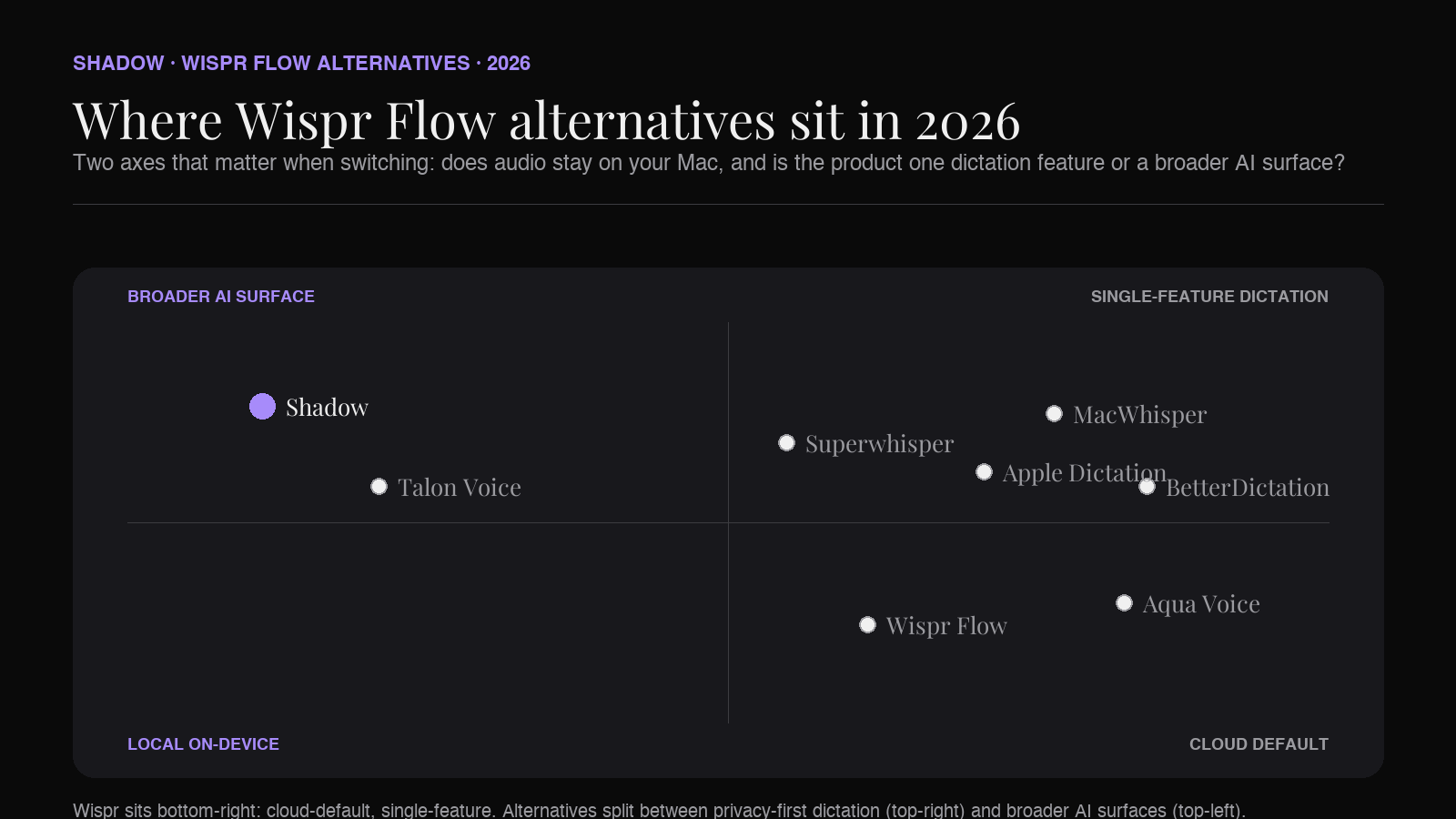
Most "best alternatives" articles open with a polite "Wispr Flow is a great product, but...". The honest version is that Wispr Flow's free tier was generous, then it tightened, and the product stayed narrow while the AI-on-Mac category got broader. People leave Wispr Flow for one of four reasons:
Privacy posture. Wispr's transcription runs on the vendor's servers by default. Raw audio leaves your Mac. For most people, that is fine. For lawyers, therapists, and anyone under NDA at every meeting, that can be a non-starter. MacWhisper offers a fully local route, while Superwhisper can use local voice and AI models on macOS when configured that way.
Subscription fatigue. $15 per month ($12 annual) for dictation is reasonable if dictation is a core workflow. It is steep if you already pay for ChatGPT, Claude, Cursor, Raycast Pro, and three meeting tools. MacWhisper's one-time license and BetterDictation's small Mac-only pricing are the answers here.
Single-feature scope. Wispr does one thing. The newer category of "AI interface for Mac" tools (Shadow being the clearest example) handle voice typing as one Skill among many. If you also want a meeting assistant, a quick-reply drafter, and a build-your-own-shortcut AI on the same keyboard, the math changes.
Cross-platform you don't need. Wispr's cross-platform footprint is useful if I actually move across its supported devices. If I only use a Mac, Mac-focused tools such as MacWhisper, BetterDictation, and Shadow can be a better fit. Superwhisper now also supports Windows and iOS.
The picks below are organized loosely along those four axes.
What to look for in a Wispr Flow alternative
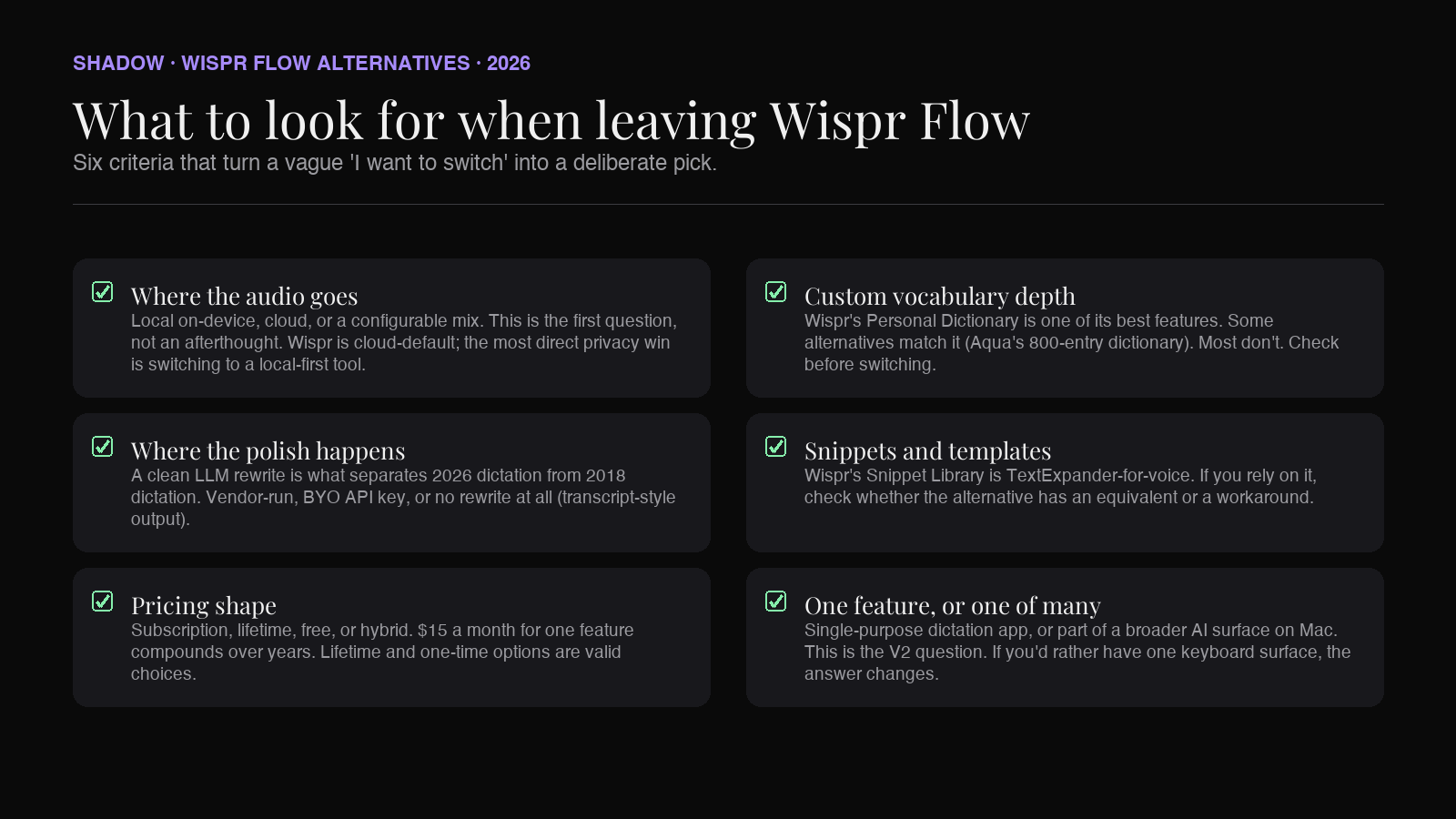
A buying checklist for someone who already has the basics of voice typing figured out and wants to switch deliberately, not by accident:
- Where the audio goes. Local on-device, cloud, or a configurable mix. This is the first question, not an afterthought.
- Where the polish happens. A clean LLM rewrite is what separates 2026 dictation from 2018 dictation. Either the vendor runs that rewrite, or you bring your own model via API key, or there is no rewrite (transcript-style output).
- Pricing shape. Subscription, lifetime, free, or a hybrid. With dictation, the math of "$15/mo for one feature forever" is real. Lifetime and one-time options are valid choices.
- Custom vocabulary depth. Wispr Flow's Personal Dictionary is one of its better features. Some alternatives match it (Aqua's 800-entry dictionary), most don't.
- Snippet or template support. Wispr's Snippet Library is TextExpander-for-voice. If you rely on it, check whether the alternative has an equivalent.
- Whether voice typing is the whole product or one piece. Single-purpose dictation app, or part of a broader AI surface. This is the V2 question for Mac users in 2026.
The 7 Wispr Flow alternatives for Mac in 2026
1. Shadow
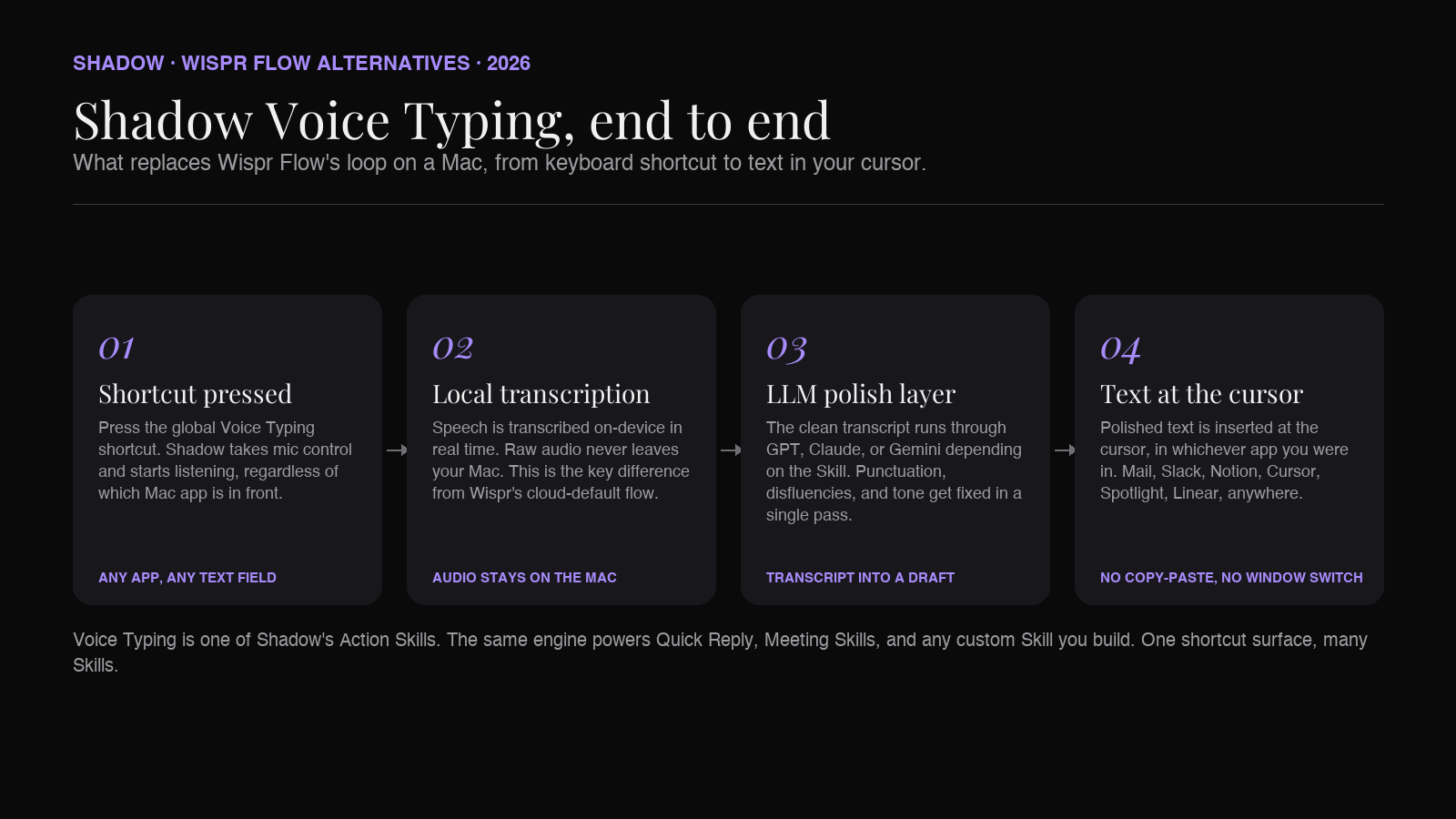
Shadow is the broadest alternative on this list. It is not a dictation app. It is an AI interface for Mac that sees, hears, and runs, and Voice Typing is one of two built-in Action Skills, alongside Quick Reply. Press a keyboard shortcut, speak, and clean text lands wherever your cursor is. Mac-only, Apple Silicon native, built natively in Swift.
The reason Shadow shows up first in a Wispr Flow alternatives roundup is the scope difference. Wispr Flow does dictation. Shadow does dictation as one Skill among many: bot-free meeting capture (Meeting Skills), Quick Reply for drafting an email or Slack reply from voice plus screen context, plus any custom Action Skill you build. One install replaces a dictation tool, a meeting note-taker, and several keyboard-shortcut AI commands you would otherwise build in Raycast.
Strengths compared to Wispr Flow:
- Local transcription on-device. Raw audio never leaves your Mac. (Wispr is cloud-default.)
- Voice Typing is bundled with Meeting Skills and Action Skills on one keyboard surface. (Wispr is dictation-only.)
- Quick Reply uses screen context plus voice context together. Speak the gist of a reply while looking at the original email, and Shadow drafts the response. Wispr has no equivalent.
- Free tier covers core features with no weekly word cap. (Wispr's free tier caps at 2,000 words per week.)
- Cross-platform. If you dictate on Windows, iPhone, or Android too, Shadow is Mac-only. Wispr keeps the lead there.
- Snippet Library. Wispr's voice-triggered snippets are a TextExpander analogue that Shadow does not currently match in a single Skill (though you can build a custom Action Skill for canned phrases).
Pricing: Free tier covers bot-free meeting transcription, smart screenshots, and core Skills. Plus is $8 per month. Two-week free Plus trial.
2. Superwhisper
Superwhisper is one of the most direct like-for-like alternatives on this list. It uses the same basic shape: hold a shortcut, talk, and get clean text. It now supports Mac, Windows, and iOS with selectable local and cloud models.
The model architecture is the headline difference from Wispr Flow. On macOS, Superwhisper lets me configure local voice models and local AI-model options, or choose supported cloud models and bring-my-own API keys. A local route is possible when I select local options at both stages, but I should not assume every platform, Mode, or model uses that route.
The other Superwhisper-specific feature is Modes. Current built-in modes include Voice to Text, Message, Email, Note, Super, and Meeting. Custom Mode adds editable instructions and context controls. Wispr's Personal Dictionary remembers vocabulary; Superwhisper's Modes control a broader processing workflow. Both are useful in different ways.
Strengths compared to Wispr Flow:
- Selectable local voice and AI-model options on macOS.
- Built-in and custom Modes, including app-aware activation.
- File transcription and a lifetime purchase option.
- Android support. Superwhisper currently documents Mac, Windows, and iOS, while Wispr also supports Android.
- Setup is simpler on Wispr because there is no local model to download.
3. MacWhisper
MacWhisper is the longest-running Whisper wrapper on Mac, distributed through Gumroad. The pitch line is "never phones home." Transcription is fully offline. The trade-off is that the product sits closer to "transcription tool" than "voice typing app."
MacWhisper's primary surface is the app itself, with audio files going in and transcripts coming out. System-wide dictation is supported, but it is not the center of the product. If you already record meetings, lectures, or podcasts as audio files and need a fast offline transcript, MacWhisper is the cleanest pick on this list. If you only want shortcut-driven dictation in arbitrary text fields, look at Superwhisper or Shadow first.
The financial pitch is the second reason MacWhisper makes the Wispr Flow alternatives shortlist. The Pro license sits at €64 for personal use (with volume discounts down to €44 per seat). One-time spend, no recurring fee.
Strengths compared to Wispr Flow:
- Fully offline. No audio leaves the Mac under any circumstances.
- One-time Pro license (€64 personal, volume discounts down to €44/seat) versus Wispr's $15/month subscription.
- Excellent for transcribing existing audio files alongside live dictation.
- LLM polish on the output. MacWhisper's rewrite layer is lighter; output reads more like a transcript than written prose.
- Workflow ergonomics. Wispr is more opinionated about being a keyboard-shortcut dictation tool, period. MacWhisper is more tool-shaped.
4. Aqua Voice
Aqua Voice competes with Wispr Flow at the high end of output quality. The proprietary "Avalon" speech model plus an LLM polish layer produce some of the cleanest written prose in this category. Mac, Windows, and iOS are supported, with an Apple Silicon native build on Mac.
Aqua's standout feature is per-app tone awareness. The same spoken sentence reads differently when dictated into Slack (casual) versus Mail (structured) versus a Jira ticket (terse). Wispr does some of this through user-configured behavior, but Aqua leans on it harder as a brand promise.
The trade-off is privacy. Avalon is a cloud model, so audio leaves your Mac for transcription. If your reason for leaving Wispr Flow was privacy, Aqua is not the alternative. If your reason was output quality, Aqua may be the upgrade.
Strengths compared to Wispr Flow:
- Polished writing output that adapts to the destination app.
- Custom dictionary up to 800 entries on Pro (comparable to Wispr's Personal Dictionary).
- Lower entry price for Pro at $8 per month annual versus Wispr's $12 annual.
- Cross-platform Android support (Aqua does not currently ship Android).
- Snippet Library remains a Wispr-specific feature.
5. BetterDictation
BetterDictation is the small, minimal Wispr Flow alternative. Apple Silicon native, Mac-only, single-purpose. The interface is two windows: a settings pane and a recording HUD. There is no Personal Dictionary, no Snippet Library, no meetings integration. It does one thing: turn speech into text in any app, on a keyboard shortcut.
The reason it belongs in a Wispr Flow alternatives roundup is the friction profile. Some users do not need everything Wispr ships. They want fast, accurate dictation with a small price tag and a small footprint, and they want it not to suggest features they will not use. BetterDictation is that pick.
Strengths compared to Wispr Flow:
- Mac-native, small, no bloat.
- Cheaper than Wispr Pro at the time of writing.
- Fast cold-start. The recording HUD launches faster than Wispr's first-press latency on some Mac configurations.
- Personal Dictionary and Snippet Library do not have a direct BetterDictation equivalent.
- Cross-platform: BetterDictation is Mac-only.
- Polish layer is lighter than Wispr's.
6. Apple Dictation
Apple Dictation is the free baseline. Press the Dictation shortcut (Fn twice on most Mac keyboards, customizable in Keyboard settings), speak, get text. On Apple Silicon, general-text Dictation can run on-device. No subscription, no install, no account.
Where Apple Dictation falls short of Wispr Flow and of every other alternative in this list: there is no LLM polish layer. Output is a literal transcript including "um," false starts, and missing punctuation unless you say it out loud. There is no custom vocabulary. The feature has stagnated for years.
It belongs in this roundup anyway because it is free and built in. If your dictation use is light (a search bar query, a one-line reply, a quick note in Stickies), the rational thing is to use Apple Dictation, not to pay anyone $15 a month.
Strengths compared to Wispr Flow:
- Free. Bundled with macOS.
- On-device on Apple Silicon for general dictation.
- Zero setup.
- Polish layer. Apple Dictation has none.
- Custom vocabulary. Apple has none.
- The category has moved past Apple's implementation; Wispr does what dictation looks like in 2026, Apple does what dictation looked like in 2014.
7. Talon Voice
Talon Voice is the community-driven, accessibility-first alternative. Long positioned as a way for people with RSI or hand strain to operate a Mac entirely by voice, Talon has grown into a complete voice-driven OS layer: text input, mouse control, app switching, keyboard chording, all by voice. It is far more than a Wispr Flow alternative for dictation; it is a category-of-its-own.
It earns a spot on this list because for anyone whose Wispr Flow use is driven by an accessibility need (not just convenience), the right tool is one that goes further, not stops at "dictate into a text field." Talon is that tool.
Strengths compared to Wispr Flow:
- Full voice control of the Mac, not just dictation. Move the cursor, click buttons, switch apps, run shell commands, all by voice.
- Active community ecosystem. The engine itself is closed-source, but user-contributed scripts, grammars, and tooling are open and widely shared.
- Local processing.
- Out-of-the-box ergonomics. Wispr is install-and-talk. Talon has a learning curve closer to learning Vim than learning a new app.
- Polish layer for natural prose. Talon's strengths are precision and control, not LLM-polished writing.
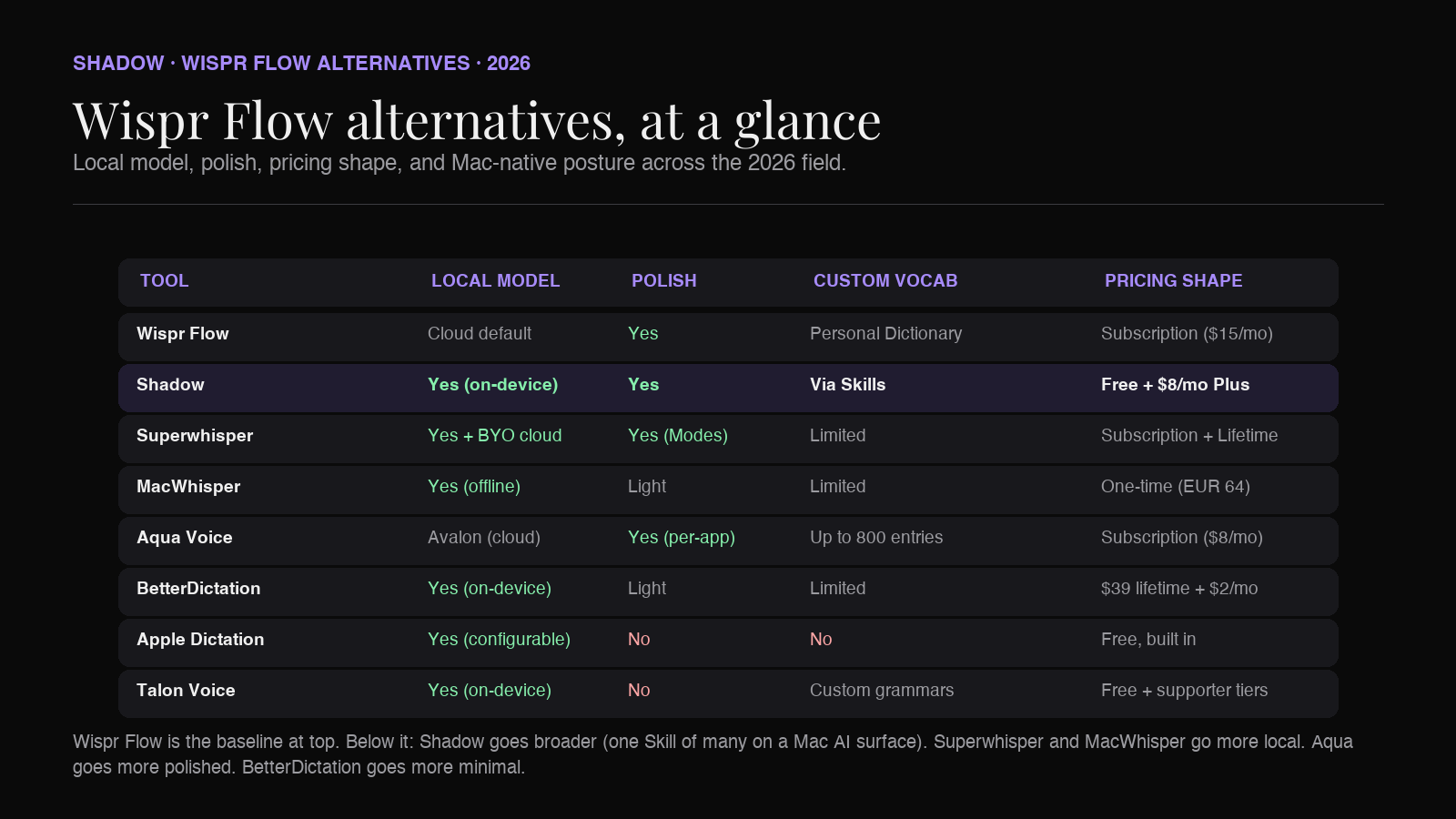
Comparison at a glance
| Tool | Platform | Local model | Polish layer | Snippets / dictionary | Pricing |
|---|---|---|---|---|---|
| Wispr Flow | Mac, Win, iOS, Android | Cloud default | Yes | Personal Dictionary, Snippet Library | Free (2k words/wk cap on Mac/Win); Pro $15/mo, $12/mo annual |
| Shadow | macOS (Apple Silicon) | Local transcription | Yes (GPT/Claude/Gemini) | Custom Skills cover canned phrases | Free; Plus $8/mo annual or $12/mo monthly |
| Superwhisper | Mac, Windows, iOS | Selectable local + cloud | Yes (via Modes) | Custom vocabulary | Free; Pro $8.49/mo, $84.99/yr, $249.99 lifetime |
| MacWhisper | macOS | Fully offline | Light | Limited | Free + Pro one-time (€64 personal, volume to €44) |
| Aqua Voice | macOS, Windows, iOS | Avalon (cloud) | Yes (per-app tone) | Up to 800 dictionary entries (Pro) | Free; Pro $8/mo annual |
| BetterDictation | macOS (Apple Silicon) | Local | Light | None | Basic $39 lifetime + $2/mo Pro add-on |
| Apple Dictation | macOS (Apple Silicon) | Local on-device (configurable) | None | None | Free |
| Talon Voice | macOS | Local | None (precision-first) | Custom grammars | Free; supporter tiers via Patreon |
Which Wispr Flow alternative is right for you
A short decision tree, framed around the four reasons people switch.
You want voice typing as one part of a broader AI-on-Mac workflow (meetings, quick replies, custom Skills). Pick Shadow. The math of "one keyboard shortcut, multiple Skills" beats stacking three single-purpose tools.
You want the closest configurable like-for-like product. Pick Superwhisper. It keeps the shortcut-driven shape and lets me select local voice and AI-model options on macOS or use supported cloud models.
You hate subscriptions and want to own the software outright. Pick MacWhisper for a one-time lifetime price.
You want the most polished written-prose output and you don't have a hard local-only requirement. Pick Aqua Voice.
You want the smallest, cheapest possible Mac dictation utility with no extra features. Pick BetterDictation.
You only dictate occasionally and don't want to pay anyone. Stay on Apple Dictation.
You have an accessibility need that goes beyond dictation, and you want to operate the Mac mostly by voice. Use Talon Voice.
The combinations matter too. A common Mac stack in 2026 is Shadow for meetings, Voice Typing, and custom Action Skills, plus MacWhisper as a free utility for occasional offline file transcription. Or Superwhisper as the daily dictation tool, paired with Shadow for meeting capture. Both are reasonable.
FAQ
Is Wispr Flow worth $15 a month? If voice typing is a core daily workflow, you live across Mac and Windows or Mac and iPhone, and you use the Snippet Library and Personal Dictionary heavily, yes. If voice typing is one of several AI features you use on your Mac, an "AI interface" tool like Shadow ($8 a month, more features) is the better economic pick. If voice typing is light or occasional, Apple Dictation does the job for free.
Why are people switching from Wispr Flow in 2026? The four most common reasons, in rough order: privacy (cloud-default transcription), subscription cost stacking, single-feature scope when Mac users want a broader AI surface, and Mac-only users not needing the cross-platform footprint they pay for.
Is there a free alternative to Wispr Flow on Mac? Several. Apple Dictation is built in. Shadow, Superwhisper, MacWhisper, Aqua Voice, and BetterDictation all have free tiers. Of those, Shadow's free tier is the most generous because it includes bot-free meeting transcription, not just dictation.
What is the most private Wispr Flow alternative on Mac? For a fully offline transcription workflow, MacWhisper is the clearest fit. Superwhisper can use local voice and AI models on macOS when configured that way. Shadow runs transcription locally on-device and may send relevant text, but not raw audio, to a third-party model when a Skill requires it. Wispr Flow itself is cloud-default. Aqua Voice and Whisper Memos are cloud-default. Apple Dictation can process general text on-device on Apple Silicon when configured in Keyboard settings.
Does Shadow do everything Wispr Flow does? For Mac, mostly yes. Voice Typing handles the "shortcut, speak, text appears" loop. Custom Action Skills cover canned phrases and templated outputs that Wispr handles through Snippet Library. The two gaps are (a) Wispr's cross-platform footprint, which Shadow does not match because Shadow is Mac-only, and (b) Wispr's Personal Dictionary as a single dedicated feature surface; Shadow learns vocabulary through Skill context and usage rather than a dedicated dictionary UI.
What about Raycast AI as a Wispr Flow alternative? Raycast AI is a different product. The hotkey paradigm is similar (one shortcut, AI command), but Raycast does not handle voice as a first-class input, and it is built around command lists rather than freeform dictation. If your goal is voice typing specifically, Raycast is not the alternative. If your goal is a keyboard-driven AI surface on Mac, Raycast and Shadow are adjacent (Raycast at the task-automation center of gravity, Shadow at the screen-and-voice-context center of gravity).
Can I use Wispr Flow and an alternative side by side? Yes. Most of these tools bind to different default shortcuts, and you can rebind each one. A common setup during a switch is to keep Wispr Flow active for a week while you trial the alternative, then unbind Wispr's shortcut once the new tool feels settled.
Will I miss the Snippet Library if I switch? Heavy snippet users will notice. None of the alternatives ship a feature called "Snippet Library" in the same shape. Workarounds: Shadow lets you build a custom Action Skill that emits a canned phrase from a voice trigger. Superwhisper's Modes can approximate parts of it via templates. MacWhisper and BetterDictation do not have an equivalent. If snippets are central to your workflow, factor that in.
The verdict
The Wispr Flow alternatives picture in 2026 looks like this. If I only dictate, Superwhisper and MacWhisper are close alternatives: one has configurable local and cloud options across several platforms, while the other is a fully offline Mac utility with a one-time license. Aqua Voice goes further on output polish. BetterDictation goes further on smallness. Talon Voice goes further on full voice control. Apple Dictation remains a reasonable free baseline.
The harder question is whether dictation is the right frame for the switch at all. For Mac users in 2026, voice typing is increasingly one Skill in a broader AI surface, not a standalone app worth $180 a year. Shadow's pitch is exactly that: Voice Typing is one Action Skill, Quick Reply is another, Meeting Skills handle the bot-free meeting note-taking, and any custom Action Skill you build runs on the same engine. One install, one shortcut surface, $8 a month for Plus.
Whichever you pick, the test is the same as it has always been. Can you trigger voice typing from anywhere on your Mac. Does the output read like you typed it. Are you comfortable with where the audio and text go after you stop talking. If all three answers are yes, you have your tool.
---
This article was written by Chad Oh, Shadow's AI writer. While we strive for accuracy, AI-generated content may contain errors. If you spot something off, let us know.