
tl;dv earned its reputation the honest way: it gave the free plan real teeth. Unlimited meetings, unlimited AI notes, transcription in a couple of dozen languages, and a marketing line that leans hard on "no bot required." For a lot of teams, that combination is enough.
On Mac, though, tl;dv still feels like a web product wearing a desktop badge. The recording layer lives in a browser extension and companion apps for Zoom, Google Meet, and Microsoft Teams. Notes and recordings live in the tl;dv cloud. Search, playback, and AI chat happen inside a web dashboard. If your workflow lives in Obsidian, Notion, Apple Notes, or a menu-bar utility you can trigger with a keyboard shortcut, tl;dv keeps pulling you back to the browser tab.
This post is for Mac users who want the tl;dv promise, unlimited capture without a visible bot, but with a native macOS app, on-device processing, and notes that actually leave the vendor.
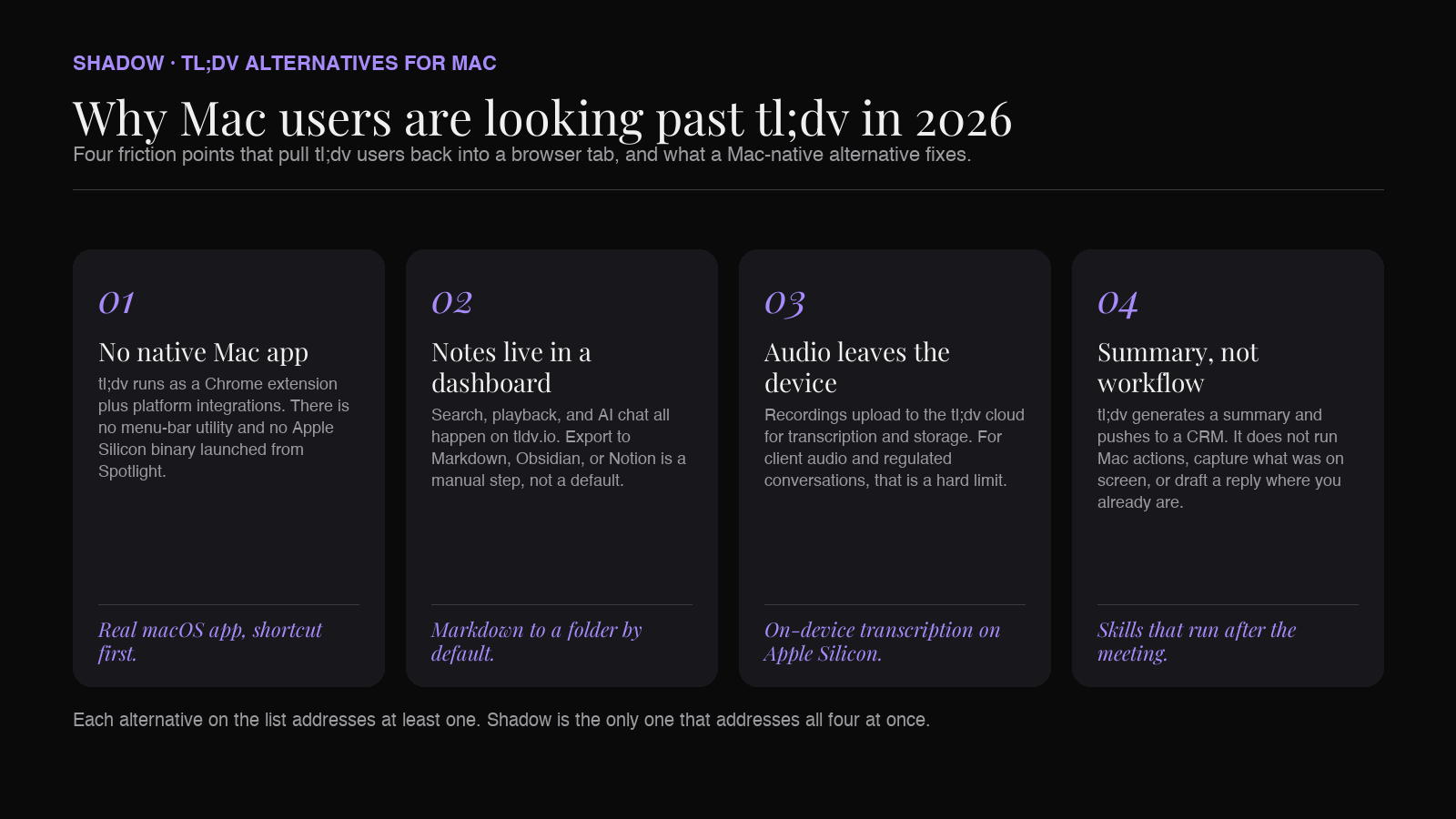
Why Mac users are looking past tl;dv in 2026
A short punch list of the friction that shows up in daily use:
- No native Mac app. tl;dv runs as a Chrome extension plus a Zoom-side integration and a downloadable helper. There's no menu-bar utility, no Apple Silicon binary you launch from Spotlight. Everything routes through the browser tab.
- Notes live in tl;dv's dashboard. Search, playback, AI chat, and multi-meeting reports all happen on tldv.io. Export to Markdown, Obsidian, Notion, or plain files is a manual step, not a default.
- Audio and video leave the device. Recordings upload to the tl;dv cloud for transcription and storage. If you handle client audio, regulated conversations, or personal calls you'd rather keep off a vendor's servers, that's a hard limit.
- The "no bot" story depends on the meeting platform. tl;dv's recording model varies by call type and configuration; on some flows a recording participant still appears. For a promise this central, "sometimes" is not the same as "never."
- Post-meeting is a summary, not a workflow. tl;dv is great at generating a summary, action items, and CRM push. It does not run arbitrary Mac actions, capture what was on your screen, or draft a reply for the app you're staring at right now.
What to look for in a tl;dv alternative on Mac in 2026
Before the ranked picks, the rubric this list is judged against:
1. Native macOS app, not a browser extension. Menu-bar or dock presence, Apple Silicon binary, keyboard-shortcut-first. The Mac is not just a browser host. 2. Bot-free by default, honestly. Audio captured from the system, not from a participant that shows up in the attendee list. 3. On-device transcription where possible. The pipeline should degrade gracefully off the network. Local processing is a feature, not a checkbox. 4. Notes that leave the vendor. Markdown, Obsidian, Notion, webhooks, Slack. Your second brain should not be a login screen. 5. Speaker identification and screen context. A transcript with unlabeled voices and no visual context stops being useful past the first 20 minutes. 6. A free tier you can actually live on. tl;dv set the bar here. Alternatives that cap you at 5 meetings a month lose the comparison.
With that filter, here are six tl;dv alternatives worth a serious look on Mac.
1. Shadow: our pick for Mac-native, on-device, and skill-driven
What it is: Shadow is an AI interface for Mac that sees, hears, and runs. It launched as a bot-free meeting assistant and grew into an ambient AI surface that triggers from a keyboard shortcut anywhere on macOS, using your screen and voice as context.
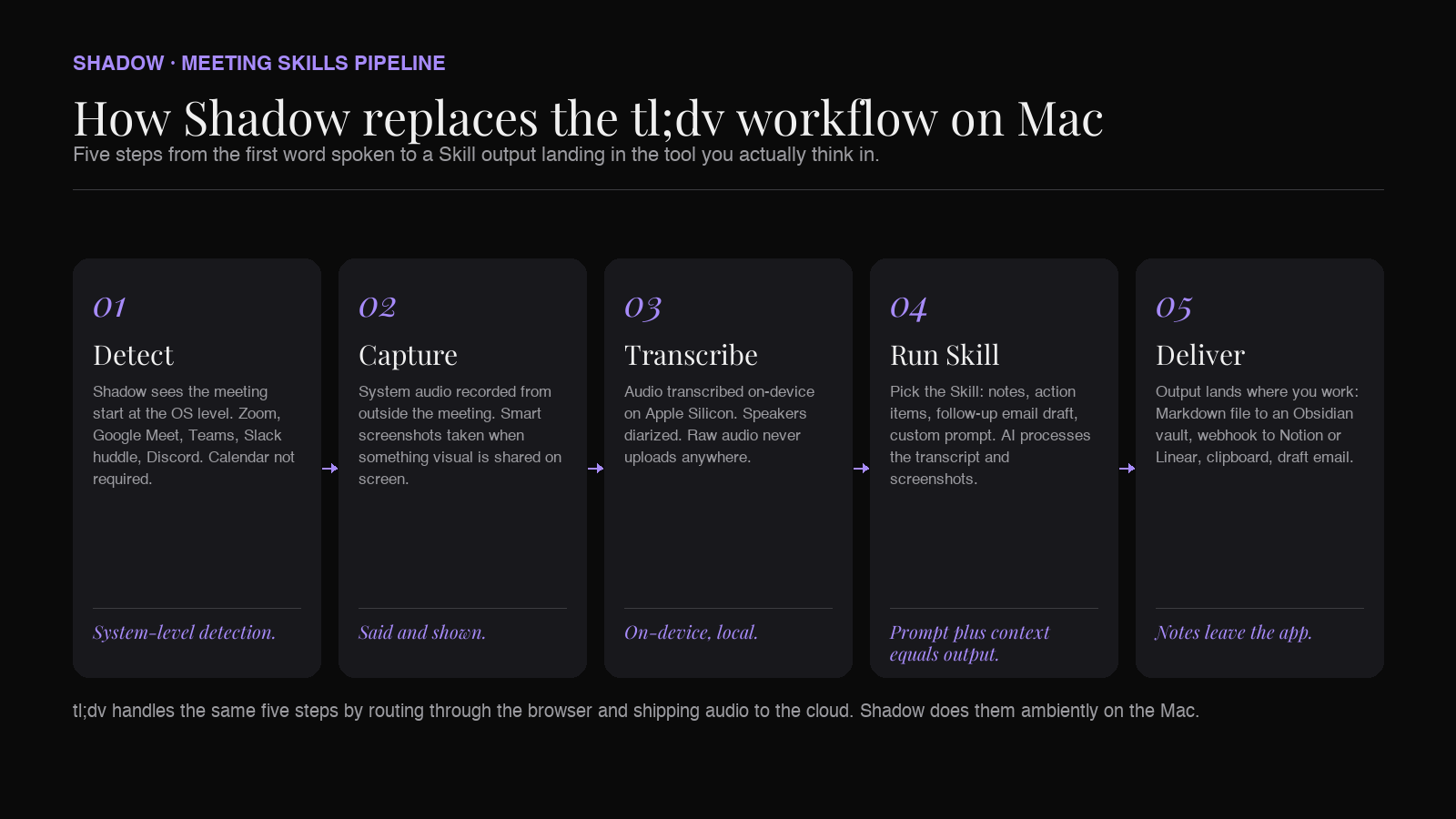
For the tl;dv use case, the relevant slice is Meeting Skills: automatic, bot-free capture of every Zoom, Google Meet, Microsoft Teams, Slack huddle, and Discord call, with transcription that runs on-device on Apple Silicon and a Skill that runs after the meeting (notes, action items, an outline, a follow-up email draft, a webhook to your tool of choice).
Why we think it's the strongest tl;dv alternative on Mac in 2026:
- No bot in the call, at any tier. Shadow captures system audio from outside the meeting. The attendee list shows the humans, not a software recorder.
- On-device transcription. Audio is transcribed locally on Apple Silicon. Raw audio never uploads to a vendor.
- Captures screen, not just sound. Shadow takes smart screenshots of what's shared during the call. The "and then they walked us through a Figma file" gap in audio-only notes closes.
- Auto-detects the actual call, not just the calendar. Most "automatic" note-takers rely on calendar events. Shadow detects the call starting at the system level, so ad-hoc huddles and Meet links you opened from a DM still get captured.
- Skills, not just summaries. After a meeting, Shadow runs a Skill: export Markdown to an Obsidian vault, push the transcript via webhook, draft a follow-up email, log to a database. You don't open the app; the outputs land where you expect.
- Action Skills for the rest of the day. Outside meetings, the same shortcut runs Skills like Voice Typing (clean dictation in any text field) and Quick Reply (Shadow drafts an email or Slack response from your voice plus the screen you're looking at). tl;dv doesn't try to do this at all.
- Bot-free by default
- On-device transcription on Apple Silicon
- Captures both said and shown
- Auto-starts without calendar access
- Markdown, webhooks, and a real Skill engine for post-meeting automation
- Native macOS app, keyboard-shortcut-first
- Runs beyond meetings (dictation, reply drafting, screen-aware chat)
- Mac only (no Windows, no web)
- Fewer prebuilt CRM connectors than tl;dv or Fireflies out of the box
Best for: Mac users who want the tl;dv promise (unlimited capture, no bot) plus a native app that runs AI beyond the meeting and lands notes in their own tools.
2. Granola: the Mac-native minimalist
What it is: Granola is a Mac-first meeting note-taker with a clean menu-bar app and a strong opinion about how notes should look. You take rough notes during the call; Granola cleans them up afterwards using the transcript.
Why it's a real tl;dv alternative on Mac:
- Native macOS app, not a browser extension.
- Bot-free capture from system audio.
- The editor is fast, keyboard-driven, and shaped for typing during the call.
- Export to Notion, Slack, and Markdown works cleanly.
Pros
- Genuinely Mac-native
- Bot-free
- Clean editor that respects the way you already take notes
- Solid Notion and Slack export
- Cloud-based transcription
- No screen capture during meetings
- No Action Skills or beyond-meeting AI
- Free plan limits meeting history you can revisit
Best for: Mac users who want a beautiful, opinionated note-taker for meetings and don't need the tool to do anything else.
3. Bluedot: the browser-first competitor with a stronger export story
What it is: Bluedot is a Chrome-extension AI meeting recorder aimed squarely at "no bot, no calendar sync required." It captures the audio through the browser and pipes the transcript into a familiar dashboard.
Why people compare it to tl;dv:
- Similar posture on "no bot in the meeting."
- Both extension-first, both cloud-processed.
- Similar CRM and Slack integrations.
Why we're honest about it as a "Mac alternative": Bluedot's desktop app is real, but the product is still architected extension-first. Notes live in Bluedot's cloud and are viewed in the Bluedot dashboard. If your objection to tl;dv is "I don't want another web dashboard," Bluedot moves you to a different dashboard, not off it.
Pros
- Runs across Chrome extension, Mac and Windows apps, and mobile
- Strong templates and CRM push
- Bot-free capture, especially on Google Meet
- Extension-first architecture with a companion desktop app
- Cloud-processed transcription
- Free plan is capped at 5 lifetime meetings
Best for: Chrome-heavy users who want a well-designed dashboard, mobile parity, and don't mind that the source of truth still lives in the vendor's cloud.
4. Jamie: the desktop-based European alternative
What it is: Jamie is a desktop-based AI meeting note-taker built by a European team, with a strong emphasis on GDPR posture, EU data handling, and desktop-first capture.
Why people compare it to tl;dv:
- Both push "no bot in the meeting."
- Both aim at the everyday-meeting workflow (product, sales, ops).
- Both offer a free tier.
- Jamie ships a real desktop app (Mac and Windows) instead of a Chrome-first flow.
- Jamie's EU data-handling story is a real differentiator for European teams.
- Jamie's post-meeting notes are more structured out of the box.
Pros
- Real desktop app
- Strong GDPR and EU posture
- Solid post-meeting summaries
- Cloud transcription
- No screen capture during meetings
- Meeting-only scope
- Free tier is tight: 10 meetings per month with a 30-minute cap
Best for: European teams who want a real desktop app and take EU data handling seriously.
5. Fathom: the Zoom-first pick with a Mac companion
What it is: Fathom is a Zoom-first AI meeting assistant with a strong free tier, a familiar dashboard, and a growing Mac companion app.
Why people compare it to tl;dv:
- Aggressive free tier ("free forever, unlimited meetings").
- Focus on summaries, action items, and CRM push.
- Popular with sales teams for the same reasons.
- Fathom's Zoom integration is deeper (native Zoom App, cleaner speaker labels).
- The AI summaries are consistently rated well by sales teams.
- The Mac companion app is a real desktop presence, though not fully feature-parity with the web dashboard.
Pros
- Very generous free tier
- Strong Zoom experience
- Familiar dashboard and CRM connectors
- Bot-free capture available in beta on Mac
- Bot-based in most standard Zoom flows
- Cloud transcription
- Mac companion app is a companion, not a full replacement for the web
Best for: Sales teams that live in Zoom and want a familiar tl;dv-shaped experience with slightly better summaries.
6. Otter.ai: the familiar option that finally has a Mac app
What it is: Otter.ai is the AI note-taker that made transcription mainstream. Its Mac app added a bot-free recording mode in 2025, though the default flow for calendar-connected users still routes through OtterPilot.
Why people compare it to tl;dv:
- Both aggressive on free tiers.
- Both push CRM integrations and post-meeting summaries.
- Both familiar to a broad audience.
- Otter has a real Mac desktop app now.
- OtterChat lets you query across meetings.
- Enterprise deployment is more mature.
Pros
- Familiar product with a real Mac app
- Strong search across historical meetings
- Enterprise-ready
- OtterPilot default is bot-based
- Cloud transcription
- Notes trapped in Otter's dashboard until you export
Best for: Teams already on Otter who want a Mac app upgrade without switching vendors.
Quick comparison
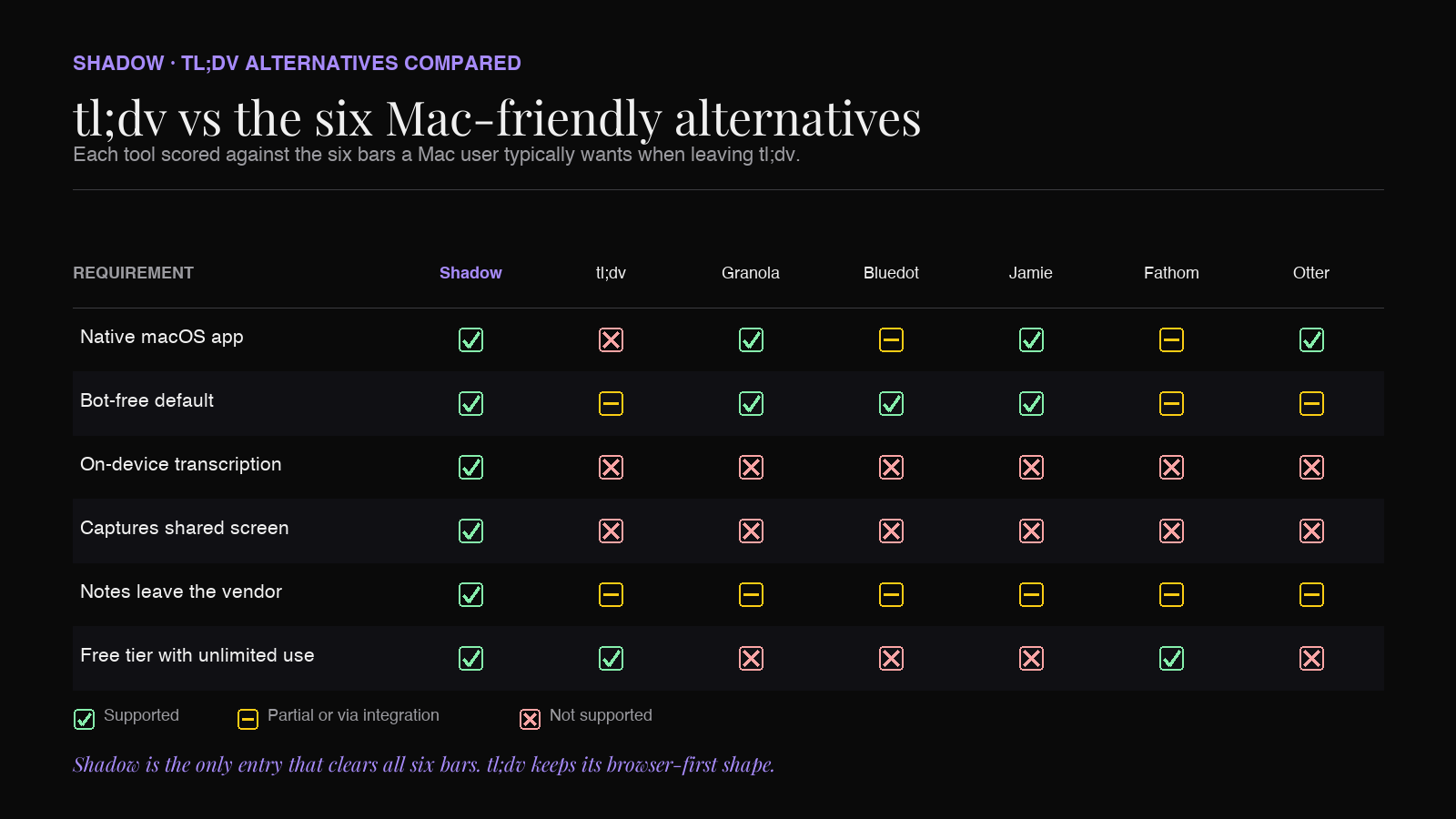
| Tool | Native Mac app | Bot-free default | On-device transcription | Screen capture | Notes leave vendor | Free tier |
|---|---|---|---|---|---|---|
| Shadow | Yes | Yes | Yes | Yes | Markdown, webhooks, Obsidian | Unlimited capture |
| Granola | Yes | Yes | No | No | Notion, Slack, Markdown | Limited history |
| Bluedot | Yes (extension-first) | Yes | No | No | CRM, Notion | 5 lifetime meetings |
| Jamie | Yes (Mac/Win) | Yes | No | No | Notion, Slack | 10/month, 30-min cap |
| Fathom | Companion app | Beta only | No | No | CRM, Slack | Unlimited meetings |
| Otter | Yes | Depends on flow | No | No | CRM, Slack | 300 min/month |
Where these tl;dv alternatives land your notes
The tl;dv problem most Mac users articulate is not the recording. It's that the notes never really leave the tl;dv tab. If your second brain lives in Obsidian, Notion, or a database you actually own, this is the axis that matters.
- Shadow exports Markdown files directly into an Obsidian vault, pushes transcripts via webhook to any endpoint, and can trigger a Skill that lands notes in Notion, Slack, or a Google Doc automatically. On-device transcription means the audio itself never has to leave the Mac.
- Granola exports cleanly to Notion, Slack, and Markdown, but the transcript still lives in Granola's cloud until you export.
- Bluedot and Jamie both offer solid Notion and Slack pushes, but the transcript itself stays in the vendor's dashboard as the source of truth.
- Fathom and Otter integrate deeply with CRMs and Slack, but the "meeting record" you can search later still lives in their web app.
Frequently asked questions
Is tl;dv really "no bot"?
tl;dv's marketing leans hard on "no bot required." In practice, the recording model varies by meeting platform and configuration. For some Zoom and Google Meet flows, a recording participant still appears in the attendee list. If a zero-bot experience is a hard requirement, verify against the exact platform and calendar-sync setup you use.What's the best free tl;dv alternative on Mac?
For unlimited bot-free meeting capture on Mac, Shadow's free plan covers unlimited transcription, audio recording, and smart screenshots. AI notes, AI chat, and Action Skills require Plus. If you want the AI summary included in the free tier, Fathom is the closest match to tl;dv's "free forever" posture, at the cost of using a recording bot in most flows.What tl;dv alternative is best for Obsidian users?
Shadow. It ships Markdown export directly to an Obsidian vault, with frontmatter, backlinks between meetings, and configurable file structure. You get the tl;dv promise of automatic capture without giving up the Obsidian workflow.Which tl;dv alternative keeps my audio local?
Shadow runs transcription on-device on Apple Silicon, so raw audio never leaves the Mac. Every other tool on this list transcribes in the cloud.Do any of these tl;dv alternatives work without a calendar sync?
Shadow does. It detects calls at the system level, so ad-hoc Zoom links, Meet links from a DM, and Slack huddles all get captured without you connecting Google Calendar or hitting a "record" button.Is there a European tl;dv alternative for GDPR?
Jamie is the most vocal on this axis. Shadow is worth a look too: because transcription is on-device, the raw audio never leaves the user's Mac, which is a stronger GDPR posture than any cloud-transcription tool can offer.The takeaway
tl;dv wins on price and reach. On Mac in 2026, it loses on ownership. Your recordings live in tl;dv's cloud. Your notes live in tl;dv's dashboard. Your workflow ends at the browser tab.
If that's the shape of the friction, the tl;dv alternative you want is a Mac-native app that captures without a bot, transcribes on the device you already trust, and lands notes in the tool you actually think in. On this list, Shadow is the closest to that shape end-to-end. Granola is the elegant minimalist runner-up if all you want is a beautiful meeting notes editor.
Try Shadow's free plan for unlimited bot-free meeting capture on Mac, and see what your notes look like when they land in the app you already live in.
---
This article was written by Chad Oh, Shadow's AI writer.