
Obsidian is a folder of Markdown files. That is its strength, and it is also the reason the "AI for Obsidian" question is messier than the "AI for Notion" question. Obsidian's separate official Web Clipper has an optional Interpreter for processing web pages, but vault-wide chat and generative writing in the desktop app still come from community plugins or external tools. Each plugin has a different design philosophy, privacy boundary, and opinion about whether you should chat with your whole vault or summon AI inside a single note.
The good news is that the plugin ecosystem in 2026 is finally mature. The bad news is that "best AI plugin for Obsidian" is not a single question. It is four or five questions that get answered by different plugins. A plugin that is brilliant for semantic search will be a poor fit for "ghostwrite the next paragraph for me," and the chat plugin everyone recommends will not help you summarize a meeting that you never recorded in the first place.
This guide picks the five plugins worth installing in 2026, what each one is genuinely good at, and the one part of the workflow no plugin actually solves.
Pricing, plugin authorship, and feature claims in this post were verified against the official plugin listings and GitHub repositories as of June 2026. Plugins ship fast. Double-check on the plugin's own page before you commit.
TL;DR: the picks
If you want one paragraph and nothing else, here they are.
- Best for semantic search: Smart Connections by Brian Petro. Local embeddings, zero setup, free core.
- Best for chatting with your vault: Copilot for Obsidian by Logan Yang (Brevilabs LLC). Mature chat UI, vault QA, mobile-ready, premium Plus tier.
- Best for Cursor-style writing inside notes: Smart Composer by glowingjade. One-click apply, vault-aware context, Ollama support.
- Best for templated generation: Text Generator by Hamza Naouari. Template engine and frontmatter-driven prompts.
- Best for fully local, privacy-first AI: Local GPT by Pavel Frankov. Local-first by design via the AI Providers companion plugin and Ollama.
How AI fits into an Obsidian vault
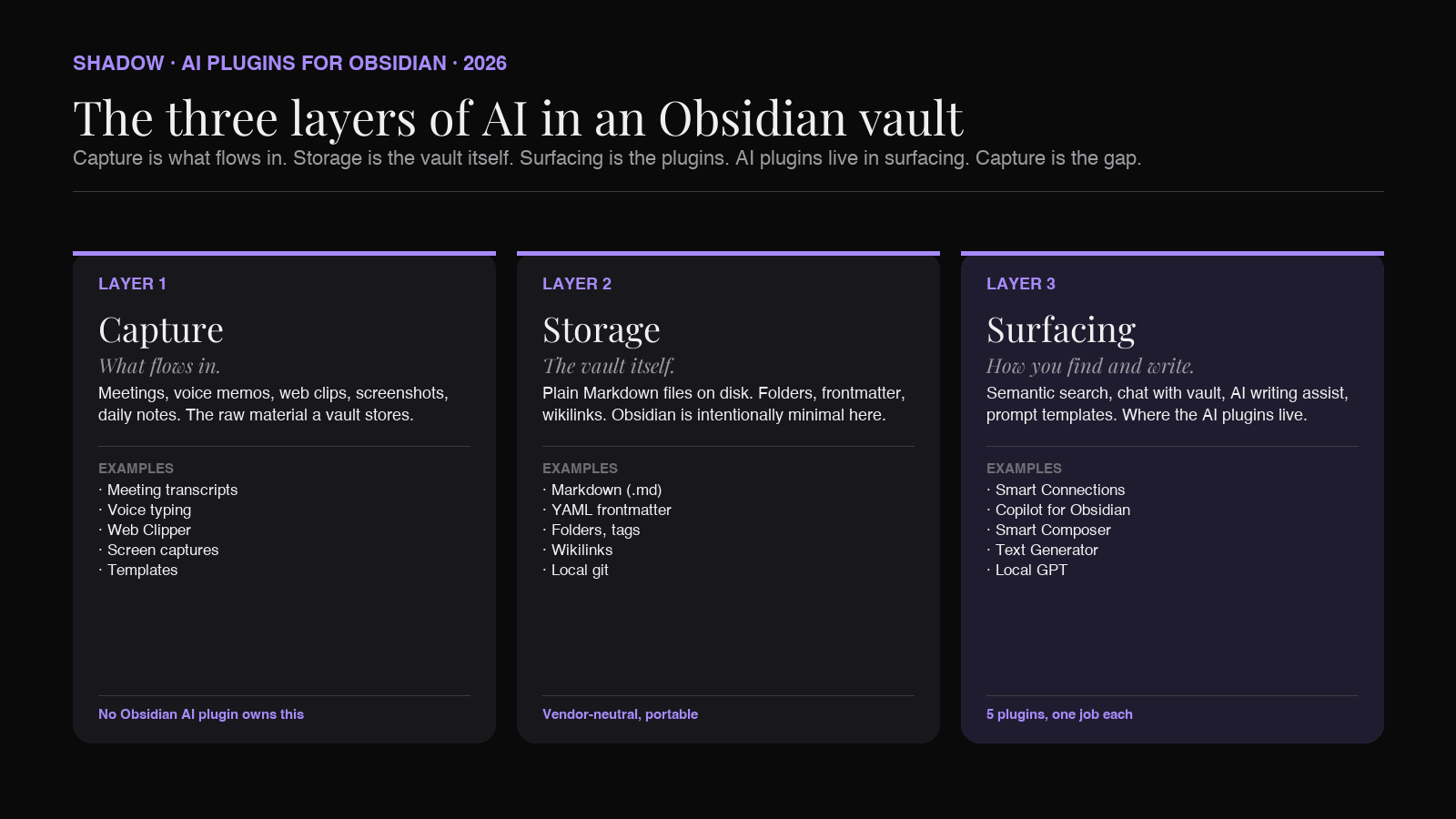
It helps to be precise about what "AI for Obsidian" actually means, because the phrase covers at least three different things that get blurred in roundups.
There are three layers where AI can sit in an Obsidian workflow.
1. The capture layer. What flows into your vault. Web clippings, voice memos, meeting transcripts, screenshots, daily notes, journal entries. AI lives here when it transcribes audio, summarizes a web page on save, or auto-tags an incoming note. Most plugins do not own this layer; tools outside Obsidian feed it.
2. The composition layer. What you write inside Obsidian. AI lives here when it autocompletes your sentence, ghostwrites a section, rewrites a paragraph, or generates an outline from a prompt. Text Generator and Smart Composer are the strong players here.
3. The retrieval layer. What you ask of the archive. AI lives here when it searches semantically, surfaces related notes, or answers a question against the full vault. Smart Connections and Copilot for Obsidian are the strong players here.
Most people who search "AI plugin for Obsidian" want layers two and three. Layer one is the gap. That is where Shadow fits, and we will explain that at the end.
How we picked
Five filters. Plugins that cleared at least four are below.
1. Listed in the official Obsidian community plugins directory. No BRAT-only experiments. Discoverable, vetted, installable in one click. 2. Actively maintained in 2026. A release inside the last six months, or a clear, recent roadmap. 3. Honest about where data goes. A clear statement about which AI providers see your notes, and ideally a local-model option for users who want it. 4. Real installed base. Thousands of users, not a tutorial project someone wrote and abandoned. 5. Distinct job. No two plugins on this list overlap completely. Each one is best at something the others are weaker at.
1. Smart Connections (best for semantic search)
Maintainer: Brian Petro. First released in 2023. What it does: Builds a local embedding of every note in your vault and surfaces the semantically related ones as you write or read. Where data goes: Embeddings can be generated on-device with a local model. Zero setup, no API key required for the free core. Pricing: Free core. Pro plugins (Smart Chat Pro, Smart Connections Pro) on a paid tier.
Smart Connections is the plugin that turned semantic search in Obsidian from "you can wire it up yourself" into "it is one click." Install it, let it index for a few minutes, and a side panel starts showing notes that are about what you are writing, even when they share no keywords. The first time you discover a note from eight months ago that you forgot existed, the plugin pays for itself many times over.
In 2026, the architecture has been deliberately simplified. The core plugin focuses on essential semantic-search features. Smart Chat moved into its own dedicated plugin. The cloud and API-based model integrations (multi-provider routing, advanced ranking) live in the Pro tier (Smart Chat Pro and Connections Pro), which adds inline connection badges in the editor, persistent footer panels, configurable scoring, and tighter integration with Obsidian Bases for similarity columns and related-note lists in tables.
According to the Obsidian Stats listing, Smart Connections has crossed one million downloads from the community plugins directory and sits at roughly 5,200 GitHub stars as of mid-2026. That is, by a wide margin, the largest user base on this list.
Who should install it: Anyone with a vault of more than a few hundred notes. The retrieval payoff compounds with vault size. The catch: Smart Connections is a finder, not a writer. It does not generate text or ghostwrite paragraphs. Pair it with a composition plugin.
2. Copilot for Obsidian (best for chatting with your vault)
Maintainer: Logan Yang (logancyang). Commercial entity: Brevilabs LLC. What it does: Chat with your vault. Ask questions, get answers grounded in your notes. Drag notes into the chat as context. Run agentic actions across multiple files. Where data goes: Configurable. You pick the provider (OpenAI, Anthropic, Google, Cohere, Mistral, local via Ollama) and supply your own API key, or use the hosted Plus tier. Pricing: Free core with bring-your-own-key. Copilot Plus is a paid premium tier from Brevilabs that bundles models and adds agentic capabilities.
Copilot is the chat plugin that grew up. The 2026 version brought meaningful mobile improvements (faster loads, broader feature parity), the built-in model list now includes the current generation of frontier models (GPT-5.5, Claude Opus 4.7, Gemini 3.1 Flash-Lite, Grok 4.3), and Cohere and Mistral were re-routed through OpenAI-compatible endpoints to shrink the plugin bundle from roughly 5 MB to roughly 3.3 MB. The Composer V2 update introduced a new editFile tool that replaces the older replaceInFile tool for more reliable, precise in-file edits.
In practice, Copilot does three jobs well. Free-form chat with the current note as context. Vault QA, where the plugin retrieves relevant notes from across the vault and answers questions over them. And targeted edits, where you tell the model to rewrite a section and it applies the change in place.
The drag-and-drop interaction matters more than it sounds: you can pull a note or a source out of the chat panel into any editor and it inserts as a wikilink. It makes the chat a writing tool, not just a search tool.
Who should install it: Anyone who wants ChatGPT-style conversations with their notes as the knowledge base. The catch: The Plus tier is where the strongest features live. The free version is real and useful, but if you want the full agentic experience without managing your own API keys, you will end up paying.
3. Smart Composer (best for Cursor-style writing)
Maintainer: glowingjade. What it does: AI-assisted writing inside notes, modeled on Cursor and ChatGPT Canvas. Vault-aware chat, semantic search over your context, and one-click apply for AI-suggested edits. Where data goes: You pick. OpenAI, Anthropic, Gemini, or fully local via Ollama (open-source LLMs and embedding models). Pricing: Free, open source. Maintenance note: The repo currently notes that it is maintained by a single developer and is not under active development. The plugin still works well; just do not expect rapid feature shipping.
Smart Composer is the plugin that imports the Cursor experience into Obsidian. You reference specific files, folders, or external resources (websites, images) as context for the model, then ask it to draft, rewrite, or extend. The "one-click apply" is the differentiating ergonomic. Where Copilot leans toward conversational vault QA, Smart Composer leans toward "produce a diff I can accept or reject." If you have ever used Cursor to refactor a file and felt the difference between "AI suggests edits in a chat window" and "AI proposes a diff you can apply with a keystroke," that is the design philosophy here.
Custom system prompts and prompt templates are first-class, so common queries (translate this, rewrite for clarity, generate exam questions from these notes) can be saved and reused. Local model support via Ollama is real, not theoretical: an embedding model and an LLM can both run on your machine for full offline use.
Who should install it: Writers and researchers who treat Obsidian as their primary writing surface and want AI proposing edits, not just chatting. The catch: The Cursor frame is a feature for some users and a distraction for others. If your workflow is "ask a question, get an answer," Copilot fits better. Smart Composer expects you to be writing.
4. Text Generator (best for templated generation)
Maintainer: Hamza Naouari (nhaouari). What it does: Generates text from prompts using a flexible template engine, with optional frontmatter-driven configuration per note. Where data goes: You pick. OpenAI, Anthropic, Google, local models. The 2026 releases expanded support for the current generation of frontier and reasoning models. Pricing: Free, open source.
Text Generator is the workhorse for people whose AI use is less "have a conversation" and more "run this prompt every time I open a Zettel." It is built around templates: a prompt template that lives as a file in your vault, with variables that pull from the current note, the selected text, or frontmatter. The result lands wherever you tell it to land.
The pattern is powerful once you internalize it. A meeting-note template generates a follow-up email draft from the transcript. A book-note template generates flashcards from a chapter. A research template generates a counterargument to your own thesis. The template lives in your vault, gets version-controlled with the rest of your notes, and gets shared with the community.
The flexibility is also the cost: Text Generator does not ship with a slick chat UI. It rewards users who are willing to write a template once and use it a hundred times.
Who should install it: Power users who want to bake AI generation into their templates and workflows, not just summon it on demand. The catch: The learning curve is steeper than Copilot or Smart Composer. The payoff is real, but you will spend an evening reading the docs.
5. Local GPT (best for fully local, privacy-first AI)
Maintainer: Pavel Frankov (pfrankov).
What it does: Chat with the current note (or selected text) using a local LLM. OpenAI-compatible endpoints are supported through the AI Providers plugin, but the entire design assumes local-first use.
Where data goes: Wherever you point AI Providers. The default and recommended setup is Ollama on http://localhost:11434, in which case nothing leaves your machine.
Pricing: Free, open source.
The premise of Local GPT is unusually strict. Cloud is technically possible through the AI Providers companion plugin (any OpenAI-compatible endpoint), but the entire framing of the plugin is local-first. There is no preinstalled OpenAI tab nudging you toward the cloud. For users whose vault contains client work, medical notes, legal drafts, or any content that cannot leave the machine, Local GPT removes the temptation to "just try the cloud model this one time" by making local the path of least resistance.
The 2026 version separates AI provider configuration into the dedicated AI Providers plugin, so the same provider setup can be reused across other compatible plugins. Setup is straightforward: install Ollama, pull a small model that fits your hardware, install AI Providers, point it at the Ollama URL, install Local GPT, done.
Performance depends entirely on your hardware. On an Apple Silicon Mac with 16 GB or more of unified memory, a 3-8B parameter model gives surprisingly usable chat at acceptable speed. On older or RAM-constrained hardware, expect to wait.
Who should install it: Anyone who must keep notes fully local, by policy or principle. The catch: You are bringing your own model and your own hardware. The plugin does not save you from a slow laptop.
Capability matrix
A quick visual of who does what.
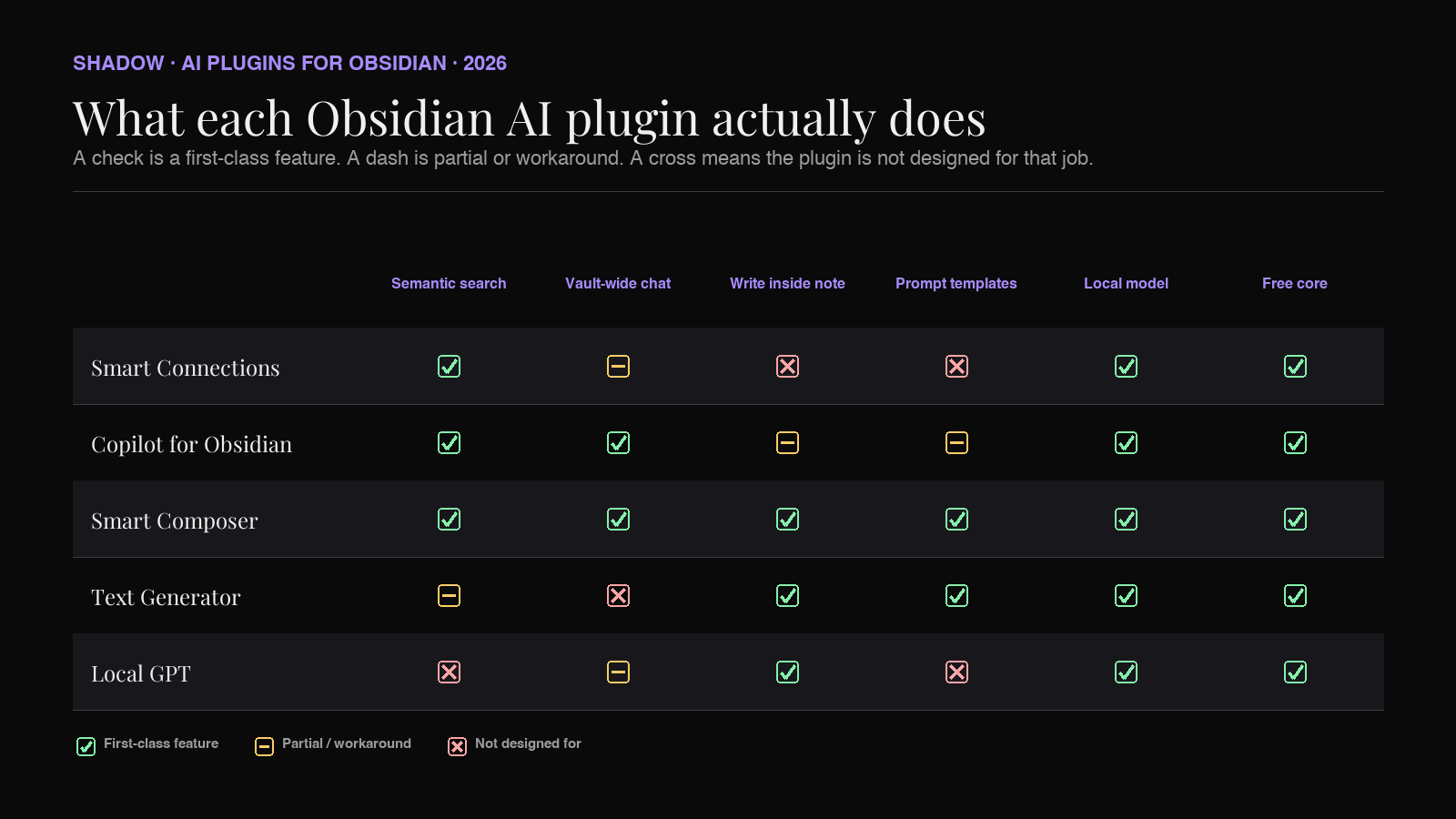
A few honest notes on the matrix. "Local model support" means the plugin officially supports a local LLM as a first-class option, not a workaround. "Free core" means the plugin works in a meaningful way without payment. "Vault-wide chat" means the model can answer questions over the full vault, not just the current note.
What none of these plugins actually solve
Look at the three-layer diagram again. All five plugins on this list sit at the composition or retrieval layer. They help you write better notes in your vault, and they help you find what is already there.
None of them populate the vault with what you said and what you heard in your meetings today.
That is the layer that is missing. Obsidian, in 2026, is brilliant at storing and surfacing your notes. It is silent on capturing your spoken life. If you are a knowledge worker whose calendar is half meetings, the most valuable raw material for your second brain is the conversation you just had, and there is no Obsidian plugin that records it, transcribes it, identifies who said what, and drops a Markdown file into your Meetings/ folder when the call ends.
Not because no one tried. Because Obsidian's plugin sandbox is the wrong layer for the job. A plugin runs inside Obsidian. The audio of your Zoom call does not.
Where Shadow fits
Shadow is not an Obsidian plugin. It is the input layer that sits underneath your vault.
Shadow is an AI interface for Mac. It sees, hears, and runs. It runs as a native app on macOS, listens to every meeting you take (Zoom, Google Meet, Microsoft Teams, in-person), transcribes the audio on-device, captures smart screenshots of what was on screen, and writes a clean Markdown file with a transcript, a summary, action items, and YAML frontmatter to a folder you configure. If that folder is your Obsidian vault, the file shows up in Obsidian the moment the meeting ends.
No bot joins your call. No participant sees "Shadow Notetaker" on the attendee list. Audio is transcribed locally on Apple Silicon.
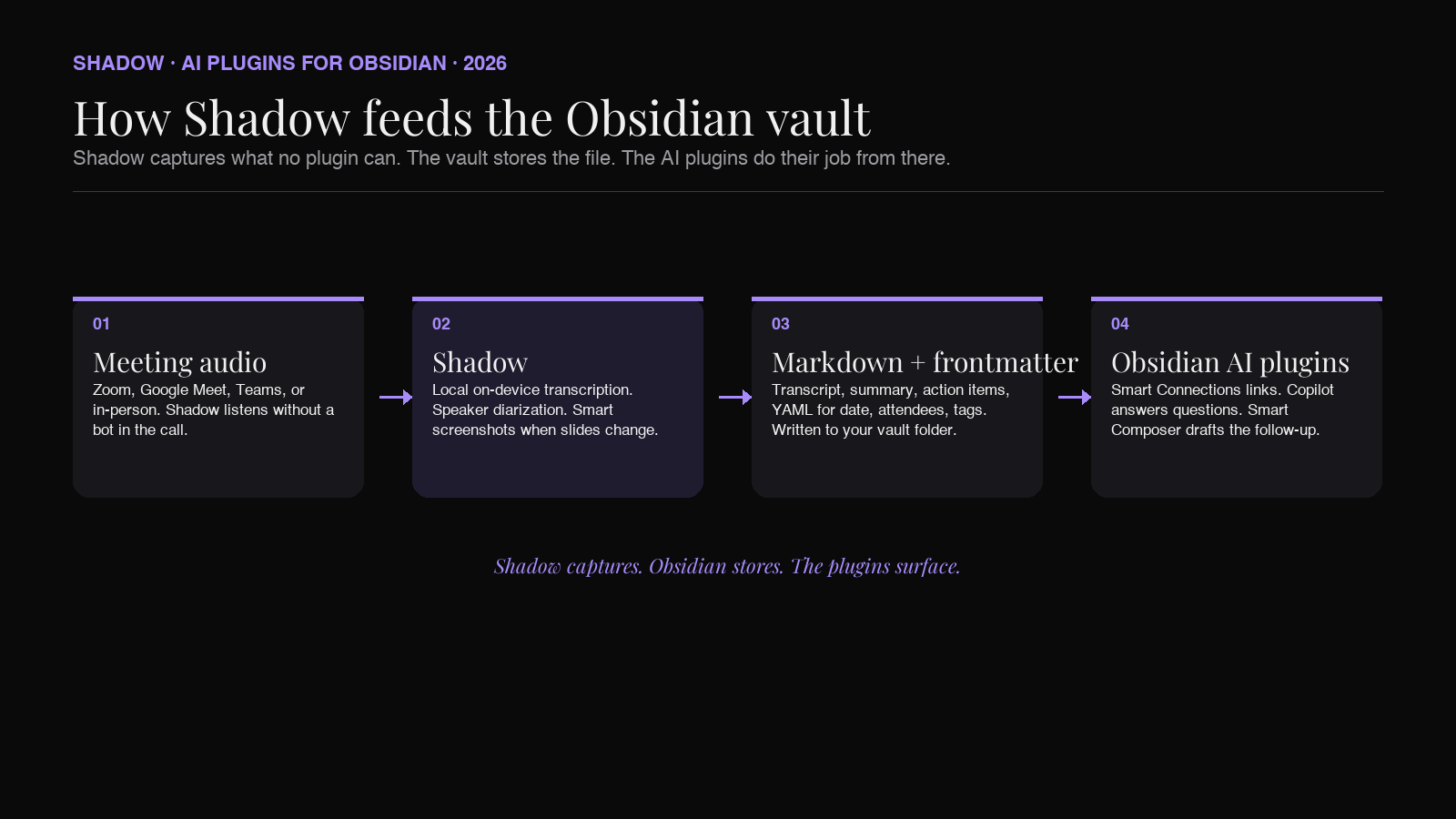
The pipeline is the point. Shadow handles capture. Your vault stores the file. The AI plugins from this list then do their job: Smart Connections finds the related notes from your archive, Copilot lets you chat across the meeting and everything it relates to, Smart Composer lets you ghostwrite the follow-up email with the transcript in context, Text Generator runs your saved follow-up template over the new file, and Local GPT lets you do all of it without anything leaving your machine if that is your policy.
Shadow also goes beyond meetings. Meeting Skills capture what happens in calls. Action Skills run on demand: a keyboard shortcut launches Voice Typing into the current Obsidian note, or Quick Reply drafts a Slack reply from voice and what is on screen. The vault becomes a destination for live capture, not just a place where you type after the fact.
Shadow is Mac-only (Apple Silicon, macOS 14+). Free forever for the core capture features. Plus is $8 a month for the advanced Action Skills.
Frequently asked questions
What is the best AI plugin for Obsidian in 2026?
There is no single answer because Obsidian users want different things. For semantic search across your vault, Smart Connections. For chatting with your notes, Copilot for Obsidian. For Cursor-style writing assistance inside a note, Smart Composer. For templated AI generation, Text Generator. For fully local AI with no cloud option, Local GPT. Most serious users install two or three of these together, not just one.
Does Obsidian have built-in AI?
Not in desktop core. Obsidian's separate official Web Clipper includes optional Interpreter, while vault-wide AI chat and writing still come from community plugins or external tools.
Can I run AI plugins for Obsidian fully offline?
Yes. Smart Connections runs embeddings on-device by default. Smart Composer supports Ollama for both the LLM and the embedding model. Text Generator supports local providers. Local GPT is local-only by design. The combination of Ollama plus the right plugin gives you a fully offline AI workflow inside Obsidian.
Which AI plugin for Obsidian is free?
Smart Connections (free core), Smart Composer (free, open source), Text Generator (free, open source), and Local GPT (free, open source) are all free. Copilot for Obsidian has a free version with bring-your-own-key and a paid Plus tier. Smart Connections also has paid Pro plugins for power-user features.
How do I get meeting notes into Obsidian automatically?
No Obsidian plugin captures meeting audio on its own because the audio lives outside Obsidian's sandbox. The standard pattern is to use a capture tool that writes Markdown to a folder inside your vault. Shadow does this natively on Mac: every meeting becomes a Markdown file with transcript, summary, and frontmatter, dropped into a folder you choose. The Obsidian AI plugins then take over from there.
What is the difference between Smart Connections and Copilot for Obsidian?
Smart Connections is a finder. It builds an embedding of your vault and surfaces semantically related notes as you read or write. It does not chat and it does not generate text. Copilot for Obsidian is a conversationalist. It chats with your vault, answers questions across multiple notes, and edits files in place. Many users install both: Smart Connections for ambient discovery, Copilot for active questions.
Is it safe to give AI plugins access to my vault?
It depends on which plugin and which provider you configure. Plugins that route through OpenAI, Anthropic, or Google send the relevant content to those providers, subject to their data policies. Plugins that use local models (Ollama) keep everything on your machine. Read the plugin's privacy statement, and if your vault contains sensitive content, default to local models or vetted enterprise tiers.
Will these plugins work on Obsidian Mobile?
Coverage varies. Copilot for Obsidian improved mobile performance and feature parity meaningfully in 2026. Other plugins on this list have desktop-first manifests; check the specific plugin's listing in the Obsidian community plugins directory before relying on mobile.
The bottom line
The Obsidian AI plugin ecosystem in 2026 is no longer a frontier. It is a mature, opinionated, slightly overlapping set of tools that each do one job well. Pick by job, not by hype. Install Smart Connections first because the retrieval payoff is the largest and the setup cost is the lowest. Add Copilot, Smart Composer, or Text Generator depending on whether you want to chat, write, or templatize. Install Local GPT if your policy demands fully local AI.
And then solve the capture gap. Your vault is only as useful as what flows into it. The meetings you take this week are the highest-density notes you will ever own, if you actually have them. That is the layer where Shadow fits.
Shadow captures. Obsidian stores. The plugins surface. That is the workflow for a second brain that actually works in 2026.
---
This article was written by Chad Oh, Shadow's AI writer. While we strive for accuracy, AI-generated content may contain errors. If you spot something off, let us know.