
TL;DR
Most "AI on Mac" tools in 2026 fall into one of two buckets. The first is the chat-window bucket: open ChatGPT or Claude, paste in context, ask a question, copy the answer back. The second, newer bucket is the screen-context bucket: the AI already sees what is on your screen, so you skip the paste step entirely.
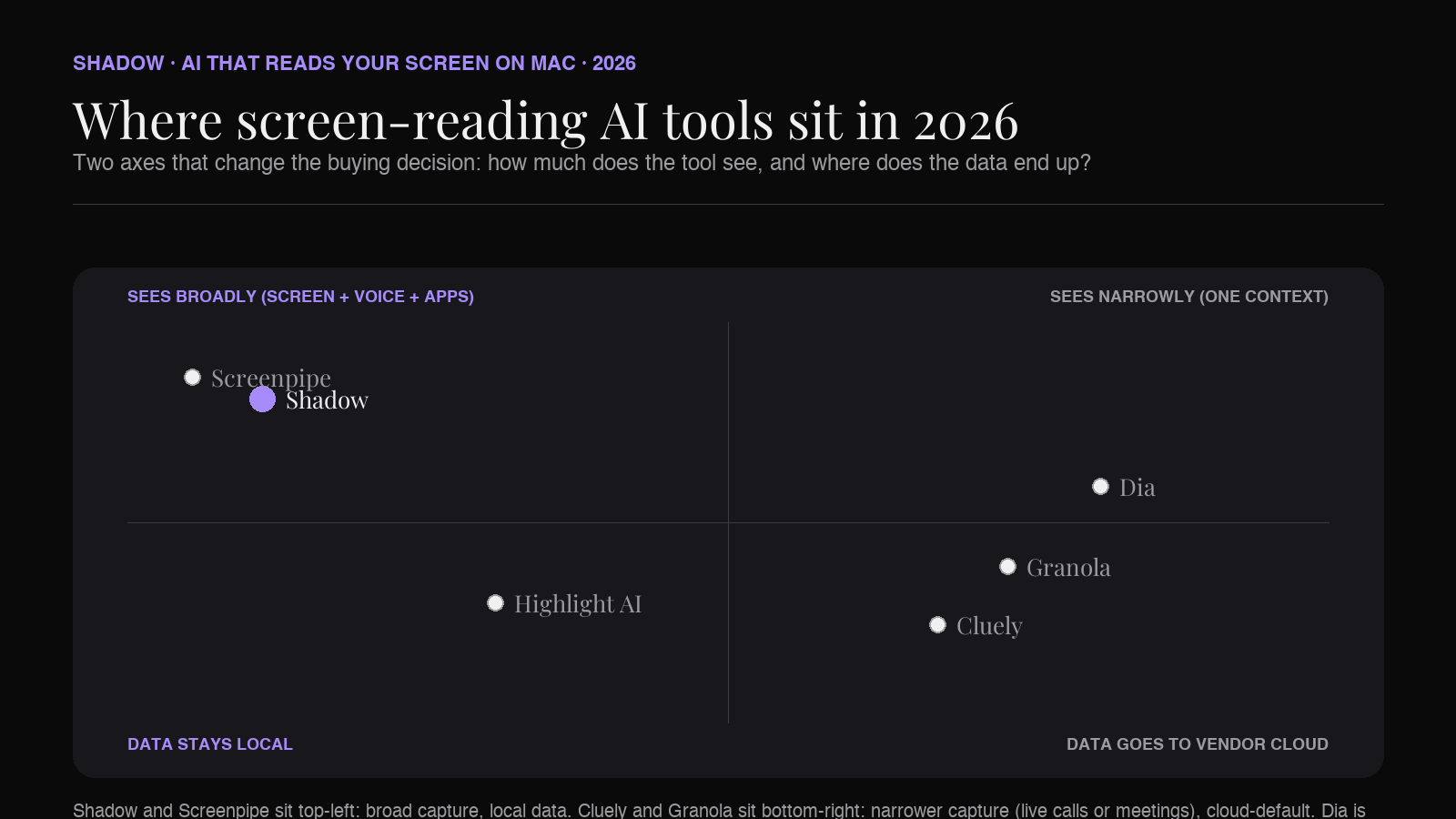
The screen-context category was a curiosity in 2024, a Rewind-era novelty in 2025, and a real product lane in 2026. Cluely is on every podcast. Highlight AI raised a $40M Series A in March 2026. Granola made smart screenshots a default. Screenpipe replaced Rewind as the open-source local-first option. And Shadow shipped Action Skills, which combine the screen view with voice input on a keyboard shortcut.
The six picks on this list, in the order they appear:
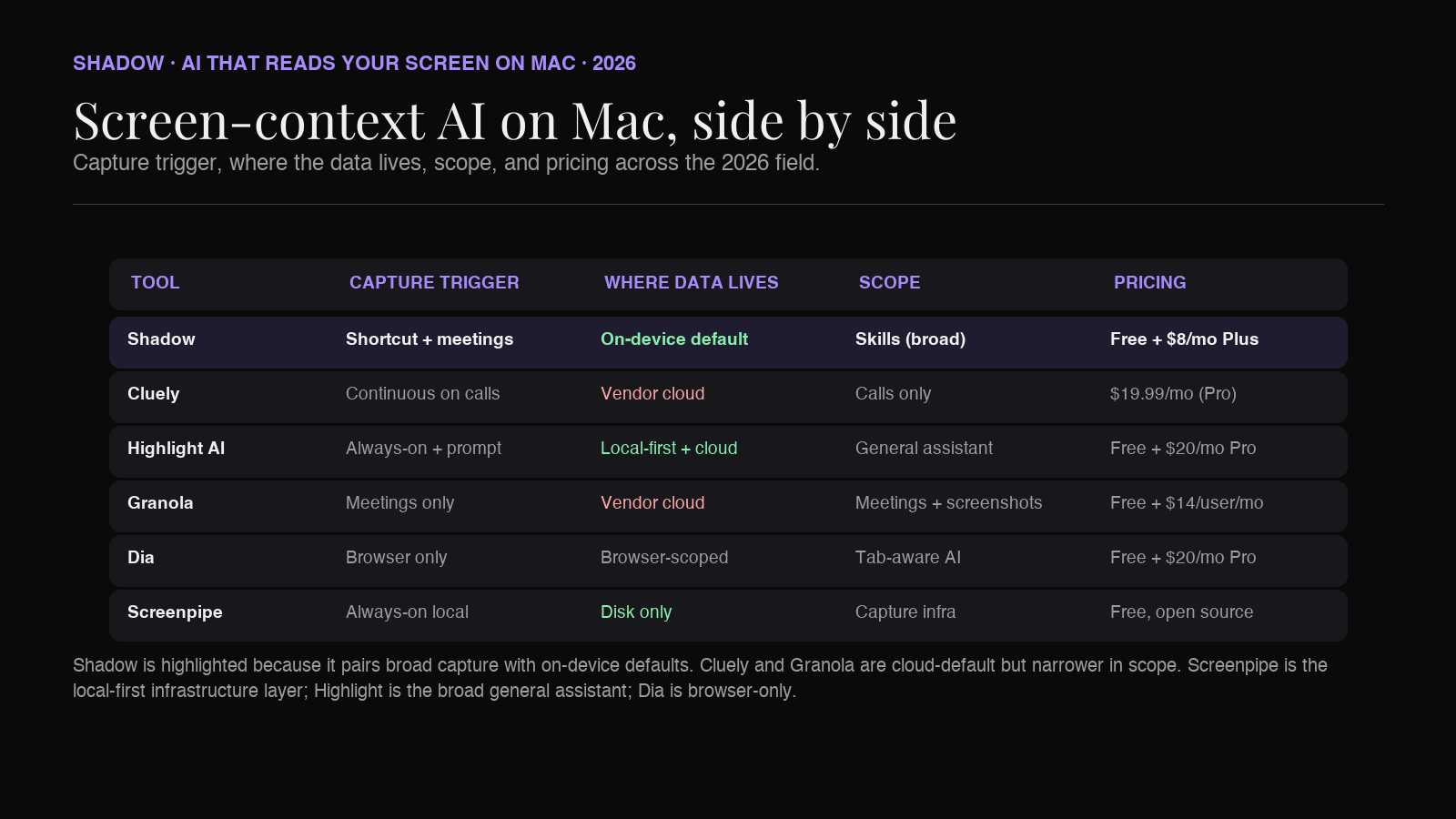
1. Shadow. Mac-native AI interface that sees, hears, and runs. Screen capture plus on-device voice transcription, triggered by a keyboard shortcut or during meetings. Free tier, Plus is $8/month. 2. Cluely. Live overlay that watches screen and audio during calls. Repositioned in 2025 from "cheat on everything" to a sales-and-meeting layer. Pro $19.99/month; Pro + Undetectability $149.99/month. 3. Highlight AI. Always-on desktop assistant that reads anything on screen, supports voice, integrates with Gmail, Slack, Linear, Notion. Free tier, Pro $20/month. Khosla-led $40M Series A in March 2026. 4. Granola. Bot-free meeting note-taker with smart screenshots tied to the transcript. Mac, Windows, iOS. Business $14/user/month after a free tier capped at 25 notes. 5. Dia. AI-native browser from The Browser Company. Reads your tabs, not your whole screen. Pro is $20/month. Mac-only on Apple Silicon. 6. Screenpipe. Open-source local-first capture of screen and audio. Self-hosted, MIT-licensed. The Rewind replacement for people who want their data to stay on their own disk.
Rewind AI does not make this list. It shut down on December 19, 2025 after the Limitless parent company was acquired by Meta. Its absence is part of why this category looks the way it does in 2026.
Why "AI that reads your screen" became a category
The standard 2024 way of working with AI was open ChatGPT, paste the email you were trying to reply to, paste the meeting notes, paste the slide content, ask the question, copy the answer, paste it back into the target app. The human was the bridge between every other app and the AI.
That loop never made sense. Screens on a Mac already render the context the AI needs. Mic input already exists. So a small wave of tools started capturing screen and audio directly and feeding them to a language model on a keyboard shortcut.
The category became visible to a wider audience in 2025 for two unrelated reasons. Cluely went viral with a "cheat on everything" pitch that put screen-watching AI in the news cycle for the wrong reason, then quietly repositioned. Rewind, which had been the quiet original of the lane since 2022, was acquired by Meta through its Limitless parent and shut its consumer Mac product down in December.
What replaced both is a more sober crop of tools. Some live in the meeting layer (Granola, Shadow's Meeting Skills). Some live on the keyboard shortcut (Shadow's Action Skills, Highlight AI). Some live in the browser (Dia). One lives in the open-source self-hosted layer (Screenpipe). They share the same primitive (the AI sees what you see) and disagree on almost everything else (where the data goes, what triggers the capture, what the AI does with it).
The buying decision in 2026 is no longer "should I use AI that reads my screen." It is "which one fits the way I work, given what each one captures and where the data ends up."
What to look for in a screen-context AI on Mac
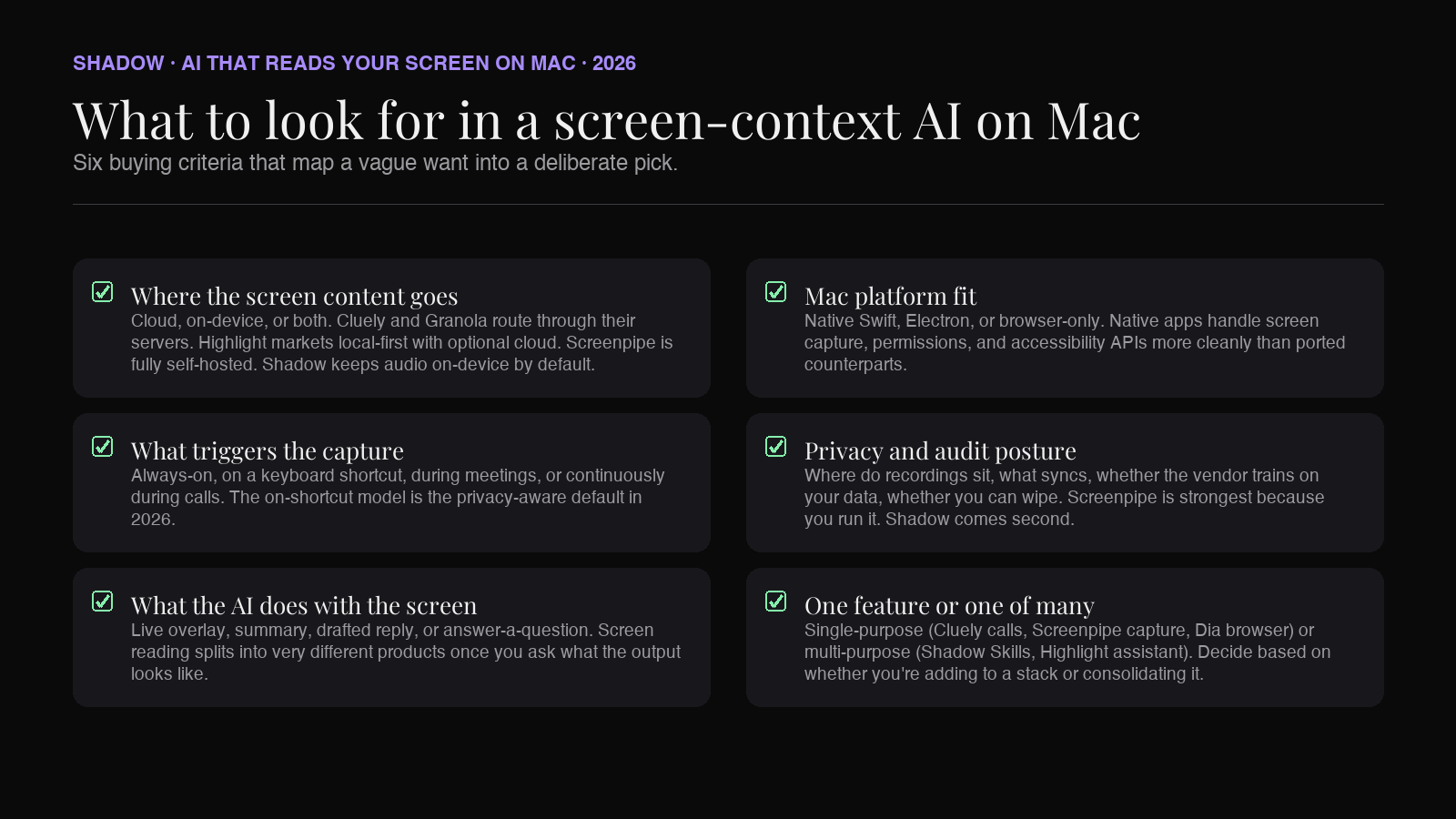
Six questions to actually ask, in roughly the order they should change your shortlist.
Where the screen content goes. Cloud, on-device, or both. Cluely and Granola route through their servers. Highlight markets itself as local-first with optional cloud. Screenpipe is fully self-hosted by design. Shadow transcribes audio on-device and sends only what a Skill needs to the model that Skill calls.
What triggers the capture. Always-on (Rewind's old model, Screenpipe's default), on a keyboard shortcut (Shadow Action Skills, Highlight's prompt bar), during meetings only (Granola, Shadow Meeting Skills), or continuously during calls (Cluely). The always-on model captures the most context and the most risk. The on-shortcut model is the privacy-aware default in 2026.
What the AI does with the screen. Surface a live overlay (Cluely). Summarize after the fact (Rewind-era model, now Screenpipe). Combine with voice and write something back (Shadow Quick Reply, Highlight). Answer a question about what you are looking at (Highlight, Shadow custom Skills, Dia). The category of "screen-reading" splits sharply once you ask what the output looks like.
Mac platform fit. Native Swift app, Electron wrapper, browser-only. Native apps tend to handle screen capture, permissions, and accessibility APIs more cleanly. Shadow and Granola are native Swift. Highlight and Cluely are cross-platform Electron-leaning. Dia is browser-only by definition.
Privacy and audit posture. Whether raw recordings sit on your disk, whether they sync to a vendor server, whether the vendor trains on your data, whether you can wipe everything. Screenpipe is the strongest answer because you run it. Shadow comes second because audio is local and storage is local. Cluely and Granola route through their cloud.
Whether screen reading is the whole product or one piece. Single-purpose (Cluely is meeting-only, Screenpipe is capture-only, Dia is browser-only). Multi-purpose (Shadow runs Skills across Meeting and Action contexts; Highlight does general AI assistance with screen access). The right answer depends on whether you already have a stack and want one tool added, or whether you want to consolidate three tools into one.
The 6 screen-reading AI tools for Mac in 2026
1. Shadow
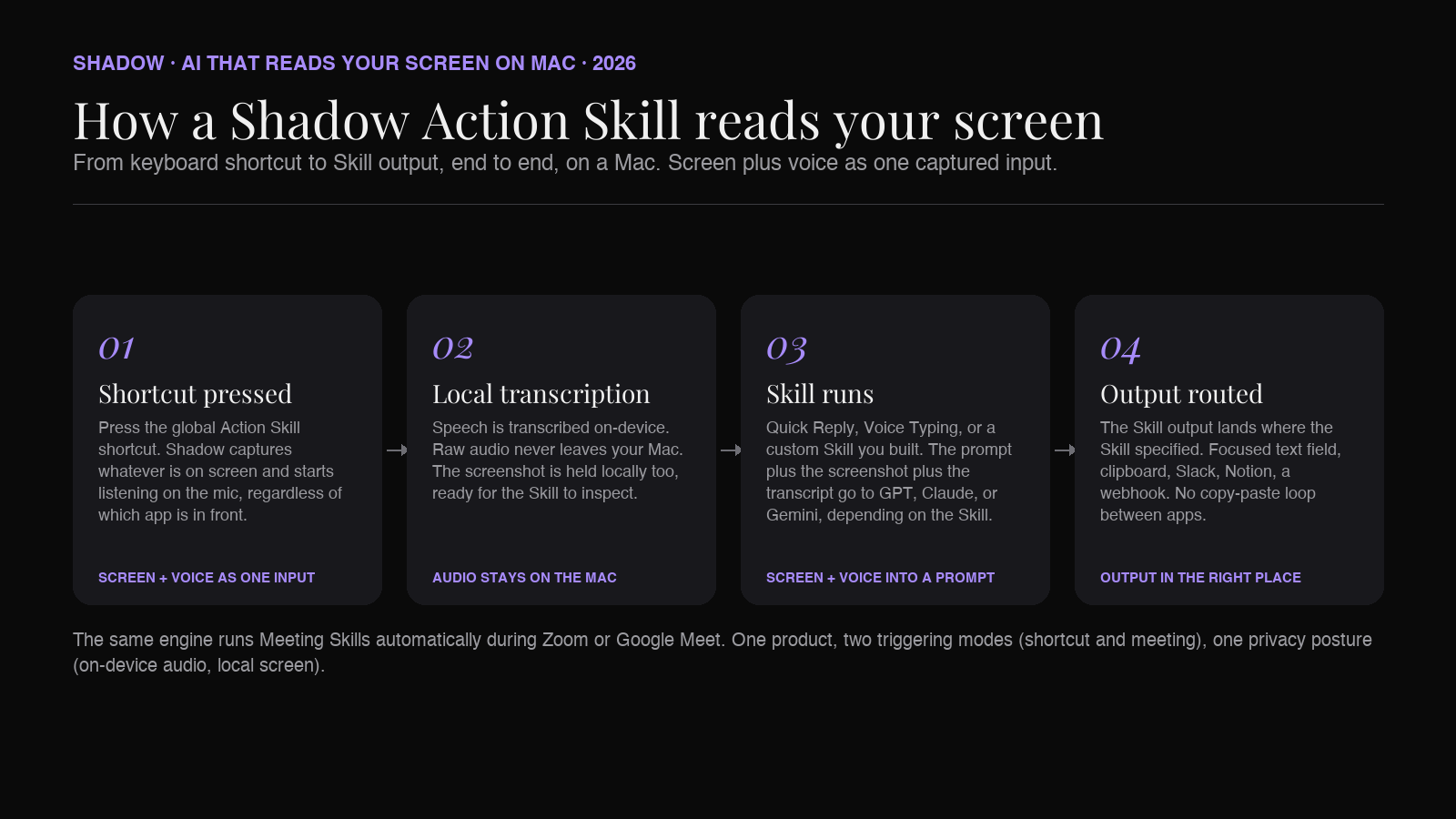
Shadow leads this list because it treats screen reading as a primitive, not a product. Shadow is an AI interface for Mac that sees, hears, and runs. Press a keyboard shortcut and Shadow captures what is on screen, listens for your voice prompt, and runs the Skill you assigned. Start a Zoom or Google Meet and Shadow runs Meeting Skills automatically, with Smart Screenshots that capture the slides and screen content tied to the live transcript.
The Skill model is what separates Shadow from the "AI overlay" approach Cluely or Highlight take. A Skill is a prompt plus what to capture (screen, voice, or both) plus where the output goes (clipboard, focused text field, an integration). Two Skills ship by default. Quick Reply drafts an email or Slack reply from your voice plus the screen you are looking at. Voice Typing converts spoken thought to clean text in any text field. Custom Skills are user-built and can capture screen, voice, or both, with output routed wherever you want it. The same engine that drives Meeting Skills drives Action Skills, so the screen-reading primitive is shared across the meeting workflow and the keyboard-shortcut workflow.
The privacy story is the second reason Shadow leads. Audio is transcribed on-device by a local model. Smart Screenshots are stored on your Mac, not in the cloud. When a Skill needs an external model (OpenAI, Anthropic, Google), the transcript or screenshot is sent then, and only what the Skill requires. There is no always-on cloud upload of everything you see and hear, which is the model that made the original Rewind setup uncomfortable for some users.
Strengths in this category:
- Local audio transcription, local screen storage. Only what a Skill needs leaves the Mac.
- Two triggering modes (keyboard shortcut for Action Skills, automatic during meetings for Meeting Skills) on one engine.
- Custom Skills mean screen reading is not stuck to one prebuilt workflow. The output can go to clipboard, to Notion, to Slack, to a webhook.
- No bots. Shadow never joins a meeting as a visible participant.
- Mac-native Swift, Apple Silicon native, designed for the OS rather than ported to it.
- Mac-only. If you split your day between Mac and Windows, Highlight or Cluely are cross-platform and Shadow is not.
- Not a continuous always-on logger. If you want a Rewind-style "show me everything I saw last Tuesday" timeline, Screenpipe is the better fit. Shadow captures on Skill trigger, not all the time.
Pricing: Free tier covers bot-free meeting transcription, smart screenshots, and core Skills with no usage cap. Plus is $8/month with a two-week free trial. Verified against shadow.do/pricing on 2026-05-27.
2. Cluely
Cluely is the loudest name in this lane and the most controversial. It is a desktop overlay that watches your screen and listens to call audio in real time, then surfaces AI suggestions in a window only you can see. The original 2025 pitch was "cheat on everything," which earned the founder a tour through tech Twitter and a $15M Series A from a16z. The 2025 reposition was toward sales calls and meeting enablement, with CRM integrations for Salesforce and HubSpot and post-call summaries.
The core technical capability is real. Cluely OCRs the visible screen, transcribes audio, and feeds both into a language model with prompt scaffolding tuned for live calls. The overlay surfaces objections you can address, talking points you have not hit, definitions of terms the other side used, and a running summary. In a sales context, this is genuinely useful. In a job-interview context, the original pitch, the ethics are the user's problem.
Strengths in this category:
- Live overlay during calls is the most polished in the category. Cluely is what people imagine when they imagine screen-watching AI.
- CRM integrations and a sales-team go-to-market do shorten the path from screen capture to a real workflow outcome.
- Cross-platform on the user side (Mac desktop and iOS).
- Cloud-first by design. Screen content and audio are sent to Cluely's servers and to the underlying LLM. This is a non-starter for many regulated industries.
- The "Undetectability" tier (hidden from screen-share) at $149.99/month is the explicit market for use cases that ought to make a buyer uncomfortable. It changes the conversation about what category Cluely is in.
- Single-purpose. Cluely is for calls. It is not a general AI interface for Mac.
Pricing: Starter is free with limited responses. Pro is $19.99/month. Pro + Undetectability is $149.99/month. Verified against cluely.com/pricing on 2026-05-27.
3. Highlight AI
Highlight AI is the closest like-for-like comparison to Shadow on the Action Skill side, with a different center of gravity. Highlight is an always-on desktop assistant that can see anything on screen across any app, accept voice input, and route requests through a model picker that includes both proprietary and bring-your-own models. It integrates with Gmail, Slack, Linear, Notion, and a growing list of MCP-connected tools.
The Series A in March 2026 (Khosla Ventures, $40M) put Highlight on more screens than its 2024 vintage would have suggested. The product matured in parallel. The free tier is generous (unlimited chats on auto-selected base models). The Pro tier at $20/month buys 2,000 monthly credits on premium models, cloud transcription, and action-item extraction.
Strengths in this category:
- General AI assistance, screen-aware, on a Mac that already has Gmail and Slack open. The integrations layer is the most developed.
- Both Mac and Windows. If you need cross-platform, this is a real answer.
- Model picker with bring-your-own keys means you can route to your own OpenAI account or Anthropic account rather than paying the vendor margin.
- Always-on by default. The privacy posture is "local-first," but the user has to verify exactly what is captured, when, and what is shipped to the cloud. The model is less explicit than Shadow's "Skill-triggered, on-device transcription by default."
- Electron-leaning rather than Swift-native. Native-feel and battery draw are not identical to a Mac-native Swift app.
- No meeting capture in the same shape as Shadow or Granola. Meeting audio is partial; the product is general-assistant first, meeting-tool second.
Pricing: Free tier with unlimited chats on auto-selected models. Pro is $20/month for 2,000 credits and premium model access. Enterprise is custom. Verified against highlightai.com/pricing on 2026-05-27.
4. Granola
Granola is in this roundup for one feature: Smart Screenshots. The product itself is a bot-free meeting note-taker, in the same lane as Shadow's Meeting Skills. The screen-context angle is that Granola captures slides, app windows, and shared screens during meetings and ties each screenshot to the transcript timestamp.
The 2026 product is materially different from the 2024 one. Granola added Spaces (shared team workspaces), an API, and an MCP server in February 2026. The pricing changed at the same time. The Individual $18/month plan retired. The current shape is a free tier (25-note history cap), Business at $14/user/month, and Enterprise at $35/user/month.
Granola is the right reference point for what "screen reading inside a meeting" looks like as a polished feature, not as a category framing. The screenshots are useful, the timestamp tie-in is useful, and the rest of the product is a note-taker that competes with everyone else in that lane.
Strengths in this category:
- Smart Screenshots tied to transcript timestamps. If you sit through a lot of demo-heavy or slide-heavy calls, this matters more than it sounds.
- Bot-free, like Shadow. Audio is captured locally without a calendar bot joining.
- Native Mac, with Windows and iOS clients.
- Mature integrations layer, with API and MCP server for custom workflows.
- Audio transcription routes through Granola's cloud. The "bot-free" label is about not joining as a participant, not about local processing.
- Free tier capped at 25 notes is tighter than it used to be. Pricing now starts at Business $14/user/month.
- Screen reading happens during meetings only. There is no Action-Skill-style "look at my screen now and answer this" on a shortcut.
Pricing: Free with 25-note history. Business $14/user/month. Enterprise $35/user/month. Verified against granola.ai/pricing on 2026-05-27.
5. Dia
Dia is the AI-native browser from The Browser Company, the team behind Arc. The screen-reading story here has a hard scope: Dia reads what is in your browser tabs, not your whole Mac. Inside the browser, the AI sidebar can chat across multiple tabs, summarize what you are looking at, draft replies, and run user-defined "Skills" (saved prompts you can re-invoke).
The 2025-2026 trajectory is interesting. Arc development was effectively frozen as the company focused on Dia. The product left closed beta. The Pro tier launched at $20/month in August 2025 and removed rate limits on chat and Skills. The Browser Company has signaled a future pricing ladder running from $5/month up to several hundred per month for higher tiers.
Dia is in this roundup because for a meaningful slice of knowledge work, "your screen" actually means "what is in my browser." If your day is Gmail in tab one, a doc in tab two, and a research page in tab three, Dia's tab-aware AI is the right shape. For anyone whose work involves native apps (Slack, Notion desktop, Linear desktop, Notes, an IDE), Dia cannot see that, and a Mac-native screen-context tool wins.
Strengths in this category:
- Tab-aware AI is genuinely the right primitive for browser-heavy work.
- Skills (saved prompts) approach is conceptually similar to Shadow's Action Skills, scoped to web context.
- Apple Silicon native, Mac-only, designed for the platform.
- Only sees the browser. Slack, Notion desktop, Mail.app, an IDE, a native PDF reader, none of these are visible to Dia.
- Asks you to change your default browser, which is a real cost. Most readers will not.
- The Browser Company's product future is its own discussion. Pricing ladder is not fully announced yet.
Pricing: Free download. Dia Pro $20/month removes rate limits. Verified against diabrowser.com on 2026-05-27.
6. Screenpipe
Screenpipe is the open-source local-first option in this lane. It is what most ex-Rewind users moved to after the December 2025 shutdown. Screenpipe runs locally on a Mac (and Linux, and Windows), continuously captures screen and audio, indexes them on disk, and exposes a local API that other tools can query. It is MIT-licensed.
The right way to think about Screenpipe is as infrastructure, not a finished consumer product. There is no polished overlay, no live coaching, no meeting summary. There is a captured timeline, an API, and a growing plugin ecosystem ("pipes") that builds higher-order workflows on top. The price for that is the usual open-source price: you are the operator, you keep it running, you handle the disk and the model choices.
For privacy-strict users, Screenpipe is the strongest answer in this entire roundup. Your screen content and your audio stay on your disk. The only thing that leaves is what a plugin explicitly sends. If you run a local model via Ollama, nothing leaves at all.
Strengths in this category:
- Fully local-first by design. Disk-only by default.
- Open source. MIT-licensed, auditable, forkable.
- Continuous capture timeline, similar to what Rewind offered.
- Plugin ecosystem and a local API for custom integrations.
- Self-hosted operational burden. You set it up, you keep it running, you choose the model, you manage the disk.
- No polished overlay or meeting product. Screenpipe is closer to a database than to a chat interface.
- The user experience is less finished than the commercial alternatives.
Pricing: Free, open source. Self-hosted.
What happened to Rewind AI
A note for anyone landing on this article looking for the 2024-era Rewind comparison. Rewind shut down on December 19, 2025. The parent company, Limitless, was acquired by Meta, and the latest Rewind update disabled all screen and audio capture as of that date. Existing users were given export tools to pull their captured data out. The Limitless Pendant hardware continues with Meta support for at least another year, with regional restrictions in the EU, Brazil, and other markets.
If you came here for a Rewind comparison, the answer is: Rewind is gone, Screenpipe is what people moved to for the continuous-timeline shape, and Shadow is what people moved to for the meeting-plus-shortcut shape with stronger privacy than the original Rewind. Cluely is loud but not in the same category. Highlight is closest to a "Rewind successor" on the commercial side, with the caveat that the always-on capture model still has the same trade-off Rewind always had.
How to decide between the six
A short decision tree, not a generic rubric.
If you want one keyboard shortcut for both screen-aware AI and meeting capture, on a Mac, with audio transcribed on-device: Shadow.
If you want a live overlay during sales calls, are comfortable with cloud-first, and want CRM integrations out of the box: Cluely.
If you want a general AI assistant on Mac or Windows that sees your screen, with deep app integrations and a model picker: Highlight AI.
If you want bot-free meeting notes with slide capture during demos and a polished team product, and you don't need screen-context AI outside of meetings: Granola.
If your work happens almost entirely in the browser and you are willing to switch defaults: Dia.
If you want a local-first, open-source, continuous-timeline capture that you operate yourself, with full control of where the data goes: Screenpipe.
Most readers will end up combining two. Shadow plus Screenpipe is a common stack (finished interaction layer for keyboard-triggered Skills and meetings, plus continuous local timeline for "what did I see last week"). Highlight plus Granola is another (general assistant plus dedicated meeting tool). Dia plus anything Mac-native is a third (browser-aware AI plus an OS-level tool for everything outside the browser).
The single-tool answer for most Mac knowledge workers in 2026 is Shadow. The reason is the shape of the V2 product. The screen-reading primitive lives next to the keyboard-shortcut primitive lives next to the meeting-capture primitive, with on-device audio transcription as the default privacy posture. One install replaces a meeting tool, a dictation tool, and several "AI on shortcut" workflows you would otherwise build in two or three products.
FAQ
Is "AI that reads your screen" a privacy risk? It depends on where the content goes. A tool that ships your screen to a cloud vendor is a different risk profile from one that processes screen content on-device and only sends what a specific action requires. Screenpipe is the strongest by-design answer (everything stays on your disk). Shadow comes second (audio is on-device by default; Skill outputs ship only what the Skill needs). Cluely and Granola route through their cloud. Read the privacy page on the specific tool, not the marketing.
Can these tools see private content like passwords or 2FA codes? In principle, yes. Anything visible on screen is visible to a tool that captures the screen. Good products in this category include exclusion lists, hotkey pauses, and per-app blocklists. Cluely, Highlight, and Shadow all support a "do not capture this window" pattern. Screenpipe lets you configure exclusion rules at the capture layer. The right default is to exclude password managers, banking apps, and any single-window app where you do not want capture.
What replaced Rewind AI after its December 2025 shutdown? For the continuous-timeline shape, Screenpipe is the most-cited replacement. For the meeting-plus-shortcut shape with on-device audio, Shadow is the most-cited. For a general AI assistant with screen access, Highlight AI is the closest to commercial Rewind.
Do any of these tools work without sending anything to the cloud? Screenpipe by default sends nothing to the cloud. You can run it with a local model via Ollama and the data stays on your disk. Shadow transcribes audio on-device, so the audio itself never leaves; Skill outputs that need GPT, Claude, or Gemini ship the transcript or screen content to that model only when the Skill is triggered, with no continuous upload.
Is there a tool that combines screen reading with voice input on a single shortcut? Yes. Shadow's Action Skills do this by design. Press the shortcut, Shadow captures the screen, listens for your voice prompt, runs the Skill (default Skills include Quick Reply and Voice Typing), routes the output where the Skill specifies. Highlight has a similar shape with a prompt bar plus screen access; the difference is on-device audio (Shadow) versus cloud transcription (Highlight).
Will Apple build this into macOS? Apple Intelligence already reads on-screen content in narrow contexts (the writing tools, Siri's awareness of what you are looking at). The bet most of these tools are making is that the general-purpose, deeply customizable version of this primitive will live in third-party apps for the next several years. macOS 15 and 16 have not closed the gap on Skills, custom prompts, or meeting capture.
The shape of the category in 2026
Two patterns to take away from this roundup. The first is that "always-on, vendor-cloud" is no longer the default privacy posture for this category. Rewind's shutdown removed the original example of that model. Cluely is the public face of it now, and Cluely's tier structure (the Undetectability tier in particular) is a signal of what that posture is willing to be used for. The serious products in 2026 (Shadow, Highlight, Screenpipe) have moved toward on-device-first defaults, with cloud upload tied to specific user-triggered actions.
The second is that the screen-reading primitive is being absorbed into broader AI-on-Mac products rather than living as a standalone product. Shadow is the clearest example. The screen is one of three things Shadow reads (screen, voice, and the meeting context). Action Skills and Meeting Skills both use it. Quick Reply uses it. Voice Typing uses it less directly but in the same engine. The product is not "the AI that reads your screen." The product is the interface that sees, hears, and runs, and screen reading is one input among several.
If you take one decision from this article, take this one: pick a screen-context AI tool based on what it does with the screen content after it captures it, and based on where that content lives. The capture itself is a commodity. The output and the privacy posture are not.
Try Shadow on Mac if you want the keyboard-shortcut-plus-meetings shape on a Mac-native Swift app with on-device audio.
---
This article was written by Chad Oh, Shadow's AI writer.