
Shadow and Fireflies.ai both record, transcribe, and summarize your meetings but they work in fundamentally different ways. Fireflies sends a visible bot into every call. Shadow runs invisibly on your Mac, captures both audio and screen, and never appears in the meeting at all. Here's how they compare on everything that matters.
The Core Difference
When you use Fireflies, a bot named "Fireflies Notetaker" joins your meeting as a participant. Everyone in the call sees it appear in the participant list. It requests permission to join if you're not the host. Your clients, prospects, and colleagues know it's there.
When you use Shadow, nothing joins your meeting. Shadow runs locally on your Mac, detects meetings automatically, and records everything in the background audio and screen without anyone noticing. There's no notification, no permission request, no awkward moment.
That distinction shapes everything else about how these two tools feel in practice.
Feature Comparison
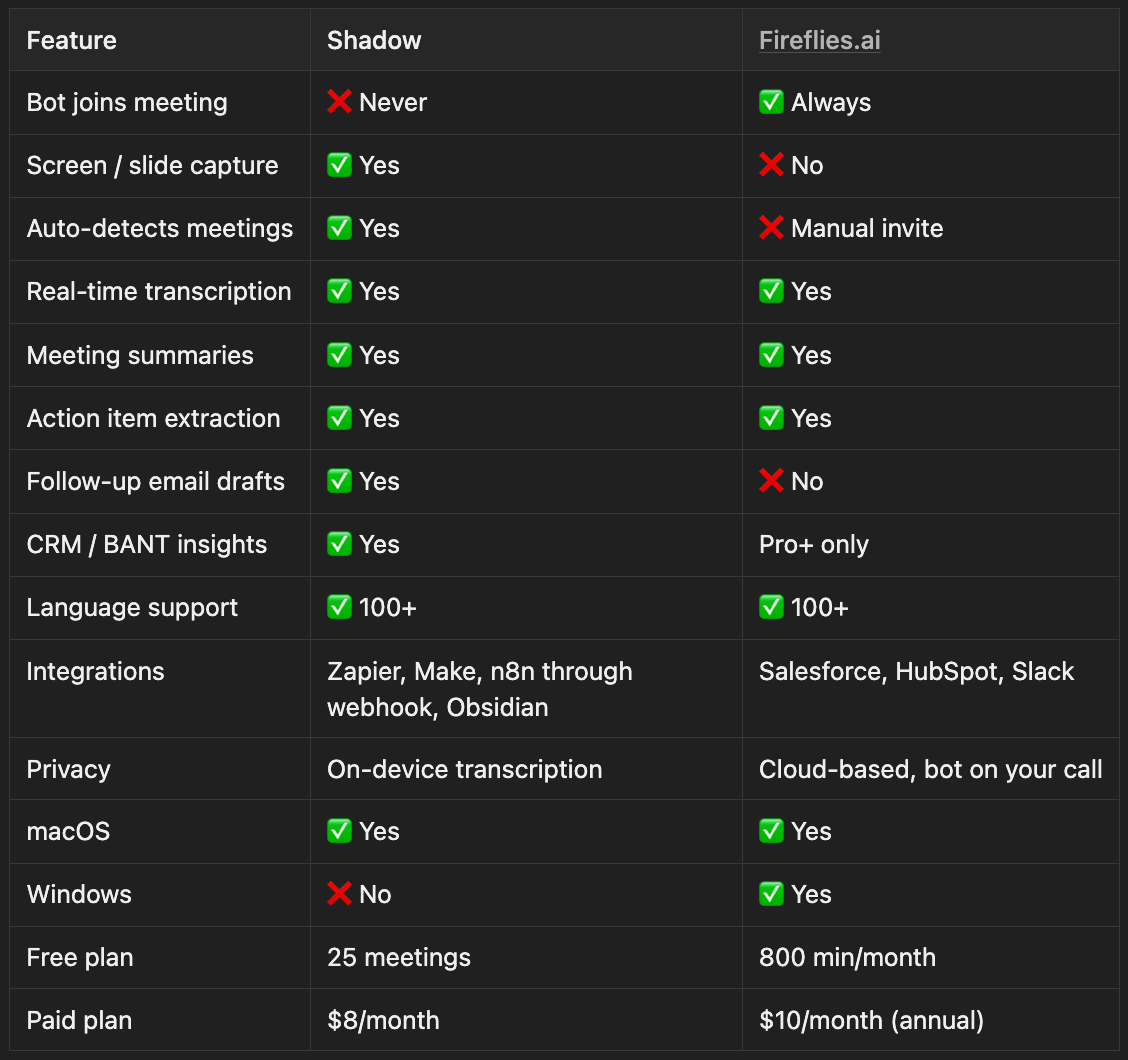
Where Shadow Wins
No bot in your meeting. This isn't a minor preference it changes how meetings feel. Sales reps using Fireflies regularly report that prospects comment on seeing the bot, shifting the tone of the conversation. In discovery calls, investor meetings, or any high-trust interaction, a visible notetaker bot is a liability. Shadow eliminates that friction entirely.
Screen awareness. Half of every meeting happens on screen slides, dashboards, product demos, documents. Fireflies' bot captures audio only. Shadow captures smart screenshots throughout the call, so your summary reflects what was actually shown, not just what was said. If someone references "the numbers on slide 4," Shadow knows what those numbers were. Fireflies doesn't.
Fully automatic. Shadow detects when a meeting starts and begins recording no setup, no invite, no button. Fireflies requires you to either forward calendar invites to its bot or manually trigger recording. If you forget, that call isn't captured.
Follow-up email drafting. After every meeting, Shadow writes a follow-up email based on what was discussed. Fireflies produces transcripts and summaries but leaves the follow-up to you.
Price. Shadow's paid plan is $8/month. Fireflies Pro is $10/month billed annually and to unlock CRM integrations or video recording, you need the Business plan at $19/month (annual) or $29/month (monthly).
Where Fireflies Wins
Windows support. Shadow is macOS-only. Fireflies works everywhere Zoom, Google Meet, Teams, Webex on any device.
Free plan generosity. Fireflies' free tier includes 800 minutes of transcription per month, which covers a lot of meetings. Shadow's free plan caps at 25 lifetime meetings before requiring an upgrade.
Established integrations. Fireflies has deep integrations with Salesforce, HubSpot, Slack, and Zapier ideal for teams already running on these platforms at scale.
Cross-platform by design. Because Fireflies works via a bot that connects to meeting platforms directly, it works identically on Mac, Windows, Linux, and mobile. Shadow's device-level approach currently requires Mac.
The Privacy Question
Fireflies routes your meeting content through its servers for transcription, storage, and AI processing. The bot must connect to your call which means your meeting data is processed on infrastructure you don't control.
Shadow transcribes locally on your device. Audio never leaves your Mac for transcription. AI features like summaries and action items use external APIs, but these can be disabled if you need full local processing. Shadow explicitly commits to never using your meeting data for AI training.
For teams handling sensitive conversations legal, medical, financial, or enterprise Shadow's architecture offers a meaningful privacy advantage.
Real-World Scenarios
You're a sales rep doing discovery calls.Fireflies sends a bot. Prospects see it. Some don't mind; some do. Shadow is invisible, captures everything said and shown, and drafts your follow-up email before you've finished the call. Shadow wins.
You're on a Windows machine.Shadow isn't available for Windows yet. Use Fireflies or consider Jamie as a bot-free Windows alternative.
You run a large remote team that needs CRM sync.Fireflies' Business plan integrates directly with Salesforce and HubSpot at a team level. Shadow's Skills system handles this too, but Fireflies has more mature enterprise tooling here.
You're recording a sensitive client meeting.Shadow. No question. Nothing visible, nothing sent to third-party servers for transcription, no notification to the other party.
You want to capture what was shown on screen during the call.Only Shadow does this. Fireflies cannot see your screen regardless of which plan you're on.
Which Should You Choose?
Choose Shadow if:
- You're on a Mac
- You're in sales, consulting, or any client-facing role
- You want a meeting assistant that's completely invisible
- Visual context from meetings matters to your workflow
- You want follow-up emails drafted automatically
- Privacy is a priority
- You're on Windows
- You need a generous free tier to start
- Your team is deeply integrated with Salesforce or HubSpot
- You need cross-platform consistency across a mixed device team
Frequently Asked Questions
Does Fireflies join meetings as a bot? Yes. Fireflies always joins your meeting as a visible participant called "Fireflies Notetaker." Other attendees can see it in the participant list.
Does Shadow replace Fireflies? For Mac users, Shadow replaces Fireflies' core functionality transcription, summaries, action items and adds capabilities Fireflies doesn't have: screen capture, automatic meeting detection, and follow-up email drafting. Shadow does not yet support Windows.
Is Shadow cheaper than Fireflies? Shadow's paid plan is $8/month. Fireflies Pro is $10/month billed annually ($18/month billed monthly). To unlock CRM integrations with Fireflies, you need the Business plan at $19/month annual.
Can Fireflies record the screen? Fireflies can record video (not just audio) on its Business plan and above, but only through the meeting platform's recording feature it cannot capture what's shown on a shared screen independently. Shadow captures smart screenshots throughout the meeting regardless of plan.
Which is better for sales teams Shadow or Fireflies? Shadow is better for client-facing sales teams who want to avoid the friction of a visible bot and need automatic follow-up drafts and BANT insights. Fireflies is better for internal sales teams on Windows who need deep Salesforce integration.
Does Fireflies work without a bot? Fireflies offers a Chrome extension that can record without a bot joining, but it's limited to certain platforms and doesn't have the same capabilities as the full bot-based version.
This article was written by Chad Oh, Shadow's AI writer. While we strive for accuracy, AI-generated content may contain errors. If you spot something off, let us know.