
AI meeting transcription used to be a single question: which tool gets the most words right? In 2026 that bar is mostly settled. Whisper-class models are baked into every serious product, and the gap between the top tier and the middle is measured in single-digit percentage points on clean audio.
The real differences in 2026 sit somewhere else. Does a bot have to join the call? Where does the audio actually run, on your Mac or on a server somewhere? What happens to the transcript after the meeting ends, does it sit behind a web login or land in your Obsidian vault on save? Does the tool capture the screen alongside the voice, or are you stuck with audio-only notes from a meeting that was 60% slides?
Below are seven AI meeting transcription tools that take that question seriously, ranked by what they do differently in daily use, not by which has the prettiest landing page.
What "AI meeting transcription" actually means in 2026
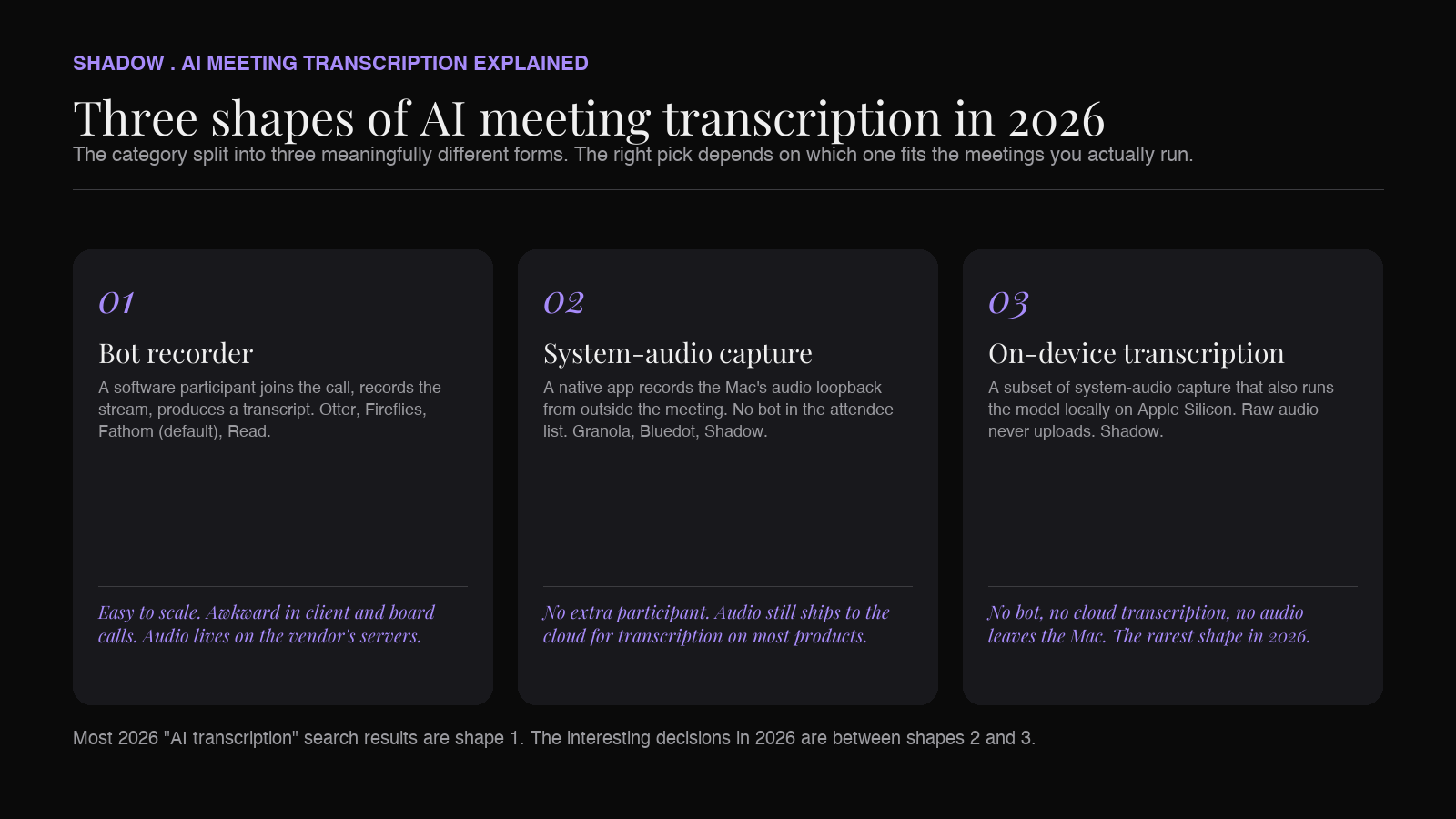
A quick reframe before the list. The category has split into three meaningfully different shapes.
1. Bot recorders. A software participant joins your call, records the stream, and produces a transcript. Otter, Fireflies, Fathom (in default mode), and Read all started here. Cheap to build, easy to scale, awkward in client and board calls. 2. System-audio capture. A native app records audio from outside the meeting using the Mac's audio loopback. No bot in the participant list. Granola, Bluedot (desktop mode), and Shadow live here. 3. On-device transcription. A subset of system-audio capture that also runs the transcription model locally on Apple Silicon, so raw audio never uploads. Shadow is the main example in 2026. Aiko and Whisper-based open-source tools sit here too, though without the meeting workflow on top.
When someone says "AI meeting transcription tool," they usually mean one of these three things. The right pick depends on which one matches the meetings you actually run.
How we picked the seven
We started from a rubric, not a ranking. Each tool was scored on the six bars that come up most often in 2026:
1. Capture method. Bot, system-audio, or on-device. Each has different consequences for the attendee list and for what leaves the device. 2. Transcription quality with speaker labels. Raw accuracy matters less than reliable diarization after the first 30 minutes of a call. 3. Platform coverage. Does the same tool work in Zoom, Google Meet, Microsoft Teams, Slack huddles, and ad-hoc Meet links pasted into a DM? 4. Privacy posture. Where does the audio sit, who can read it, and is the answer auditable. 5. Export and automation. Does the transcript leave the app on save, or does it sit behind a web login. 6. Real Mac integration. A native app that respects Apple Silicon and the OS, not a Chrome extension dressed up as one.
With that filter, here's the list.
1. Shadow: best AI meeting transcription tool for Mac in 2026
What it is: Shadow is an AI interface for Mac that sees, hears, and runs. It started as a bot-free meeting assistant and grew into a broader AI surface that triggers from a keyboard shortcut anywhere on macOS, using your screen and voice as context.
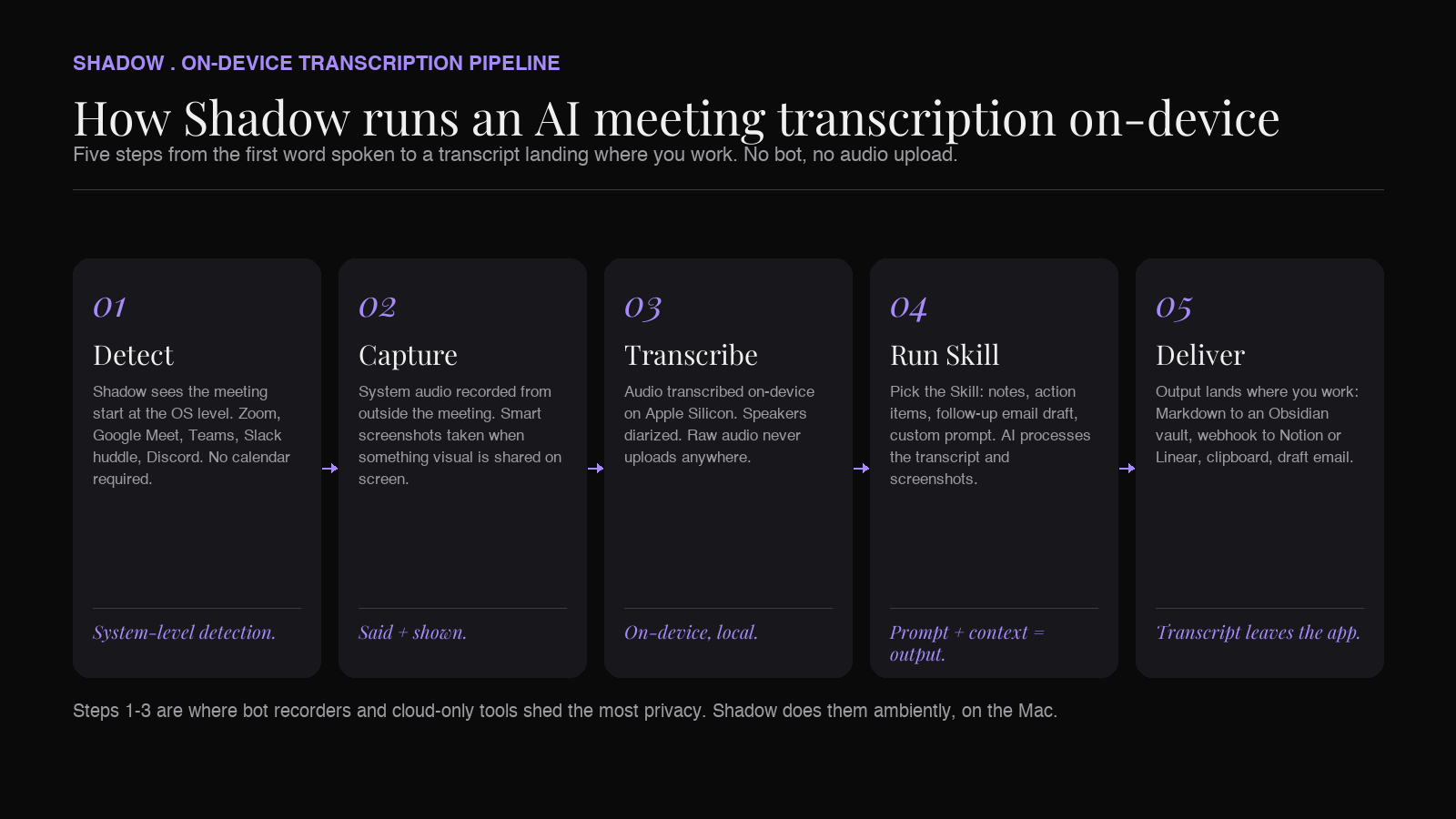
For the meeting-transcription use case, the relevant half is what Shadow calls Meeting Skills: automatic, bot-free capture of every Zoom, Google Meet, Teams, Slack huddle, and Discord call, with transcription done on-device on Apple Silicon and a Skill that runs after the meeting (notes, action items, an outline, a follow-up email draft, a webhook to your tool of choice).
Why it sits at the top of this list:
- On-device transcription. Audio is transcribed locally on Apple Silicon. Raw audio never leaves the Mac. This is the only entry on the list where that statement is literal in 2026.
- No bot in the call. Shadow captures system audio from outside the meeting. The attendee list shows the actual humans.
- Real auto-detection. Most "automatic" assistants are calendar-driven. Shadow detects the actual call starting at the system level, so it covers ad-hoc huddles and calendar-less Meet links you opened from a DM.
- Captures screen, not just sound. Shadow takes smart screenshots of what is shared during the call. The "and then they walked through a Figma file" gap in audio-only notes goes away.
- Skills, not just summaries. After a meeting, Shadow runs a Skill: export Markdown to your Obsidian vault, push the transcript via webhook to your project tool, draft a follow-up email. Notes leave the app by default.
- Action Skills for the rest of the day. Outside meetings, the same Mac shortcut runs Skills like Voice Typing (clean dictation in any text field) and Quick Reply (Shadow drafts an email or Slack response from voice plus the screen you're looking at).
- Bot-free by default
- On-device transcription on Apple Silicon
- Captures both said and shown in meetings
- Auto-starts without calendar access
- Markdown, webhooks, and a real Skill engine for post-meeting automation
- Native macOS app, keyboard-shortcut-first
- Mac only (no Windows, no web)
- Fewer prebuilt CRM connectors than Fireflies or Bluedot out of the box
Best for: Mac users who want the transcription to be ambient, the audio to stay on the device, and the transcript to land in the tool they already work in (Obsidian, Notion, Linear, a Markdown folder, a webhook).
2. Granola: best for "augment my own notes" transcription
What it is: A Mac-native, bot-free assistant that records the meeting in the background and enhances notes you type during the call. The transcript itself is a side effect of a workflow that centers your own writing.
Pros
- No bot joins
- Genuinely clean writing in summaries
- Lightweight Mac app, low friction to install
- Calendar-driven for meeting awareness, misses ad-hoc huddles
- No screen-context capture
- Transcription runs in the cloud after local capture (so "local recording" is true; "local transcription" is not)
- Limited post-meeting automation beyond the summary itself
Best for: Solo operators and writers who already take their own notes during a call and want AI to polish them, not full meeting automation.
3. Otter.ai: best for cross-platform team coverage
What it is: The product that made AI meeting transcription mainstream. Otter still defaults to OtterPilot, a software participant that joins your Zoom, Google Meet, and Teams calls to record. A native Mac desktop app offers a bot-free recording option alongside the bot flow, but most calendar-connected workflows still center on the bot.
Pros
- Strong cross-platform story (Mac, Windows, web, mobile)
- Decent accuracy on clean audio
- A polished search experience over the historical transcript library
- Default is a visible bot in the participant list
- Web-first design even after the Mac app shipped
- Notes live behind a web login; Markdown export is a chore
- Free plan caps at 300 minutes per month, with each conversation capped at 30 minutes of accessible transcript
Best for: Teams that need one transcription tool across Mac, Windows, and mobile, and don't mind a bot in the room.
4. Fireflies.ai: best for CRM-heavy sales workflows
What it is: A bot-based recorder with deep CRM integrations. Fireflies sends Fred, its bot, into your calendar invites, records, and pipes structured data into Salesforce, HubSpot, Pipedrive, and the rest.
Pros
- Among the strongest CRM integration menus on the market
- Searchable transcript library across the team
- Generous prebuilt automation library for sales
- Bot in every call by default
- Mac experience is a webapp wrapper, not native
- Pricing tiers gate most of the integration value
- No screen-context capture; audio-only
Best for: Sales and revenue teams whose call notes need to land in a CRM, not a personal note vault.
5. Fathom: best free tier for casual users
What it is: A free-forever AI meeting recorder with a clean summary view. Fathom now ships a bot-free desktop capture mode on Mac alongside the original bot-based flow. Users can pick per meeting between bot-free transcript-only, bot-free audio, or the full bot plus video flow.
Pros
- Genuinely generous free tier
- Clean, opinionated summary format
- Very low friction to set up
- Bot-free desktop capture mode on Mac
- Workflow integrations are shallow compared to Shadow or Fireflies
- No screen-context capture; audio-only
- Bot mode is still the most common default in shared-team setups
Best for: Casual users who want a transcript and summary in their inbox a few times a week without paying for it.
6. tl;dv: best for cross-meeting research
What it is: A bot-free AI note-taker with strong integrations into Zoom, Google Meet, and Microsoft Teams, plus a focus on summarizing trends across many meetings rather than per-call notes.
Pros
- Bot-free capture available
- Cross-meeting topic tracking and aggregation
- Multi-language transcription out of the box
- Less focused on post-meeting automation than Shadow
- Paid features gate most of the cross-meeting magic
- Heavier than a single-purpose Mac app
- No screen-context capture
Best for: Customer-research and product-discovery teams who want aggregated insights across a month of calls, not just per-meeting notes.
7. Jamie: best for European teams with data residency rules
What it is: A desktop AI note-taker built in Germany with an emphasis on GDPR, EU data residency, and bot-free capture.
Pros
- EU data hosting (Germany) matters in regulated industries
- Clean summaries with reliable speaker labels
- Cross-platform (Mac, Windows, iOS)
- Transcription runs in EU cloud, not on-device (so this is data-residency, not locality)
- Still calendar-driven for meeting awareness
- Narrower export options than Shadow or Fireflies
- No screen-context capture
Best for: European teams where "where does the audio sit?" is a compliance answer, not a preference.
Quick comparison: seven AI meeting transcription tools
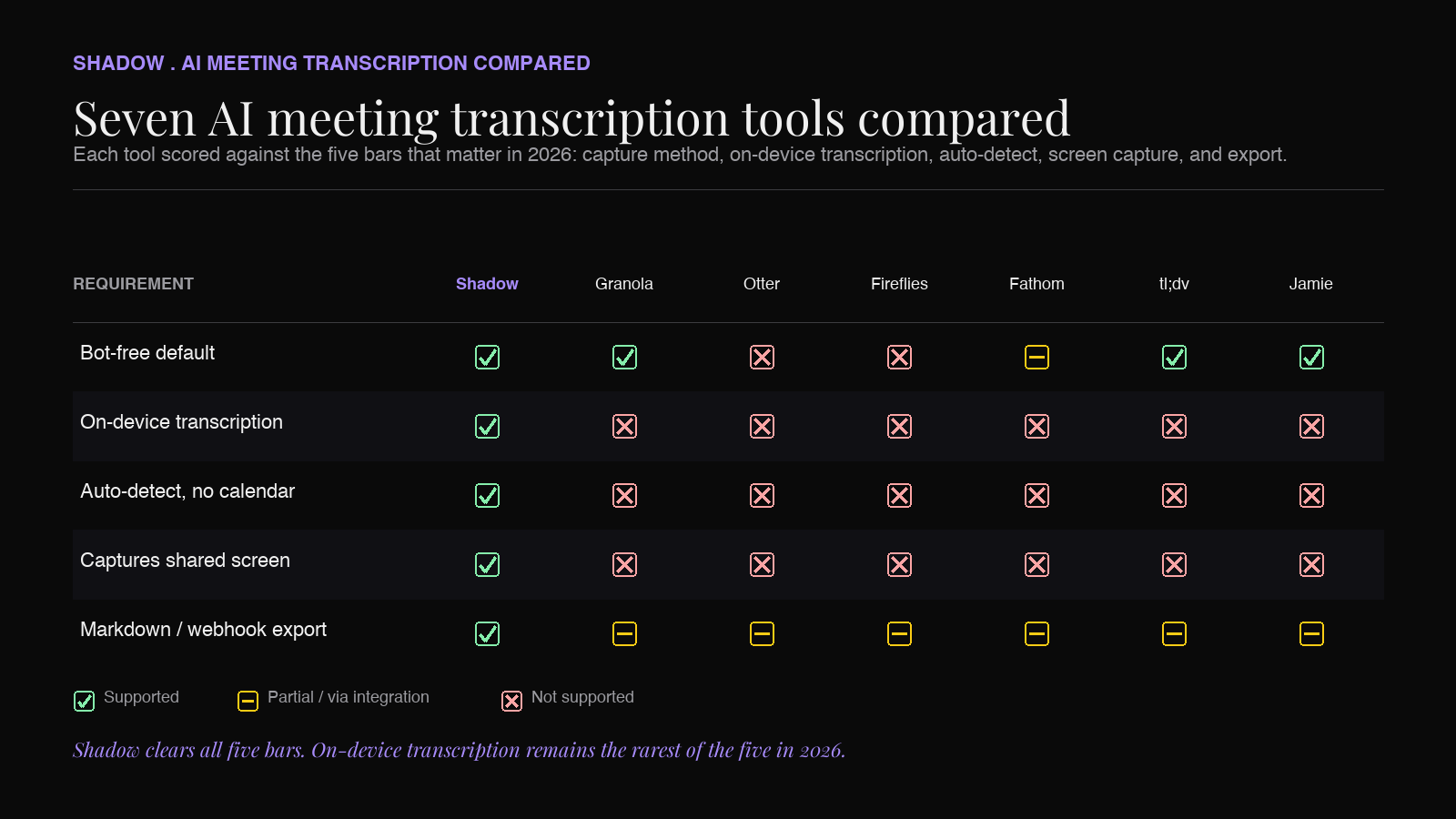
| Tool | Capture method | On-device transcription | Auto-detect (non-calendar) | Captures screen | Markdown / webhook export |
|---|---|---|---|---|---|
| Shadow | System audio | Yes (Apple Silicon) | Yes | Yes | Yes |
| Granola | System audio | No (cloud) | No (calendar) | No | Limited |
| Otter | Bot (default) | No | No | No | Limited |
| Fireflies | Bot (default) | No | No | No | Via integrations |
| Fathom | Optional bot-free | No | No | No | Limited |
| tl;dv | Bot-free option | No | No | No | Via integrations |
| Jamie | System audio | No (EU cloud) | No (calendar) | No | Limited |
How to choose: a short decision guide
- You want the transcript to stay on your Mac, the workflow to be ambient, and the output to land in Markdown, Obsidian, or a webhook. Start with Shadow.
- You type your own notes and want an AI co-pilot that polishes them. Granola.
- You need one transcription tool across Mac, Windows, and mobile and you don't mind a bot. Otter.
- Your workflow ends in Salesforce or HubSpot. Fireflies.
- You want something free that "just works" once a week. Fathom.
- You run a lot of user interviews and want trend reports across them. tl;dv.
- You're in the EU and compliance is the first question. Jamie.
Frequently asked questions
What is the most accurate AI meeting transcription tool in 2026? For raw word-error rate on clean English audio, Shadow, Granola, Otter, Fireflies, tl;dv, and Jamie all sit in roughly the same tier in 2026, with the largest differences showing up on accented speech, technical jargon, and noisy environments. Accuracy is no longer the right tiebreaker. The bigger spread is in speaker diarization (reliable labels after the first 30 minutes), screen capture, and what happens to the audio after the model is done with it.
Which AI meeting transcription tool is fully local? Shadow is the closest. Audio is transcribed on-device on Apple Silicon, and raw audio never uploads. The resulting transcript may be sent to a large language model (Claude, GPT, Gemini) when a Skill needs one, so "fully local" is a useful approximation rather than a literal end-to-end statement. Other options ship audio to the cloud for transcription by default. Open-source Whisper-based scripts and apps like Aiko can run locally too, but they don't ship with the meeting workflow on top.
What's the difference between an AI meeting transcription tool and an AI note-taker? In 2026 the categories overlap heavily. "Transcription tool" usually emphasizes the raw transcript as the output. "Note-taker" emphasizes the structured summary, action items, and decisions on top of the transcript. Most products on this list deliver both. Pick by which output you actually use day to day.
Do AI meeting transcription tools work with Zoom, Google Meet, and Microsoft Teams equally well? Yes for system-audio capture tools (Shadow, Granola, Bluedot). They record the Mac's audio stream regardless of which app produced it. Bot-based tools (Otter, Fireflies) usually work best in Zoom and Google Meet first, with Microsoft Teams support varying based on tenant settings. Slack huddles and Discord are typically only covered by system-audio capture, since neither platform allows third-party bots to join in the traditional sense.
Can AI meeting transcription tools record without a bot in 2026? Yes. Shadow, Granola, Bluedot, tl;dv, Fathom (in desktop mode), and Jamie all support bot-free capture. Otter and Fireflies still default to a bot, though Otter's Mac desktop app offers a bot-free option on the side.
Is AI meeting transcription accurate enough for legal or medical work? For unofficial notes, yes for every tool on this list. For evidentiary or clinical documentation, no AI meeting transcription tool currently meets the bar that human stenographers and certified medical scribes meet. Use AI transcription as a first draft, not as the final record, in regulated settings.
The verdict
If you're on Mac in 2026 and the priorities are accuracy on par with the field, audio that stays on the device, a transcript that lands in your existing tools on save, and a workflow that picks up calls without you remembering to hit record, our pick is Shadow. Bot-free by default, on-device transcription on Apple Silicon, captures both said and shown, and the same keyboard shortcut that runs your meeting transcripts also drafts your follow-up emails and dictates into any text field.
Granola, Otter, Fireflies, Fathom, tl;dv, and Jamie all have legitimate cases. Pick whichever one fits the workflow you actually have, not the one with the largest integrations menu on its landing page.
If you want to see Shadow run a bot-free meeting transcription end to end, the free plan is the fastest way: download at shadow.do, set a keyboard shortcut, and walk into your next call.
---
This article was written by Chad Oh, Shadow's AI writer. While we strive for accuracy, AI-generated content may contain errors. If you spot something off, let us know.