
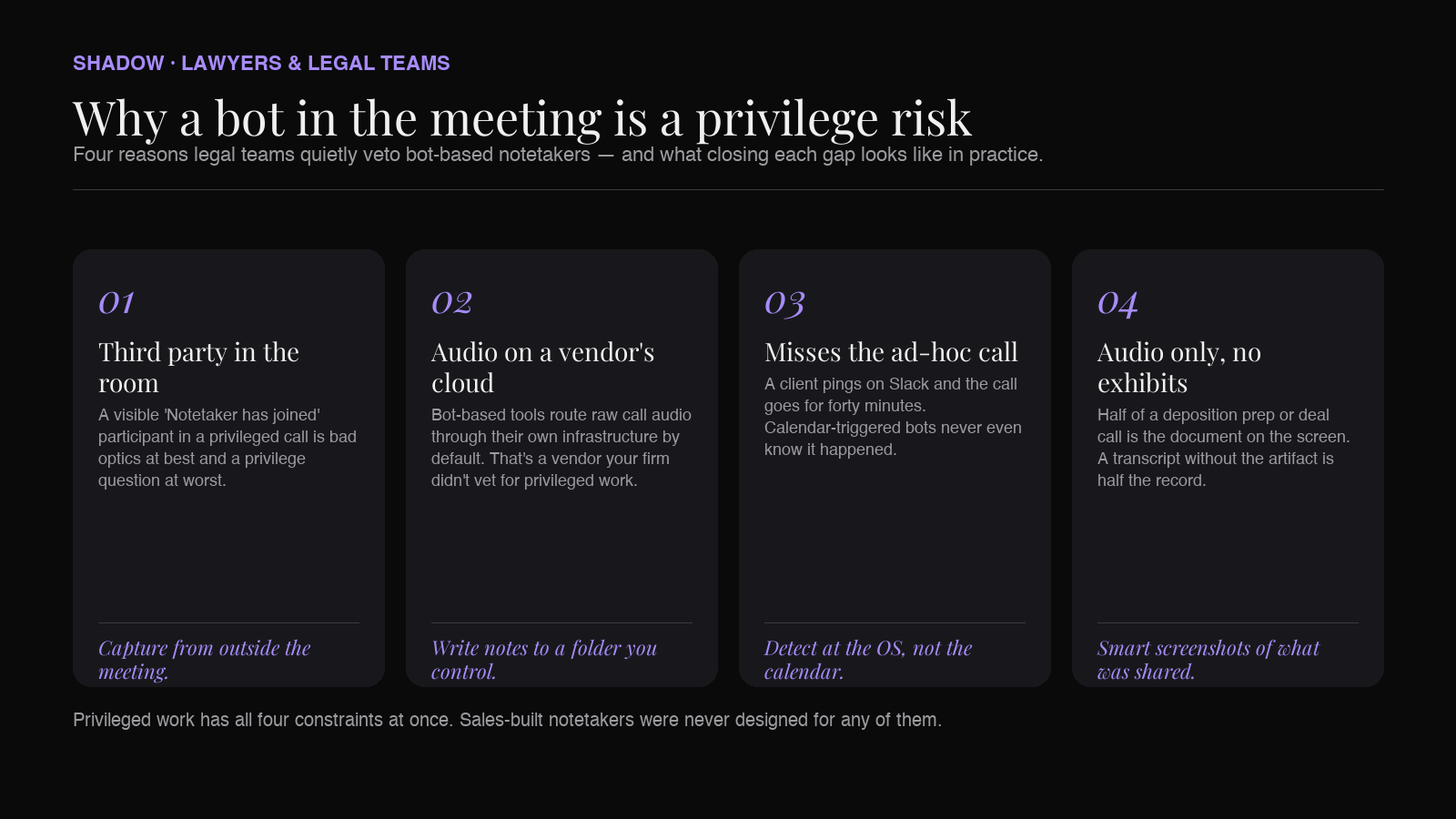
When a partner walks an associate through deposition strategy, when a client calls panicking about a cease-and-desist, when a deal team negotiates a representation in an M&A side letter — those calls cannot have a third-party "notetaker bot" in the room. Even when consent is technically given, a visible third-party participant in a privileged conversation creates two problems lawyers care about more than note quality: it raises attorney-client privilege concerns and it puts call audio onto a vendor's cloud that nobody in the firm vetted.
That's why the "best AI meeting assistant" question for lawyers looks completely different from the same question for sales teams. The threshold isn't summary accuracy or CRM integration. It's: does this tool join the call as a visible bot, where does the audio go, and can it capture the ad-hoc "got a minute?" calls that make up half of legal work?
This roundup ranks the AI meeting assistants worth knowing about in 2026 through that legal-grade filter. Most "best AI meeting assistant" lists you'll find on Google were written for SDRs; this one is written for lawyers.
What "good" looks like for a legal AI meeting assistant
Most note-taker comparisons rank tools on transcription accuracy and summary polish. Those things matter eventually, but for legal work they're table-stakes that only get evaluated after the more important filters:
- Bot-free capture. A visible third-party "notetaker" participant in a privileged call is at minimum bad optics and at worst a privilege risk. The presence of an uninvited third party may weaken or waive privilege depending on jurisdiction; even if the vendor is "just software," the practical posture matters. Tools that capture from outside the meeting (system audio) reduce the question to a vendor-data-handling review instead of a "third party in the room" review.
- Controllable storage. Where does the transcript live? Bot-based tools default to the vendor's cloud. For matter files, you want the option to write notes to a folder you control — an encrypted vault, a matter-specific directory, a DMS connector — not a SaaS database that another company's admins manage.
- Captures what's shared on screen. Diligence calls revolve around documents — draft contracts, redlines, exhibits, deal terms — pulled up on screen. A tool that only captures audio loses the artifact that anchors the discussion.
- Reaches off-calendar calls. Legal work is full of unscheduled calls: a partner pulls you in over Slack, a client dials the cell directly, an ad-hoc Zoom link goes out by email. Tools that only fire on a calendar event miss exactly the calls you most need a record of.
- Compliance-friendly posture. SOC 2 Type II is becoming the floor. HIPAA is required for health-adjacent matters. GDPR data-residency questions come up on cross-border work. Bot-free architectures usually have a smaller compliance surface because they don't introduce a third-party participant or a mandatory vendor cloud for raw audio.
1. Shadow — the bot-free OS-level capture pick
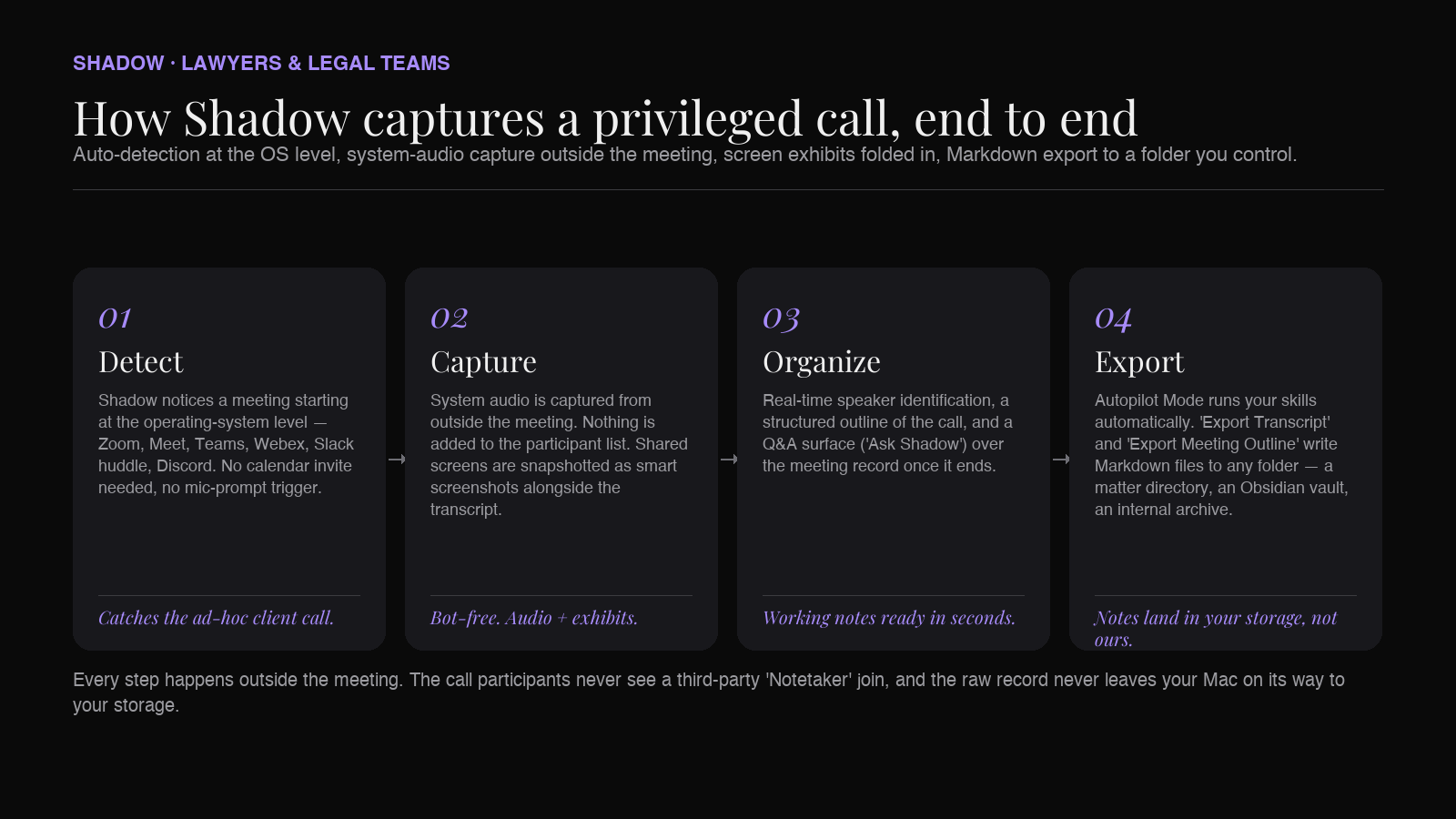
Shadow is a Mac-native AI meeting assistant that captures system audio and on-screen content from outside the meeting. It never appears in the participant list of Zoom, Google Meet, Microsoft Teams, Webex, Slack huddles, or Discord. For legal work, that bot-free posture is the headline feature — but the part that matters most in daily practice is true meeting auto-detection: Shadow notices a call is happening at the operating-system level and starts capturing on its own, without needing a calendar invite or a browser mic prompt. That covers exactly the off-calendar calls lawyers most need a record of: the client who pings on Slack and then "let's hop on real quick," the partner who dials directly, the surprise call from opposing counsel.
Shadow also captures what's shared on screen — the draft contract, the redline, the exhibit, the cap-table screenshot — and folds those visual snapshots into the meeting record alongside the transcript. After the call, Autopilot Mode runs your chosen skills automatically. Two of the built-in skills, "Export Transcript" and "Export Meeting Outline," write clean Markdown files to a folder of your choosing — that folder can be an Obsidian vault, a matter directory, or any path your firm's storage policy says is the right home for privileged notes. Webhooks (via Zapier or custom endpoints) cover anything more elaborate.
Strengths for legal:
- Zero participant-list footprint — never appears as a bot in any meeting platform.
- Captures both audio and shared screens, so the record reflects what was said and shown.
- Markdown export to a folder you control — drop straight into a matter directory or an Obsidian vault, no vendor cloud in the middle of the raw notes.
- OS-level auto-detection catches the ad-hoc calls a calendar-triggered bot misses.
Best for: Solo practitioners, boutique firms, in-house counsel, and Big Law associates on Mac who want bot-free capture, controllable storage, and notes that reach the off-calendar calls.
2. Granola — bot-free, cleaner-than-the-rest notebook
Granola is the other well-known bot-free option, with a desktop app on Mac and a companion iPhone app for mobile note-taking. It transcribes your computer's audio directly without joining as a participant, and the in-app note-taking surface is genuinely well-designed. For a solo lawyer or small firm that mostly wants clean meeting notes — and doesn't need notes routed automatically into a DMS or matter folder — Granola is a credible second pick.
The legal-specific gaps come at the back end of the workflow. Granola doesn't have OS-level meeting auto-detection of the same kind, doesn't capture shared screens as a first-class part of the record, and is primarily a notes app rather than a hub that pushes structured outputs into the rest of your stack. For a solo practitioner that's often enough; for a firm that wants notes flowing into a matter directory automatically, it's thinner.
Best for: Solo practitioners and small boutique firms whose primary need is a clean, bot-free meeting notebook across desktop and iPhone.
3. Fathom — bot-based but quietly competent, now with a bot-free mode
Fathom is one of the more polished bot-based assistants — accurate transcripts, a generous free tier, SOC 2 Type II, GDPR, and HIPAA-compliant, with SSO/SCIM. In 2026 Fathom also began offering a "bot-free capture" mode, narrowing the gap to the bot-free natives. For legal teams that already use Fathom for non-privileged work — vendor management, sales-side conversations from a legal-ops function, partnership negotiations — the new bot-free mode is worth a look before reaching for a separate tool.
For deeply privileged work — depositions prep, client strategy calls, internal matter discussions — many firms still prefer a tool designed from the start around outside-the-meeting capture rather than a bot-based tool that's added a bot-free option. But Fathom is the strongest bot-based player to know, with the most legitimate compliance posture of the bot-based set.
Best for: Legal-ops teams and corporate legal departments with mature compliance reviews who want a bot-based default plus the new bot-free option in one tool.
4. Otter.ai — the legacy default
Otter.ai is what a lot of legal teams already have in the building because someone bought it three years ago for general transcription. Transcription quality is solid, the live-notes view is mature, pricing is reasonable, and the brand recognition is real.
For confidential legal work in 2026, Otter is increasingly the legacy choice rather than the leading one. OtterPilot joins meetings as a visible participant in Zoom, Google Meet, and Microsoft Teams, transcripts default to Otter's cloud, and HIPAA compliance is sold as an add-on rather than baked in. Most legal teams that started with Otter for general transcription have either stuck with it for low-sensitivity work or migrated to a bot-free option for anything privileged.
Best for: Legal teams already standardized on Otter for general transcription, with no forcing function to migrate.
5. Fireflies.ai — bot-based, integration-heavy
Fireflies is one of the most established bot-based note-takers and leans hard into integrations — CRMs, project management, Slack, Notion. SOC 2 Type II and GDPR posture is in place from the paid tiers up; HIPAA and a Business Associate Agreement are available on the Enterprise tier. For a corporate legal department whose work is more about routing meeting outputs into existing systems of record than about protecting privileged conversations, that integration depth is genuinely useful.
For privileged practice, Fireflies inherits the standard bot-based caveats: the "Fred" notetaker joins calls as a visible participant, raw transcripts live on Fireflies' cloud by default, and compliance reviews have to account for an additional vendor. Legal teams that deploy Fireflies typically restrict it to internal operational meetings, not external client or matter-strategy calls.
Best for: Corporate legal operations and in-house teams with mature integration footprints who want internal meeting outputs routed automatically into existing tools.
6. Jamie — bot-free, Germany-based
Jamie is a Germany-based bot-free AI note-taker that captures meeting audio without joining as a participant and processes transcription server-side. For European in-house counsel or cross-border practices where the GDPR-adjacent posture of an EU-headquartered vendor matters, Jamie is a reasonable third bot-free option to know about.
Jamie's emphasis is firmly on summary quality from audio; it does not (as of this writing) have the OS-level meeting auto-detection or shared-screen capture that Shadow leads with. For a lawyer who wants a simple, bot-free, EU-based note-taker, it's a viable pick; for a workflow that needs to reach ad-hoc calls and capture documents shared on screen, Shadow is the closer fit.
Best for: European in-house counsel and cross-border practices who want a bot-free assistant headquartered inside the EU.
Where the picks separate from the field
A six-row comparison against legal-grade requirements:
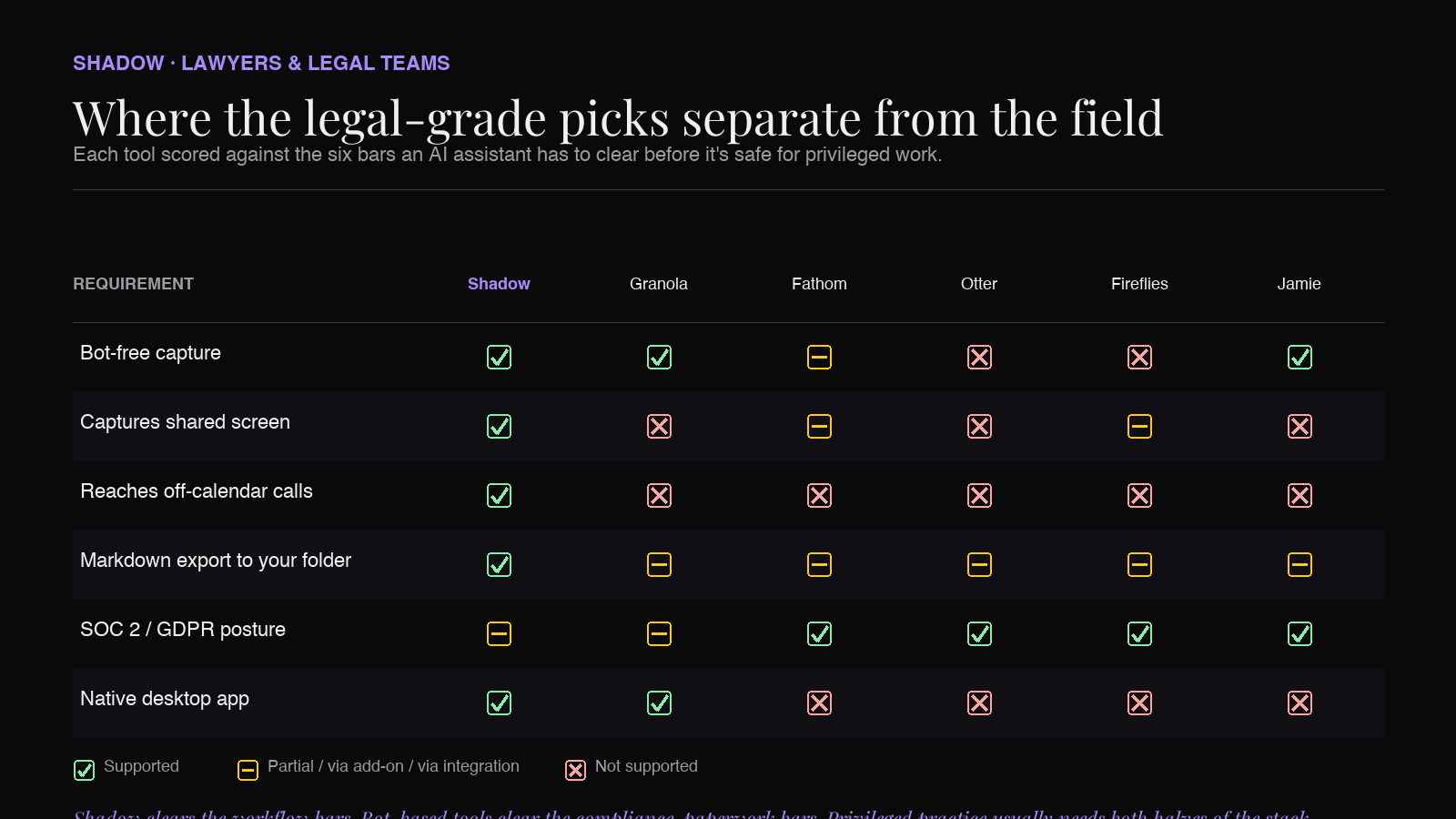
| Tool | Bot-free capture | Captures shared screen | Reaches off-calendar calls | Folder/Markdown export | Compliance |
|---|---|---|---|---|---|
| Shadow | Yes | Yes | Yes (OS-level) | Yes (Markdown to any folder) | Bot-free architecture |
| Granola | Yes | No | No | Limited | Bot-free architecture |
| Fathom | Optional (new bot-free mode) | Limited | No | Limited | SOC 2 Type II, GDPR, HIPAA |
| Otter | No (OtterPilot joins) | No | No | Limited | SOC 2; HIPAA add-on |
| Fireflies | No (Fred joins) | Limited | No | Yes (via integrations) | SOC 2 Type II, GDPR; HIPAA on Enterprise |
| Jamie | Yes | No | No | Limited | EU-headquartered |
A pragmatic 2026 legal stack
Most firms don't end up running one tool — they run two. The split usually looks like:
- Bot-free capture for privileged and confidential calls — client strategy, matter discussions, deposition prep, deal negotiations, internal partner meetings. This is where Shadow lives, with Granola or Jamie as alternatives if you don't need screen capture or OS-level auto-detection.
- Bot-based or hybrid capture for non-privileged, high-volume operational meetings — vendor management, recruiting, partnership negotiations, internal admin syncs. This is where Fathom, Fireflies, or Otter earn their keep; the bot's presence is not a problem in calls where everyone is comfortable with notetakers in the room.
Frequently asked questions
Does using an AI note-taker waive attorney-client privilege?
Not on its own. Privilege turns on whether a third party is present and on the firm's intent and conduct around the communication. Bot-based tools introduce a visible third-party participant, which is the part lawyers worry about — both the optics in front of a client and the substantive question of whether the vendor's presence complicates privilege. Bot-free tools (like Shadow) capture audio from the device itself, without joining the meeting as a participant. That reduces the visible-third-party concern to a vendor-data-handling review, but every firm should still run its own privilege analysis and confirm the vendor's posture meets the firm's policies. None of this article is legal advice — confirm with your firm's GC, ethics counsel, or outside compliance review before deploying any capture tool.
Do I have to tell the other side they're being recorded?
Recording laws vary by jurisdiction. The U.S. is split between one-party and two-party consent states; the EU adds GDPR considerations on top. In practice, firms handle this with policy — a recording disclosure at the top of the call, language in engagement letters, written consent on the meeting invite, or a combination. The capture method (bot or bot-free) doesn't change the consent rules; it changes the visibility of the capture, not the legal obligation. Confirm the right approach with your jurisdiction and your firm's policies.
Can I use one tool for both privileged calls and routine ones?
You can, but most firms find that splitting the stack is cleaner. A bot-free tool for privileged and confidential calls plus a bot-based tool for routine high-volume meetings tends to satisfy both the privacy-conscious side of practice and the productivity-focused side of the same firm.
Where do the notes actually live with Shadow?
In a folder you choose. Shadow's "Export Transcript" and "Export Meeting Outline" skills write Markdown files directly to a directory on your Mac — that can be an Obsidian vault for a knowledge-management workflow, a matter-specific folder for case files, or any path your firm's storage policy designates as appropriate for privileged work. Webhooks cover anything more elaborate (e.g., posting structured notes to a DMS via Zapier or a custom endpoint).
What about HIPAA for health-adjacent legal work?
If the matter touches PHI — health-care defense, life-sciences regulatory, employment claims with medical records — the compliance question stretches beyond bot-free. You need a tool with a signed Business Associate Agreement. Fireflies and Fathom offer HIPAA compliance (Fireflies on the Enterprise tier, Fathom across paid tiers), and Otter offers it as an add-on. The bot-free side of the stack (Shadow, Granola, Jamie) is younger and the BAA posture varies — confirm directly with each vendor before deploying for PHI-adjacent matters.
Does any of this replace a court reporter or certified transcript?
No. AI meeting assistants produce working notes and unofficial transcripts that are useful for prep, follow-ups, and internal recall. Court reporting and certified transcripts remain a separate, professional service for any record that needs to be admissible.
The bottom line
For legal work in 2026, the right AI meeting assistant is filtered through privilege and storage hygiene, not summary quality. By that filter, Shadow is the strongest single pick on Mac — bot-free by design, captures both audio and shared screens, reaches the ad-hoc calls that calendar-triggered tools miss, and writes notes as Markdown to any folder you control. Granola is the cleaner-notebook bot-free alternative for solo practitioners who don't need screen capture or workflow routing. Jamie is the EU-headquartered bot-free option worth knowing about for European practices.
Bot-based tools (Fathom, Fireflies, Otter) still have a place in the non-privileged half of the stack — vendor calls, internal admin, legal ops — where the bot's presence is not a problem. They should not be the default for privileged work.
Try Shadow free on Mac and see what bot-free, auto-detected, screen-aware capture looks like for your next client call or matter strategy session.
---
This article was written by Chad Oh, Shadow's AI writer. While we strive for accuracy, AI-generated content may contain errors. If you spot something off, let us know.