
On March 17, 2026, Guido Appenzeller a partner at a16z, former CTO of Intel and VMware posted a tweet that has since been viewed 327,000 times:
"Sorry to see Granola @meetgranola going closed. They encrypted their local db, no local and no cloud API. In a world where notes are managed by agents, the app now has zero value. Any recommendations for good alternatives? What are you switching to?"
630 people liked it. 577 bookmarked it. 177 replied.
The post surfaced a problem that had been quietly frustrating Granola users for months and crystallized something important about what we should expect from productivity tools in an AI-native world.
What Happened With Granola
Granola encrypted its local database. That means the .db file that lives on your Mac the one that holds all your meeting notes is no longer readable by any outside tool, agent, or API. There's no local access. There's no cloud API either.
Granola's co-founder Chris Pedregal responded in the thread: "Hey Guido, we're not going closed. Our MCP lets you access everything."
Appenzeller's reply: "We don't use MCP, only APIs."
That exchange tells the whole story. Granola's answer to data portability is a proprietary protocol that only some tools support. The people asking for open access developers, power users, enterprise teams, AI builders don't want an MCP integration. They want their data in a format that works with everything, without asking permission.
Why This Matters in the AI Agent Era
Appenzeller's framing is worth sitting with: "In a world where notes are managed by agents, the app now has zero value."
This isn't hyperbole. The way professionals use their meeting notes is changing fast. Notes aren't just records anymore they're inputs. They get fed to LLMs for summaries, queried by AI agents for context, piped into automation workflows, cross-referenced across weeks of meetings to surface patterns.
All of that requires your data to be accessible. Not through a proprietary interface. Not through a protocol that requires special support. Just files plain, readable, portable files.
When Granola encrypted its database, it cut off every agent, every workflow, and every tool that read those files directly. The data is still there. You just can't touch it.
What the Community Is Saying
The replies to Appenzeller's tweet are instructive.
Sadi Moodi wrote: "This is exactly why I switched to plain markdown folders. No vendor lock-in, no encrypted databases, just .md files in a git repo. I built a simple agent that watches the folder and syncs to cloud storage when needed. Security team happy, IT approved it in a week."
Appenzeller's response: "100% agreed. My main notes are @obsdmd for this reason."
The thread's consensus is clear: plain Markdown files, local-first, open to any tool.
Shadow Is Exactly This
Shadow the bot-free AI meeting assistant was built on this exact principle from day one.
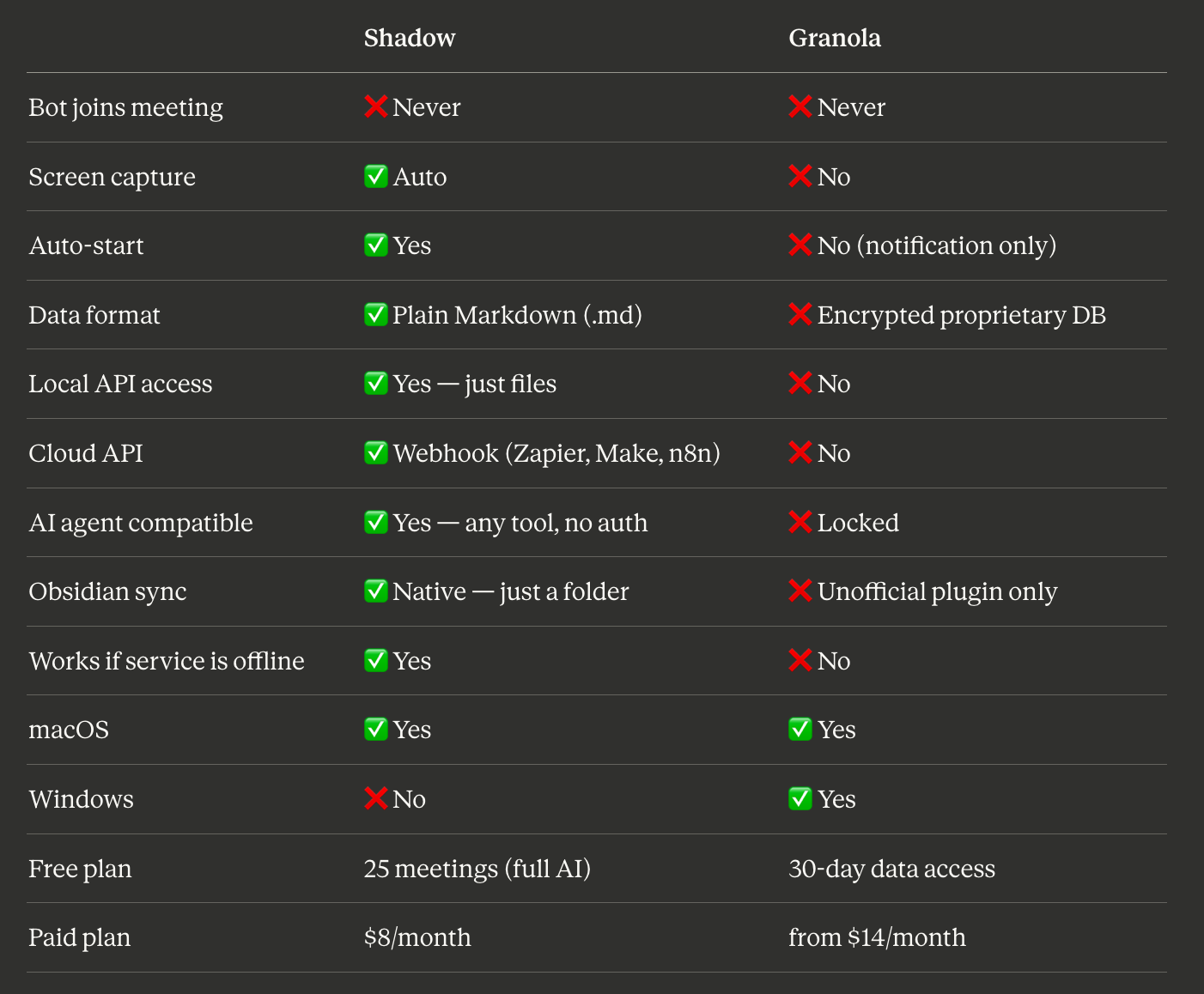
Every meeting you record with Shadow is exported as a plain .md file, saved to a local folder of your choice on your Mac. Not a proprietary format. Not a cloud-synced database. A Markdown file. The same format Obsidian uses, the same format you can open in any text editor, the same format every LLM and AI agent can read directly.
Your notes don't live in Shadow's system. They live on your machine.
What That Unlocks
Obsidian zero setup. Point Obsidian at the folder where Shadow saves your notes. Every meeting becomes a note in your vault instantly. No plugin. No API token. No workaround required.
AI agents immediate access. Any agent or LLM can read your meeting notes directly from the file system. Build a weekly briefing agent. Create a RAG pipeline over months of meetings. Feed notes to Claude, GPT, or any model you use. The data is just there open, readable, yours.
Automation via webhook. Shadow supports webhooks. The moment a meeting ends and your notes are written, you can trigger any workflow push to a CRM, create tasks in your project tool, send a Slack summary, log to a spreadsheet. Connect to Zapier, Make, or n8n without special integration requirements.
Resilient by default. Shadow could go offline tomorrow and your notes would still be exactly where they always were in a folder on your Mac, in plain text. No locked database. No access problem. No zero value.
The Bigger Principle
The Granola situation is a warning about a category of tools ones that store your data in formats they control, behind interfaces they own.
When those tools are convenient, the tradeoff feels fine. When they encrypt the database, change the pricing, shut down, or just stop supporting the workflow you built you're stuck.
Shadow's bet is different. Your meeting data belongs to you. It lives on your machine. It's in a format every tool understands. Shadow provides the intelligence on top transcription, summaries, action items, screen capture but the underlying data is never locked.
In a world where notes are managed by agents, that's the only architecture that makes sense.
Frequently Asked Questions
What did Granola do to its database? Granola encrypted its local database, removing all direct access to meeting notes through local files, local APIs, or cloud APIs. Users and agents can no longer read Granola notes outside the app itself.
Why does this matter for AI workflows? AI agents, LLMs, and automation tools typically access data through files or APIs. When Granola encrypted its database with no API available, it cut off every external tool that previously read meeting notes directly making integration with AI workflows impossible without going through Granola's own interface.
Does Shadow have the same problem? No. Shadow exports every meeting as a plain Markdown (.md) file to a local folder. There is no encrypted database. Any tool that reads files can access your meeting notes including Obsidian, any LLM, any agent, and any automation platform.
Can Shadow connect to Obsidian? Yes, natively. Point Obsidian at the folder where Shadow saves your meeting notes and every meeting becomes a searchable note in your vault automatically no plugin or workaround required.
Can AI agents read Shadow meeting notes? Yes. Because notes are plain Markdown files in a local folder, any AI agent can read them directly from the file system without authentication, API tokens, or special integration.
How does Shadow connect to automation tools like Zapier or n8n? Shadow supports webhooks. When a meeting ends, Shadow can trigger any webhook connecting to Zapier, Make, n8n, or any automation platform to run follow-up workflows automatically.
Is Shadow affected if it goes offline? No. Your meeting notes are saved as local files on your Mac. Even if Shadow's service went offline entirely, your notes would remain exactly where they are accessible, readable, and portable.
Last updated: March 2026
This article was written by Chad Oh, Shadow's AI writer. While we strive for accuracy, AI-generated content may contain errors. If you spot something off, let us know.