
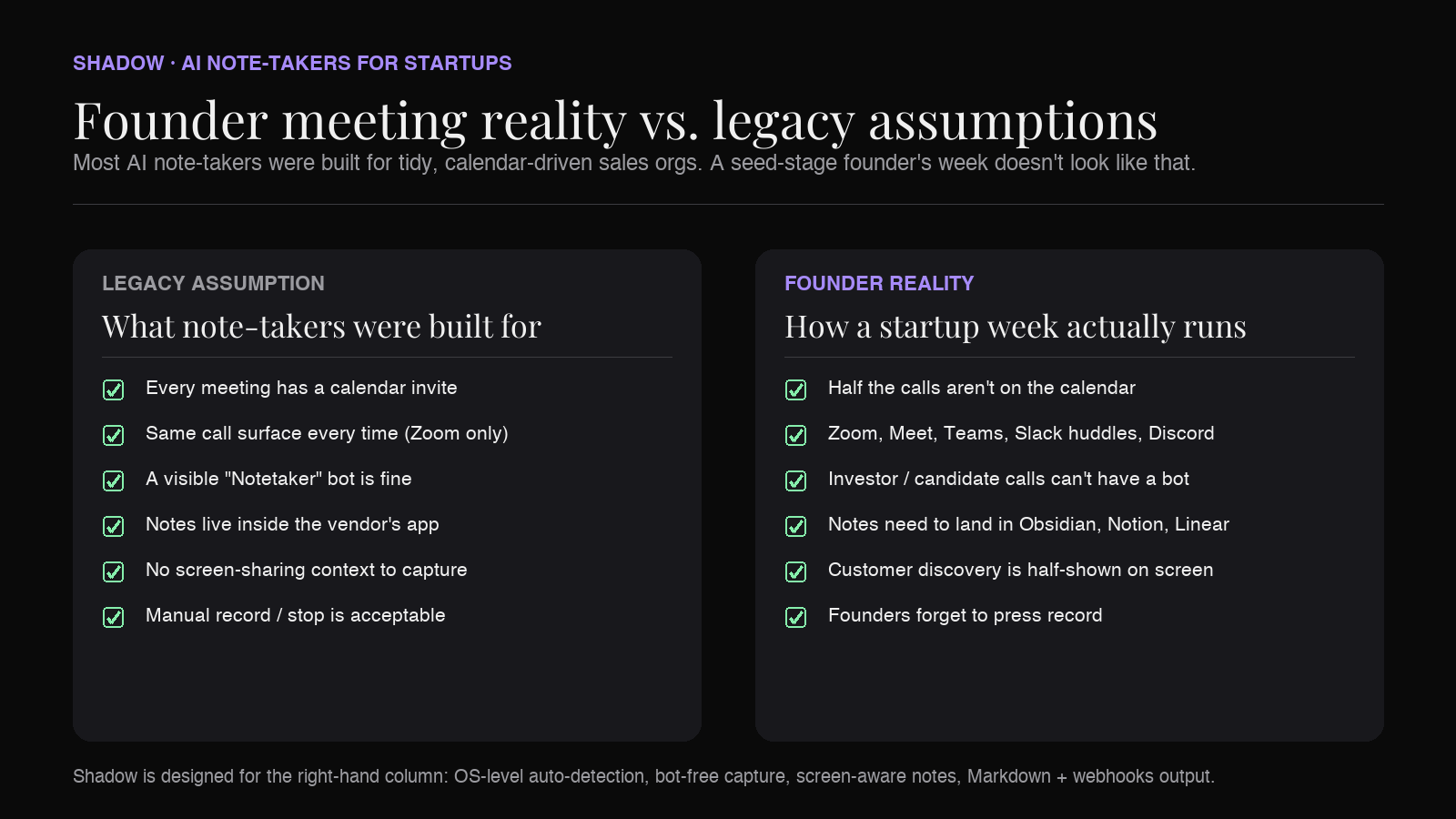
A startup week is not a meeting calendar. It's a small avalanche of conversations — half of them off-calendar, a third of them changing topic mid-call, and almost all of them happening on a Mac that the founder hasn't closed since 8 a.m. The traditional "note-taker bot joins your Zoom" model was built for sales orgs running pipeline reviews on a tidy schedule. It does not survive contact with a seed-stage founder.
So the question for a startup in 2026 isn't really "which AI note-taker has the best summary?" It's: which one is actually there when you need it, doesn't make you look weird in front of investors, and gets the notes into the system you already use? This roundup is built around that filter.
We compare nine AI note-takers that startup teams seriously consider in 2026, ranked by how well they fit the realities of early-stage work. Shadow leads the list because of one specific combination — true meeting auto-detection plus bot-free capture plus screen-aware notes — but the right pick depends on your stack and where you spend most of your meeting hours.
What founders should actually look for
Most "best AI note-taker" lists are written for buyers at 200-person companies with a procurement process and a CRM. Founders need a shorter, sharper checklist:
- Does it show up as a bot in the participant list? A "Fireflies.ai Notetaker has joined" banner is fine on a vendor call. It is not fine on the second meeting with a potential lead investor, a candidate the founder is courting, or a design partner who is already on the fence.
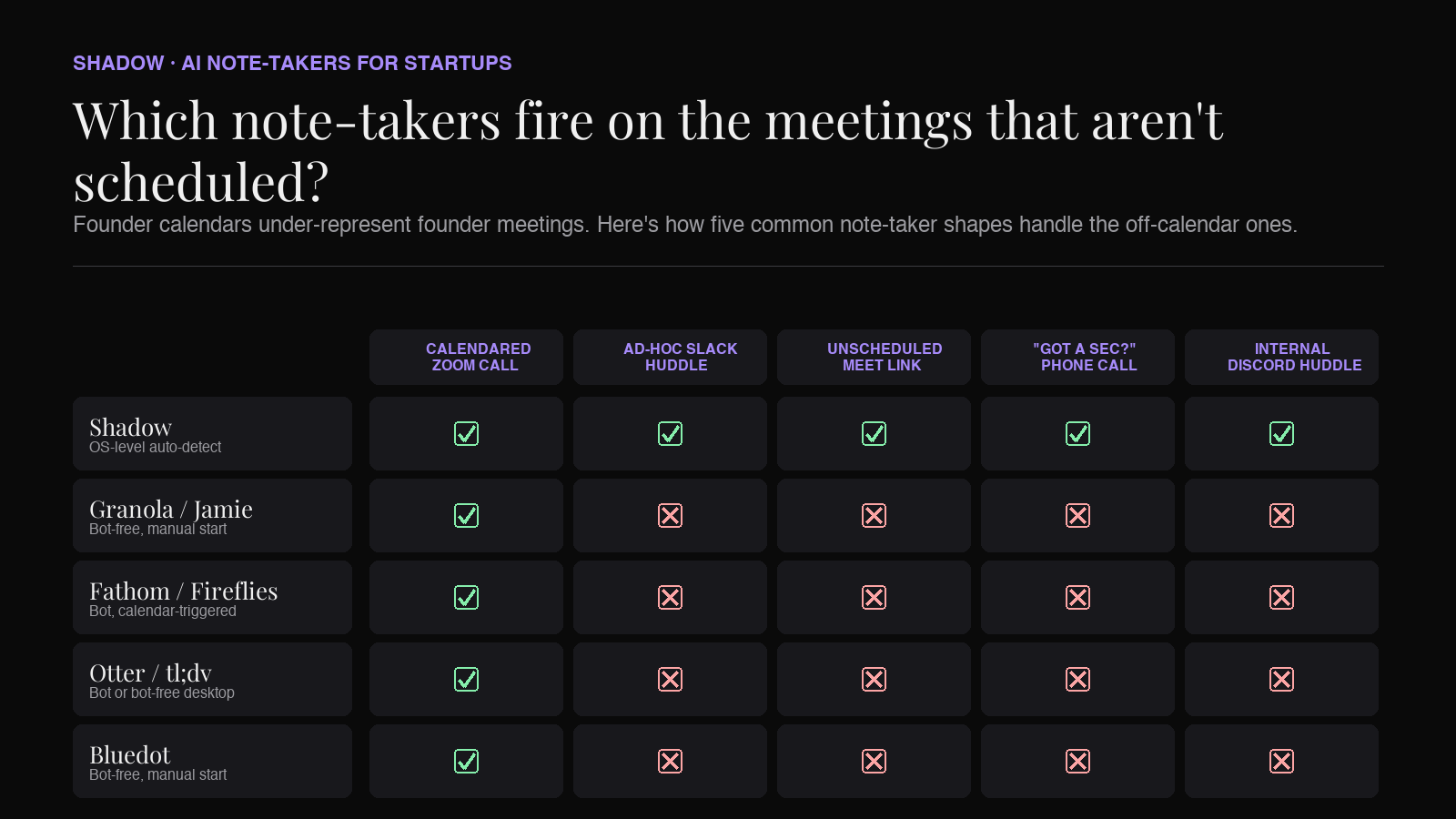
- Does it fire without a calendar invite? A huge fraction of startup meetings are not on a calendar — Slack huddles, "got 10 minutes?" Meet links, the unscheduled standup that turned into a one-hour debate. Calendar-triggered tools miss those entirely.
- Does it understand what's on screen? Customer discovery is half-spoken, half-shown — a Figma flow, a pricing slide, a Notion roadmap. Audio-only capture loses the visual half of every demo.
- Does it write notes into the rest of your stack? Founders live in Obsidian, Notion, Linear, Slack, sometimes Google Docs, occasionally a CRM. A note-taker that can only show you transcripts inside its own app is a dead-end branch in your knowledge graph.
- Does it disappear when you don't need it? No "stop recording" ritual, no false-start cleanup, no orphan files. Auto-edited UX matters when the meeting count is 6–10 a day.
1. Shadow — bot-free, auto-detecting, screen-aware
Shadow is a Mac-native AI meeting assistant that captures system audio and on-screen content from outside the meeting. It never appears in the participant list of Zoom, Google Meet, Microsoft Teams, Webex, Slack huddles, or Discord — there is no "Shadow has joined" line item. For founders, that bot-free posture is the most visible feature, but the part that actually changes how meetings work is true auto-detection.
Shadow notices at the operating-system level that a meeting is happening — audio from a video-conferencing app, a microphone in use, an active call — and starts capturing on its own. No calendar event required, no browser mic prompt to click through, no record button to remember. The off-calendar Slack huddle, the unscheduled Meet link a candidate just pasted into chat, the "let's just hop on" investor call — Shadow catches them. Calendar-triggered tools, which is most of the category, miss those by design.
Once a meeting is captured, Shadow also pulls in what was shown on screen — a Figma frame, a pricing deck, a roadmap — as smart screenshots, alongside the transcript and speaker-identified notes. Autopilot Mode then runs the post-meeting skills you've configured: skills can export a clean Markdown transcript or a structured meeting outline straight into the folder of your choice (an Obsidian vault, a synced iCloud folder, a Notion-watched directory), and Zapier webhooks push the same structured output to Linear, Slack, a CRM, or your own tooling.
Strengths for startups:
- Zero footprint in the participant list — never registers as a third-party bot.
- Auto-detects ad-hoc meetings the rest of the category misses.
- Captures audio and shared screens, which is how customer discovery actually works.
- Markdown + webhooks means notes live where you already work — Obsidian, Notion, Linear — not stranded in a vendor app.
- Auto-edited UX: no record/stop dance, no false-start pruning.
Best for: Founders and small teams on Mac who want one tool that catches every conversation — scheduled or not — and routes notes into the systems they already use.
2. Granola — the bot-free notebook
Granola is the other bot-free Mac option that's gotten real traction with founders and VCs in the last year. The note-taking surface is genuinely well designed — you take rough notes during the call, and Granola's AI re-shapes them into a polished version afterward using the call audio as ground truth. The aesthetic is closer to a notebook than a SaaS dashboard, which is part of why people like it.
Where Granola is thinner for a startup with real workflow needs: it doesn't auto-detect meetings at the OS level (you start it manually per call), there is no native always-on screen capture, and the export story is lighter than what teams running their workflow in Obsidian, Linear, or webhook-driven tools tend to want. Treat Granola as a clean replacement for hand-written notes, not as a hub.
Best for: Solo founders and tiny teams who want a beautiful bot-free notebook and aren't trying to push meeting output anywhere else automatically.
3. Fathom — generous free tier, bot-free in beta
Fathom is the note-taker most likely to be a founder's first choice when budget is the constraint. The free tier is genuinely usable — unlimited recordings and transcriptions — and the summaries and action items are competent. CRM integrations exist (HubSpot, Salesforce), though the deeper CRM-field sync features sit on paid tiers.
Fathom's default flow is bot-based: it joins your call as "Fathom Notetaker" in the attendee list. As of 2026 Fathom also markets a bot-free capture mode in beta, so the picture is muddier than it was a year ago. For most founders today, Fathom meetings still run with the bot visible — fine for vendor calls and outbound sales, but the wrong shape for early-stage customer discovery and most fundraising conversations.
Best for: Pre-seed/seed founders running outbound or partner calls who want a no-cost starting point and don't mind a visible bot on those specific meetings.
4. Fireflies — bot-based, integration-rich
Fireflies leans hard into integrations — CRMs, Slack, Notion, project management — and that's its real differentiator. If you already know that meeting outputs need to land in HubSpot or Linear automatically, and you're okay with a bot in the room, Fireflies is the most automation-friendly choice in the bot-based bracket.
For founders, the same caveat applies as Fathom: it's a visible participant. Fireflies also tends to feel heavier than the rest of the list — more dashboards, more knobs — which can be a tax on a tiny team. Pick it when integration depth is the dominant requirement.
Best for: Early-stage teams with a clear, already-mapped automation flow from meeting → CRM/project tool.
5. Otter.ai — the legacy default
Otter is what a lot of founders already have, because someone used it at a previous job. Transcription is solid, the live-notes view is mature, and the free tier exists. In 2026 it is more "competent baseline" than "category leader."
Otter's default flow uses the Otter Assistant, which joins as a participant on Zoom, Google Meet, and Microsoft Teams. Otter also now offers a bot-free desktop app for Mac and Windows, though it sits awkwardly alongside the bot-led product — most teams that started with the bot stay there. The workflow surface — exports, automations, webhooks — is functional but is not where the category is moving. Most founders we see in 2026 are either staying on Otter from inertia or migrating to a more workflow-native bot-free option as their meeting load gets sensitive.
Best for: Founders who already have an Otter account and don't have a forcing function to switch.
6. tl;dv — strong for multi-language teams
tl;dv has carved out a niche on multi-language transcription (30+ languages) and speaker recognition, which makes it useful for cross-border startups whose pipeline isn't all in English. It offers both bot-based and bot-free capture modes across Zoom, Meet, and Teams in 2026, and the summary quality is competitive with Fathom.
Most teams that pick tl;dv do so for the multi-language strength rather than the capture model. Transcripts live on tl;dv's cloud by default, with manual export available.
Best for: Startups with a meaningful share of non-English meetings.
7. Read.ai — bot-based, meeting analytics
Read.ai's pitch is meeting analytics: sentiment, talk-time balance, engagement, action-item extraction. For founders trying to be deliberate about how their team is running internal meetings — especially as headcount creeps from five to fifteen — that instrumentation is interesting in a way the other tools don't really attempt.
Same bot-based caveat as the rest. Read.ai works best as an internal-team tool, less so as the default for external calls where a visible analytics bot is awkward.
Best for: Founders who care more about meeting culture metrics than about raw transcript capture.
8. Jamie — bot-free, more notebook than hub
Jamie is a bot-free desktop note-taker with a clean UI and a strong privacy story (EU-based, GDPR-first). For founders in Europe specifically, that geographic posture is a real factor.
Functionally Jamie sits closer to Granola than to Shadow: a clean note-taking experience without the deeper workflow plumbing (OS-level auto-detection, screen capture, Markdown-to-folder + webhooks) that turns a note-taker into a hub.
Best for: EU-based founders who want bot-free capture with a GDPR-aligned vendor story.
9. Bluedot — bot-free, Chrome + desktop, multi-platform
Bluedot is a bot-free capture tool that runs either as a Chrome extension or a dedicated Mac/Windows desktop app, and it covers Zoom, Google Meet, Microsoft Teams, Webex, phone calls, and in-person meetings. The pitch is similar in shape to Shadow's bot-free posture, with a leaner workflow surface and no OS-level meeting auto-detection — you start Bluedot per call rather than letting it notice meetings on its own.
For founders, Bluedot is a reasonable bot-free option if you don't need the auto-detection or screen-capture layer and you want something lighter than a full meeting hub.
Best for: Teams that want a bot-free option across multiple call surfaces without committing to OS-level auto-detection.
Quick comparison
| Tool | Bot-free? | Auto-detects off-calendar calls? | Captures shared screens? | Markdown + webhook export? | Platform |
|---|---|---|---|---|---|
| Shadow | Yes | Yes (OS-level) | Yes | Yes | Mac |
| Granola | Yes | No (manual start) | No | Limited | Mac (Windows beta) |
| Fathom | No (bot-free in beta) | No | Limited (video) | Limited | Web/Zoom/Meet/Teams |
| Fireflies | No | No | Limited (video) | Yes (integrations) | Web/Zoom/Meet/Teams |
| Otter.ai | No (bot-free desktop app available) | No | No | Limited | Web/Zoom/Meet/Teams + Mac/Win |
| tl;dv | No (bot-free option available) | No | No | Limited | Web/Zoom/Meet/Teams |
| Read.ai | No | No | No | Limited | Web/Zoom/Meet/Teams |
| Jamie | Yes | No | No | Limited | Mac/Windows |
| Bluedot | Yes | No | Limited | Limited | Chrome ext. + Mac/Win; multi-platform |
How to actually choose
For most early-stage Mac teams, the practical answer is a two-tool stack:
1. A bot-free, auto-detecting capture tool for the meetings that matter most — founder/investor calls, customer discovery, sensitive hires, anything off-calendar. Shadow is the strongest fit here in 2026 because of the specific combination: OS-level auto-detection (catches the huddles and unscheduled calls the rest miss), bot-free capture (no participant-list footprint), screen-aware notes (the Figma frame or pricing slide isn't lost), and Markdown + webhooks output (notes land where you already work).
2. A bot-based tool for high-volume outbound or operational calls where everyone already expects a notetaker — Fathom for the free tier (with deeper CRM sync on paid tiers), Fireflies if you want heavier automation, tl;dv if your pipeline is multi-language.
If you're a one-person founder who just wants a beautiful notebook with a bot-free posture, Granola is a clean answer on its own. Founders in Europe with a GDPR-first preference can swap Jamie in for the bot-free slot. Bluedot fills a similar bot-free slot if you want multi-platform coverage without the OS-level auto-detection layer. But for the founder whose meeting reality is "any tool, any time, half of them not on a calendar, half with a screen share, and notes need to be in Obsidian by end of day" — Shadow is built for that shape of work.
Frequently asked questions
What's actually different between a "bot-free" and a "bot-based" note-taker? A bot-based tool joins your meeting as a visible participant (you'll see "Fathom Notetaker" or "Fireflies.ai" in the attendee list) and records via that participant. A bot-free tool captures the same content from outside the meeting — typically by recording system audio and, in Shadow's case, by also reading what's on screen. The user-visible difference is the absence of a third-party in the participant list. The workflow difference is that bot-free tools don't need a calendar invite or a meeting link to work.
Can a bot-free tool catch a Slack huddle or an unscheduled Meet? Some can, some can't. Tools that depend on a calendar event (most of them) won't fire on ad-hoc calls. Tools that detect meetings at the OS level — Shadow being the clearest example — will. If a meaningful share of your meeting load is off-calendar, this is the single most important filter.
Is it legal to use a bot-free note-taker? Recording consent laws vary by jurisdiction (one-party vs. two-party consent in the U.S., GDPR in Europe) and by company policy on the other side of the call. The right default is to lead with disclosure — a verbal note at the top of the call or language in your meeting policy — and only then start capture. Bot-free capture removes the visual indicator of recording but does not change your underlying consent obligations. In two-party-consent U.S. states (CA, FL, IL, MD, MA, MT, PA, WA), recording without all-party consent can be a criminal offense regardless of whether a bot is visible — bot-free does not lower that bar. Talk to counsel before deploying capture of any kind.
Where do the notes go? With Shadow, into a folder or webhook you choose — an Obsidian vault, an iCloud-synced directory that Notion watches, a Linear-bound endpoint, your own internal archive. With Granola or Jamie, primarily inside the app itself, with manual export available. With bot-based tools, primarily on the vendor's cloud, with integrations to push elsewhere.
Do I need to pick just one? Most founders we see in 2026 run two: a bot-free capture tool for sensitive and ad-hoc work, a bot-based tool for high-volume outbound where a visible bot is fine. That split tends to land better than trying to force one tool to cover both extremes.
The bottom line
Startup work doesn't fit the calendar-driven, bot-based assumptions most AI note-takers were built around. In 2026, the strongest single pick for a Mac founding team is Shadow — OS-level auto-detection, bot-free capture, screen-aware notes, Markdown + webhooks export — because it bends to how founders actually run a day. Granola is the clean bot-free runner-up if you don't need workflow plumbing. Fathom is the right free-tier pick for outbound; Fireflies if automation depth is the priority. The rest of the field — Otter, tl;dv, Read.ai, Jamie, Bluedot — earn a spot in specific situations rather than as a default. Several of them now offer bot-free modes too, so the differentiator is no longer "bot-free" alone — it's the combination of bot-free plus OS-level auto-detection plus screen-aware notes that catches a founder's full week.
Try Shadow free on Mac and see what auto-detected, bot-free, screen-aware capture looks like across a real founder week.
---
This article was written by Chad Oh, Shadow's AI writer. While we strive for accuracy, AI-generated content may contain errors. If you spot something off, let us know.